BY:
Manas U Nayak
4/29/2016 Texture Mapping in OpenGL 1
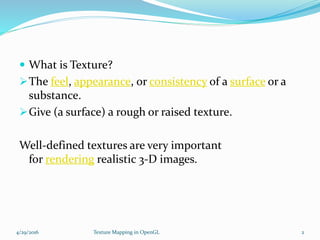
 What is Texture?
The feel, appearance, or consistency of a surface or a
substance.
Give (a surface) a rough or raised texture.
Well-defined textures are very important
for rendering realistic 3-D images.
4/29/2016 Texture Mapping in OpenGL 2
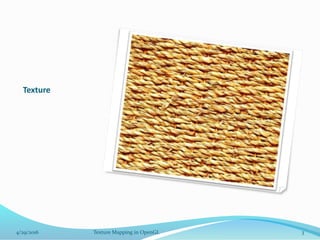
Texture
4/29/2016 Texture Mapping in OpenGL 3
1- 3D Model Without Textures
2-3D Model With Textures
4/29/2016 Texture Mapping in OpenGL 4
Texture Mapping
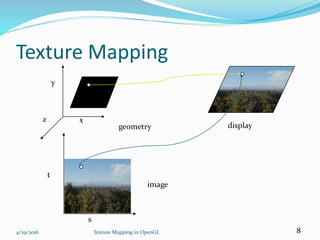
Texture mapping is a graphic design process in
which a two-dimensional (2-D) surface, called
a texture map, is "wrapped around" a three-
dimensional (3-D)object.Thus, the 3-D object acquires
a surface texture similar to that of the 2-D surface.
Its application to 3D graphics was pioneered
by Edwin Catmull in 1974.
4/29/2016 Texture Mapping in OpenGL 5
Example for Texture Mapping
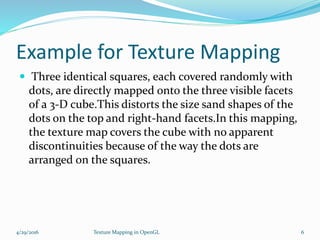
 Three identical squares, each covered randomly with
dots, are directly mapped onto the three visible facets
of a 3-D cube.This distorts the size sand shapes of the
dots on the top and right-hand facets.In this mapping,
the texture map covers the cube with no apparent
discontinuities because of the way the dots are
arranged on the squares.
4/29/2016 Texture Mapping in OpenGL 6
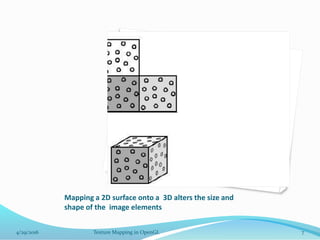
Mapping a 2D surface onto a 3D alters the size and
shape of the image elements
4/29/2016 Texture Mapping in OpenGL 7
Texture Mapping
4/29/2016 Texture Mapping in OpenGL 8
s
t
x
y
z
image
geometry display
Texels
 A texel, texture element, or texture pixel is the
fundamental unit of texture space, used in computer
graphics. Textures are represented by arrays of texels,
just as pictures are represented by arrays of pixels.
4/29/2016 Texture Mapping in OpenGL 9
Texel Vs Pixel…
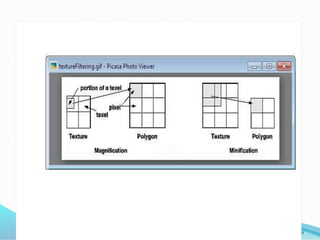
 When a 3-D texture-mapped object appears close to the
viewer so that the texture elements appear relatively large,
there may be several pixels in each texel and the pattern of
the texture map is easy to see. When the same 3-D object is
removed to increasing distances, the texture-map pattern
appears smaller and smaller. Eventually, each texel can
become smaller than a pixel. Then an averaging process
must be used; several texels are combined to form each
pixel. If the object becomes distant enough, or if one of its
facets appears at a sharp angle with respect to the viewer,
the texels may become so small that the essence of the
pattern is lost in the observed image.
4/29/2016 Texture Mapping in OpenGL 10
4/29/2016 Texture Mapping in OpenGL 11
Texture Representation
Bitmap (pixel map) textures (supported by OpenGL)
 Procedural textures (used in advanced rendering
programs)
4/29/2016 Texture Mapping in OpenGL 12
Bitmap texture:
 A 2D image - represented by 2D array
texture[height][width]
 Each pixel (or called texel ) by a unique
pair texture coordinate (s, t)
 The s and t are usually normalized to
a [0,1] range
 For any given (s,t) in the normalized range,
there is a unique image value (i.e.,
a unique [red, green, blue] set )
s
t
(0,0)
(1,1)
Map textures to surfaces
 Establish mapping from texture to surfaces (polygons):
- Application program needs to specify texture
coordinates for each corner of the polygon
4/29/2016 Texture Mapping in OpenGL 13
The polygon can be
in an arbitrary size
(0,0) (1,0)
(1,0) (1,1)
Map textures to surfaces
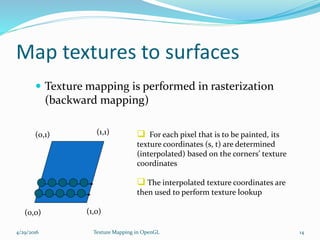
 Texture mapping is performed in rasterization
(backward mapping)
4/29/2016 Texture Mapping in OpenGL 14
(0,0) (1,0)
(0,1) (1,1)  For each pixel that is to be painted, its
texture coordinates (s, t) are determined
(interpolated) based on the corners’ texture
coordinates
 The interpolated texture coordinates are
then used to perform texture lookup
OpenGL texture mapping
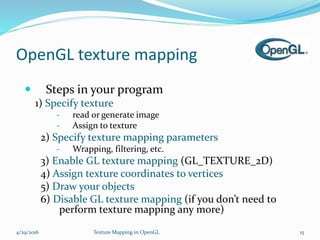
 Steps in your program
1) Specify texture
- read or generate image
- Assign to texture
2) Specify texture mapping parameters
- Wrapping, filtering, etc.
3) Enable GL texture mapping (GL_TEXTURE_2D)
4) Assign texture coordinates to vertices
5) Draw your objects
6) Disable GL texture mapping (if you don’t need to
perform texture mapping any more)
4/29/2016 Texture Mapping in OpenGL 15
Specifying a Texture
 Define a texture image from an array of texels (texture
elements) in CPU memory:
GLubyte my_texels[512][512];
 Define as any other pixel map:
 Scanned image. Generate by application code.
 Enable texture mapping:
 glEnable(GL_TEXTURE_2D)
 OpenGL supports 1-4 dimensional texture maps.
4/29/2016 Texture Mapping in OpenGL 16
Define Texture as an Image
glTexImage2D( target, level, components, w, h,
border, format, type, texels );
target: type of texture, e.g. GL_TEXTURE_2D
level: used for mipmapping (discussed later).
components: elements per texel.
w, h: width and height of texels in pixels.
border: used for smoothing
format and type: describe texels.
texels: pointer to texel array.
glTexImage2D(GL_TEXTURE_2D, 0, 3, 512, 512, 0,
GL_RGB, GL_UNSIGNED_BYTE, my_texels);
4/29/2016 Texture Mapping in OpenGL 17
Converting A Texture Image
 OpenGL requires texture dimensions to be powers of 2.
 If dimensions of image are not powers of 2, perform
scaling:
• gluScaleImage(format, w_in, h_in, type_in, *data_in,
w_out, h_out, type_out, *data_out);
• data_in is source image.
• data_out is for destination image.
 Image interpolated and filtered during scaling.
4/29/2016 Texture Mapping in OpenGL 18
Texture mapping parameters
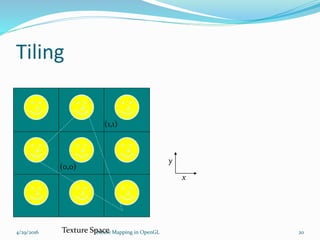
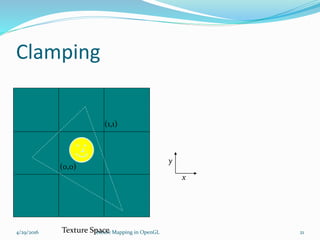
 What happen if the given texture coordinates (s,t) are outside [0,1]
range?
 Example: glTexParameteri(GL_TEXTAURE_2D,
GL_TEXTURE_WRAP_S, GL_CLAMP)
4/29/2016 Texture Mapping in OpenGL 19
(0,0)
(1,1)
texture GL_Repeat
(0,0)
(2,2)
(0,0)
(2,2)
GL_Clamp
If (s >1) s = 1
If (t >1) t = 1
Tiling
4/29/2016 Texture Mapping in OpenGL 20
x
y
Texture Space
(0,0)
(1,1)
Clamping
4/29/2016 Texture Mapping in OpenGL 21
x
y
Texture Space
(0,0)
(1,1)
Mapping a Texture
 Based on parametric texture coordinates.
 glTexCoord*() specified at each vertex.
4/29/2016 Texture Mapping in OpenGL 22
s
t
1, 1
0, 1
0, 0 1, 0
(s, t) = (0.2, 0.8)
(0.4, 0.2)
(0.8, 0.4)
A
B C
a
b
c
Texture Space Object Space
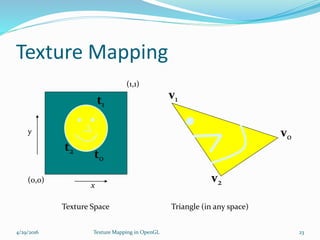
Texture Mapping
4/29/2016 Texture Mapping in OpenGL 23
v0
v1
v2
t2
t0
t1
(1,1)
(0,0)
x
y
Texture Space Triangle (in any space)
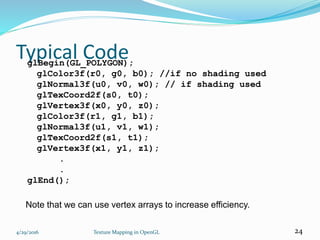
Typical CodeglBegin(GL_POLYGON);
glColor3f(r0, g0, b0); //if no shading used
glNormal3f(u0, v0, w0); // if shading used
glTexCoord2f(s0, t0);
glVertex3f(x0, y0, z0);
glColor3f(r1, g1, b1);
glNormal3f(u1, v1, w1);
glTexCoord2f(s1, t1);
glVertex3f(x1, y1, z1);
.
.
glEnd();
4/29/2016 Texture Mapping in OpenGL 24
Note that we can use vertex arrays to increase efficiency.
Enable (Disable) Textures
 Enable texture – glEnable(GL_TEXTURE_2D)
 Disable texture – glDisable(GL_TEXTURE_2D)
Remember to disable texture mapping when you
draw non-textured polygons
4/29/2016 Texture Mapping in OpenGL 25
Specify texture coordinates
 Give texture coordinates before defining each
vertex
glBegin(GL_QUADS);
glTexCoord2D(0,0);
glVertex3f(-0.5, 0, 0.5);
…
glEnd();
4/29/2016 Texture Mapping in OpenGL 26
Interpolation
 OpenGL uses interpolation to find texels from texture
coordinates. Distortions can occur.
 Point sampling and linear filtering.
4/29/2016 Texture Mapping in OpenGL 27
Good selection of
texture coordinates.
Poor selection of
texture coordinates.
Texture stretched over
trapezoid shows effects
of bilinear interpolation.
Magnification and
Minification
4/29/2016 Texture Mapping in OpenGL 28
Texture Polygon
Magnification Minification
PolygonTexture
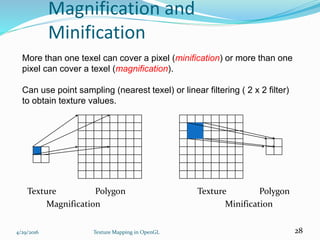
More than one texel can cover a pixel (minification) or more than one
pixel can cover a texel (magnification).
Can use point sampling (nearest texel) or linear filtering ( 2 x 2 filter)
to obtain texture values.
Filtering
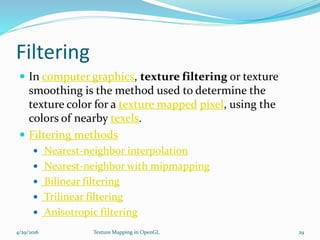
 In computer graphics, texture filtering or texture
smoothing is the method used to determine the
texture color for a texture mapped pixel, using the
colors of nearby texels.
 Filtering methods
 Nearest-neighbor interpolation
 Nearest-neighbor with mipmapping
 Bilinear filtering
 Trilinear filtering
 Anisotropic filtering
4/29/2016 Texture Mapping in OpenGL 29
Mip-Mapping
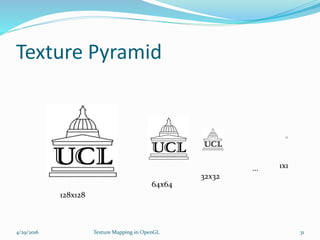
 When undersampling(pixels only sparsely sample the
texels) are sparsely we use mippmapping
 Mipmapping allows for pre-filtered texture maps of
decreasing resolutions.
 Lessens interpolation errors for smaller textured objects.
 Resample image at lower resolution
 Create a “pyramid” of textures.
 Invoke mipmaps automatically:
glTexParameteri(GL_TEXTURE_2D,GL_TEXURE_MIN_FILTER
, GL_NEAREST_MIPMAP_NEAREST);
4/29/2016 Texture Mapping in OpenGL 30
Texture Pyramid
4/29/2016 Texture Mapping in OpenGL 31
128x128
64x64
32x32
1x1...
Other Texture Features
 Environment Mapping
 Bump Mapping
 Orthographic Mapping
 Perspective Mapping
 Displacement Mapping
 Spherical Mapping
 Cylindrical Mapping
 Cube Mapping
4/29/2016 Texture Mapping in OpenGL 32
4/29/2016 Texture Mapping in OpenGL 33

Texture mapping in_opengl

  • 1.
    BY: Manas U Nayak 4/29/2016Texture Mapping in OpenGL 1
  • 2.
     What isTexture? The feel, appearance, or consistency of a surface or a substance. Give (a surface) a rough or raised texture. Well-defined textures are very important for rendering realistic 3-D images. 4/29/2016 Texture Mapping in OpenGL 2
  • 3.
  • 4.
    1- 3D ModelWithout Textures 2-3D Model With Textures 4/29/2016 Texture Mapping in OpenGL 4
  • 5.
    Texture Mapping Texture mappingis a graphic design process in which a two-dimensional (2-D) surface, called a texture map, is "wrapped around" a three- dimensional (3-D)object.Thus, the 3-D object acquires a surface texture similar to that of the 2-D surface. Its application to 3D graphics was pioneered by Edwin Catmull in 1974. 4/29/2016 Texture Mapping in OpenGL 5
  • 6.
    Example for TextureMapping  Three identical squares, each covered randomly with dots, are directly mapped onto the three visible facets of a 3-D cube.This distorts the size sand shapes of the dots on the top and right-hand facets.In this mapping, the texture map covers the cube with no apparent discontinuities because of the way the dots are arranged on the squares. 4/29/2016 Texture Mapping in OpenGL 6
  • 7.
    Mapping a 2Dsurface onto a 3D alters the size and shape of the image elements 4/29/2016 Texture Mapping in OpenGL 7
  • 8.
    Texture Mapping 4/29/2016 TextureMapping in OpenGL 8 s t x y z image geometry display
  • 9.
    Texels  A texel,texture element, or texture pixel is the fundamental unit of texture space, used in computer graphics. Textures are represented by arrays of texels, just as pictures are represented by arrays of pixels. 4/29/2016 Texture Mapping in OpenGL 9
  • 10.
    Texel Vs Pixel… When a 3-D texture-mapped object appears close to the viewer so that the texture elements appear relatively large, there may be several pixels in each texel and the pattern of the texture map is easy to see. When the same 3-D object is removed to increasing distances, the texture-map pattern appears smaller and smaller. Eventually, each texel can become smaller than a pixel. Then an averaging process must be used; several texels are combined to form each pixel. If the object becomes distant enough, or if one of its facets appears at a sharp angle with respect to the viewer, the texels may become so small that the essence of the pattern is lost in the observed image. 4/29/2016 Texture Mapping in OpenGL 10
  • 11.
  • 12.
    Texture Representation Bitmap (pixelmap) textures (supported by OpenGL)  Procedural textures (used in advanced rendering programs) 4/29/2016 Texture Mapping in OpenGL 12 Bitmap texture:  A 2D image - represented by 2D array texture[height][width]  Each pixel (or called texel ) by a unique pair texture coordinate (s, t)  The s and t are usually normalized to a [0,1] range  For any given (s,t) in the normalized range, there is a unique image value (i.e., a unique [red, green, blue] set ) s t (0,0) (1,1)
  • 13.
    Map textures tosurfaces  Establish mapping from texture to surfaces (polygons): - Application program needs to specify texture coordinates for each corner of the polygon 4/29/2016 Texture Mapping in OpenGL 13 The polygon can be in an arbitrary size (0,0) (1,0) (1,0) (1,1)
  • 14.
    Map textures tosurfaces  Texture mapping is performed in rasterization (backward mapping) 4/29/2016 Texture Mapping in OpenGL 14 (0,0) (1,0) (0,1) (1,1)  For each pixel that is to be painted, its texture coordinates (s, t) are determined (interpolated) based on the corners’ texture coordinates  The interpolated texture coordinates are then used to perform texture lookup
  • 15.
    OpenGL texture mapping Steps in your program 1) Specify texture - read or generate image - Assign to texture 2) Specify texture mapping parameters - Wrapping, filtering, etc. 3) Enable GL texture mapping (GL_TEXTURE_2D) 4) Assign texture coordinates to vertices 5) Draw your objects 6) Disable GL texture mapping (if you don’t need to perform texture mapping any more) 4/29/2016 Texture Mapping in OpenGL 15
  • 16.
    Specifying a Texture Define a texture image from an array of texels (texture elements) in CPU memory: GLubyte my_texels[512][512];  Define as any other pixel map:  Scanned image. Generate by application code.  Enable texture mapping:  glEnable(GL_TEXTURE_2D)  OpenGL supports 1-4 dimensional texture maps. 4/29/2016 Texture Mapping in OpenGL 16
  • 17.
    Define Texture asan Image glTexImage2D( target, level, components, w, h, border, format, type, texels ); target: type of texture, e.g. GL_TEXTURE_2D level: used for mipmapping (discussed later). components: elements per texel. w, h: width and height of texels in pixels. border: used for smoothing format and type: describe texels. texels: pointer to texel array. glTexImage2D(GL_TEXTURE_2D, 0, 3, 512, 512, 0, GL_RGB, GL_UNSIGNED_BYTE, my_texels); 4/29/2016 Texture Mapping in OpenGL 17
  • 18.
    Converting A TextureImage  OpenGL requires texture dimensions to be powers of 2.  If dimensions of image are not powers of 2, perform scaling: • gluScaleImage(format, w_in, h_in, type_in, *data_in, w_out, h_out, type_out, *data_out); • data_in is source image. • data_out is for destination image.  Image interpolated and filtered during scaling. 4/29/2016 Texture Mapping in OpenGL 18
  • 19.
    Texture mapping parameters What happen if the given texture coordinates (s,t) are outside [0,1] range?  Example: glTexParameteri(GL_TEXTAURE_2D, GL_TEXTURE_WRAP_S, GL_CLAMP) 4/29/2016 Texture Mapping in OpenGL 19 (0,0) (1,1) texture GL_Repeat (0,0) (2,2) (0,0) (2,2) GL_Clamp If (s >1) s = 1 If (t >1) t = 1
  • 20.
    Tiling 4/29/2016 Texture Mappingin OpenGL 20 x y Texture Space (0,0) (1,1)
  • 21.
    Clamping 4/29/2016 Texture Mappingin OpenGL 21 x y Texture Space (0,0) (1,1)
  • 22.
    Mapping a Texture Based on parametric texture coordinates.  glTexCoord*() specified at each vertex. 4/29/2016 Texture Mapping in OpenGL 22 s t 1, 1 0, 1 0, 0 1, 0 (s, t) = (0.2, 0.8) (0.4, 0.2) (0.8, 0.4) A B C a b c Texture Space Object Space
  • 23.
    Texture Mapping 4/29/2016 TextureMapping in OpenGL 23 v0 v1 v2 t2 t0 t1 (1,1) (0,0) x y Texture Space Triangle (in any space)
  • 24.
    Typical CodeglBegin(GL_POLYGON); glColor3f(r0, g0,b0); //if no shading used glNormal3f(u0, v0, w0); // if shading used glTexCoord2f(s0, t0); glVertex3f(x0, y0, z0); glColor3f(r1, g1, b1); glNormal3f(u1, v1, w1); glTexCoord2f(s1, t1); glVertex3f(x1, y1, z1); . . glEnd(); 4/29/2016 Texture Mapping in OpenGL 24 Note that we can use vertex arrays to increase efficiency.
  • 25.
    Enable (Disable) Textures Enable texture – glEnable(GL_TEXTURE_2D)  Disable texture – glDisable(GL_TEXTURE_2D) Remember to disable texture mapping when you draw non-textured polygons 4/29/2016 Texture Mapping in OpenGL 25
  • 26.
    Specify texture coordinates Give texture coordinates before defining each vertex glBegin(GL_QUADS); glTexCoord2D(0,0); glVertex3f(-0.5, 0, 0.5); … glEnd(); 4/29/2016 Texture Mapping in OpenGL 26
  • 27.
    Interpolation  OpenGL usesinterpolation to find texels from texture coordinates. Distortions can occur.  Point sampling and linear filtering. 4/29/2016 Texture Mapping in OpenGL 27 Good selection of texture coordinates. Poor selection of texture coordinates. Texture stretched over trapezoid shows effects of bilinear interpolation.
  • 28.
    Magnification and Minification 4/29/2016 TextureMapping in OpenGL 28 Texture Polygon Magnification Minification PolygonTexture More than one texel can cover a pixel (minification) or more than one pixel can cover a texel (magnification). Can use point sampling (nearest texel) or linear filtering ( 2 x 2 filter) to obtain texture values.
  • 29.
    Filtering  In computergraphics, texture filtering or texture smoothing is the method used to determine the texture color for a texture mapped pixel, using the colors of nearby texels.  Filtering methods  Nearest-neighbor interpolation  Nearest-neighbor with mipmapping  Bilinear filtering  Trilinear filtering  Anisotropic filtering 4/29/2016 Texture Mapping in OpenGL 29
  • 30.
    Mip-Mapping  When undersampling(pixelsonly sparsely sample the texels) are sparsely we use mippmapping  Mipmapping allows for pre-filtered texture maps of decreasing resolutions.  Lessens interpolation errors for smaller textured objects.  Resample image at lower resolution  Create a “pyramid” of textures.  Invoke mipmaps automatically: glTexParameteri(GL_TEXTURE_2D,GL_TEXURE_MIN_FILTER , GL_NEAREST_MIPMAP_NEAREST); 4/29/2016 Texture Mapping in OpenGL 30
  • 31.
    Texture Pyramid 4/29/2016 TextureMapping in OpenGL 31 128x128 64x64 32x32 1x1...
  • 32.
    Other Texture Features Environment Mapping  Bump Mapping  Orthographic Mapping  Perspective Mapping  Displacement Mapping  Spherical Mapping  Cylindrical Mapping  Cube Mapping 4/29/2016 Texture Mapping in OpenGL 32
  • 33.