Computer Graphics (CS 543)
Lecture 9 (Part 1): Environment
Mapping (Reflections and Refractions)
Prof Emmanuel Agu
(Adapted from slides by Ed Angel)
Computer Science Dept.
Worcester Polytechnic Institute (WPI)
Environment Mapping
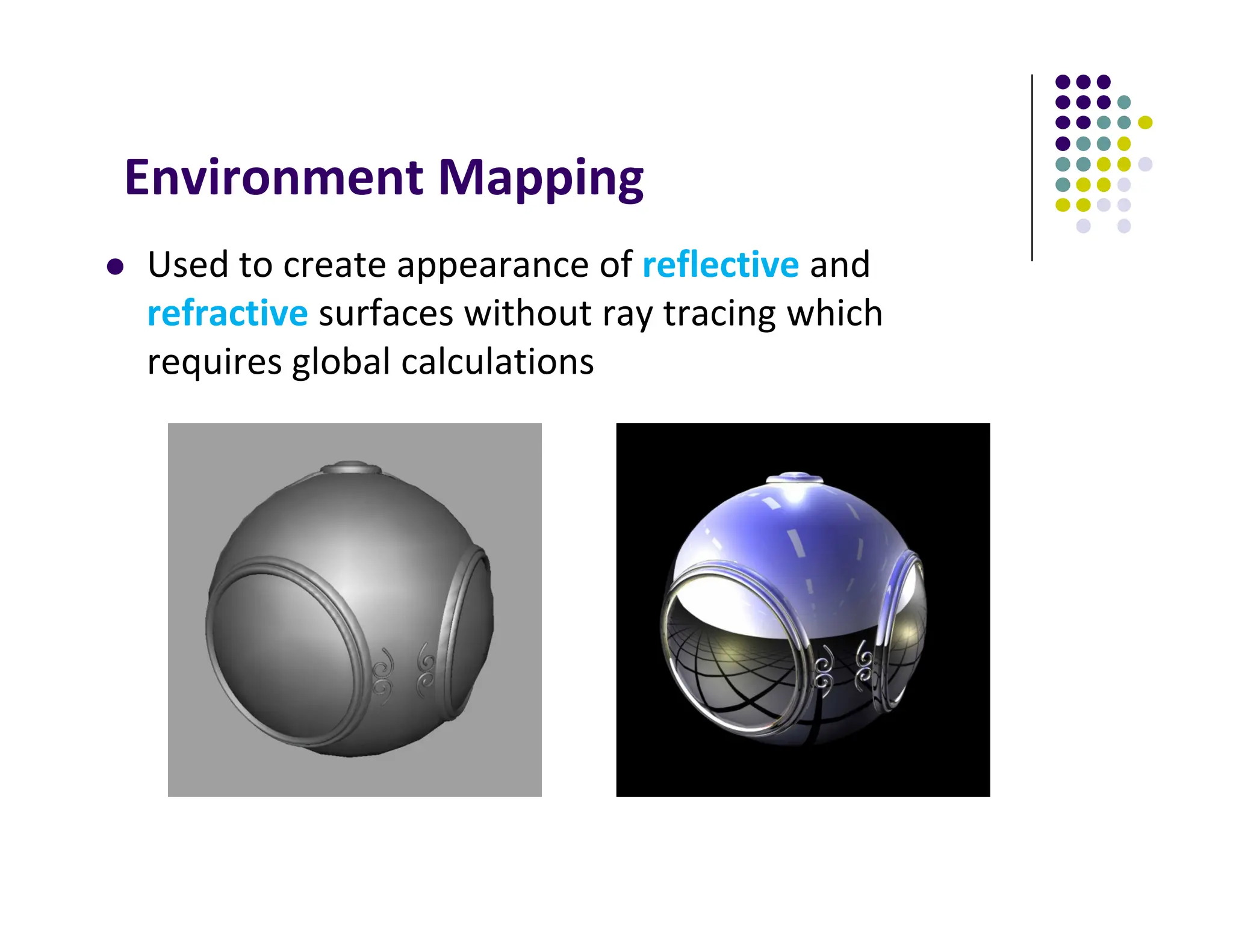
 Used to create appearance of reflective and
refractive surfaces without ray tracing which
requires global calculations
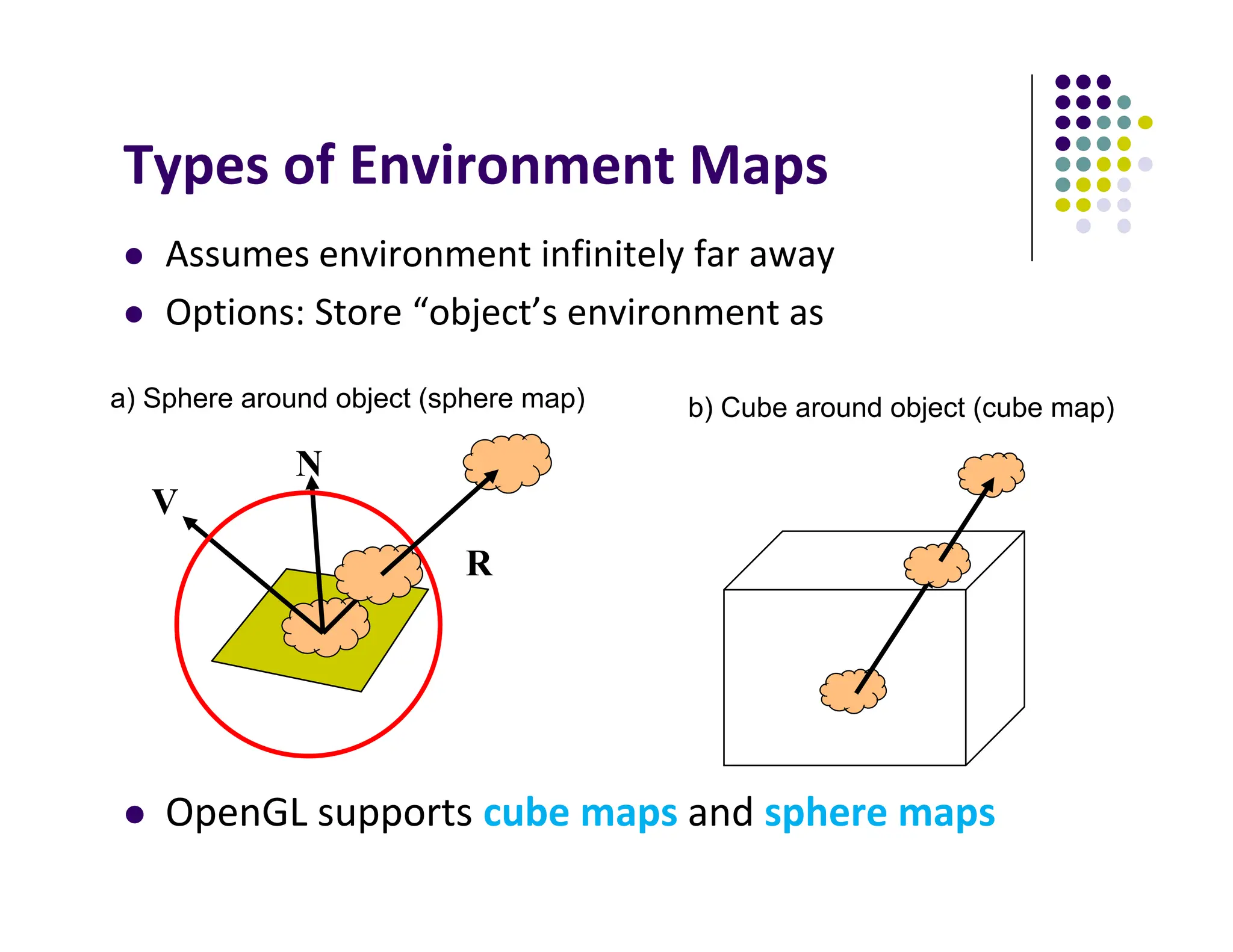
 Assumes environment infinitely far away
 Options: Store “object’s environment as
 OpenGL supports cube maps and sphere maps
Types of Environment Maps
V
N
R
b) Cube around object (cube map)
a) Sphere around object (sphere map)
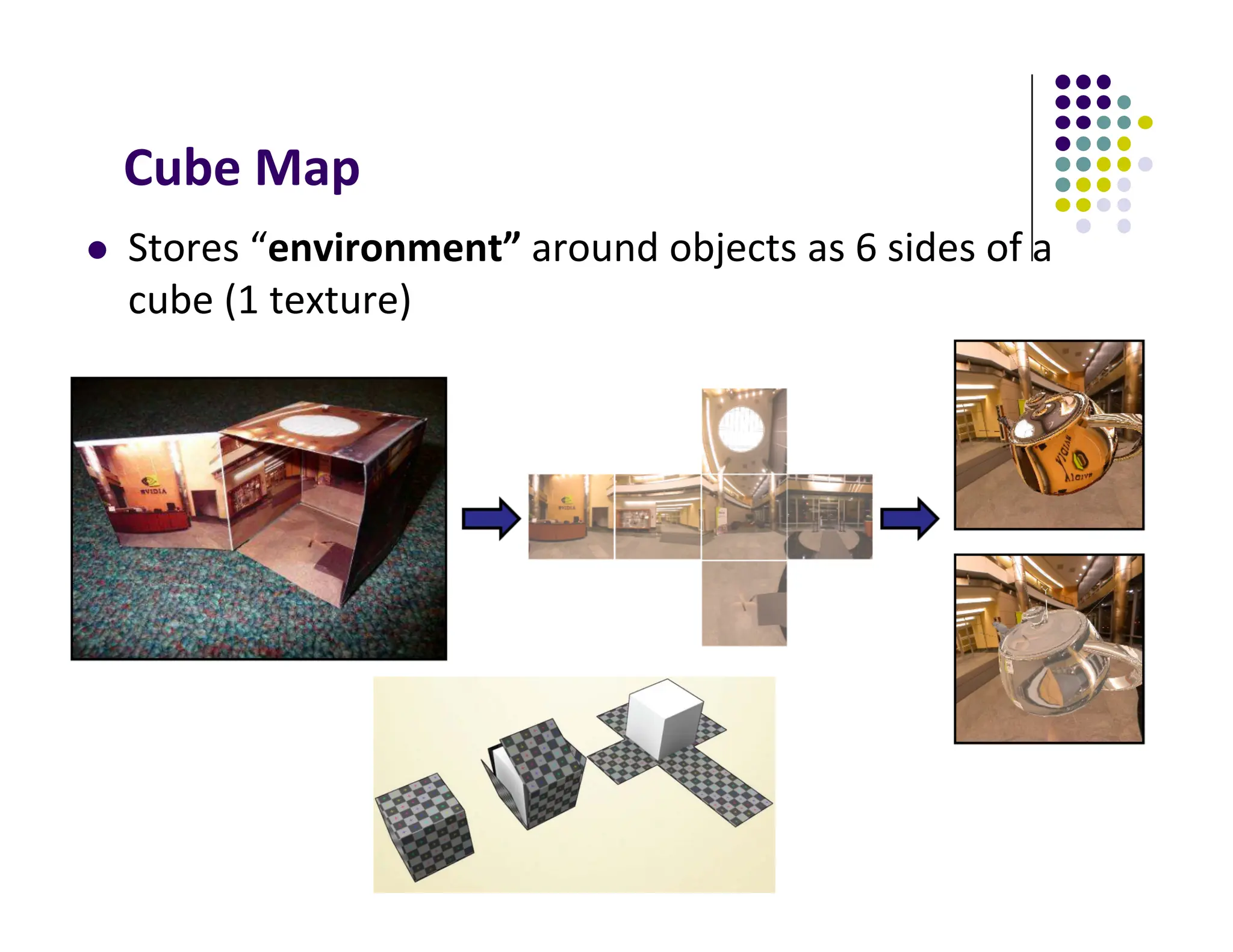
Cube Map
 Stores “environment” around objects as 6 sides of a
cube (1 texture)
6
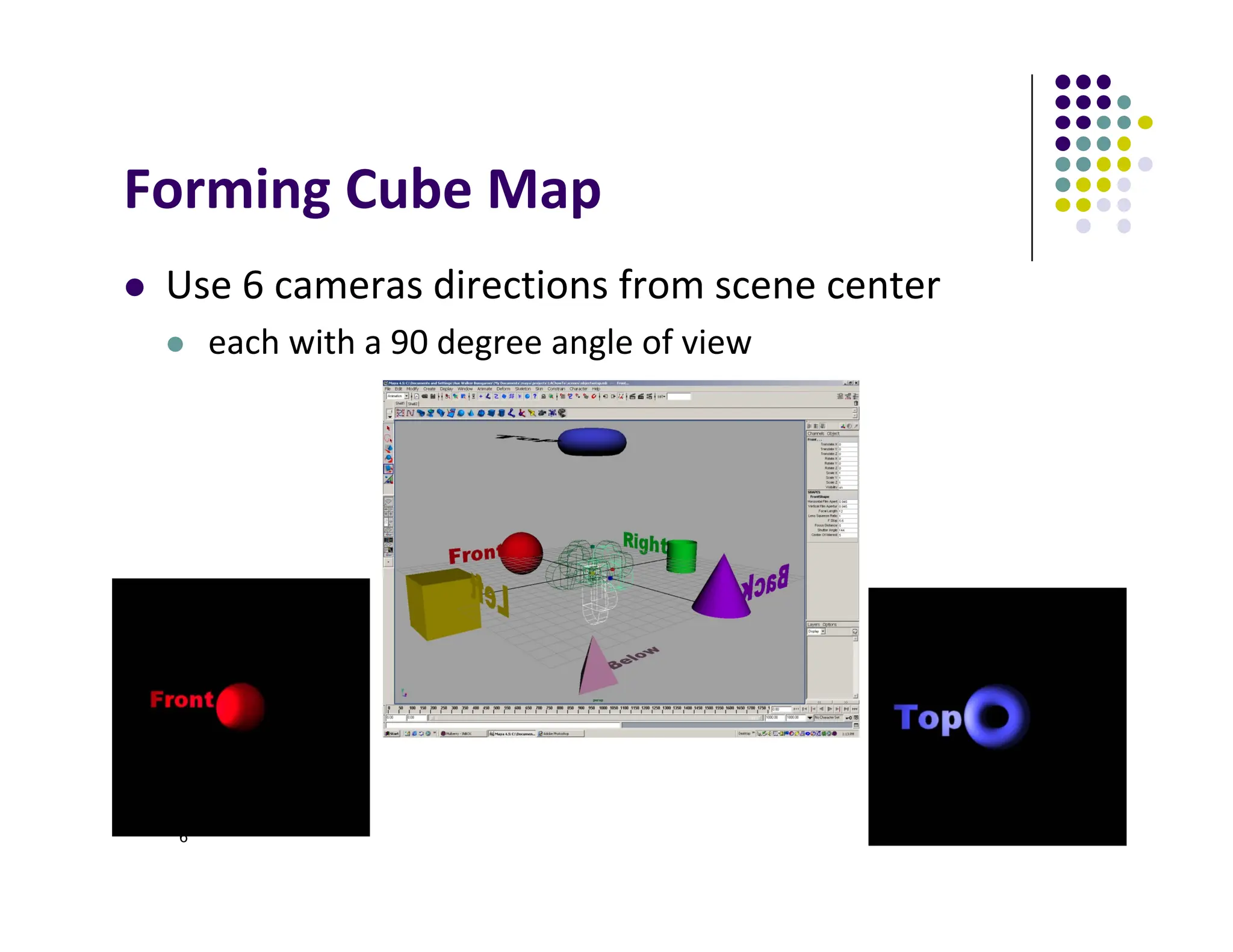
Forming Cube Map
 Use 6 cameras directions from scene center
 each with a 90 degree angle of view
x
y
z
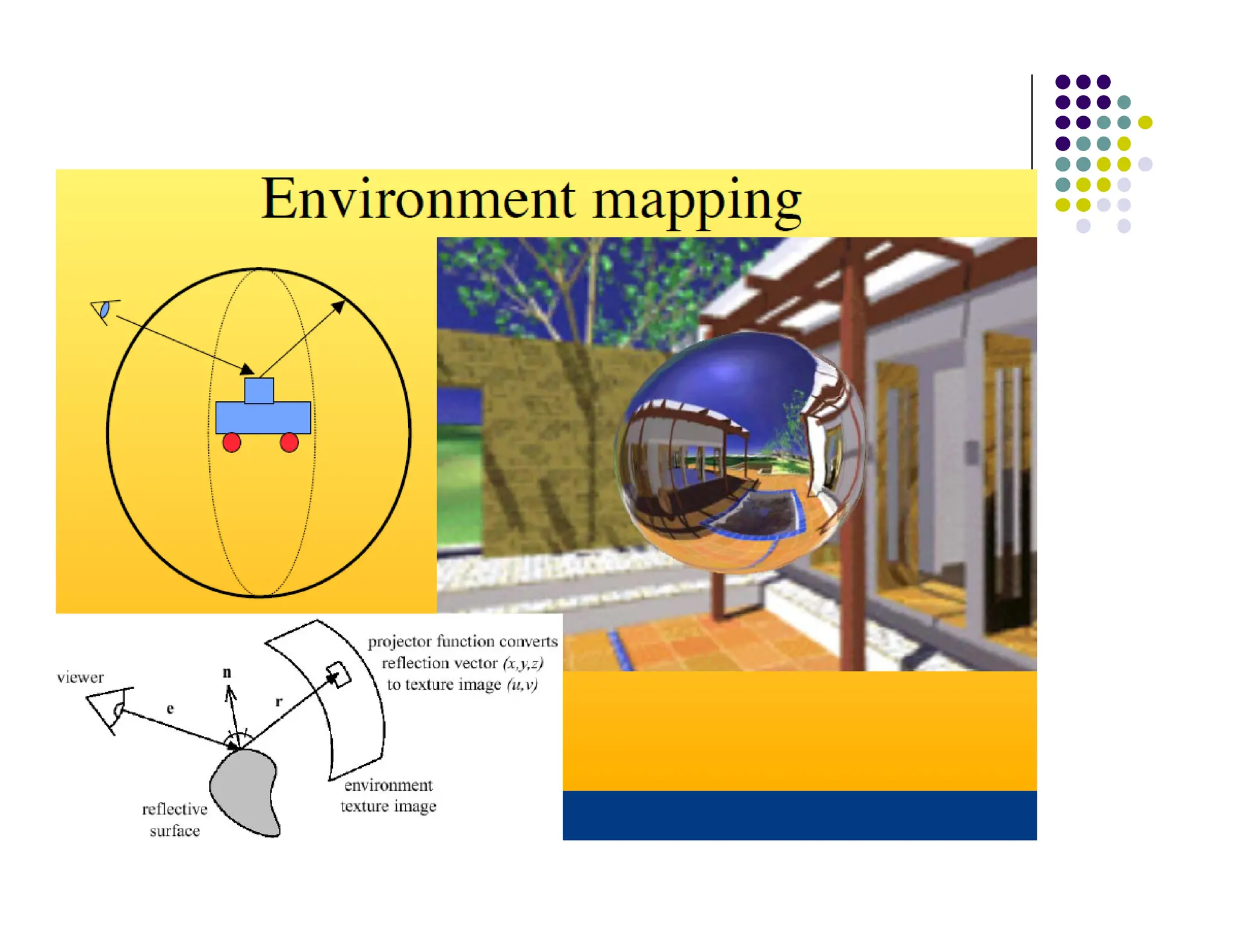
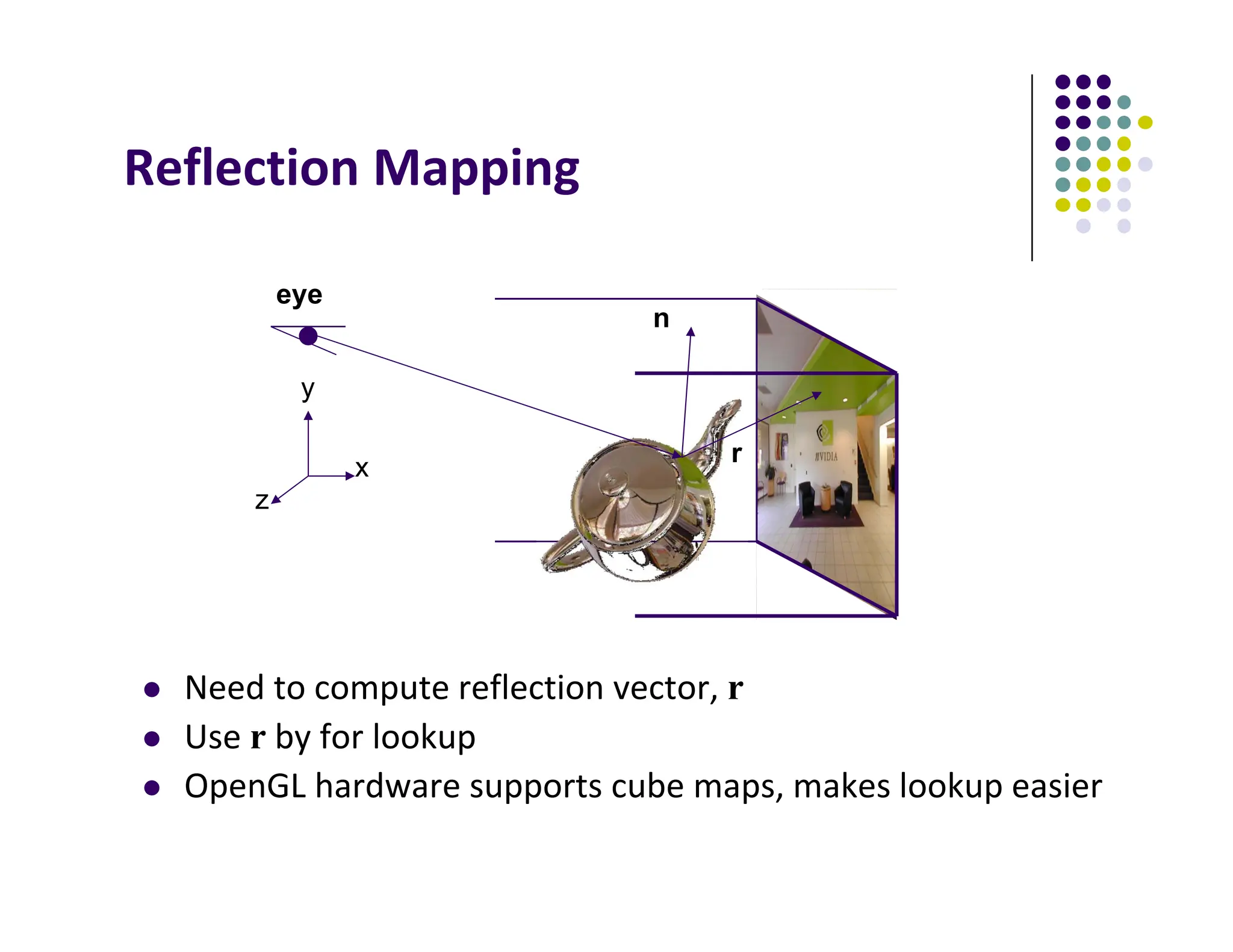
Reflection Mapping
 Need to compute reflection vector, r
 Use r by for lookup
 OpenGL hardware supports cube maps, makes lookup easier
n
eye
r
8
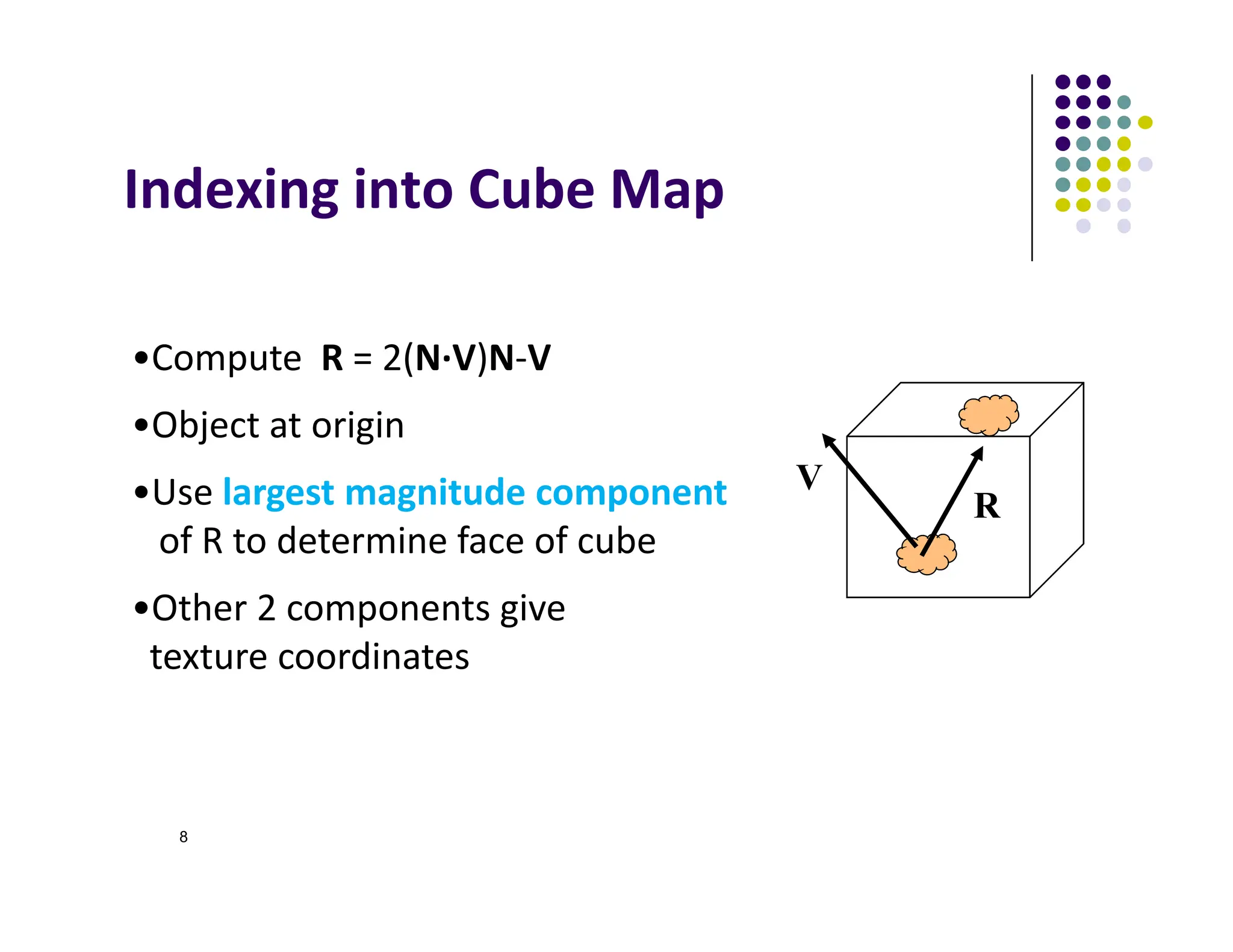
Indexing into Cube Map
V
R
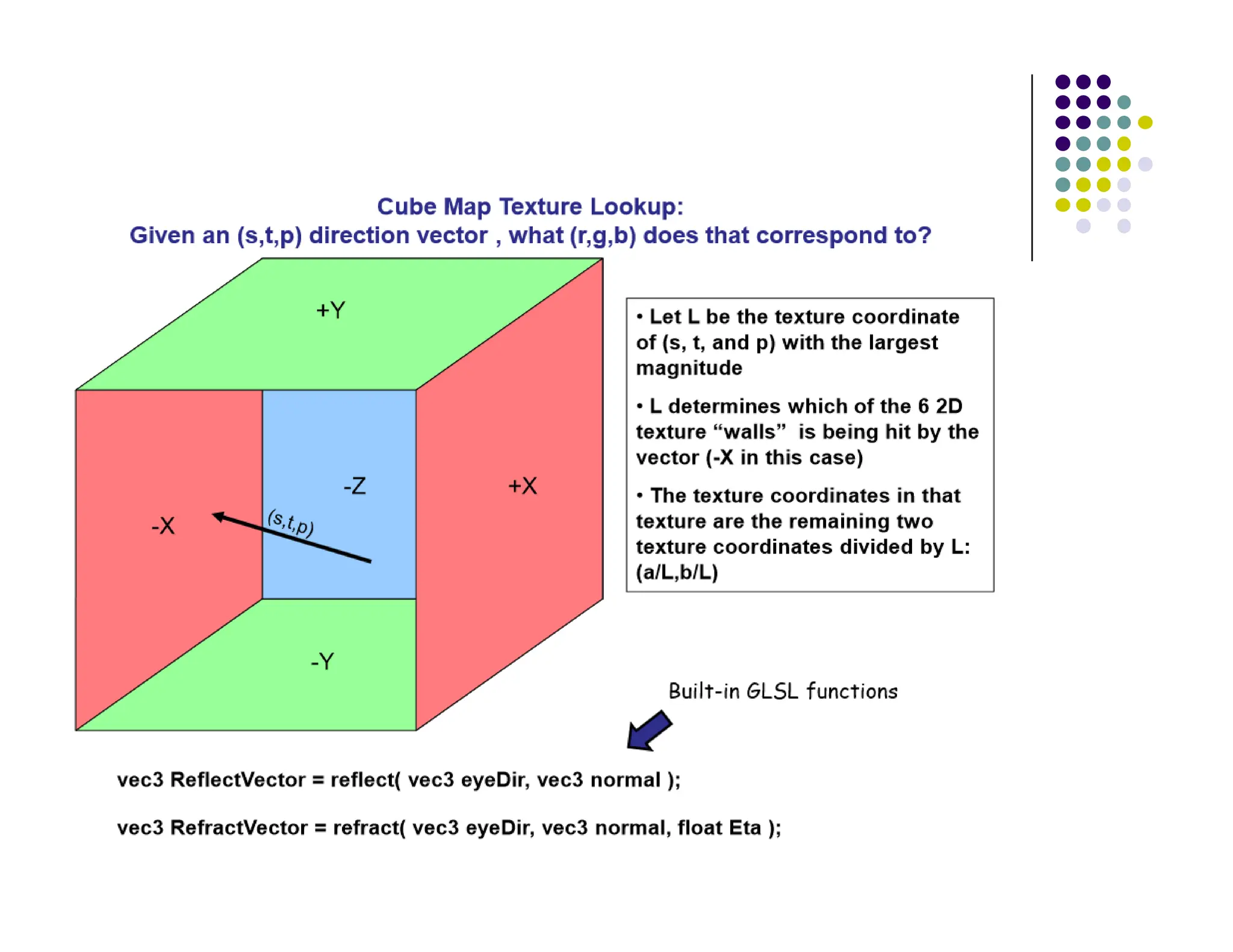
•Compute R = 2(N∙V)N‐V
•Object at origin
•Use largest magnitude component
of R to determine face of cube
•Other 2 components give
texture coordinates
Example
 R = (‐4, 3, ‐1)
 Same as R = (‐1, 0.75, ‐0.25)
 Use face x = ‐1 and y = 0.75, z = ‐0.25
 Not quite right since cube defined by x, y, z = ± 1
rather than [0, 1] range needed for texture
coordinates
 Remap by s = ½ + ½ y, t = ½ + ½ z
 Hence, s =0.875, t = 0.375
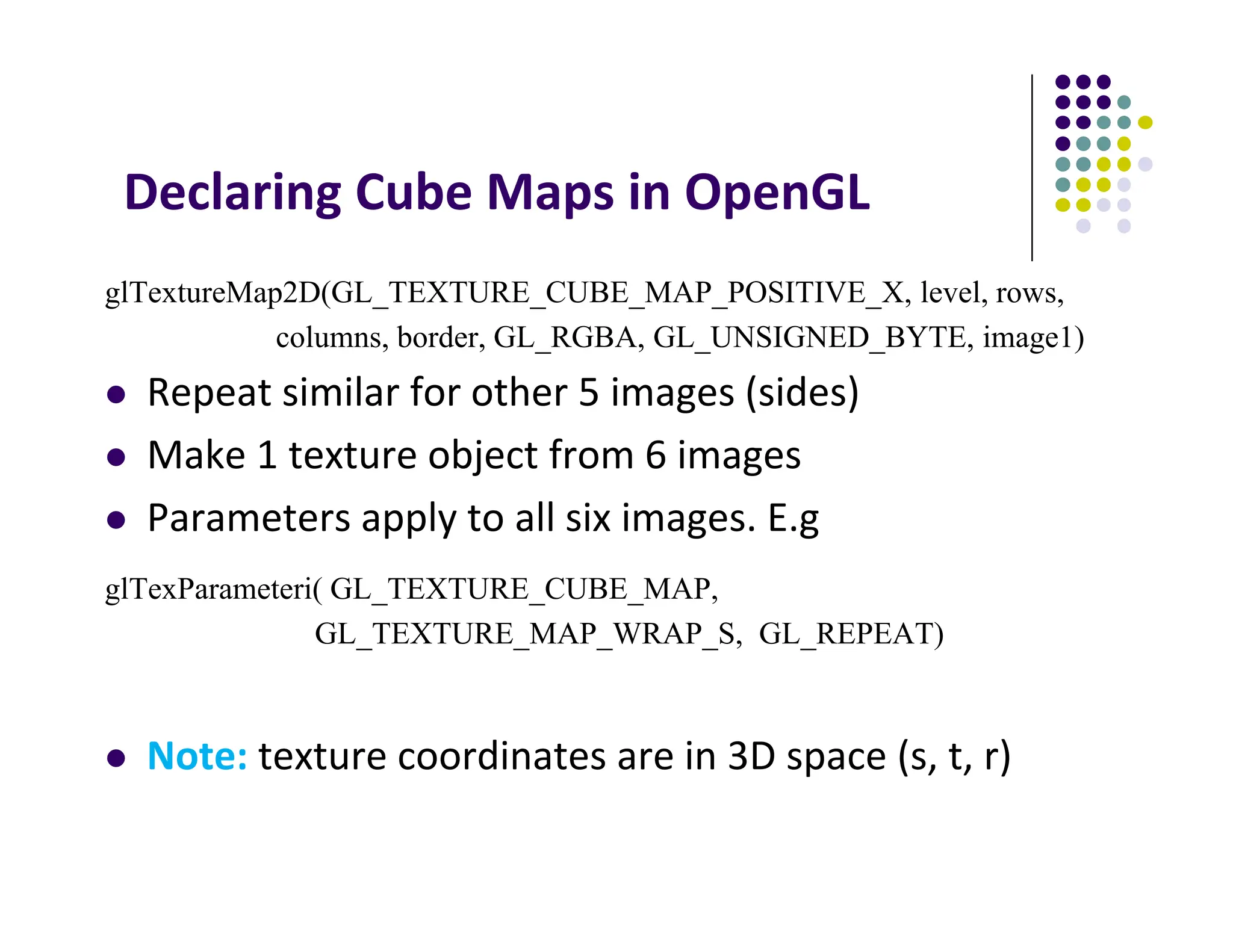
Declaring Cube Maps in OpenGL
glTextureMap2D(GL_TEXTURE_CUBE_MAP_POSITIVE_X, level, rows,
columns, border, GL_RGBA, GL_UNSIGNED_BYTE, image1)
 Repeat similar for other 5 images (sides)
 Make 1 texture object from 6 images
 Parameters apply to all six images. E.g
glTexParameteri( GL_TEXTURE_CUBE_MAP,
GL_TEXTURE_MAP_WRAP_S, GL_REPEAT)
 Note: texture coordinates are in 3D space (s, t, r)
Cube Map Example (init)
// colors for sides of cube
GLubyte red[3] = {255, 0, 0};
GLubyte green[3] = {0, 255, 0};
GLubyte blue[3] = {0, 0, 255};
GLubyte cyan[3] = {0, 255, 255};
GLubyte magenta[3] = {255, 0, 255};
GLubyte yellow[3] = {255, 255, 0};
glEnable(GL_TEXTURE_CUBE_MAP);
// Create texture object
glGenTextures(1, tex);
glActiveTexture(GL_TEXTURE1);
glBindTexture(GL_TEXTURE_CUBE_MAP, tex[0]);
You can also just load
6 pictures of environment
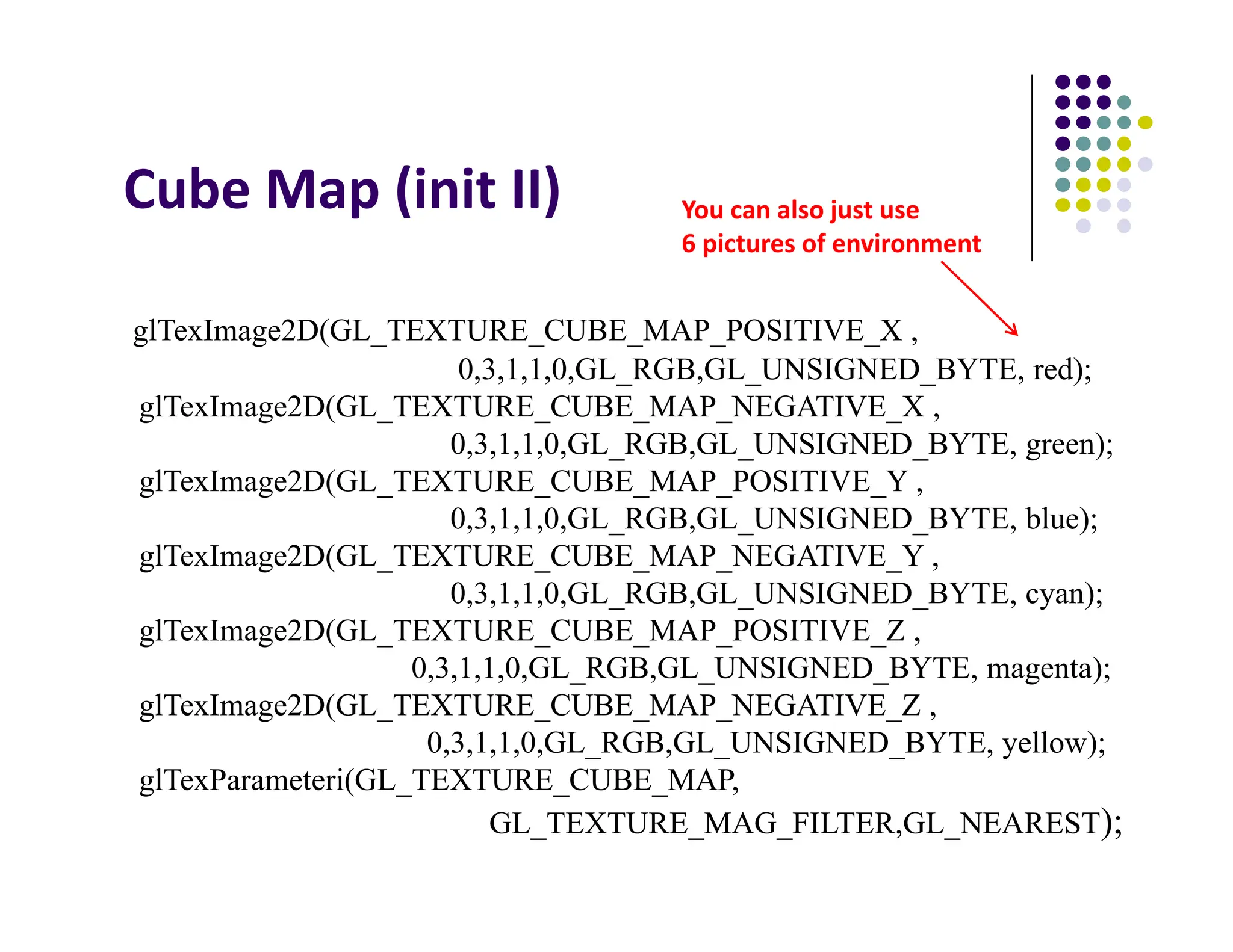
Cube Map (init II)
glTexImage2D(GL_TEXTURE_CUBE_MAP_POSITIVE_X ,
0,3,1,1,0,GL_RGB,GL_UNSIGNED_BYTE, red);
glTexImage2D(GL_TEXTURE_CUBE_MAP_NEGATIVE_X ,
0,3,1,1,0,GL_RGB,GL_UNSIGNED_BYTE, green);
glTexImage2D(GL_TEXTURE_CUBE_MAP_POSITIVE_Y ,
0,3,1,1,0,GL_RGB,GL_UNSIGNED_BYTE, blue);
glTexImage2D(GL_TEXTURE_CUBE_MAP_NEGATIVE_Y ,
0,3,1,1,0,GL_RGB,GL_UNSIGNED_BYTE, cyan);
glTexImage2D(GL_TEXTURE_CUBE_MAP_POSITIVE_Z ,
0,3,1,1,0,GL_RGB,GL_UNSIGNED_BYTE, magenta);
glTexImage2D(GL_TEXTURE_CUBE_MAP_NEGATIVE_Z ,
0,3,1,1,0,GL_RGB,GL_UNSIGNED_BYTE, yellow);
glTexParameteri(GL_TEXTURE_CUBE_MAP,
GL_TEXTURE_MAG_FILTER,GL_NEAREST);
You can also just use
6 pictures of environment
Cube Map (init III)
GLuint texMapLocation;
GLuint tex[1];
texMapLocation = glGetUniformLocation(program, "texMap");
glUniform1i(texMapLocation, tex[0]);
Connect texture map (tex[0])
to variable texMap in fragment shader
(texture mapping done in frag shader)
Adding Normals
void quad(int a, int b, int c, int d)
{
static int i =0;
normal = normalize(cross(vertices[b] - vertices[a],
vertices[c] - vertices[b]));
normals[i] = normal;
points[i] = vertices[a];
i++;
// rest of data
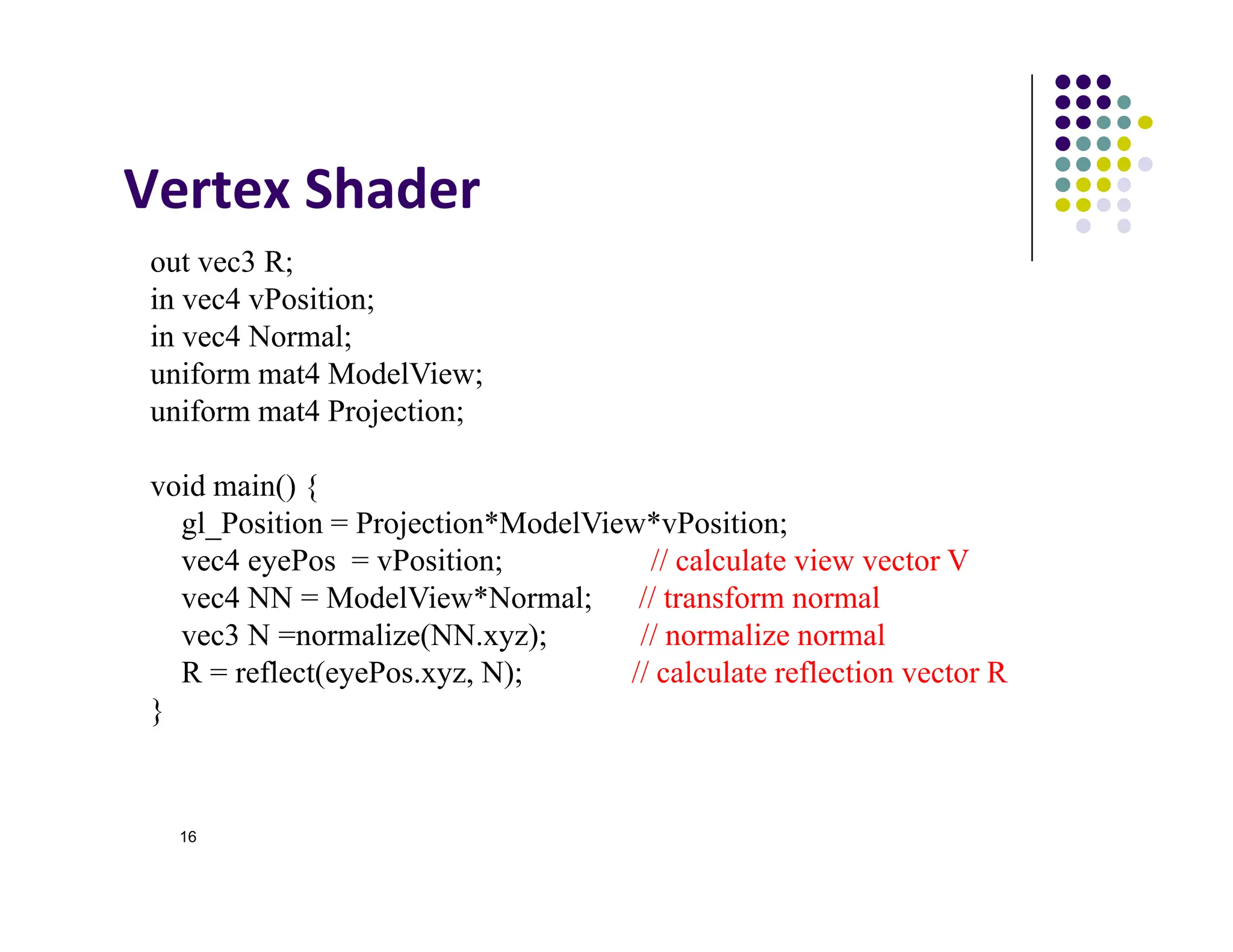
Vertex Shader
16
out vec3 R;
in vec4 vPosition;
in vec4 Normal;
uniform mat4 ModelView;
uniform mat4 Projection;
void main() {
gl_Position = Projection*ModelView*vPosition;
vec4 eyePos = vPosition; // calculate view vector V
vec4 NN = ModelView*Normal; // transform normal
vec3 N =normalize(NN.xyz); // normalize normal
R = reflect(eyePos.xyz, N); // calculate reflection vector R
}
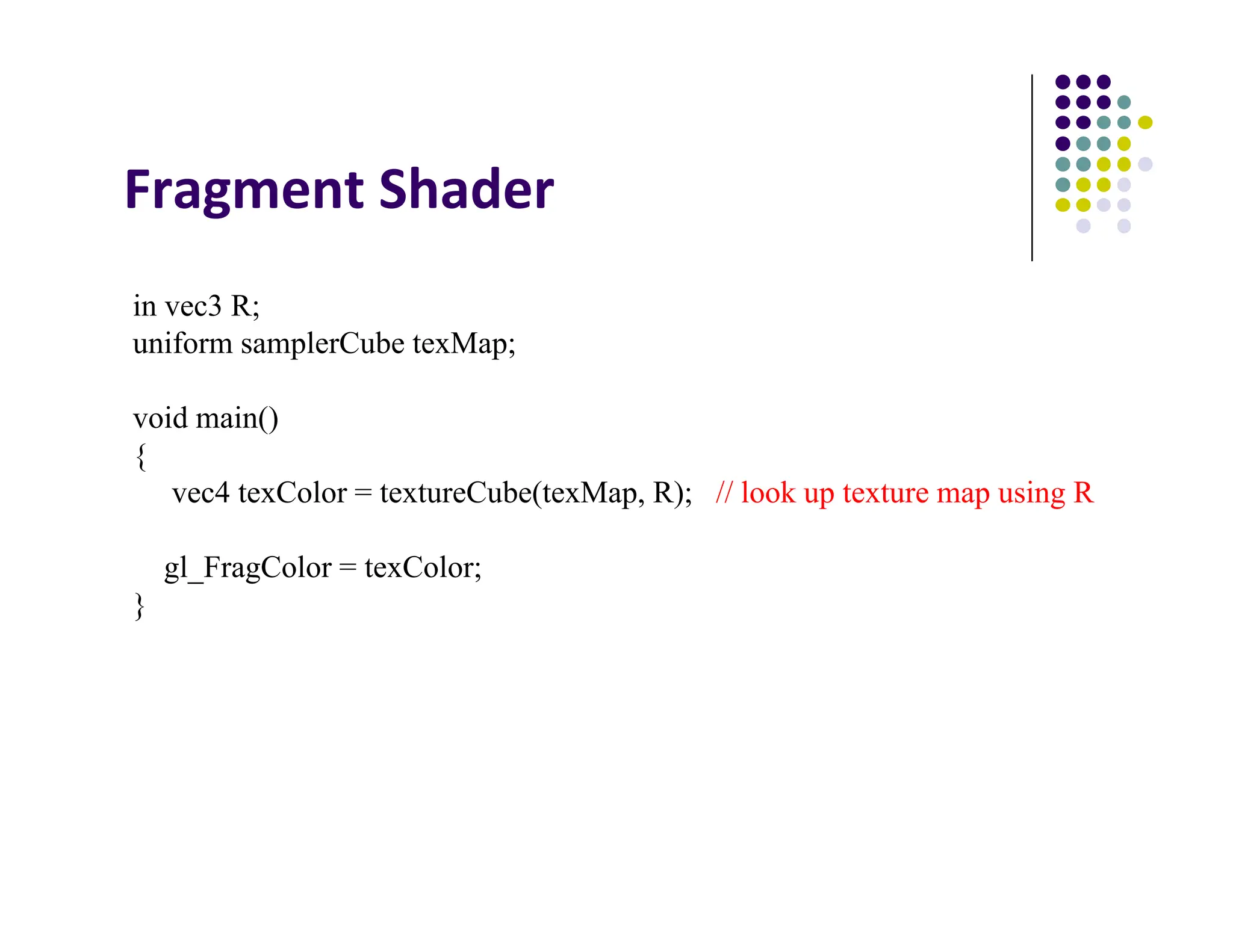
Fragment Shader
in vec3 R;
uniform samplerCube texMap;
void main()
{
vec4 texColor = textureCube(texMap, R); // look up texture map using R
gl_FragColor = texColor;
}
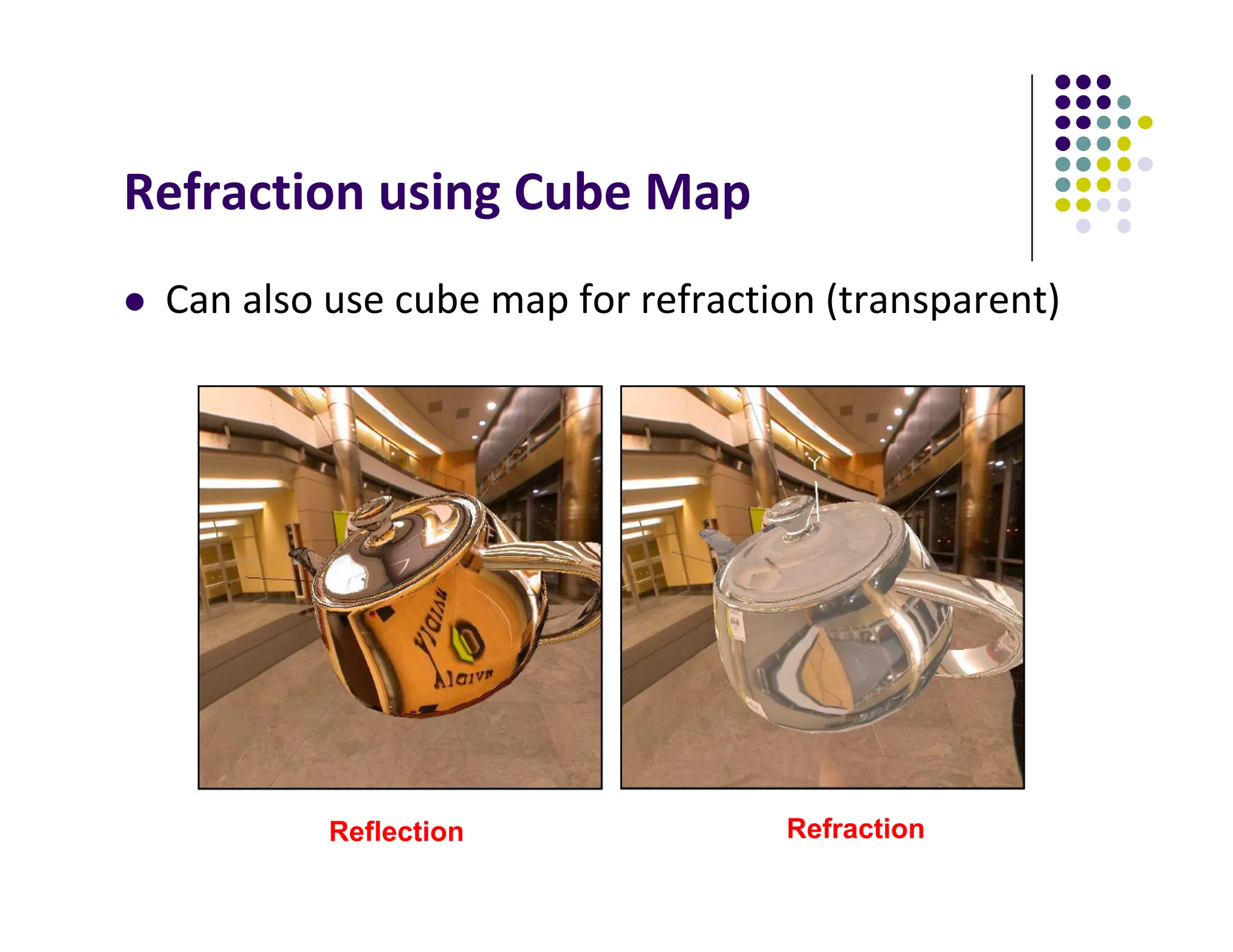
Refraction using Cube Map
 Can also use cube map for refraction (transparent)
Reflection Refraction
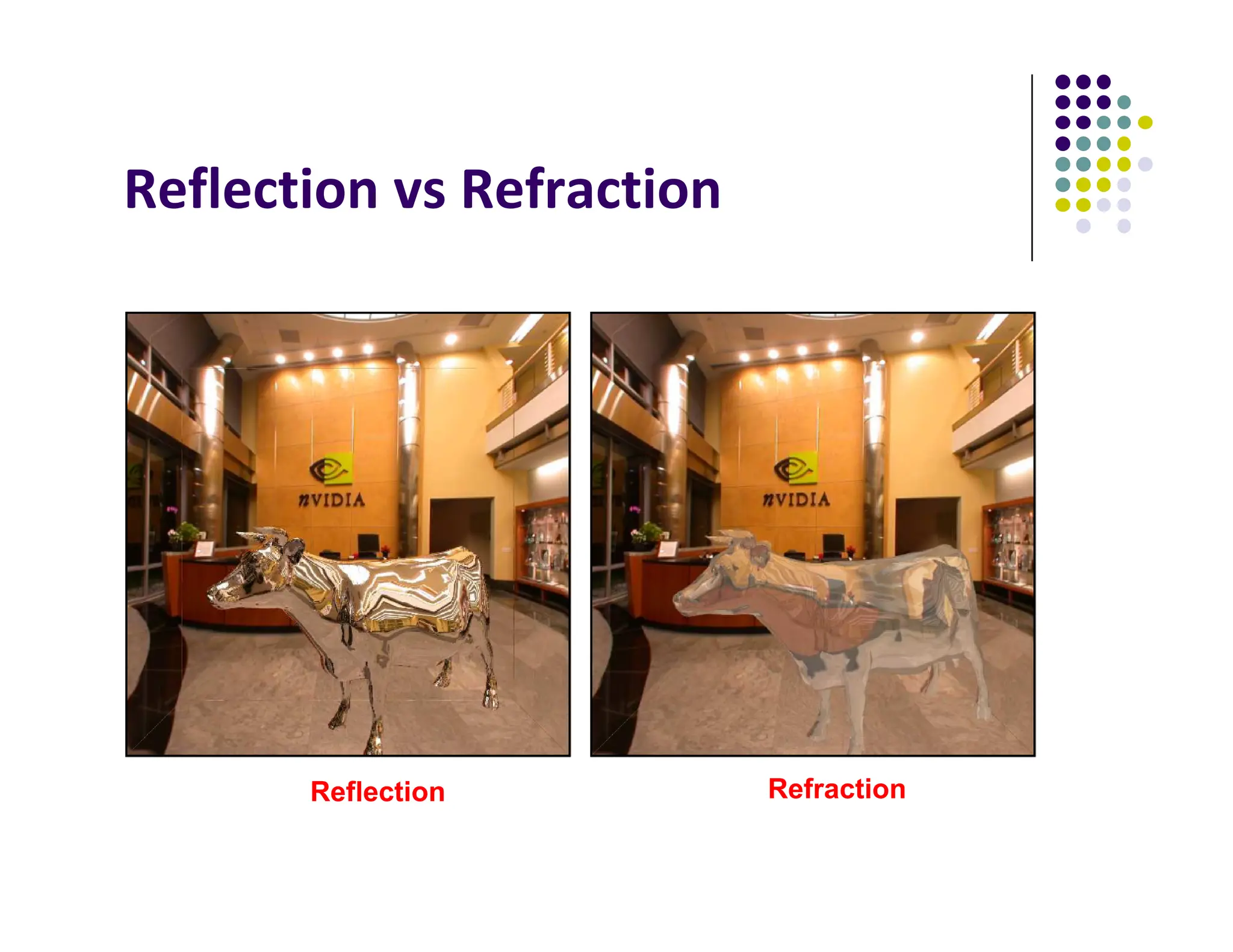
Reflection vs Refraction
Reflection Refraction
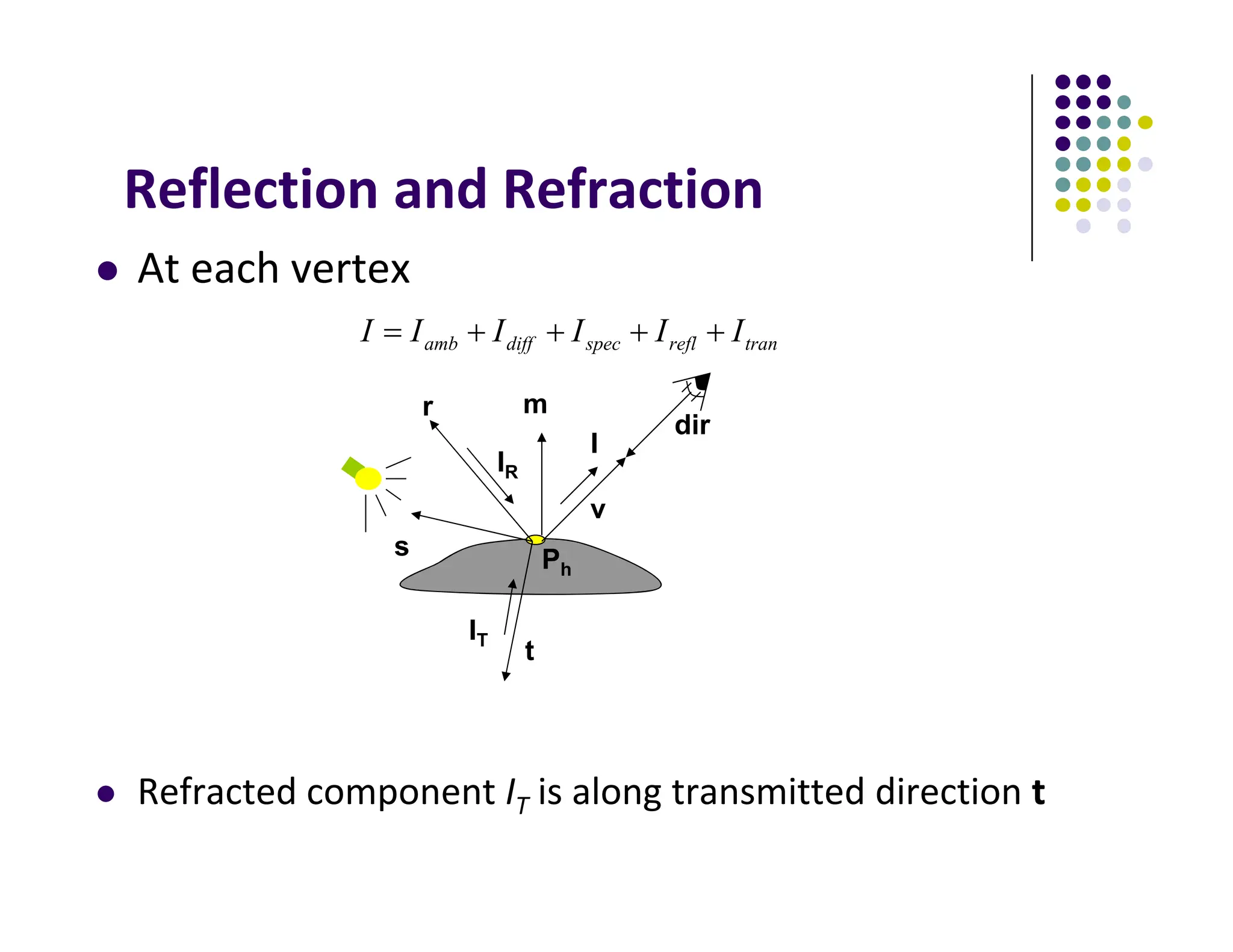
Reflection and Refraction
 At each vertex
 Refracted component IT is along transmitted direction t
tran
refl
spec
diff
amb I
I
I
I
I
I 




Ph
v
r m
s
dir
t
IR
IT
I
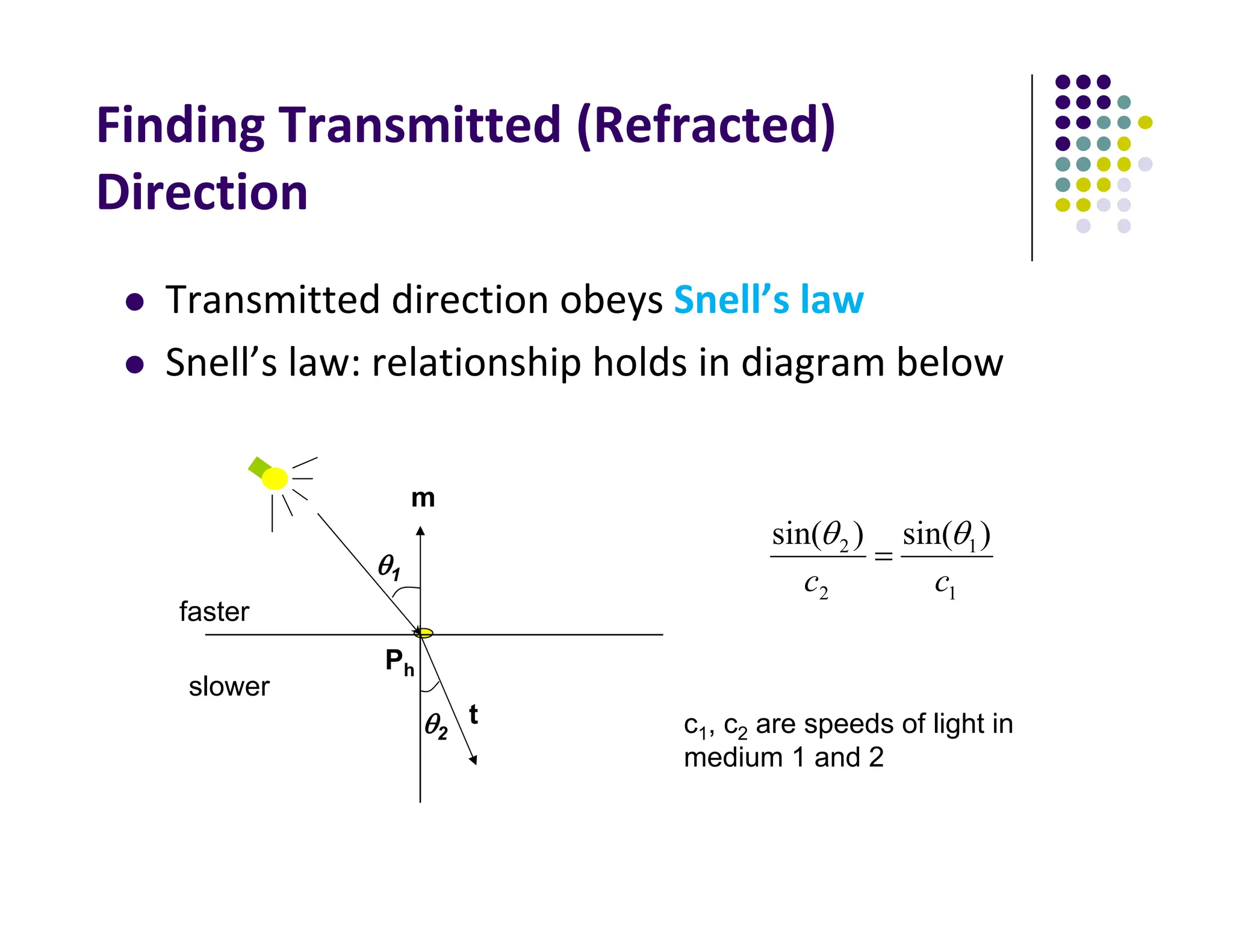
Finding Transmitted (Refracted)
Direction
 Transmitted direction obeys Snell’s law
 Snell’s law: relationship holds in diagram below
Ph
m
t
1
1
2
2 )
sin(
)
sin(
c
c



faster
slower
2
1
c1, c2 are speeds of light in
medium 1 and 2
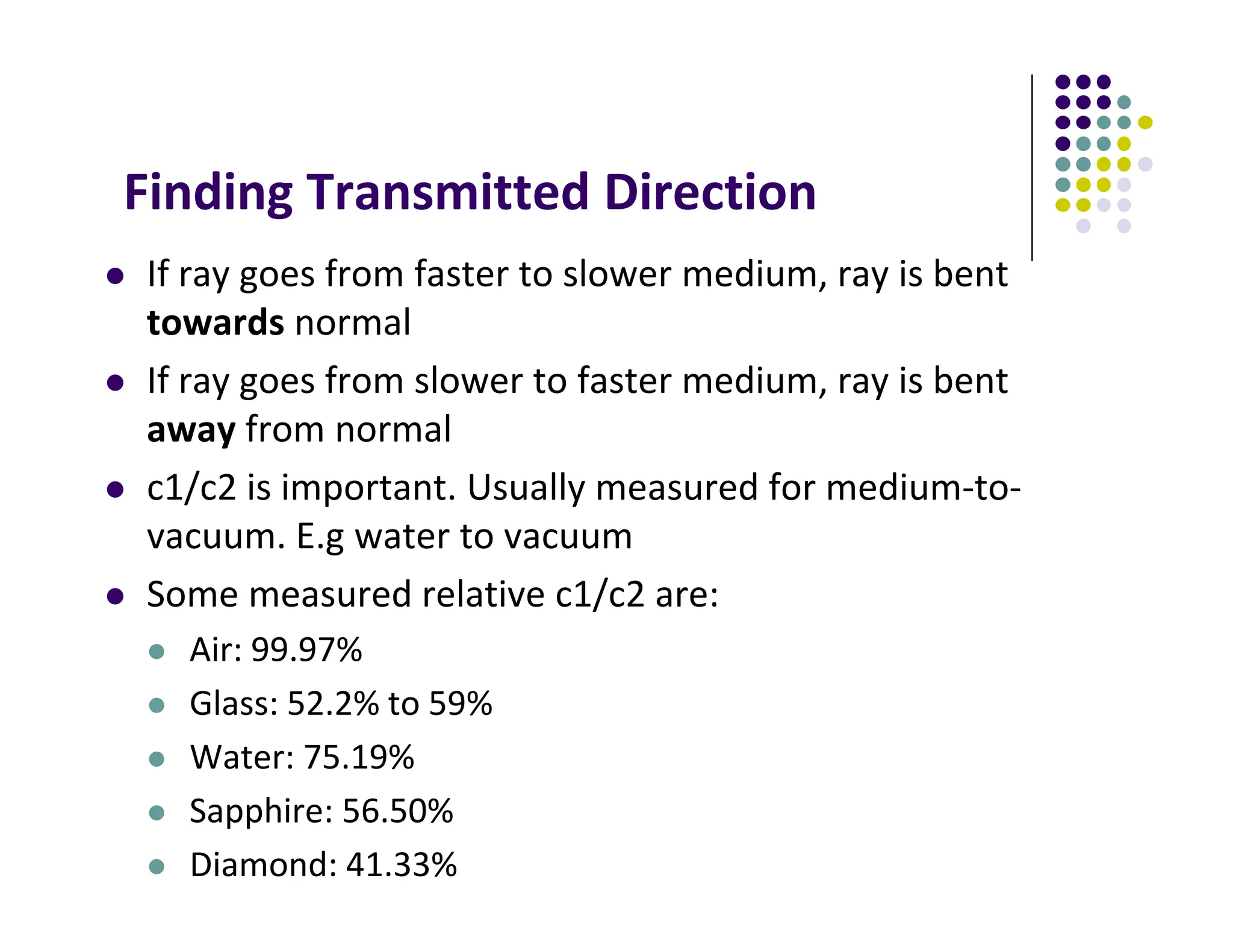
Finding Transmitted Direction
 If ray goes from faster to slower medium, ray is bent
towards normal
 If ray goes from slower to faster medium, ray is bent
away from normal
 c1/c2 is important. Usually measured for medium‐to‐
vacuum. E.g water to vacuum
 Some measured relative c1/c2 are:
 Air: 99.97%
 Glass: 52.2% to 59%
 Water: 75.19%
 Sapphire: 56.50%
 Diamond: 41.33%
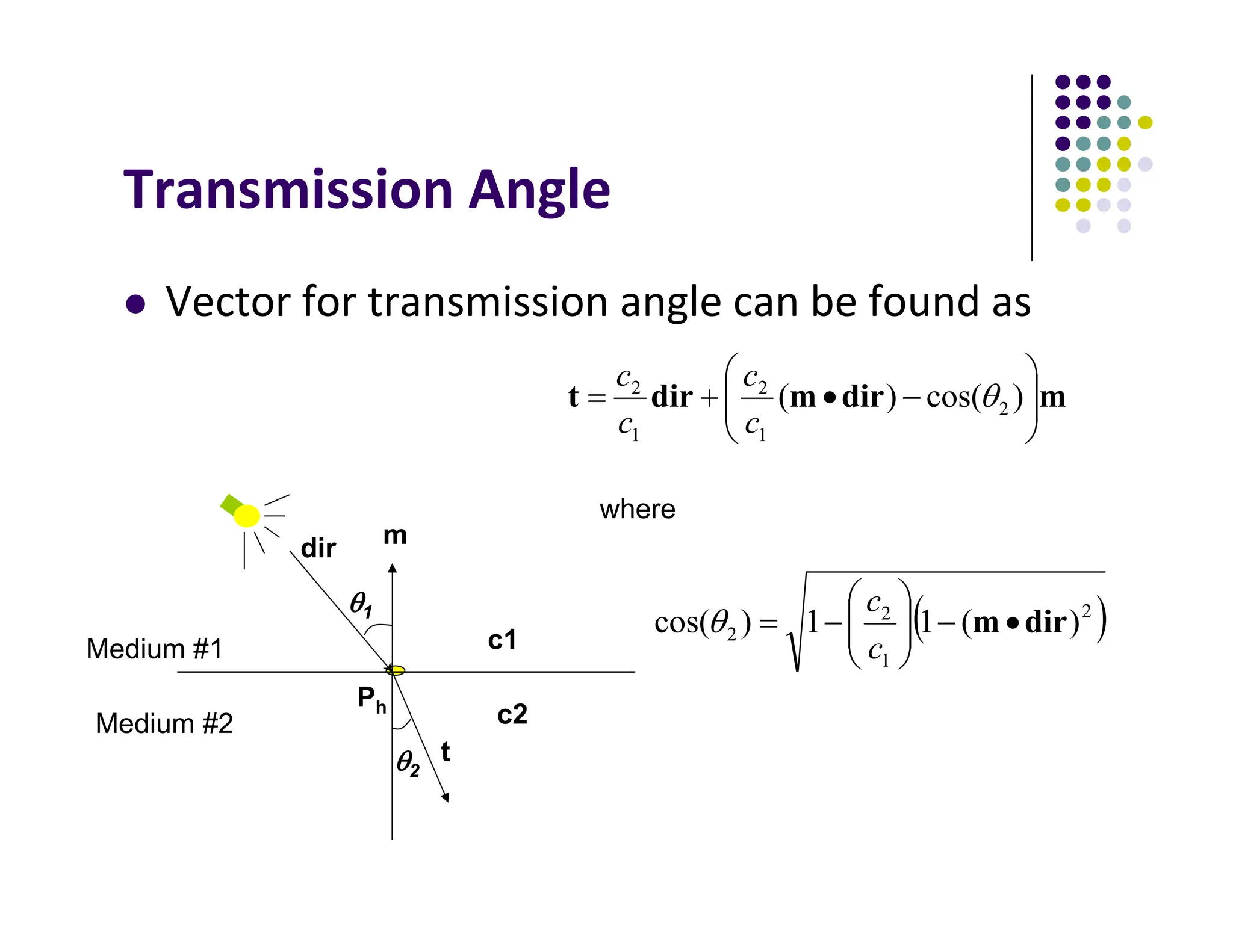
Transmission Angle
 Vector for transmission angle can be found as
Ph
m
t
m
dir
m
dir
t 










 )
cos(
)
( 2
1
2
1
2

c
c
c
c
Medium #1
Medium #2
2
1
where
dir
c2
c1
 
2
1
2
2 )
(
1
1
)
cos( dir
m 











c
c

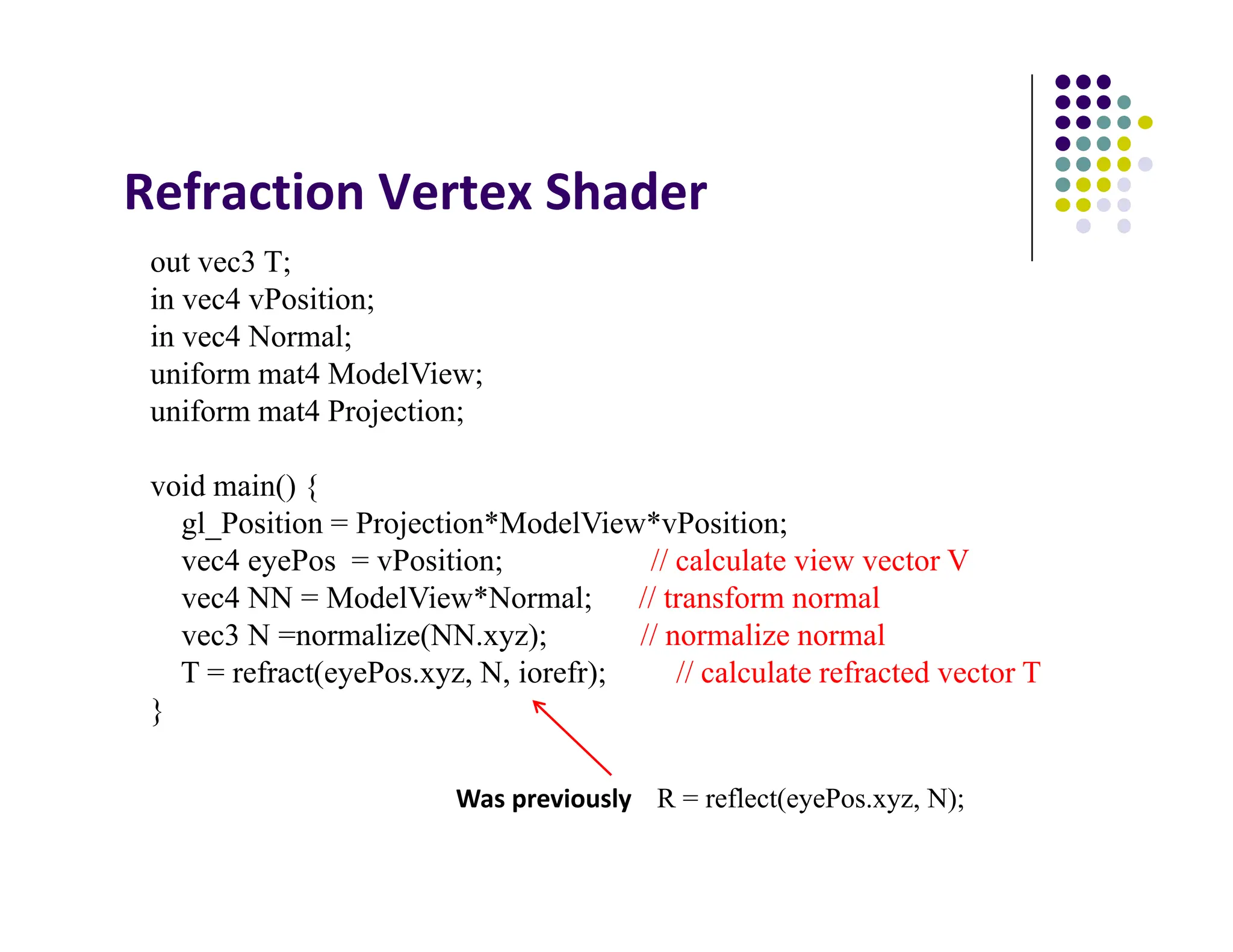
Refraction Vertex Shader
out vec3 T;
in vec4 vPosition;
in vec4 Normal;
uniform mat4 ModelView;
uniform mat4 Projection;
void main() {
gl_Position = Projection*ModelView*vPosition;
vec4 eyePos = vPosition; // calculate view vector V
vec4 NN = ModelView*Normal; // transform normal
vec3 N =normalize(NN.xyz); // normalize normal
T = refract(eyePos.xyz, N, iorefr); // calculate refracted vector T
}
Was previously R = reflect(eyePos.xyz, N);
Refraction Fragment Shader
in vec3 T;
uniform samplerCube RefMap;
void main()
{
vec4 refractColor = textureCube(RefMap, T); // look up texture map using T
refractcolor = mix(refractcolor, WHITE, 0.3); // mix pure color with 0.3 white
gl_FragColor = texColor;
}
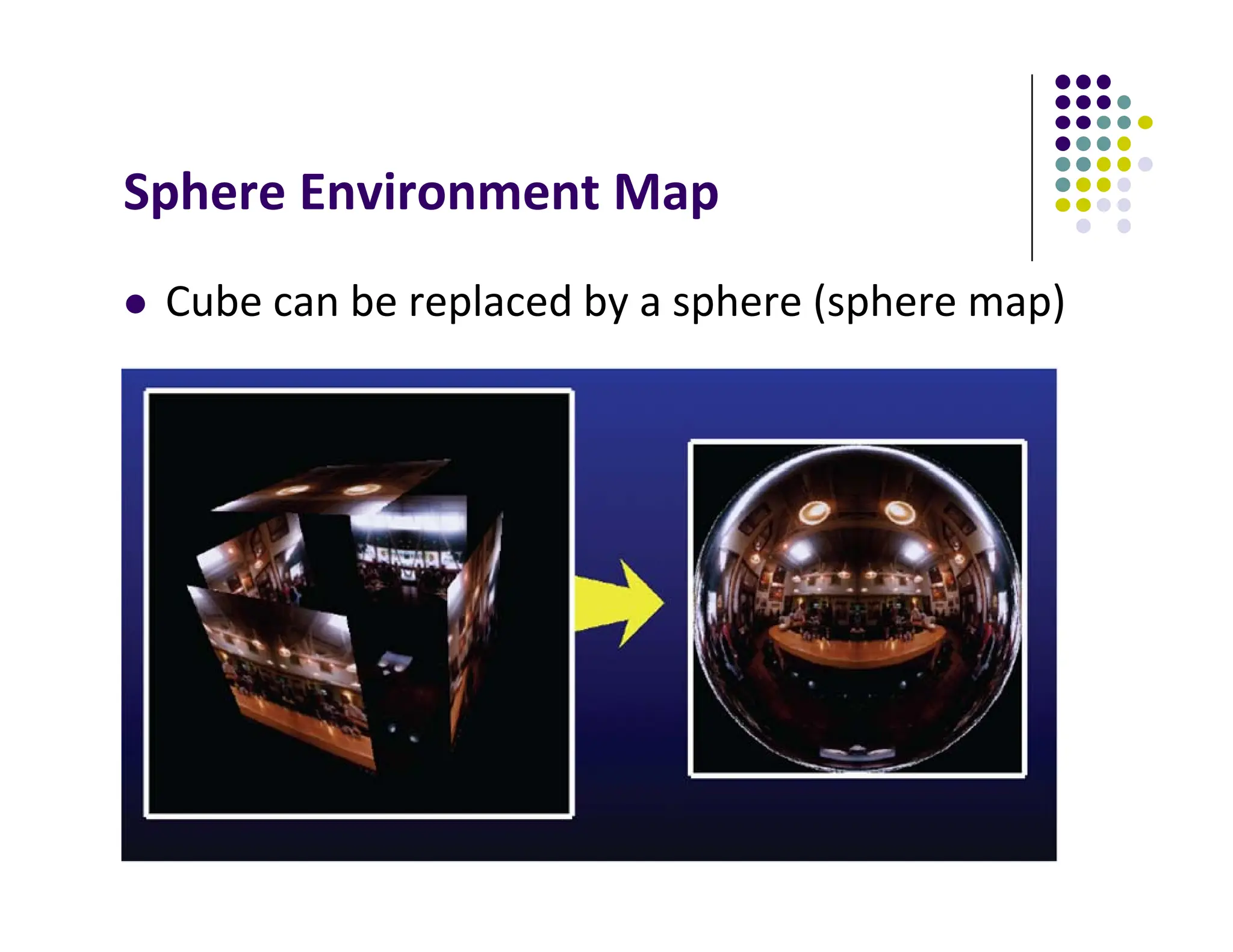
Sphere Environment Map
 Cube can be replaced by a sphere (sphere map)
Sphere Mapping
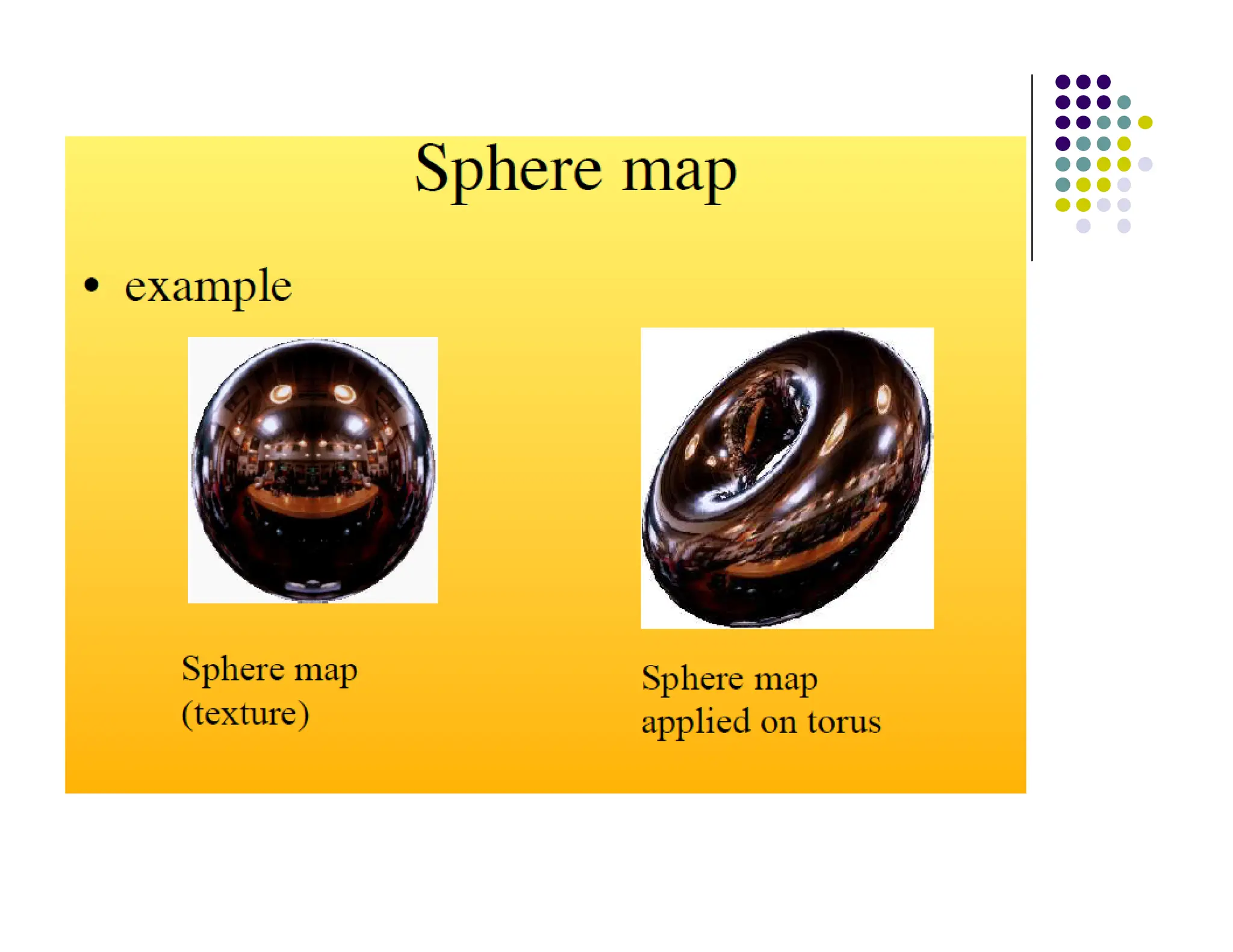
 Original environmental mapping technique
 Proposed by Blinn and Newell
 Uses lines of longitude and latitude to map
parametric variables to texture coordinates
 OpenGL supports sphere mapping
 Requires a circular texture map equivalent to an
image taken with a fisheye lens
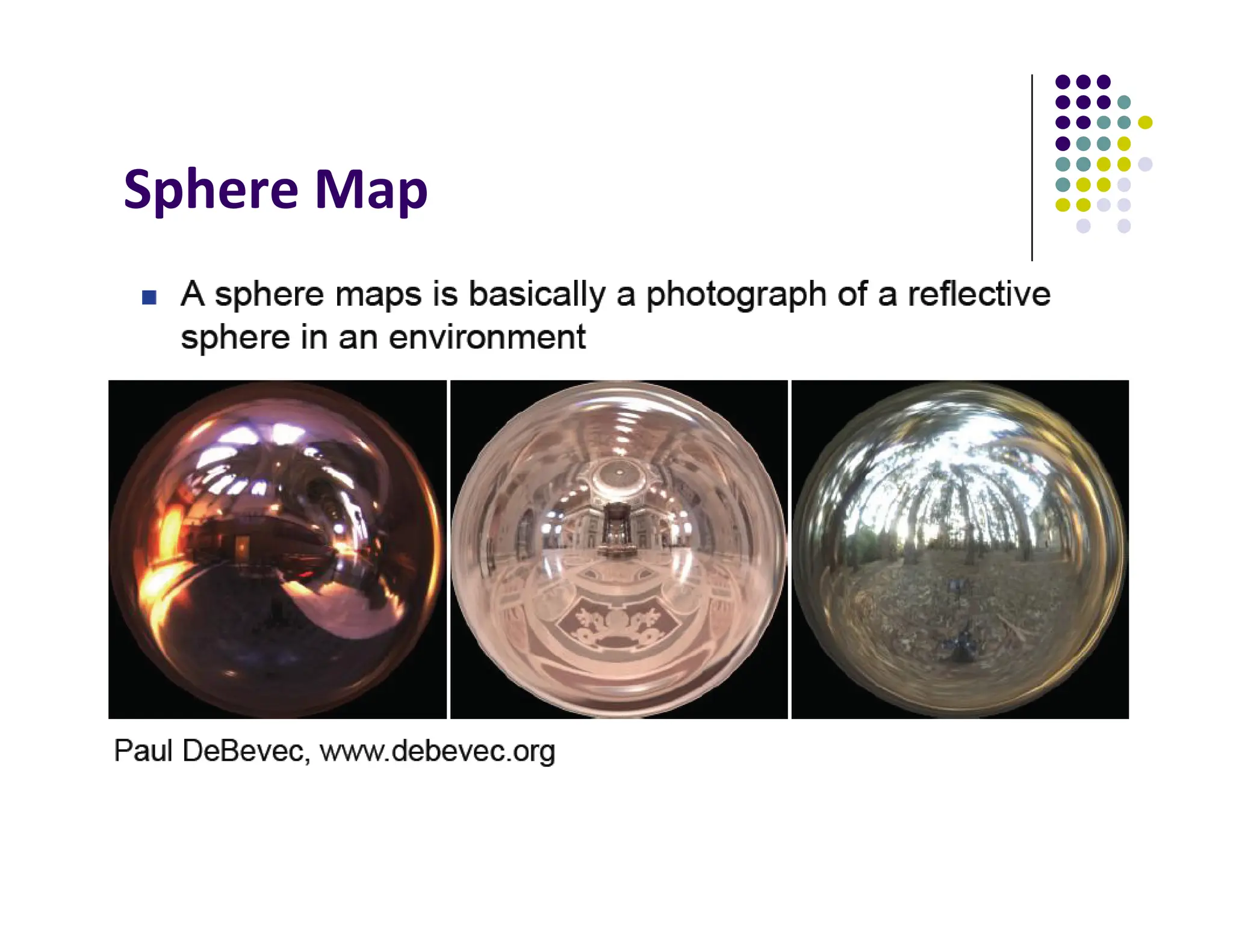
Sphere Map
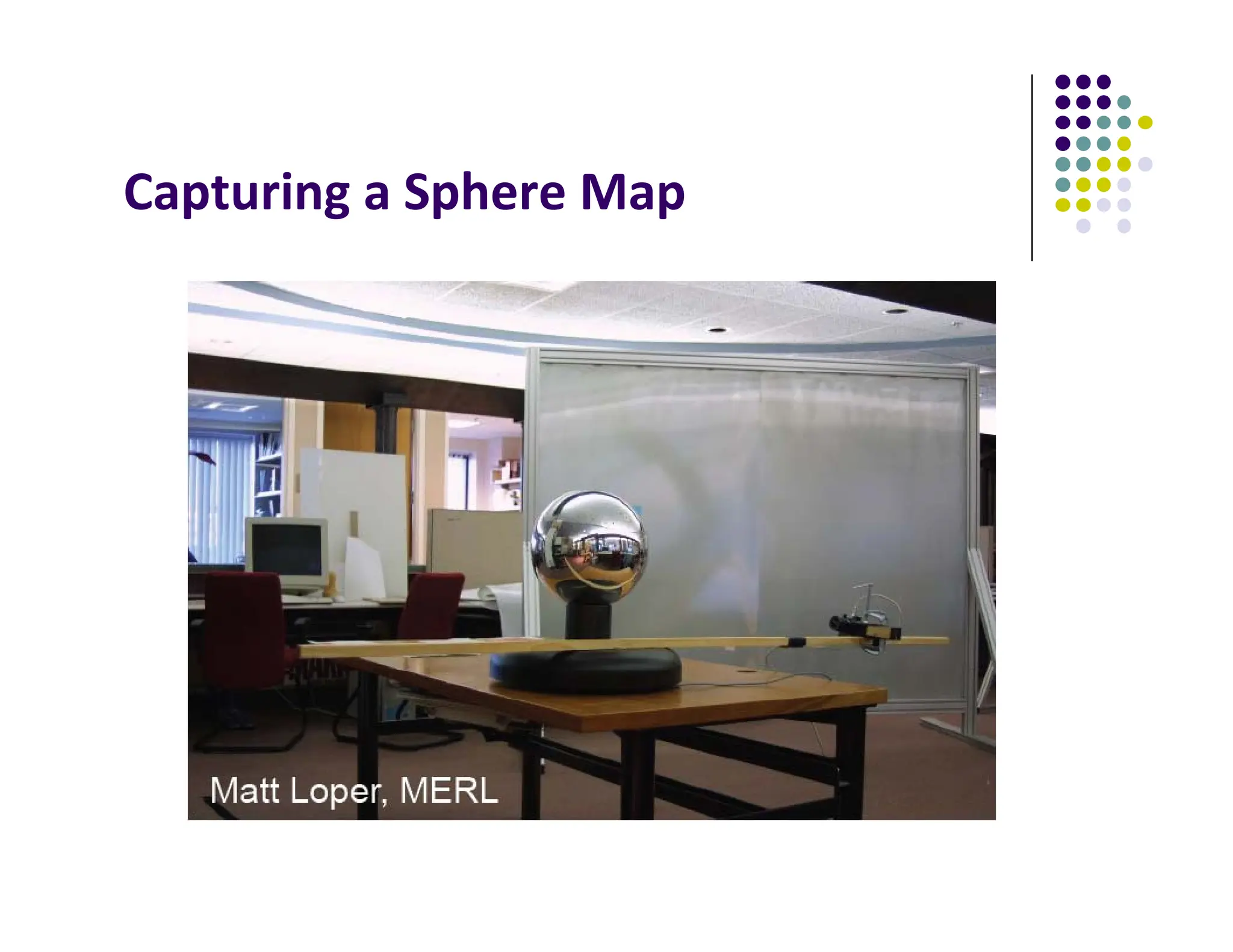
Capturing a Sphere Map
For derivation of sphere map, see section 7.8 of your text
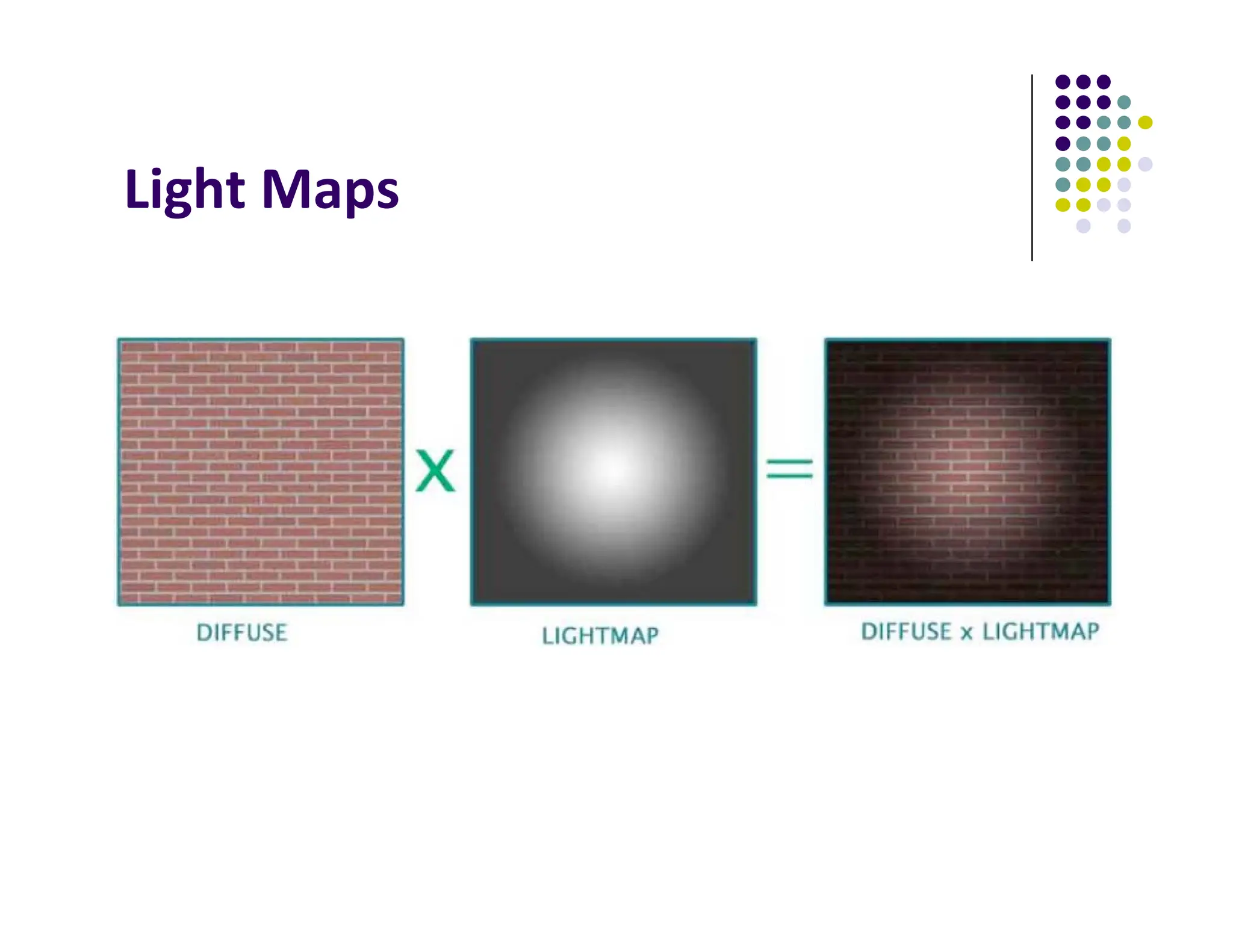
Light Maps
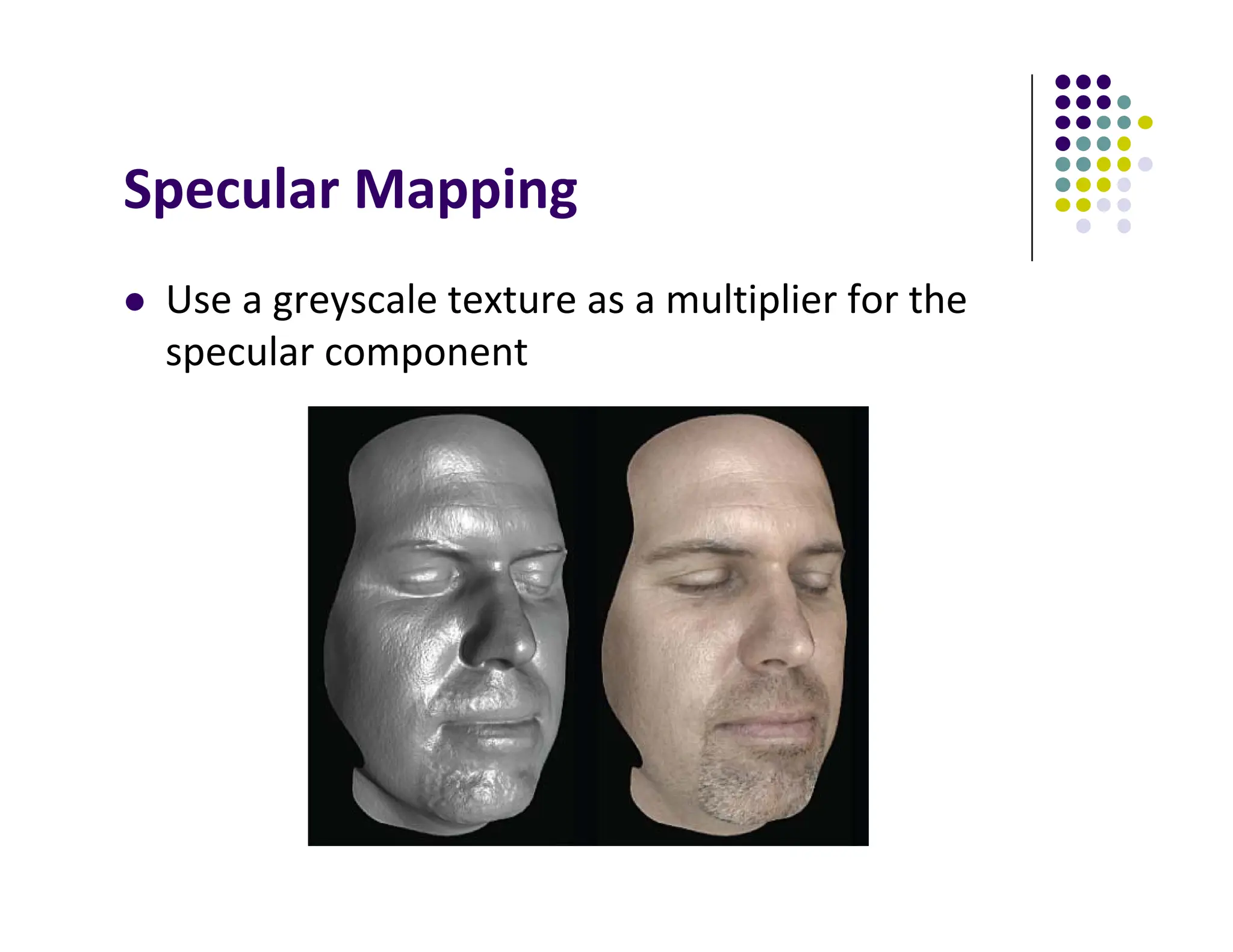
Specular Mapping
 Use a greyscale texture as a multiplier for the
specular component
Irradiance Mapping
 You can reuse environment maps for diffuse reflections
 Integrate the map over a hemisphere at each pixel
(basically blurs the whole thing out)
Irradiance Mapping Example
3D Textures
 3D volumetric textures exist as well, though you can
only render slices of them in OpenGL
 Generate a full image by stacking up slices in Z
 Used in visualization
Procedural Texturing
 Math functions that generate textures
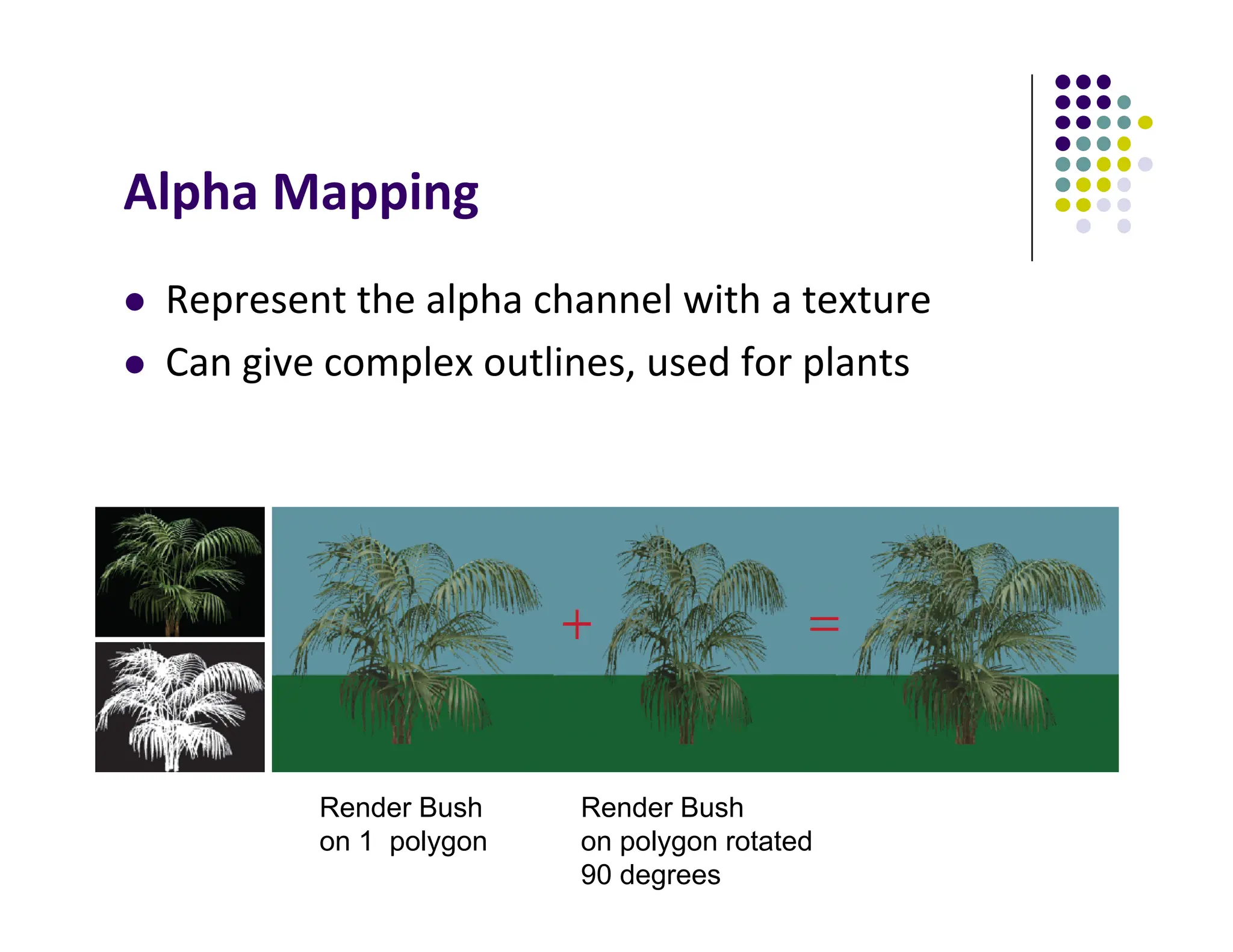
Alpha Mapping
 Represent the alpha channel with a texture
 Can give complex outlines, used for plants
Render Bush
on 1 polygon
Render Bush
on polygon rotated
90 degrees
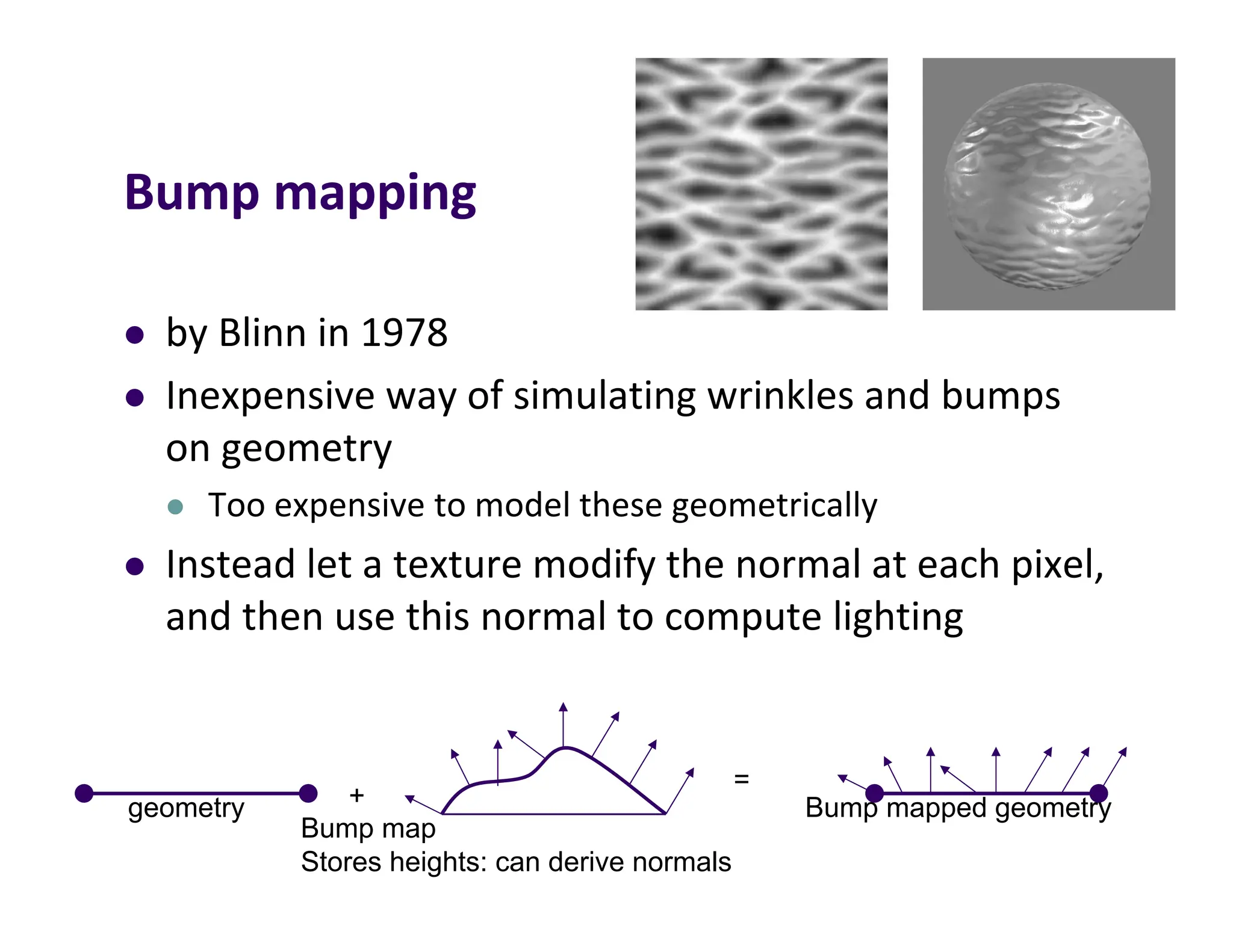
Bump mapping
 by Blinn in 1978
 Inexpensive way of simulating wrinkles and bumps
on geometry
 Too expensive to model these geometrically
 Instead let a texture modify the normal at each pixel,
and then use this normal to compute lighting
geometry
Bump map
Stores heights: can derive normals
+ Bump mapped geometry
=
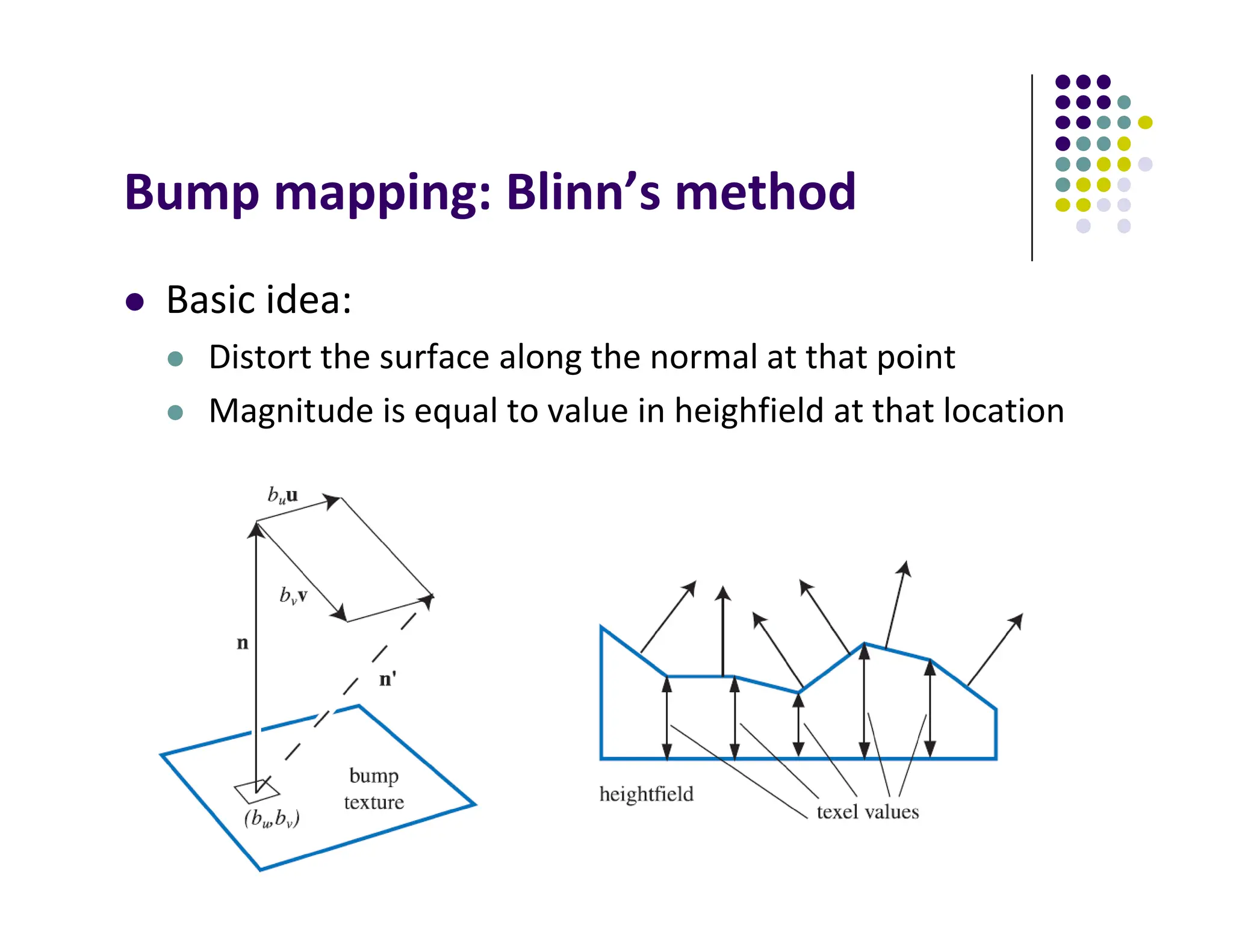
Bump mapping: Blinn’s method
 Basic idea:
 Distort the surface along the normal at that point
 Magnitude is equal to value in heighfield at that location
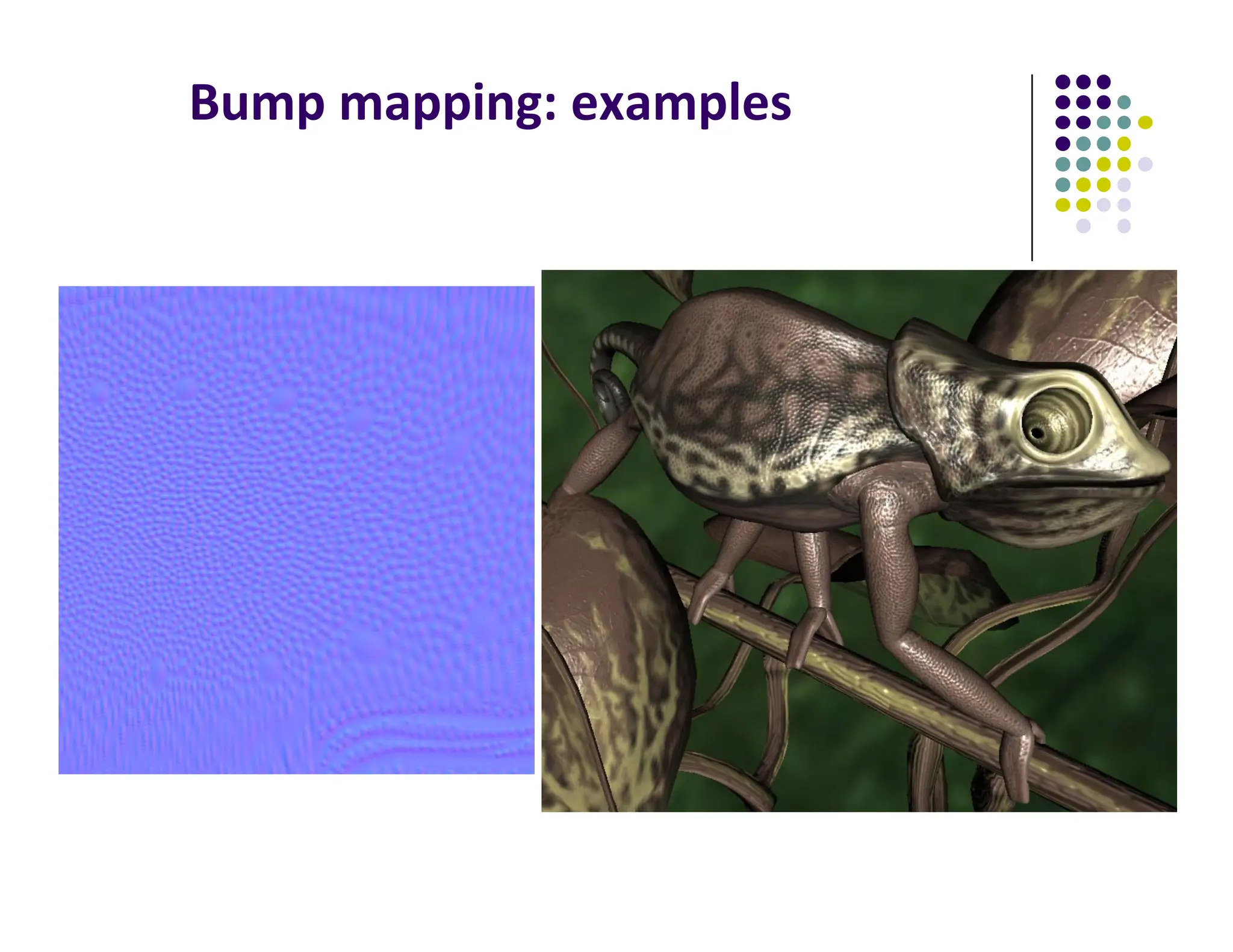
Bump mapping: examples
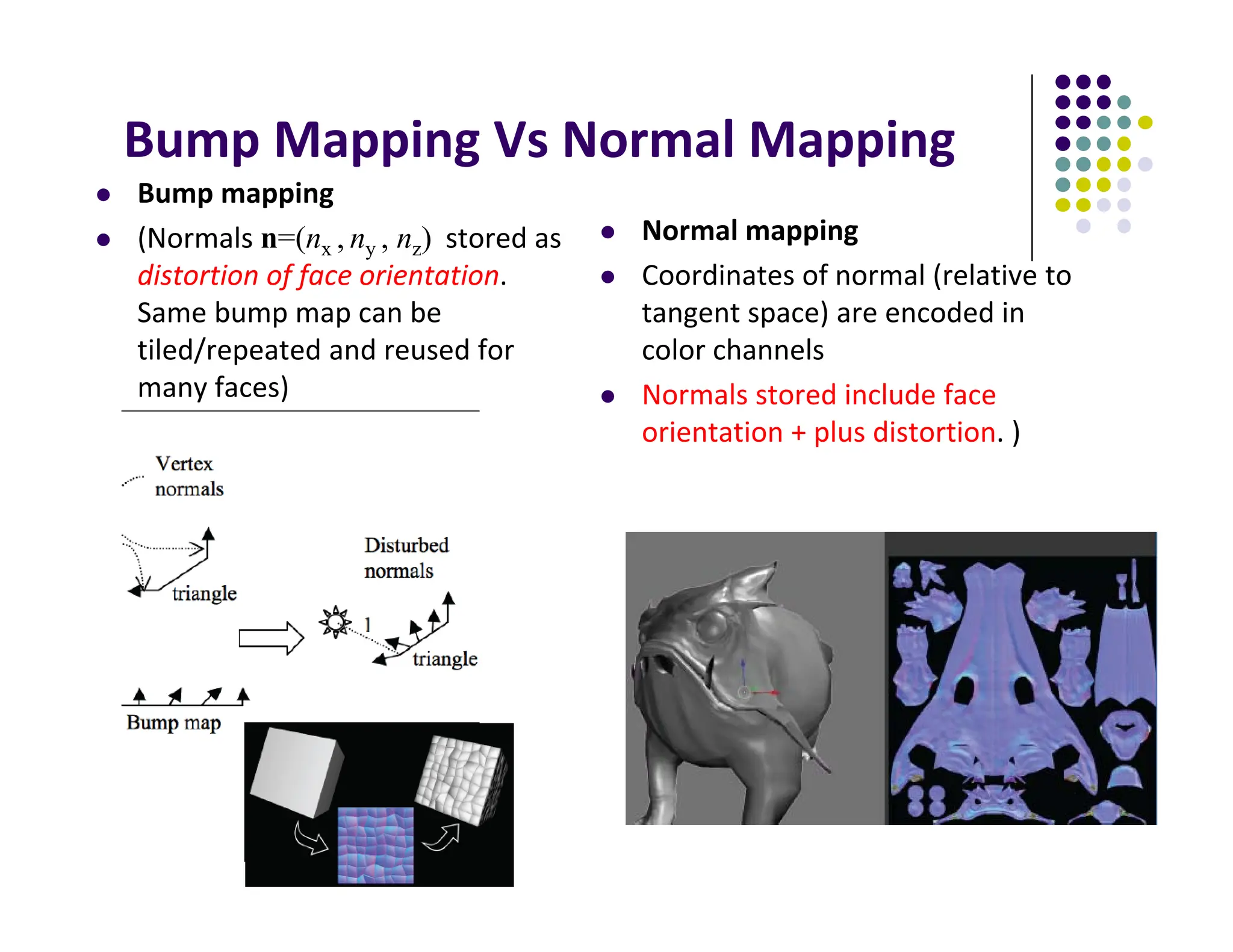
Bump Mapping Vs Normal Mapping
 Bump mapping
 (Normals n=(nx , ny , nz) stored as
distortion of face orientation.
Same bump map can be
tiled/repeated and reused for
many faces)
 Normal mapping
 Coordinates of normal (relative to
tangent space) are encoded in
color channels
 Normals stored include face
orientation + plus distortion. )
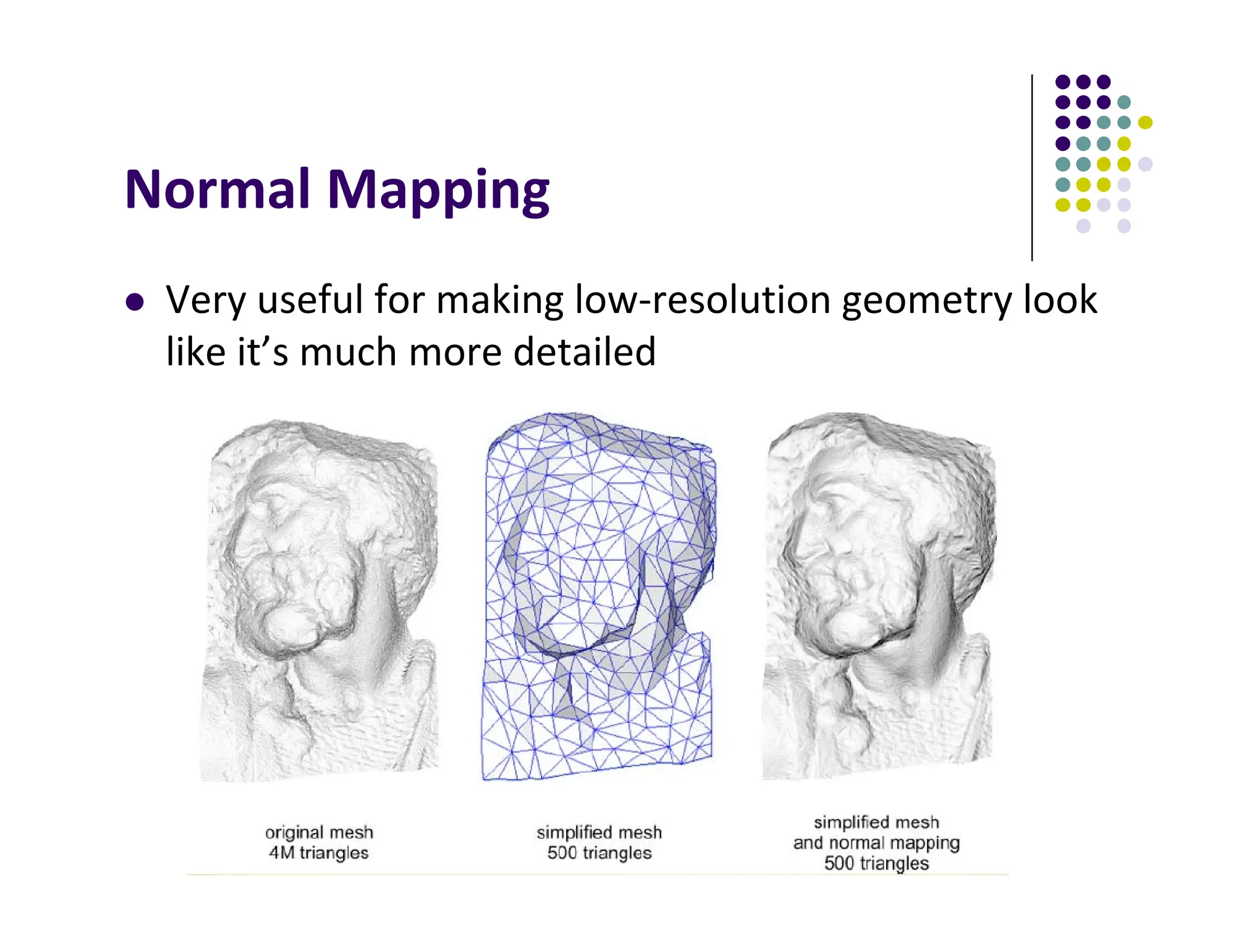
Normal Mapping
 Very useful for making low‐resolution geometry look
like it’s much more detailed
Tangent Space Vectors
 Normals stored in local coordinate frame
 Need Tangent, normal and bi‐tangent vectors
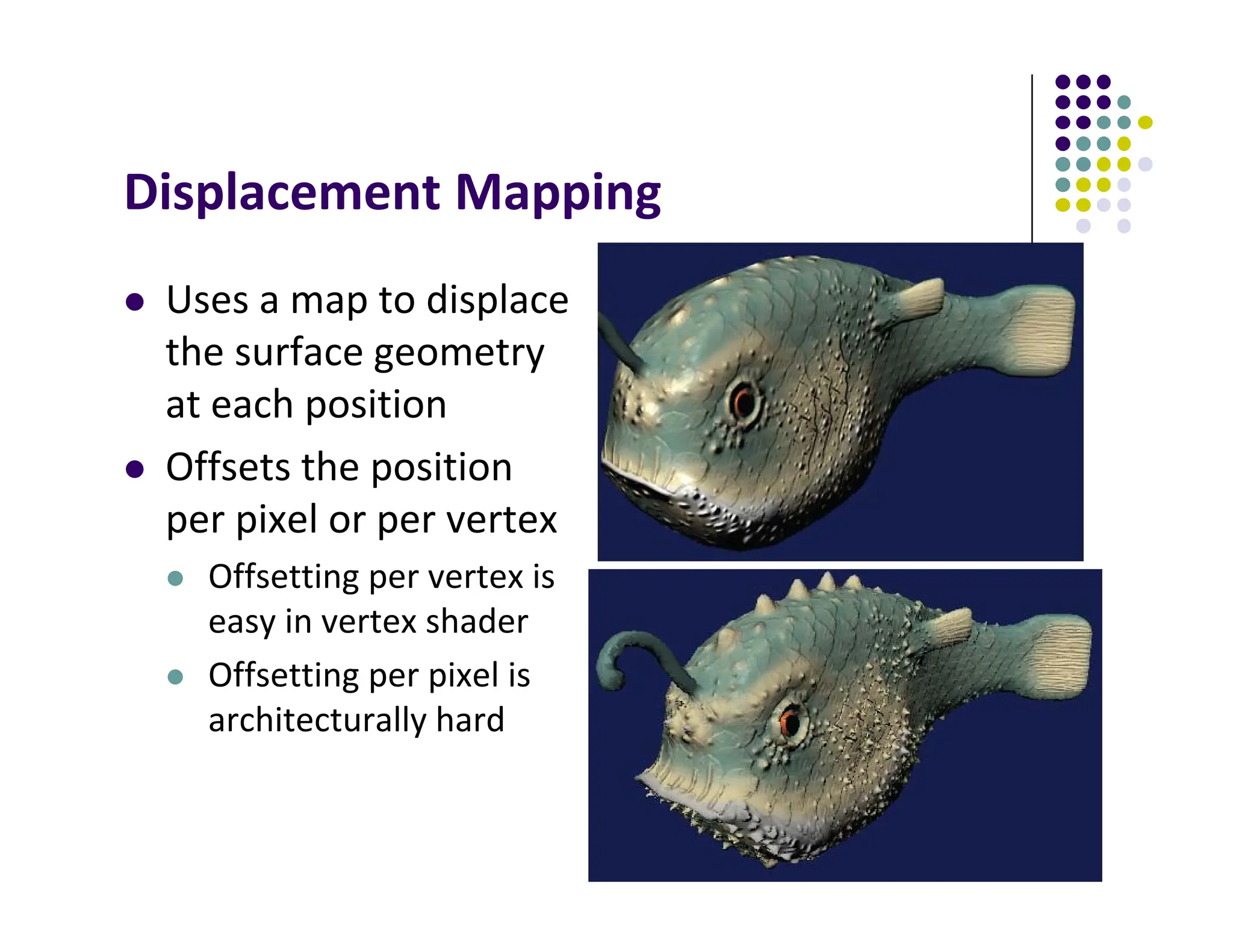
Displacement Mapping
 Uses a map to displace
the surface geometry
at each position
 Offsets the position
per pixel or per vertex
 Offsetting per vertex is
easy in vertex shader
 Offsetting per pixel is
architecturally hard
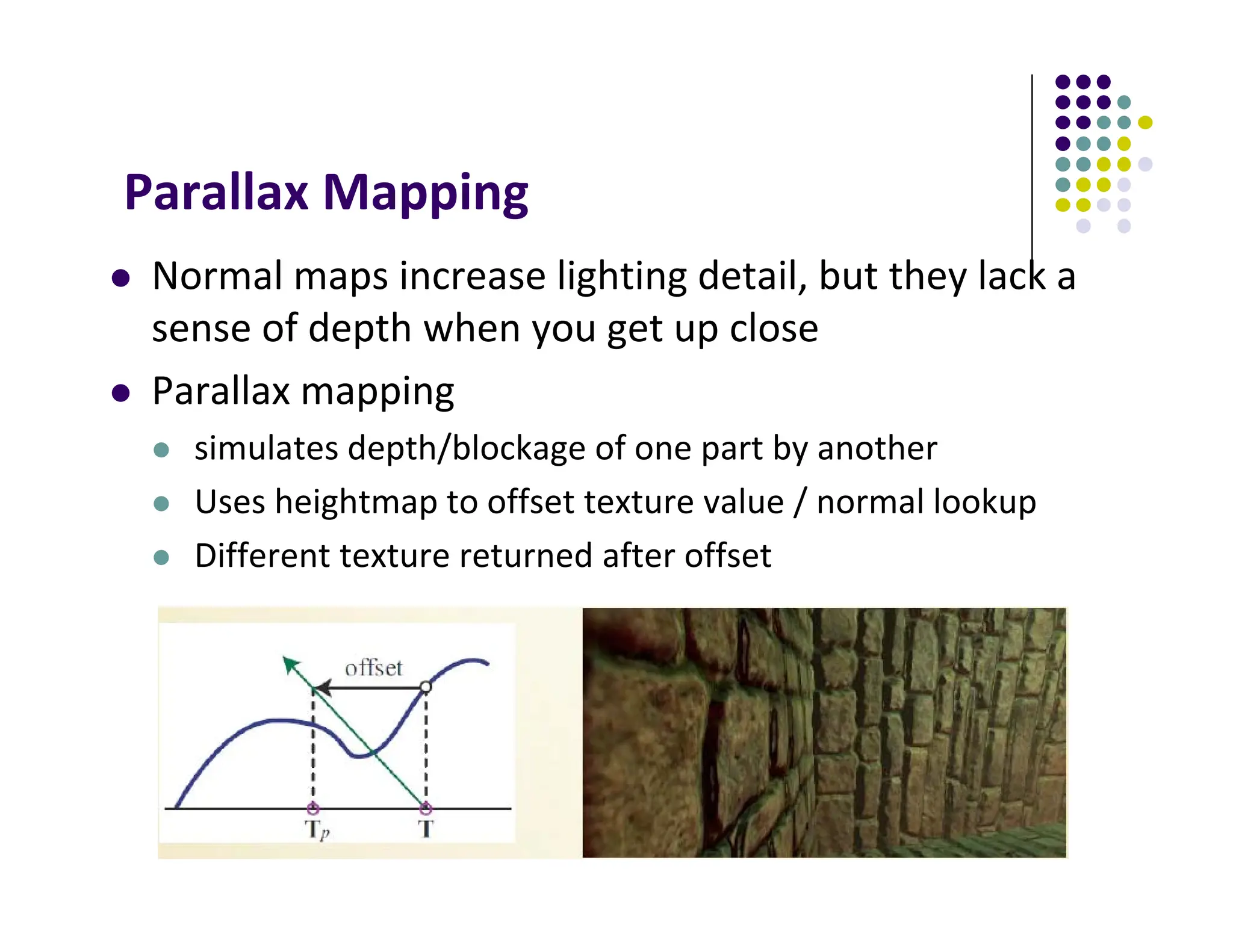
Parallax Mapping
 Normal maps increase lighting detail, but they lack a
sense of depth when you get up close
 Parallax mapping
 simulates depth/blockage of one part by another
 Uses heightmap to offset texture value / normal lookup
 Different texture returned after offset
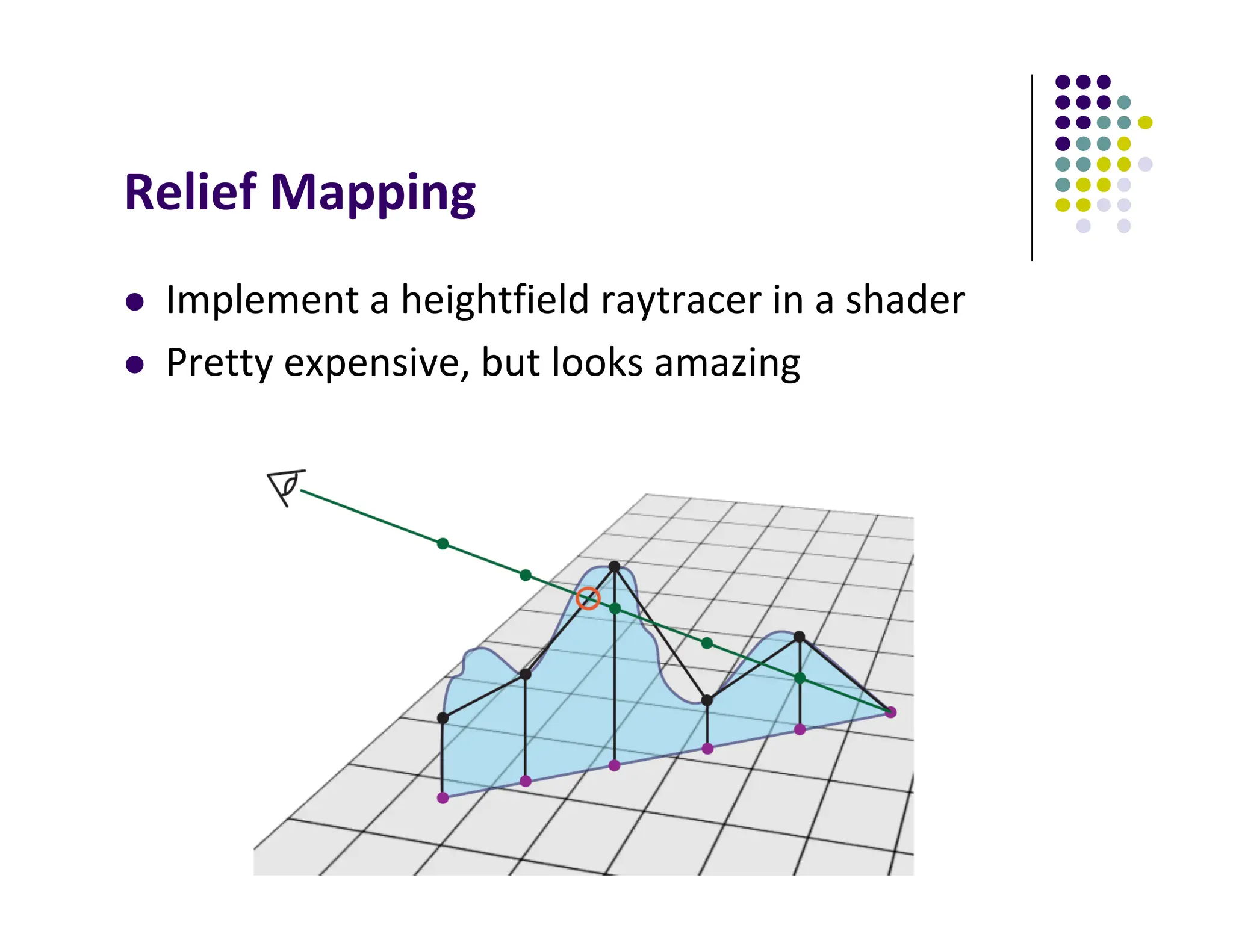
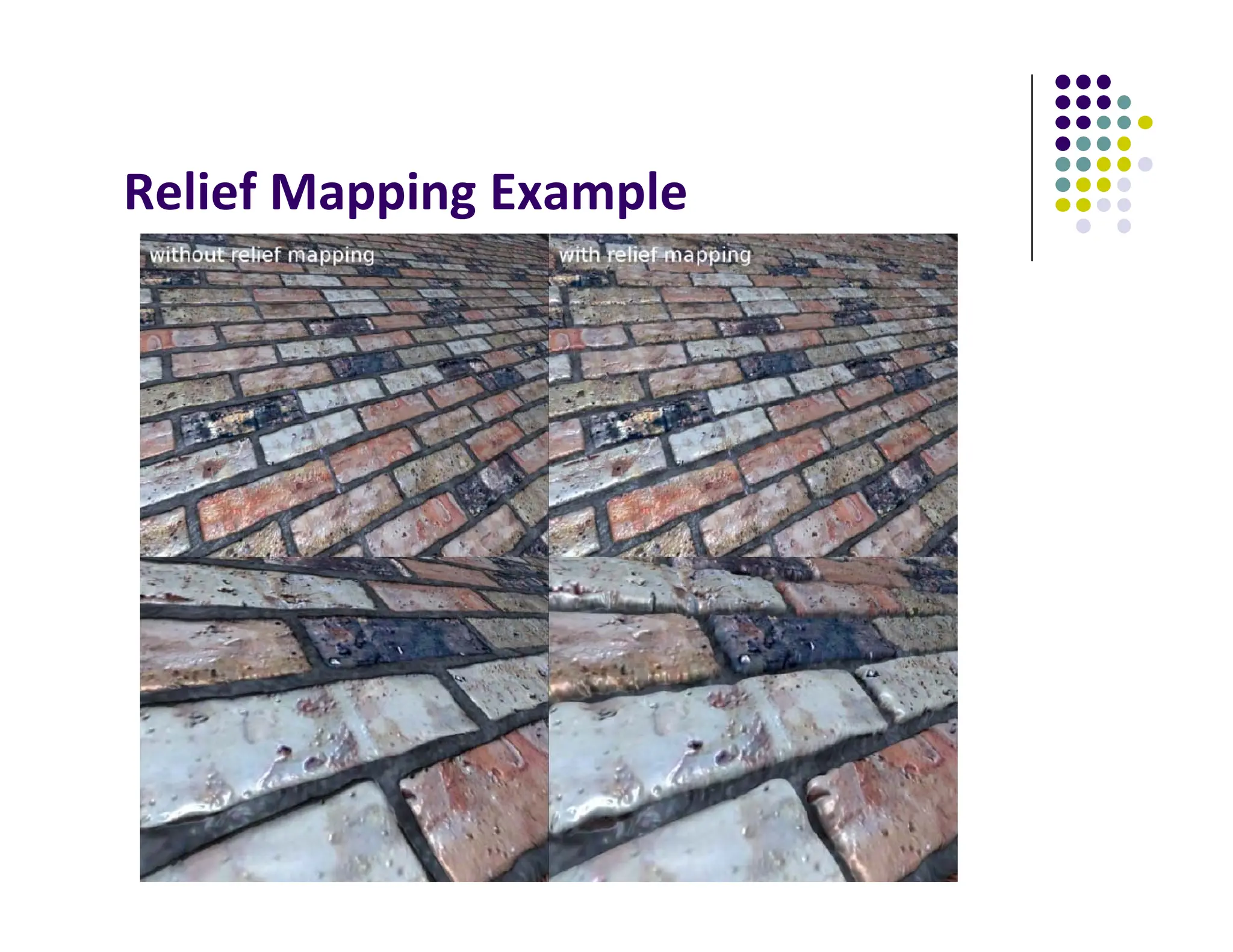
Relief Mapping
 Implement a heightfield raytracer in a shader
 Pretty expensive, but looks amazing
Relief Mapping Example
References
 Angel and Shreiner, Interactive Computer Graphics, 6th edition
 Hill and Kelley, Computer Graphics using OpenGL, 3rd edition
 UIUC CS 319, Advanced Computer Graphics Course
 David Luebke, CS 446, U. of Virginia, slides
 Chapter 1‐6 of RT Rendering
 Hanspeter Pfister, CS 175 Introduction to Computer Graphics,
Harvard Extension School, Fall 2010 slides
 Christian Miller, CS 354, Computer Graphics, U. of Texas, Austin
slides, Fall 2011
 Ulf Assarsson, TDA361/DIT220 ‐ Computer graphics 2011,
Chalmers Instititute of Tech, Sweden

reflective bump environment mappings.pdf

  • 1.
    Computer Graphics (CS543) Lecture 9 (Part 1): Environment Mapping (Reflections and Refractions) Prof Emmanuel Agu (Adapted from slides by Ed Angel) Computer Science Dept. Worcester Polytechnic Institute (WPI)
  • 2.
    Environment Mapping  Usedto create appearance of reflective and refractive surfaces without ray tracing which requires global calculations
  • 4.
     Assumes environmentinfinitely far away  Options: Store “object’s environment as  OpenGL supports cube maps and sphere maps Types of Environment Maps V N R b) Cube around object (cube map) a) Sphere around object (sphere map)
  • 5.
    Cube Map  Stores“environment” around objects as 6 sides of a cube (1 texture)
  • 6.
    6 Forming Cube Map Use 6 cameras directions from scene center  each with a 90 degree angle of view
  • 7.
    x y z Reflection Mapping  Needto compute reflection vector, r  Use r by for lookup  OpenGL hardware supports cube maps, makes lookup easier n eye r
  • 8.
    8 Indexing into CubeMap V R •Compute R = 2(N∙V)N‐V •Object at origin •Use largest magnitude component of R to determine face of cube •Other 2 components give texture coordinates
  • 10.
    Example  R =(‐4, 3, ‐1)  Same as R = (‐1, 0.75, ‐0.25)  Use face x = ‐1 and y = 0.75, z = ‐0.25  Not quite right since cube defined by x, y, z = ± 1 rather than [0, 1] range needed for texture coordinates  Remap by s = ½ + ½ y, t = ½ + ½ z  Hence, s =0.875, t = 0.375
  • 11.
    Declaring Cube Mapsin OpenGL glTextureMap2D(GL_TEXTURE_CUBE_MAP_POSITIVE_X, level, rows, columns, border, GL_RGBA, GL_UNSIGNED_BYTE, image1)  Repeat similar for other 5 images (sides)  Make 1 texture object from 6 images  Parameters apply to all six images. E.g glTexParameteri( GL_TEXTURE_CUBE_MAP, GL_TEXTURE_MAP_WRAP_S, GL_REPEAT)  Note: texture coordinates are in 3D space (s, t, r)
  • 12.
    Cube Map Example(init) // colors for sides of cube GLubyte red[3] = {255, 0, 0}; GLubyte green[3] = {0, 255, 0}; GLubyte blue[3] = {0, 0, 255}; GLubyte cyan[3] = {0, 255, 255}; GLubyte magenta[3] = {255, 0, 255}; GLubyte yellow[3] = {255, 255, 0}; glEnable(GL_TEXTURE_CUBE_MAP); // Create texture object glGenTextures(1, tex); glActiveTexture(GL_TEXTURE1); glBindTexture(GL_TEXTURE_CUBE_MAP, tex[0]); You can also just load 6 pictures of environment
  • 13.
    Cube Map (initII) glTexImage2D(GL_TEXTURE_CUBE_MAP_POSITIVE_X , 0,3,1,1,0,GL_RGB,GL_UNSIGNED_BYTE, red); glTexImage2D(GL_TEXTURE_CUBE_MAP_NEGATIVE_X , 0,3,1,1,0,GL_RGB,GL_UNSIGNED_BYTE, green); glTexImage2D(GL_TEXTURE_CUBE_MAP_POSITIVE_Y , 0,3,1,1,0,GL_RGB,GL_UNSIGNED_BYTE, blue); glTexImage2D(GL_TEXTURE_CUBE_MAP_NEGATIVE_Y , 0,3,1,1,0,GL_RGB,GL_UNSIGNED_BYTE, cyan); glTexImage2D(GL_TEXTURE_CUBE_MAP_POSITIVE_Z , 0,3,1,1,0,GL_RGB,GL_UNSIGNED_BYTE, magenta); glTexImage2D(GL_TEXTURE_CUBE_MAP_NEGATIVE_Z , 0,3,1,1,0,GL_RGB,GL_UNSIGNED_BYTE, yellow); glTexParameteri(GL_TEXTURE_CUBE_MAP, GL_TEXTURE_MAG_FILTER,GL_NEAREST); You can also just use 6 pictures of environment
  • 14.
    Cube Map (initIII) GLuint texMapLocation; GLuint tex[1]; texMapLocation = glGetUniformLocation(program, "texMap"); glUniform1i(texMapLocation, tex[0]); Connect texture map (tex[0]) to variable texMap in fragment shader (texture mapping done in frag shader)
  • 15.
    Adding Normals void quad(inta, int b, int c, int d) { static int i =0; normal = normalize(cross(vertices[b] - vertices[a], vertices[c] - vertices[b])); normals[i] = normal; points[i] = vertices[a]; i++; // rest of data
  • 16.
    Vertex Shader 16 out vec3R; in vec4 vPosition; in vec4 Normal; uniform mat4 ModelView; uniform mat4 Projection; void main() { gl_Position = Projection*ModelView*vPosition; vec4 eyePos = vPosition; // calculate view vector V vec4 NN = ModelView*Normal; // transform normal vec3 N =normalize(NN.xyz); // normalize normal R = reflect(eyePos.xyz, N); // calculate reflection vector R }
  • 17.
    Fragment Shader in vec3R; uniform samplerCube texMap; void main() { vec4 texColor = textureCube(texMap, R); // look up texture map using R gl_FragColor = texColor; }
  • 18.
    Refraction using CubeMap  Can also use cube map for refraction (transparent) Reflection Refraction
  • 19.
  • 20.
    Reflection and Refraction At each vertex  Refracted component IT is along transmitted direction t tran refl spec diff amb I I I I I I      Ph v r m s dir t IR IT I
  • 21.
    Finding Transmitted (Refracted) Direction Transmitted direction obeys Snell’s law  Snell’s law: relationship holds in diagram below Ph m t 1 1 2 2 ) sin( ) sin( c c    faster slower 2 1 c1, c2 are speeds of light in medium 1 and 2
  • 22.
    Finding Transmitted Direction If ray goes from faster to slower medium, ray is bent towards normal  If ray goes from slower to faster medium, ray is bent away from normal  c1/c2 is important. Usually measured for medium‐to‐ vacuum. E.g water to vacuum  Some measured relative c1/c2 are:  Air: 99.97%  Glass: 52.2% to 59%  Water: 75.19%  Sapphire: 56.50%  Diamond: 41.33%
  • 23.
    Transmission Angle  Vectorfor transmission angle can be found as Ph m t m dir m dir t             ) cos( ) ( 2 1 2 1 2  c c c c Medium #1 Medium #2 2 1 where dir c2 c1   2 1 2 2 ) ( 1 1 ) cos( dir m             c c 
  • 24.
    Refraction Vertex Shader outvec3 T; in vec4 vPosition; in vec4 Normal; uniform mat4 ModelView; uniform mat4 Projection; void main() { gl_Position = Projection*ModelView*vPosition; vec4 eyePos = vPosition; // calculate view vector V vec4 NN = ModelView*Normal; // transform normal vec3 N =normalize(NN.xyz); // normalize normal T = refract(eyePos.xyz, N, iorefr); // calculate refracted vector T } Was previously R = reflect(eyePos.xyz, N);
  • 25.
    Refraction Fragment Shader invec3 T; uniform samplerCube RefMap; void main() { vec4 refractColor = textureCube(RefMap, T); // look up texture map using T refractcolor = mix(refractcolor, WHITE, 0.3); // mix pure color with 0.3 white gl_FragColor = texColor; }
  • 26.
    Sphere Environment Map Cube can be replaced by a sphere (sphere map)
  • 27.
    Sphere Mapping  Originalenvironmental mapping technique  Proposed by Blinn and Newell  Uses lines of longitude and latitude to map parametric variables to texture coordinates  OpenGL supports sphere mapping  Requires a circular texture map equivalent to an image taken with a fisheye lens
  • 28.
  • 30.
  • 31.
    For derivation ofsphere map, see section 7.8 of your text
  • 32.
  • 33.
    Specular Mapping  Usea greyscale texture as a multiplier for the specular component
  • 34.
    Irradiance Mapping  Youcan reuse environment maps for diffuse reflections  Integrate the map over a hemisphere at each pixel (basically blurs the whole thing out)
  • 35.
  • 36.
    3D Textures  3Dvolumetric textures exist as well, though you can only render slices of them in OpenGL  Generate a full image by stacking up slices in Z  Used in visualization
  • 37.
    Procedural Texturing  Mathfunctions that generate textures
  • 38.
    Alpha Mapping  Representthe alpha channel with a texture  Can give complex outlines, used for plants Render Bush on 1 polygon Render Bush on polygon rotated 90 degrees
  • 39.
    Bump mapping  byBlinn in 1978  Inexpensive way of simulating wrinkles and bumps on geometry  Too expensive to model these geometrically  Instead let a texture modify the normal at each pixel, and then use this normal to compute lighting geometry Bump map Stores heights: can derive normals + Bump mapped geometry =
  • 40.
    Bump mapping: Blinn’smethod  Basic idea:  Distort the surface along the normal at that point  Magnitude is equal to value in heighfield at that location
  • 41.
  • 42.
    Bump Mapping VsNormal Mapping  Bump mapping  (Normals n=(nx , ny , nz) stored as distortion of face orientation. Same bump map can be tiled/repeated and reused for many faces)  Normal mapping  Coordinates of normal (relative to tangent space) are encoded in color channels  Normals stored include face orientation + plus distortion. )
  • 43.
    Normal Mapping  Veryuseful for making low‐resolution geometry look like it’s much more detailed
  • 44.
    Tangent Space Vectors Normals stored in local coordinate frame  Need Tangent, normal and bi‐tangent vectors
  • 45.
    Displacement Mapping  Usesa map to displace the surface geometry at each position  Offsets the position per pixel or per vertex  Offsetting per vertex is easy in vertex shader  Offsetting per pixel is architecturally hard
  • 46.
    Parallax Mapping  Normalmaps increase lighting detail, but they lack a sense of depth when you get up close  Parallax mapping  simulates depth/blockage of one part by another  Uses heightmap to offset texture value / normal lookup  Different texture returned after offset
  • 47.
    Relief Mapping  Implementa heightfield raytracer in a shader  Pretty expensive, but looks amazing
  • 48.
  • 49.
    References  Angel andShreiner, Interactive Computer Graphics, 6th edition  Hill and Kelley, Computer Graphics using OpenGL, 3rd edition  UIUC CS 319, Advanced Computer Graphics Course  David Luebke, CS 446, U. of Virginia, slides  Chapter 1‐6 of RT Rendering  Hanspeter Pfister, CS 175 Introduction to Computer Graphics, Harvard Extension School, Fall 2010 slides  Christian Miller, CS 354, Computer Graphics, U. of Texas, Austin slides, Fall 2011  Ulf Assarsson, TDA361/DIT220 ‐ Computer graphics 2011, Chalmers Instititute of Tech, Sweden