Storage Devices
Introduction A  storage device  is a  hardware  device capable of storing information. There are two storage devices used in computers; a  primary storage  device such as computer  RAM  and a  secondary storage  device such as a computer  hard disk drive .
Parts of a Computer Monitor System Unit Keyboard Mouse
System Unit Central Processing Unit Holds the central processor It is the brain of the computer Processes data and instructions Consists of :- Hard Disk RAM ROM CD-ROM drive Floppy Disk drive
Storage Devices RAM ROM Thumb Drive CD-ROM DVD-ROM Hard Disc Floppy Disc
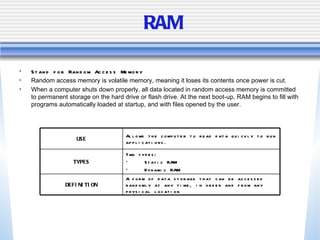
RAM Stand for Random Access Memory Random access memory is volatile memory, meaning it loses its contents once power is cut.  When a computer shuts down properly, all data located in random access memory is committed to permanent storage on the hard drive or flash drive. At the next boot-up, RAM begins to fill with programs automatically loaded at startup, and with files opened by the user.  A form of data storage that can be accessed randomly at any time, in order and from any physical location DEFINITION Two types: Static RAM Dynamic RAM TYPES Allows the computer to read data quickly to run applications. USE
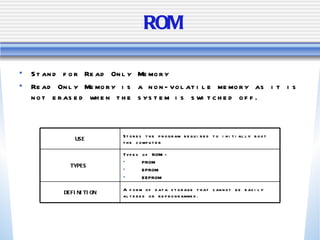
ROM Stand for Read Only Memory Read Only Memory is a non-volatile memory as it is not erased when the system is switched off. A form of data storage that cannot be easily altered or reprogrammed. DEFINITION Types of ROM:- PROM EPROM EEPROM TYPES  Stores the program required to initially boot the computer USE
RAM vs ROM Data is safe when PC is switched off Data is lost when PC is switched off Information inside cannot be changed Data can be changed Stores information permanently Stores information temporarily Read Only Memory Random Access Memory ROM RAM
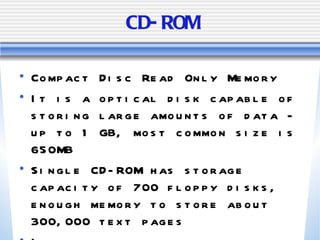
CD-ROM Compact Disc Read Only Memory It is a optical disk capable of storing large amounts of data - up to 1 GB, most common size is 650MB Single CD-ROM has storage capacity of 700 floppy disks, enough memory to store about 300,000 text pages Information stored cannot be changed
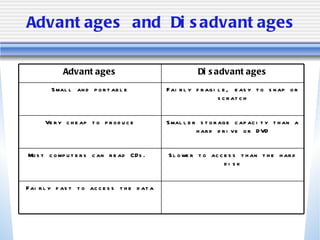
Advantages and Disadvantages Fairly fast to access the data Slower to access than the hard disk Most computers can read CDs.  Smaller storage capacity than a hard drive or DVD Very cheap to produce Fairly fragile, easy to snap or scratch Small and portable Disadvantages Advantages
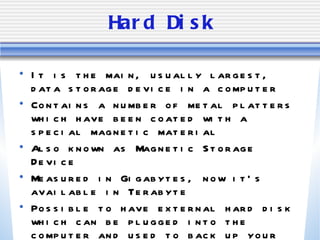
Hard Disk It is the main, usually largest, data storage device in a computer Contains a number of metal platters which have been coated with a special magnetic material Also known as Magnetic Storage Device Measured in Gigabytes, now it’s available in Terabyte Possible to have external hard disk which can be plugged into the computer and used to back up your data
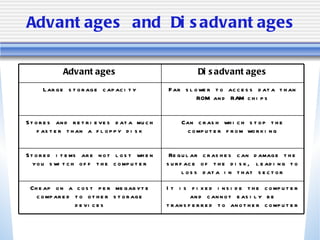
Advantages and Disadvantages It is fixed inside the computer and cannot easily be transferred to another computer Cheap on a cost per megabyte compared to other storage devices Regular crashes can damage the surface of the disk, leading to loss data in that sector Stored items are not lost when you switch off the computer Can crash which stop the computer from working Stores and retrieves data much faster than a floppy disk Far slower to access data than ROM and RAM chips Large storage capacity Disadvantages Advantages
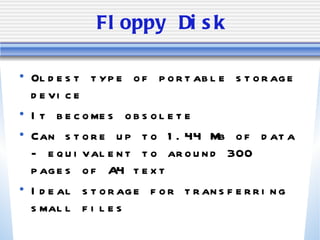
Floppy Disk Oldest type of portable storage device It becomes obsolete Can store up to 1.44 Mb of data - equivalent to around 300 pages of A4 text Ideal storage for transferring small files
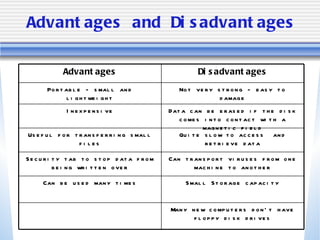
Advantages and Disadvantages Many new computers don’t have floppy disk drives Small Storage capacity Can be used many times Can transport viruses from one machine to another Security tab to stop data from being written over Quite slow to access  and retrieve data Useful for transferring small files Data can be erased if the disk comes into contact with a magnetic field Inexpensive Not very strong - easy to damage Portable - small and lightweight Disadvantages Advantages
Flash Memory Typically Small, lightweight, removable and rewritable Consist of a small printed circuit board which is encased in plastic or metal casing Available from 1 Gb up to 16 Gb
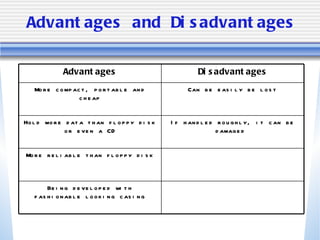
Advantages and Disadvantages Being developed with fashionable looking casing More reliable than floppy disk If handled roughly, it can be damaged  Hold more data than floppy disk or even a CD Can be easily be lost More compact, portable and cheap Disadvantages Advantages
BINARY CODE
Binary Codes A bit is a binary digit. It can only hold one of two values: 0 and 1 Bits are usually assembled into group of eight to form a byte A byte contains enough information to store a single ASCII character
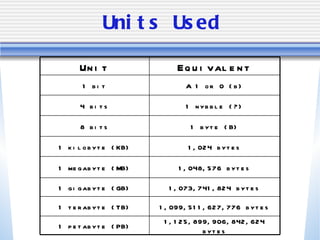
Units Used A 1 or 0 (b) 1 bit 1 nybble (?) 4 bits 1 byte (B) 8 bits 1,125,899,906,842,624 bytes 1 petabyte (PB) 1,099,511,627,776 bytes 1 terabyte (TB) 1,073,741,824 bytes 1 gigabyte (GB) 1,048,576 bytes 1 megabyte (MB) 1,024 bytes 1 kilobyte (KB) Equivalent Unit
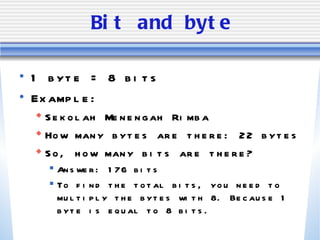
Bit and byte 1 byte = 8 bits  Example: Sekolah Menengah Rimba How many bytes are there: 22 bytes So, how many bits are there? Answer: 176 bits To find the total bits, you need to multiply the bytes with 8. Because 1 byte is equal to 8 bits.
ASCII Stand for American Standard Code for Information Interchange. It’s a 7 bit character code where every single bit represents a unique character. Why 7 bit?  Because the minimum workable size is 1 byte, those 7 bits are the low 7 bits of any byte. The most significant bit is 0.  That means, in any ASCII file, you're wasting 1/8 of the bits. In particular, the most significant bit of each byte is not being used. In the computer program, information is not being stored as characters. It is stored as ASCII codes. ASCII codes are stored as 1’s and 0’s. In fact, ASCII codes are basically binary codes.
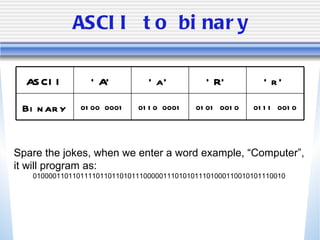
ASCII to binary Spare the jokes, when we enter a word example, “Computer”, it will program as: 0100001101101111011011010111000001110101011101000110010101110010 0111 0010 0101 0010 0110 0001 0100 0001 Binary ‘ r’ ‘ R’ ‘ a’ ‘ A’ ASCII
Now you try!! Find out how many bits and bytes in these sentence:- Respectful, Responsible, Caring, Positive, Collaborative and Integrity is Sekolah Menengah Rimba’s School Values. Answer:  Bytes - 113 bytes,  Bits - 113 * 8 = 904 bits

Storage devices

  • 1.
  • 2.
    Introduction A storage device is a hardware device capable of storing information. There are two storage devices used in computers; a primary storage device such as computer RAM and a secondary storage device such as a computer hard disk drive .
  • 3.
    Parts of aComputer Monitor System Unit Keyboard Mouse
  • 4.
    System Unit CentralProcessing Unit Holds the central processor It is the brain of the computer Processes data and instructions Consists of :- Hard Disk RAM ROM CD-ROM drive Floppy Disk drive
  • 5.
    Storage Devices RAMROM Thumb Drive CD-ROM DVD-ROM Hard Disc Floppy Disc
  • 6.
    RAM Stand forRandom Access Memory Random access memory is volatile memory, meaning it loses its contents once power is cut. When a computer shuts down properly, all data located in random access memory is committed to permanent storage on the hard drive or flash drive. At the next boot-up, RAM begins to fill with programs automatically loaded at startup, and with files opened by the user. A form of data storage that can be accessed randomly at any time, in order and from any physical location DEFINITION Two types: Static RAM Dynamic RAM TYPES Allows the computer to read data quickly to run applications. USE
  • 7.
    ROM Stand forRead Only Memory Read Only Memory is a non-volatile memory as it is not erased when the system is switched off. A form of data storage that cannot be easily altered or reprogrammed. DEFINITION Types of ROM:- PROM EPROM EEPROM TYPES Stores the program required to initially boot the computer USE
  • 8.
    RAM vs ROMData is safe when PC is switched off Data is lost when PC is switched off Information inside cannot be changed Data can be changed Stores information permanently Stores information temporarily Read Only Memory Random Access Memory ROM RAM
  • 9.
    CD-ROM Compact DiscRead Only Memory It is a optical disk capable of storing large amounts of data - up to 1 GB, most common size is 650MB Single CD-ROM has storage capacity of 700 floppy disks, enough memory to store about 300,000 text pages Information stored cannot be changed
  • 10.
    Advantages and DisadvantagesFairly fast to access the data Slower to access than the hard disk Most computers can read CDs. Smaller storage capacity than a hard drive or DVD Very cheap to produce Fairly fragile, easy to snap or scratch Small and portable Disadvantages Advantages
  • 11.
    Hard Disk Itis the main, usually largest, data storage device in a computer Contains a number of metal platters which have been coated with a special magnetic material Also known as Magnetic Storage Device Measured in Gigabytes, now it’s available in Terabyte Possible to have external hard disk which can be plugged into the computer and used to back up your data
  • 12.
    Advantages and DisadvantagesIt is fixed inside the computer and cannot easily be transferred to another computer Cheap on a cost per megabyte compared to other storage devices Regular crashes can damage the surface of the disk, leading to loss data in that sector Stored items are not lost when you switch off the computer Can crash which stop the computer from working Stores and retrieves data much faster than a floppy disk Far slower to access data than ROM and RAM chips Large storage capacity Disadvantages Advantages
  • 13.
    Floppy Disk Oldesttype of portable storage device It becomes obsolete Can store up to 1.44 Mb of data - equivalent to around 300 pages of A4 text Ideal storage for transferring small files
  • 14.
    Advantages and DisadvantagesMany new computers don’t have floppy disk drives Small Storage capacity Can be used many times Can transport viruses from one machine to another Security tab to stop data from being written over Quite slow to access and retrieve data Useful for transferring small files Data can be erased if the disk comes into contact with a magnetic field Inexpensive Not very strong - easy to damage Portable - small and lightweight Disadvantages Advantages
  • 15.
    Flash Memory TypicallySmall, lightweight, removable and rewritable Consist of a small printed circuit board which is encased in plastic or metal casing Available from 1 Gb up to 16 Gb
  • 16.
    Advantages and DisadvantagesBeing developed with fashionable looking casing More reliable than floppy disk If handled roughly, it can be damaged Hold more data than floppy disk or even a CD Can be easily be lost More compact, portable and cheap Disadvantages Advantages
  • 17.
  • 18.
    Binary Codes Abit is a binary digit. It can only hold one of two values: 0 and 1 Bits are usually assembled into group of eight to form a byte A byte contains enough information to store a single ASCII character
  • 19.
    Units Used A1 or 0 (b) 1 bit 1 nybble (?) 4 bits 1 byte (B) 8 bits 1,125,899,906,842,624 bytes 1 petabyte (PB) 1,099,511,627,776 bytes 1 terabyte (TB) 1,073,741,824 bytes 1 gigabyte (GB) 1,048,576 bytes 1 megabyte (MB) 1,024 bytes 1 kilobyte (KB) Equivalent Unit
  • 20.
    Bit and byte1 byte = 8 bits Example: Sekolah Menengah Rimba How many bytes are there: 22 bytes So, how many bits are there? Answer: 176 bits To find the total bits, you need to multiply the bytes with 8. Because 1 byte is equal to 8 bits.
  • 21.
    ASCII Stand forAmerican Standard Code for Information Interchange. It’s a 7 bit character code where every single bit represents a unique character. Why 7 bit? Because the minimum workable size is 1 byte, those 7 bits are the low 7 bits of any byte. The most significant bit is 0. That means, in any ASCII file, you're wasting 1/8 of the bits. In particular, the most significant bit of each byte is not being used. In the computer program, information is not being stored as characters. It is stored as ASCII codes. ASCII codes are stored as 1’s and 0’s. In fact, ASCII codes are basically binary codes.
  • 22.
    ASCII to binarySpare the jokes, when we enter a word example, “Computer”, it will program as: 0100001101101111011011010111000001110101011101000110010101110010 0111 0010 0101 0010 0110 0001 0100 0001 Binary ‘ r’ ‘ R’ ‘ a’ ‘ A’ ASCII
  • 23.
    Now you try!!Find out how many bits and bytes in these sentence:- Respectful, Responsible, Caring, Positive, Collaborative and Integrity is Sekolah Menengah Rimba’s School Values. Answer: Bytes - 113 bytes, Bits - 113 * 8 = 904 bits