Engr. Haseeb Ahmad Khan
 The Parts of a Computer System
 Looking Inside the Machine
 Software: Bringing the Machine to Life
 What is a Computer?
◦ An electronic device, operating under the control of
instructions stored in its own memory, accept data,
process the data according to specified rules, produce
results and store the results for future use
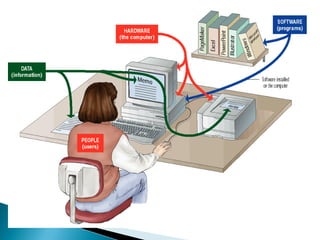
 Consists of:
◦ Hardware
◦ Software
◦ Data
◦ Users
 What is a Computer?
◦ A computer can convert data into information that is
useful to people
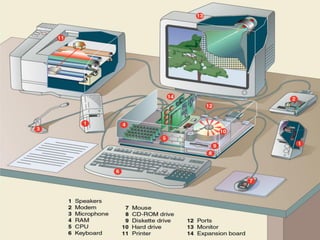
 A computer's hardware consists of electronic
devices; the parts you can see and touch.
 The term "device" refers to any piece of
hardware used by the computer, such as a:
◦ keyboard
◦ monitor
◦ modem
◦ mouse
◦ etc
 Software – also called programs – consists of
organized sets of instructions for controlling the
computer.
 Some programs exist for the computer's use, to
help it manage its own tasks and devices.
 Other programs exist for the user, and enable the
computer to perform tasks for you, such as
creating documents.
 Data consists of raw facts, which the computer
can manipulate and process into information that
is useful to people.
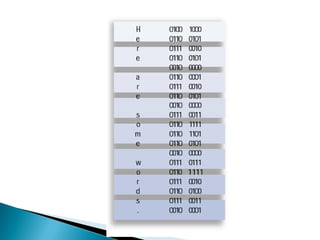
 Computerized data is digital, meaning that it has
been reduced to digits, or numbers. The
computer stores and reads all data as numbers.
 Although computers use data in digital form,
they convert data into forms that people can
understand, such as text, numerals, sounds, and
images.
 Data is collection of unprocessed items, which
can include text, numbers, images, audio and
video
 When data are processed, organized, structured
or presented in a given context so as to make
them useful, they are called Information
 People are the computer's operators, or users.
 Some types of computers can operate without
much intervention from people, but personal
computers are designed specifically for use by
people.
 Types of Hardware
 The CPU
 Memory
 How Memory is Measured
 Input and Output Devices
 Storage Devices
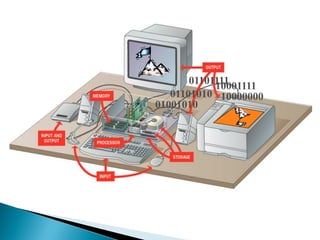
 A computer's hardware devices are categorized as
follows:
◦ Processor
◦ Memory
◦ Input and output (I/O) devices
◦ Storage devices
01001010
01101010
0110111110001111
10000000
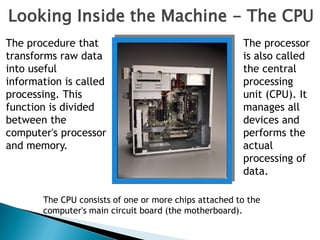
Looking Inside the Machine - The CPU
The procedure that
transforms raw data
into useful
information is called
processing. This
function is divided
between the
computer's processor
and memory.
The processor
is also called
the central
processing
unit (CPU). It
manages all
devices and
performs the
actual
processing of
data.
The CPU consists of one or more chips attached to the
computer's main circuit board (the motherboard).
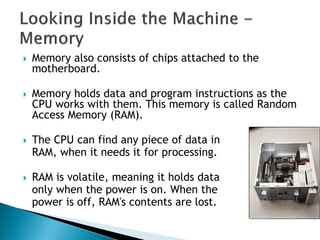
 Memory also consists of chips attached to the
motherboard.
 Memory holds data and program instructions as the
CPU works with them. This memory is called Random
Access Memory (RAM).
 The CPU can find any piece of data in
RAM, when it needs it for processing.
 RAM is volatile, meaning it holds data
only when the power is on. When the
power is off, RAM's contents are lost.
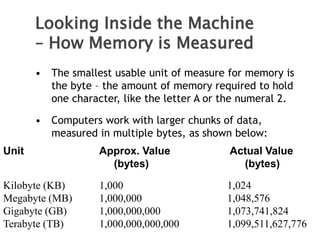
• The smallest usable unit of measure for memory is
the byte – the amount of memory required to hold
one character, like the letter A or the numeral 2.
• Computers work with larger chunks of data,
measured in multiple bytes, as shown below:
Unit Approx. Value Actual Value
(bytes) (bytes)
Kilobyte (KB) 1,000 1,024
Megabyte (MB) 1,000,000 1,048,576
Gigabyte (GB) 1,000,000,000 1,073,741,824
Terabyte (TB) 1,000,000,000,000 1,099,511,627,776
Looking Inside the Machine
– How Memory is Measured
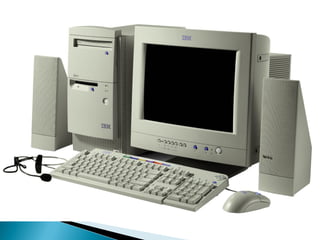
 Input devices accept data and instructions from the
user or from another computer system. The keyboard
and mouse are examples of input devices.
 Output devices return processed data back to the
user or to another computer system. The printer and
monitor are examples.
 Communications devices (such as modems and
network interface cards) perform both input and
output, allowing computers to share information.
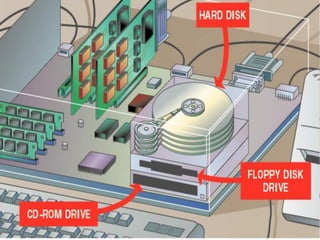
 Storage devices hold data not currently being used by
the CPU. Data is commonly stored on a magnetic or
optical disk. Each type uses a special medium for
storing data on its surface.
 A disk drive is a device that reads data from and
writes data to a disk. Most new computers feature a
floppy disk drive, a hard disk drive, and an optical
disk drive.
 The most common optical storage devices are CD-
ROM and DVD-ROM drives.
Software: Bringing the Machine to
Life
• What is Software?
• System Software
• Application Software
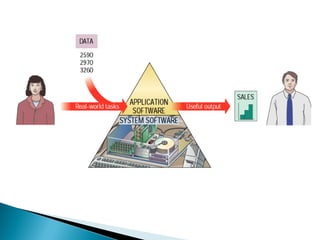
 Software is a set of electronic instructions that
tells the computer how to do certain tasks. A set
of instructions is often called a program.
 When a computer is using a particular program, it
is said to be running or executing the program.
 The two most common types of programs are
system software and application software.
 System software exists primarily for the computer
itself, to help the computer perform specific
functions.
 One major type of system software is the operating
system (OS). All computers require an operating
system.
 The OS tells the computer how to interact with the
user and its own devices.
 Common operating systems include Windows, the
Macintosh OS, OS/2, and UNIX .
• Application software tells the computer how to
accomplish tasks the user requires, such as
creating a document or editing a graphic image.
• Some important kinds of application software are:
Word processing programs Spreadsheet software
Database management Presentation programs
Graphics programs Networking software
Web design tools and browsers Internet applications
Communications programs Utilities
Entertainment and education
Bringing the Machine to Life -
Applications
 What is a communications device?
Hardware component that
enables a computer to
send and receive data, instructions,
and information
Occurs over cables, telephone
lines, cellular radio networks,
satellites, and other
transmission media
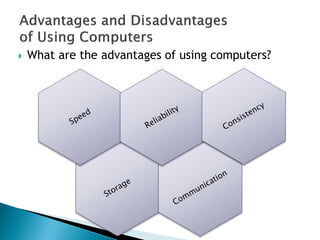
 What are the advantages of using computers?
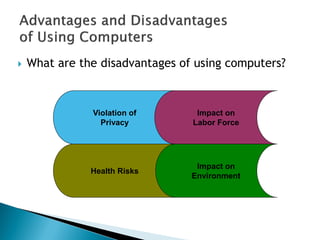
 What are the disadvantages of using computers?
Violation of
Privacy
Impact on
Environment
Impact on
Labor Force
Health Risks
 The Brain of the computer
 Silicon Chip (IC)
 Pentium-4 has around 125 million transistors
 Performs Billions of Instructions per second
 Combines with other devices such as Memory and
I/O to form a “Microprocessor system”
 The ―Calculator‖ Model
 Should be able to
◦ Take Data
◦ Decode
◦ Execute
◦ Give Results
 Control Unit; for decoding signals and activate
the devices (memories, buses, registers) in a
proper sequence
 Arithmetic Unit; to perform mathematical
calculations
 The series of steps taken by the CPU to execute
an instruction is called ‗Machine Cycle‘
◦ Two smaller Cycles
 Instruction Cycle
 Execution Cycle
 Instruction Cycle
1. Fetching: Fetching a command from memory
2. Decoding: Map the command to Instructions
 Execution Cycle
1. Executing: CPU converts the instructions into
microcode and carries them out
2. Storing: (Optional) The CPU stores the result
somewhere in the memory
 Memory; stores data and instructions
 Bus Interface Unit; transfers data in and out of
the Processor, instructions into the Processor
 Instruction Decoder; Decodes Instructions
 Arithmetic and Logic Unit; Performs Math,
Comparisons and Logical Operations on Integers
 Control Unit; Controls and Manages all the
Processing
 Accessing RAM for Data/Instructions is slow
 Solution:
◦ Registers attached to the ALU (for data currently in use)
◦ Cache Memory (for most frequently used data)
 Internal Cache (on processor chip)
 Instruction Cache
 Data Cache
 External Cache (on motherboard)
 Basic components of a microprocessor system
combined on a single chip
◦ The CPU core
◦ RAM and ROM
◦ I/O ports (Parallel & Serial)
◦ Timers and Interrupts
◦ Analogue to Digital Converter (ADC), etc
 Used in Autonomous Systems
◦ ovens, ATMs, vehicles
 Advantage:
◦ Compact integrated design on single chip
◦ Reduced interface
 Busicom‘s Desk Calculators
 1971, Intel‘s 1st Microprocessor-4004
◦ 2250 Transistors
◦ 740 KHz, 60,000 Op/sec
◦ 16 pins
◦ 10 Microns
◦ As Powerful as ENIAC
 2001, Intel‘s P4 – Today‘s Processor
◦ 55 Million Transistors
◦ 32-bit Word size
◦ 2.2 GHz
◦ 2 ALUs
◦ 128 bit FPU
◦ 0.13 Micron
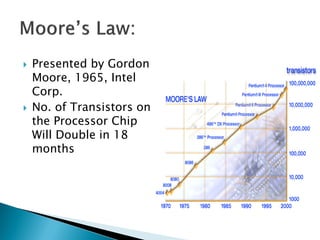
 Presented by Gordon
Moore, 1965, Intel
Corp.
 No. of Transistors on
the Processor Chip
Will Double in 18
months
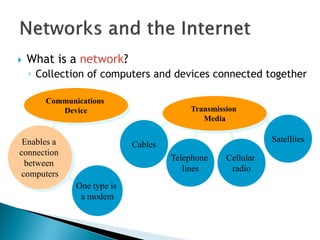
One type is
a modem
 What is a network?
◦ Collection of computers and devices connected together
Enables a
connection
between
computers
Cables
Cellular
radio
Telephone
lines
Satellites
Transmission
Media
Communications
Device
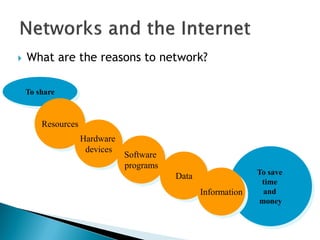
To share
 What are the reasons to network?
Resources
Hardware
devices
Software
programs
Data To save
time
and
money
Information
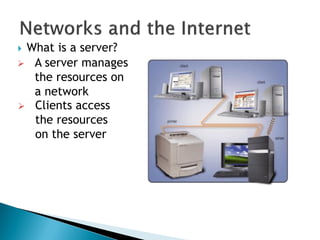
 What is a server?
 A server manages
the resources on
a network
 Clients access
the resources
on the server
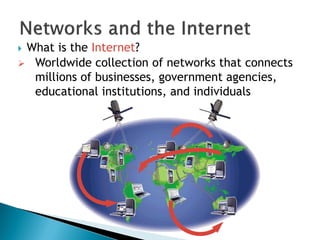
 What is the Internet?
 Worldwide collection of networks that connects
millions of businesses, government agencies,
educational institutions, and individuals
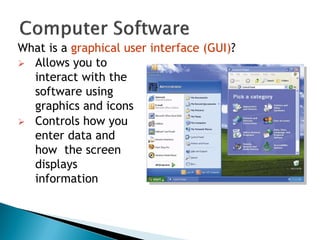
What is a graphical user interface (GUI)?
 Allows you to
interact with the
software using
graphics and icons
 Controls how you
enter data and
how the screen
displays
information
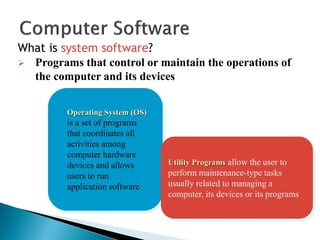
What is system software?
Operating System (OS)
is a set of programs
that coordinates all
activities among
computer hardware
devices and allows
users to run
application software
Utility Programs allow the user to
perform maintenance-type tasks
usually related to managing a
computer, its devices or its programs
 Programs that control or maintain the operations of
the computer and its devices
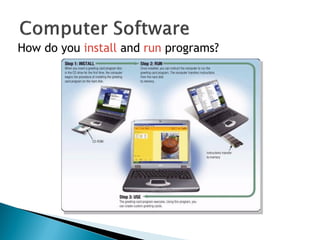
How do you install and run programs?
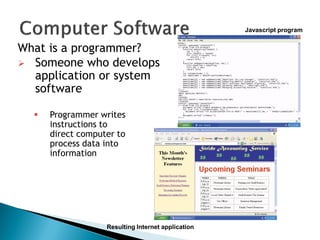
What is a programmer?
 Someone who develops
application or system
software
 Programmer writes
instructions to
direct computer to
process data into
information
Javascript program
Resulting Internet application
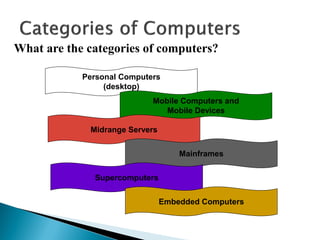
What are the categories of computers?
Personal Computers
(desktop)
Mobile Computers and
Mobile Devices
Midrange Servers
Mainframes
Supercomputers
Embedded Computers
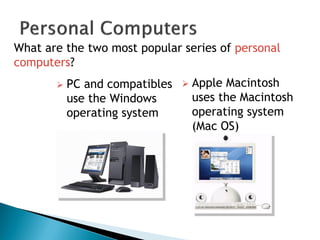
What are the two most popular series of personal
computers?
 PC and compatibles
use the Windows
operating system
 Apple Macintosh
uses the Macintosh
operating system
(Mac OS)
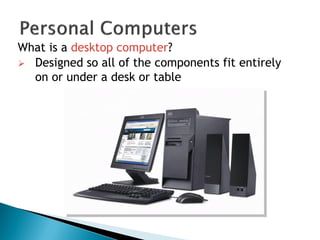
What is a desktop computer?
 Designed so all of the components fit entirely
on or under a desk or table
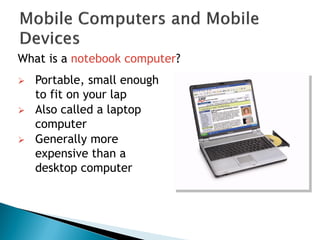
What is a notebook computer?
 Portable, small enough
to fit on your lap
 Also called a laptop
computer
 Generally more
expensive than a
desktop computer
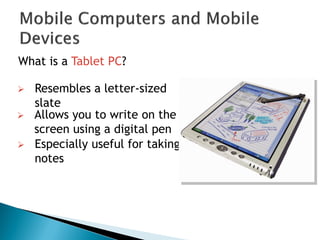
What is a Tablet PC?
 Especially useful for taking
notes
 Resembles a letter-sized
slate
 Allows you to write on the
screen using a digital pen
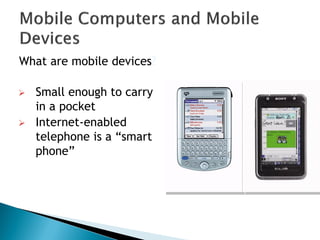
What are mobile devices?
 Small enough to carry
in a pocket
 Internet-enabled
telephone is a ―smart
phone‖
What is a handheld computer?
Used
by mobile
employees such as
meter readers and
delivery people
Small
enough to fit
in one
hand
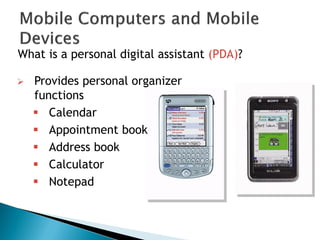
What is a personal digital assistant (PDA)?
 Provides personal organizer
functions
 Calendar
 Appointment book
 Address book
 Calculator
 Notepad
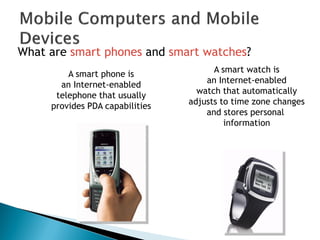
What are smart phones and smart watches?
A smart watch is
an Internet-enabled
watch that automatically
adjusts to time zone changes
and stores personal
information
A smart phone is
an Internet-enabled
telephone that usually
provides PDA capabilities
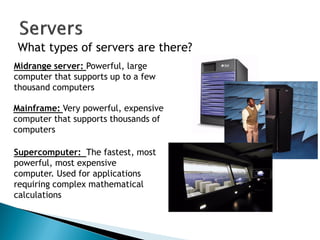
What types of servers are there?
Midrange server: Powerful, large
computer that supports up to a few
thousand computers
Mainframe: Very powerful, expensive
computer that supports thousands of
computers
Supercomputer: The fastest, most
powerful, most expensive
computer. Used for applications
requiring complex mathematical
calculations
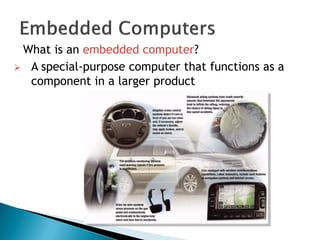
What is an embedded computer?
 A special-purpose computer that functions as a
component in a larger product
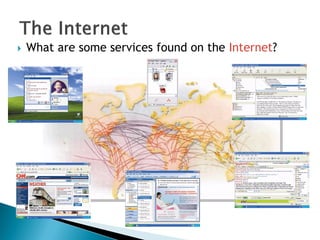
 What are some services found on the Internet?
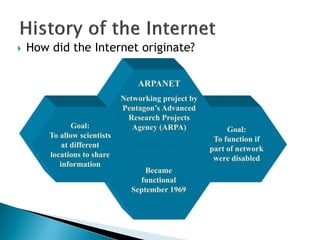
 How did the Internet originate?
Goal:
To function if
part of network
were disabled
Became
functional
September 1969
ARPANET
Networking project by
Pentagon’s Advanced
Research Projects
Agency (ARPA)Goal:
To allow scientists
at different
locations to share
information
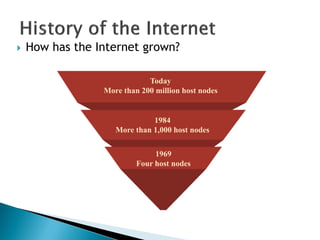
 How has the Internet grown?
Today
More than 200 million host nodes
1984
More than 1,000 host nodes
1969
Four host nodes
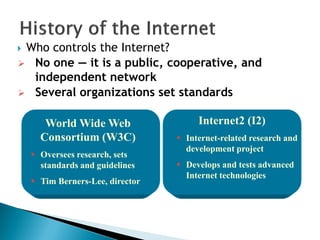
 Who controls the Internet?
World Wide Web
Consortium (W3C)
 Oversees research, sets
standards and guidelines
 Tim Berners-Lee, director
Internet2 (I2)
 Internet-related research and
development project
 Develops and tests advanced
Internet technologies
 No one — it is a public, cooperative, and
independent network
 Several organizations set standards
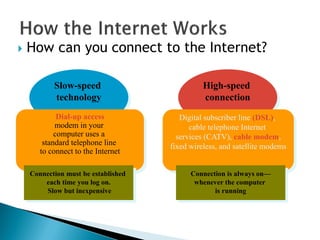
High-speed
connection
Slow-speed
technology
 How can you connect to the Internet?
Dial-up access
modem in your
computer uses a
standard telephone line
to connect to the Internet
Digital subscriber line (DSL),
cable telephone Internet
services (CATV), cable modem,
fixed wireless, and satellite modems
Connection is always on—
whenever the computer
is running
Connection must be established
each time you log on.
Slow but inexpensive
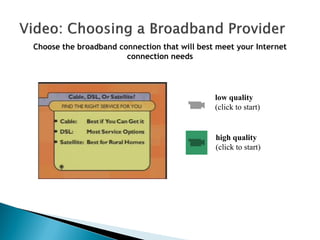
Choose the broadband connection that will best meet your Internet
connection needs
low quality
(click to start)
high quality
(click to start)
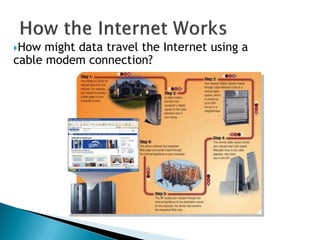
How might data travel the Internet using a
cable modem connection?
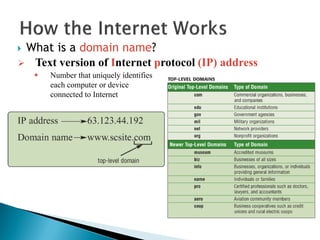
 What is a domain name?
 Text version of Internet protocol (IP) address
 Number that uniquely identifies
each computer or device
connected to Internet
What is the World Wide Web (WWW)?
A worldwide collection of electronic documents
Each electronic document is called a Web page
Also called the Web
Can contain text, graphics, sound, video, and built-in
connections
A Web site is a collection of related Web pages
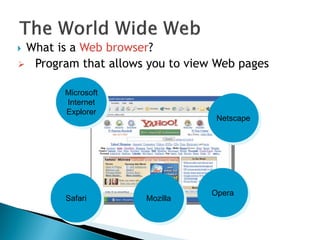
 What is a Web browser?
Microsoft
Internet
Explorer
Netscape
Mozilla
 Program that allows you to view Web pages
Opera
Safari
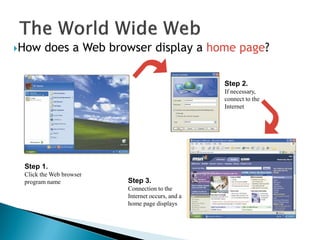
How does a Web browser display a home page?
Step 2.
If necessary,
connect to the
Internet
Step 3.
Connection to the
Internet occurs, and a
home page displays
Step 1.
Click the Web browser
program name
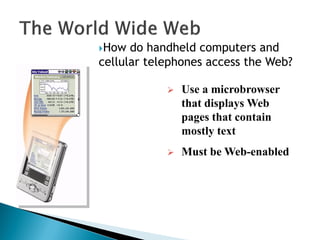
How do handheld computers and
cellular telephones access the Web?
 Use a microbrowser
that displays Web
pages that contain
mostly text
 Must be Web-enabled
 What is downloading?
 The process of a computer receiving information
 Depending upon connection speed, downloading
can take from a few seconds to several minutes
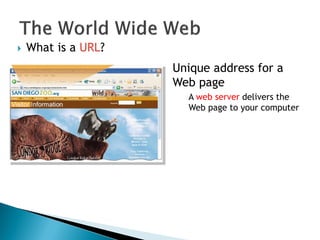
 What is a URL?
Unique address for a
Web page
A web server delivers the
Web page to your computer
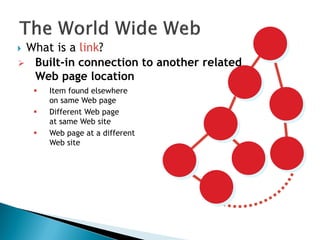
 What is a link?
 Item found elsewhere
on same Web page
 Different Web page
at same Web site
 Web page at a different
Web site
 Built-in connection to another related
Web page location
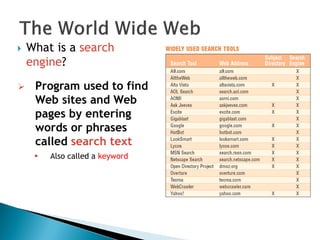
 What is a search
engine?
 Program used to find
Web sites and Web
pages by entering
words or phrases
called search text
 Also called a keyword
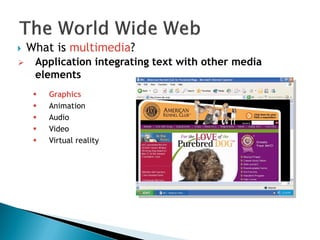
 What is multimedia?
 Application integrating text with other media
elements
 Graphics
 Animation
 Audio
 Video
 Virtual reality
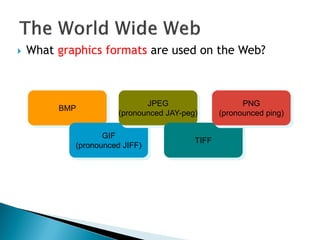
 What graphics formats are used on the Web?
BMP
GIF
(pronounced JIFF)
JPEG
(pronounced JAY-peg)
TIFF
PNG
(pronounced ping)
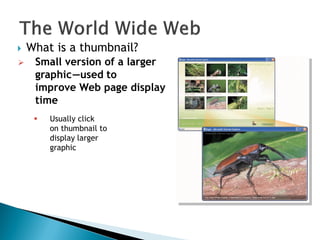
 What is a thumbnail?
 Small version of a larger
graphicc—used to
improve Web page display
time
 Usually click
on thumbnail to
display larger
graphic
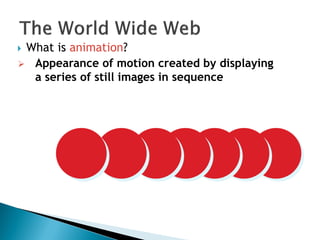
 What is animation?
 Appearance of motion created by displaying
a series of still images in sequence
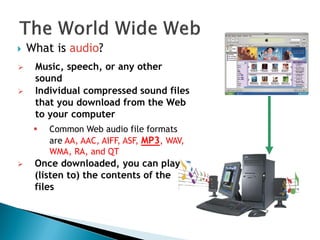
 What is audio?
 Music, speech, or any other
sound
 Individual compressed sound files
that you download from the Web
to your computer
 Common Web audio file formats
are AA, AAC, AIFF, ASF, MP3, WAV,
WMA, RA, and QT
 Once downloaded, you can play
(listen to) the contents of the
files
 What is streaming audio?
The process of
transferring audio
in a continuous
and even flow
Enables you to
listen to music
as it downloads
to your computer
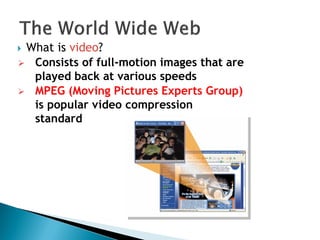
 What is video?
 Consists of full-motion images that are
played back at various speeds
 MPEG (Moving Pictures Experts Group)
is popular video compression
standard
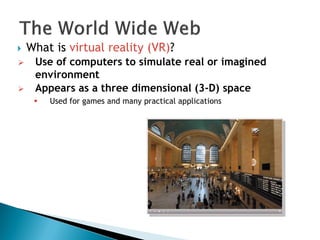
 What is virtual reality (VR)?
 Use of computers to simulate real or imagined
environment
 Appears as a three dimensional (3-D) space
 Used for games and many practical applications
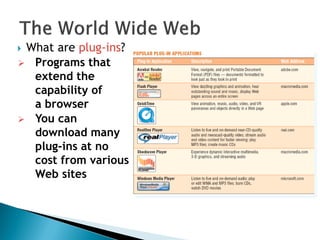
 What are plug-ins?
 Programs that
extend the
capability of
a browser
 You can
download many
plug-ins at no
cost from various
Web sites
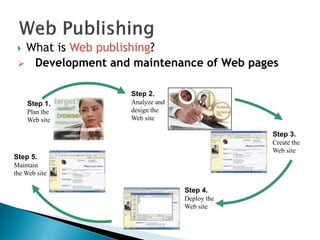
 What is Web publishing?
Step 1.
Plan the
Web site
Step 2.
Analyze and
design the
Web site
Step 3.
Create the
Web site
Step 4.
Deploy the
Web site
Step 5.
Maintain
the Web site
 Development and maintenance of Web pages
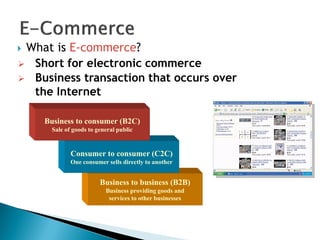
Business to business (B2B)
Business providing goods and
services to other businesses
Consumer to consumer (C2C)
One consumer sells directly to another
 What is E-commerce?
Business to consumer (B2C)
Sale of goods to general public
 Short for electronic commerce
 Business transaction that occurs over
the Internet
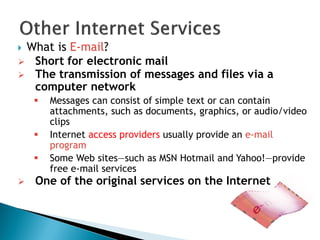
 What is E-mail?
 Short for electronic mail
 The transmission of messages and files via a
computer network
 Messages can consist of simple text or can contain
attachments, such as documents, graphics, or audio/video
clips
 Internet access providers usually provide an e-mail
program
 Some Web sites—such as MSN Hotmail and Yahoo!—provide
free e-mail services
 One of the original services on the Internet
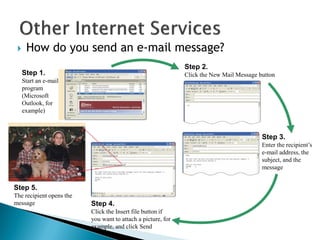
 How do you send an e-mail message?
Step 1.
Start an e-mail
program
(Microsoft
Outlook, for
example)
Step 2.
Click the New Mail Message button
Step 3.
Enter the recipient’s
e-mail address, the
subject, and the
message
Step 4.
Click the Insert file button if
you want to attach a picture, for
example, and click Send
Step 5.
The recipient opens the
message
 What is an e-mail address?
 Unique name that consists of a user name and
domain name that identifies the user
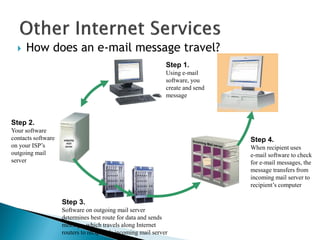
 How does an e-mail message travel?
Step 1.
Using e-mail
software, you
create and send
message
Step 2.
Your software
contacts software
on your ISP’s
outgoing mail
server
Step 4.
When recipient uses
e-mail software to check
for e-mail messages, the
message transfers from
incoming mail server to
recipient’s computer
Step 3.
Software on outgoing mail server
determines best route for data and sends
message, which travels along Internet
routers to recipient’s incoming mail server
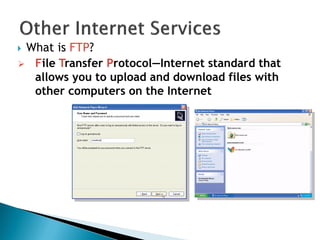
 What is FTP?
 File Transfer Protocol—Internet standard that
allows you to upload and download files with
other computers on the Internet
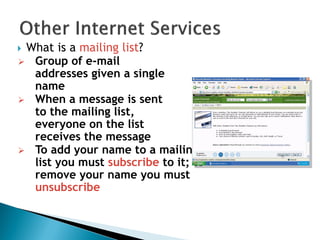
 What is a mailing list?
 Group of e-mail
addresses given a single
name
 When a message is sent
to the mailing list,
everyone on the list
receives the message
 To add your name to a mailing
list you must subscribe to it; to
remove your name you must
unsubscribe
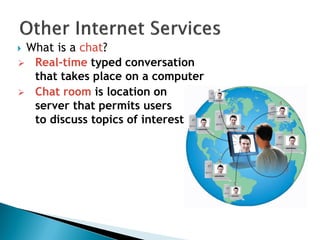
 What is a chat?
 Real-time typed conversation
that takes place on a computer
 Chat room is location on
server that permits users
to discuss topics of interest
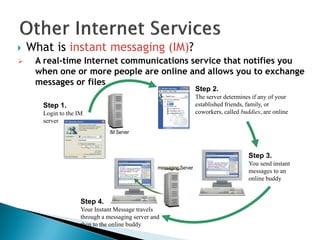
 What is instant messaging (IM)?
Step 2.
The server determines if any of your
established friends, family, or
coworkers, called buddies, are online
Step 3.
You send instant
messages to an
online buddy
Step 1.
Login to the IM
server
IM Server
Step 4.
Your Instant Message travels
through a messaging server and
then to the online buddy
messaging Server
 A real-time Internet communications service that notifies you
when one or more people are online and allows you to exchange
messages or files
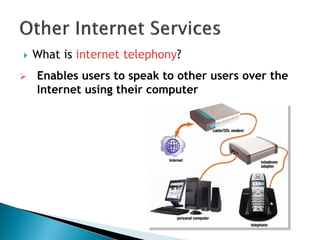
 What is internet telephony?
 Enables users to speak to other users over the
Internet using their computer
 What is netiquette?
Golden Rule: Treat others as
you would like them to treat you.
 Code of acceptable behaviors users should follow
while on the Internet
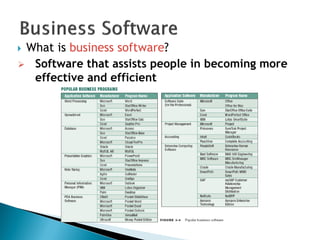
 What is business software?
 Software that assists people in becoming more
effective and efficient
 What is word processing software?
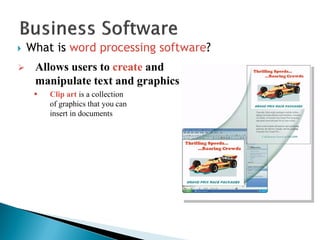
 Allows users to create and
manipulate text and graphics
 Clip art is a collection
of graphics that you can
insert in documents
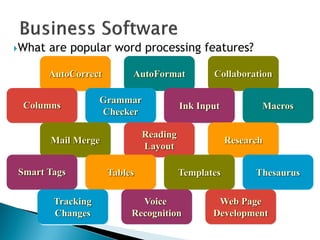
What are popular word processing features?
AutoFormatAutoCorrect Collaboration
Columns MacrosInk Input
Grammar
Checker
Mail Merge Research
Reading
Layout
Smart Tags ThesaurusTemplatesTables
Voice
Recognition
Tracking
Changes
Web Page
Development
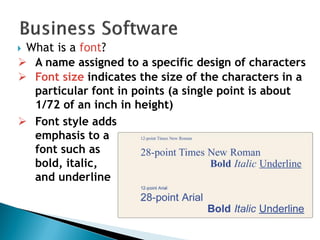
 What is a font?
 A name assigned to a specific design of characters
 Font size indicates the size of the characters in a
particular font in points (a single point is about
1/72 of an inch in height)
 Font style adds
emphasis to a
font such as
bold, italic,
and underline
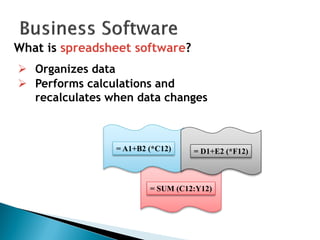
= SUM (C12:Y12)
= A1+B2 (*C12) = D1+E2 (*F12)
What is spreadsheet software?
 Organizes data
 Performs calculations and
recalculates when data changes
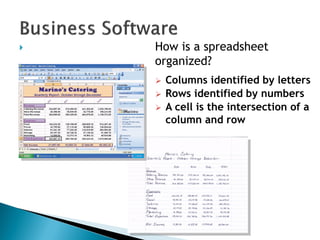
 How is a spreadsheet
organized?
 Columns identified by letters
 Rows identified by numbers
 A cell is the intersection of a
column and row
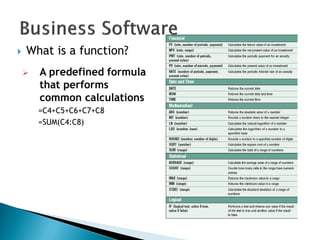
 What is a function?
 A predefined formula
that performs
common calculations
=C4+C5+C6+C7+C8
=SUM(C4:C8)
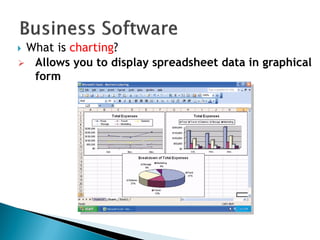
 What is charting?
 Allows you to display spreadsheet data in graphical
form
 What is database software?
Allows you to create
and manage data
Add, change, delete,
sort, and retrieve data
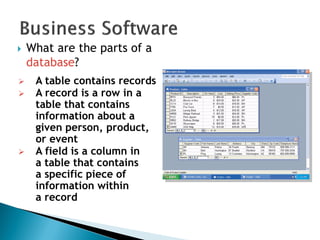
 What are the parts of a
database?
 A table contains records
 A record is a row in a
table that contains
information about a
given person, product,
or event
 A field is a column in
a table that contains
a specific piece of
information within
a record
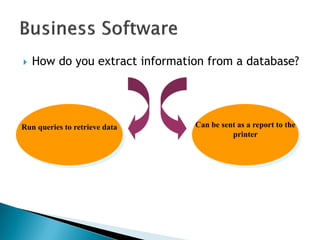
 How do you extract information from a database?
Can be sent as a report to the
printer
Run queries to retrieve data
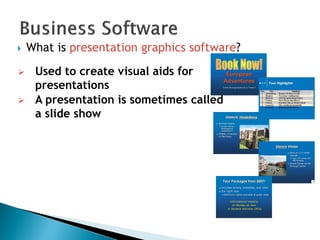
 What is presentation graphics software?
 Used to create visual aids for
presentations
 A presentation is sometimes called
a slide show
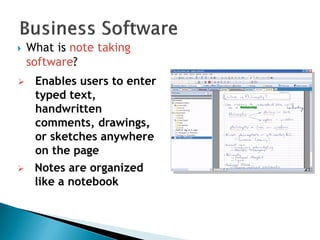
 What is note taking
software?
 Enables users to enter
typed text,
handwritten
comments, drawings,
or sketches anywhere
on the page
 Notes are organized
like a notebook
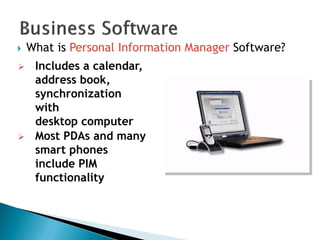
 What is Personal Information Manager Software?
 Includes a calendar,
address book,
synchronization
with
desktop computer
 Most PDAs and many
smart phones
include PIM
functionality
 What is a software suite?
A collection of individual
programs sold as
a single package
Two major advantages:
lower cost ease of use
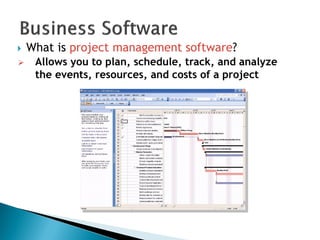
 What is project management software?
 Allows you to plan, schedule, track, and analyze
the events, resources, and costs of a project
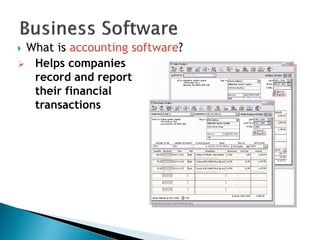
 What is accounting software?
 Helps companies
record and report
their financial
transactions
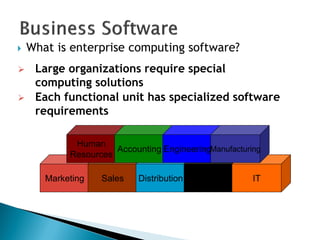
Marketing Sales Distribution
Customer
Service
IT
 What is enterprise computing software?
 Large organizations require special
computing solutions
 Each functional unit has specialized software
requirements
Human
Resources
Accounting EngineeringManufacturing
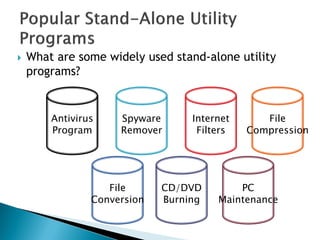
 What are some widely used stand-alone utility
programs?
Antivirus
Program
Spyware
Remover
Internet
Filters
File
Compression
File
Conversion
CD/DVD
Burning
PC
Maintenance
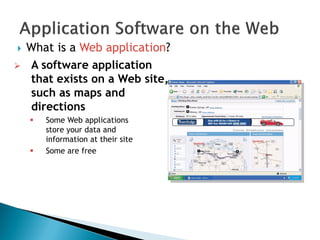
 What is a Web application?
 A software application
that exists on a Web site,
such as maps and
directions
 Some Web applications
store your data and
information at their site
 Some are free
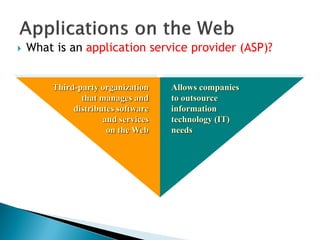
 What is an application service provider (ASP)?
Third-party organization
that manages and
distributes software
and services
on the Web
Allows companies
to outsource
information
technology (IT)
needs
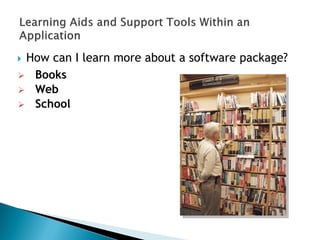
 How can I learn more about a software package?
 Books
 Web
 School

Itc lecture

  • 1.
  • 3.
     The Partsof a Computer System  Looking Inside the Machine  Software: Bringing the Machine to Life
  • 4.
     What isa Computer? ◦ An electronic device, operating under the control of instructions stored in its own memory, accept data, process the data according to specified rules, produce results and store the results for future use  Consists of: ◦ Hardware ◦ Software ◦ Data ◦ Users
  • 5.
     What isa Computer? ◦ A computer can convert data into information that is useful to people
  • 7.
     A computer'shardware consists of electronic devices; the parts you can see and touch.  The term "device" refers to any piece of hardware used by the computer, such as a: ◦ keyboard ◦ monitor ◦ modem ◦ mouse ◦ etc
  • 9.
     Software –also called programs – consists of organized sets of instructions for controlling the computer.  Some programs exist for the computer's use, to help it manage its own tasks and devices.  Other programs exist for the user, and enable the computer to perform tasks for you, such as creating documents.
  • 10.
     Data consistsof raw facts, which the computer can manipulate and process into information that is useful to people.  Computerized data is digital, meaning that it has been reduced to digits, or numbers. The computer stores and reads all data as numbers.  Although computers use data in digital form, they convert data into forms that people can understand, such as text, numerals, sounds, and images.
  • 12.
     Data iscollection of unprocessed items, which can include text, numbers, images, audio and video  When data are processed, organized, structured or presented in a given context so as to make them useful, they are called Information
  • 13.
     People arethe computer's operators, or users.  Some types of computers can operate without much intervention from people, but personal computers are designed specifically for use by people.
  • 14.
     Types ofHardware  The CPU  Memory  How Memory is Measured  Input and Output Devices  Storage Devices
  • 15.
     A computer'shardware devices are categorized as follows: ◦ Processor ◦ Memory ◦ Input and output (I/O) devices ◦ Storage devices
  • 16.
  • 17.
    Looking Inside theMachine - The CPU The procedure that transforms raw data into useful information is called processing. This function is divided between the computer's processor and memory. The processor is also called the central processing unit (CPU). It manages all devices and performs the actual processing of data. The CPU consists of one or more chips attached to the computer's main circuit board (the motherboard).
  • 18.
     Memory alsoconsists of chips attached to the motherboard.  Memory holds data and program instructions as the CPU works with them. This memory is called Random Access Memory (RAM).  The CPU can find any piece of data in RAM, when it needs it for processing.  RAM is volatile, meaning it holds data only when the power is on. When the power is off, RAM's contents are lost.
  • 19.
    • The smallestusable unit of measure for memory is the byte – the amount of memory required to hold one character, like the letter A or the numeral 2. • Computers work with larger chunks of data, measured in multiple bytes, as shown below: Unit Approx. Value Actual Value (bytes) (bytes) Kilobyte (KB) 1,000 1,024 Megabyte (MB) 1,000,000 1,048,576 Gigabyte (GB) 1,000,000,000 1,073,741,824 Terabyte (TB) 1,000,000,000,000 1,099,511,627,776 Looking Inside the Machine – How Memory is Measured
  • 20.
     Input devicesaccept data and instructions from the user or from another computer system. The keyboard and mouse are examples of input devices.  Output devices return processed data back to the user or to another computer system. The printer and monitor are examples.  Communications devices (such as modems and network interface cards) perform both input and output, allowing computers to share information.
  • 22.
     Storage deviceshold data not currently being used by the CPU. Data is commonly stored on a magnetic or optical disk. Each type uses a special medium for storing data on its surface.  A disk drive is a device that reads data from and writes data to a disk. Most new computers feature a floppy disk drive, a hard disk drive, and an optical disk drive.  The most common optical storage devices are CD- ROM and DVD-ROM drives.
  • 24.
    Software: Bringing theMachine to Life • What is Software? • System Software • Application Software
  • 25.
     Software isa set of electronic instructions that tells the computer how to do certain tasks. A set of instructions is often called a program.  When a computer is using a particular program, it is said to be running or executing the program.  The two most common types of programs are system software and application software.
  • 27.
     System softwareexists primarily for the computer itself, to help the computer perform specific functions.  One major type of system software is the operating system (OS). All computers require an operating system.  The OS tells the computer how to interact with the user and its own devices.  Common operating systems include Windows, the Macintosh OS, OS/2, and UNIX .
  • 28.
    • Application softwaretells the computer how to accomplish tasks the user requires, such as creating a document or editing a graphic image. • Some important kinds of application software are: Word processing programs Spreadsheet software Database management Presentation programs Graphics programs Networking software Web design tools and browsers Internet applications Communications programs Utilities Entertainment and education Bringing the Machine to Life - Applications
  • 29.
     What isa communications device? Hardware component that enables a computer to send and receive data, instructions, and information Occurs over cables, telephone lines, cellular radio networks, satellites, and other transmission media
  • 30.
     What arethe advantages of using computers?
  • 31.
     What arethe disadvantages of using computers? Violation of Privacy Impact on Environment Impact on Labor Force Health Risks
  • 33.
     The Brainof the computer  Silicon Chip (IC)  Pentium-4 has around 125 million transistors  Performs Billions of Instructions per second  Combines with other devices such as Memory and I/O to form a “Microprocessor system”
  • 34.
     The ―Calculator‖Model  Should be able to ◦ Take Data ◦ Decode ◦ Execute ◦ Give Results
  • 35.
     Control Unit;for decoding signals and activate the devices (memories, buses, registers) in a proper sequence  Arithmetic Unit; to perform mathematical calculations
  • 36.
     The seriesof steps taken by the CPU to execute an instruction is called ‗Machine Cycle‘ ◦ Two smaller Cycles  Instruction Cycle  Execution Cycle  Instruction Cycle 1. Fetching: Fetching a command from memory 2. Decoding: Map the command to Instructions
  • 37.
     Execution Cycle 1.Executing: CPU converts the instructions into microcode and carries them out 2. Storing: (Optional) The CPU stores the result somewhere in the memory
  • 38.
     Memory; storesdata and instructions  Bus Interface Unit; transfers data in and out of the Processor, instructions into the Processor  Instruction Decoder; Decodes Instructions  Arithmetic and Logic Unit; Performs Math, Comparisons and Logical Operations on Integers  Control Unit; Controls and Manages all the Processing
  • 39.
     Accessing RAMfor Data/Instructions is slow  Solution: ◦ Registers attached to the ALU (for data currently in use) ◦ Cache Memory (for most frequently used data)  Internal Cache (on processor chip)  Instruction Cache  Data Cache  External Cache (on motherboard)
  • 40.
     Basic componentsof a microprocessor system combined on a single chip ◦ The CPU core ◦ RAM and ROM ◦ I/O ports (Parallel & Serial) ◦ Timers and Interrupts ◦ Analogue to Digital Converter (ADC), etc
  • 41.
     Used inAutonomous Systems ◦ ovens, ATMs, vehicles  Advantage: ◦ Compact integrated design on single chip ◦ Reduced interface
  • 42.
     Busicom‘s DeskCalculators  1971, Intel‘s 1st Microprocessor-4004 ◦ 2250 Transistors ◦ 740 KHz, 60,000 Op/sec ◦ 16 pins ◦ 10 Microns ◦ As Powerful as ENIAC  2001, Intel‘s P4 – Today‘s Processor ◦ 55 Million Transistors ◦ 32-bit Word size ◦ 2.2 GHz ◦ 2 ALUs ◦ 128 bit FPU ◦ 0.13 Micron
  • 43.
     Presented byGordon Moore, 1965, Intel Corp.  No. of Transistors on the Processor Chip Will Double in 18 months
  • 44.
    One type is amodem  What is a network? ◦ Collection of computers and devices connected together Enables a connection between computers Cables Cellular radio Telephone lines Satellites Transmission Media Communications Device
  • 45.
    To share  Whatare the reasons to network? Resources Hardware devices Software programs Data To save time and money Information
  • 46.
     What isa server?  A server manages the resources on a network  Clients access the resources on the server
  • 47.
     What isthe Internet?  Worldwide collection of networks that connects millions of businesses, government agencies, educational institutions, and individuals
  • 48.
    What is agraphical user interface (GUI)?  Allows you to interact with the software using graphics and icons  Controls how you enter data and how the screen displays information
  • 49.
    What is systemsoftware? Operating System (OS) is a set of programs that coordinates all activities among computer hardware devices and allows users to run application software Utility Programs allow the user to perform maintenance-type tasks usually related to managing a computer, its devices or its programs  Programs that control or maintain the operations of the computer and its devices
  • 50.
    How do youinstall and run programs?
  • 51.
    What is aprogrammer?  Someone who develops application or system software  Programmer writes instructions to direct computer to process data into information Javascript program Resulting Internet application
  • 52.
    What are thecategories of computers? Personal Computers (desktop) Mobile Computers and Mobile Devices Midrange Servers Mainframes Supercomputers Embedded Computers
  • 53.
    What are thetwo most popular series of personal computers?  PC and compatibles use the Windows operating system  Apple Macintosh uses the Macintosh operating system (Mac OS)
  • 54.
    What is adesktop computer?  Designed so all of the components fit entirely on or under a desk or table
  • 55.
    What is anotebook computer?  Portable, small enough to fit on your lap  Also called a laptop computer  Generally more expensive than a desktop computer
  • 56.
    What is aTablet PC?  Especially useful for taking notes  Resembles a letter-sized slate  Allows you to write on the screen using a digital pen
  • 57.
    What are mobiledevices?  Small enough to carry in a pocket  Internet-enabled telephone is a ―smart phone‖
  • 58.
    What is ahandheld computer? Used by mobile employees such as meter readers and delivery people Small enough to fit in one hand
  • 59.
    What is apersonal digital assistant (PDA)?  Provides personal organizer functions  Calendar  Appointment book  Address book  Calculator  Notepad
  • 60.
    What are smartphones and smart watches? A smart watch is an Internet-enabled watch that automatically adjusts to time zone changes and stores personal information A smart phone is an Internet-enabled telephone that usually provides PDA capabilities
  • 61.
    What types ofservers are there? Midrange server: Powerful, large computer that supports up to a few thousand computers Mainframe: Very powerful, expensive computer that supports thousands of computers Supercomputer: The fastest, most powerful, most expensive computer. Used for applications requiring complex mathematical calculations
  • 62.
    What is anembedded computer?  A special-purpose computer that functions as a component in a larger product
  • 64.
     What aresome services found on the Internet?
  • 65.
     How didthe Internet originate? Goal: To function if part of network were disabled Became functional September 1969 ARPANET Networking project by Pentagon’s Advanced Research Projects Agency (ARPA)Goal: To allow scientists at different locations to share information
  • 66.
     How hasthe Internet grown? Today More than 200 million host nodes 1984 More than 1,000 host nodes 1969 Four host nodes
  • 67.
     Who controlsthe Internet? World Wide Web Consortium (W3C)  Oversees research, sets standards and guidelines  Tim Berners-Lee, director Internet2 (I2)  Internet-related research and development project  Develops and tests advanced Internet technologies  No one — it is a public, cooperative, and independent network  Several organizations set standards
  • 68.
    High-speed connection Slow-speed technology  How canyou connect to the Internet? Dial-up access modem in your computer uses a standard telephone line to connect to the Internet Digital subscriber line (DSL), cable telephone Internet services (CATV), cable modem, fixed wireless, and satellite modems Connection is always on— whenever the computer is running Connection must be established each time you log on. Slow but inexpensive
  • 69.
    Choose the broadbandconnection that will best meet your Internet connection needs low quality (click to start) high quality (click to start)
  • 70.
    How might datatravel the Internet using a cable modem connection?
  • 71.
     What isa domain name?  Text version of Internet protocol (IP) address  Number that uniquely identifies each computer or device connected to Internet
  • 72.
    What is theWorld Wide Web (WWW)? A worldwide collection of electronic documents Each electronic document is called a Web page Also called the Web Can contain text, graphics, sound, video, and built-in connections A Web site is a collection of related Web pages
  • 73.
     What isa Web browser? Microsoft Internet Explorer Netscape Mozilla  Program that allows you to view Web pages Opera Safari
  • 74.
    How does aWeb browser display a home page? Step 2. If necessary, connect to the Internet Step 3. Connection to the Internet occurs, and a home page displays Step 1. Click the Web browser program name
  • 75.
    How do handheldcomputers and cellular telephones access the Web?  Use a microbrowser that displays Web pages that contain mostly text  Must be Web-enabled
  • 76.
     What isdownloading?  The process of a computer receiving information  Depending upon connection speed, downloading can take from a few seconds to several minutes
  • 77.
     What isa URL? Unique address for a Web page A web server delivers the Web page to your computer
  • 78.
     What isa link?  Item found elsewhere on same Web page  Different Web page at same Web site  Web page at a different Web site  Built-in connection to another related Web page location
  • 79.
     What isa search engine?  Program used to find Web sites and Web pages by entering words or phrases called search text  Also called a keyword
  • 80.
     What ismultimedia?  Application integrating text with other media elements  Graphics  Animation  Audio  Video  Virtual reality
  • 81.
     What graphicsformats are used on the Web? BMP GIF (pronounced JIFF) JPEG (pronounced JAY-peg) TIFF PNG (pronounced ping)
  • 82.
     What isa thumbnail?  Small version of a larger graphicc—used to improve Web page display time  Usually click on thumbnail to display larger graphic
  • 83.
     What isanimation?  Appearance of motion created by displaying a series of still images in sequence
  • 84.
     What isaudio?  Music, speech, or any other sound  Individual compressed sound files that you download from the Web to your computer  Common Web audio file formats are AA, AAC, AIFF, ASF, MP3, WAV, WMA, RA, and QT  Once downloaded, you can play (listen to) the contents of the files
  • 85.
     What isstreaming audio? The process of transferring audio in a continuous and even flow Enables you to listen to music as it downloads to your computer
  • 86.
     What isvideo?  Consists of full-motion images that are played back at various speeds  MPEG (Moving Pictures Experts Group) is popular video compression standard
  • 87.
     What isvirtual reality (VR)?  Use of computers to simulate real or imagined environment  Appears as a three dimensional (3-D) space  Used for games and many practical applications
  • 88.
     What areplug-ins?  Programs that extend the capability of a browser  You can download many plug-ins at no cost from various Web sites
  • 89.
     What isWeb publishing? Step 1. Plan the Web site Step 2. Analyze and design the Web site Step 3. Create the Web site Step 4. Deploy the Web site Step 5. Maintain the Web site  Development and maintenance of Web pages
  • 90.
    Business to business(B2B) Business providing goods and services to other businesses Consumer to consumer (C2C) One consumer sells directly to another  What is E-commerce? Business to consumer (B2C) Sale of goods to general public  Short for electronic commerce  Business transaction that occurs over the Internet
  • 91.
     What isE-mail?  Short for electronic mail  The transmission of messages and files via a computer network  Messages can consist of simple text or can contain attachments, such as documents, graphics, or audio/video clips  Internet access providers usually provide an e-mail program  Some Web sites—such as MSN Hotmail and Yahoo!—provide free e-mail services  One of the original services on the Internet
  • 92.
     How doyou send an e-mail message? Step 1. Start an e-mail program (Microsoft Outlook, for example) Step 2. Click the New Mail Message button Step 3. Enter the recipient’s e-mail address, the subject, and the message Step 4. Click the Insert file button if you want to attach a picture, for example, and click Send Step 5. The recipient opens the message
  • 93.
     What isan e-mail address?  Unique name that consists of a user name and domain name that identifies the user
  • 94.
     How doesan e-mail message travel? Step 1. Using e-mail software, you create and send message Step 2. Your software contacts software on your ISP’s outgoing mail server Step 4. When recipient uses e-mail software to check for e-mail messages, the message transfers from incoming mail server to recipient’s computer Step 3. Software on outgoing mail server determines best route for data and sends message, which travels along Internet routers to recipient’s incoming mail server
  • 95.
     What isFTP?  File Transfer Protocol—Internet standard that allows you to upload and download files with other computers on the Internet
  • 96.
     What isa mailing list?  Group of e-mail addresses given a single name  When a message is sent to the mailing list, everyone on the list receives the message  To add your name to a mailing list you must subscribe to it; to remove your name you must unsubscribe
  • 97.
     What isa chat?  Real-time typed conversation that takes place on a computer  Chat room is location on server that permits users to discuss topics of interest
  • 98.
     What isinstant messaging (IM)? Step 2. The server determines if any of your established friends, family, or coworkers, called buddies, are online Step 3. You send instant messages to an online buddy Step 1. Login to the IM server IM Server Step 4. Your Instant Message travels through a messaging server and then to the online buddy messaging Server  A real-time Internet communications service that notifies you when one or more people are online and allows you to exchange messages or files
  • 99.
     What isinternet telephony?  Enables users to speak to other users over the Internet using their computer
  • 100.
     What isnetiquette? Golden Rule: Treat others as you would like them to treat you.  Code of acceptable behaviors users should follow while on the Internet
  • 102.
     What isbusiness software?  Software that assists people in becoming more effective and efficient
  • 103.
     What isword processing software?  Allows users to create and manipulate text and graphics  Clip art is a collection of graphics that you can insert in documents
  • 104.
    What are popularword processing features? AutoFormatAutoCorrect Collaboration Columns MacrosInk Input Grammar Checker Mail Merge Research Reading Layout Smart Tags ThesaurusTemplatesTables Voice Recognition Tracking Changes Web Page Development
  • 105.
     What isa font?  A name assigned to a specific design of characters  Font size indicates the size of the characters in a particular font in points (a single point is about 1/72 of an inch in height)  Font style adds emphasis to a font such as bold, italic, and underline
  • 106.
    = SUM (C12:Y12) =A1+B2 (*C12) = D1+E2 (*F12) What is spreadsheet software?  Organizes data  Performs calculations and recalculates when data changes
  • 107.
     How isa spreadsheet organized?  Columns identified by letters  Rows identified by numbers  A cell is the intersection of a column and row
  • 108.
     What isa function?  A predefined formula that performs common calculations =C4+C5+C6+C7+C8 =SUM(C4:C8)
  • 109.
     What ischarting?  Allows you to display spreadsheet data in graphical form
  • 110.
     What isdatabase software? Allows you to create and manage data Add, change, delete, sort, and retrieve data
  • 111.
     What arethe parts of a database?  A table contains records  A record is a row in a table that contains information about a given person, product, or event  A field is a column in a table that contains a specific piece of information within a record
  • 112.
     How doyou extract information from a database? Can be sent as a report to the printer Run queries to retrieve data
  • 113.
     What ispresentation graphics software?  Used to create visual aids for presentations  A presentation is sometimes called a slide show
  • 114.
     What isnote taking software?  Enables users to enter typed text, handwritten comments, drawings, or sketches anywhere on the page  Notes are organized like a notebook
  • 115.
     What isPersonal Information Manager Software?  Includes a calendar, address book, synchronization with desktop computer  Most PDAs and many smart phones include PIM functionality
  • 116.
     What isa software suite? A collection of individual programs sold as a single package Two major advantages: lower cost ease of use
  • 117.
     What isproject management software?  Allows you to plan, schedule, track, and analyze the events, resources, and costs of a project
  • 118.
     What isaccounting software?  Helps companies record and report their financial transactions
  • 119.
    Marketing Sales Distribution Customer Service IT What is enterprise computing software?  Large organizations require special computing solutions  Each functional unit has specialized software requirements Human Resources Accounting EngineeringManufacturing
  • 120.
     What aresome widely used stand-alone utility programs? Antivirus Program Spyware Remover Internet Filters File Compression File Conversion CD/DVD Burning PC Maintenance
  • 121.
     What isa Web application?  A software application that exists on a Web site, such as maps and directions  Some Web applications store your data and information at their site  Some are free
  • 122.
     What isan application service provider (ASP)? Third-party organization that manages and distributes software and services on the Web Allows companies to outsource information technology (IT) needs
  • 123.
     How canI learn more about a software package?  Books  Web  School