Chapter 3 Storage ITBIS 105 : Elementary Computing
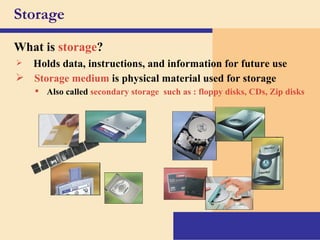
Storage What is   storage ? Holds data, instructions, and information for future use Storage medium   is physical material used for storage Also called  secondary storage  such as : floppy disks, CDs, Zip disks
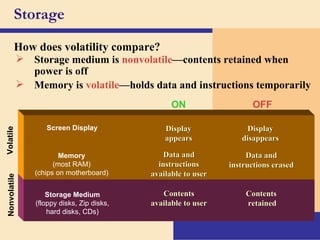
Storage How does volatility compare? Nonvolatile Storage medium is  nonvolatile —contents retained when power is off Contents  retained Contents available to user ON OFF Volatile Display disappears Data and instructions available to user Display appears Data and instructions erased Memory is  volatile —holds data and instructions temporarily Storage Medium (floppy disks, Zip disks, hard disks, CDs) Memory (most RAM) (chips on motherboard) Screen Display
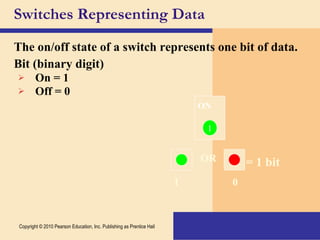
The on/off state of a switch represents one bit of data. Bit (binary digit) On = 1 Off = 0 Switches Representing Data 0 1 OR = 1 bit Copyright © 2010 Pearson Education, Inc. Publishing as Prentice Hall OFF 0 ON 1
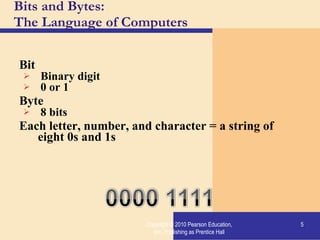
Bits and Bytes:  The Language of Computers Bit Binary digit 0 or 1 Byte 8 bits Each letter, number, and character = a string of eight 0s and 1s Copyright © 2010 Pearson Education, Inc. Publishing as Prentice Hall
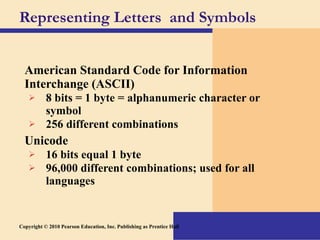
Representing Letters  and Symbols American Standard Code for Information Interchange (ASCII) 8 bits = 1 byte = alphanumeric character or symbol 256 different combinations Unicode 16 bits equal 1 byte 96,000 different combinations; used for all languages Copyright © 2010 Pearson Education, Inc. Publishing as Prentice Hall
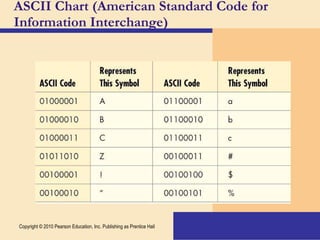
ASCII Chart (American Standard Code for Information Interchange) Copyright © 2010 Pearson Education, Inc. Publishing as Prentice Hall
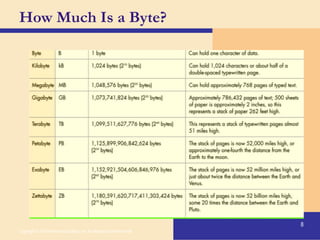
How Much Is a Byte? Copyright © 2010 Pearson Education, Inc. Publishing as Prentice Hall
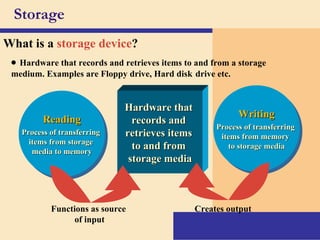
Storage What is a   storage device ? Writing Process of transferring  items from memory  to storage media Reading Process of transferring  items from storage  media to memory Hardware that  records and  retrieves items  to and from  storage media    Hardware that records and retrieves items to and from a storage medium. Examples are Floppy drive, Hard disk   drive etc. Functions as source  of input Creates output
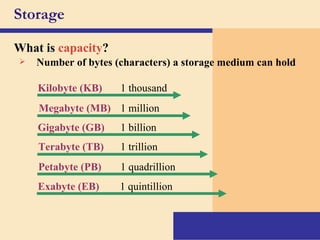
Storage What is   capacity ? Number of bytes (characters) a storage medium can hold Kilobyte (KB) 1 thousand Megabyte (MB) 1 million Gigabyte (GB) 1 billion Terabyte (TB) 1 trillion Petabyte (PB) 1 quadrillion Exabyte (EB) 1 quintillion
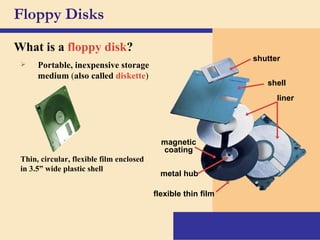
Floppy Disks What is a   floppy disk ? Portable, inexpensive storage medium  ( also called  diskette ) Thin, circular, flexible film enclosed in 3.5” wide plastic shell shutter shell liner magnetic coating flexible thin film metal hub
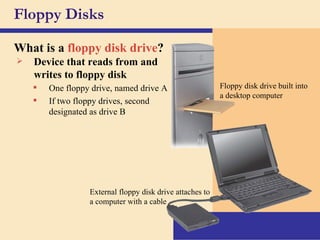
Floppy Disks What is a   floppy disk drive ? Floppy disk drive built into a desktop computer External floppy disk drive attaches to a computer with a cable One floppy drive, named drive A If two floppy drives, second designated as drive B Device that reads from and writes to floppy disk
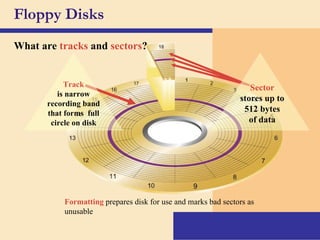
Floppy Disks What are   tracks  and   sectors ? Formatting  prepares disk for use and marks bad sectors as unusable Track is narrow recording band that forms  full circle on disk Sector   stores up to 512 bytes of data
Floppy Disks What are   tracks  and   sectors ?         Tracks  are configured in concentric circles in which data are stored.    PC disks use  sector  organization to store and retrieve data.  The recording surface is divided into  sectors  (a disk-storage concept of a pie-shaped portion of a disk or diskette in which records are stored and subsequently retrieved).
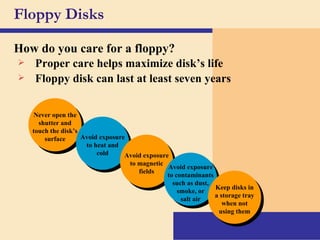
Floppy Disks Never open the shutter and touch the disk’s surface How do you care for a floppy? Avoid exposure to heat and cold Avoid exposure to magnetic fields Avoid exposure to contaminants such as dust, smoke, or salt air Keep disks in a storage tray when not using them Proper care helps maximize disk’s life Floppy disk can last at least seven years
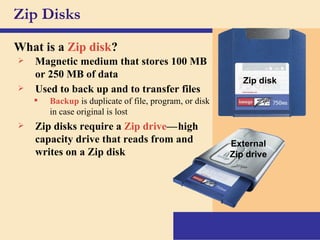
Zip Disks What is a   Zip disk ? Magnetic medium that stores 100 MB or 250 MB of data Zip disks require a   Zip drive — c high capacity drive that reads from and writes on a Zip disk Used to back up and to transfer files Backup  is duplicate of file, program, or disk in case original is lost c External Zip drive Zip disk
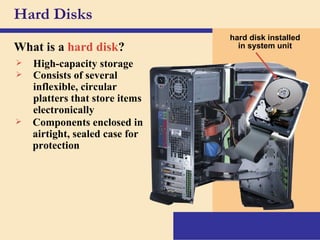
Hard Disks What is a   hard disk ? hard disk installed in system unit High-capacity storage Consists of several inflexible, circular platters that store items electronically Components enclosed in airtight, sealed case for protection
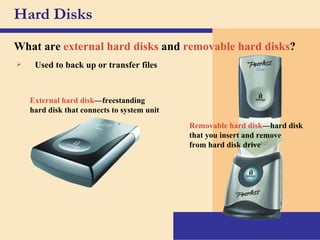
Hard Disks What are   external hard disks   and   removable hard disks ? External hard disk —freestanding hard disk that connects to system unit Removable hard disk —hard disk that you insert and remove from hard disk drive Used to back up or transfer files
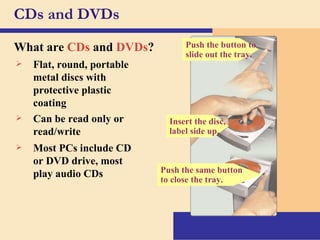
CDs and DVDs What are   CDs  and  DVDs ? Push the same button to close the tray. Most PCs include CD or DVD drive, most play audio CDs Flat, round, portable metal discs with protective plastic coating Can be read only or read/write Insert the disc, label side up. Push the button to slide out the tray.
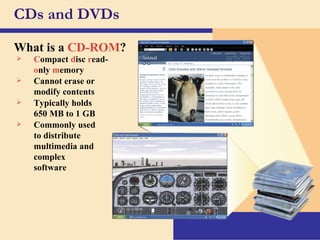
CDs and DVDs What is a   CD-ROM ? C ompact   d isc   r ead- o nly   m emory Cannot erase or modify contents Typically holds  650 MB to 1 GB Commonly used to distribute multimedia and complex software
CDs and DVDs What are   CDs  and  DVDs ?    CD-ROM  stands for compact disc-read-only memory.    Once inserted in the CD-ROM drive, the text, video images, and so on can be read into RAM for processing or display.    The data on the disk are fixed-they cannot be altered.  This is in contrast to the read/write capabilities of magnetic disks.  What makes CD-ROM so inviting is its vast capacity to store data and programs.  The capacity of a single CD-ROM is up to 680 MB-about that of 477 diskettes.
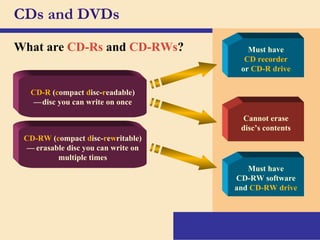
CDs and DVDs What are   CD-Rs  and  CD-RWs ? Must have CD recorder or  CD-R drive Cannot erase disc’s contents CD-R  ( c ompact  d isc- r eadable) — c disc you can write on once CD-RW  ( c ompact  d isc- r e w ritable) — ce erasable disc you can write on multiple times Must have CD-RW software and  CD-RW drive
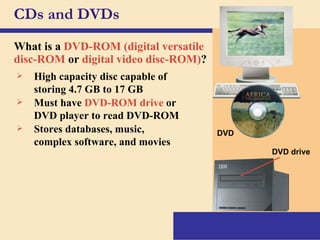
CDs and DVDs What is a   DVD-ROM (digital versatile disc-ROM  or  digital video disc-ROM) ? DVD DVD drive High capacity disc capable of storing 4.7 GB to 17 GB Must have   DVD-ROM drive   or DVD player to read DVD-ROM Stores databases, music, complex software, and movies
CDs and DVDs What are   CDs  and  DVDs ?    DVDs are poised to replace CD-ROMs.  The DVD (digital videodisk) looks like the CD and the CD-ROM, but it can store from 7 to 14 times as mush information (up to about 10 GB).  A DVD can store the video for a full-length movie.    DVD drives are back-wards compatible; that is, they can play all of your CD-ROM and CDs. DVDs probably will replace videotapes and CDs in a few years  
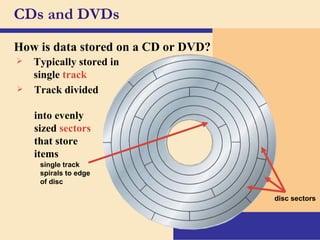
CDs and DVDs How is data stored on a CD or DVD? Typically stored in single   track Track divided  into evenly  sized   sectors   that store  items single track spirals to edge of disc disc sectors
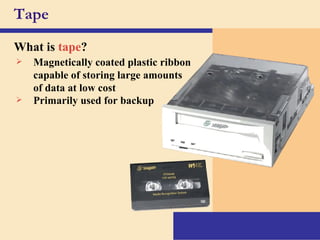
Tape What is   tape ? Magnetically coated plastic ribbon capable of storing large amounts of data at low cost Primarily used for backup
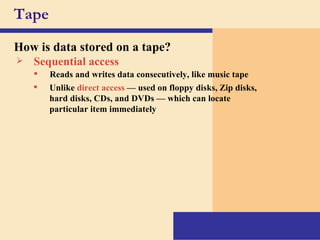
Tape How is data stored on a tape? Sequential access Unlike  direct access  — used on floppy disks, Zip disks, hard disks, CDs, and DVDs — which can locate particular item immediately Reads and writes data consecutively, like music tape
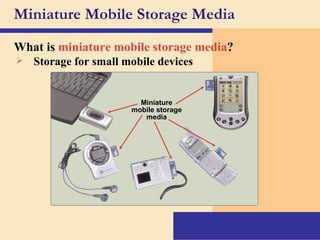
Miniature Mobile Storage Media What is   miniature mobile storage media ? Storage for small mobile devices Miniature mobile storage media
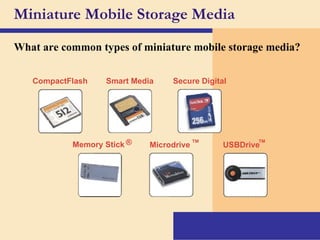
Miniature Mobile Storage Media What are common types of miniature mobile storage media? Smart Media Secure Digital Microdrive ™ USBDrive ™ Memory Stick ® CompactFlash
Setting It All Up: Ergonomics Ergonomics: minimizing injury or discomfort while using the computer Steps to follow: Position monitor correctly. Use adjustable chair. Assume proper position while typing. Take breaks. Ensure adequate lighting. Copyright © 2010 Pearson Education, Inc. Publishing as Prentice Hall
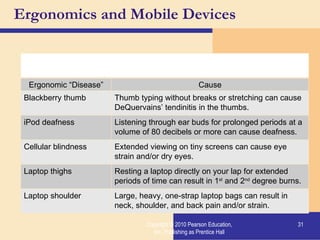
Ergonomics and Mobile Devices Copyright © 2010 Pearson Education, Inc. Publishing as Prentice Hall Mobile devices present ergonomic challenges Ergonomic “Disease” Cause Blackberry thumb Thumb typing without breaks or stretching can cause DeQuervains’ tendinitis in the thumbs. iPod deafness Listening through ear buds for prolonged periods at a volume of 80 decibels or more can cause deafness. Cellular blindness Extended viewing on tiny screens can cause eye strain and/or dry eyes. Laptop thighs Resting a laptop directly on your lap for extended periods of time can result in 1 st  and 2 nd  degree burns. Laptop shoulder Large, heavy, one-strap laptop bags can result in neck, shoulder, and back pain and/or strain.

ITBIS105 5

  • 1.
    Chapter 3 StorageITBIS 105 : Elementary Computing
  • 2.
    Storage What is storage ? Holds data, instructions, and information for future use Storage medium is physical material used for storage Also called secondary storage such as : floppy disks, CDs, Zip disks
  • 3.
    Storage How doesvolatility compare? Nonvolatile Storage medium is nonvolatile —contents retained when power is off Contents retained Contents available to user ON OFF Volatile Display disappears Data and instructions available to user Display appears Data and instructions erased Memory is volatile —holds data and instructions temporarily Storage Medium (floppy disks, Zip disks, hard disks, CDs) Memory (most RAM) (chips on motherboard) Screen Display
  • 4.
    The on/off stateof a switch represents one bit of data. Bit (binary digit) On = 1 Off = 0 Switches Representing Data 0 1 OR = 1 bit Copyright © 2010 Pearson Education, Inc. Publishing as Prentice Hall OFF 0 ON 1
  • 5.
    Bits and Bytes: The Language of Computers Bit Binary digit 0 or 1 Byte 8 bits Each letter, number, and character = a string of eight 0s and 1s Copyright © 2010 Pearson Education, Inc. Publishing as Prentice Hall
  • 6.
    Representing Letters and Symbols American Standard Code for Information Interchange (ASCII) 8 bits = 1 byte = alphanumeric character or symbol 256 different combinations Unicode 16 bits equal 1 byte 96,000 different combinations; used for all languages Copyright © 2010 Pearson Education, Inc. Publishing as Prentice Hall
  • 7.
    ASCII Chart (AmericanStandard Code for Information Interchange) Copyright © 2010 Pearson Education, Inc. Publishing as Prentice Hall
  • 8.
    How Much Isa Byte? Copyright © 2010 Pearson Education, Inc. Publishing as Prentice Hall
  • 9.
    Storage What isa storage device ? Writing Process of transferring items from memory to storage media Reading Process of transferring items from storage media to memory Hardware that records and retrieves items to and from storage media    Hardware that records and retrieves items to and from a storage medium. Examples are Floppy drive, Hard disk drive etc. Functions as source of input Creates output
  • 10.
    Storage What is capacity ? Number of bytes (characters) a storage medium can hold Kilobyte (KB) 1 thousand Megabyte (MB) 1 million Gigabyte (GB) 1 billion Terabyte (TB) 1 trillion Petabyte (PB) 1 quadrillion Exabyte (EB) 1 quintillion
  • 11.
    Floppy Disks Whatis a floppy disk ? Portable, inexpensive storage medium ( also called diskette ) Thin, circular, flexible film enclosed in 3.5” wide plastic shell shutter shell liner magnetic coating flexible thin film metal hub
  • 12.
    Floppy Disks Whatis a floppy disk drive ? Floppy disk drive built into a desktop computer External floppy disk drive attaches to a computer with a cable One floppy drive, named drive A If two floppy drives, second designated as drive B Device that reads from and writes to floppy disk
  • 13.
    Floppy Disks Whatare tracks and sectors ? Formatting prepares disk for use and marks bad sectors as unusable Track is narrow recording band that forms full circle on disk Sector stores up to 512 bytes of data
  • 14.
    Floppy Disks Whatare tracks and sectors ?        Tracks are configured in concentric circles in which data are stored.    PC disks use sector organization to store and retrieve data. The recording surface is divided into sectors (a disk-storage concept of a pie-shaped portion of a disk or diskette in which records are stored and subsequently retrieved).
  • 15.
    Floppy Disks Neveropen the shutter and touch the disk’s surface How do you care for a floppy? Avoid exposure to heat and cold Avoid exposure to magnetic fields Avoid exposure to contaminants such as dust, smoke, or salt air Keep disks in a storage tray when not using them Proper care helps maximize disk’s life Floppy disk can last at least seven years
  • 16.
    Zip Disks Whatis a Zip disk ? Magnetic medium that stores 100 MB or 250 MB of data Zip disks require a Zip drive — c high capacity drive that reads from and writes on a Zip disk Used to back up and to transfer files Backup is duplicate of file, program, or disk in case original is lost c External Zip drive Zip disk
  • 17.
    Hard Disks Whatis a hard disk ? hard disk installed in system unit High-capacity storage Consists of several inflexible, circular platters that store items electronically Components enclosed in airtight, sealed case for protection
  • 18.
    Hard Disks Whatare external hard disks and removable hard disks ? External hard disk —freestanding hard disk that connects to system unit Removable hard disk —hard disk that you insert and remove from hard disk drive Used to back up or transfer files
  • 19.
    CDs and DVDsWhat are CDs and DVDs ? Push the same button to close the tray. Most PCs include CD or DVD drive, most play audio CDs Flat, round, portable metal discs with protective plastic coating Can be read only or read/write Insert the disc, label side up. Push the button to slide out the tray.
  • 20.
    CDs and DVDsWhat is a CD-ROM ? C ompact d isc r ead- o nly m emory Cannot erase or modify contents Typically holds 650 MB to 1 GB Commonly used to distribute multimedia and complex software
  • 21.
    CDs and DVDsWhat are CDs and DVDs ?    CD-ROM stands for compact disc-read-only memory.    Once inserted in the CD-ROM drive, the text, video images, and so on can be read into RAM for processing or display.    The data on the disk are fixed-they cannot be altered. This is in contrast to the read/write capabilities of magnetic disks.  What makes CD-ROM so inviting is its vast capacity to store data and programs. The capacity of a single CD-ROM is up to 680 MB-about that of 477 diskettes.
  • 22.
    CDs and DVDsWhat are CD-Rs and CD-RWs ? Must have CD recorder or CD-R drive Cannot erase disc’s contents CD-R ( c ompact d isc- r eadable) — c disc you can write on once CD-RW ( c ompact d isc- r e w ritable) — ce erasable disc you can write on multiple times Must have CD-RW software and CD-RW drive
  • 23.
    CDs and DVDsWhat is a DVD-ROM (digital versatile disc-ROM or digital video disc-ROM) ? DVD DVD drive High capacity disc capable of storing 4.7 GB to 17 GB Must have DVD-ROM drive or DVD player to read DVD-ROM Stores databases, music, complex software, and movies
  • 24.
    CDs and DVDsWhat are CDs and DVDs ?    DVDs are poised to replace CD-ROMs. The DVD (digital videodisk) looks like the CD and the CD-ROM, but it can store from 7 to 14 times as mush information (up to about 10 GB). A DVD can store the video for a full-length movie.    DVD drives are back-wards compatible; that is, they can play all of your CD-ROM and CDs. DVDs probably will replace videotapes and CDs in a few years  
  • 25.
    CDs and DVDsHow is data stored on a CD or DVD? Typically stored in single track Track divided into evenly sized sectors that store items single track spirals to edge of disc disc sectors
  • 26.
    Tape What is tape ? Magnetically coated plastic ribbon capable of storing large amounts of data at low cost Primarily used for backup
  • 27.
    Tape How isdata stored on a tape? Sequential access Unlike direct access — used on floppy disks, Zip disks, hard disks, CDs, and DVDs — which can locate particular item immediately Reads and writes data consecutively, like music tape
  • 28.
    Miniature Mobile StorageMedia What is miniature mobile storage media ? Storage for small mobile devices Miniature mobile storage media
  • 29.
    Miniature Mobile StorageMedia What are common types of miniature mobile storage media? Smart Media Secure Digital Microdrive ™ USBDrive ™ Memory Stick ® CompactFlash
  • 30.
    Setting It AllUp: Ergonomics Ergonomics: minimizing injury or discomfort while using the computer Steps to follow: Position monitor correctly. Use adjustable chair. Assume proper position while typing. Take breaks. Ensure adequate lighting. Copyright © 2010 Pearson Education, Inc. Publishing as Prentice Hall
  • 31.
    Ergonomics and MobileDevices Copyright © 2010 Pearson Education, Inc. Publishing as Prentice Hall Mobile devices present ergonomic challenges Ergonomic “Disease” Cause Blackberry thumb Thumb typing without breaks or stretching can cause DeQuervains’ tendinitis in the thumbs. iPod deafness Listening through ear buds for prolonged periods at a volume of 80 decibels or more can cause deafness. Cellular blindness Extended viewing on tiny screens can cause eye strain and/or dry eyes. Laptop thighs Resting a laptop directly on your lap for extended periods of time can result in 1 st and 2 nd degree burns. Laptop shoulder Large, heavy, one-strap laptop bags can result in neck, shoulder, and back pain and/or strain.

Editor's Notes