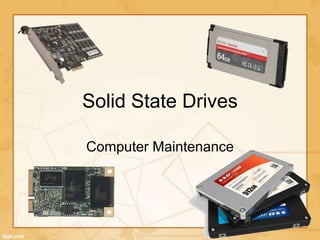
Solid State Drives
Computer Maintenance
Contents:
• What is a SSD (solid-state drive)?
• Architecture of SSD
• Advantages of SSDs
• Disadvantages of SSDs
• Where SSDs are found
What is a Solid-State Drive?
• A SSD (solid-state drive or solid-state
disk) is a storage device that stores
persistent data on solid-state flash
memory.
• No moving parts in SSD compared to a
hard disk drive.
• Connections: IDE, SATA, mSATA,
ExpressCard, PCI Express
• Hybrid drive
Architecture of SSD
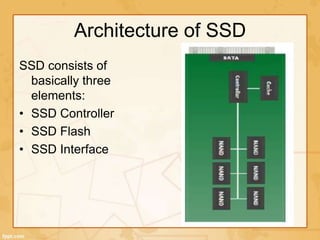
SSD consists of
basically three
elements:
• SSD Controller
• SSD Flash
• SSD Interface
Advantages of SSDs
 High performance –
significantly faster than a
standard HDD
 Faster seek time – up to
60x faster than HDD
 Lower power – Lesser
power consumption ,cooler
operation
 Silent operation
 Lighter weight –
perfect for portable
devices.
 Ability to endure
extreme shock, high
altitude, vibration and
extremes of
temperature.
 Immune to magnets.
Disadvantages of SSDs
 They are more expensive than traditional
hard drives.
 They currently offer less storage space than
traditional hard drives.
 Solid-state drives slow down as you fill them
up. Fill your solid-state drive to near-capacity
and its write performance will decrease
dramatically. The reason why lies in the way
SSDs and NAND Flash storage work.
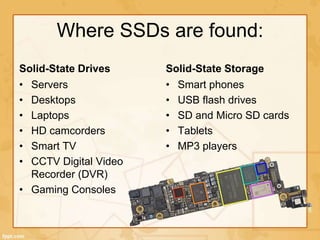
Where SSDs are found:
Solid-State Drives
• Servers
• Desktops
• Laptops
• HD camcorders
• Smart TV
• CCTV Digital Video
Recorder (DVR)
• Gaming Consoles
Solid-State Storage
• Smart phones
• USB flash drives
• SD and Micro SD cards
• Tablets
• MP3 players

Solid state drives

  • 1.
  • 2.
    Contents: • What isa SSD (solid-state drive)? • Architecture of SSD • Advantages of SSDs • Disadvantages of SSDs • Where SSDs are found
  • 3.
    What is aSolid-State Drive? • A SSD (solid-state drive or solid-state disk) is a storage device that stores persistent data on solid-state flash memory. • No moving parts in SSD compared to a hard disk drive. • Connections: IDE, SATA, mSATA, ExpressCard, PCI Express • Hybrid drive
  • 4.
    Architecture of SSD SSDconsists of basically three elements: • SSD Controller • SSD Flash • SSD Interface
  • 5.
    Advantages of SSDs High performance – significantly faster than a standard HDD  Faster seek time – up to 60x faster than HDD  Lower power – Lesser power consumption ,cooler operation  Silent operation  Lighter weight – perfect for portable devices.  Ability to endure extreme shock, high altitude, vibration and extremes of temperature.  Immune to magnets.
  • 6.
    Disadvantages of SSDs They are more expensive than traditional hard drives.  They currently offer less storage space than traditional hard drives.  Solid-state drives slow down as you fill them up. Fill your solid-state drive to near-capacity and its write performance will decrease dramatically. The reason why lies in the way SSDs and NAND Flash storage work.
  • 7.
    Where SSDs arefound: Solid-State Drives • Servers • Desktops • Laptops • HD camcorders • Smart TV • CCTV Digital Video Recorder (DVR) • Gaming Consoles Solid-State Storage • Smart phones • USB flash drives • SD and Micro SD cards • Tablets • MP3 players