SSAD
Tools
&
technique S
PRAGNESH DAVE : 1
SAHELI KHERATKAR :2
SUREKHA RASKAR :3
RASIKA PATIL : 4
RICHA KOTHARI : 6
MINAL CHAUHAN : 7
NAMRATA JEURKAR : 8
SNEHAL BARI : 9
ASHWIN PATIL : 10
MALVIKA BANSAL : 11
RASHMI MAHASKAR : 12
TASVIR ZAIDI :13
SHILPA TAHAKAR: 14
PRESENTED
BY
Management Information System
MIS is a system consisting of people,
machines, procedures, databases and data
models, as its elements.
The system gathers data from the internal
and external sources of a organization,
processes it and supplies information.
 SSAD was introduced in 1981 as the standard method of
analysis and design developed by CCTA (Central
Computing and Telecommunications Agency) for UK
Government projects
 SSAD was made mandatory for all new information
system developments in 1983
HISTORY
 Structured Systems Analysis and Design (SSAD) is an
integrated set of standards and guides for the analysis and
design of computer systems
 It is an integrated set of standards and guidelines consisting
of : Structural standards, which define the structure of a
development project in the form of
explicitly defined tasks, with clearly defined
interfaces between them, and also the tangible
products
Structured Systems Analysis and Design
 Improves productivity
 Improves flexibility
 Improves quality by reducing error rates
 Delivers the system to users on time
 Prevents IT developers’ bureaucracy
 Delivers systems that meets user's needs
Benefits Of SSAD
Disadvantages Of SSAD
 The size of SSAD is a big hindrance to using it in all
circumstances
 There is a large investment in cost and time involved in
training people to use the technique to come to terms with
 There are lot of standards for the preparation and
presentation of documents
Data Flow Diagram
Data Dictionary
Decision Tree
Structured English
Decision Table
Tools of SSAD
Data Flow Diagram
 Data Flow Diagram is a graphical representation of
the logical flow of the data.
 It helps in expressing the system’s requirements in
simple and understandable form
 It is also known as a bubble chart.
 Its aim is to clarify the system requirements and
identify major transformations that will become
programs in system design
 It decomposes the requirement specifications down
to the lowest level of details
DFD contains 4 graphic symbols for
 Source/destination
 Data flow
 Process
 Data store
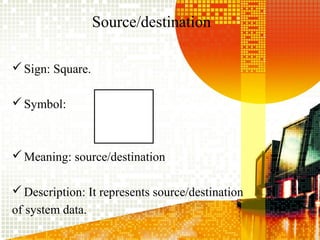
Source/destination
Sign: Square.
Symbol:
Meaning: source/destination
Description: It represents source/destination
of system data.
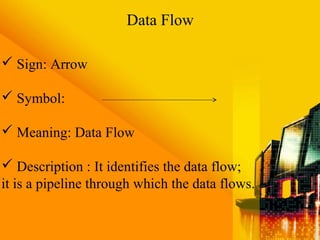
 Sign: Arrow
 Symbol:
 Meaning: Data Flow
 Description : It identifies the data flow;
it is a pipeline through which the data flows.
Data Flow
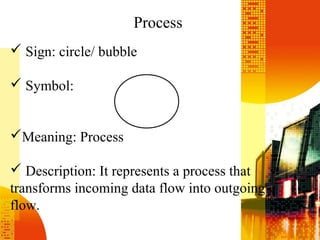
 Sign: circle/ bubble
 Symbol:
Meaning: Process
 Description: It represents a process that
transforms incoming data flow into outgoing
flow.
Process
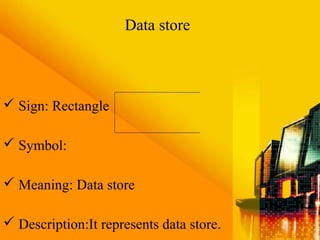
 Sign: Rectangle
 Symbol:
 Meaning: Data store
 Description:It represents data store.
Data store
 Processes should be named and numbered
 The direction of flow is from top to bottom from left to
right
 The name of the data stores, sources and destination is in
capital letter.
 Process and data flows name have the first letter capital
 When a process is explored / divided in lower level they
are number properly
Rules for constructing /drawing DFD
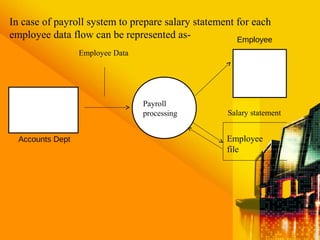
In case of payroll system to prepare salary statement for each
employee data flow can be represented as-
Employee Data
Accounts Dept
Payroll
processing Salary statement
Employee
file
Employee
 Though DFD is very effective when required
design is not clear and the user requires only graphic
representation but more than 10-12 processes will
make system complex and difficult to understand.
ADVANTAGE & DISADVANTAGE
Data Dictionary
A data dictionary is a structured repository of data. It
is a set of rigorous definitions of all DFD data elements
and data structure
 It supports documentation in a better way
 It serves as a common database for programmer and
can be also used for control purposes
THERE ARE THREE CLASSES OF ITEMS TO BE
DEFINED:
1. Data element -
the smallest unit of data that provides for no further
decomposition.
2. Data structure -
a group of data elements handled as a unit
3. Data flows/stores -
data flows are nothing but data structures in motion,
whereas data stores are data structures at rest.
Rules for constructing Data Dictionary
 The terms used to describe data structures are always in
capital letters
Assigned names should be straightforward and user
oriented
 There should be names for every data flow, data store,
data structure and data element
 Consistency checks should be performed
 Identification numbers of the process and their names
should be mentioned in the data dictionary
STRUCTURED ENGLISH
 Structured English aims at getting the benefits of both the
programming logic and natural language
 It uses logical construction and imperative sentences
designed to carry out instructions for action
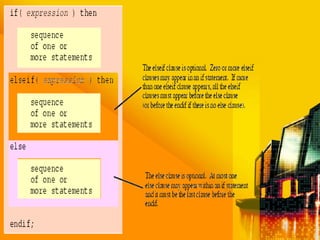
 Decision are made through IF-THEN-ELSE
statements
 Its sentences should be precise, concise and clear
in word and meaning
Example of Structured English
A bank will grant loan under the following
conditions :
 If a customer has an account with the bank and
had no loan outstanding, loan will be granted
 If a customer has an account with the bank but
some amount is outstanding from previous loans
then loan will be granted if special approval is
given
 Reject all loan applications in all other cases
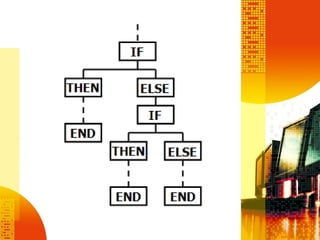
IF customer has a Bank Account THEN
IF Customer has no dues from previous account
THEN
Allow loan facility
ELSE
IF Management Approval is obtained THEN
Allow loan facility
ELSE
Reject
DECISION TREE
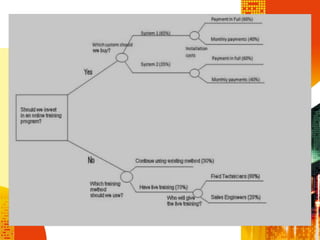
 Clear graphic representation of the logic, which looks like
the branches of a tree, called decision tree
 Easy to construct, read and update
 Turns a decision table into a diagram & is read from left to
right
 Can be used to verify logic in problem that involves
few complex decisions.
Example: Computer dealer gets a trade discount of 35% if the order size is 6 or
more PCs, whereas for orders from educational institutions and individuals, 15%
discount is allowed on order of 6-19 PCs, 20% on orders for 20-49 PCs; 30% on
orders for 50 PCs or more
Dealer 6 or more 35%
Less than 6 NIL
DISCOUNT POLICY
Educational
Institution or individual 50 or more 30%
20 – 49 20%
6-19 15%
Less than 6 NIL
Decision tree
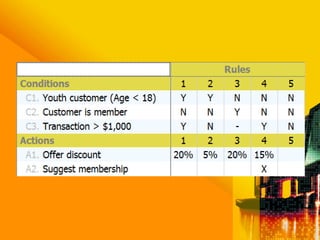
DECISION TABLE
 A matrix of rows and columns that shows conditions
and actions
 Decision rules state the procedure to be followed
when certain conditions exist.
 Decision table are best-suited for dealing with
complex branching routines, e.g., inventory control
 A condition is usually given a value of 'Y' for 'Yes,
if is true", 'N' for 'No' and a dash for 'Do not care' in
each rule.
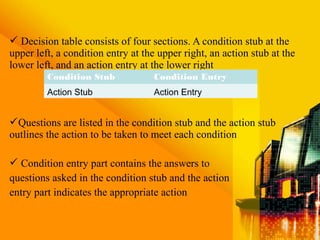
 Decision table consists of four sections. A condition stub at the
upper left, a condition entry at the upper right, an action stub at the
lower left, and an action entry at the lower right
Questions are listed in the condition stub and the action stub
outlines the action to be taken to meet each condition
 Condition entry part contains the answers to
questions asked in the condition stub and the action
entry part indicates the appropriate action
Condition Stub Condition Entry
Action Stub Action Entry
In constricting a decision table, the following rules are
observed:
 A decision should be given a name to be written at the top left
of the table
 The logic should be independent of the sequence in which the
condition rules were written but the action takes place in the
order in which the events occur
 Consistent and standardized language should be used
 Duplication of the terms should be avoided to the maximum
extent
TECHNIQUES OF STRUCTURAL SYSTEM
ANALYSIS AND DESIGN
Data Flow Modeling (DFM)
Logical Data Structure (LDS)
Entity Life History (ELH)
DATA FLOW MODELING
 Pictorial representations of systems have long
been acknowledged as being more effective than
narrative
 Conventional flowcharts have been used for
many years, with considerable advantages over
narrative
Here are some examples:
 System flowchart (for high-level system
description)
 Clerical procedure flowchart (for low-level
description)
 Computer run chart
Disadvantages
 They confuse the logical aspects of the system (what is
done) with the specific physical implementation (how
it is done)
 They do not allow any easy transition from high-level
broad description to detailed low-level description
 They are "procedure orientated", placing the greatest
emphasis on procedures in the system, rather than on
data which appears only occasionally on the flow chart
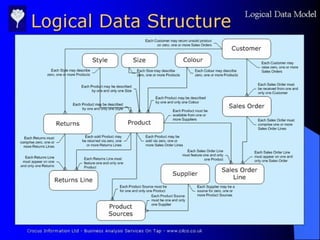
LOGICAL DATA STRUCTURE:
 The pictorial representation of entities and the
relationships between them is called an Entity
model
 A current system Logical Data Structure
(LDS) is a form of Entity model which
represents entities and their relationships in the
current system environment
Entities
 For those unfamiliar with the term "entity" its
nearest equivalent in more familiar
terminology is "file"
 A working definition, suitable at this stage, is
"something about which an organization keeps
data"
 An entity may be physical, e.g. Person,
Building, Machine etc, or conceptual, e.g. Cost
centre, project, etc.
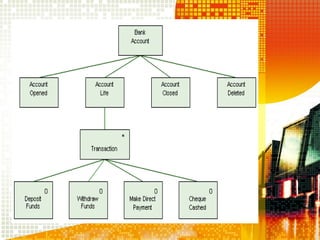
ENTITY LIFE HISTORY
 Entity Life Histories (Elhs) look at a system
from a third viewpoint, providing a means of
representing how entities change within a
system with the passage of time
 Elhs start with the creation of an entity,
record the sequence of changes which take place
during its life within the system and end with its
removal from the system
ELHS & PROCESSES
Elhs are used to help define :
 the logic associated with update processes
 an examination of processes provides a
starting point to describe ELH concepts and
terminology
 ELHS are concerned with update processes
only
 Facilitate more focus on reducing maintenances
and time effort in system development
 Integrate change when needed
 Widely useful in industry - proven techniques
 Part of career growth in IT - lots of interesting
and well-paying jobs!
 Shows a steep increase in demand for systems
analysis skills
CONCLUSION
SSAD; TOOLS & TECHNIQUES

SSAD; TOOLS & TECHNIQUES

  • 1.
  • 2.
    PRAGNESH DAVE :1 SAHELI KHERATKAR :2 SUREKHA RASKAR :3 RASIKA PATIL : 4 RICHA KOTHARI : 6 MINAL CHAUHAN : 7 NAMRATA JEURKAR : 8 SNEHAL BARI : 9 ASHWIN PATIL : 10 MALVIKA BANSAL : 11 RASHMI MAHASKAR : 12 TASVIR ZAIDI :13 SHILPA TAHAKAR: 14 PRESENTED BY
  • 3.
    Management Information System MISis a system consisting of people, machines, procedures, databases and data models, as its elements. The system gathers data from the internal and external sources of a organization, processes it and supplies information.
  • 4.
     SSAD wasintroduced in 1981 as the standard method of analysis and design developed by CCTA (Central Computing and Telecommunications Agency) for UK Government projects  SSAD was made mandatory for all new information system developments in 1983 HISTORY
  • 5.
     Structured SystemsAnalysis and Design (SSAD) is an integrated set of standards and guides for the analysis and design of computer systems  It is an integrated set of standards and guidelines consisting of : Structural standards, which define the structure of a development project in the form of explicitly defined tasks, with clearly defined interfaces between them, and also the tangible products Structured Systems Analysis and Design
  • 6.
     Improves productivity Improves flexibility  Improves quality by reducing error rates  Delivers the system to users on time  Prevents IT developers’ bureaucracy  Delivers systems that meets user's needs Benefits Of SSAD
  • 7.
    Disadvantages Of SSAD The size of SSAD is a big hindrance to using it in all circumstances  There is a large investment in cost and time involved in training people to use the technique to come to terms with  There are lot of standards for the preparation and presentation of documents
  • 8.
    Data Flow Diagram DataDictionary Decision Tree Structured English Decision Table Tools of SSAD
  • 9.
    Data Flow Diagram Data Flow Diagram is a graphical representation of the logical flow of the data.  It helps in expressing the system’s requirements in simple and understandable form  It is also known as a bubble chart.  Its aim is to clarify the system requirements and identify major transformations that will become programs in system design  It decomposes the requirement specifications down to the lowest level of details
  • 10.
    DFD contains 4graphic symbols for  Source/destination  Data flow  Process  Data store
  • 11.
  • 12.
     Sign: Arrow Symbol:  Meaning: Data Flow  Description : It identifies the data flow; it is a pipeline through which the data flows. Data Flow
  • 13.
     Sign: circle/bubble  Symbol: Meaning: Process  Description: It represents a process that transforms incoming data flow into outgoing flow. Process
  • 14.
     Sign: Rectangle Symbol:  Meaning: Data store  Description:It represents data store. Data store
  • 15.
     Processes shouldbe named and numbered  The direction of flow is from top to bottom from left to right  The name of the data stores, sources and destination is in capital letter.  Process and data flows name have the first letter capital  When a process is explored / divided in lower level they are number properly Rules for constructing /drawing DFD
  • 16.
    In case ofpayroll system to prepare salary statement for each employee data flow can be represented as- Employee Data Accounts Dept Payroll processing Salary statement Employee file Employee
  • 18.
     Though DFDis very effective when required design is not clear and the user requires only graphic representation but more than 10-12 processes will make system complex and difficult to understand. ADVANTAGE & DISADVANTAGE
  • 19.
    Data Dictionary A datadictionary is a structured repository of data. It is a set of rigorous definitions of all DFD data elements and data structure  It supports documentation in a better way  It serves as a common database for programmer and can be also used for control purposes
  • 20.
    THERE ARE THREECLASSES OF ITEMS TO BE DEFINED: 1. Data element - the smallest unit of data that provides for no further decomposition. 2. Data structure - a group of data elements handled as a unit 3. Data flows/stores - data flows are nothing but data structures in motion, whereas data stores are data structures at rest.
  • 21.
    Rules for constructingData Dictionary  The terms used to describe data structures are always in capital letters Assigned names should be straightforward and user oriented  There should be names for every data flow, data store, data structure and data element  Consistency checks should be performed  Identification numbers of the process and their names should be mentioned in the data dictionary
  • 22.
    STRUCTURED ENGLISH  StructuredEnglish aims at getting the benefits of both the programming logic and natural language  It uses logical construction and imperative sentences designed to carry out instructions for action  Decision are made through IF-THEN-ELSE statements  Its sentences should be precise, concise and clear in word and meaning
  • 25.
    Example of StructuredEnglish A bank will grant loan under the following conditions :  If a customer has an account with the bank and had no loan outstanding, loan will be granted  If a customer has an account with the bank but some amount is outstanding from previous loans then loan will be granted if special approval is given  Reject all loan applications in all other cases
  • 26.
    IF customer hasa Bank Account THEN IF Customer has no dues from previous account THEN Allow loan facility ELSE IF Management Approval is obtained THEN Allow loan facility ELSE Reject
  • 27.
    DECISION TREE  Cleargraphic representation of the logic, which looks like the branches of a tree, called decision tree  Easy to construct, read and update  Turns a decision table into a diagram & is read from left to right  Can be used to verify logic in problem that involves few complex decisions.
  • 28.
    Example: Computer dealergets a trade discount of 35% if the order size is 6 or more PCs, whereas for orders from educational institutions and individuals, 15% discount is allowed on order of 6-19 PCs, 20% on orders for 20-49 PCs; 30% on orders for 50 PCs or more Dealer 6 or more 35% Less than 6 NIL DISCOUNT POLICY Educational Institution or individual 50 or more 30% 20 – 49 20% 6-19 15% Less than 6 NIL Decision tree
  • 30.
    DECISION TABLE  Amatrix of rows and columns that shows conditions and actions  Decision rules state the procedure to be followed when certain conditions exist.  Decision table are best-suited for dealing with complex branching routines, e.g., inventory control  A condition is usually given a value of 'Y' for 'Yes, if is true", 'N' for 'No' and a dash for 'Do not care' in each rule.
  • 31.
     Decision tableconsists of four sections. A condition stub at the upper left, a condition entry at the upper right, an action stub at the lower left, and an action entry at the lower right Questions are listed in the condition stub and the action stub outlines the action to be taken to meet each condition  Condition entry part contains the answers to questions asked in the condition stub and the action entry part indicates the appropriate action Condition Stub Condition Entry Action Stub Action Entry
  • 32.
    In constricting adecision table, the following rules are observed:  A decision should be given a name to be written at the top left of the table  The logic should be independent of the sequence in which the condition rules were written but the action takes place in the order in which the events occur  Consistent and standardized language should be used  Duplication of the terms should be avoided to the maximum extent
  • 34.
    TECHNIQUES OF STRUCTURALSYSTEM ANALYSIS AND DESIGN Data Flow Modeling (DFM) Logical Data Structure (LDS) Entity Life History (ELH)
  • 35.
    DATA FLOW MODELING Pictorial representations of systems have long been acknowledged as being more effective than narrative  Conventional flowcharts have been used for many years, with considerable advantages over narrative Here are some examples:  System flowchart (for high-level system description)  Clerical procedure flowchart (for low-level description)  Computer run chart
  • 36.
    Disadvantages  They confusethe logical aspects of the system (what is done) with the specific physical implementation (how it is done)  They do not allow any easy transition from high-level broad description to detailed low-level description  They are "procedure orientated", placing the greatest emphasis on procedures in the system, rather than on data which appears only occasionally on the flow chart
  • 37.
    LOGICAL DATA STRUCTURE: The pictorial representation of entities and the relationships between them is called an Entity model  A current system Logical Data Structure (LDS) is a form of Entity model which represents entities and their relationships in the current system environment
  • 39.
    Entities  For thoseunfamiliar with the term "entity" its nearest equivalent in more familiar terminology is "file"  A working definition, suitable at this stage, is "something about which an organization keeps data"  An entity may be physical, e.g. Person, Building, Machine etc, or conceptual, e.g. Cost centre, project, etc.
  • 42.
    ENTITY LIFE HISTORY Entity Life Histories (Elhs) look at a system from a third viewpoint, providing a means of representing how entities change within a system with the passage of time  Elhs start with the creation of an entity, record the sequence of changes which take place during its life within the system and end with its removal from the system
  • 43.
    ELHS & PROCESSES Elhsare used to help define :  the logic associated with update processes  an examination of processes provides a starting point to describe ELH concepts and terminology  ELHS are concerned with update processes only
  • 44.
     Facilitate morefocus on reducing maintenances and time effort in system development  Integrate change when needed  Widely useful in industry - proven techniques  Part of career growth in IT - lots of interesting and well-paying jobs!  Shows a steep increase in demand for systems analysis skills CONCLUSION