Essentials of 
Database Design
Database Design 
It can be used to describe many different 
parts of the design of an overall database 
system 
Principally, and most correctly, it can be 
thought of as the logical design of the 
base data structures used to store the 
data
Database Design 
 In the relational model these are the tables and 
views. In an object database the entities and 
relationships map directly to object classes and 
named relationships 
 However, the term database design could also be 
used to apply to the overall process of designing, 
not just the base data structures, but also the 
forms and queries used as part of the overall 
database application within the database 
management system
Database Design 
The process of doing database design 
generally consists of a number of steps which 
will be carried out by the database designer. 
Usually, the designer must: 
Determine the relationships between the different 
data elements 
Overlay a logical structure upon the data on the 
basis of these relationships
ER Diagram (Entity Relationship Diagram) 
Database designs also include ER (entity-relationship 
model) diagrams 
An ER diagram is a diagram that helps to 
design databases in an efficient way 
Attributes in ER diagrams are usually modeled 
as an oval with the name of the attribute, linked 
to the entity or relationship that contains the 
attribute
ER Diagram (Entity Relationship Diagram) 
Database designs also include ER (entity-relationship 
model) diagrams 
An ER diagram is a diagram that helps to 
design databases in an efficient way 
Attributes in ER diagrams are usually modeled 
as an oval with the name of the attribute, linked 
to the entity or relationship that contains the 
attribute
A Sample 
Entity-relationship Diagram
Database design process 
1. Determine the purpose of the database - 
This helps prepare for the remaining 
steps 
2. Find and organize the information 
required - Gather all of the types of 
information to record in the database, such 
as product name and order number
Database design process 
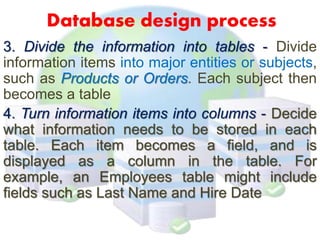
3. Divide the information into tables - Divide 
information items into major entities or subjects, 
such as Products or Orders. Each subject then 
becomes a table 
4. Turn information items into columns - Decide 
what information needs to be stored in each 
table. Each item becomes a field, and is 
displayed as a column in the table. For 
example, an Employees table might include 
fields such as Last Name and Hire Date
Database design process 
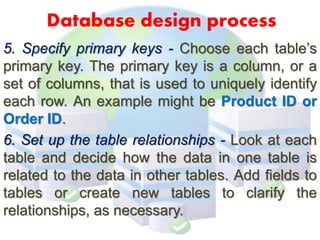
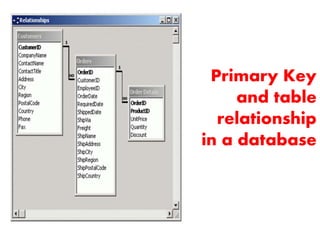
5. Specify primary keys - Choose each table’s 
primary key. The primary key is a column, or a 
set of columns, that is used to uniquely identify 
each row. An example might be Product ID or 
Order ID. 
6. Set up the table relationships - Look at each 
table and decide how the data in one table is 
related to the data in other tables. Add fields to 
tables or create new tables to clarify the 
relationships, as necessary.
Primary Key 
and table 
relationship 
in a database
Database design process 
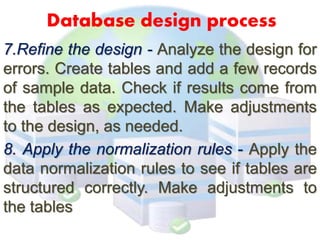
7.Refine the design - Analyze the design for 
errors. Create tables and add a few records 
of sample data. Check if results come from 
the tables as expected. Make adjustments 
to the design, as needed. 
8. Apply the normalization rules - Apply the 
data normalization rules to see if tables are 
structured correctly. Make adjustments to 
the tables
Designing Inputs, 
Outputs and Control
Input Integrity Controls 
 Use with all input mechanism from specific 
electronic device to standard keyboard inputs 
 Additional level of verification that helps reduce 
errors on input data 
 For example a system need a certain amount of 
information for a valid entry, but an input device 
cannot ensure that all the necessary fields have 
been entered 
 An additional level of verification, which will call a 
control is necessary to check for completeness
Common input control techniques 
Error Detection and Elimination 
 Field Combination Control. Verifies data in 
one field based on data in another field or 
fields 
Value limit Control. Identify when a value in a 
field is too large or too small 
Completeness Control. Ensures all necessary 
fields in an input form have been entered 
Data validation Control. Validate the input data 
for correctness and appropriateness
Common input control techniques 
Transaction Logging 
A technique by which any update to the 
database is logged with audit information 
such as user ID, date, time, input data, and 
type of update 
So that it can trace any errors or problems 
that occur. The more advanced database 
systems- such as those that run on servers, 
workstations, and mainframes
Common Input Control techniques 
Transaction Logging 
It has 2 main objective: 
 Helps discourage fraudulent transactions, If person 
knows that every transaction is logged, then that 
person is less apt to attempt a fraudulent 
transaction 
 Provide recovery mechanism for erroneous 
transaction, more sophisticated systems can 
provide a “before” and “after” image of he field 
that are change by the transaction, as well as audit 
trail of all transactions. Typically used only for 
highly sensitive or critical data files, but they do 
represent an important control mechanism that is 
available when necessary
Output Integrity Control 
Output from a system comes in various 
forms such as output that is used by 
other systems, printed reports, and 
data output on computer screens. 
The main purpose of it is to ensure 
that output arrives at the proper 
destination and is correct, 
accurate, current, and complete.
Destination Control 
 Ensure that output information is channeled to the 
correct person 
Systems with good controls printed 
destination and routing information on a 
report cover page along with the report 
Today ,business accomplish the same 
function of a control desk by placing 
printers in each of the locations that need 
printed reports
Completeness, Accuracy and 
Correctness Control 
This are the main function primarily of the 
internal processing of the system rather than 
any set of controls 
To ensure this, printing of control fields on 
the output report 
Every report must have a date and time 
stamp, both for the time the report was 
printed and the date of the report is 
reprinted due to previous error
Completeness, Accuracy and 
Correctness Control 
The following items are controls that should 
be printed on reports: 
 Date and time of report printing 
 Date and time of data on the report 
 Time period covered by the report 
 Beginning header with report identification and 
description 
 Destination of routing information 
 Pagination in the form “page-of-” 
 Control totals and cross footings 
 “End of Report” trailer 
 Report version number and version date
Design of System Inputs 
When designing inputs for the 
system, the system developer 
must perform four tasks: 
o Identify the devices and mechanisms 
that will be used to enter inputs 
o Identify all system inputs and develop a 
list with data content of each 
o Design and prototype the electronic 
forms(the window the user works with) 
and other inputs
Design of System Inputs 
Identifying Device Mechanism 
 Often when analysts begin developing a system, 
they assume that all input will be entered via 
electronic, graphical forms because they are now 
so common on a personal computers and 
workstations 
 All data must be error-free, it must be validated; 
avoid reentering the information as much as 
possible avoid human involvement
Identifying device mechanism 
Devices that allow data captured without 
human keystroking: 
Magnetic Card strip readers 
Bar Code readers 
Optical-character recognition reader and 
scanner 
Touch screens and devices 
Electronic pens and writing surfaces 
Digitizers, such as digital cameras and 
digital audio devices
Developing list of Inputs 
and data requirement 
Provides check of the quality of analysis 
models 
It also identify the flows that cross the 
system boundary 
Analysis Model: Structured approach and 
Object Oriented Approach
Developing list of Inputs 
and data requirement 
Structured Approach 
The first task is to define the automation 
boundary 
The point is not all processing done with 
computer, However, the input data flows 
crossing the boundary are clearly defined, 
so the required inputs will be the new order 
information data flow
DFD showing 
automation boundary
Developing list of Inputs 
and data requirement 
Object Oriented Approach 
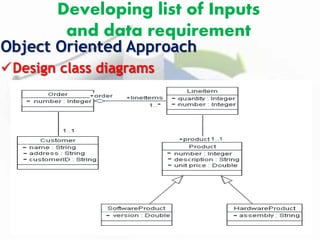
Sequence diagrams identify each incoming 
message, and the Design class diagrams 
contain the pseudocode to verify the 
characteristic of the input
Developing list of Inputs 
and data requirement 
Object Oriented Approach 
Sequence diagram
Developing list of Inputs 
and data requirement 
Object Oriented Approach 
Design class diagrams
Designing and 
Prototyping Input Forms 
Good design principles dictate that the 
paper form and its electronic 
counterpart should have the same 
general layout and sequence of data 
fields 
In other words, this will be use to 
enter the information into the system
Designing of System Outputs 
Determining type of output 
Making list of specific reports 
based on the application design 
Designing and prototyping reports
Designing of System Outputs 
Determining Type of Output 
Detailed Report 
Carry out the day-to-day processing of the 
business, contain detailed information about the 
transaction 
Summary Report 
Recaps or summarize detailed information over 
a period of time or some category 
Exception Report 
A Report that contains only information about 
nonstandard, conditions 
Executive Report 
A report use for information resources that is 
normally used for strategic decisions
Designing of System Outputs 
Making list of specific report 
oThe objective is to ensure that each of 
the required outputs from the system is 
specified correctly 
oWhereas the data content of the input 
forms must support the needs of the 
database, the data content of the 
outputs must support the information 
requirements of the report users.
Designing of System Outputs 
Designing and Prototyping Reports 
o Key principles during design of output reports: 
What is the objective of the report? Who is the 
intended audience? 
o Designer must decide on the level of detail and 
format of the report, they can decide if they know 
the objective of the report 
o Labels and headings should be used to ensure the 
correct interpretation of the report data and 
make sure that every report must have a 
meaningful title to indicate data content.
Output Design Objectives 
 Output is information delivered to users through 
information system by the ways of networks 
 Some data require extensive processing before they 
become suitable output 
 Output can take many forms; Traditional hard copy 
of printed reports and soft copy such as computer 
screens, microforms and audio output 
 To create most useful output possible, system 
analyst works closely with the user through an 
interactive process until the result is considered to 
be satisfactory
6 Objectives for Output Design 
 Designing output to serve a specific purpose 
 Making output meaningful to the user 
 Delivering the appropriate quantity of output 
 Providing appropriate output distribution 
 Providing output on time 
 Choosing the most effective output method
Objectives for Output design 
Designing output to serve a specific purpose 
o Output is designed based on the 
purpose that the system analyst find 
out during information requirement 
determination phase of analysis
Objectives for Output design 
Designing output to fit the user 
o It is more practical to create user-specific or user-customizable 
output when designing for a decision 
support system or highly interactive applications 
such as those mounted on the web 
o On the basis of interview, observation, cost 
considerations and perhaps prototypes, it will be 
possible to design output that addresses what 
many, if not all, users need and prefer.
Objectives for Output design 
Delivering appropriate Quantity of Output 
o More is not always better, especially where the 
amount of output is concerned. Part of the task of 
designing output is deciding what quantity of 
output is correct from users 
o The Problem with information overload is so 
prevalent as to have become a cliché, but it 
remains a valid concern 
o No one is served if excess information is given 
only to flaunt the capabilities of the system
Objectives for Output design 
Making sure the output is where it is needed 
o Output is often produced at one location(for 
example, in the data-processing department) 
and then distributed to the user 
o Appropriate distribution is still an important 
objective for the system analyst, to be used 
and useful, output must be presented to the 
right user
Objectives for Output design 
Providing output on time 
o Many reports are required on a daily basis, 
some only monthly, other annually, and others 
only by exception 
o Using well-publicized Web-based output can 
alleviate some problems with the timing of 
output distribution as well. Accurate timing of 
output can be critical to business operation
Objectives for Output design 
Choosing the right output method 
o Output can come in many forms, 
with the movement to online 
systems, much output now appears 
on display screen, and users have 
the option of printing it out with 
their own printer.
Output Technologies 
Printer 
Advantages: Affordable in most organization 
Flexible in time, location, and capabilities 
Handles large volume of outputs 
Reaches many inexpensively 
Highly reliable with little down time 
Disadvantages: May be noisy, Compatibility problems 
with computer software, May require special, 
expensive supplies, Still requires operator intervention, 
Depending on model, may be slow
Output Technologies 
Display Screen 
Advantages: Interactive, Works online, real-time 
transmission, Quiet, Takes advantage of 
computer capabilities for movement within 
databases and files, Good for frequently 
accessed 
Disadvantages: Require cabling and setup space, Still 
may require printed documentation, Can be expensive 
if required for many users
Output Technologies 
Audio Output 
Advantages: Good for individual user, Transient 
message, worker needs hands free, output is 
highly relative 
Disadvantages: Expensive to develop, needs dedicated 
room where output will not interfere with other tasks, 
has limited application
Output Technologies 
DVD, CD-ROM, and CD-RW 
Advantages: Has large capacity, Allow 
multimedia output, has speedy retrieval, less 
vulnerable to damage 
Disadvantages: Expensive to develop, more difficult to 
use on a network
Output Technologies 
Electronic Output (email, faxes, and web pages) 
Advantages: Reduces paper, can be updated 
very easily, Eliminates “telephone tag”, can be 
“broadcast”, can be more interactive 
Disadvantages: Has generally lower resolution, Not 
conducive to formatting, difficult to convey context of 
messages (email), Web sites need diligent maintenance
Factors to considered 
when choosing output technology 
1. Who will use the output(requisite quality)? 
2. How many people need the output? 
3. Where is the output needed (distribution/ logistics)? 
4. What is the purpose of output? 
5. What is the speed with which output is needed? 
6. How frequently will the output be accessed? 
7. How long will(or must) the output be stored? 
8. Under what special regulation is the output produced, stored, and 
distributed? 
9. What are the initial and ongoing costs of maintenance supplies? 
10. What are the environmental requirements (noise absorption, controlled 
temperature, space for equipment, and cabling) for output technologies?

Database Design

  • 1.
  • 2.
    Database Design Itcan be used to describe many different parts of the design of an overall database system Principally, and most correctly, it can be thought of as the logical design of the base data structures used to store the data
  • 3.
    Database Design In the relational model these are the tables and views. In an object database the entities and relationships map directly to object classes and named relationships  However, the term database design could also be used to apply to the overall process of designing, not just the base data structures, but also the forms and queries used as part of the overall database application within the database management system
  • 4.
    Database Design Theprocess of doing database design generally consists of a number of steps which will be carried out by the database designer. Usually, the designer must: Determine the relationships between the different data elements Overlay a logical structure upon the data on the basis of these relationships
  • 5.
    ER Diagram (EntityRelationship Diagram) Database designs also include ER (entity-relationship model) diagrams An ER diagram is a diagram that helps to design databases in an efficient way Attributes in ER diagrams are usually modeled as an oval with the name of the attribute, linked to the entity or relationship that contains the attribute
  • 6.
    ER Diagram (EntityRelationship Diagram) Database designs also include ER (entity-relationship model) diagrams An ER diagram is a diagram that helps to design databases in an efficient way Attributes in ER diagrams are usually modeled as an oval with the name of the attribute, linked to the entity or relationship that contains the attribute
  • 7.
  • 8.
    Database design process 1. Determine the purpose of the database - This helps prepare for the remaining steps 2. Find and organize the information required - Gather all of the types of information to record in the database, such as product name and order number
  • 9.
    Database design process 3. Divide the information into tables - Divide information items into major entities or subjects, such as Products or Orders. Each subject then becomes a table 4. Turn information items into columns - Decide what information needs to be stored in each table. Each item becomes a field, and is displayed as a column in the table. For example, an Employees table might include fields such as Last Name and Hire Date
  • 10.
    Database design process 5. Specify primary keys - Choose each table’s primary key. The primary key is a column, or a set of columns, that is used to uniquely identify each row. An example might be Product ID or Order ID. 6. Set up the table relationships - Look at each table and decide how the data in one table is related to the data in other tables. Add fields to tables or create new tables to clarify the relationships, as necessary.
  • 11.
    Primary Key andtable relationship in a database
  • 12.
    Database design process 7.Refine the design - Analyze the design for errors. Create tables and add a few records of sample data. Check if results come from the tables as expected. Make adjustments to the design, as needed. 8. Apply the normalization rules - Apply the data normalization rules to see if tables are structured correctly. Make adjustments to the tables
  • 13.
  • 14.
    Input Integrity Controls  Use with all input mechanism from specific electronic device to standard keyboard inputs  Additional level of verification that helps reduce errors on input data  For example a system need a certain amount of information for a valid entry, but an input device cannot ensure that all the necessary fields have been entered  An additional level of verification, which will call a control is necessary to check for completeness
  • 15.
    Common input controltechniques Error Detection and Elimination  Field Combination Control. Verifies data in one field based on data in another field or fields Value limit Control. Identify when a value in a field is too large or too small Completeness Control. Ensures all necessary fields in an input form have been entered Data validation Control. Validate the input data for correctness and appropriateness
  • 16.
    Common input controltechniques Transaction Logging A technique by which any update to the database is logged with audit information such as user ID, date, time, input data, and type of update So that it can trace any errors or problems that occur. The more advanced database systems- such as those that run on servers, workstations, and mainframes
  • 17.
    Common Input Controltechniques Transaction Logging It has 2 main objective:  Helps discourage fraudulent transactions, If person knows that every transaction is logged, then that person is less apt to attempt a fraudulent transaction  Provide recovery mechanism for erroneous transaction, more sophisticated systems can provide a “before” and “after” image of he field that are change by the transaction, as well as audit trail of all transactions. Typically used only for highly sensitive or critical data files, but they do represent an important control mechanism that is available when necessary
  • 18.
    Output Integrity Control Output from a system comes in various forms such as output that is used by other systems, printed reports, and data output on computer screens. The main purpose of it is to ensure that output arrives at the proper destination and is correct, accurate, current, and complete.
  • 19.
    Destination Control Ensure that output information is channeled to the correct person Systems with good controls printed destination and routing information on a report cover page along with the report Today ,business accomplish the same function of a control desk by placing printers in each of the locations that need printed reports
  • 20.
    Completeness, Accuracy and Correctness Control This are the main function primarily of the internal processing of the system rather than any set of controls To ensure this, printing of control fields on the output report Every report must have a date and time stamp, both for the time the report was printed and the date of the report is reprinted due to previous error
  • 21.
    Completeness, Accuracy and Correctness Control The following items are controls that should be printed on reports:  Date and time of report printing  Date and time of data on the report  Time period covered by the report  Beginning header with report identification and description  Destination of routing information  Pagination in the form “page-of-”  Control totals and cross footings  “End of Report” trailer  Report version number and version date
  • 22.
    Design of SystemInputs When designing inputs for the system, the system developer must perform four tasks: o Identify the devices and mechanisms that will be used to enter inputs o Identify all system inputs and develop a list with data content of each o Design and prototype the electronic forms(the window the user works with) and other inputs
  • 23.
    Design of SystemInputs Identifying Device Mechanism  Often when analysts begin developing a system, they assume that all input will be entered via electronic, graphical forms because they are now so common on a personal computers and workstations  All data must be error-free, it must be validated; avoid reentering the information as much as possible avoid human involvement
  • 24.
    Identifying device mechanism Devices that allow data captured without human keystroking: Magnetic Card strip readers Bar Code readers Optical-character recognition reader and scanner Touch screens and devices Electronic pens and writing surfaces Digitizers, such as digital cameras and digital audio devices
  • 25.
    Developing list ofInputs and data requirement Provides check of the quality of analysis models It also identify the flows that cross the system boundary Analysis Model: Structured approach and Object Oriented Approach
  • 26.
    Developing list ofInputs and data requirement Structured Approach The first task is to define the automation boundary The point is not all processing done with computer, However, the input data flows crossing the boundary are clearly defined, so the required inputs will be the new order information data flow
  • 27.
  • 28.
    Developing list ofInputs and data requirement Object Oriented Approach Sequence diagrams identify each incoming message, and the Design class diagrams contain the pseudocode to verify the characteristic of the input
  • 29.
    Developing list ofInputs and data requirement Object Oriented Approach Sequence diagram
  • 30.
    Developing list ofInputs and data requirement Object Oriented Approach Design class diagrams
  • 31.
    Designing and PrototypingInput Forms Good design principles dictate that the paper form and its electronic counterpart should have the same general layout and sequence of data fields In other words, this will be use to enter the information into the system
  • 32.
    Designing of SystemOutputs Determining type of output Making list of specific reports based on the application design Designing and prototyping reports
  • 33.
    Designing of SystemOutputs Determining Type of Output Detailed Report Carry out the day-to-day processing of the business, contain detailed information about the transaction Summary Report Recaps or summarize detailed information over a period of time or some category Exception Report A Report that contains only information about nonstandard, conditions Executive Report A report use for information resources that is normally used for strategic decisions
  • 34.
    Designing of SystemOutputs Making list of specific report oThe objective is to ensure that each of the required outputs from the system is specified correctly oWhereas the data content of the input forms must support the needs of the database, the data content of the outputs must support the information requirements of the report users.
  • 35.
    Designing of SystemOutputs Designing and Prototyping Reports o Key principles during design of output reports: What is the objective of the report? Who is the intended audience? o Designer must decide on the level of detail and format of the report, they can decide if they know the objective of the report o Labels and headings should be used to ensure the correct interpretation of the report data and make sure that every report must have a meaningful title to indicate data content.
  • 36.
    Output Design Objectives  Output is information delivered to users through information system by the ways of networks  Some data require extensive processing before they become suitable output  Output can take many forms; Traditional hard copy of printed reports and soft copy such as computer screens, microforms and audio output  To create most useful output possible, system analyst works closely with the user through an interactive process until the result is considered to be satisfactory
  • 37.
    6 Objectives forOutput Design  Designing output to serve a specific purpose  Making output meaningful to the user  Delivering the appropriate quantity of output  Providing appropriate output distribution  Providing output on time  Choosing the most effective output method
  • 38.
    Objectives for Outputdesign Designing output to serve a specific purpose o Output is designed based on the purpose that the system analyst find out during information requirement determination phase of analysis
  • 39.
    Objectives for Outputdesign Designing output to fit the user o It is more practical to create user-specific or user-customizable output when designing for a decision support system or highly interactive applications such as those mounted on the web o On the basis of interview, observation, cost considerations and perhaps prototypes, it will be possible to design output that addresses what many, if not all, users need and prefer.
  • 40.
    Objectives for Outputdesign Delivering appropriate Quantity of Output o More is not always better, especially where the amount of output is concerned. Part of the task of designing output is deciding what quantity of output is correct from users o The Problem with information overload is so prevalent as to have become a cliché, but it remains a valid concern o No one is served if excess information is given only to flaunt the capabilities of the system
  • 41.
    Objectives for Outputdesign Making sure the output is where it is needed o Output is often produced at one location(for example, in the data-processing department) and then distributed to the user o Appropriate distribution is still an important objective for the system analyst, to be used and useful, output must be presented to the right user
  • 42.
    Objectives for Outputdesign Providing output on time o Many reports are required on a daily basis, some only monthly, other annually, and others only by exception o Using well-publicized Web-based output can alleviate some problems with the timing of output distribution as well. Accurate timing of output can be critical to business operation
  • 43.
    Objectives for Outputdesign Choosing the right output method o Output can come in many forms, with the movement to online systems, much output now appears on display screen, and users have the option of printing it out with their own printer.
  • 44.
    Output Technologies Printer Advantages: Affordable in most organization Flexible in time, location, and capabilities Handles large volume of outputs Reaches many inexpensively Highly reliable with little down time Disadvantages: May be noisy, Compatibility problems with computer software, May require special, expensive supplies, Still requires operator intervention, Depending on model, may be slow
  • 45.
    Output Technologies DisplayScreen Advantages: Interactive, Works online, real-time transmission, Quiet, Takes advantage of computer capabilities for movement within databases and files, Good for frequently accessed Disadvantages: Require cabling and setup space, Still may require printed documentation, Can be expensive if required for many users
  • 46.
    Output Technologies AudioOutput Advantages: Good for individual user, Transient message, worker needs hands free, output is highly relative Disadvantages: Expensive to develop, needs dedicated room where output will not interfere with other tasks, has limited application
  • 47.
    Output Technologies DVD,CD-ROM, and CD-RW Advantages: Has large capacity, Allow multimedia output, has speedy retrieval, less vulnerable to damage Disadvantages: Expensive to develop, more difficult to use on a network
  • 48.
    Output Technologies ElectronicOutput (email, faxes, and web pages) Advantages: Reduces paper, can be updated very easily, Eliminates “telephone tag”, can be “broadcast”, can be more interactive Disadvantages: Has generally lower resolution, Not conducive to formatting, difficult to convey context of messages (email), Web sites need diligent maintenance
  • 49.
    Factors to considered when choosing output technology 1. Who will use the output(requisite quality)? 2. How many people need the output? 3. Where is the output needed (distribution/ logistics)? 4. What is the purpose of output? 5. What is the speed with which output is needed? 6. How frequently will the output be accessed? 7. How long will(or must) the output be stored? 8. Under what special regulation is the output produced, stored, and distributed? 9. What are the initial and ongoing costs of maintenance supplies? 10. What are the environmental requirements (noise absorption, controlled temperature, space for equipment, and cabling) for output technologies?

Editor's Notes

  • #27 Automation boundary on a system-level DFD images
  • #29 Sequence diagram and design class diagram
  • #30 Sequence diagram and design class diagram
  • #31 Sequence diagram and design class diagram