Unit 2
Classical Systems Development
Methodology
Contents
Concept of System development
Classical Systems Development Life Cycle (SDLC) phases
Feasibility study
Technical Feasibility
Economic Feasibility
Operational Feasibility
Fact finding techniques
Tools for documenting procedures and decisions
Tools for systems development
Understanding the format of System Requirement Specification
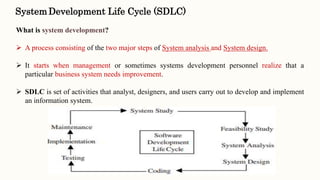
SystemDevelopment Life Cycle (SDLC)
What is system development?
 A process consisting of the two major steps of System analysis and System design.
 It starts when management or sometimes systems development personnel realize that a
particular business system needs improvement.
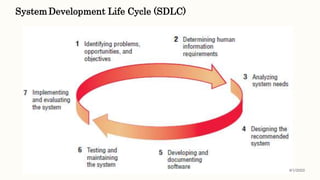
 SDLC is set of activities that analyst, designers, and users carry out to develop and implement
an information system.
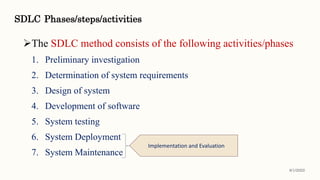
SDLC Phases/steps/activities
The SDLC method consists of the following activities/phases
1. Preliminary investigation
2. Determination of system requirements
3. Design of system
4. Development of software
5. System testing
6. System Deployment
7. System Maintenance
8/1/2022
Implementation and Evaluation
SystemDevelopment Life Cycle (SDLC)
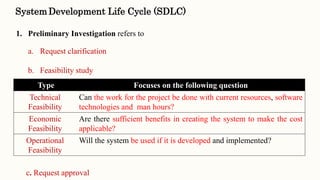
1. Preliminary Investigation refers to
a. Request clarification
b. Feasibility study
c. Request approval
Type Focuses on the following question
Technical
Feasibility
Can the work for the project be done with current resources, software
technologies and man hours?
Economic
Feasibility
Are there sufficient benefits in creating the system to make the cost
applicable?
Operational
Feasibility
Will the system be used if it is developed and implemented?
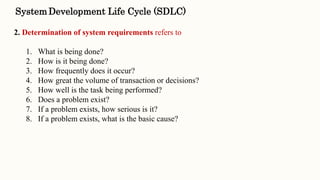
2. Determination of system requirements refers to
1. What is being done?
2. How is it being done?
3. How frequently does it occur?
4. How great the volume of transaction or decisions?
5. How well is the task being performed?
6. Does a problem exist?
7. If a problem exists, how serious is it?
8. If a problem exists, what is the basic cause?
SystemDevelopment Life Cycle (SDLC)
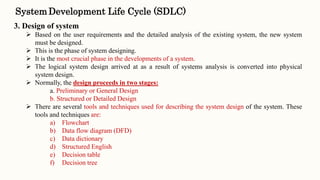
3. Design of system
 Based on the user requirements and the detailed analysis of the existing system, the new system
must be designed.
 This is the phase of system designing.
 It is the most crucial phase in the developments of a system.
 The logical system design arrived at as a result of systems analysis is converted into physical
system design.
 Normally, the design proceeds in two stages:
a. Preliminary or General Design
b. Structured or Detailed Design
 There are several tools and techniques used for describing the system design of the system. These
tools and techniques are:
a) Flowchart
b) Data flow diagram (DFD)
c) Data dictionary
d) Structured English
e) Decision table
f) Decision tree
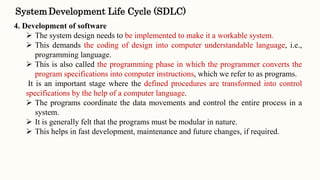
4. Development of software
 The system design needs to be implemented to make it a workable system.
 This demands the coding of design into computer understandable language, i.e.,
programming language.
 This is also called the programming phase in which the programmer converts the
program specifications into computer instructions, which we refer to as programs.
It is an important stage where the defined procedures are transformed into control
specifications by the help of a computer language.
 The programs coordinate the data movements and control the entire process in a
system.
 It is generally felt that the programs must be modular in nature.
 This helps in fast development, maintenance and future changes, if required.
SystemDevelopment Life Cycle (SDLC)
5. System testing
 Before actually implementing the new system into operation, a test run of the
system is done for removing the bugs, if any.
 It is an important phase of a successful system.
 After codifying the whole programs of the system, a test plan should be
developed and run on a given set of test data.
 The output of the test run should match the expected results. Sometimes, system
testing is considered a part of implementation process.
SystemDevelopment Life Cycle (SDLC)
6. Implementation and Evaluation
 Implementation is the stage of a project during which theory is turned into practice.
 The major steps involved in this phase are:
• Acquisition and Installation of Hardware and Software
• Conversion
• User Training & Documentation
• The hardware and the relevant software required for running the system must be
made fully operational before implementation.
• The conversion is also one of the most critical and expensive activities in the
system development life cycle.
SystemDevelopment Life Cycle (SDLC)
6. Implementation and Evaluation (Continue…)
 The data from the old system needs to be converted to operate in the new format of
the new system. The database needs to be setup with security and recovery
procedures fully defined.
 During this phase, all the programs of the system are loaded onto the user’s
computer. After loading the system, training of the user starts.
 Main topics of such type of training are:
• How to execute the package ?
• How to enter the data ?
• How to process the data (processing details) ?
• How to take out the reports ?
SystemDevelopment Life Cycle (SDLC)
8/1/2022
Fact Finding Techniques
 It is a technique or method that analyst use for collecting data about
requirements.
 The following are the techniques using which analyst can ensure an accurate and
comprehensive investigation.
 Information gathering in large and complex organizations is not an easy task. It
has to be gathered in an organized way so that
a. No system detail is left out
b. Right problems are identified
c. Repetitive work is avoided
d. Wrong or incomplete details are not collected
8/1/2022
 The various methods (information gathering tools) used for fact finding are :
 Interviews
 Questionnaires
 Review of Written Documents (Record review)
 On-site observations
Fact Finding Techniques
8/1/2022
Interview
It is suitable for getting qualitative information.
 There are two types of interviews
1. Structured Interview
• The interviewee is asked a standard set of questions in a particular order.
• Cost of preparation is high
• Results in shorter information
2. Unstructured Interview
• May produce information about areas that overlooked or not thought to be
important.
• Undertaken in an question and answer format.
• Takes some extra time to collect facts about data.
8/1/2022
 Questionnaires are another way of information gathering where the potential users of
the system are given questionnaires to be filled up and returned to the analyst.
 Questionnaires are useful when the analyst need to gather information from a large
number of people in a short time period.
 May not be successful with busy key personal
 Should be well-prepared
 It can be
 Open Response Question form
 Close Response Question form
Questionnaire
Fact Finding Techniques
Record Review
 The information related to the system is published in the sources like newspapers,
magazines, journals, documents etc.
 This record review helps the analyst to get valuable information about the system and
the organization.
 An existing system can be better understood by examining existing documents, forms
and files.
 Records may include:
(i) Written policy manuals.
(ii) Rules and regulations.
(iii) Standard operating procedures used in the organization.
(iv) Forms and documents. 8/1/2022
Observation
 Analyst himself visits the organization and observes and understands the flow of
documents, working of the existing system, the users of the system etc.
 Observation can look for:
(a) Operational inefficiencies.
(b) Alternate routes and procedures.
(c) Interruptions in the normal flow of work
(d) The usage of files and documents
(e) Informal communication channels etc.
 The analyst may observe the unwanted things as well and simply cause delay in the
development of the new system.
Fact Finding Techniques
8/1/2022
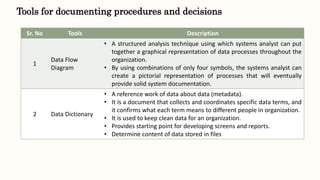
Tools for documenting procedures and decisions
Sr. No Tools Description
1
Data Flow
Diagram
• A structured analysis technique using which systems analyst can put
together a graphical representation of data processes throughout the
organization.
• By using combinations of only four symbols, the systems analyst can
create a pictorial representation of processes that will eventually
provide solid system documentation.
2 Data Dictionary
• A reference work of data about data (metadata).
• It is a document that collects and coordinates specific data terms, and
it confirms what each term means to different people in organization.
• It is used to keep clean data for an organization.
• Provides starting point for developing screens and reports.
• Determine content of data stored in files
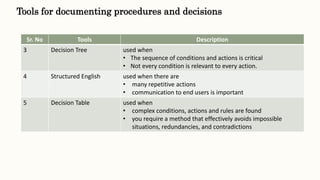
Tools for documenting procedures and decisions
Sr. No Tools Description
3 Decision Tree used when
• The sequence of conditions and actions is critical
• Not every condition is relevant to every action.
4 Structured English used when there are
• many repetitive actions
• communication to end users is important
5 Decision Table used when
• complex conditions, actions and rules are found
• you require a method that effectively avoids impossible
situations, redundancies, and contradictions
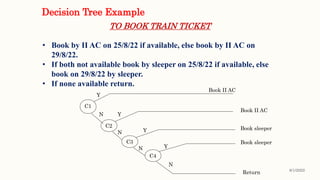
Decision Tree Example
TO BOOK TRAIN TICKET
• Book by II AC on 25/8/22 if available, else book by II AC on
29/8/22.
• If both not available book by sleeper on 25/8/22 if available, else
book on 29/8/22 by sleeper.
• If none available return.
C1
C2
C3
C4
Book II AC
Book sleeper
Book sleeper
Return
Y
Y
Y
N
N
N
N
Book II AC
Y
8/1/2022
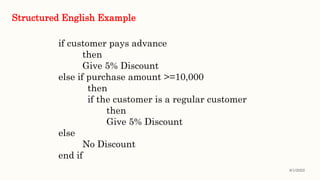
if customer pays advance
then
Give 5% Discount
else if purchase amount >=10,000
then
if the customer is a regular customer
then
Give 5% Discount
else
No Discount
end if
Structured English Example
8/1/2022
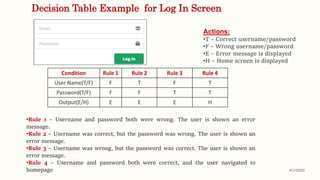
Decision Table Example for Log In Screen
Condition Rule 1 Rule 2 Rule 3 Rule 4
User Name(T/F) F T F T
Password(T/F) F F T T
Output(E/H) E E E H
•Rule 1 – Username and password both were wrong. The user is shown an error
message.
•Rule 2 – Username was correct, but the password was wrong. The user is shown an
error message.
•Rule 3 – Username was wrong, but the password was correct. The user is shown an
error message.
•Rule 4 – Username and password both were correct, and the user navigated to
homepage
Actions:
•T – Correct username/password
•F – Wrong username/password
•E – Error message is displayed
•H – Home screen is displayed
8/1/2022
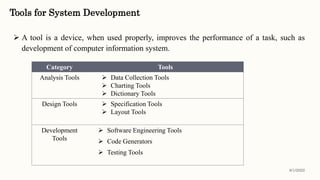
Tools for System Development
 A tool is a device, when used properly, improves the performance of a task, such as
development of computer information system.
Category Tools
Analysis Tools  Data Collection Tools
 Charting Tools
 Dictionary Tools
Design Tools  Specification Tools
 Layout Tools
Development
Tools
 Software Engineering Tools
 Code Generators
 Testing Tools
8/1/2022
Software Requirement Specification (SRS)
 A software requirements specification (SRS) is a description of a software system to be developed.
 An SRS is basically an organization's understanding (in writing) or blueprint of a customer or client's
system requirements and dependencies at a particular point of time (usually) prior to any actual
design or development work.
 SRS provide a realistic basis for estimating product costs, risks, and schedules.
 It's important that SRS contains functional and nonfunctional requirements only; it doesn't offer
design suggestions, possible solutions to technology or business issues, or any other information other
than what the development team understands the customer's system requirements to be.
 SRS establishes the basis for an agreement between customers and contractors or suppliers on what
the software product is to do as well as what it is not expected to do.
 SRS permits a rigorous assessment of requirements before design can begin and reduces later
redesign.
8/1/2022
1. Feedback to the Customer : An SRS is the customer's assurance that the development organization
understands the issues or problems to be solved and the software behavior necessary to address those
problems
2. Breaking the Requirements Down : The simple act of writing down software requirements in a well-
designed format organize information, places borders around the problem, solidifies ideas, and helps
break down the problem into its component parts in an orderly fashion.
3. Facilitating other Documentation : The SRS serves as the parent document to subsequent documents,
such as the software design specification. Therefore, the SRS must contain sufficient detail in the
functional system requirements so that a design solution can be devised.
4. Product Validation: The SRS also serves as the parent document for testing and validation strategies that
will be applied to the requirements for verification
Software Requirement Specification (SRS) Goals
8/1/2022
SRS Format
Introduction
Overall Description
External Interface Requirements
System Features
Other non-functional requirements
Other requirements
8/1/2022
!!..Thank You.!!

Unit 2 Classical Systems Development Methodology.pptx

  • 1.
    Unit 2 Classical SystemsDevelopment Methodology
  • 2.
    Contents Concept of Systemdevelopment Classical Systems Development Life Cycle (SDLC) phases Feasibility study Technical Feasibility Economic Feasibility Operational Feasibility Fact finding techniques Tools for documenting procedures and decisions Tools for systems development Understanding the format of System Requirement Specification
  • 3.
    SystemDevelopment Life Cycle(SDLC) What is system development?  A process consisting of the two major steps of System analysis and System design.  It starts when management or sometimes systems development personnel realize that a particular business system needs improvement.  SDLC is set of activities that analyst, designers, and users carry out to develop and implement an information system.
  • 4.
    SDLC Phases/steps/activities The SDLCmethod consists of the following activities/phases 1. Preliminary investigation 2. Determination of system requirements 3. Design of system 4. Development of software 5. System testing 6. System Deployment 7. System Maintenance 8/1/2022 Implementation and Evaluation
  • 5.
    SystemDevelopment Life Cycle(SDLC) 1. Preliminary Investigation refers to a. Request clarification b. Feasibility study c. Request approval Type Focuses on the following question Technical Feasibility Can the work for the project be done with current resources, software technologies and man hours? Economic Feasibility Are there sufficient benefits in creating the system to make the cost applicable? Operational Feasibility Will the system be used if it is developed and implemented?
  • 6.
    2. Determination ofsystem requirements refers to 1. What is being done? 2. How is it being done? 3. How frequently does it occur? 4. How great the volume of transaction or decisions? 5. How well is the task being performed? 6. Does a problem exist? 7. If a problem exists, how serious is it? 8. If a problem exists, what is the basic cause? SystemDevelopment Life Cycle (SDLC)
  • 7.
    SystemDevelopment Life Cycle(SDLC) 3. Design of system  Based on the user requirements and the detailed analysis of the existing system, the new system must be designed.  This is the phase of system designing.  It is the most crucial phase in the developments of a system.  The logical system design arrived at as a result of systems analysis is converted into physical system design.  Normally, the design proceeds in two stages: a. Preliminary or General Design b. Structured or Detailed Design  There are several tools and techniques used for describing the system design of the system. These tools and techniques are: a) Flowchart b) Data flow diagram (DFD) c) Data dictionary d) Structured English e) Decision table f) Decision tree
  • 8.
    4. Development ofsoftware  The system design needs to be implemented to make it a workable system.  This demands the coding of design into computer understandable language, i.e., programming language.  This is also called the programming phase in which the programmer converts the program specifications into computer instructions, which we refer to as programs. It is an important stage where the defined procedures are transformed into control specifications by the help of a computer language.  The programs coordinate the data movements and control the entire process in a system.  It is generally felt that the programs must be modular in nature.  This helps in fast development, maintenance and future changes, if required. SystemDevelopment Life Cycle (SDLC)
  • 9.
    5. System testing Before actually implementing the new system into operation, a test run of the system is done for removing the bugs, if any.  It is an important phase of a successful system.  After codifying the whole programs of the system, a test plan should be developed and run on a given set of test data.  The output of the test run should match the expected results. Sometimes, system testing is considered a part of implementation process. SystemDevelopment Life Cycle (SDLC)
  • 10.
    6. Implementation andEvaluation  Implementation is the stage of a project during which theory is turned into practice.  The major steps involved in this phase are: • Acquisition and Installation of Hardware and Software • Conversion • User Training & Documentation • The hardware and the relevant software required for running the system must be made fully operational before implementation. • The conversion is also one of the most critical and expensive activities in the system development life cycle. SystemDevelopment Life Cycle (SDLC)
  • 11.
    6. Implementation andEvaluation (Continue…)  The data from the old system needs to be converted to operate in the new format of the new system. The database needs to be setup with security and recovery procedures fully defined.  During this phase, all the programs of the system are loaded onto the user’s computer. After loading the system, training of the user starts.  Main topics of such type of training are: • How to execute the package ? • How to enter the data ? • How to process the data (processing details) ? • How to take out the reports ? SystemDevelopment Life Cycle (SDLC)
  • 12.
  • 13.
    Fact Finding Techniques It is a technique or method that analyst use for collecting data about requirements.  The following are the techniques using which analyst can ensure an accurate and comprehensive investigation.  Information gathering in large and complex organizations is not an easy task. It has to be gathered in an organized way so that a. No system detail is left out b. Right problems are identified c. Repetitive work is avoided d. Wrong or incomplete details are not collected 8/1/2022
  • 14.
     The variousmethods (information gathering tools) used for fact finding are :  Interviews  Questionnaires  Review of Written Documents (Record review)  On-site observations Fact Finding Techniques 8/1/2022
  • 15.
    Interview It is suitablefor getting qualitative information.  There are two types of interviews 1. Structured Interview • The interviewee is asked a standard set of questions in a particular order. • Cost of preparation is high • Results in shorter information 2. Unstructured Interview • May produce information about areas that overlooked or not thought to be important. • Undertaken in an question and answer format. • Takes some extra time to collect facts about data. 8/1/2022
  • 16.
     Questionnaires areanother way of information gathering where the potential users of the system are given questionnaires to be filled up and returned to the analyst.  Questionnaires are useful when the analyst need to gather information from a large number of people in a short time period.  May not be successful with busy key personal  Should be well-prepared  It can be  Open Response Question form  Close Response Question form Questionnaire
  • 17.
    Fact Finding Techniques RecordReview  The information related to the system is published in the sources like newspapers, magazines, journals, documents etc.  This record review helps the analyst to get valuable information about the system and the organization.  An existing system can be better understood by examining existing documents, forms and files.  Records may include: (i) Written policy manuals. (ii) Rules and regulations. (iii) Standard operating procedures used in the organization. (iv) Forms and documents. 8/1/2022
  • 18.
    Observation  Analyst himselfvisits the organization and observes and understands the flow of documents, working of the existing system, the users of the system etc.  Observation can look for: (a) Operational inefficiencies. (b) Alternate routes and procedures. (c) Interruptions in the normal flow of work (d) The usage of files and documents (e) Informal communication channels etc.  The analyst may observe the unwanted things as well and simply cause delay in the development of the new system. Fact Finding Techniques 8/1/2022
  • 19.
    Tools for documentingprocedures and decisions Sr. No Tools Description 1 Data Flow Diagram • A structured analysis technique using which systems analyst can put together a graphical representation of data processes throughout the organization. • By using combinations of only four symbols, the systems analyst can create a pictorial representation of processes that will eventually provide solid system documentation. 2 Data Dictionary • A reference work of data about data (metadata). • It is a document that collects and coordinates specific data terms, and it confirms what each term means to different people in organization. • It is used to keep clean data for an organization. • Provides starting point for developing screens and reports. • Determine content of data stored in files
  • 20.
    Tools for documentingprocedures and decisions Sr. No Tools Description 3 Decision Tree used when • The sequence of conditions and actions is critical • Not every condition is relevant to every action. 4 Structured English used when there are • many repetitive actions • communication to end users is important 5 Decision Table used when • complex conditions, actions and rules are found • you require a method that effectively avoids impossible situations, redundancies, and contradictions
  • 21.
    Decision Tree Example TOBOOK TRAIN TICKET • Book by II AC on 25/8/22 if available, else book by II AC on 29/8/22. • If both not available book by sleeper on 25/8/22 if available, else book on 29/8/22 by sleeper. • If none available return. C1 C2 C3 C4 Book II AC Book sleeper Book sleeper Return Y Y Y N N N N Book II AC Y 8/1/2022
  • 22.
    if customer paysadvance then Give 5% Discount else if purchase amount >=10,000 then if the customer is a regular customer then Give 5% Discount else No Discount end if Structured English Example 8/1/2022
  • 23.
    Decision Table Examplefor Log In Screen Condition Rule 1 Rule 2 Rule 3 Rule 4 User Name(T/F) F T F T Password(T/F) F F T T Output(E/H) E E E H •Rule 1 – Username and password both were wrong. The user is shown an error message. •Rule 2 – Username was correct, but the password was wrong. The user is shown an error message. •Rule 3 – Username was wrong, but the password was correct. The user is shown an error message. •Rule 4 – Username and password both were correct, and the user navigated to homepage Actions: •T – Correct username/password •F – Wrong username/password •E – Error message is displayed •H – Home screen is displayed 8/1/2022
  • 24.
    Tools for SystemDevelopment  A tool is a device, when used properly, improves the performance of a task, such as development of computer information system. Category Tools Analysis Tools  Data Collection Tools  Charting Tools  Dictionary Tools Design Tools  Specification Tools  Layout Tools Development Tools  Software Engineering Tools  Code Generators  Testing Tools 8/1/2022
  • 25.
    Software Requirement Specification(SRS)  A software requirements specification (SRS) is a description of a software system to be developed.  An SRS is basically an organization's understanding (in writing) or blueprint of a customer or client's system requirements and dependencies at a particular point of time (usually) prior to any actual design or development work.  SRS provide a realistic basis for estimating product costs, risks, and schedules.  It's important that SRS contains functional and nonfunctional requirements only; it doesn't offer design suggestions, possible solutions to technology or business issues, or any other information other than what the development team understands the customer's system requirements to be.  SRS establishes the basis for an agreement between customers and contractors or suppliers on what the software product is to do as well as what it is not expected to do.  SRS permits a rigorous assessment of requirements before design can begin and reduces later redesign. 8/1/2022
  • 26.
    1. Feedback tothe Customer : An SRS is the customer's assurance that the development organization understands the issues or problems to be solved and the software behavior necessary to address those problems 2. Breaking the Requirements Down : The simple act of writing down software requirements in a well- designed format organize information, places borders around the problem, solidifies ideas, and helps break down the problem into its component parts in an orderly fashion. 3. Facilitating other Documentation : The SRS serves as the parent document to subsequent documents, such as the software design specification. Therefore, the SRS must contain sufficient detail in the functional system requirements so that a design solution can be devised. 4. Product Validation: The SRS also serves as the parent document for testing and validation strategies that will be applied to the requirements for verification Software Requirement Specification (SRS) Goals 8/1/2022
  • 27.
    SRS Format Introduction Overall Description ExternalInterface Requirements System Features Other non-functional requirements Other requirements 8/1/2022
  • 28.