

Android
Security
Threats
Alexey Chernin, Software Developer
Based on:
“OWASP AppSecUSA 2011: OWASP Mobile Top 10 Risks”
- Jack Mannino (nVisium), Zach Lanier (Intrepidus Group),
Mike Zusman (Carve Systems)
“OWASP Top 10 Mobile Risks: 2014 Reboot”
- Jack Mannino (nVisium), Jason Haddix (HP Fortify)
“OWASP Mobile Top Ten 2014 - The New Lack of Binary
Protection Category”
- Winston Bond (Arxan Technologies)
“If 6,000 Mobile Malware Applications Could Talk! Ow, They
Do, And A Lot!”
- Matias Madou, Daan Raman (Nviso)
“Mobile Security Attacks: A Glimpse from the Trenches”
- Yair Amit, Adi Sharabani (Skycure)
Based on:
“Security under Android” - Raimund Genes (Trend Micro)
“Mobile OWASP TOP TEN” - Leonid Igolnik (Oracle)
“Android Security Overview” - Matthias Lange
“Security and Privacy in Android Apps”
- Jon Larimer, Kenny Root (Android Team)
“Deep Dive into Android Security”
- Aleksandar Gargenta (Marakana, Inc.)
“Security Testing Android with Mercury”
- Daniel Bradberry (MWR Info Security)
“When Security Gets in the Way: Pen Testing Apps that use
Certificate Pinning”
- Alban Diquet, Justine Osborne
Captain Obvious Slide
 There is no silver bullet in security
 Always will be trade-off between convenience and security
 It's not if, but when: even all the possible approaches
together will not give you a 100% guarantee of safety
 Security is not a feature
 Weak security is better then nothing
Keep in mind:
OWASP
The Open Web Application Security Project (OWASP) is an online
community dedicated to web application security. The OWASP community
includes corporations, educational organizations and individuals from
around the world. This community works to create freely-available articles,
methodologies, documentation, tools, and technologies.
OWASP projects:
o OWASP Top Ten: The goal of the Top 10 project is to raise awareness about
application security by identifying some of the most critical risks facing
organizations.
o OWASP Development Guide: The Development Guide provides practical
guidance and includes J2EE, ASP.NET, and PHP code samples.
o OWASP Testing Guide: The OWASP Testing Guide includes a "best practice"
penetration testing framework that users can implement in their own
organizations and a "low level" penetration testing guide that describes
techniques for testing most common web application and web service security
issues.
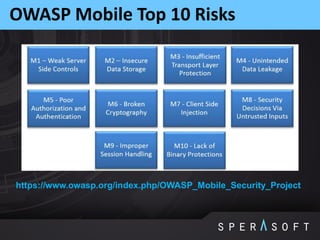
OWASP Mobile Top 10 Risks
https://www.owasp.org/index.php/OWASP_Mobile_Security_Project
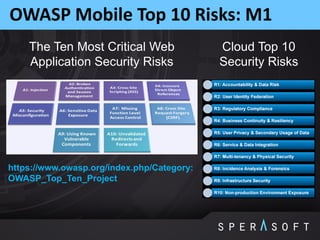
OWASP Mobile Top 10 Risks: M1
The Ten Most Critical Web
Application Security Risks
Cloud Top 10
Security Risks
https://www.owasp.org/index.php/Category:
OWASP_Top_Ten_Project
OWASP Mobile Top 10 Risks: M1
Factors that have lead to a proliferation of server-side
vulnerabilities:
o Rush to market
o Lack of security knowledge because of the new-ness of the languages
o Easy access to frameworks that don’t prioritize security
o Higher than average outsourced development
o Lower security budgets for mobile applications
o Assumption that the mobile OS takes full responsibility for security
o Weakness due to cross-platform development and compilation
OWASP Mobile Top 10 Risks: M2
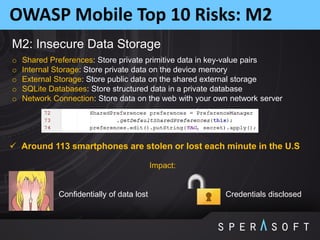
M2: Insecure Data Storage
o Shared Preferences: Store private primitive data in key-value pairs
o Internal Storage: Store private data on the device memory
o External Storage: Store public data on the shared external storage
o SQLite Databases: Store structured data in a private database
o Network Connection: Store data on the web with your own network server
Impact:
Confidentially of data lost Credentials disclosed
 Around 113 smartphones are stolen or lost each minute in the U.S
OWASP Mobile Top 10 Risks: M2
Prevention Tips
o Store ONLY what is absolutely required
o Separate storage on the level of "secret"
o Never use public storage areas (SD card)
o Leverage secure containers and platform provided file encryption APIs
o Do not grant files world readable or world writeable permissions
o Define the data lifecycle
o Data kill switch
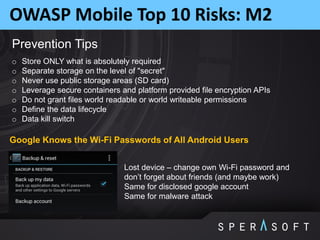
Lost device – change own Wi-Fi password and
don’t forget about friends (and maybe work)
Same for disclosed google account
Same for malware attack
Google Knows the Wi-Fi Passwords of All Android Users
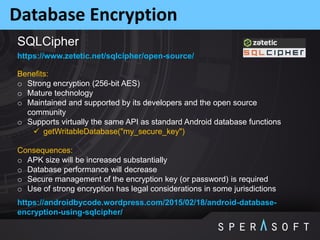
Database Encryption
https://www.zetetic.net/sqlcipher/open-source/
Benefits:
o Strong encryption (256-bit AES)
o Mature technology
o Maintained and supported by its developers and the open source
community
o Supports virtually the same API as standard Android database functions
 getWritableDatabase("my_secure_key")
Consequences:
o APK size will be increased substantially
o Database performance will decrease
o Secure management of the encryption key (or password) is required
o Use of strong encryption has legal considerations in some jurisdictions
https://androidbycode.wordpress.com/2015/02/18/android-database-
encryption-using-sqlcipher/
SQLCipher
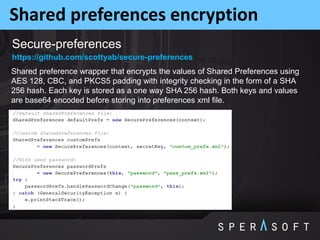
Shared preferences encryption
Secure-preferences
Shared preference wrapper that encrypts the values of Shared Preferences using
AES 128, CBC, and PKCS5 padding with integrity checking in the form of a SHA
256 hash. Each key is stored as a one way SHA 256 hash. Both keys and values
are base64 encoded before storing into preferences xml file.
https://github.com/scottyab/secure-preferences
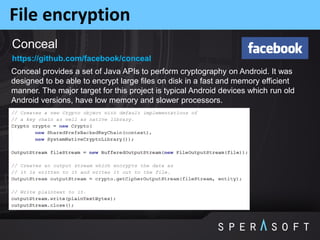
File encryption
Conceal
Conceal provides a set of Java APIs to perform cryptography on Android. It was
designed to be able to encrypt large files on disk in a fast and memory efficient
manner. The major target for this project is typical Android devices which run old
Android versions, have low memory and slower processors.
https://github.com/facebook/conceal
OWASP Mobile Top 10 Risks: M3
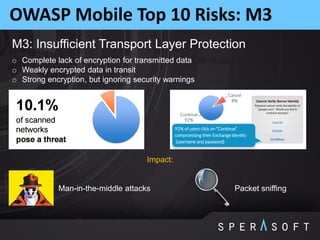
M3: Insufficient Transport Layer Protection
Impact:
Man-in-the-middle attacks Packet sniffing
o Complete lack of encryption for transmitted data
o Weakly encrypted data in transit
o Strong encryption, but ignoring security warnings
OWASP Mobile Top 10 Risks: M3
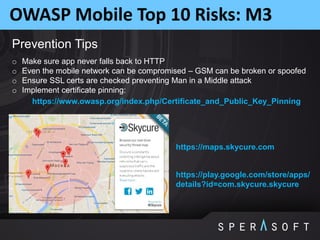
Prevention Tips
o Make sure app never falls back to HTTP
o Even the mobile network can be compromised – GSM can be broken or spoofed
o Ensure SSL certs are checked preventing Man in a Middle attack
o Implement certificate pinning:
https://www.owasp.org/index.php/Certificate_and_Public_Key_Pinning
https://maps.skycure.com
https://play.google.com/store/apps/
details?id=com.skycure.skycure
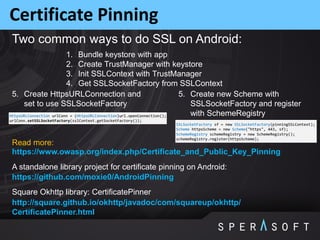
Certificate Pinning
A standalone library project for certificate pinning on Android:
https://github.com/moxie0/AndroidPinning
1. Bundle keystore with app
2. Create TrustManager with keystore
3. Init SSLContext with TrustManager
4. Get SSLSocketFactory from SSLContext
Two common ways to do SSL on Android:
5. Create HttpsURLConnection and
set to use SSLSocketFactory
5. Create new Scheme with
SSLSocketFactory and register
with SchemeRegistry
Square Okhttp library: CertificatePinner
http://square.github.io/okhttp/javadoc/com/squareup/okhttp/
CertificatePinner.html
https://www.owasp.org/index.php/Certificate_and_Public_Key_Pinning
Read more:
OWASP Mobile Top 10 Risks: M4
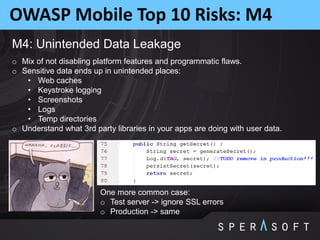
M4: Unintended Data Leakage
o Mix of not disabling platform features and programmatic flaws.
o Sensitive data ends up in unintended places:
• Web caches
• Keystroke logging
• Screenshots
• Logs
• Temp directories
o Understand what 3rd party libraries in your apps are doing with user data.
One more common case:
o Test server -> ignore SSL errors
o Production -> same
OWASP Mobile Top 10 Risks: M4
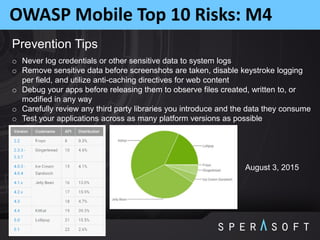
Prevention Tips
o Never log credentials or other sensitive data to system logs
o Remove sensitive data before screenshots are taken, disable keystroke logging
per field, and utilize anti-caching directives for web content
o Debug your apps before releasing them to observe files created, written to, or
modified in any way
o Carefully review any third party libraries you introduce and the data they consume
o Test your applications across as many platform versions as possible
August 3, 2015
OWASP Mobile Top 10 Risks: M5
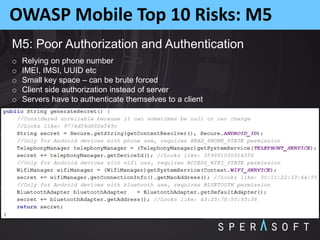
M5: Poor Authorization and Authentication
o Relying on phone number
o IMEI, IMSI, UUID etc
o Small key space – can be brute forced
o Client side authorization instead of server
o Servers have to authenticate themselves to a client
OWASP Mobile Top 10 Risks: M5
Prevention Tips
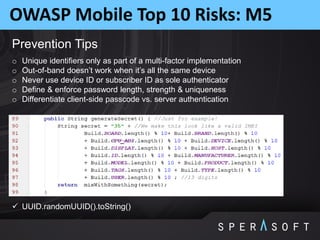
o Unique identifiers only as part of a multi-factor implementation
o Out-of-band doesn’t work when it’s all the same device
o Never use device ID or subscriber ID as sole authenticator
o Define & enforce password length, strength & uniqueness
o Differentiate client-side passcode vs. server authentication
 UUID.randomUUID().toString()
OWASP Mobile Top 10 Risks: M6
M6: Broken Cryptography
o Two primary categories:
• Broken implementations using strong crypto libraries
• Custom, easily defeated crypto implementations
o Encoding != encryption
o Obfuscation != encryption
o Serialization != encryption
Prevention Tips
o Storing the key with the encrypted data negates everything
o Leverage battle-tested crypto libraries vice writing your own
o Take advantage of what your platform already provides:
http://developer.android.com/training/articles/security-tips.html
https://source.android.com/devices/tech/security/index.html
OWASP Mobile Top 10 Risks: M7
M7: Client Side Injection
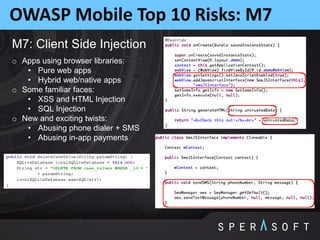
o Apps using browser libraries:
• Pure web apps
• Hybrid web/native apps
o Some familiar faces:
• XSS and HTML Injection
• SQL Injection
o New and exciting twists:
• Abusing phone dialer + SMS
• Abusing in-app payments
OWASP Mobile Top 10 Risks: M7
Prevention Tips
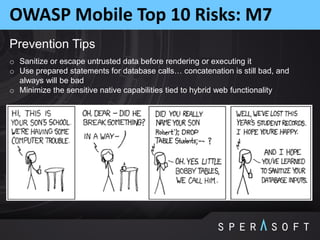
o Sanitize or escape untrusted data before rendering or executing it
o Use prepared statements for database calls… concatenation is still bad, and
always will be bad
o Minimize the sensitive native capabilities tied to hybrid web functionality
OWASP Mobile Top 10 Risks: M8
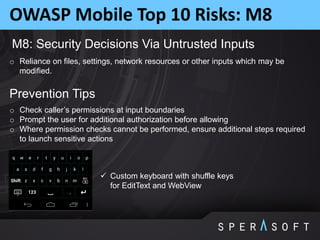
M8: Security Decisions Via Untrusted Inputs
o Reliance on files, settings, network resources or other inputs which may be
modified.
Prevention Tips
o Check caller’s permissions at input boundaries
o Prompt the user for additional authorization before allowing
o Where permission checks cannot be performed, ensure additional steps required
to launch sensitive actions
 Custom keyboard with shuffle keys
for EditText and WebView
OWASP Mobile Top 10 Risks: M8
Your mobile application can accept data from all kinds of sources. In most cases this
will be an Inter Process Communication (IPC) mechanism. In general try and adhere
to the following IPC design patterns:
o If there is a business requirement for IPC communication, the mobile application
should restrict access to a white-list of trusted applications
o Sensitive actions which are triggered through IPC entry points should require
user interaction before performing the action
o All input received from IPC entry points must undergo stringent input validation in
order to prevent input driven attacks
o Do not pass any sensitive information through IPC mechanisms, as it may be
susceptible to being read by third party applications under certain scenarios
OWASP Mobile Top 10 Risks: M9
M9: Improper Session Handling
o Lack of Adequate Timeout Protection, mobile app sessions are generally MUCH
longer because of convenience and usability
o Failure to Invalidate Sessions on the Backend
o Failure to Properly Rotate Cookies
o Insecure Token Creation, bad idea = using a device identifier as a session token
Prevention Tips
o Don’t be afraid to make users re-authenticate every so often
• 15 minutes for high security applications
• 30 minutes for medium security applications
• 1 hour for low security applications
o Ensure that tokens can be revoked quickly in the event of a lost/stolen device
o Utilize high entropy, tested token generation resources
OWASP Mobile Top 10 Risks: M10
M10: Lack of Binary Protections
o Software in untrusted environments is exposed to reverse-engineering, analysis,
modification, and exploitation by attackers
o Attackers can directly access the binary and compromise its integrity with various
tools and techniques
o Attackers may cause brand, revenue, or IP loss through reverse-engineering
Impact:
o Compromise (disable, circumvent) of security controls, e.g., authentication,
encryption, license management / checking, DRM, root detection
o Exposure of sensitive application information, e.g., keys, certificates, credentials,
metadata
o Tampering with critical business logic, control flows, and program operations
o Insertion of malware or exploits in the application and repackaging
o Exposure of application internals (logic, vulnerabilities) via reverse-engineering
o IP theft (e.g., proprietary algorithms) via reverse-engineering
o Piracy and unauthorized distribution
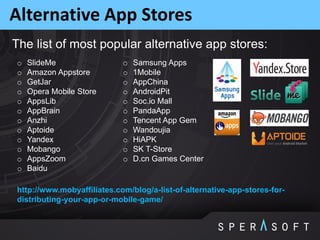
Alternative App Stores
o SlideMe
o Amazon Appstore
o GetJar
o Opera Mobile Store
o AppsLib
o AppBrain
o Anzhi
o Aptoide
o Yandex
o Mobango
o AppsZoom
o Baidu
o Samsung Apps
o 1Mobile
o AppChina
o AndroidPit
o Soc.io Mall
o PandaApp
o Tencent App Gem
o Wandoujia
o HiAPK
o SK T-Store
o D.cn Games Center
http://www.mobyaffiliates.com/blog/a-list-of-alternative-app-stores-for-
distributing-your-app-or-mobile-game/
The list of most popular alternative app stores:
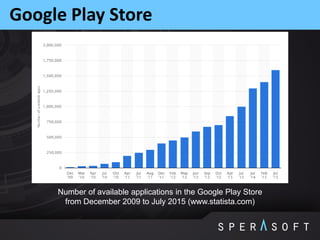
Google Play Store
Number of available applications in the Google Play Store
from December 2009 to July 2015 (www.statista.com)
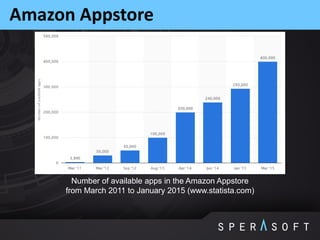
Amazon Appstore
Number of available apps in the Amazon Appstore
from March 2011 to January 2015 (www.statista.com)
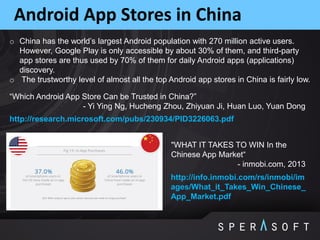
Android App Stores in China
o China has the world’s largest Android population with 270 million active users.
However, Google Play is only accessible by about 30% of them, and third-party
app stores are thus used by 70% of them for daily Android apps (applications)
discovery.
o The trustworthy level of almost all the top Android app stores in China is fairly low.
http://research.microsoft.com/pubs/230934/PID3226063.pdf
“Which Android App Store Can be Trusted in China?”
- Yi Ying Ng, Hucheng Zhou, Zhiyuan Ji, Huan Luo, Yuan Dong
http://info.inmobi.com/rs/inmobi/im
ages/What_it_Takes_Win_Chinese_
App_Market.pdf
"WHAT IT TAKES TO WIN In the
Chinese App Market“
- inmobi.com, 2013
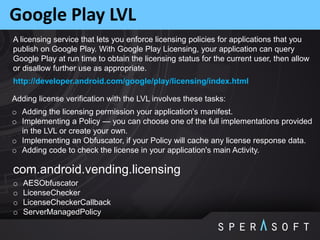
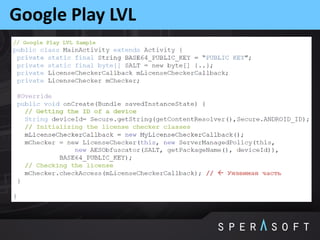
Google Play LVL
o Adding the licensing permission your application's manifest.
o Implementing a Policy — you can choose one of the full implementations provided
in the LVL or create your own.
o Implementing an Obfuscator, if your Policy will cache any license response data.
o Adding code to check the license in your application's main Activity.
Adding license verification with the LVL involves these tasks:
com.android.vending.licensing
o AESObfuscator
o LicenseChecker
o LicenseCheckerCallback
o ServerManagedPolicy
A licensing service that lets you enforce licensing policies for applications that you
publish on Google Play. With Google Play Licensing, your application can query
Google Play at run time to obtain the licensing status for the current user, then allow
or disallow further use as appropriate.
http://developer.android.com/google/play/licensing/index.html
Google Play LVL
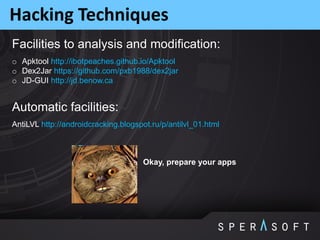
Hacking Techniques
AntiLVL http://androidcracking.blogspot.ru/p/antilvl_01.html
Facilities to analysis and modification:
Automatic facilities:
o Apktool http://ibotpeaches.github.io/Apktool
o Dex2Jar https://github.com/pxb1988/dex2jar
o JD-GUI http://jd.benow.ca
Okay, prepare your apps
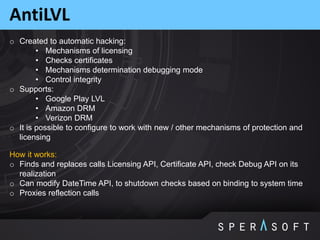
AntiLVL
o Created to automatic hacking:
• Mechanisms of licensing
• Checks certificates
• Mechanisms determination debugging mode
• Control integrity
o Supports:
• Google Play LVL
• Amazon DRM
• Verizon DRM
o It is possible to configure to work with new / other mechanisms of protection and
licensing
How it works:
o Finds and replaces calls Licensing API, Certificate API, check Debug API on its
realization
o Can modify DateTime API, to shutdown checks based on binding to system time
o Proxies reflection calls
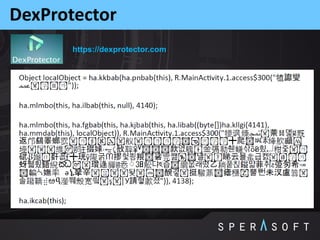
DexProtector
https://dexprotector.com
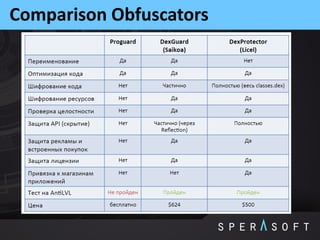
Comparison Obfuscators
ProGuard
ProGuard is not about obfuscation, but optimization and shrinking
OWASP Mobile Top 10 Risks: M10
Prevention Tips
o Private API keys are called that for a reason…keep them off of the client
o Keep proprietary and sensitive business logic on the server
o Almost never a legitimate reason to hardcode a password (if there is, you have
other problems)
o Implement adequate algorithms for:
• Root detection
• Checksum controls
• Certificate pinning controls
• Debugger detection controls
o Protect these algorithms from:
• Reverse-engineering
• Unauthorized code modification
Your mobile app must be able to:
o Prevent an adversary from reverse-engineering sensitive parts of your app
o Detect at runtime that code modification has occurred
o React appropriately at runtime to integrity violations
https://www.owasp.org/index.php/OWASP_
Reverse_Engineering_and_Code_Modificat
ion_Prevention_Project
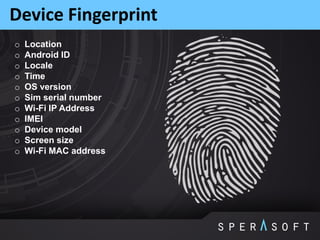
Device Fingerprint
o Location
o Android ID
o Locale
o Time
o OS version
o Sim serial number
o Wi-Fi IP Address
o IMEI
o Device model
o Screen size
o Wi-Fi MAC address
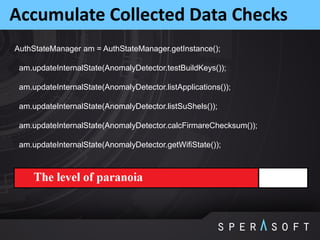
Accumulate Collected Data Checks
AuthStateManager am = AuthStateManager.getInstance();
am.updateInternalState(AnomalyDetector.testBuildKeys());
am.updateInternalState(AnomalyDetector.listApplications());
am.updateInternalState(AnomalyDetector.listSuShels());
am.updateInternalState(AnomalyDetector.calcFirmareChecksum());
am.updateInternalState(AnomalyDetector.getWifiState());
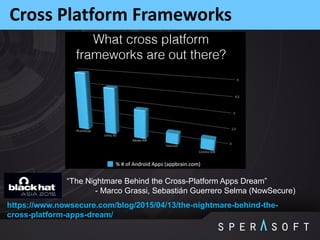
Cross Platform Frameworks
https://www.nowsecure.com/blog/2015/04/13/the-nightmare-behind-the-
cross-platform-apps-dream/
“The Nightmare Behind the Cross-Platform Apps Dream”
- Marco Grassi, Sebastián Guerrero Selma (NowSecure)
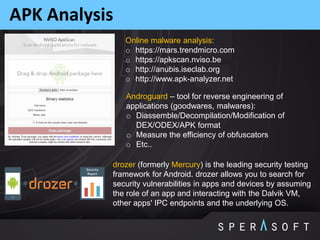
APK Analysis
Online malware analysis:
o https://mars.trendmicro.com
o https://apkscan.nviso.be
o http://anubis.iseclab.org
o http://www.apk-analyzer.net
drozer (formerly Mercury) is the leading security testing
framework for Android. drozer allows you to search for
security vulnerabilities in apps and devices by assuming
the role of an app and interacting with the Dalvik VM,
other apps' IPC endpoints and the underlying OS.
Androguard – tool for reverse engineering of
applications (goodwares, malwares):
o Diassemble/Decompilation/Modification of
DEX/ODEX/APK format
o Measure the efficiency of obfuscators
o Etc..
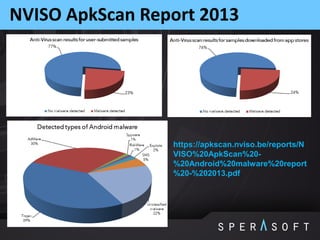
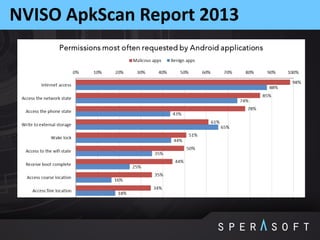
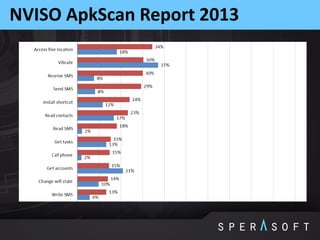
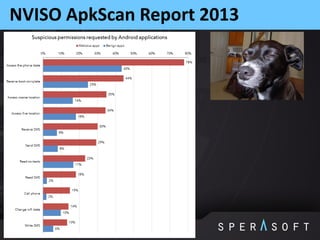
NVISO ApkScan Report 2013
https://apkscan.nviso.be/reports/N
VISO%20ApkScan%20-
%20Android%20malware%20report
%20-%202013.pdf
NVISO ApkScan Report 2013
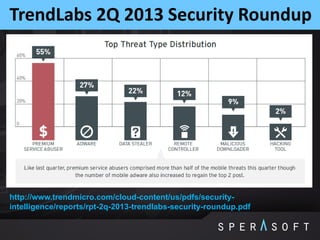
TrendLabs 2Q 2013 Security Roundup
http://www.trendmicro.com/cloud-content/us/pdfs/security-
intelligence/reports/rpt-2q-2013-trendlabs-security-roundup.pdf
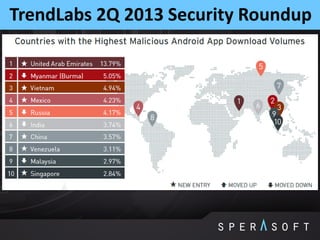
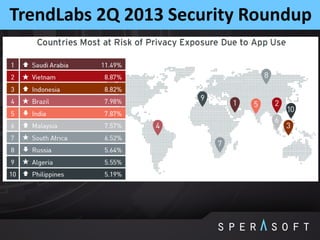
TrendLabs 2Q 2013 Security Roundup
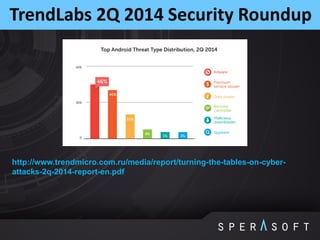
TrendLabs 2Q 2014 Security Roundup
http://www.trendmicro.com.ru/media/report/turning-the-tables-on-cyber-
attacks-2q-2014-report-en.pdf
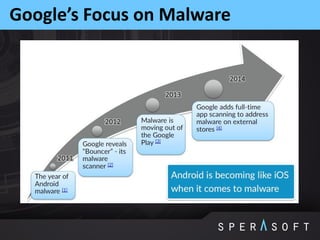
Google’s Focus on Malware
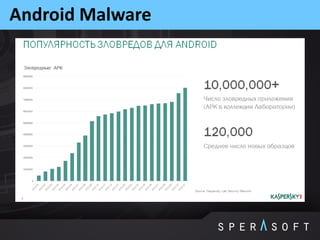
Android Malware
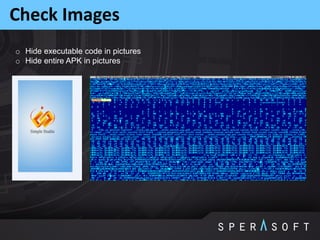
Check Images
o Hide executable code in pictures
o Hide entire APK in pictures
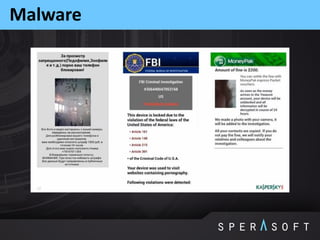
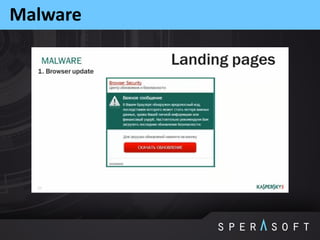
Malware
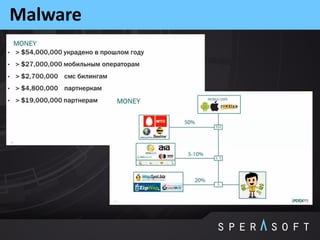
Malware
Malware
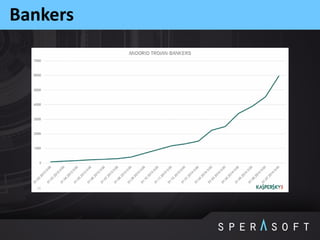
Bankers
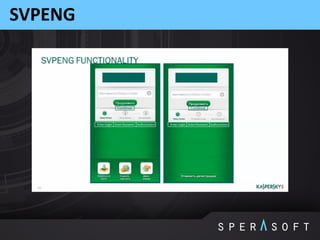
SVPENG
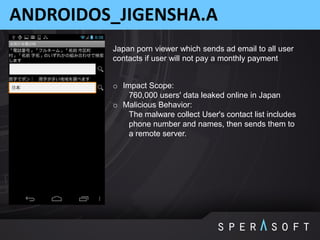
ANDROIDOS_JIGENSHA.A
o Impact Scope:
760,000 users' data leaked online in Japan
o Malicious Behavior:
The malware collect User's contact list includes
phone number and names, then sends them to
a remote server.
Japan porn viewer which sends ad email to all user
contacts if user will not pay a monthly payment
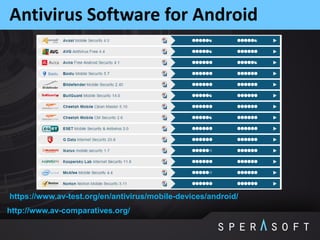
Antivirus Software for Android
http://www.av-comparatives.org/
https://www.av-test.org/en/antivirus/mobile-devices/android/
Kaspersky Internet Security
http://usa.kaspersky.com/products-services/home-computer-security/security-
for-android/
Books
o Android Hacker's Handbook, Joshua J. Drake, Zach Lanier, Collin Mulliner, Pau
Oliva Fora, Stephen A. Ridley, Georg Wicherski, 2014, John Wiley & Sons, Inc.
o Android Security Internals: An In-Depth Guide to Android's Security Architecture,
Nikolay Elenkov, 2014, William Pollock
o Application Security for the Android Platform: Processes, Permissions, and
Other Safeguards, Jeff Six, 2012, O'Reilly Media
o Android Application Security Essentials, Pragati Ogal Rai, 2013, Packt
Publishing
o Embedded Android: Porting, Extending, and Customizing, Karim Yaghmour,
2013, O'Reilly Media
Thanks
Visit Sperasoft online:
www/sperasoft.com
www.facebook.com/Sperasoft
www.twitter.com/sperasoft

Sperasoft talks: Android Security Threats

  • 1.
  • 2.
    Based on: “OWASP AppSecUSA2011: OWASP Mobile Top 10 Risks” - Jack Mannino (nVisium), Zach Lanier (Intrepidus Group), Mike Zusman (Carve Systems) “OWASP Top 10 Mobile Risks: 2014 Reboot” - Jack Mannino (nVisium), Jason Haddix (HP Fortify) “OWASP Mobile Top Ten 2014 - The New Lack of Binary Protection Category” - Winston Bond (Arxan Technologies) “If 6,000 Mobile Malware Applications Could Talk! Ow, They Do, And A Lot!” - Matias Madou, Daan Raman (Nviso) “Mobile Security Attacks: A Glimpse from the Trenches” - Yair Amit, Adi Sharabani (Skycure)
  • 3.
    Based on: “Security underAndroid” - Raimund Genes (Trend Micro) “Mobile OWASP TOP TEN” - Leonid Igolnik (Oracle) “Android Security Overview” - Matthias Lange “Security and Privacy in Android Apps” - Jon Larimer, Kenny Root (Android Team) “Deep Dive into Android Security” - Aleksandar Gargenta (Marakana, Inc.) “Security Testing Android with Mercury” - Daniel Bradberry (MWR Info Security) “When Security Gets in the Way: Pen Testing Apps that use Certificate Pinning” - Alban Diquet, Justine Osborne
  • 4.
    Captain Obvious Slide There is no silver bullet in security  Always will be trade-off between convenience and security  It's not if, but when: even all the possible approaches together will not give you a 100% guarantee of safety  Security is not a feature  Weak security is better then nothing Keep in mind:
  • 5.
    OWASP The Open WebApplication Security Project (OWASP) is an online community dedicated to web application security. The OWASP community includes corporations, educational organizations and individuals from around the world. This community works to create freely-available articles, methodologies, documentation, tools, and technologies. OWASP projects: o OWASP Top Ten: The goal of the Top 10 project is to raise awareness about application security by identifying some of the most critical risks facing organizations. o OWASP Development Guide: The Development Guide provides practical guidance and includes J2EE, ASP.NET, and PHP code samples. o OWASP Testing Guide: The OWASP Testing Guide includes a "best practice" penetration testing framework that users can implement in their own organizations and a "low level" penetration testing guide that describes techniques for testing most common web application and web service security issues.
  • 6.
    OWASP Mobile Top10 Risks https://www.owasp.org/index.php/OWASP_Mobile_Security_Project
  • 7.
    OWASP Mobile Top10 Risks: M1 The Ten Most Critical Web Application Security Risks Cloud Top 10 Security Risks https://www.owasp.org/index.php/Category: OWASP_Top_Ten_Project
  • 8.
    OWASP Mobile Top10 Risks: M1 Factors that have lead to a proliferation of server-side vulnerabilities: o Rush to market o Lack of security knowledge because of the new-ness of the languages o Easy access to frameworks that don’t prioritize security o Higher than average outsourced development o Lower security budgets for mobile applications o Assumption that the mobile OS takes full responsibility for security o Weakness due to cross-platform development and compilation
  • 9.
    OWASP Mobile Top10 Risks: M2 M2: Insecure Data Storage o Shared Preferences: Store private primitive data in key-value pairs o Internal Storage: Store private data on the device memory o External Storage: Store public data on the shared external storage o SQLite Databases: Store structured data in a private database o Network Connection: Store data on the web with your own network server Impact: Confidentially of data lost Credentials disclosed  Around 113 smartphones are stolen or lost each minute in the U.S
  • 10.
    OWASP Mobile Top10 Risks: M2 Prevention Tips o Store ONLY what is absolutely required o Separate storage on the level of "secret" o Never use public storage areas (SD card) o Leverage secure containers and platform provided file encryption APIs o Do not grant files world readable or world writeable permissions o Define the data lifecycle o Data kill switch Lost device – change own Wi-Fi password and don’t forget about friends (and maybe work) Same for disclosed google account Same for malware attack Google Knows the Wi-Fi Passwords of All Android Users
  • 11.
    Database Encryption https://www.zetetic.net/sqlcipher/open-source/ Benefits: o Strongencryption (256-bit AES) o Mature technology o Maintained and supported by its developers and the open source community o Supports virtually the same API as standard Android database functions  getWritableDatabase("my_secure_key") Consequences: o APK size will be increased substantially o Database performance will decrease o Secure management of the encryption key (or password) is required o Use of strong encryption has legal considerations in some jurisdictions https://androidbycode.wordpress.com/2015/02/18/android-database- encryption-using-sqlcipher/ SQLCipher
  • 12.
    Shared preferences encryption Secure-preferences Sharedpreference wrapper that encrypts the values of Shared Preferences using AES 128, CBC, and PKCS5 padding with integrity checking in the form of a SHA 256 hash. Each key is stored as a one way SHA 256 hash. Both keys and values are base64 encoded before storing into preferences xml file. https://github.com/scottyab/secure-preferences
  • 13.
    File encryption Conceal Conceal providesa set of Java APIs to perform cryptography on Android. It was designed to be able to encrypt large files on disk in a fast and memory efficient manner. The major target for this project is typical Android devices which run old Android versions, have low memory and slower processors. https://github.com/facebook/conceal
  • 14.
    OWASP Mobile Top10 Risks: M3 M3: Insufficient Transport Layer Protection Impact: Man-in-the-middle attacks Packet sniffing o Complete lack of encryption for transmitted data o Weakly encrypted data in transit o Strong encryption, but ignoring security warnings
  • 15.
    OWASP Mobile Top10 Risks: M3 Prevention Tips o Make sure app never falls back to HTTP o Even the mobile network can be compromised – GSM can be broken or spoofed o Ensure SSL certs are checked preventing Man in a Middle attack o Implement certificate pinning: https://www.owasp.org/index.php/Certificate_and_Public_Key_Pinning https://maps.skycure.com https://play.google.com/store/apps/ details?id=com.skycure.skycure
  • 16.
    Certificate Pinning A standalonelibrary project for certificate pinning on Android: https://github.com/moxie0/AndroidPinning 1. Bundle keystore with app 2. Create TrustManager with keystore 3. Init SSLContext with TrustManager 4. Get SSLSocketFactory from SSLContext Two common ways to do SSL on Android: 5. Create HttpsURLConnection and set to use SSLSocketFactory 5. Create new Scheme with SSLSocketFactory and register with SchemeRegistry Square Okhttp library: CertificatePinner http://square.github.io/okhttp/javadoc/com/squareup/okhttp/ CertificatePinner.html https://www.owasp.org/index.php/Certificate_and_Public_Key_Pinning Read more:
  • 17.
    OWASP Mobile Top10 Risks: M4 M4: Unintended Data Leakage o Mix of not disabling platform features and programmatic flaws. o Sensitive data ends up in unintended places: • Web caches • Keystroke logging • Screenshots • Logs • Temp directories o Understand what 3rd party libraries in your apps are doing with user data. One more common case: o Test server -> ignore SSL errors o Production -> same
  • 18.
    OWASP Mobile Top10 Risks: M4 Prevention Tips o Never log credentials or other sensitive data to system logs o Remove sensitive data before screenshots are taken, disable keystroke logging per field, and utilize anti-caching directives for web content o Debug your apps before releasing them to observe files created, written to, or modified in any way o Carefully review any third party libraries you introduce and the data they consume o Test your applications across as many platform versions as possible August 3, 2015
  • 19.
    OWASP Mobile Top10 Risks: M5 M5: Poor Authorization and Authentication o Relying on phone number o IMEI, IMSI, UUID etc o Small key space – can be brute forced o Client side authorization instead of server o Servers have to authenticate themselves to a client
  • 20.
    OWASP Mobile Top10 Risks: M5 Prevention Tips o Unique identifiers only as part of a multi-factor implementation o Out-of-band doesn’t work when it’s all the same device o Never use device ID or subscriber ID as sole authenticator o Define & enforce password length, strength & uniqueness o Differentiate client-side passcode vs. server authentication  UUID.randomUUID().toString()
  • 21.
    OWASP Mobile Top10 Risks: M6 M6: Broken Cryptography o Two primary categories: • Broken implementations using strong crypto libraries • Custom, easily defeated crypto implementations o Encoding != encryption o Obfuscation != encryption o Serialization != encryption Prevention Tips o Storing the key with the encrypted data negates everything o Leverage battle-tested crypto libraries vice writing your own o Take advantage of what your platform already provides: http://developer.android.com/training/articles/security-tips.html https://source.android.com/devices/tech/security/index.html
  • 22.
    OWASP Mobile Top10 Risks: M7 M7: Client Side Injection o Apps using browser libraries: • Pure web apps • Hybrid web/native apps o Some familiar faces: • XSS and HTML Injection • SQL Injection o New and exciting twists: • Abusing phone dialer + SMS • Abusing in-app payments
  • 23.
    OWASP Mobile Top10 Risks: M7 Prevention Tips o Sanitize or escape untrusted data before rendering or executing it o Use prepared statements for database calls… concatenation is still bad, and always will be bad o Minimize the sensitive native capabilities tied to hybrid web functionality
  • 24.
    OWASP Mobile Top10 Risks: M8 M8: Security Decisions Via Untrusted Inputs o Reliance on files, settings, network resources or other inputs which may be modified. Prevention Tips o Check caller’s permissions at input boundaries o Prompt the user for additional authorization before allowing o Where permission checks cannot be performed, ensure additional steps required to launch sensitive actions  Custom keyboard with shuffle keys for EditText and WebView
  • 25.
    OWASP Mobile Top10 Risks: M8 Your mobile application can accept data from all kinds of sources. In most cases this will be an Inter Process Communication (IPC) mechanism. In general try and adhere to the following IPC design patterns: o If there is a business requirement for IPC communication, the mobile application should restrict access to a white-list of trusted applications o Sensitive actions which are triggered through IPC entry points should require user interaction before performing the action o All input received from IPC entry points must undergo stringent input validation in order to prevent input driven attacks o Do not pass any sensitive information through IPC mechanisms, as it may be susceptible to being read by third party applications under certain scenarios
  • 26.
    OWASP Mobile Top10 Risks: M9 M9: Improper Session Handling o Lack of Adequate Timeout Protection, mobile app sessions are generally MUCH longer because of convenience and usability o Failure to Invalidate Sessions on the Backend o Failure to Properly Rotate Cookies o Insecure Token Creation, bad idea = using a device identifier as a session token Prevention Tips o Don’t be afraid to make users re-authenticate every so often • 15 minutes for high security applications • 30 minutes for medium security applications • 1 hour for low security applications o Ensure that tokens can be revoked quickly in the event of a lost/stolen device o Utilize high entropy, tested token generation resources
  • 27.
    OWASP Mobile Top10 Risks: M10 M10: Lack of Binary Protections o Software in untrusted environments is exposed to reverse-engineering, analysis, modification, and exploitation by attackers o Attackers can directly access the binary and compromise its integrity with various tools and techniques o Attackers may cause brand, revenue, or IP loss through reverse-engineering Impact: o Compromise (disable, circumvent) of security controls, e.g., authentication, encryption, license management / checking, DRM, root detection o Exposure of sensitive application information, e.g., keys, certificates, credentials, metadata o Tampering with critical business logic, control flows, and program operations o Insertion of malware or exploits in the application and repackaging o Exposure of application internals (logic, vulnerabilities) via reverse-engineering o IP theft (e.g., proprietary algorithms) via reverse-engineering o Piracy and unauthorized distribution
  • 28.
    Alternative App Stores oSlideMe o Amazon Appstore o GetJar o Opera Mobile Store o AppsLib o AppBrain o Anzhi o Aptoide o Yandex o Mobango o AppsZoom o Baidu o Samsung Apps o 1Mobile o AppChina o AndroidPit o Soc.io Mall o PandaApp o Tencent App Gem o Wandoujia o HiAPK o SK T-Store o D.cn Games Center http://www.mobyaffiliates.com/blog/a-list-of-alternative-app-stores-for- distributing-your-app-or-mobile-game/ The list of most popular alternative app stores:
  • 29.
    Google Play Store Numberof available applications in the Google Play Store from December 2009 to July 2015 (www.statista.com)
  • 30.
    Amazon Appstore Number ofavailable apps in the Amazon Appstore from March 2011 to January 2015 (www.statista.com)
  • 31.
    Android App Storesin China o China has the world’s largest Android population with 270 million active users. However, Google Play is only accessible by about 30% of them, and third-party app stores are thus used by 70% of them for daily Android apps (applications) discovery. o The trustworthy level of almost all the top Android app stores in China is fairly low. http://research.microsoft.com/pubs/230934/PID3226063.pdf “Which Android App Store Can be Trusted in China?” - Yi Ying Ng, Hucheng Zhou, Zhiyuan Ji, Huan Luo, Yuan Dong http://info.inmobi.com/rs/inmobi/im ages/What_it_Takes_Win_Chinese_ App_Market.pdf "WHAT IT TAKES TO WIN In the Chinese App Market“ - inmobi.com, 2013
  • 32.
    Google Play LVL oAdding the licensing permission your application's manifest. o Implementing a Policy — you can choose one of the full implementations provided in the LVL or create your own. o Implementing an Obfuscator, if your Policy will cache any license response data. o Adding code to check the license in your application's main Activity. Adding license verification with the LVL involves these tasks: com.android.vending.licensing o AESObfuscator o LicenseChecker o LicenseCheckerCallback o ServerManagedPolicy A licensing service that lets you enforce licensing policies for applications that you publish on Google Play. With Google Play Licensing, your application can query Google Play at run time to obtain the licensing status for the current user, then allow or disallow further use as appropriate. http://developer.android.com/google/play/licensing/index.html
  • 33.
  • 34.
    Hacking Techniques AntiLVL http://androidcracking.blogspot.ru/p/antilvl_01.html Facilitiesto analysis and modification: Automatic facilities: o Apktool http://ibotpeaches.github.io/Apktool o Dex2Jar https://github.com/pxb1988/dex2jar o JD-GUI http://jd.benow.ca Okay, prepare your apps
  • 35.
    AntiLVL o Created toautomatic hacking: • Mechanisms of licensing • Checks certificates • Mechanisms determination debugging mode • Control integrity o Supports: • Google Play LVL • Amazon DRM • Verizon DRM o It is possible to configure to work with new / other mechanisms of protection and licensing How it works: o Finds and replaces calls Licensing API, Certificate API, check Debug API on its realization o Can modify DateTime API, to shutdown checks based on binding to system time o Proxies reflection calls
  • 36.
  • 37.
  • 38.
    ProGuard ProGuard is notabout obfuscation, but optimization and shrinking
  • 39.
    OWASP Mobile Top10 Risks: M10 Prevention Tips o Private API keys are called that for a reason…keep them off of the client o Keep proprietary and sensitive business logic on the server o Almost never a legitimate reason to hardcode a password (if there is, you have other problems) o Implement adequate algorithms for: • Root detection • Checksum controls • Certificate pinning controls • Debugger detection controls o Protect these algorithms from: • Reverse-engineering • Unauthorized code modification Your mobile app must be able to: o Prevent an adversary from reverse-engineering sensitive parts of your app o Detect at runtime that code modification has occurred o React appropriately at runtime to integrity violations https://www.owasp.org/index.php/OWASP_ Reverse_Engineering_and_Code_Modificat ion_Prevention_Project
  • 40.
    Device Fingerprint o Location oAndroid ID o Locale o Time o OS version o Sim serial number o Wi-Fi IP Address o IMEI o Device model o Screen size o Wi-Fi MAC address
  • 41.
    Accumulate Collected DataChecks AuthStateManager am = AuthStateManager.getInstance(); am.updateInternalState(AnomalyDetector.testBuildKeys()); am.updateInternalState(AnomalyDetector.listApplications()); am.updateInternalState(AnomalyDetector.listSuShels()); am.updateInternalState(AnomalyDetector.calcFirmareChecksum()); am.updateInternalState(AnomalyDetector.getWifiState());
  • 42.
    Cross Platform Frameworks https://www.nowsecure.com/blog/2015/04/13/the-nightmare-behind-the- cross-platform-apps-dream/ “TheNightmare Behind the Cross-Platform Apps Dream” - Marco Grassi, Sebastián Guerrero Selma (NowSecure)
  • 43.
    APK Analysis Online malwareanalysis: o https://mars.trendmicro.com o https://apkscan.nviso.be o http://anubis.iseclab.org o http://www.apk-analyzer.net drozer (formerly Mercury) is the leading security testing framework for Android. drozer allows you to search for security vulnerabilities in apps and devices by assuming the role of an app and interacting with the Dalvik VM, other apps' IPC endpoints and the underlying OS. Androguard – tool for reverse engineering of applications (goodwares, malwares): o Diassemble/Decompilation/Modification of DEX/ODEX/APK format o Measure the efficiency of obfuscators o Etc..
  • 44.
    NVISO ApkScan Report2013 https://apkscan.nviso.be/reports/N VISO%20ApkScan%20- %20Android%20malware%20report %20-%202013.pdf
  • 45.
  • 46.
  • 47.
  • 48.
    TrendLabs 2Q 2013Security Roundup http://www.trendmicro.com/cloud-content/us/pdfs/security- intelligence/reports/rpt-2q-2013-trendlabs-security-roundup.pdf
  • 49.
    TrendLabs 2Q 2013Security Roundup
  • 50.
    TrendLabs 2Q 2013Security Roundup
  • 51.
    TrendLabs 2Q 2014Security Roundup http://www.trendmicro.com.ru/media/report/turning-the-tables-on-cyber- attacks-2q-2014-report-en.pdf
  • 52.
  • 53.
  • 54.
    Check Images o Hideexecutable code in pictures o Hide entire APK in pictures
  • 55.
  • 56.
  • 57.
  • 58.
  • 59.
  • 60.
    ANDROIDOS_JIGENSHA.A o Impact Scope: 760,000users' data leaked online in Japan o Malicious Behavior: The malware collect User's contact list includes phone number and names, then sends them to a remote server. Japan porn viewer which sends ad email to all user contacts if user will not pay a monthly payment
  • 61.
    Antivirus Software forAndroid http://www.av-comparatives.org/ https://www.av-test.org/en/antivirus/mobile-devices/android/
  • 62.
  • 63.
    Books o Android Hacker'sHandbook, Joshua J. Drake, Zach Lanier, Collin Mulliner, Pau Oliva Fora, Stephen A. Ridley, Georg Wicherski, 2014, John Wiley & Sons, Inc. o Android Security Internals: An In-Depth Guide to Android's Security Architecture, Nikolay Elenkov, 2014, William Pollock o Application Security for the Android Platform: Processes, Permissions, and Other Safeguards, Jeff Six, 2012, O'Reilly Media o Android Application Security Essentials, Pragati Ogal Rai, 2013, Packt Publishing o Embedded Android: Porting, Extending, and Customizing, Karim Yaghmour, 2013, O'Reilly Media
  • 64.