Android Security
Key Management
Roberto Piccirillo (r.piccirillo@mseclab.com)
Roberto Gassirà (r.gassira@mseclab.com)
Android Security
Key Management
Roberto Piccirillo
● Senior Security Analyst - Mobile Security Lab
○ Vulnerability Assessment (IT, Mobile Application)
○ Hijacking Mobile Data Connection
■ BlackHat Europe 2009
■ DeepSec Vienna 2009
■ HITB Amsterdam 2010
○ Android Secure Development
@robpicone
Android Security
Key Management
Roberto Gassirà
● Senior Security Analyst - Mobile Security Lab
○ Vulnerability Assessment (IT, Mobile Application)
○ Hijacking Mobile Data Connection
■ BlackHat Europe 2009
■ DeepSec Vienna 2009
■ HITB Amsterdam 2010
○ Android Secure Development
● IpTrack Developer
@robgas
Android Security
Key Management
Agenda
● Cryptography in Mobile Application
● CryptoSystem
● Crypto in Android
● Symmetric Encryption
● Symmetric Key Management
● Keychain e AndroidKeyStore
● Tipologie di AndroidKeyStore
Android Security
Key Management
Requirements
● A computer
● Eclipse with ADT Plugin 22.3.0
● SDK Android 4.4 ( API 19 rev 2)
● Android SDK Build-tools 19
Android Security
Key Management
Cryptography in Mobile
Applications
● Protect data
○ Sensitive data
○ Data on /sdcard
○ Cryptographic material
● Exchange data securely
○ Documents
○ Mail
○ SMS
○ Session Keys
● Digital Signature
○ Documents
○ Mail
Android Security
Key Management
Key Management
"Key management is the management of cryptographic keys in a
cryptosystem."
Android Security
Key Management
CryptoSystem
"refers to a suite of algorithms needed to implement a particular
form of encryption and decryption"
●
● Two types of encryption:
○ Symmetric Key Algorithms
■ Identical encryption key for
encryption/decryption
■ AES, Blowfish, DES, Triple DES
○ Asymmetric Key Algorithms
■ Different key for
encryption/decryption
■ RSA, DSA, ECDSA
Android Security
Key Management
Ciphers
● Two types of ciphers:
○ Block: Process entire blocks of fixed-length
groups of bits at a time ( padding may be
required)
○ Stream: Process single byte at a time ( no
padding )
● Block Cipher modes of operation
○ ECB: each block encrypted independently
○ CBC, CFB, OFB: the previous block of
output is used to alter the input blocks
before applying the encryption algorithm
starting from a IV ( initialization vector )
Android Security
Key Management
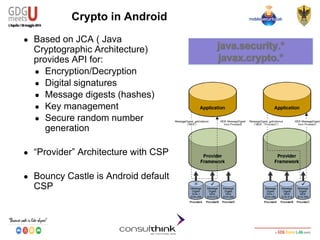
Crypto in Android
● Based on JCA ( Java
Cryptographic Architecture)
provides API for:
● Encryption/Decryption
● Digital signatures
● Message digests (hashes)
● Key management
● Secure random number
generation
● “Provider” Architecture with CSP
● Bouncy Castle is Android default
CSP
Android Security
Key Management
Bouncy Castle Android Version
● Customized:
○ Some services and API removed
● Varies between Android versions
● Fixed only in the latest versions
● Solution: Spongy Castle
● Repackage of Bouncy Castle
● Supports more cryptographic options
● Up-to-date
● Not vulnerable to the Heartbleed Bug
(CVE-2014-0160)
Android Security
Key Management
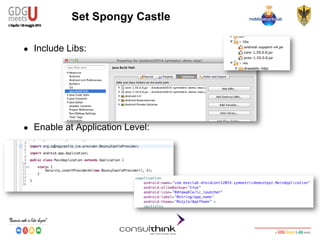
Set Spongy Castle
● Include Libs:
● Enable at Application Level:
Android Security
Key Management
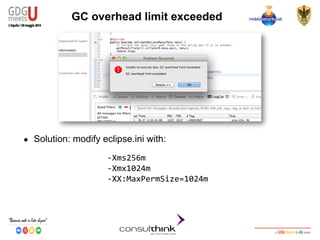
GC overhead limit exceeded
● Solution: modify eclipse.ini with:
-Xms256m
-Xmx1024m
-XX:MaxPermSize=1024m
Android Security
Key Management
Step 1
Enabling SpongyCastle
https://github.com/mseclab/gdgmeetsu2014-symmetric-demo-step1.git
Android Security
Key Management
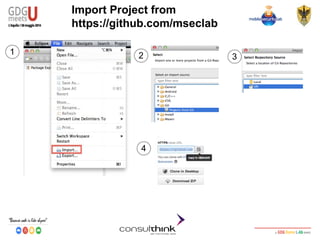
Import Project from
https://github.com/mseclab
1 2 3
4
Android Security
Key Management
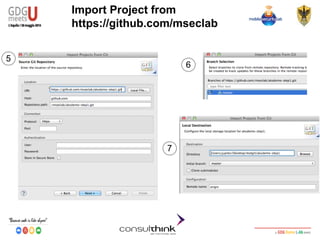
Import Project from
https://github.com/mseclab
5
6
7
Android Security
Key Management
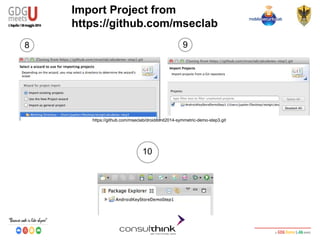
Import Project from
https://github.com/mseclab
8 9
10
https://github.com/mseclab/droidconit2014-symmetric-demo-step3.git
Android Security
Key Management
The project cannot be built...
1
2
3
Android Security
Key Management
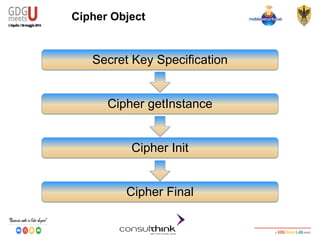
Cipher Object
Secret Key Specification
Cipher getInstance
Cipher Init
Cipher Final
Android Security
Key Management
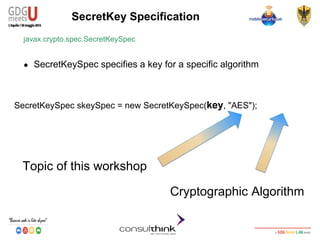
SecretKey Specification
javax.crypto.spec.SecretKeySpec
● SecretKeySpec specifies a key for a specific algorithm
SecretKeySpec skeySpec = new SecretKeySpec(key, "AES");
Topic of this workshop
Cryptographic Algorithm
Android Security
Key Management
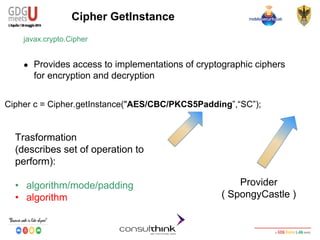
Cipher GetInstance
javax.crypto.Cipher
● Provides access to implementations of cryptographic ciphers
for encryption and decryption
Cipher c = Cipher.getInstance("AES/CBC/PKCS5Padding”,“SC”);
Trasformation
(describes set of operation to
perform):
• algorithm/mode/padding
• algorithm
Provider
( SpongyCastle )
Android Security
Key Management
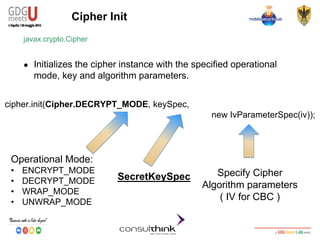
Cipher Init
javax.crypto.Cipher
● Initializes the cipher instance with the specified operational
mode, key and algorithm parameters.
cipher.init(Cipher.DECRYPT_MODE, keySpec,
new IvParameterSpec(iv));
Operational Mode:
• ENCRYPT_MODE
• DECRYPT_MODE
• WRAP_MODE
• UNWRAP_MODE
SecretKeySpec Specify Cipher
Algorithm parameters
( IV for CBC )
Android Security
Key Management
Cipher Final
javax.crypto.Cipher
● Finishes a multi-part transformation (encryption or decryption)
byte[] encryptedText = cipher.doFinal(clearText.getBytes());
Encrypted
Text in byte
ClearText in
bytes
Android Security
Key Management
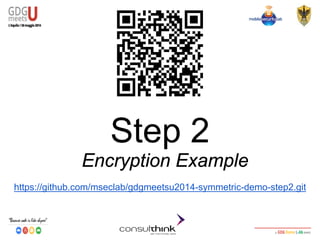
Step 2
Encryption Example
https://github.com/mseclab/gdgmeetsu2014-symmetric-demo-step2.git
Android Security
Key Management
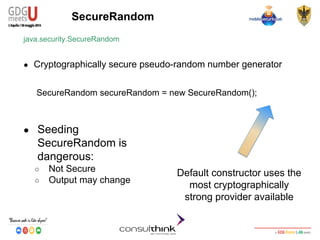
SecureRandom
java.security.SecureRandom
● Cryptographically secure pseudo-random number generator
SecureRandom secureRandom = new SecureRandom();
Default constructor uses the
most cryptographically
strong provider available
● Seeding
SecureRandom is
dangerous:
○ Not Secure
○ Output may change
Android Security
Key Management
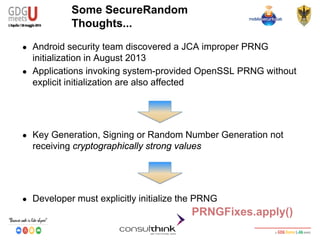
Some SecureRandom
Thoughts...
● Android security team discovered a JCA improper PRNG
initialization in August 2013
● Applications invoking system-provided OpenSSL PRNG without
explicit initialization are also affected
● Key Generation, Signing or Random Number Generation not
receiving cryptographically strong values
● Developer must explicitly initialize the PRNG
PRNGFixes.apply()
Android Security
Key Management
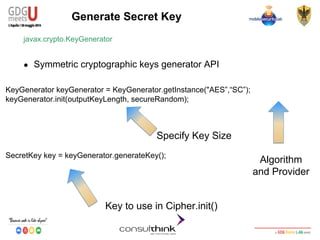
KeyGenerator keyGenerator = KeyGenerator.getInstance("AES”,“SC”);
keyGenerator.init(outputKeyLength, secureRandom);
SecretKey key = keyGenerator.generateKey();
Generate Secret Key
javax.crypto.KeyGenerator
● Symmetric cryptographic keys generator API
Specify Key Size
Algorithm
and Provider
Key to use in Cipher.init()
Android Security
Key Management
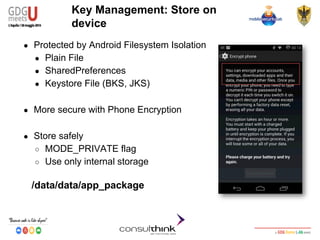
Key Management: Store on
device
● Protected by Android Filesystem Isolation
● Plain File
● SharedPreferences
● Keystore File (BKS, JKS)
● More secure with Phone Encryption
● Store safely
○ MODE_PRIVATE flag
○ Use only internal storage
/data/data/app_package
Android Security
Key Management
Key Management: Store on
device
● Device Rooted?
Android Security
Key Management
Step 3
Rooted device demo
https://github.com/mseclab/gdgmeetsu2014-symmetric-demo-step3.git
Android Security
Key Management
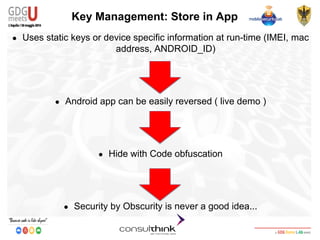
Key Management: Store in App
● Uses static keys or device specific information at run-time (IMEI, mac
address, ANDROID_ID)
● Android app can be easily reversed ( live demo )
● Hide with Code obfuscation
● Security by Obscurity is never a good idea...
Android Security
Key Management
Key Management: Store in App
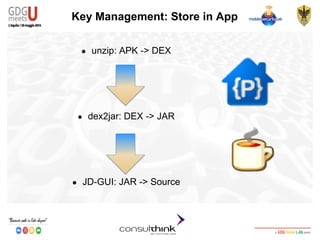
● unzip: APK -> DEX
● dex2jar: DEX -> JAR
● JD-GUI: JAR -> Source
Android Security
Key Management
Reversing Demo
Android Security
Key Management
Key Management: PBKDF2
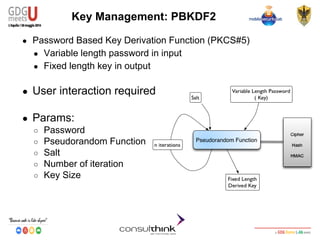
● Password Based Key Derivation Function (PKCS#5)
● Variable length password in input
● Fixed length key in output
● User interaction required
● Params:
○ Password
○ Pseudorandom Function
○ Salt
○ Number of iteration
○ Key Size
Android Security
Key Management
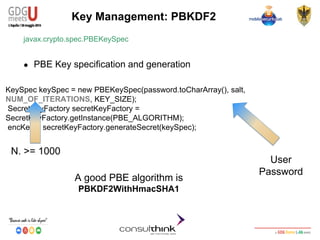
KeySpec keySpec = new PBEKeySpec(password.toCharArray(), salt,
NUM_OF_ITERATIONS, KEY_SIZE);
SecretKeyFactory secretKeyFactory =
SecretKeyFactory.getInstance(PBE_ALGORITHM);
encKey = secretKeyFactory.generateSecret(keySpec);
Key Management: PBKDF2
javax.crypto.spec.PBEKeySpec
● PBE Key specification and generation
A good PBE algorithm is
PBKDF2WithHmacSHA1
User
Password
N. >= 1000
Android Security
Key Management
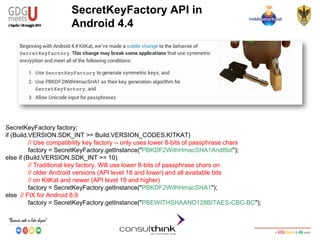
SecretKeyFactory factory;
if (Build.VERSION.SDK_INT >= Build.VERSION_CODES.KITKAT)
// Use compatibility key factory -- only uses lower 8-bits of passphrase chars
factory = SecretKeyFactory.getInstance("PBKDF2WithHmacSHA1And8bit");
else if (Build.VERSION.SDK_INT >= 10)
// Traditional key factory. Will use lower 8-bits of passphrase chars on
// older Android versions (API level 18 and lower) and all available bits
// on KitKat and newer (API level 19 and higher)
factory = SecretKeyFactory.getInstance("PBKDF2WithHmacSHA1");
else // FIX for Android 8,9
factory = SecretKeyFactory.getInstance("PBEWITHSHAAND128BITAES-CBC-BC");
SecretKeyFactory API in
Android 4.4
Android Security
Key Management
Step 4
PBE Example
https://github.com/mseclab/gdgmeetsu2014-symmetric-demo-step4.git
Android Security
Key Management
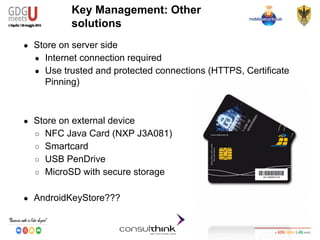
Key Management: Other
solutions
● Store on server side
● Internet connection required
● Use trusted and protected connections (HTTPS, Certificate
Pinning)
● Store on external device
○ NFC Java Card (NXP J3A081)
○ Smartcard
○ USB PenDrive
○ MicroSD with secure storage
● AndroidKeyStore???
Android Security
Key Management
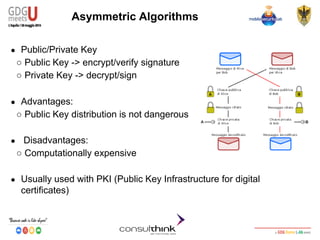
Asymmetric Algorithms
● Public/Private Key
○ Public Key -> encrypt/verify signature
○ Private Key -> decrypt/sign
● Advantages:
○ Public Key distribution is not dangerous
● Disadvantages:
○ Computationally expensive
● Usually used with PKI (Public Key Infrastructure for digital
certificates)
Android Security
Key Management
Public-key Applications
● Can classify uses into 3 categories:
○ Encryption/Decryption (provides confidentiality)
○ Digital Signatures (provides authentication and Integrity)
○ Key Exchange (of session keys)
● Some algorithms are suitable for all uses (RSA),
others are specific to one
Android Security
Key Management
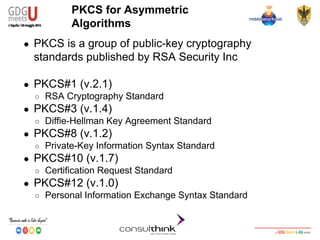
PKCS for Asymmetric
Algorithms
● PKCS is a group of public-key cryptography
standards published by RSA Security Inc
● PKCS#1 (v.2.1)
○ RSA Cryptography Standard
● PKCS#3 (v.1.4)
○ Diffie-Hellman Key Agreement Standard
● PKCS#8 (v.1.2)
○ Private-Key Information Syntax Standard
● PKCS#10 (v.1.7)
○ Certification Request Standard
● PKCS#12 (v.1.0)
○ Personal Information Exchange Syntax Standard
Android Security
Key Management
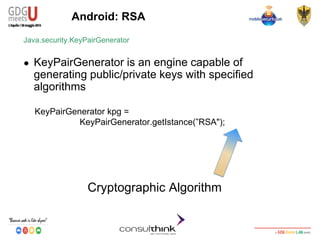
Android: RSA
KeyPairGenerator kpg =
KeyPairGenerator.getIstance(”RSA");
Java.security.KeyPairGenerator
● KeyPairGenerator is an engine capable of
generating public/private keys with specified
algorithms
Cryptographic Algorithm
Android Security
Key Management
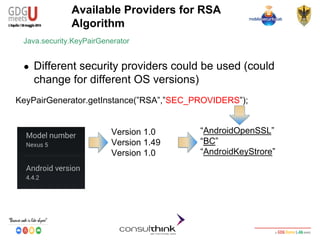
Available Providers for RSA
Algorithm
KeyPairGenerator.getInstance(”RSA”,”SEC_PROVIDERS”);
Java.security.KeyPairGenerator
● Different security providers could be used (could
change for different OS versions)
“AndroidOpenSSL”
“BC”
“AndroidKeyStrore”
Version 1.0
Version 1.49
Version 1.0
Android Security
Key Management
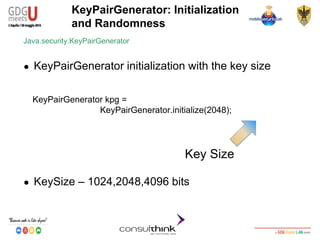
● KeySize – 1024,2048,4096 bits
KeyPairGenerator: Initialization
and Randomness
KeyPairGenerator kpg =
KeyPairGenerator.initialize(2048);
Java.security.KeyPairGenerator
● KeyPairGenerator initialization with the key size
Key Size
Android Security
Key Management
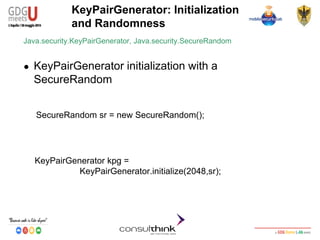
KeyPairGenerator: Initialization
and Randomness
KeyPairGenerator kpg =
KeyPairGenerator.initialize(2048,sr);
Java.security.KeyPairGenerator, Java.security.SecureRandom
● KeyPairGenerator initialization with a
SecureRandom
SecureRandom sr = new SecureRandom();
Android Security
Key Management
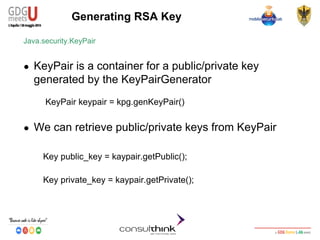
Generating RSA Key
Java.security.KeyPair
● KeyPair is a container for a public/private key
generated by the KeyPairGenerator
KeyPair keypair = kpg.genKeyPair()
● We can retrieve public/private keys from KeyPair
Key public_key = kaypair.getPublic();
Key private_key = kaypair.getPrivate();
Android Security
Key Management
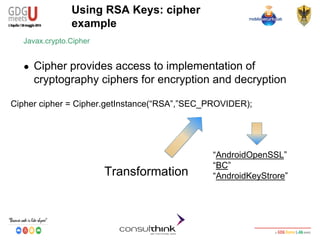
Using RSA Keys: cipher
example
Javax.crypto.Cipher
● Cipher provides access to implementation of
cryptography ciphers for encryption and decryption
Cipher cipher = Cipher.getInstance(“RSA”,”SEC_PROVIDER);
Transformation
“AndroidOpenSSL”
“BC”
“AndroidKeyStrore”
Android Security
Key Management
Using RSA Key: cipher example
Javax.crypto.Cipher
● Encryption
cipher.init(Cipher.ENCRYPT_MODE,public_key);
● Decryption
byte[] encrypted_data=
cipher.doFinal(“GDG-Meets-U2014”.getBytes());
cipher.init(Cipher.DECRYPT_MODE,private_key);
byte[] decrypted_data=
cipher.doFinal(cipherd_data);
Android Security
Key Management
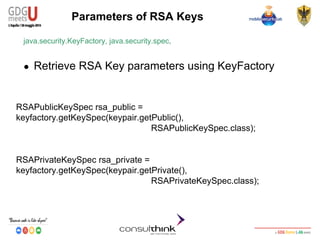
Parameters of RSA Keys
java.security.KeyFactory, java.security.spec,
● Retrieve RSA Key parameters using KeyFactory
RSAPublicKeySpec rsa_public =
keyfactory.getKeySpec(keypair.getPublic(),
RSAPublicKeySpec.class);
RSAPrivateKeySpec rsa_private =
keyfactory.getKeySpec(keypair.getPrivate(),
RSAPrivateKeySpec.class);
Android Security
Key Management
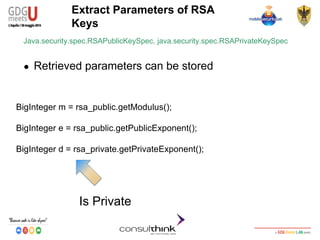
Extract Parameters of RSA
Keys
Java.security.spec.RSAPublicKeySpec, java.security.spec.RSAPrivateKeySpec
● Retrieved parameters can be stored
BigInteger m = rsa_public.getModulus();
BigInteger e = rsa_public.getPublicExponent();
BigInteger d = rsa_private.getPrivateExponent();
Is Private
Android Security
Key Management
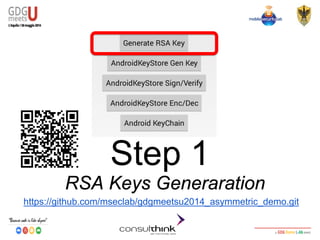
Step 1
RSA Keys Generaration
https://github.com/mseclab/gdgmeetsu2014_asymmetric_demo.git
Android Security
Key Management
AndroidKeyStore
● Custom Java Security Provider available from Android 4.3
version and beyond
● An App can generate and save private keys
● Keys are private for each App
● 2048-bit key size (4.3), 1024-2048-4096-bit key size (4.4) can
be stored
● ECDSA support added from Android 4.4
Android Security
Key Management
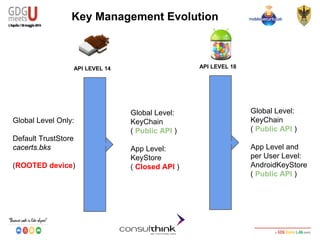
Key Management Evolution
API LEVEL 14 API LEVEL 18
Global Level:
KeyChain
( Public API )
App Level:
KeyStore
( Closed API )
Global Level Only:
Default TrustStore
cacerts.bks
(ROOTED device)
Global Level:
KeyChain
( Public API )
App Level and
per User Level:
AndroidKeyStore
( Public API )
Android Security
Key Management
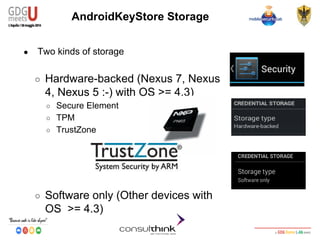
AndroidKeyStore Storage
● Two kinds of storage
○ Hardware-backed (Nexus 7, Nexus
4, Nexus 5 :-) with OS >= 4.3)
○ Secure Element
○ TPM
○ TrustZone
○ Software only (Other devices with
OS >= 4.3)
Android Security
Key Management
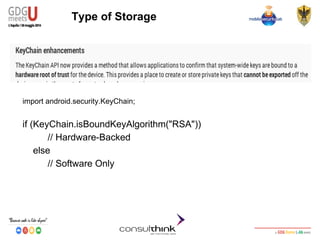
Type of Storage
import android.security.KeyChain;
if (KeyChain.isBoundKeyAlgorithm("RSA"))
// Hardware-Backed
else
// Software Only
Android Security
Key Management
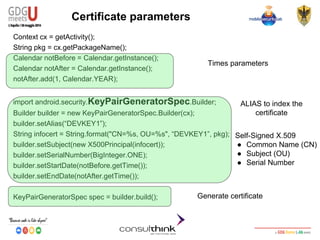
Certificate parameters
Context cx = getActivity();
String pkg = cx.getPackageName();
Calendar notBefore = Calendar.getInstance();
Calendar notAfter = Calendar.getInstance();
notAfter.add(1, Calendar.YEAR);
import android.security.KeyPairGeneratorSpec.Builder;
Builder builder = new KeyPairGeneratorSpec.Builder(cx);
builder.setAlias(“DEVKEY1”);
String infocert = String.format("CN=%s, OU=%s", “DEVKEY1”, pkg);
builder.setSubject(new X500Principal(infocert));
builder.setSerialNumber(BigInteger.ONE);
builder.setStartDate(notBefore.getTime());
builder.setEndDate(notAfter.getTime());
KeyPairGeneratorSpec spec = builder.build();
Times parameters
Self-Signed X.509
● Common Name (CN)
● Subject (OU)
● Serial Number
Generate certificate
ALIAS to index the
certificate
Android Security
Key Management
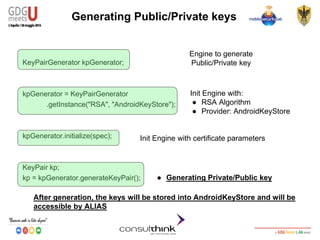
Generating Public/Private keys
KeyPairGenerator kpGenerator;
kpGenerator = KeyPairGenerator
.getInstance("RSA", "AndroidKeyStore");
kpGenerator.initialize(spec);
KeyPair kp;
kp = kpGenerator.generateKeyPair();
Engine to generate
Public/Private key
Init Engine with:
● RSA Algorithm
● Provider: AndroidKeyStore
Init Engine with certificate parameters
After generation, the keys will be stored into AndroidKeyStore and will be
accessible by ALIAS
● Generating Private/Public key
Android Security
Key Management
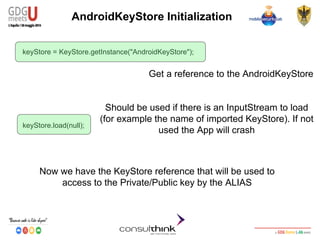
AndroidKeyStore Initialization
keyStore = KeyStore.getInstance("AndroidKeyStore");
keyStore.load(null);
Now we have the KeyStore reference that will be used to
access to the Private/Public key by the ALIAS
Should be used if there is an InputStream to load
(for example the name of imported KeyStore). If not
used the App will crash
Get a reference to the AndroidKeyStore
Android Security
Key Management
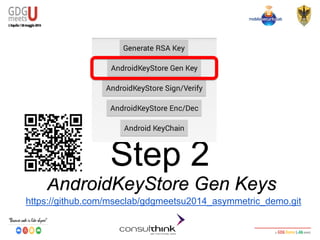
Step 2
AndroidKeyStore Gen Keys
https://github.com/mseclab/gdgmeetsu2014_asymmetric_demo.git
Android Security
Key Management
RSA Digital Signature
● Digital Signature
○ Authentication, Non-Repudiation and Integrity
○ RSA Private key to Sign
○ RSA Public Key to Verify
KeyStore.Entry entry = ks.getEntry(“DEVKEY1”, null);
byte[] data = “GDG-Meets-U 2014!”.getBytes();
Signature s = Signature.getInstance(“SHA256withRSA”);
s.initSign(((KeyStore.PrivateKeyEntry) entry).getPrivateKey());
s.update(data);
byte[] signature = s.sign();
String result = null;
result = Base64.encodeToString(signature, Base64.DEFAULT);
Access to Private/Public key identified
by ALIAS
Algorithm choice
Private key to sign
Signature and Base64
encoding
Android Security
Key Management
Verify RSA Digital Signature
byte[] data = input.getBytes();
byte[] signature;
signature = Base64.decode(signatureStr, Base64.DEFAULT);
KeyStore.Entry entry = ks.getEntry(“DEVKEY1”, null);
Signature s = Signature.getInstance("SHA256withRSA");
s.initVerify(((KeyStore.PrivateKeyEntry) entry).getCertificate());
s.update(data);
boolean valid = s.verify(signature);
Base64 decoding
Access to the Private/Public key
identified by ALIAS==DEVKEY1
Algorithm choice
Public Key in certificate to
verify signature
TRUE == Verified
FALSE== Not Verified
Android Security
Key Management
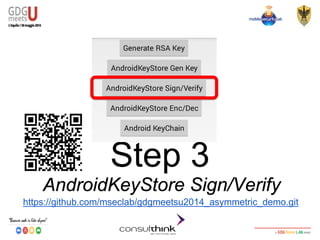
Step 3
AndroidKeyStore Sign/Verify
https://github.com/mseclab/gdgmeetsu2014_asymmetric_demo.git
Android Security
Key Management
RSA Encryption
● Encryption
○ Confidentiality
○ RSA Public key to Encrypt
○ RSA Private key to Decrypt
PublicKey publicKeyEnc = ((KeyStore.PrivateKeyEntry) entry)
.getCertificate().getPublicKey();
String textToEncrypt = new String(”GDG-Meet-U-2014");
byte[] textToEncryptToByte = textToEncrypt.getBytes();
Cipher encCipher = null;
byte[] encryptedText = null;
encCipher = Cipher.getInstance("RSA/ECB/PKCS1Padding");
encCipher.init(Cipher.ENCRYPT_MODE, publicKeyEnc);
encryptedText = encCipher.doFinal(textToEncryptToByte);
Access to Public key
to encrypt
● Algorithm
● Encryption with Public
key
Ciphered
Android Security
Key Management
RSA Decryption
Cipher decCipher = null;
byte[] plainTextByte = null;
decCipher = Cipher.getInstance("RSA/ECB/PKCS1Padding");
decCipher.init(Cipher.DECRYPT_MODE,
((KeyStore.PrivateKeyEntry) entry).getPrivateKey());
plainTextByte = decCipher.doFinal(ecryptedText);
String plainText = new String(plainTextByte);
Algorithm
Decryption with
Private key
Plaintext
Android Security
Key Management
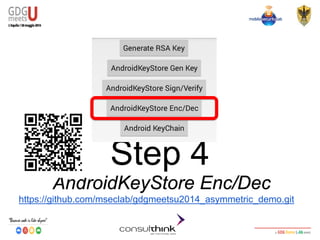
Step 4
AndroidKeyStore Enc/Dec
https://github.com/mseclab/gdgmeetsu2014_asymmetric_demo.git
Android Security
Key Management
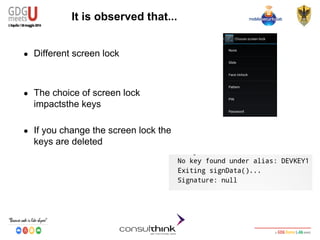
It is observed that...
● Different screen lock
● The choice of screen lock
impactsthe keys
● If you change the screen lock the
keys are deleted
Android Security
Key Management
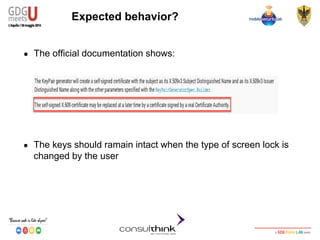
Expected behavior?
● The official documentation shows:
● The keys should ramain intact when the type of screen lock is
changed by the user
Android Security
Key Management
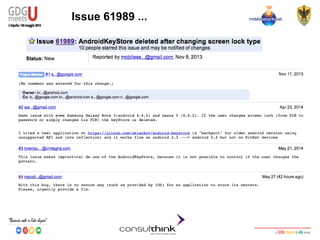
Issue 61989 ...
Android Security
Key Management
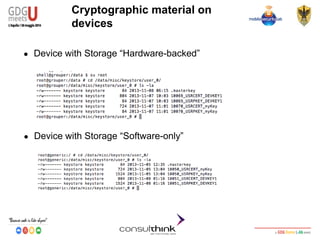
Cryptographic material on
devices
● Device with Storage “Hardware-backed”
● Device with Storage “Software-only”
Android Security
Key Management
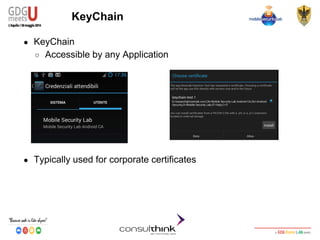
KeyChain
● KeyChain
○ Accessible by any Application
● Typically used for corporate certificates
Android Security
Key Management
Example: Import Certificates
● Import .p12 certificates
Intent intent = KeyChain.createInstallIntent();
byte[] p12 = readFile(“CERTIFICATE_NAME.p12”);
Intent.putExtra(KeyChain.EXTRA_PKCS12,p12);
Specify PKCS#12 Key to install
startActivity(intent);
The user will be
prompted for the
password
Android Security
Key Management
KeyChain.choosePrivateKeyAlias(
Activity activity,
KeyChainAliasCallBack response,
String[] keyTypes,
Principal[] issuers,
String host,
Int port,
String Alias);
Example: Retrieve the key
● The KeyChainAliasCallback invoked when a user chooses a
certificate/private key
Android Security
Key Management
@Override
public void alias(String alias){
.
.
PrivateKey private_key = KeyChain.
getPrivateKey(this,alias);
.
.
X509Certificate[] chain = KeyChain.
getCertificateChain(this,”Droidcon”);
.
PublicKey public_key = chain[0].getPublicKey();
}
Example: Retrieve and use the
keys
● KeyChainAliasCallbak must implement the abstract method
alias:
Private Key
Public Key
Android Security
Key Management
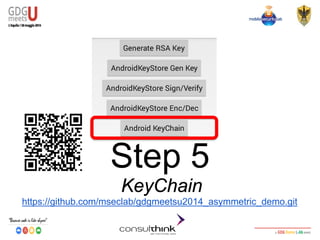
Step 5
KeyChain
https://github.com/mseclab/gdgmeetsu2014_asymmetric_demo.git
Android Security
Key Management
References
● http://developer.android.com/about/versions/android-4.3.html#Security
● http://developer.android.com/reference/java/security/KeyStore.html
● http://en.wikipedia.org/wiki/Encryption
● http://en.wikipedia.org/wiki/Digital_signature
● http://nelenkov.blogspot.it/2013/08/credential-storage-enhancements-android-43.html
● http://nelenkov.blogspot.it/2012/05/storing-application-secrets-in-androids.html
● http://nelenkov.blogspot.it/2012/04/using-password-based-encryption-on.html
● http://nelenkov.blogspot.it/2011/11/ics-credential-storage-implementation.html
● http://developer.android.com/reference/android/security/KeyPairGeneratorSpec.html
● http://android-developers.blogspot.it/2013/02/using-cryptography-to-store-
credentials.html
● http://www.bouncycastle.org/
● http://android-developers.blogspot.it/2013/08/some-securerandom-thoughts.html
● http://nelenkov.blogspot.it/2013/10/signing-email-with-nfc-smart-card.html
● http://en.wikipedia.org/wiki/PKCS
● http://developer.android.com/reference/android/security/KeyChain.html
● http://android-developers.blogspot.it/2013/12/changes-to-secretkeyfactory-api-in.html
Android Security
Key Management
Thank you
Q&Awww.mseclab.com
www.consulthink.it
research@mseclab.comgoo.gl/TA8EA1

Consulthink @ GDG Meets U - L'Aquila2014 - Codelab: Android Security -Il key management

  • 1.
    Android Security Key Management RobertoPiccirillo (r.piccirillo@mseclab.com) Roberto Gassirà (r.gassira@mseclab.com)
  • 2.
    Android Security Key Management RobertoPiccirillo ● Senior Security Analyst - Mobile Security Lab ○ Vulnerability Assessment (IT, Mobile Application) ○ Hijacking Mobile Data Connection ■ BlackHat Europe 2009 ■ DeepSec Vienna 2009 ■ HITB Amsterdam 2010 ○ Android Secure Development @robpicone
  • 3.
    Android Security Key Management RobertoGassirà ● Senior Security Analyst - Mobile Security Lab ○ Vulnerability Assessment (IT, Mobile Application) ○ Hijacking Mobile Data Connection ■ BlackHat Europe 2009 ■ DeepSec Vienna 2009 ■ HITB Amsterdam 2010 ○ Android Secure Development ● IpTrack Developer @robgas
  • 4.
    Android Security Key Management Agenda ●Cryptography in Mobile Application ● CryptoSystem ● Crypto in Android ● Symmetric Encryption ● Symmetric Key Management ● Keychain e AndroidKeyStore ● Tipologie di AndroidKeyStore
  • 5.
    Android Security Key Management Requirements ●A computer ● Eclipse with ADT Plugin 22.3.0 ● SDK Android 4.4 ( API 19 rev 2) ● Android SDK Build-tools 19
  • 6.
    Android Security Key Management Cryptographyin Mobile Applications ● Protect data ○ Sensitive data ○ Data on /sdcard ○ Cryptographic material ● Exchange data securely ○ Documents ○ Mail ○ SMS ○ Session Keys ● Digital Signature ○ Documents ○ Mail
  • 7.
    Android Security Key Management KeyManagement "Key management is the management of cryptographic keys in a cryptosystem."
  • 8.
    Android Security Key Management CryptoSystem "refersto a suite of algorithms needed to implement a particular form of encryption and decryption" ● ● Two types of encryption: ○ Symmetric Key Algorithms ■ Identical encryption key for encryption/decryption ■ AES, Blowfish, DES, Triple DES ○ Asymmetric Key Algorithms ■ Different key for encryption/decryption ■ RSA, DSA, ECDSA
  • 9.
    Android Security Key Management Ciphers ●Two types of ciphers: ○ Block: Process entire blocks of fixed-length groups of bits at a time ( padding may be required) ○ Stream: Process single byte at a time ( no padding ) ● Block Cipher modes of operation ○ ECB: each block encrypted independently ○ CBC, CFB, OFB: the previous block of output is used to alter the input blocks before applying the encryption algorithm starting from a IV ( initialization vector )
  • 10.
    Android Security Key Management Cryptoin Android ● Based on JCA ( Java Cryptographic Architecture) provides API for: ● Encryption/Decryption ● Digital signatures ● Message digests (hashes) ● Key management ● Secure random number generation ● “Provider” Architecture with CSP ● Bouncy Castle is Android default CSP
  • 11.
    Android Security Key Management BouncyCastle Android Version ● Customized: ○ Some services and API removed ● Varies between Android versions ● Fixed only in the latest versions ● Solution: Spongy Castle ● Repackage of Bouncy Castle ● Supports more cryptographic options ● Up-to-date ● Not vulnerable to the Heartbleed Bug (CVE-2014-0160)
  • 12.
    Android Security Key Management SetSpongy Castle ● Include Libs: ● Enable at Application Level:
  • 13.
    Android Security Key Management GCoverhead limit exceeded ● Solution: modify eclipse.ini with: -Xms256m -Xmx1024m -XX:MaxPermSize=1024m
  • 14.
    Android Security Key Management Step1 Enabling SpongyCastle https://github.com/mseclab/gdgmeetsu2014-symmetric-demo-step1.git
  • 15.
    Android Security Key Management ImportProject from https://github.com/mseclab 1 2 3 4
  • 16.
    Android Security Key Management ImportProject from https://github.com/mseclab 5 6 7
  • 17.
    Android Security Key Management ImportProject from https://github.com/mseclab 8 9 10 https://github.com/mseclab/droidconit2014-symmetric-demo-step3.git
  • 18.
    Android Security Key Management Theproject cannot be built... 1 2 3
  • 19.
    Android Security Key Management CipherObject Secret Key Specification Cipher getInstance Cipher Init Cipher Final
  • 20.
    Android Security Key Management SecretKeySpecification javax.crypto.spec.SecretKeySpec ● SecretKeySpec specifies a key for a specific algorithm SecretKeySpec skeySpec = new SecretKeySpec(key, "AES"); Topic of this workshop Cryptographic Algorithm
  • 21.
    Android Security Key Management CipherGetInstance javax.crypto.Cipher ● Provides access to implementations of cryptographic ciphers for encryption and decryption Cipher c = Cipher.getInstance("AES/CBC/PKCS5Padding”,“SC”); Trasformation (describes set of operation to perform): • algorithm/mode/padding • algorithm Provider ( SpongyCastle )
  • 22.
    Android Security Key Management CipherInit javax.crypto.Cipher ● Initializes the cipher instance with the specified operational mode, key and algorithm parameters. cipher.init(Cipher.DECRYPT_MODE, keySpec, new IvParameterSpec(iv)); Operational Mode: • ENCRYPT_MODE • DECRYPT_MODE • WRAP_MODE • UNWRAP_MODE SecretKeySpec Specify Cipher Algorithm parameters ( IV for CBC )
  • 23.
    Android Security Key Management CipherFinal javax.crypto.Cipher ● Finishes a multi-part transformation (encryption or decryption) byte[] encryptedText = cipher.doFinal(clearText.getBytes()); Encrypted Text in byte ClearText in bytes
  • 24.
    Android Security Key Management Step2 Encryption Example https://github.com/mseclab/gdgmeetsu2014-symmetric-demo-step2.git
  • 25.
    Android Security Key Management SecureRandom java.security.SecureRandom ●Cryptographically secure pseudo-random number generator SecureRandom secureRandom = new SecureRandom(); Default constructor uses the most cryptographically strong provider available ● Seeding SecureRandom is dangerous: ○ Not Secure ○ Output may change
  • 26.
    Android Security Key Management SomeSecureRandom Thoughts... ● Android security team discovered a JCA improper PRNG initialization in August 2013 ● Applications invoking system-provided OpenSSL PRNG without explicit initialization are also affected ● Key Generation, Signing or Random Number Generation not receiving cryptographically strong values ● Developer must explicitly initialize the PRNG PRNGFixes.apply()
  • 27.
    Android Security Key Management KeyGeneratorkeyGenerator = KeyGenerator.getInstance("AES”,“SC”); keyGenerator.init(outputKeyLength, secureRandom); SecretKey key = keyGenerator.generateKey(); Generate Secret Key javax.crypto.KeyGenerator ● Symmetric cryptographic keys generator API Specify Key Size Algorithm and Provider Key to use in Cipher.init()
  • 28.
    Android Security Key Management KeyManagement: Store on device ● Protected by Android Filesystem Isolation ● Plain File ● SharedPreferences ● Keystore File (BKS, JKS) ● More secure with Phone Encryption ● Store safely ○ MODE_PRIVATE flag ○ Use only internal storage /data/data/app_package
  • 29.
    Android Security Key Management KeyManagement: Store on device ● Device Rooted?
  • 30.
    Android Security Key Management Step3 Rooted device demo https://github.com/mseclab/gdgmeetsu2014-symmetric-demo-step3.git
  • 31.
    Android Security Key Management KeyManagement: Store in App ● Uses static keys or device specific information at run-time (IMEI, mac address, ANDROID_ID) ● Android app can be easily reversed ( live demo ) ● Hide with Code obfuscation ● Security by Obscurity is never a good idea...
  • 32.
    Android Security Key Management KeyManagement: Store in App ● unzip: APK -> DEX ● dex2jar: DEX -> JAR ● JD-GUI: JAR -> Source
  • 33.
  • 34.
    Android Security Key Management KeyManagement: PBKDF2 ● Password Based Key Derivation Function (PKCS#5) ● Variable length password in input ● Fixed length key in output ● User interaction required ● Params: ○ Password ○ Pseudorandom Function ○ Salt ○ Number of iteration ○ Key Size
  • 35.
    Android Security Key Management KeySpeckeySpec = new PBEKeySpec(password.toCharArray(), salt, NUM_OF_ITERATIONS, KEY_SIZE); SecretKeyFactory secretKeyFactory = SecretKeyFactory.getInstance(PBE_ALGORITHM); encKey = secretKeyFactory.generateSecret(keySpec); Key Management: PBKDF2 javax.crypto.spec.PBEKeySpec ● PBE Key specification and generation A good PBE algorithm is PBKDF2WithHmacSHA1 User Password N. >= 1000
  • 36.
    Android Security Key Management SecretKeyFactoryfactory; if (Build.VERSION.SDK_INT >= Build.VERSION_CODES.KITKAT) // Use compatibility key factory -- only uses lower 8-bits of passphrase chars factory = SecretKeyFactory.getInstance("PBKDF2WithHmacSHA1And8bit"); else if (Build.VERSION.SDK_INT >= 10) // Traditional key factory. Will use lower 8-bits of passphrase chars on // older Android versions (API level 18 and lower) and all available bits // on KitKat and newer (API level 19 and higher) factory = SecretKeyFactory.getInstance("PBKDF2WithHmacSHA1"); else // FIX for Android 8,9 factory = SecretKeyFactory.getInstance("PBEWITHSHAAND128BITAES-CBC-BC"); SecretKeyFactory API in Android 4.4
  • 37.
    Android Security Key Management Step4 PBE Example https://github.com/mseclab/gdgmeetsu2014-symmetric-demo-step4.git
  • 38.
    Android Security Key Management KeyManagement: Other solutions ● Store on server side ● Internet connection required ● Use trusted and protected connections (HTTPS, Certificate Pinning) ● Store on external device ○ NFC Java Card (NXP J3A081) ○ Smartcard ○ USB PenDrive ○ MicroSD with secure storage ● AndroidKeyStore???
  • 39.
    Android Security Key Management AsymmetricAlgorithms ● Public/Private Key ○ Public Key -> encrypt/verify signature ○ Private Key -> decrypt/sign ● Advantages: ○ Public Key distribution is not dangerous ● Disadvantages: ○ Computationally expensive ● Usually used with PKI (Public Key Infrastructure for digital certificates)
  • 40.
    Android Security Key Management Public-keyApplications ● Can classify uses into 3 categories: ○ Encryption/Decryption (provides confidentiality) ○ Digital Signatures (provides authentication and Integrity) ○ Key Exchange (of session keys) ● Some algorithms are suitable for all uses (RSA), others are specific to one
  • 41.
    Android Security Key Management PKCSfor Asymmetric Algorithms ● PKCS is a group of public-key cryptography standards published by RSA Security Inc ● PKCS#1 (v.2.1) ○ RSA Cryptography Standard ● PKCS#3 (v.1.4) ○ Diffie-Hellman Key Agreement Standard ● PKCS#8 (v.1.2) ○ Private-Key Information Syntax Standard ● PKCS#10 (v.1.7) ○ Certification Request Standard ● PKCS#12 (v.1.0) ○ Personal Information Exchange Syntax Standard
  • 42.
    Android Security Key Management Android:RSA KeyPairGenerator kpg = KeyPairGenerator.getIstance(”RSA"); Java.security.KeyPairGenerator ● KeyPairGenerator is an engine capable of generating public/private keys with specified algorithms Cryptographic Algorithm
  • 43.
    Android Security Key Management AvailableProviders for RSA Algorithm KeyPairGenerator.getInstance(”RSA”,”SEC_PROVIDERS”); Java.security.KeyPairGenerator ● Different security providers could be used (could change for different OS versions) “AndroidOpenSSL” “BC” “AndroidKeyStrore” Version 1.0 Version 1.49 Version 1.0
  • 44.
    Android Security Key Management ●KeySize – 1024,2048,4096 bits KeyPairGenerator: Initialization and Randomness KeyPairGenerator kpg = KeyPairGenerator.initialize(2048); Java.security.KeyPairGenerator ● KeyPairGenerator initialization with the key size Key Size
  • 45.
    Android Security Key Management KeyPairGenerator:Initialization and Randomness KeyPairGenerator kpg = KeyPairGenerator.initialize(2048,sr); Java.security.KeyPairGenerator, Java.security.SecureRandom ● KeyPairGenerator initialization with a SecureRandom SecureRandom sr = new SecureRandom();
  • 46.
    Android Security Key Management GeneratingRSA Key Java.security.KeyPair ● KeyPair is a container for a public/private key generated by the KeyPairGenerator KeyPair keypair = kpg.genKeyPair() ● We can retrieve public/private keys from KeyPair Key public_key = kaypair.getPublic(); Key private_key = kaypair.getPrivate();
  • 47.
    Android Security Key Management UsingRSA Keys: cipher example Javax.crypto.Cipher ● Cipher provides access to implementation of cryptography ciphers for encryption and decryption Cipher cipher = Cipher.getInstance(“RSA”,”SEC_PROVIDER); Transformation “AndroidOpenSSL” “BC” “AndroidKeyStrore”
  • 48.
    Android Security Key Management UsingRSA Key: cipher example Javax.crypto.Cipher ● Encryption cipher.init(Cipher.ENCRYPT_MODE,public_key); ● Decryption byte[] encrypted_data= cipher.doFinal(“GDG-Meets-U2014”.getBytes()); cipher.init(Cipher.DECRYPT_MODE,private_key); byte[] decrypted_data= cipher.doFinal(cipherd_data);
  • 49.
    Android Security Key Management Parametersof RSA Keys java.security.KeyFactory, java.security.spec, ● Retrieve RSA Key parameters using KeyFactory RSAPublicKeySpec rsa_public = keyfactory.getKeySpec(keypair.getPublic(), RSAPublicKeySpec.class); RSAPrivateKeySpec rsa_private = keyfactory.getKeySpec(keypair.getPrivate(), RSAPrivateKeySpec.class);
  • 50.
    Android Security Key Management ExtractParameters of RSA Keys Java.security.spec.RSAPublicKeySpec, java.security.spec.RSAPrivateKeySpec ● Retrieved parameters can be stored BigInteger m = rsa_public.getModulus(); BigInteger e = rsa_public.getPublicExponent(); BigInteger d = rsa_private.getPrivateExponent(); Is Private
  • 51.
    Android Security Key Management Step1 RSA Keys Generaration https://github.com/mseclab/gdgmeetsu2014_asymmetric_demo.git
  • 52.
    Android Security Key Management AndroidKeyStore ●Custom Java Security Provider available from Android 4.3 version and beyond ● An App can generate and save private keys ● Keys are private for each App ● 2048-bit key size (4.3), 1024-2048-4096-bit key size (4.4) can be stored ● ECDSA support added from Android 4.4
  • 53.
    Android Security Key Management KeyManagement Evolution API LEVEL 14 API LEVEL 18 Global Level: KeyChain ( Public API ) App Level: KeyStore ( Closed API ) Global Level Only: Default TrustStore cacerts.bks (ROOTED device) Global Level: KeyChain ( Public API ) App Level and per User Level: AndroidKeyStore ( Public API )
  • 54.
    Android Security Key Management AndroidKeyStoreStorage ● Two kinds of storage ○ Hardware-backed (Nexus 7, Nexus 4, Nexus 5 :-) with OS >= 4.3) ○ Secure Element ○ TPM ○ TrustZone ○ Software only (Other devices with OS >= 4.3)
  • 55.
    Android Security Key Management Typeof Storage import android.security.KeyChain; if (KeyChain.isBoundKeyAlgorithm("RSA")) // Hardware-Backed else // Software Only
  • 56.
    Android Security Key Management Certificateparameters Context cx = getActivity(); String pkg = cx.getPackageName(); Calendar notBefore = Calendar.getInstance(); Calendar notAfter = Calendar.getInstance(); notAfter.add(1, Calendar.YEAR); import android.security.KeyPairGeneratorSpec.Builder; Builder builder = new KeyPairGeneratorSpec.Builder(cx); builder.setAlias(“DEVKEY1”); String infocert = String.format("CN=%s, OU=%s", “DEVKEY1”, pkg); builder.setSubject(new X500Principal(infocert)); builder.setSerialNumber(BigInteger.ONE); builder.setStartDate(notBefore.getTime()); builder.setEndDate(notAfter.getTime()); KeyPairGeneratorSpec spec = builder.build(); Times parameters Self-Signed X.509 ● Common Name (CN) ● Subject (OU) ● Serial Number Generate certificate ALIAS to index the certificate
  • 57.
    Android Security Key Management GeneratingPublic/Private keys KeyPairGenerator kpGenerator; kpGenerator = KeyPairGenerator .getInstance("RSA", "AndroidKeyStore"); kpGenerator.initialize(spec); KeyPair kp; kp = kpGenerator.generateKeyPair(); Engine to generate Public/Private key Init Engine with: ● RSA Algorithm ● Provider: AndroidKeyStore Init Engine with certificate parameters After generation, the keys will be stored into AndroidKeyStore and will be accessible by ALIAS ● Generating Private/Public key
  • 58.
    Android Security Key Management AndroidKeyStoreInitialization keyStore = KeyStore.getInstance("AndroidKeyStore"); keyStore.load(null); Now we have the KeyStore reference that will be used to access to the Private/Public key by the ALIAS Should be used if there is an InputStream to load (for example the name of imported KeyStore). If not used the App will crash Get a reference to the AndroidKeyStore
  • 59.
    Android Security Key Management Step2 AndroidKeyStore Gen Keys https://github.com/mseclab/gdgmeetsu2014_asymmetric_demo.git
  • 60.
    Android Security Key Management RSADigital Signature ● Digital Signature ○ Authentication, Non-Repudiation and Integrity ○ RSA Private key to Sign ○ RSA Public Key to Verify KeyStore.Entry entry = ks.getEntry(“DEVKEY1”, null); byte[] data = “GDG-Meets-U 2014!”.getBytes(); Signature s = Signature.getInstance(“SHA256withRSA”); s.initSign(((KeyStore.PrivateKeyEntry) entry).getPrivateKey()); s.update(data); byte[] signature = s.sign(); String result = null; result = Base64.encodeToString(signature, Base64.DEFAULT); Access to Private/Public key identified by ALIAS Algorithm choice Private key to sign Signature and Base64 encoding
  • 61.
    Android Security Key Management VerifyRSA Digital Signature byte[] data = input.getBytes(); byte[] signature; signature = Base64.decode(signatureStr, Base64.DEFAULT); KeyStore.Entry entry = ks.getEntry(“DEVKEY1”, null); Signature s = Signature.getInstance("SHA256withRSA"); s.initVerify(((KeyStore.PrivateKeyEntry) entry).getCertificate()); s.update(data); boolean valid = s.verify(signature); Base64 decoding Access to the Private/Public key identified by ALIAS==DEVKEY1 Algorithm choice Public Key in certificate to verify signature TRUE == Verified FALSE== Not Verified
  • 62.
    Android Security Key Management Step3 AndroidKeyStore Sign/Verify https://github.com/mseclab/gdgmeetsu2014_asymmetric_demo.git
  • 63.
    Android Security Key Management RSAEncryption ● Encryption ○ Confidentiality ○ RSA Public key to Encrypt ○ RSA Private key to Decrypt PublicKey publicKeyEnc = ((KeyStore.PrivateKeyEntry) entry) .getCertificate().getPublicKey(); String textToEncrypt = new String(”GDG-Meet-U-2014"); byte[] textToEncryptToByte = textToEncrypt.getBytes(); Cipher encCipher = null; byte[] encryptedText = null; encCipher = Cipher.getInstance("RSA/ECB/PKCS1Padding"); encCipher.init(Cipher.ENCRYPT_MODE, publicKeyEnc); encryptedText = encCipher.doFinal(textToEncryptToByte); Access to Public key to encrypt ● Algorithm ● Encryption with Public key Ciphered
  • 64.
    Android Security Key Management RSADecryption Cipher decCipher = null; byte[] plainTextByte = null; decCipher = Cipher.getInstance("RSA/ECB/PKCS1Padding"); decCipher.init(Cipher.DECRYPT_MODE, ((KeyStore.PrivateKeyEntry) entry).getPrivateKey()); plainTextByte = decCipher.doFinal(ecryptedText); String plainText = new String(plainTextByte); Algorithm Decryption with Private key Plaintext
  • 65.
    Android Security Key Management Step4 AndroidKeyStore Enc/Dec https://github.com/mseclab/gdgmeetsu2014_asymmetric_demo.git
  • 66.
    Android Security Key Management Itis observed that... ● Different screen lock ● The choice of screen lock impactsthe keys ● If you change the screen lock the keys are deleted
  • 67.
    Android Security Key Management Expectedbehavior? ● The official documentation shows: ● The keys should ramain intact when the type of screen lock is changed by the user
  • 68.
  • 69.
    Android Security Key Management Cryptographicmaterial on devices ● Device with Storage “Hardware-backed” ● Device with Storage “Software-only”
  • 70.
    Android Security Key Management KeyChain ●KeyChain ○ Accessible by any Application ● Typically used for corporate certificates
  • 71.
    Android Security Key Management Example:Import Certificates ● Import .p12 certificates Intent intent = KeyChain.createInstallIntent(); byte[] p12 = readFile(“CERTIFICATE_NAME.p12”); Intent.putExtra(KeyChain.EXTRA_PKCS12,p12); Specify PKCS#12 Key to install startActivity(intent); The user will be prompted for the password
  • 72.
    Android Security Key Management KeyChain.choosePrivateKeyAlias( Activityactivity, KeyChainAliasCallBack response, String[] keyTypes, Principal[] issuers, String host, Int port, String Alias); Example: Retrieve the key ● The KeyChainAliasCallback invoked when a user chooses a certificate/private key
  • 73.
    Android Security Key Management @Override publicvoid alias(String alias){ . . PrivateKey private_key = KeyChain. getPrivateKey(this,alias); . . X509Certificate[] chain = KeyChain. getCertificateChain(this,”Droidcon”); . PublicKey public_key = chain[0].getPublicKey(); } Example: Retrieve and use the keys ● KeyChainAliasCallbak must implement the abstract method alias: Private Key Public Key
  • 74.
    Android Security Key Management Step5 KeyChain https://github.com/mseclab/gdgmeetsu2014_asymmetric_demo.git
  • 75.
    Android Security Key Management References ●http://developer.android.com/about/versions/android-4.3.html#Security ● http://developer.android.com/reference/java/security/KeyStore.html ● http://en.wikipedia.org/wiki/Encryption ● http://en.wikipedia.org/wiki/Digital_signature ● http://nelenkov.blogspot.it/2013/08/credential-storage-enhancements-android-43.html ● http://nelenkov.blogspot.it/2012/05/storing-application-secrets-in-androids.html ● http://nelenkov.blogspot.it/2012/04/using-password-based-encryption-on.html ● http://nelenkov.blogspot.it/2011/11/ics-credential-storage-implementation.html ● http://developer.android.com/reference/android/security/KeyPairGeneratorSpec.html ● http://android-developers.blogspot.it/2013/02/using-cryptography-to-store- credentials.html ● http://www.bouncycastle.org/ ● http://android-developers.blogspot.it/2013/08/some-securerandom-thoughts.html ● http://nelenkov.blogspot.it/2013/10/signing-email-with-nfc-smart-card.html ● http://en.wikipedia.org/wiki/PKCS ● http://developer.android.com/reference/android/security/KeyChain.html ● http://android-developers.blogspot.it/2013/12/changes-to-secretkeyfactory-api-in.html
  • 76.
    Android Security Key Management Thankyou Q&Awww.mseclab.com www.consulthink.it research@mseclab.comgoo.gl/TA8EA1