YOU REALLY
THINK YOU
ARE SAFE ??
Answer
lies inside.
Android Security
An Introduction
E-security summit
Computer Society of India
Allahabad Chapter
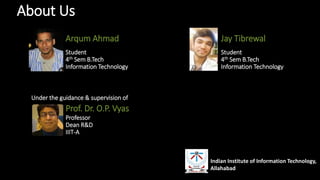
About Us
Arqum Ahmad
Student
4th Sem B.Tech
Information Technology
Jay Tibrewal
Student
4th Sem B.Tech
Information Technology
Indian Institute of Information Technology,
Allahabad
Under the guidance & supervision of
Prof. Dr. O.P. Vyas
Professor
Dean R&D
IIIT-A
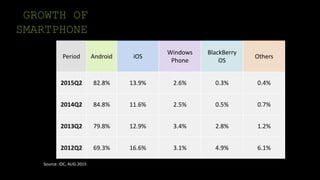
GROWTH OF
SMARTPHONE
Period Android iOS
Windows
Phone
BlackBerry
OS
Others
2015Q2 82.8% 13.9% 2.6% 0.3% 0.4%
2014Q2 84.8% 11.6% 2.5% 0.5% 0.7%
2013Q2 79.8% 12.9% 3.4% 2.8% 1.2%
2012Q2 69.3% 16.6% 3.1% 4.9% 6.1%
Source: IDC, AUG 2015
How much unsecure is ANDROID ?
Who is this ?
Is your
android
secured ?
In a major conference, the former
CEO of Google.Inc Eric Schmidt
claimed that ANDROID is more
secure than iPhone
What do you think
about the audience’s
response.
They laughed , A LOT.
Why Care ?
• “Android users are two and half times as likely to encounter malware today than
6 months ago…”
-Lookout Mobile Threat Report
• “Today’s mobile devices are a mix bag when it comes to security… still vulnerable
to many traditional attacks..”
-Carey Nachenberg, Symantec
• The growth rate in malware within Android is huge; in the future there will
definetly be more.”
-Nikolay Grebennikov, CTO of Kaspersky
• “Any time a technology becomes adopted and popular, that technology will be
targeted by the bad guys.”
-Jay Abbott, PricewaterhouseCoopers LLP
Outline
• Security Basics
• Smartphone’s security
• Android Platform
• Device and data Security
Smartphone, Android Mobile
Security
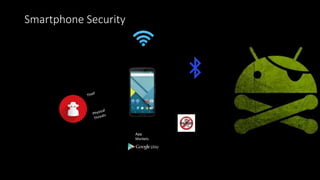
Smartphone Security
App
Markets
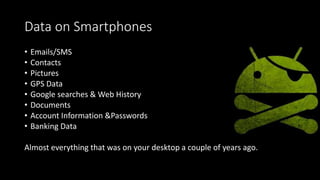
Data on Smartphones
• Emails/SMS
• Contacts
• Pictures
• GPS Data
• Google searches & Web History
• Documents
• Account Information &Passwords
• Banking Data
Almost everything that was on your desktop a couple of years ago.
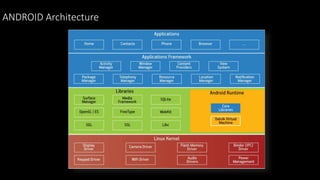
THE ANDROID PLATFORM
ANDROID Architecture
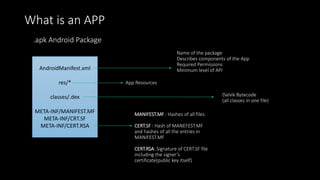
What is an APP
AndroidManifest.xml
res/*
classes/.dex
META-INF/MANIFEST.MF
META-INF/CRT.SF
META-INF/CERT.RSA
.apk Android Package
Name of the package
Describes components of the App
Required Permissions
Minimum level of API
App Resources
Dalvik Bytecode
(all classes in one file)
MANIFEST.MF : Hashes of all files.
CERT.SF : Hash of MANEFEST.MF
and hashes of all the entries in
MANIFEST.MF
CERT.RSA: Signature of CERT.SF file
including the signer’s
certificate(public key itself)
App Installation
• .apk Package are self signed!
• It’s not about the trustworthiness of the developer!
• The signature is just checked at installation time
• Files may be manipulated after that!
• At installation every App gets an own Linux User assigned
• Example: app_user_10
• Every App gets a directory within the filesystem
• Example: /data/data/com.example.MyApp
Where does App run?
• Every App runs within it’s own Linux process
• And as it’s own Linux user!
• Within the process a Dalvik VM instances is running
• Most Apps are just JAVA based
• Or they are Web based running within WebKit
• Native code can also be used for specific use-cases
• Over JNI or completely native
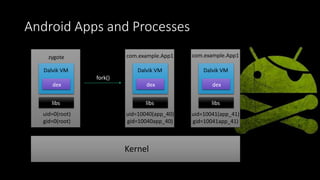
Android Apps and Processes
zygote
Dalvik VM
dex
libs
uid=0(root)
gid=0(root)
com.example.App1
Dalvik VM
dex
libs
uid=10040(app_40)
gid=10040app_40)
Dalvik VM
dex
libs
com.example.App1
uid=10041(app_41)
gid=10041app_41)
Kernel
fork()
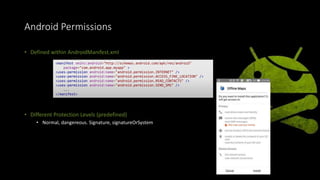
Android Permissions
• Defined within AndroidManifest.xml
• Different Protection Levels (predefined)
• Normal, dangereous. Signature, signatureOrSystem
<manifest xmlns:android="http://schemas.android.com/apk/res/android"
package="com.android.app.myapp" >
<uses-permission android:name="android.permission.INTERNET" />
<uses-permission android:name="android.permission.ACCESS_FINE_LOCATION" />
<uses-permission android:name="android.permission.READ_CONTACTS" />
<uses-permission android:name="android.permission.SEND_SMS" />
...
</manifest>
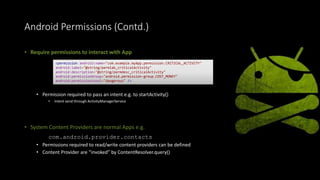
Android Permissions (Contd.)
• Require permissions to interact with App
• Permission required to pass an intent e.g. to startActivity()
• Intent send through ActivityManagerService
• System Content Providers are normal Apps e.g.
com.android.provider.contacts
• Permissions required to read/write content providers can be defined
• Content Provider are “invoked” by ContentResolver.query()
<permission android:name="com.example.myApp.permission.CRITICAL_ACTIVITY"
android:label="@string/permlab_criticalActivity"
android:description="@string/permdesc_criticalActivity"
android:permissionGroup="android.permission-group.COST_MONEY"
android:permissionLevel="dangerous" />
Android Sandbox
• Sandboxing is implemented by the Android Permission
Model and Linux User separation
• Process are separated by different UIDs
• Filesystem Access is authorized by File Permissions
• Android API calls are authorized according to the Android
permissions e.g. access to Contacts, SMS, Location…
• Network, SD Card or Blutooth access is authorized by Linux Group
Membership
Escaping The Sandbox
• Apps can talk to other Apps via
• Intents
• IPC (Binder)
• Content Providers
• Otherwise, to escape our sandbox, we need to use
Permissions
• Some permissions are only available to system apps
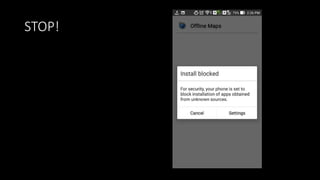
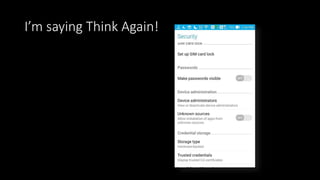
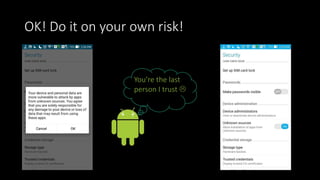
Installing App from Unknown Source
• Downloaded App from Unknown Source
• Download .apk directly from internet
• Black Market App (Cracked version of Paid App)
STOP!
I’m saying Think Again!
OK! Do it on your own risk!
You’re the last
person I trust 
Device And Data Security
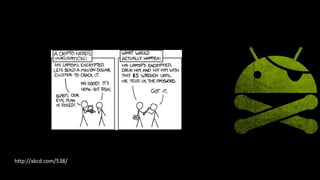
http://xkcd.com/538/
Device Protection
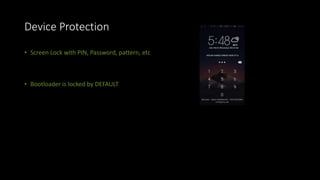
• Screen Lock with PIN, Password, pattern, etc
• Bootloader is locked by DEFAULT
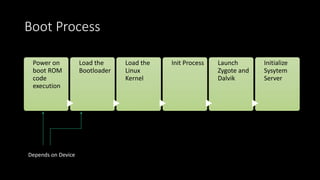
Boot Process
Power on
boot ROM
code
execution
Load the
Bootloader
Load the
Linux
Kernel
Init Process Launch
Zygote and
Dalvik
Initialize
Sysytem
Server
Depends on Device
Rooting
• By default there is no way to execute app as root
• Rooting: Find a way to run apps/ process as root!
• Eg. Install a Super User binary
• If you want to do it safely, do not do it!
• An unlocked bootloader is risky!
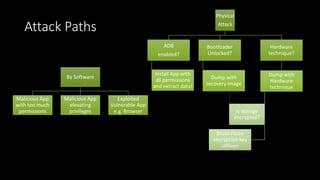
Attack Paths
By Software
Malicious App
with too much
permissions
Malicious App
elevating
privileges
Exploited
Vulnerable App
e.g. Browser
Physical
Attack
ADB
enabled?
Install App with
all permissions
and extract data!
Bootloader
Unlocked?
Dump with
recovery image
Hardware
technique?
Dump with
Hardware
technique
Is storage
encrypted?
Brute-Force
encryption key
offline!
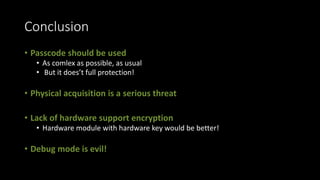
Conclusion
• Passcode should be used
• As comlex as possible, as usual
• But it does’t full protection!
• Physical acquisition is a serious threat
• Lack of hardware support encryption
• Hardware module with hardware key would be better!
• Debug mode is evil!
Sources
• Hacktivity-2012 Android Security
• developers.android.com
• Stackoverflow.com
ITS SHOW TIME!

Android Security

  • 1.
    YOU REALLY THINK YOU ARESAFE ?? Answer lies inside.
  • 2.
    Android Security An Introduction E-securitysummit Computer Society of India Allahabad Chapter
  • 3.
    About Us Arqum Ahmad Student 4thSem B.Tech Information Technology Jay Tibrewal Student 4th Sem B.Tech Information Technology Indian Institute of Information Technology, Allahabad Under the guidance & supervision of Prof. Dr. O.P. Vyas Professor Dean R&D IIIT-A
  • 4.
    GROWTH OF SMARTPHONE Period AndroidiOS Windows Phone BlackBerry OS Others 2015Q2 82.8% 13.9% 2.6% 0.3% 0.4% 2014Q2 84.8% 11.6% 2.5% 0.5% 0.7% 2013Q2 79.8% 12.9% 3.4% 2.8% 1.2% 2012Q2 69.3% 16.6% 3.1% 4.9% 6.1% Source: IDC, AUG 2015
  • 5.
    How much unsecureis ANDROID ?
  • 6.
  • 7.
    Is your android secured ? Ina major conference, the former CEO of Google.Inc Eric Schmidt claimed that ANDROID is more secure than iPhone
  • 8.
    What do youthink about the audience’s response.
  • 9.
  • 10.
    Why Care ? •“Android users are two and half times as likely to encounter malware today than 6 months ago…” -Lookout Mobile Threat Report • “Today’s mobile devices are a mix bag when it comes to security… still vulnerable to many traditional attacks..” -Carey Nachenberg, Symantec • The growth rate in malware within Android is huge; in the future there will definetly be more.” -Nikolay Grebennikov, CTO of Kaspersky • “Any time a technology becomes adopted and popular, that technology will be targeted by the bad guys.” -Jay Abbott, PricewaterhouseCoopers LLP

  • 11.
    Outline • Security Basics •Smartphone’s security • Android Platform • Device and data Security
  • 12.
  • 13.
  • 14.
    Data on Smartphones •Emails/SMS • Contacts • Pictures • GPS Data • Google searches & Web History • Documents • Account Information &Passwords • Banking Data Almost everything that was on your desktop a couple of years ago.
  • 15.
  • 16.
  • 17.
    What is anAPP AndroidManifest.xml res/* classes/.dex META-INF/MANIFEST.MF META-INF/CRT.SF META-INF/CERT.RSA .apk Android Package Name of the package Describes components of the App Required Permissions Minimum level of API App Resources Dalvik Bytecode (all classes in one file) MANIFEST.MF : Hashes of all files. CERT.SF : Hash of MANEFEST.MF and hashes of all the entries in MANIFEST.MF CERT.RSA: Signature of CERT.SF file including the signer’s certificate(public key itself)
  • 18.
    App Installation • .apkPackage are self signed! • It’s not about the trustworthiness of the developer! • The signature is just checked at installation time • Files may be manipulated after that! • At installation every App gets an own Linux User assigned • Example: app_user_10 • Every App gets a directory within the filesystem • Example: /data/data/com.example.MyApp
  • 19.
    Where does Apprun? • Every App runs within it’s own Linux process • And as it’s own Linux user! • Within the process a Dalvik VM instances is running • Most Apps are just JAVA based • Or they are Web based running within WebKit • Native code can also be used for specific use-cases • Over JNI or completely native
  • 20.
    Android Apps andProcesses zygote Dalvik VM dex libs uid=0(root) gid=0(root) com.example.App1 Dalvik VM dex libs uid=10040(app_40) gid=10040app_40) Dalvik VM dex libs com.example.App1 uid=10041(app_41) gid=10041app_41) Kernel fork()
  • 21.
    Android Permissions • Definedwithin AndroidManifest.xml • Different Protection Levels (predefined) • Normal, dangereous. Signature, signatureOrSystem <manifest xmlns:android="http://schemas.android.com/apk/res/android" package="com.android.app.myapp" > <uses-permission android:name="android.permission.INTERNET" /> <uses-permission android:name="android.permission.ACCESS_FINE_LOCATION" /> <uses-permission android:name="android.permission.READ_CONTACTS" /> <uses-permission android:name="android.permission.SEND_SMS" /> ... </manifest>
  • 22.
    Android Permissions (Contd.) •Require permissions to interact with App • Permission required to pass an intent e.g. to startActivity() • Intent send through ActivityManagerService • System Content Providers are normal Apps e.g. com.android.provider.contacts • Permissions required to read/write content providers can be defined • Content Provider are “invoked” by ContentResolver.query() <permission android:name="com.example.myApp.permission.CRITICAL_ACTIVITY" android:label="@string/permlab_criticalActivity" android:description="@string/permdesc_criticalActivity" android:permissionGroup="android.permission-group.COST_MONEY" android:permissionLevel="dangerous" />
  • 23.
    Android Sandbox • Sandboxingis implemented by the Android Permission Model and Linux User separation • Process are separated by different UIDs • Filesystem Access is authorized by File Permissions • Android API calls are authorized according to the Android permissions e.g. access to Contacts, SMS, Location… • Network, SD Card or Blutooth access is authorized by Linux Group Membership
  • 24.
    Escaping The Sandbox •Apps can talk to other Apps via • Intents • IPC (Binder) • Content Providers • Otherwise, to escape our sandbox, we need to use Permissions • Some permissions are only available to system apps
  • 25.
    Installing App fromUnknown Source • Downloaded App from Unknown Source • Download .apk directly from internet • Black Market App (Cracked version of Paid App)
  • 26.
  • 27.
  • 28.
    OK! Do iton your own risk! You’re the last person I trust 
  • 29.
  • 30.
  • 31.
    Device Protection • ScreenLock with PIN, Password, pattern, etc • Bootloader is locked by DEFAULT
  • 32.
    Boot Process Power on bootROM code execution Load the Bootloader Load the Linux Kernel Init Process Launch Zygote and Dalvik Initialize Sysytem Server Depends on Device
  • 33.
    Rooting • By defaultthere is no way to execute app as root • Rooting: Find a way to run apps/ process as root! • Eg. Install a Super User binary • If you want to do it safely, do not do it! • An unlocked bootloader is risky!
  • 34.
    Attack Paths By Software MaliciousApp with too much permissions Malicious App elevating privileges Exploited Vulnerable App e.g. Browser Physical Attack ADB enabled? Install App with all permissions and extract data! Bootloader Unlocked? Dump with recovery image Hardware technique? Dump with Hardware technique Is storage encrypted? Brute-Force encryption key offline!
  • 35.
    Conclusion • Passcode shouldbe used • As comlex as possible, as usual • But it does’t full protection! • Physical acquisition is a serious threat • Lack of hardware support encryption • Hardware module with hardware key would be better! • Debug mode is evil!
  • 36.
    Sources • Hacktivity-2012 AndroidSecurity • developers.android.com • Stackoverflow.com
  • 37.