

William Enck, Machigar Ongtang, and PatrickMcDanielWilliam Enck, Machigar Ongtang, and PatrickMcDaniel
Pennsylvania State UniversityPennsylvania State University
Presented by:
Dilruk G.A .(148209B)
Jagoda S.D. (148214K)
Outline
 Introduction
 Android Applications
 Security Enforcement
 Security Refinements
 Lessons in Defining Policy
Introduction
 Android (Google)
 Open source
 A base operation system for
mobiles
 Application middleware layer
 Java software development kit
 Collection of system
applications
Feature of Android OS
 Doesn’t support applications developed for other
platforms
 Restricts application interaction to its special APIs
by running each application as its own user identity
 Uses a simple permission label assignment model to
restrict access to resources and other applications
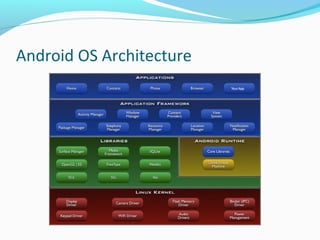
Android OS Architecture
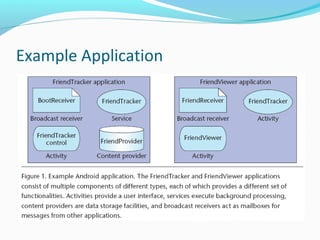
Example Application
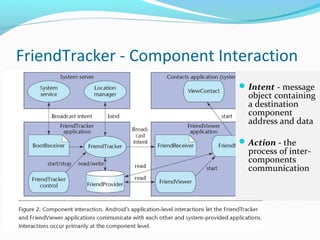
FriendTracker - Component Interaction
Intent - message
object containing
a destination
component
address and data
Action - the
process of inter-
components
communication
Security Enforcement
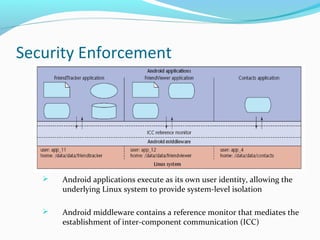
 Android applications execute as its own user identity, allowing the
underlying Linux system to provide system-level isolation
 Android middleware contains a reference monitor that mediates the
establishment of inter-component communication (ICC)
Security Enforcement
 Core idea of Android security enforcement - labels assignment to
applications and components
 A reference monitor provides mandatory access control (MAC)
enforcement of how applications access components
 Access to each component is restricted by assigning it an access
permission label. Applications are assigned collections of permission
labels
 When a component initiates ICC, the reference monitor looks at the
permission labels assigned to its containing application and— if the target
component’s access permission label is in that collection— allows ICC
establishment to proceed.
Security Enforcement : Access permission logic Example
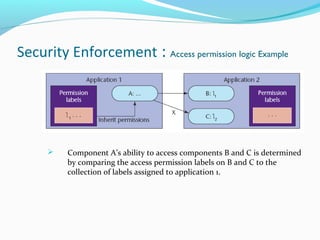
 Component A’s ability to access components B and C is determined
by comparing the access permission labels on B and C to the
collection of labels assigned to application 1.
Android
Security Refinements
Public and Private Components
 Applications often contain components that another
application should never access. For example,
component related to password storing.
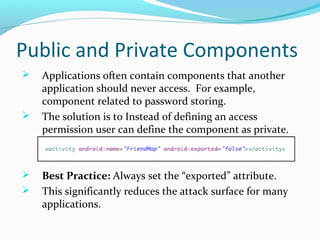
 The solution is to Instead of defining an access
permission user can define the component as private.
 Best Practice: Always set the “exported” attribute.
 This significantly reduces the attack surface for many
applications.
Implicitly Open Components
 At development time, if the decision of access
permission is unclear, The developer can permit
the functionality by not assigning an access
permission to it.
 If a public component doesn’t explicitly have an
access permission listed in its manifest definition,
Android permits any application to access it.
 Best Practice: Should always assign access
permissions to public components.
Intent Broadcast Permissions
 Sending the unprotected intent is a privacy risk.
 Android API for broadcasting intents optionally
allows the developer to specify a permission label
to restrict access to the intent object.
 Best Practice: Always specify an access
permission on Intent broadcasts
Content Provider Permissions
 If the developer want his application to be the only
one to update the contents but for other
applications to be able to read them.
 Android allows such a security policy assigning
read or write permissions.
 Best Practice: Always define separate read and
write permissions.
Service Hooks
 Android only lets the developer assign one
permission label to restrict starting, stopping, and
binding to a service.
 Under this model, any application can start or stop
Friend tracker can also tell it to monitor new
friends.
 Best Practice: Use service hooks and let the
developers write code to perform custom runtime
security.
 Eg.. Use checkPermission() to mediate
“administrative” operations in Friend Tracker .
Protected APIs
 Not all system are accessed through components—
instead, Android provides direct API access.
 Android protects these sensitive APIs with
additional permission label checks: an application
must declare a corresponding permission label in
its manifest file to use them.
 Best Practice: Application need to request
permissions for protected APIs
Permission Protection Levels
 The permission protection levels provide a means of
controlling how developers assign permission labels.
 Normal – grant to any application that request them in
its manifest
 Dangerous – granted only after user confirmation
 Signature – granted only to application signed by the
same developer key
 Signature or system – same like signature but exist for
legacy compatibility.
 Best Practice: Use either signature or dangerous
permissions depending on the application behaviour
Pending Intents
 The Pending Intent object is simply a reference
pointer that can pass to another application.
 Recipient application can modify the original
intent and specify when the action is invoked.
 Pending intents allow applications included with
the framework to integrate better with third-party
applications.
 Best Practice: Only use Pending Intents as
“delayed callbacks” to private Components and
always specify the private broadcast receiver.
Lessons in Defining Policy
 Android security policy begins with a relatively
easy-to-understand MAC enforcement model
 Some refinements push policy into the application
code
 The permission label itself is merely a text string,
but its assignment to an application provides
access to potentially limitless resources
Understanding Android Security

Understanding Android Security

  • 1.
    William Enck, MachigarOngtang, and PatrickMcDanielWilliam Enck, Machigar Ongtang, and PatrickMcDaniel Pennsylvania State UniversityPennsylvania State University Presented by: Dilruk G.A .(148209B) Jagoda S.D. (148214K)
  • 2.
    Outline  Introduction  AndroidApplications  Security Enforcement  Security Refinements  Lessons in Defining Policy
  • 3.
    Introduction  Android (Google) Open source  A base operation system for mobiles  Application middleware layer  Java software development kit  Collection of system applications
  • 4.
    Feature of AndroidOS  Doesn’t support applications developed for other platforms  Restricts application interaction to its special APIs by running each application as its own user identity  Uses a simple permission label assignment model to restrict access to resources and other applications
  • 5.
  • 6.
  • 7.
    FriendTracker - ComponentInteraction Intent - message object containing a destination component address and data Action - the process of inter- components communication
  • 8.
    Security Enforcement  Androidapplications execute as its own user identity, allowing the underlying Linux system to provide system-level isolation  Android middleware contains a reference monitor that mediates the establishment of inter-component communication (ICC)
  • 9.
    Security Enforcement  Coreidea of Android security enforcement - labels assignment to applications and components  A reference monitor provides mandatory access control (MAC) enforcement of how applications access components  Access to each component is restricted by assigning it an access permission label. Applications are assigned collections of permission labels  When a component initiates ICC, the reference monitor looks at the permission labels assigned to its containing application and— if the target component’s access permission label is in that collection— allows ICC establishment to proceed.
  • 10.
    Security Enforcement :Access permission logic Example  Component A’s ability to access components B and C is determined by comparing the access permission labels on B and C to the collection of labels assigned to application 1.
  • 11.
  • 12.
    Public and PrivateComponents  Applications often contain components that another application should never access. For example, component related to password storing.  The solution is to Instead of defining an access permission user can define the component as private.  Best Practice: Always set the “exported” attribute.  This significantly reduces the attack surface for many applications.
  • 13.
    Implicitly Open Components At development time, if the decision of access permission is unclear, The developer can permit the functionality by not assigning an access permission to it.  If a public component doesn’t explicitly have an access permission listed in its manifest definition, Android permits any application to access it.  Best Practice: Should always assign access permissions to public components.
  • 14.
    Intent Broadcast Permissions Sending the unprotected intent is a privacy risk.  Android API for broadcasting intents optionally allows the developer to specify a permission label to restrict access to the intent object.  Best Practice: Always specify an access permission on Intent broadcasts
  • 15.
    Content Provider Permissions If the developer want his application to be the only one to update the contents but for other applications to be able to read them.  Android allows such a security policy assigning read or write permissions.  Best Practice: Always define separate read and write permissions.
  • 16.
    Service Hooks  Androidonly lets the developer assign one permission label to restrict starting, stopping, and binding to a service.  Under this model, any application can start or stop Friend tracker can also tell it to monitor new friends.  Best Practice: Use service hooks and let the developers write code to perform custom runtime security.  Eg.. Use checkPermission() to mediate “administrative” operations in Friend Tracker .
  • 17.
    Protected APIs  Notall system are accessed through components— instead, Android provides direct API access.  Android protects these sensitive APIs with additional permission label checks: an application must declare a corresponding permission label in its manifest file to use them.  Best Practice: Application need to request permissions for protected APIs
  • 18.
    Permission Protection Levels The permission protection levels provide a means of controlling how developers assign permission labels.  Normal – grant to any application that request them in its manifest  Dangerous – granted only after user confirmation  Signature – granted only to application signed by the same developer key  Signature or system – same like signature but exist for legacy compatibility.  Best Practice: Use either signature or dangerous permissions depending on the application behaviour
  • 19.
    Pending Intents  ThePending Intent object is simply a reference pointer that can pass to another application.  Recipient application can modify the original intent and specify when the action is invoked.  Pending intents allow applications included with the framework to integrate better with third-party applications.  Best Practice: Only use Pending Intents as “delayed callbacks” to private Components and always specify the private broadcast receiver.
  • 20.
    Lessons in DefiningPolicy  Android security policy begins with a relatively easy-to-understand MAC enforcement model  Some refinements push policy into the application code  The permission label itself is merely a text string, but its assignment to an application provides access to potentially limitless resources

Editor's Notes

  • #2 In the first part of the paper they explain about android market and android flat form. Then they discussed sample application developed by them to explain android framework architecture and application components. After that main topic android security implementation is explained as two major topics which are security enforcement and security refinements. Finally paper is discussed about the lessons in defining android security policy.
  • #3 Our presentation is organized as here. First we will give brief introduction about android OS. Then let’s looking to the android application framework. Next we are willing to talk about security enforcement and security refinements of android application. And finally about the lesion in defining security policy.
  • #4 Android is a base operating system for mobile applications which is led by Google. It is widely anticipated open source application development platform and a large community of developers organized around android. Because of that many new products and application are now available for it. Android provides base operating system, application middleware layer, Java development kit (SDK) and collection of system level applications. Android is supporting for lot of online services like Google's Gmail, calendar and contacts. Phones which are used android is automatically synchronized with these services.
  • #5 Here we can see several main features of android which is very important when we talked about the android application security. First android OS Doesn’t support applications developed for other platforms Android Restricts application interaction to its special APIs by running each application as its own user identity Android Uses a simple permission label assignment model to restrict access to resources and other applications We will looking to these in more details under security enforcements section.
  • #6 The Android operating system is built on a modified Linux kernel. The software stack contains Java applications running on a virtual machine called Dalvik virtual machine. The system components are written in Java, C, C++, and XML. Android OS consist of lot of core libraries which is support java. On top of that application framework is build to support android application developments.
  • #7 Authors are developed sample application to explain android application components. Which is called friend tracker application and developed as two android applications. One is called friend tracker and other is friend viewer. This is mainly due to explain communication between two applications. Android application doesn’t have a main () function or single entry point for execution, instead, developers must design applications in terms of components. There are four components Activity, Broadcast Receiver, Service and Content Provider.
  • #8 Components in android applications are communicate each other using intents and actions. Intent is a message object, which is containing a destination component address and data. Action is a process of inter component communication.
  • #12 9 security refinements Some are extension to basic MAC model and some are new concepts
  • #13 Some Applications often contain components that another application should never need access.
  • #14 This is also related to the first point.
  • #15 That can leak the user privacy information to explicitly listening attackers.
  • #16 Insert, Update or delete
  • #18 resources(for example, network, camera, microphone
  • #19 Early model had two levels application or system But new model has 4 protection levels for permission labels Nomal is same as application permission in previous model
  • #20 In Android defines an intent object to perform an action. However, instead of performing the action, it passes the intent to a special method that creates a Pending Intent object corresponding to that action.
  • #21 Android has to find a answer for how to control access to permission label Things like allowing a application to use both microphone and internet