Presented by
ANUSHA TUKE
Contents
   Introduction
   Android
   Sandbox
   Static software analysis vs. sandboxing
   Android application sandbox
   System call diagrams
   Static &dynamic analysis of AASandbox.
   Experiments
   Conclusion
   References.
                                              2
Introduction
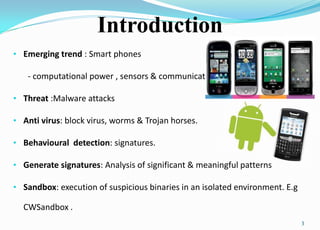
• Emerging trend : Smart phones

   - computational power , sensors & communication

• Threat :Malware attacks

• Anti virus: block virus, worms & Trojan horses.

• Behavioural detection: signatures.

• Generate signatures: Analysis of significant & meaningful patterns

• Sandbox: execution of suspicious binaries in an isolated environment. E.g

  CWSandbox .
                                                                              3
ANDROID
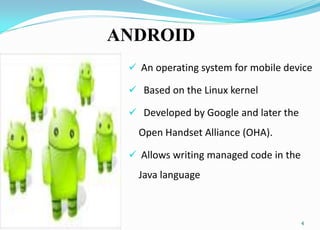
  An operating system for mobile device

  Based on the Linux kernel

  Developed by Google and later the
   Open Handset Alliance (OHA).

  Allows writing managed code in the
   Java language


                                        4
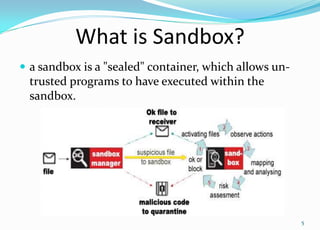
What is Sandbox?
 a sandbox is a "sealed" container, which allows un-
 trusted programs to have executed within the
 sandbox.


                                                        5
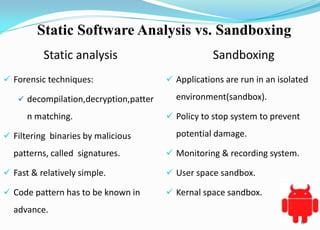
Static Software Analysis vs. Sandboxing
          Static analysis                          Sandboxing
 Forensic techniques:                  Applications are run in an isolated

    decompilation,decryption,patter     environment(sandbox).

      n matching.                       Policy to stop system to prevent

 Filtering binaries by malicious        potential damage.

  patterns, called signatures.          Monitoring & recording system.

 Fast & relatively simple.             User space sandbox.

 Code pattern has to be known in       Kernal space sandbox.
  advance.
                                                                            6
Android Application Sandbox for suspicious
                software detection
 Located in kernal space since access to critical part of OS is
  realized.

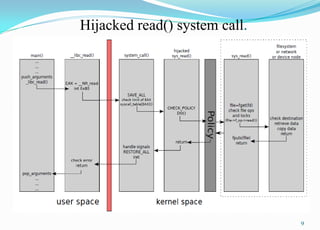
 System call hijacking

    Monitor system & library calls.

 Android uses a modified Linux basis to host a Java-based
  middleware running the user applications.

 Calls are monitored on lowest level possible.

                                                                   7
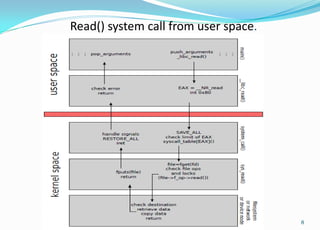
Read() system call from user space.


                                      8
Hijacked read() system call.


                               9
Features
 Loadable kernal module(LKM) is placed in Android emulator environment.


 LKM intended to hijack all available system calls.


 Two step analysis of android applications
     Kernal space sandbox.
     Fast static pre-check
 Aasandbox takes android application archive which is packaged in *.apk file as input.


 Java virtual machine-Dalvik.


                                                                                  10
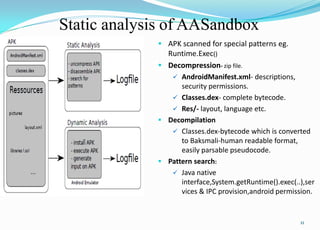
Static analysis of AASandbox
              APK scanned for special patterns eg.
               Runtime.Exec()
              Decompression- zip file.
                 AndroidManifest.xml- descriptions,
                   security permissions.
                 Classes.dex- complete bytecode.
                 Res/- layout, language etc.
              Decompilation
                 Classes.dex-bytecode which is converted
                   to Baksmali-human readable format,
                   easily parsable pseudocode.
              Pattern search:
                 Java native
                   interface,System.getRuntime().exec(..),ser
                   vices & IPC provision,android permission.


                                                        11
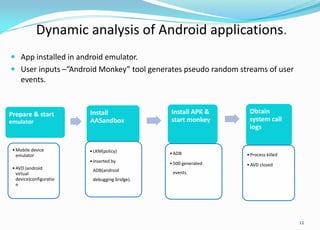
Dynamic analysis of Android applications.
 App installed in android emulator.
 User inputs –”Android Monkey” tool generates pseudo random streams of user
     events.


Prepare & start          Install               Install APK &      Obtain
emulator                 AASandbox             start monkey       system call
                                                                  logs


 • Mobile device         • LKM(policy)
   emulator                                    • ADB             • Process killed
                         • Inserted by         • 500 generated   • AVD closed
 • AVD (android           ADB(android
   virtual                                      events.
   device)configuratio    debugging bridge).
   n


                                                                                    12
Experiments as examples
           Ex application- self written fork bomb it uses
             Runtime.Exec() to start external binary
             program.

           App is started & analysis is done.
               Static analysis –REPORTS/ForkBomb.apk/

                    Subdirectories like unzipped/ & disasm/

           The log file output after static analysis.


                                                         13
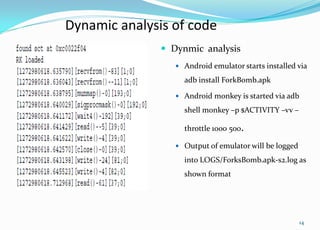
Dynamic analysis of code
                Dynmic analysis
                   Android emulator starts installed via

                    adb install ForkBomb.apk

                   Android monkey is started via adb

                    shell monkey –p $ACTIVITY –vv –

                    throttle 1000 500.

                   Output of emulator will be logged

                    into LOGS/ForksBomb.apk-s2.log as
                    shown format


                                                        14
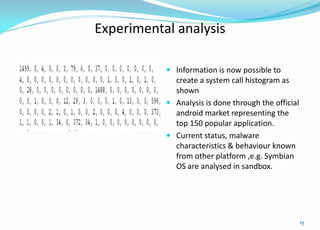
Experimental analysis

                            Information is now possible to
                             create a system call histogram as
                             shown
                            Analysis is done through the official
                             android market representing the
Upto 150 applictions..       top 150 popular application.
                            Current status, malware
                             characteristics & behaviour known
                             from other platform ,e.g. Symbian
                             OS are analysed in sandbox.


                                                                     15
Conclusion
 Android emulator can be used to run android applications
  in isolated environment.

 The pre-check functionality that analyses indicate usage of
  malicious pattern in source code.

 In dynamic analysis, system calls are traced & corresponding

  reports are logged.


                                                                 16
REFERENCES
 [1] M. Becher, F. Freiling, and B. Leider. On the effort to create smartphone worms in
    windows mobile. In Information Assurance and Security Workshop, 2007. IAW ’07.
    IEEESMC, pages 199–206, 20-22 June 2007.

 [2] Bundesamt f¨ur Sicherheit in der Informationstechnik. Mobile endger¨ate und
    mobile applikationen: Sicherheitsgef¨ahrdungen und schutzmassnahmen, 2006.

 [3] W. Enck, M. Ongtang, and P. McDaniel. Understanding android security. IEEE
    Security and Privacy, 7(1):50–57, 2009.

 [4] S. Forrest, S. Hofmeyr, and A. Somayaji. The evolution of system-call monitoring.
    In ACSAC ’08: Proceedings of the 2008 Annual Computer Security Applications
    Conference,pages 418–430. IEEE Computer Society, 2008.

   [5] A. Rubini. Kernel system calls. http://www.ar.linux.it/docs/ksys/ksys.html.
    [Online; accessed 01-March-2010].

                                                                                           17
Android sandbox

Android sandbox

  • 1.
  • 2.
    Contents  Introduction  Android  Sandbox  Static software analysis vs. sandboxing  Android application sandbox  System call diagrams  Static &dynamic analysis of AASandbox.  Experiments  Conclusion  References. 2
  • 3.
    Introduction • Emerging trend: Smart phones - computational power , sensors & communication • Threat :Malware attacks • Anti virus: block virus, worms & Trojan horses. • Behavioural detection: signatures. • Generate signatures: Analysis of significant & meaningful patterns • Sandbox: execution of suspicious binaries in an isolated environment. E.g CWSandbox . 3
  • 4.
    ANDROID  Anoperating system for mobile device  Based on the Linux kernel  Developed by Google and later the Open Handset Alliance (OHA).  Allows writing managed code in the Java language 4
  • 5.
    What is Sandbox? a sandbox is a "sealed" container, which allows un- trusted programs to have executed within the sandbox. 5
  • 6.
    Static Software Analysisvs. Sandboxing Static analysis Sandboxing  Forensic techniques:  Applications are run in an isolated  decompilation,decryption,patter environment(sandbox). n matching.  Policy to stop system to prevent  Filtering binaries by malicious potential damage. patterns, called signatures.  Monitoring & recording system.  Fast & relatively simple.  User space sandbox.  Code pattern has to be known in  Kernal space sandbox. advance. 6
  • 7.
    Android Application Sandboxfor suspicious software detection  Located in kernal space since access to critical part of OS is realized.  System call hijacking  Monitor system & library calls.  Android uses a modified Linux basis to host a Java-based middleware running the user applications.  Calls are monitored on lowest level possible. 7
  • 8.
    Read() system callfrom user space. 8
  • 9.
  • 10.
    Features  Loadable kernalmodule(LKM) is placed in Android emulator environment.  LKM intended to hijack all available system calls.  Two step analysis of android applications  Kernal space sandbox.  Fast static pre-check  Aasandbox takes android application archive which is packaged in *.apk file as input.  Java virtual machine-Dalvik. 10
  • 11.
    Static analysis ofAASandbox  APK scanned for special patterns eg. Runtime.Exec()  Decompression- zip file.  AndroidManifest.xml- descriptions, security permissions.  Classes.dex- complete bytecode.  Res/- layout, language etc.  Decompilation  Classes.dex-bytecode which is converted to Baksmali-human readable format, easily parsable pseudocode.  Pattern search:  Java native interface,System.getRuntime().exec(..),ser vices & IPC provision,android permission. 11
  • 12.
    Dynamic analysis ofAndroid applications.  App installed in android emulator.  User inputs –”Android Monkey” tool generates pseudo random streams of user events. Prepare & start Install Install APK & Obtain emulator AASandbox start monkey system call logs • Mobile device • LKM(policy) emulator • ADB • Process killed • Inserted by • 500 generated • AVD closed • AVD (android ADB(android virtual events. device)configuratio debugging bridge). n 12
  • 13.
    Experiments as examples  Ex application- self written fork bomb it uses Runtime.Exec() to start external binary program.  App is started & analysis is done.  Static analysis –REPORTS/ForkBomb.apk/  Subdirectories like unzipped/ & disasm/  The log file output after static analysis. 13
  • 14.
    Dynamic analysis ofcode  Dynmic analysis  Android emulator starts installed via adb install ForkBomb.apk  Android monkey is started via adb shell monkey –p $ACTIVITY –vv – throttle 1000 500.  Output of emulator will be logged into LOGS/ForksBomb.apk-s2.log as shown format 14
  • 15.
    Experimental analysis  Information is now possible to create a system call histogram as shown  Analysis is done through the official android market representing the Upto 150 applictions.. top 150 popular application.  Current status, malware characteristics & behaviour known from other platform ,e.g. Symbian OS are analysed in sandbox. 15
  • 16.
    Conclusion  Android emulatorcan be used to run android applications in isolated environment.  The pre-check functionality that analyses indicate usage of malicious pattern in source code.  In dynamic analysis, system calls are traced & corresponding reports are logged. 16
  • 17.
    REFERENCES  [1] M.Becher, F. Freiling, and B. Leider. On the effort to create smartphone worms in windows mobile. In Information Assurance and Security Workshop, 2007. IAW ’07. IEEESMC, pages 199–206, 20-22 June 2007.  [2] Bundesamt f¨ur Sicherheit in der Informationstechnik. Mobile endger¨ate und mobile applikationen: Sicherheitsgef¨ahrdungen und schutzmassnahmen, 2006.  [3] W. Enck, M. Ongtang, and P. McDaniel. Understanding android security. IEEE Security and Privacy, 7(1):50–57, 2009.  [4] S. Forrest, S. Hofmeyr, and A. Somayaji. The evolution of system-call monitoring. In ACSAC ’08: Proceedings of the 2008 Annual Computer Security Applications Conference,pages 418–430. IEEE Computer Society, 2008.  [5] A. Rubini. Kernel system calls. http://www.ar.linux.it/docs/ksys/ksys.html. [Online; accessed 01-March-2010]. 17