OWASP Top 10 Mobile Risks 2016(RC)
Prathan Phongthiproek
OWASP Mobile Security Team
Overview
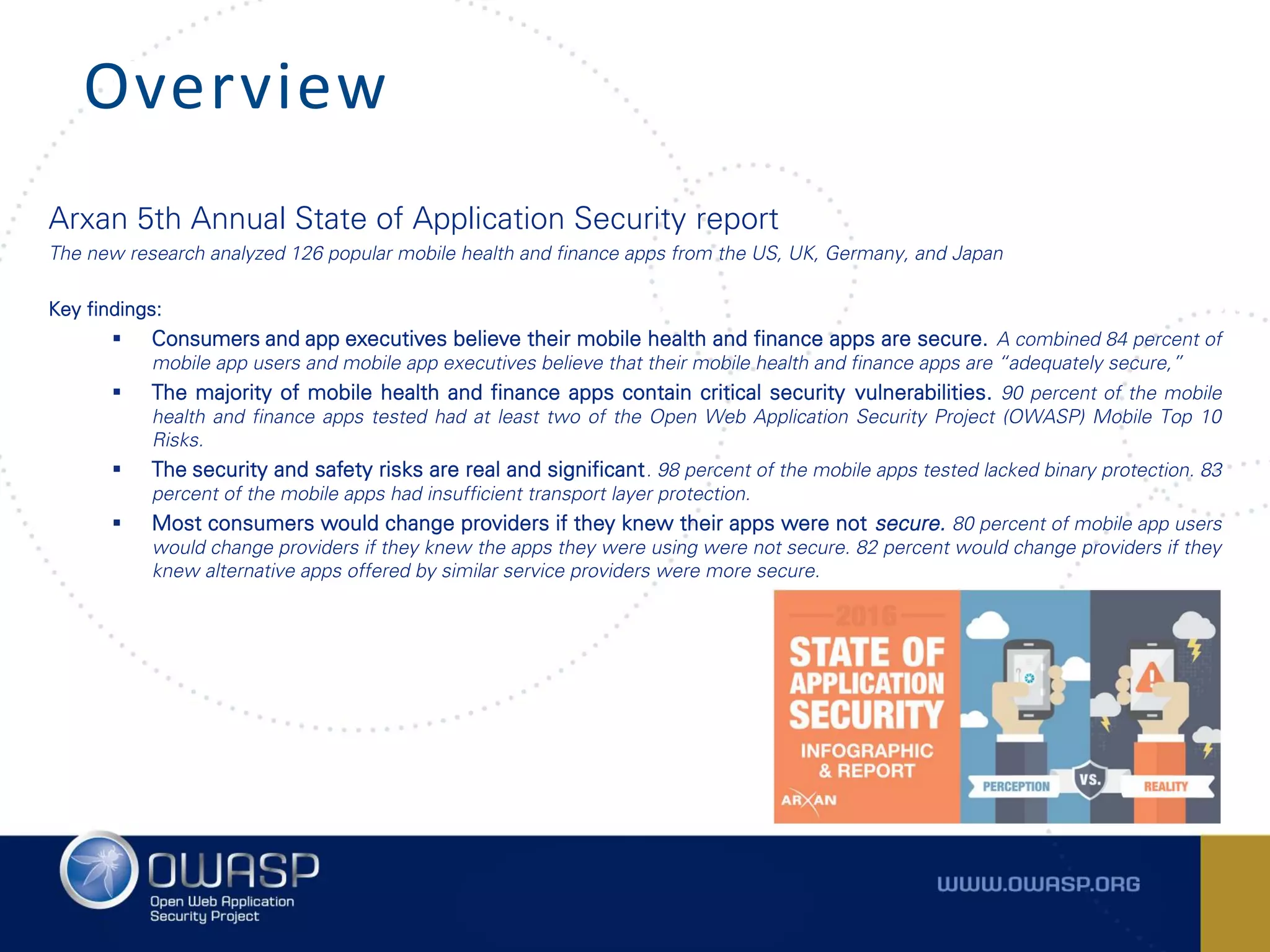
Arxan 5th Annual State of Application Security report
The new research analyzed 126 popular mobile health and finance apps from the US, UK, Germany, and Japan
Key findings:
 Consumers and app executives believe their mobile health and finance apps are secure. A combined 84 percent of
mobile app users and mobile app executives believe that their mobile health and finance apps are “adequately secure,”
 The majority of mobile health and finance apps contain critical security vulnerabilities. 90 percent of the mobile
health and finance apps tested had at least two of the Open Web Application Security Project (OWASP) Mobile Top 10
Risks.
 The security and safety risks are real and significant. 98 percent of the mobile apps tested lacked binary protection. 83
percent of the mobile apps had insufficient transport layer protection.
 Most consumers would change providers if they knew their apps were not secure. 80 percent of mobile app users
would change providers if they knew the apps they were using were not secure. 82 percent would change providers if they
knew alternative apps offered by similar service providers were more secure.
The Open Web Application Security Project (OWASP)
– OWASP Top 10 Mobile Risks 2014 and 2016(RC)
https://www.owasp.org/index.php/Projects/OWASP_Mobile_Security_Project_-_Top_Ten_Mobile_Risks
https://www.owasp.org/index.php/Mobile_Top_10_2016-Top_10
Guideline for Mobile Application Security
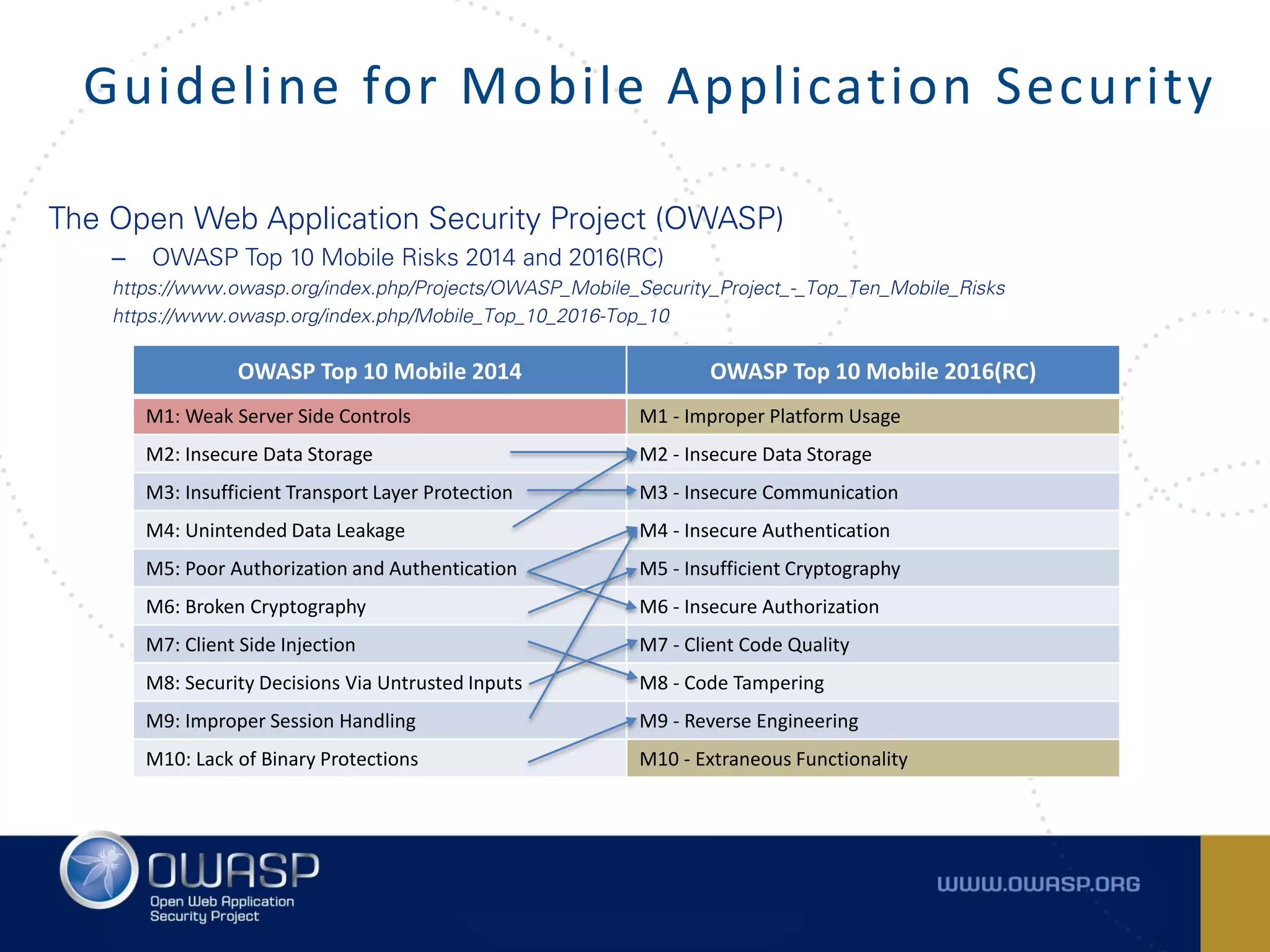
OWASP Top 10 Mobile 2014 OWASP Top 10 Mobile 2016(RC)
M1: Weak Server Side Controls M1 - Improper Platform Usage
M2: Insecure Data Storage M2 - Insecure Data Storage
M3: Insufficient Transport Layer Protection M3 - Insecure Communication
M4: Unintended Data Leakage M4 - Insecure Authentication
M5: Poor Authorization and Authentication M5 - Insufficient Cryptography
M6: Broken Cryptography M6 - Insecure Authorization
M7: Client Side Injection M7 - Client Code Quality
M8: Security Decisions Via Untrusted Inputs M8 - Code Tampering
M9: Improper Session Handling M9 - Reverse Engineering
M10: Lack of Binary Protections M10 - Extraneous Functionality
The Open Web Application Security Project (OWASP)
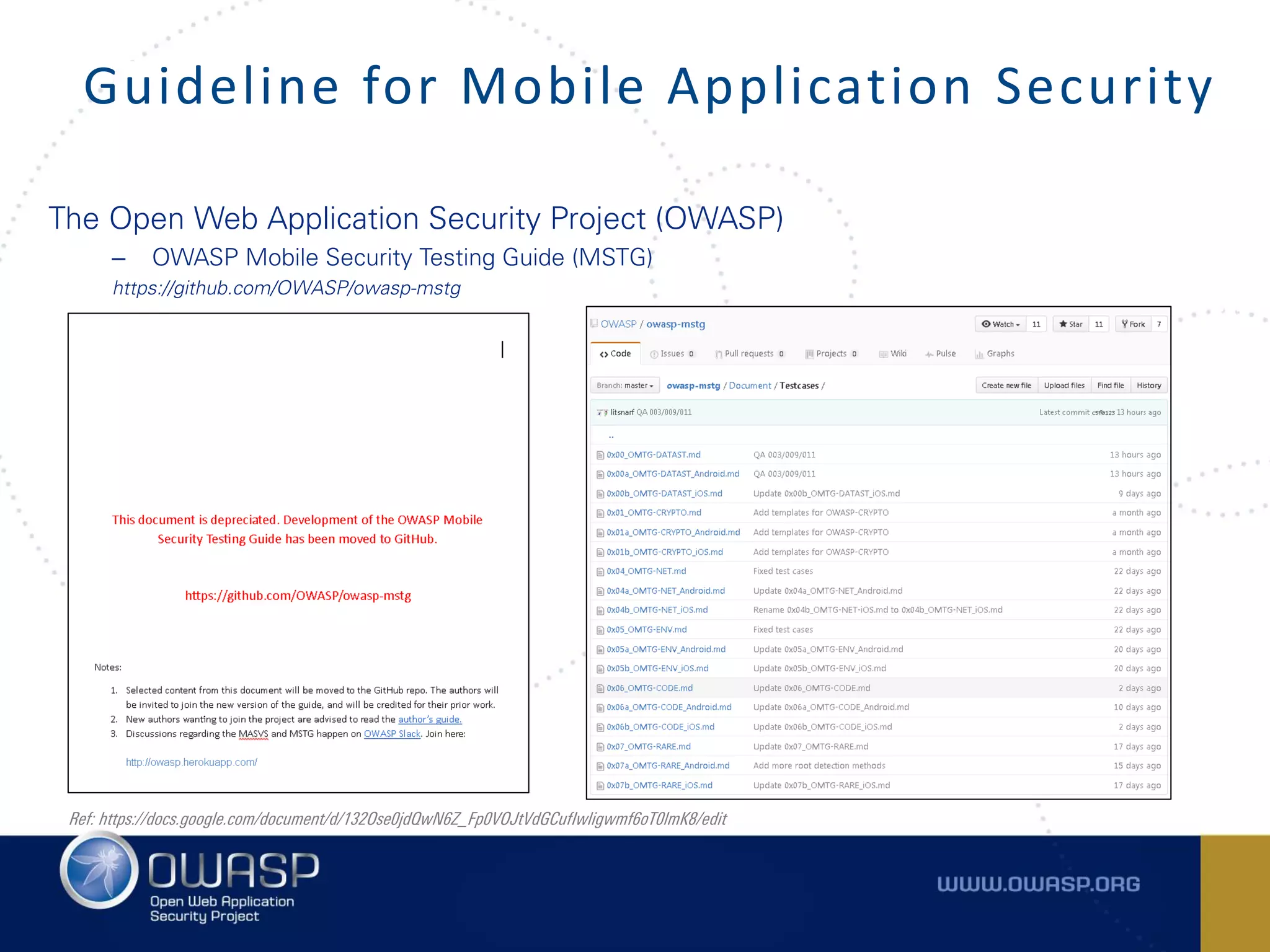
– OWASP Mobile Security Testing Guide (MSTG)
https://github.com/OWASP/owasp-mstg
Guideline for Mobile Application Security
Ref: https://docs.google.com/document/d/132Ose0jdQwN6Z_Fp0VOJtVdGCufIwligwmf6oT0lmK8/edit
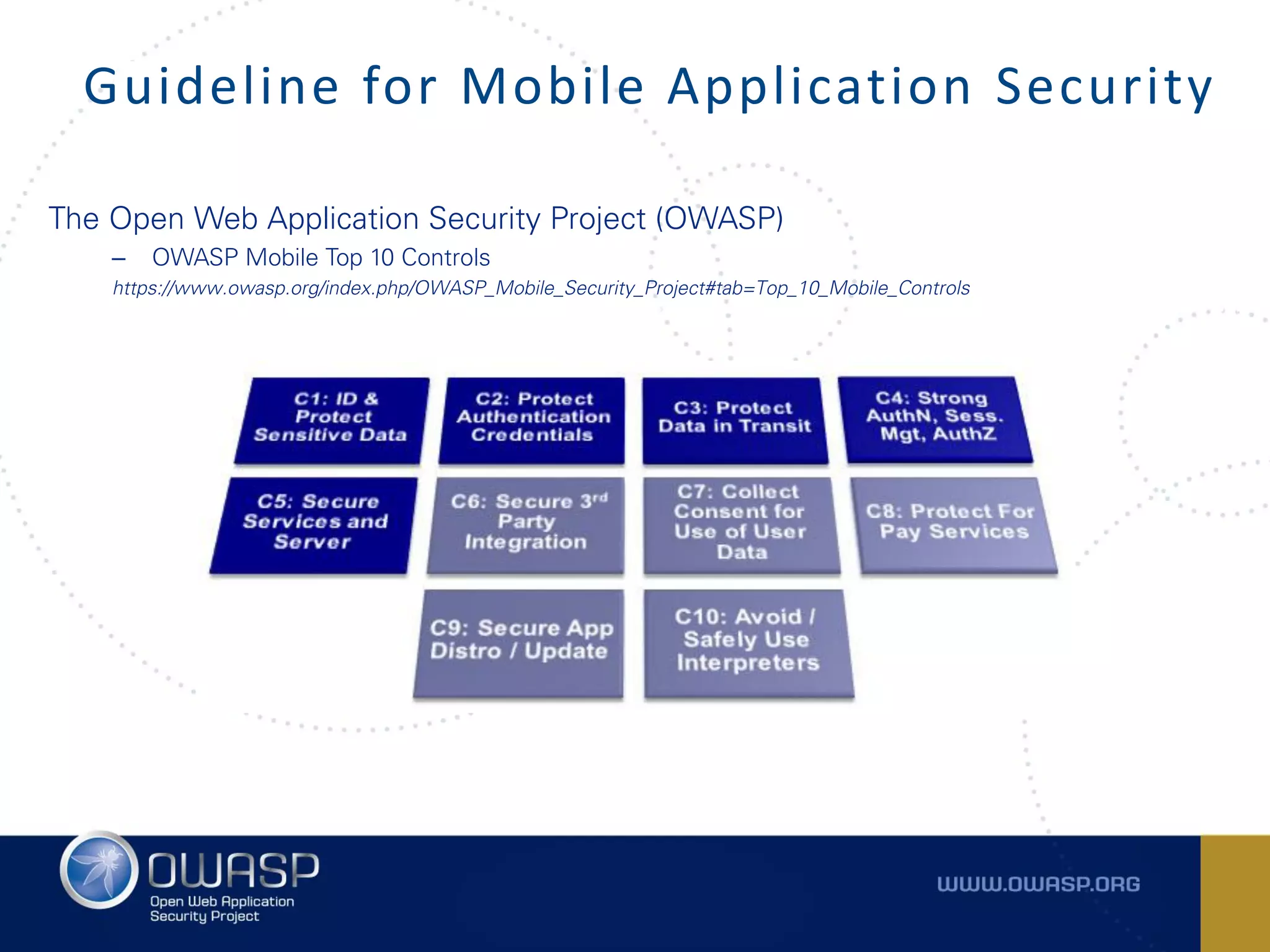
The Open Web Application Security Project (OWASP)
– OWASP Mobile Top 10 Controls
https://www.owasp.org/index.php/OWASP_Mobile_Security_Project#tab=Top_10_Mobile_Controls
Guideline for Mobile Application Security
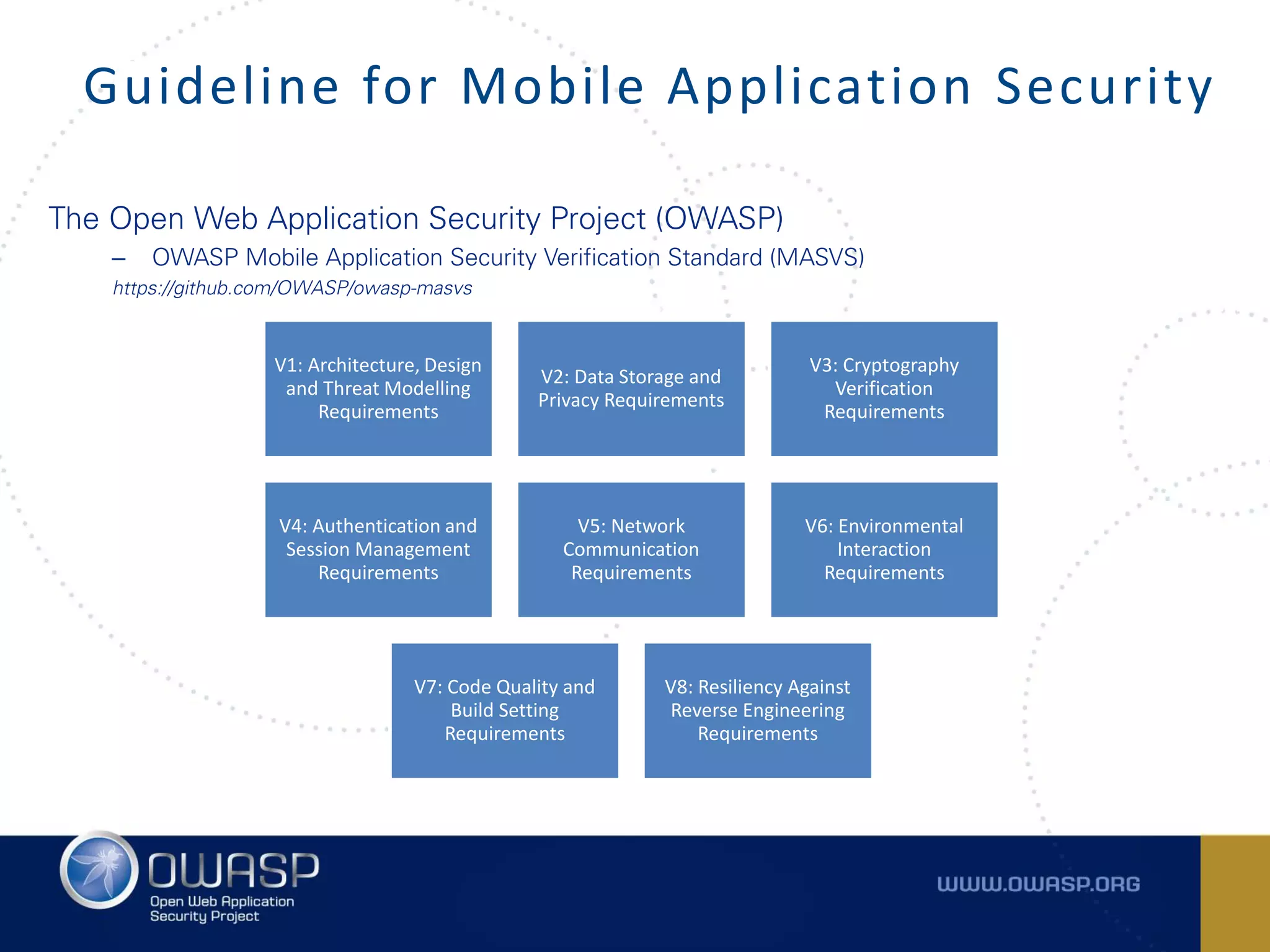
The Open Web Application Security Project (OWASP)
– OWASP Mobile Application Security Verification Standard (MASVS)
https://github.com/OWASP/owasp-masvs
Guideline for Mobile Application Security
V1: Architecture, Design
and Threat Modelling
Requirements
V2: Data Storage and
Privacy Requirements
V3: Cryptography
Verification
Requirements
V4: Authentication and
Session Management
Requirements
V5: Network
Communication
Requirements
V6: Environmental
Interaction
Requirements
V7: Code Quality and
Build Setting
Requirements
V8: Resiliency Against
Reverse Engineering
Requirements
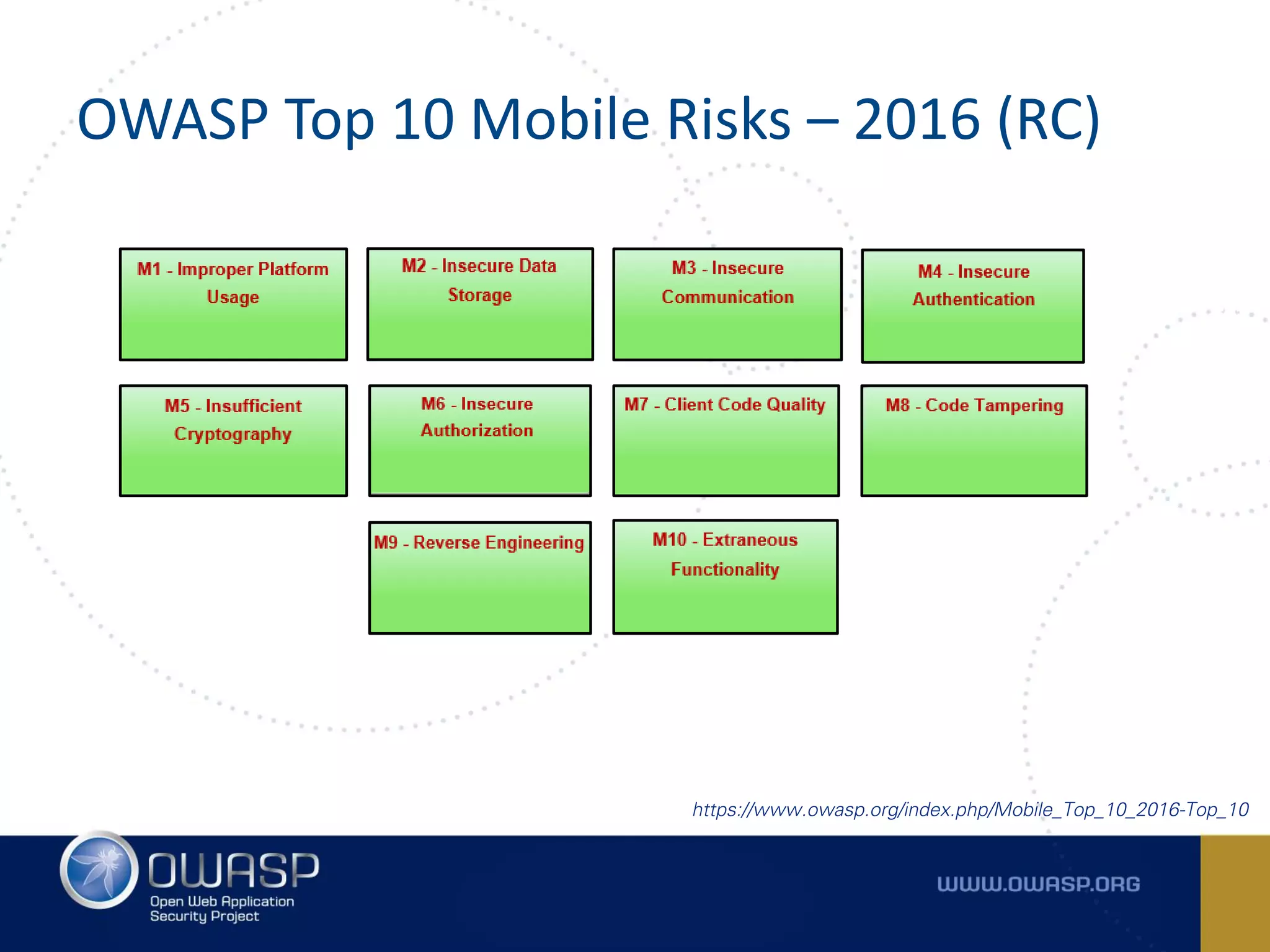
OWASP Top 10 Mobile Risks – 2016 (RC)
https://www.owasp.org/index.php/Mobile_Top_10_2016-Top_10
M1 – IMPROPER PLATFORM USAGE
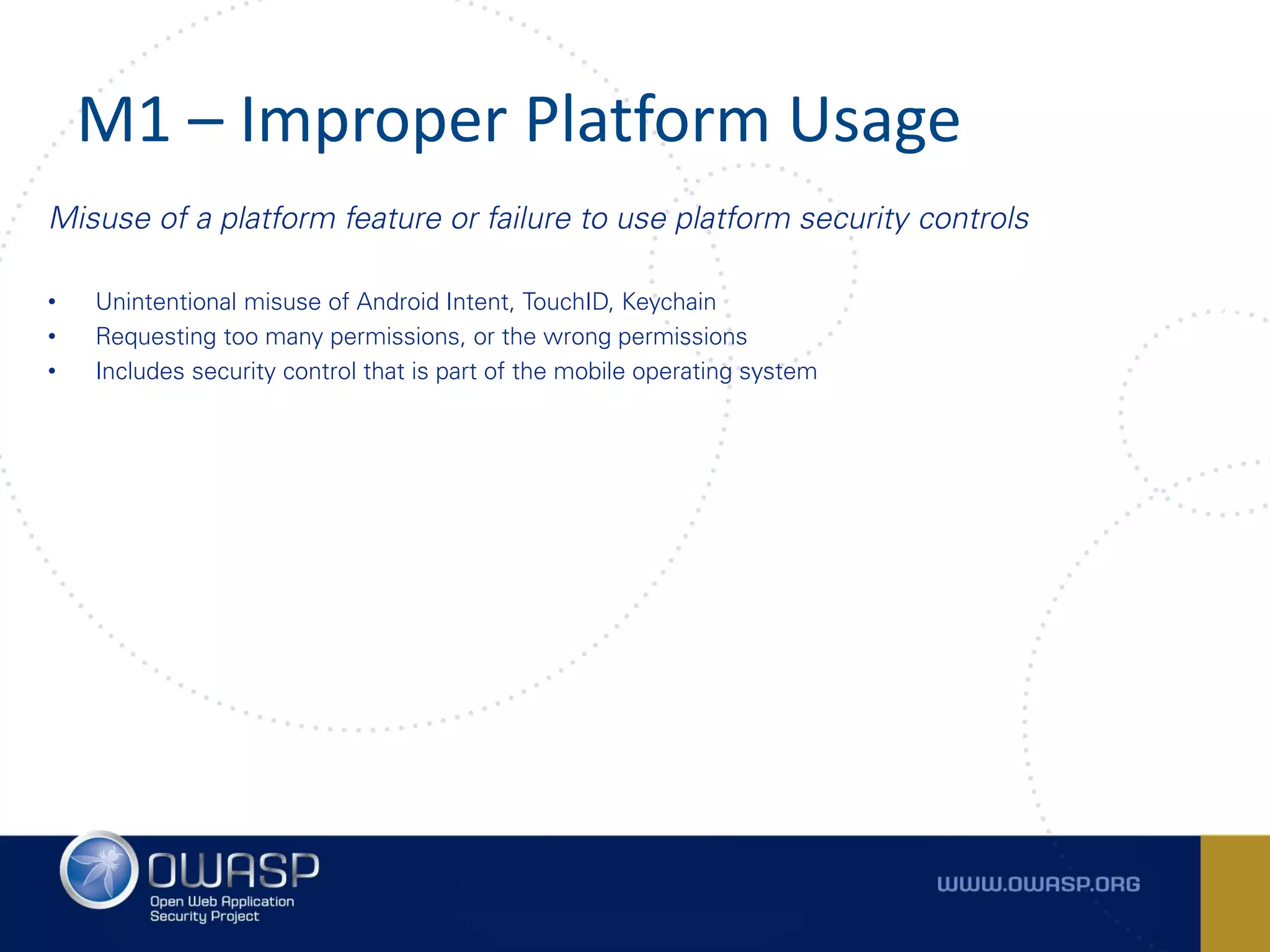
M1 – Improper Platform Usage
Misuse of a platform feature or failure to use platform security controls
• Unintentional misuse of Android Intent, TouchID, Keychain
• Requesting too many permissions, or the wrong permissions
• Includes security control that is part of the mobile operating system
M1 – Improper Platform Usage
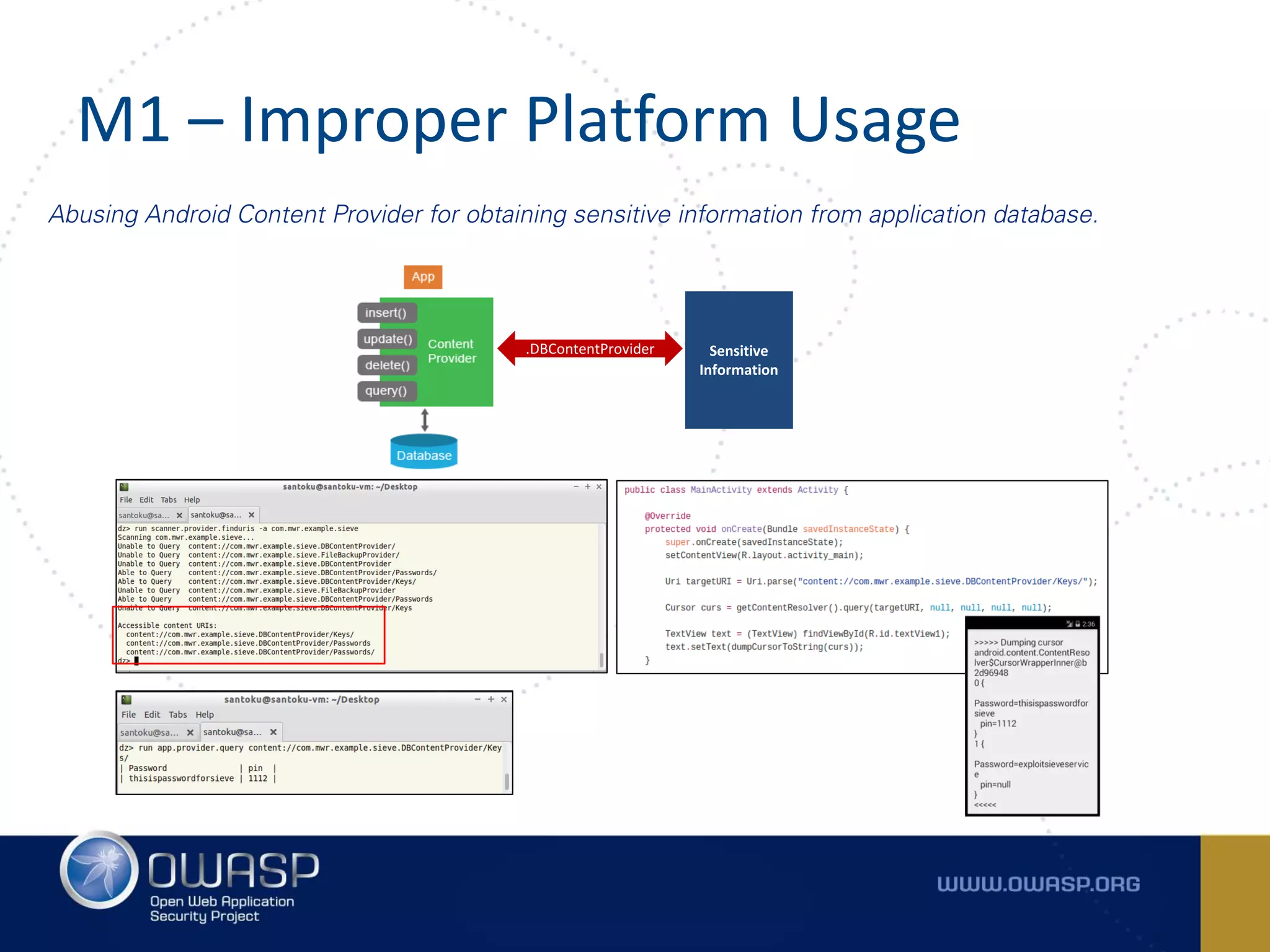
Abusing Android Content Provider for obtaining sensitive information from application database.
Sensitive
Information
.DBContentProvider
M1 – Improper Platform Usage
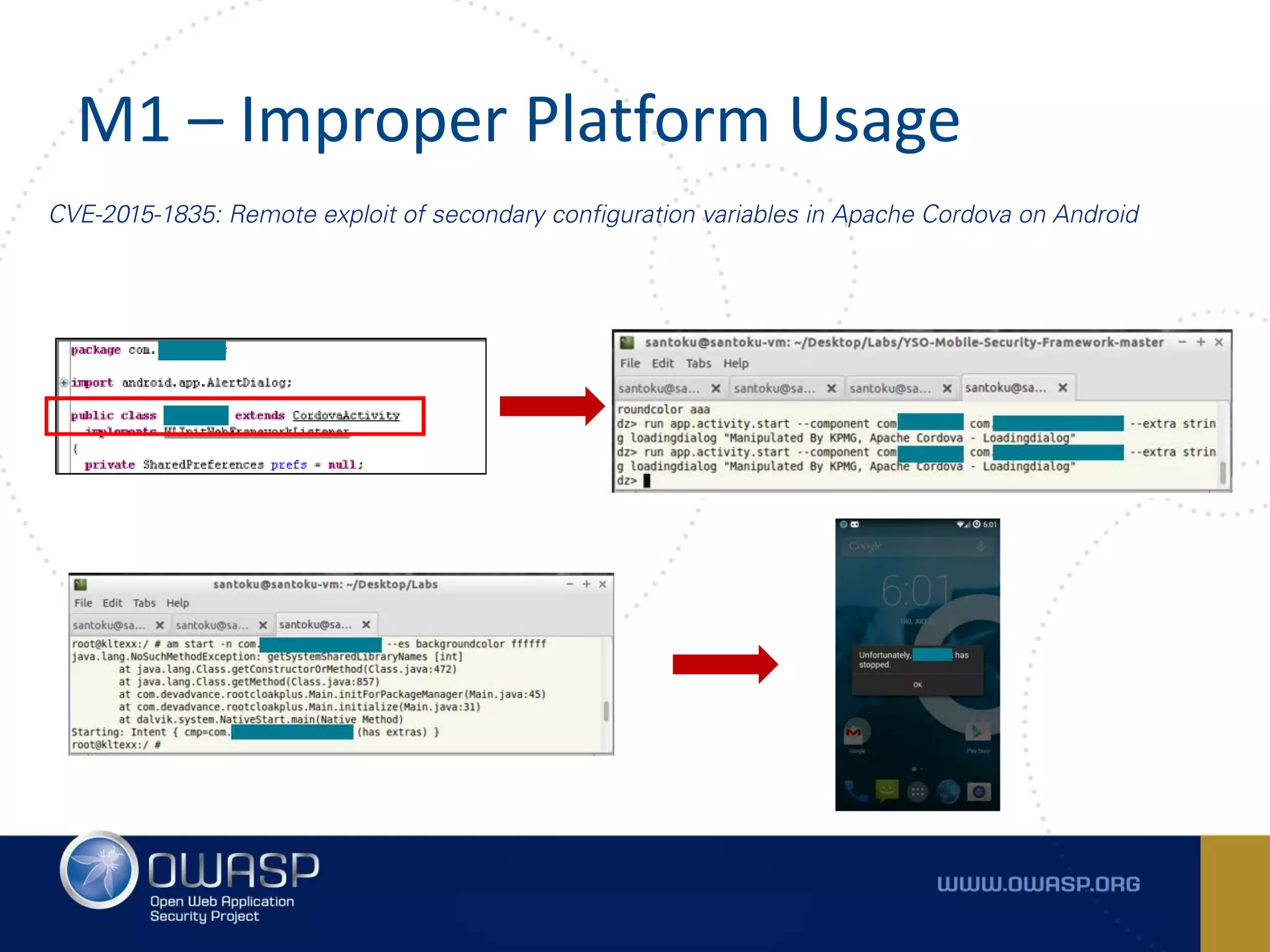
CVE-2015-1835: Remote exploit of secondary configuration variables in Apache Cordova on Android
M2 – INSECURE DATA STORAGE
M2 – Insecure Data Storage
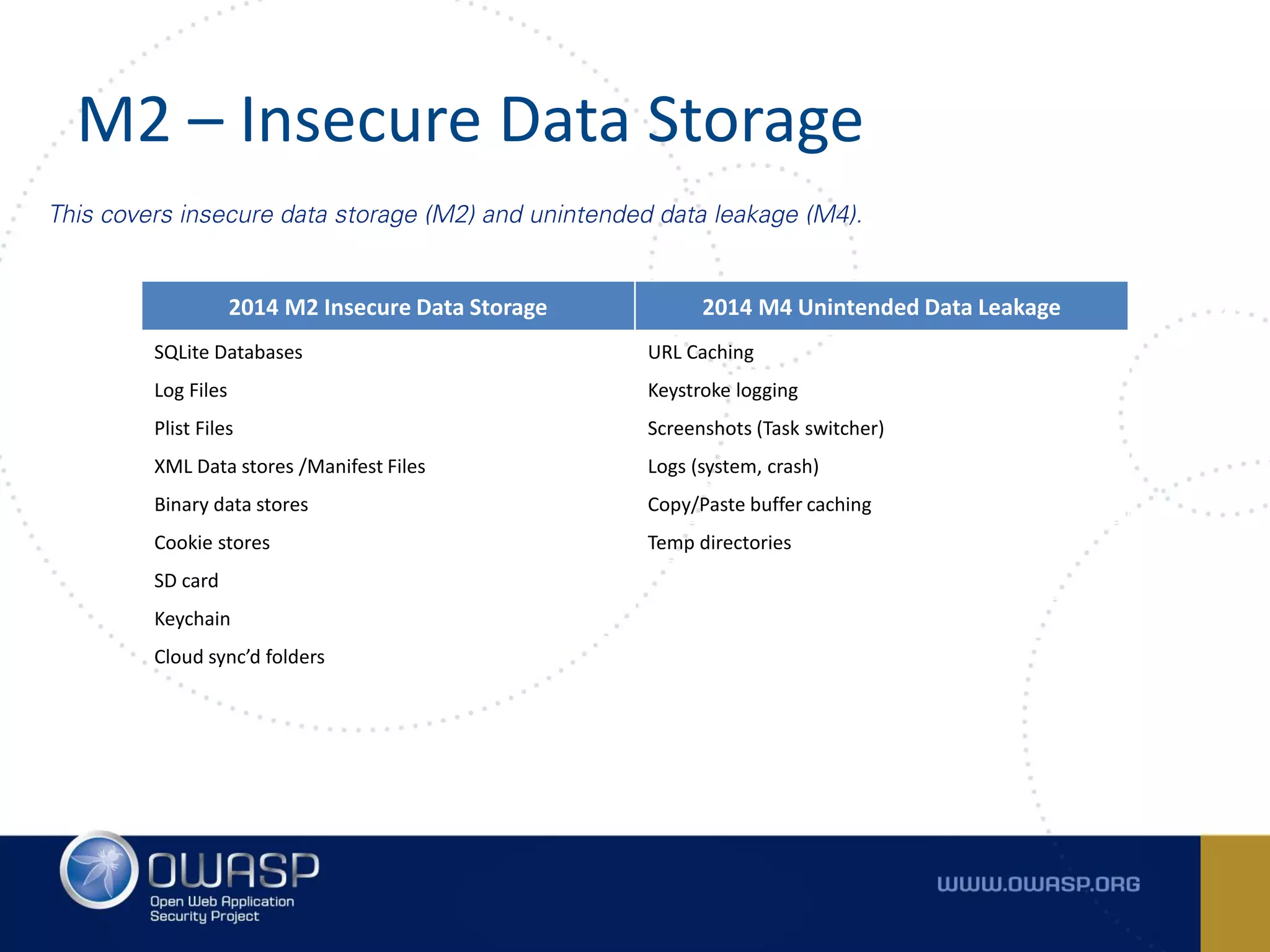
This covers insecure data storage (M2) and unintended data leakage (M4).
2014 M2 Insecure Data Storage 2014 M4 Unintended Data Leakage
SQLite Databases URL Caching
Log Files Keystroke logging
Plist Files Screenshots (Task switcher)
XML Data stores /Manifest Files Logs (system, crash)
Binary data stores Copy/Paste buffer caching
Cookie stores Temp directories
SD card
Keychain
Cloud sync’d folders
M2 – Insecure Data Storage
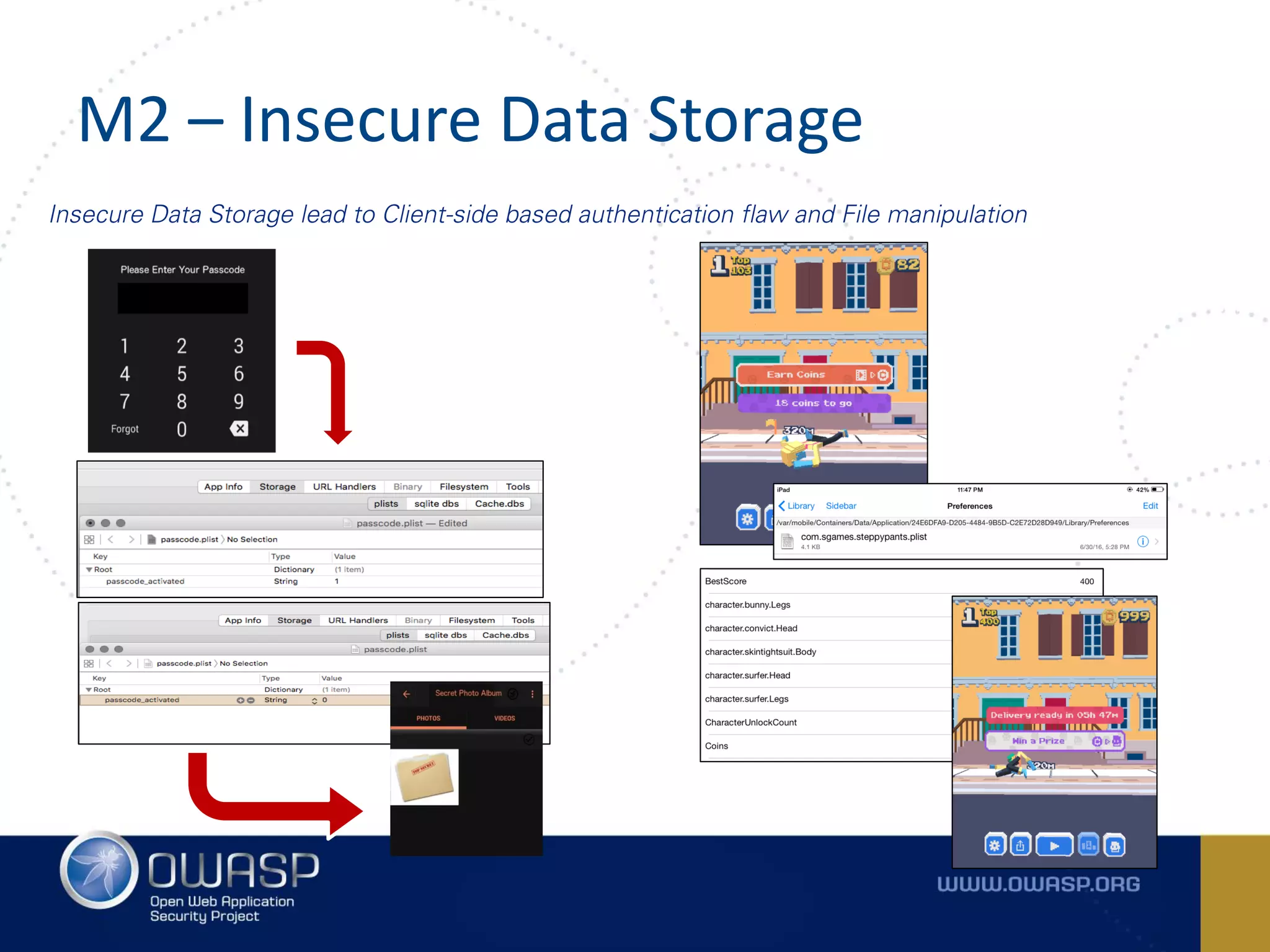
Insecure Data Storage lead to Client-side based authentication flaw and File manipulation
M2 – Insecure Data Storage
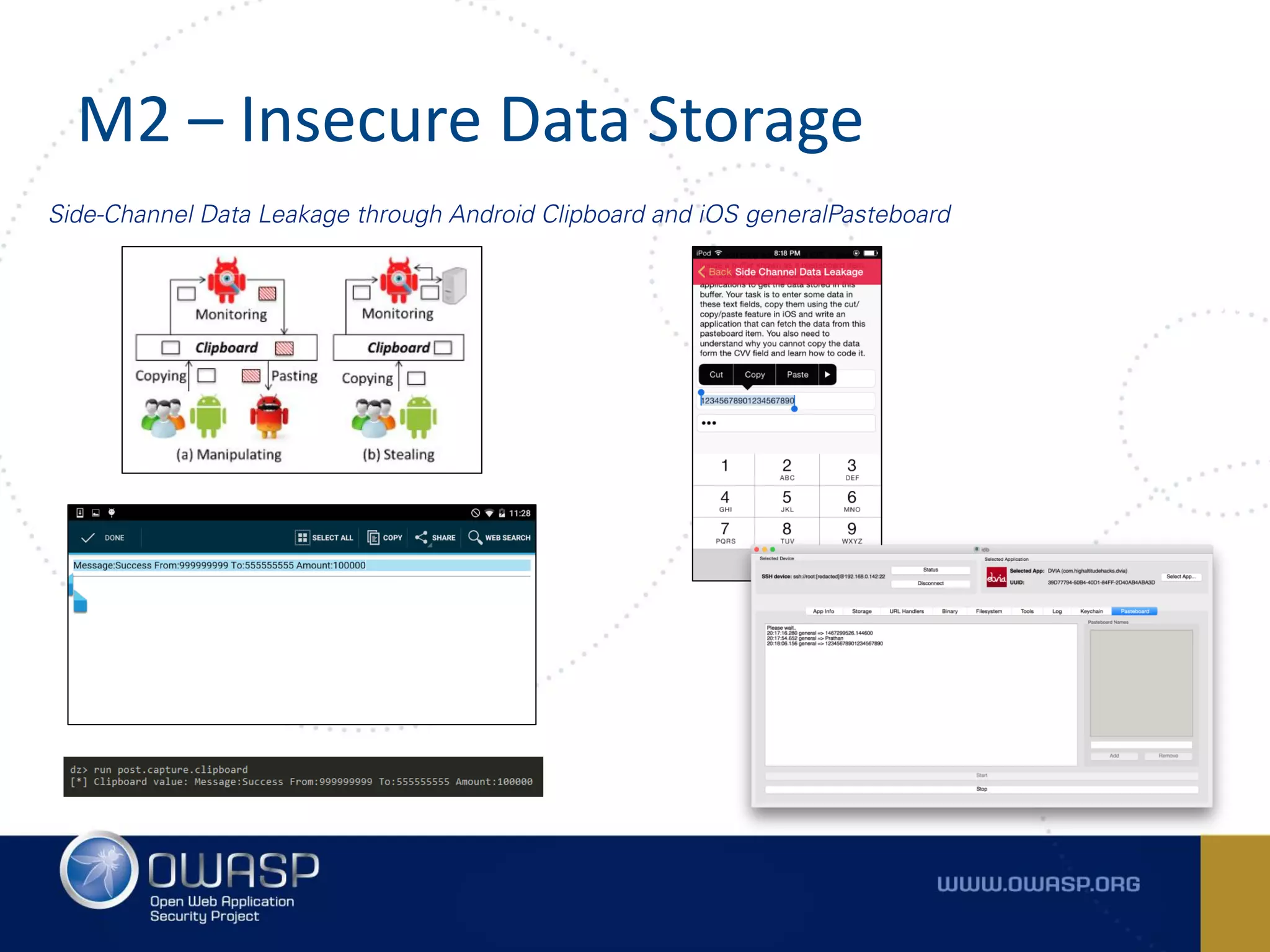
Side-Channel Data Leakage through Android Clipboard and iOS generalPasteboard
M2 – Insecure Data Storage
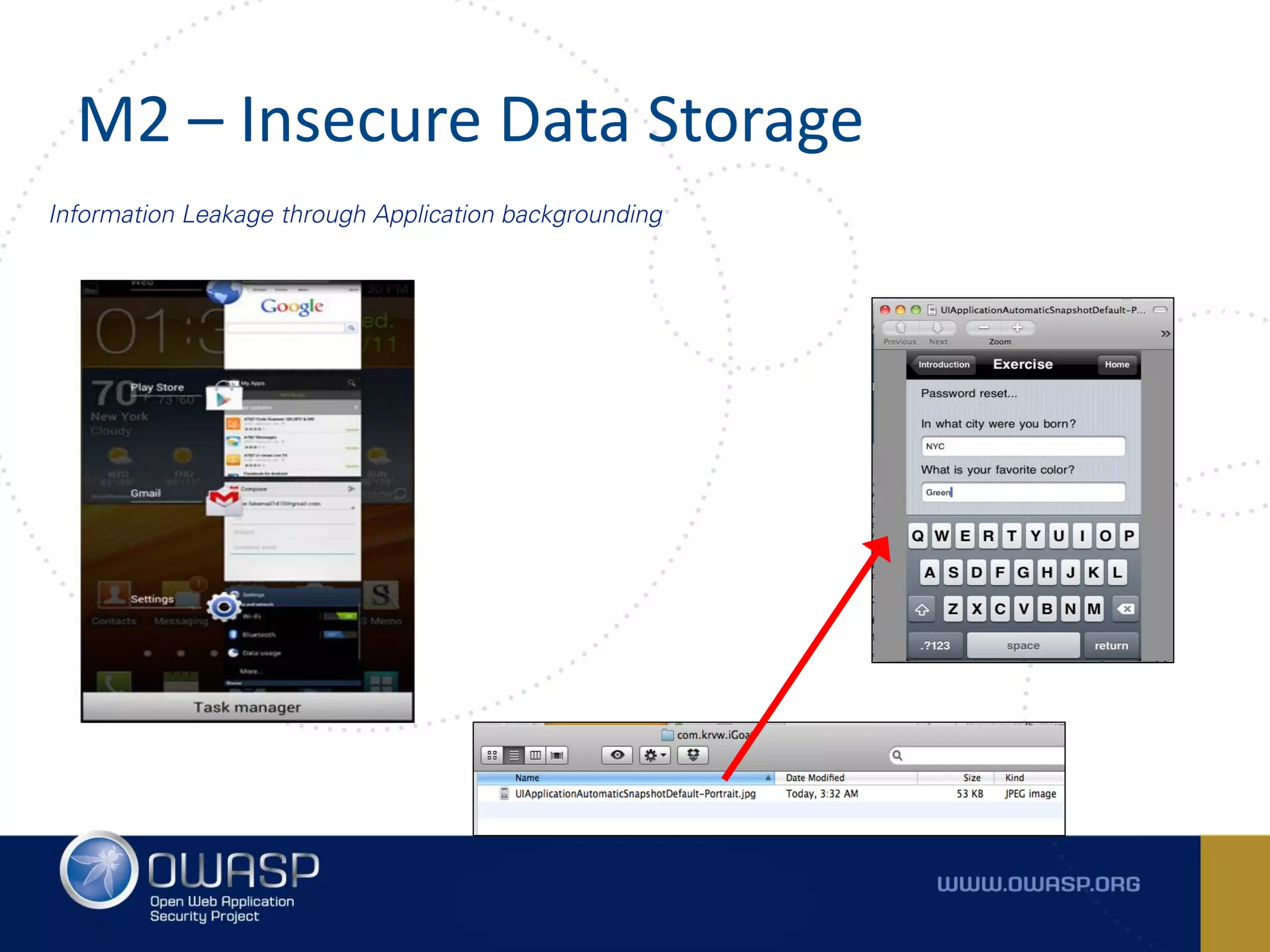
Information Leakage through Application backgrounding
M3 – INSECURE COMMUNICATION
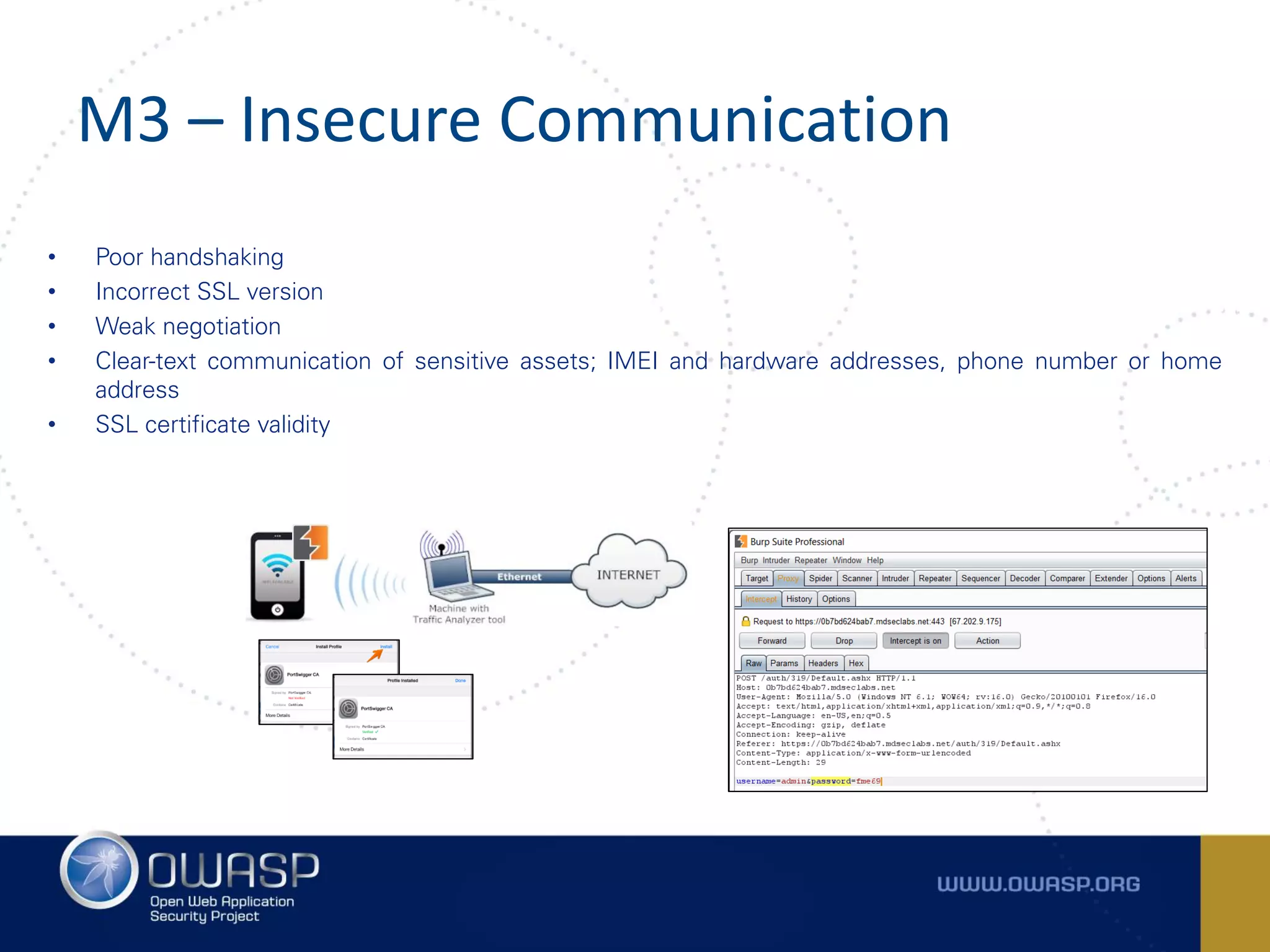
M3 – Insecure Communication
• Poor handshaking
• Incorrect SSL version
• Weak negotiation
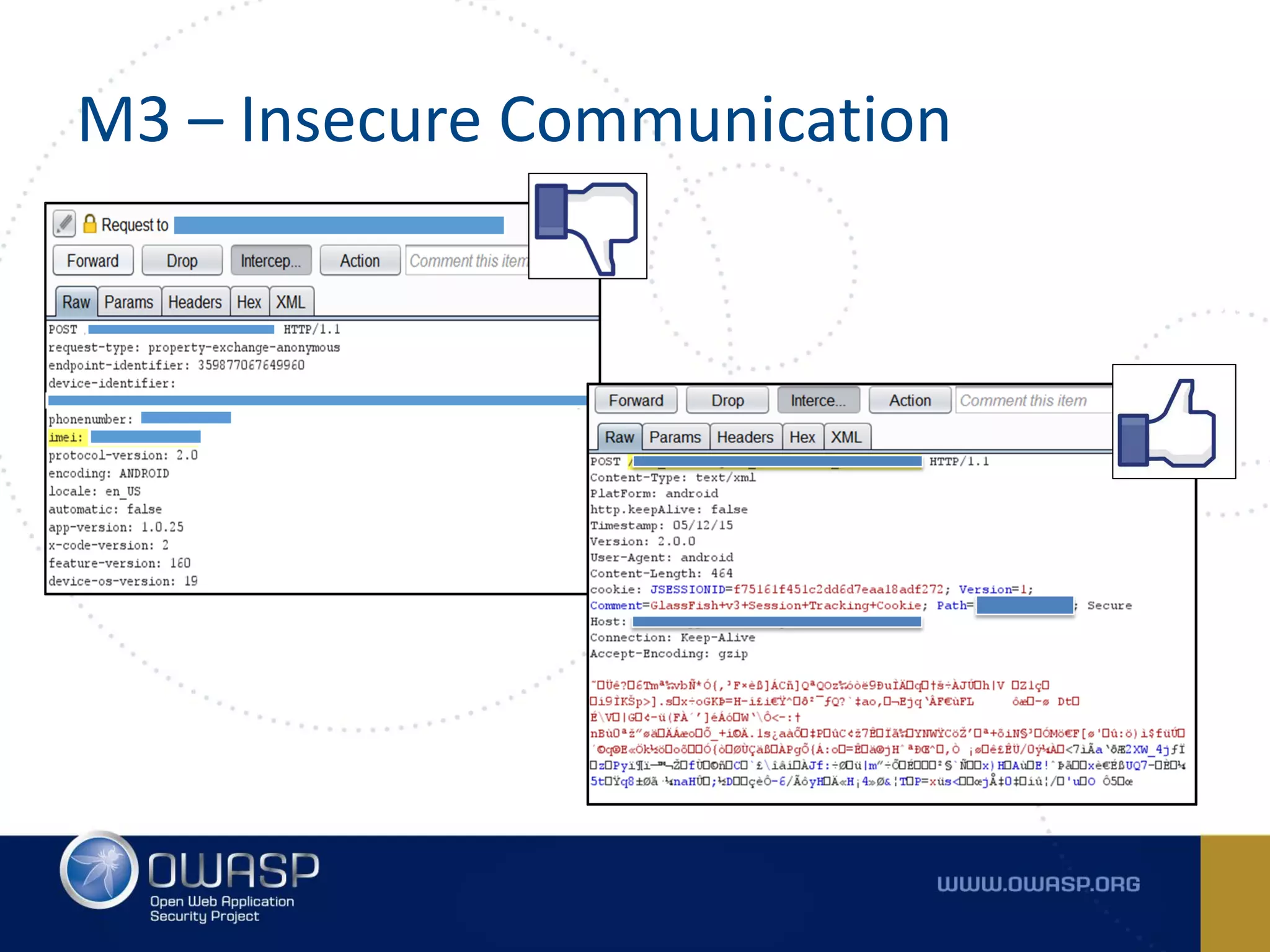
• Clear-text communication of sensitive assets; IMEI and hardware addresses, phone number or home
address
• SSL certificate validity
M3 – Insecure Communication
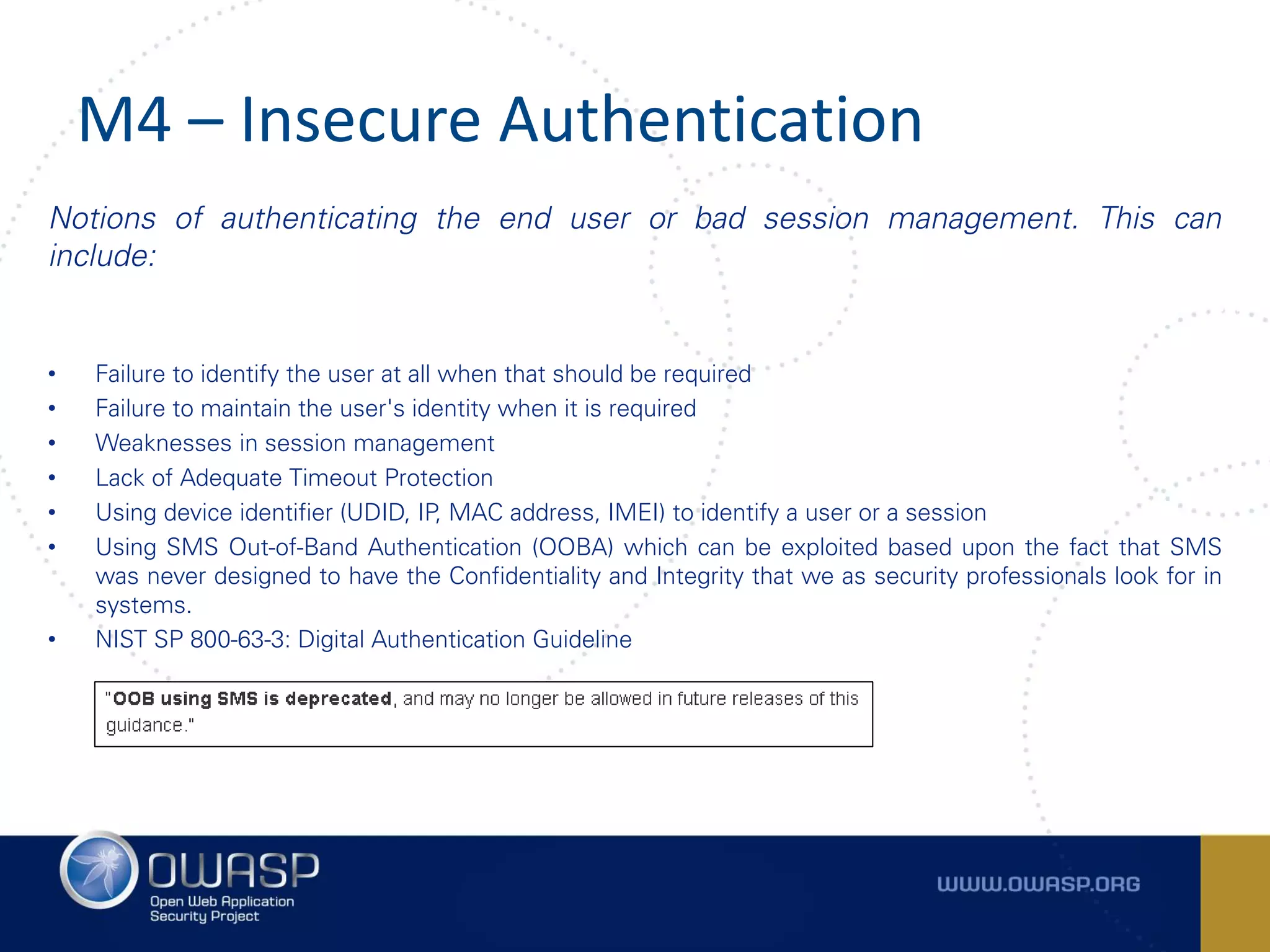
M4 – INSECURE AUTHENTICATION
M4 – Insecure Authentication
Notions of authenticating the end user or bad session management. This can
include:
• Failure to identify the user at all when that should be required
• Failure to maintain the user's identity when it is required
• Weaknesses in session management
• Lack of Adequate Timeout Protection
• Using device identifier (UDID, IP, MAC address, IMEI) to identify a user or a session
• Using SMS Out-of-Band Authentication (OOBA) which can be exploited based upon the fact that SMS
was never designed to have the Confidentiality and Integrity that we as security professionals look for in
systems.
• NIST SP 800-63-3: Digital Authentication Guideline
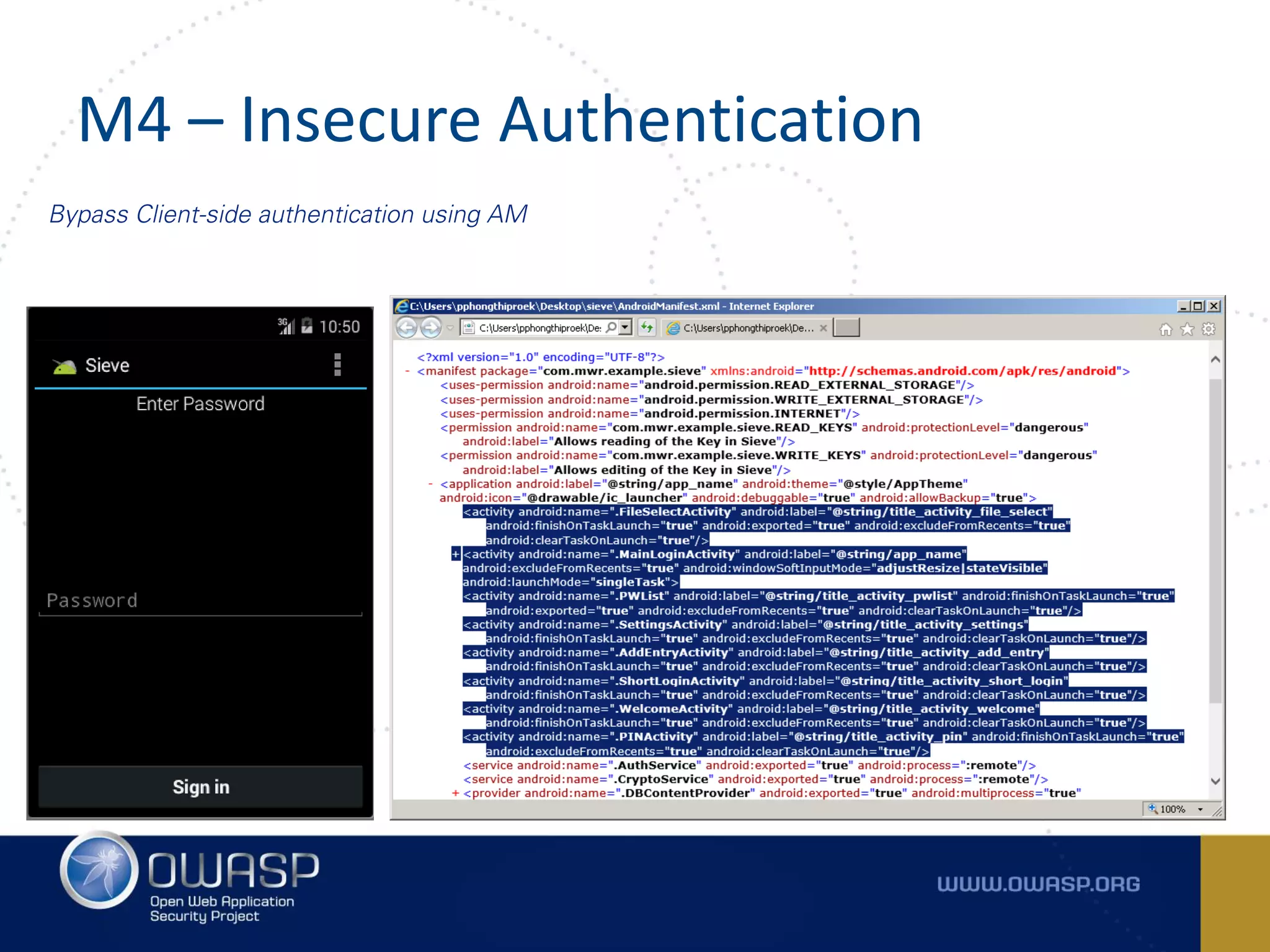
M4 – Insecure Authentication
Bypass Client-side authentication using AM
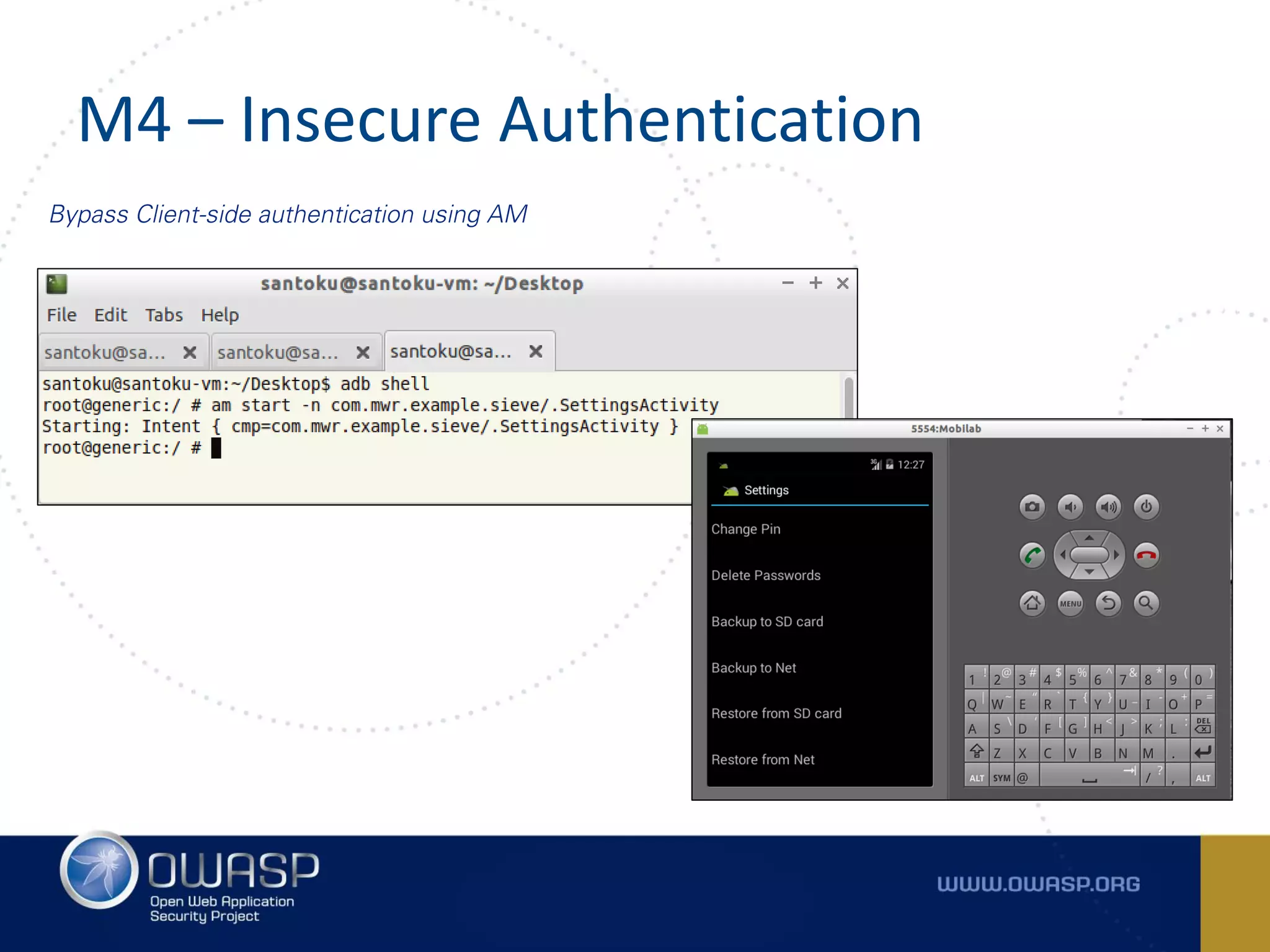
M4 – Insecure Authentication
Bypass Client-side authentication using AM
M5 – INSUFFICIENT CRYPTOGRAPHY
M5 – Insufficient Cryptography
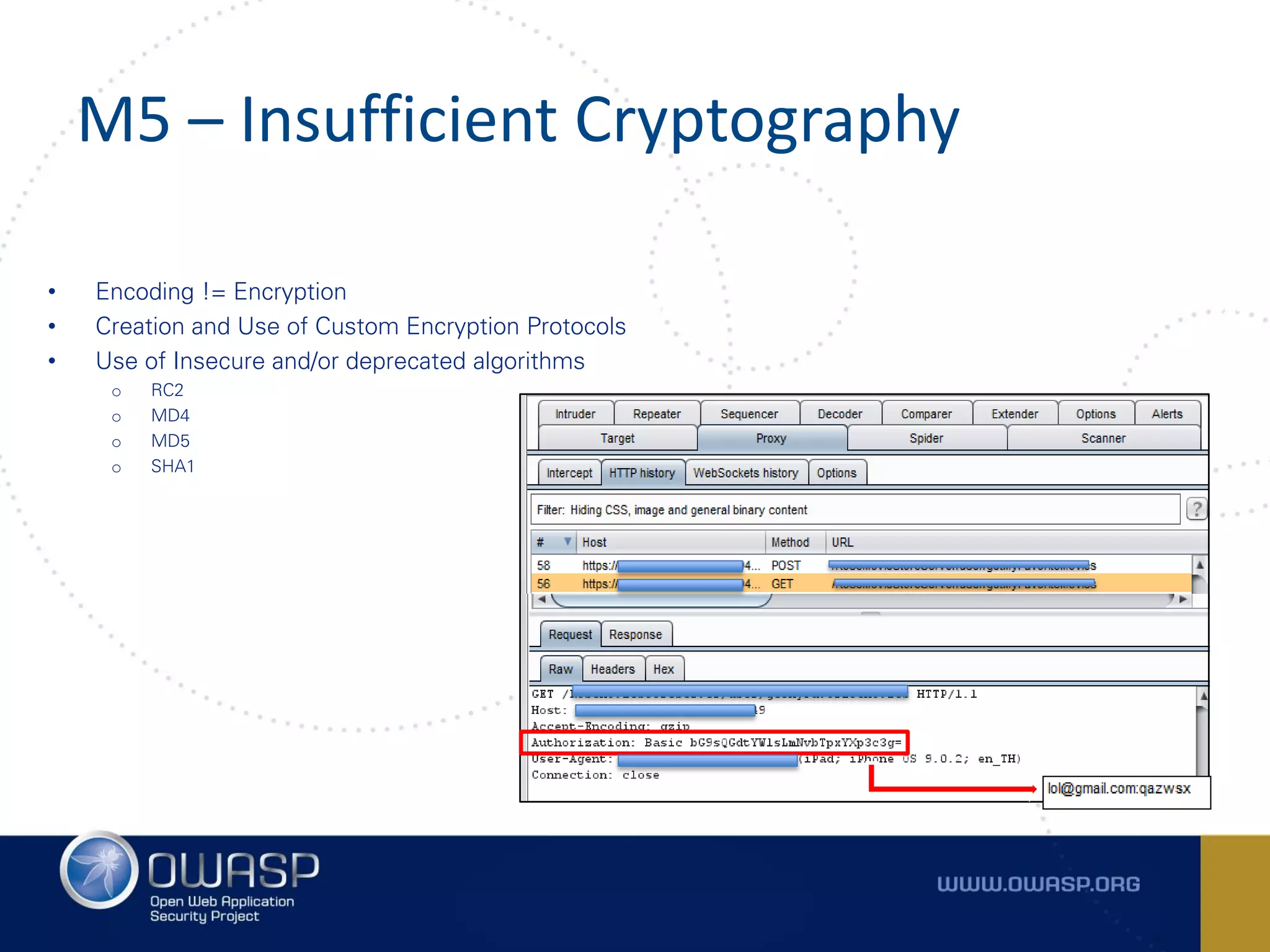
• Encoding != Encryption
• Creation and Use of Custom Encryption Protocols
• Use of Insecure and/or deprecated algorithms
o RC2
o MD4
o MD5
o SHA1
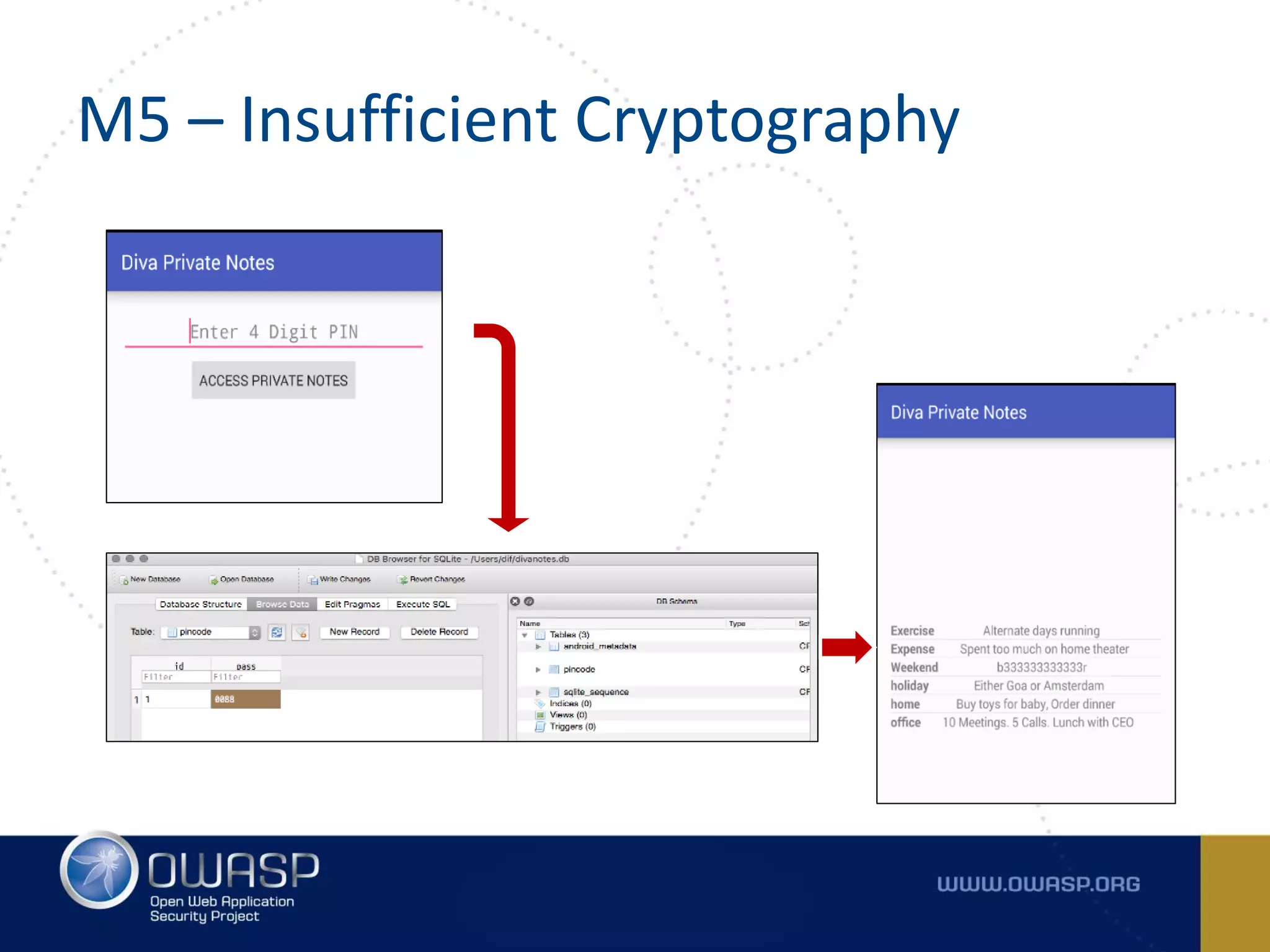
M5 – Insufficient Cryptography
M6 – INSECURE AUTHORIZATION
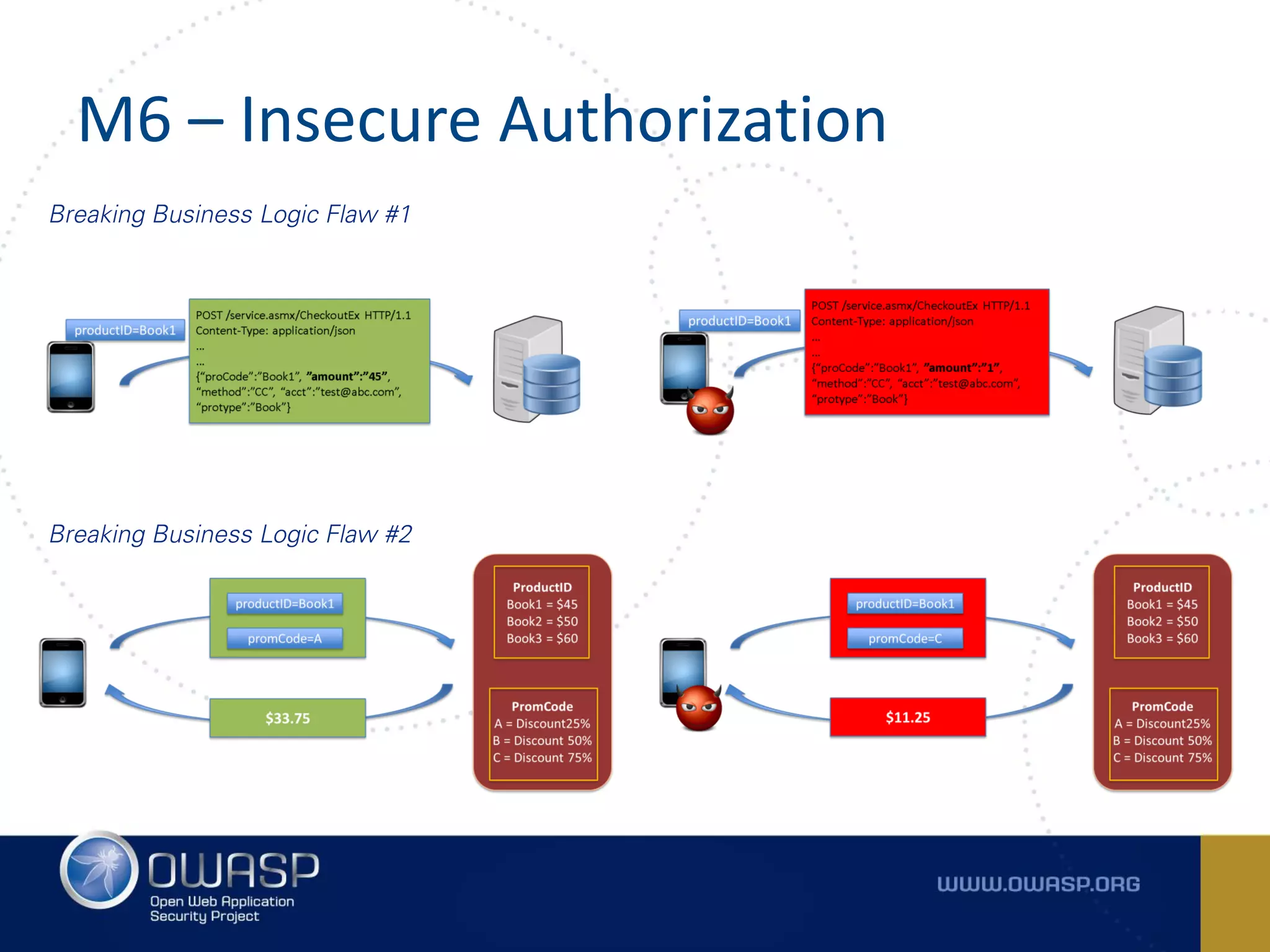
M6 – Insecure Authorization
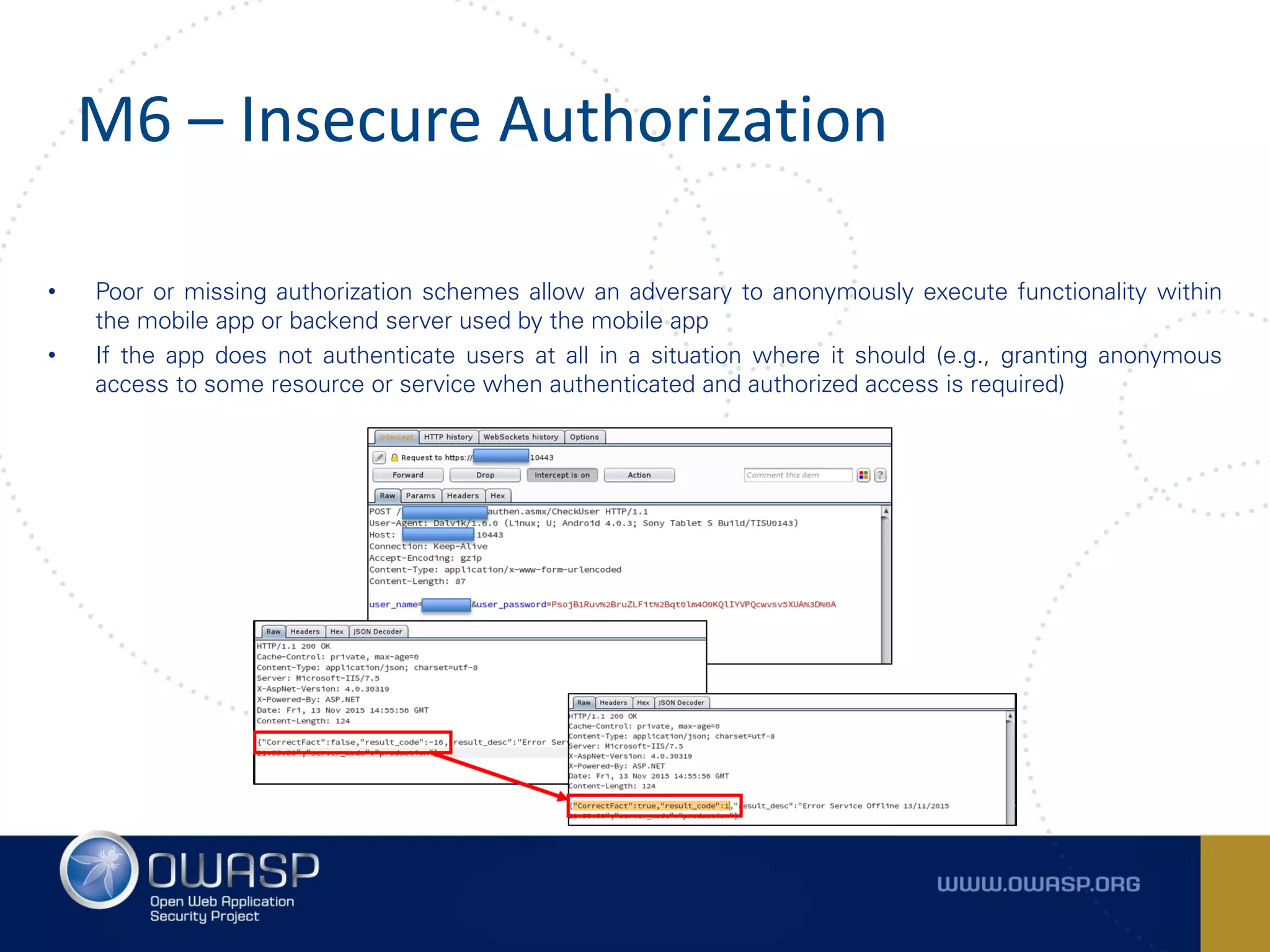
• Poor or missing authorization schemes allow an adversary to anonymously execute functionality within
the mobile app or backend server used by the mobile app
• If the app does not authenticate users at all in a situation where it should (e.g., granting anonymous
access to some resource or service when authenticated and authorized access is required)
M6 – Insecure Authorization
Breaking Business Logic Flaw #1
Breaking Business Logic Flaw #2
M7 – CLIENT CODE QUALITY
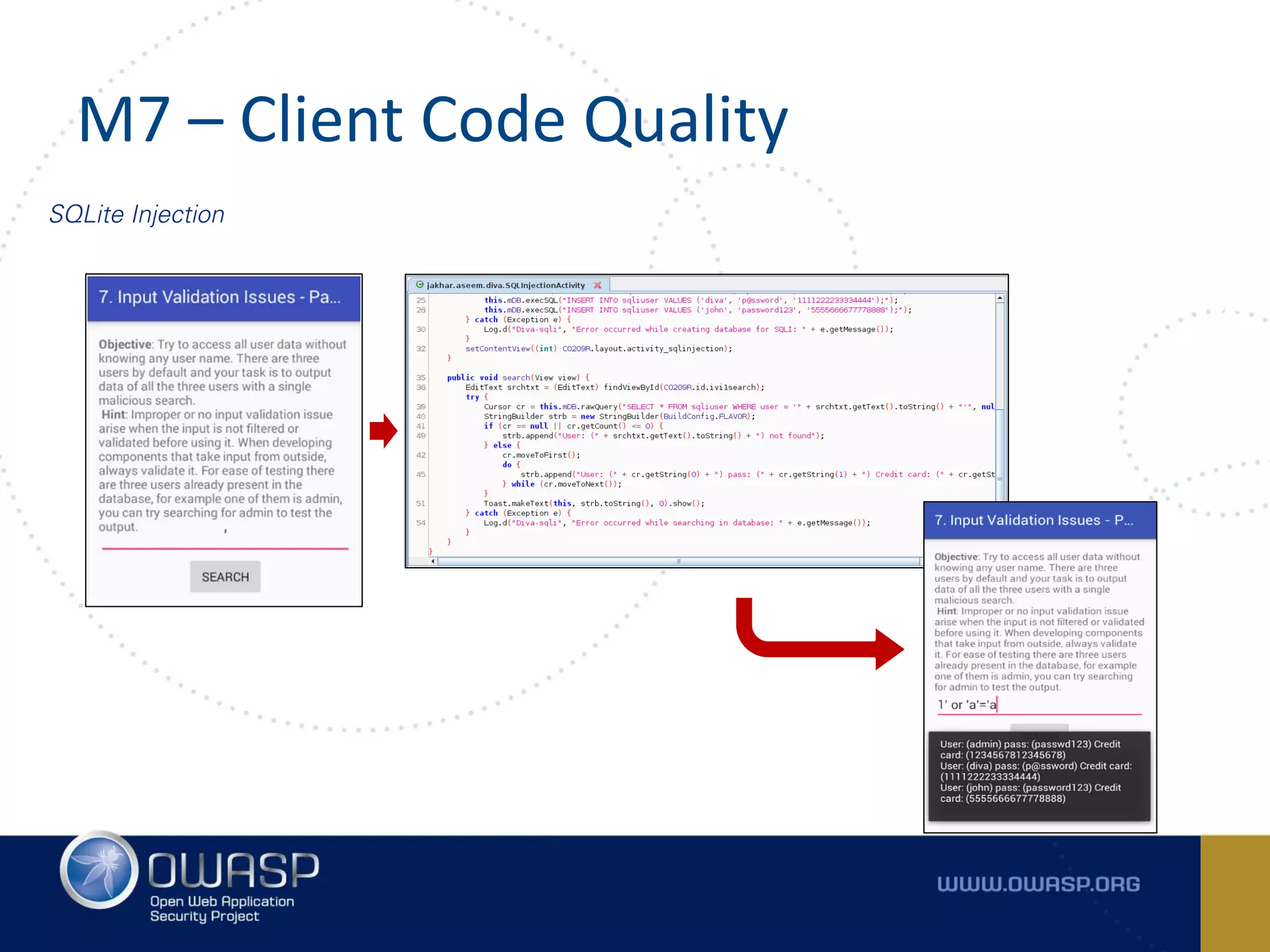
M7 – Client Code Quality
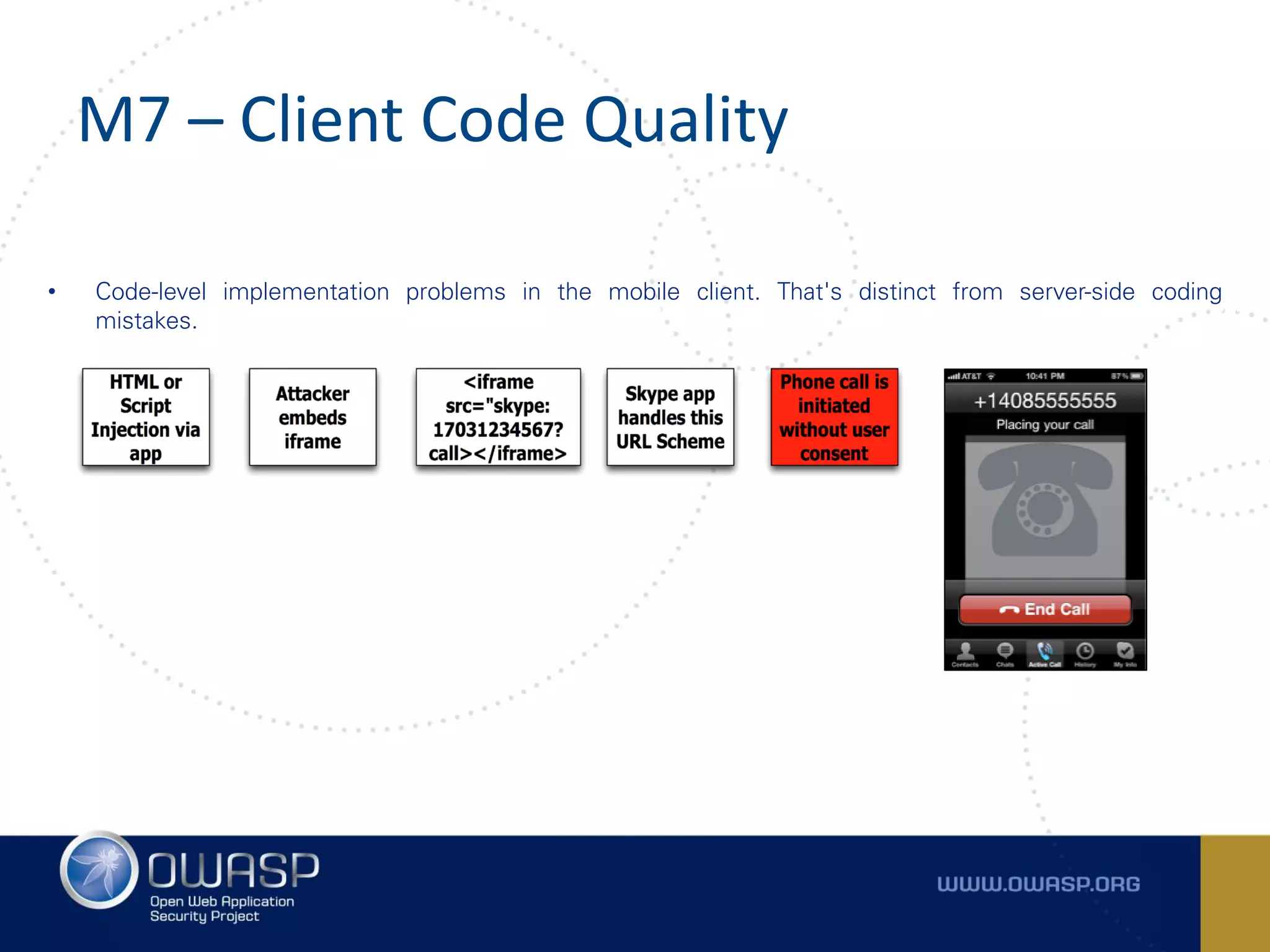
• Code-level implementation problems in the mobile client. That's distinct from server-side coding
mistakes.
M7 – Client Code Quality
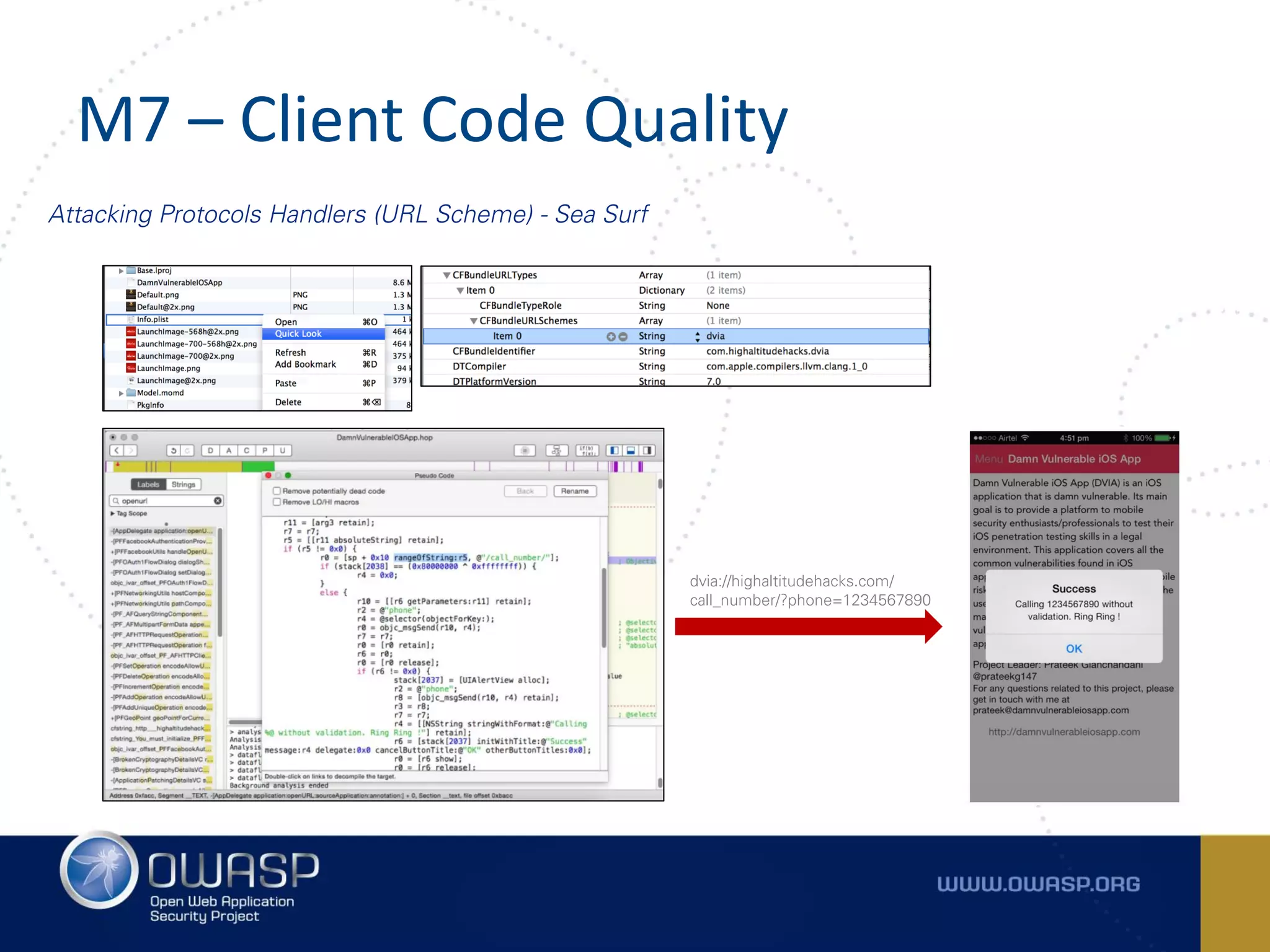
Attacking Protocols Handlers (URL Scheme) - Sea Surf
dvia://highaltitudehacks.com/
call_number/?phone=1234567890
M7 – Client Code Quality
SQLite Injection
M8 – CODE TAMPERING
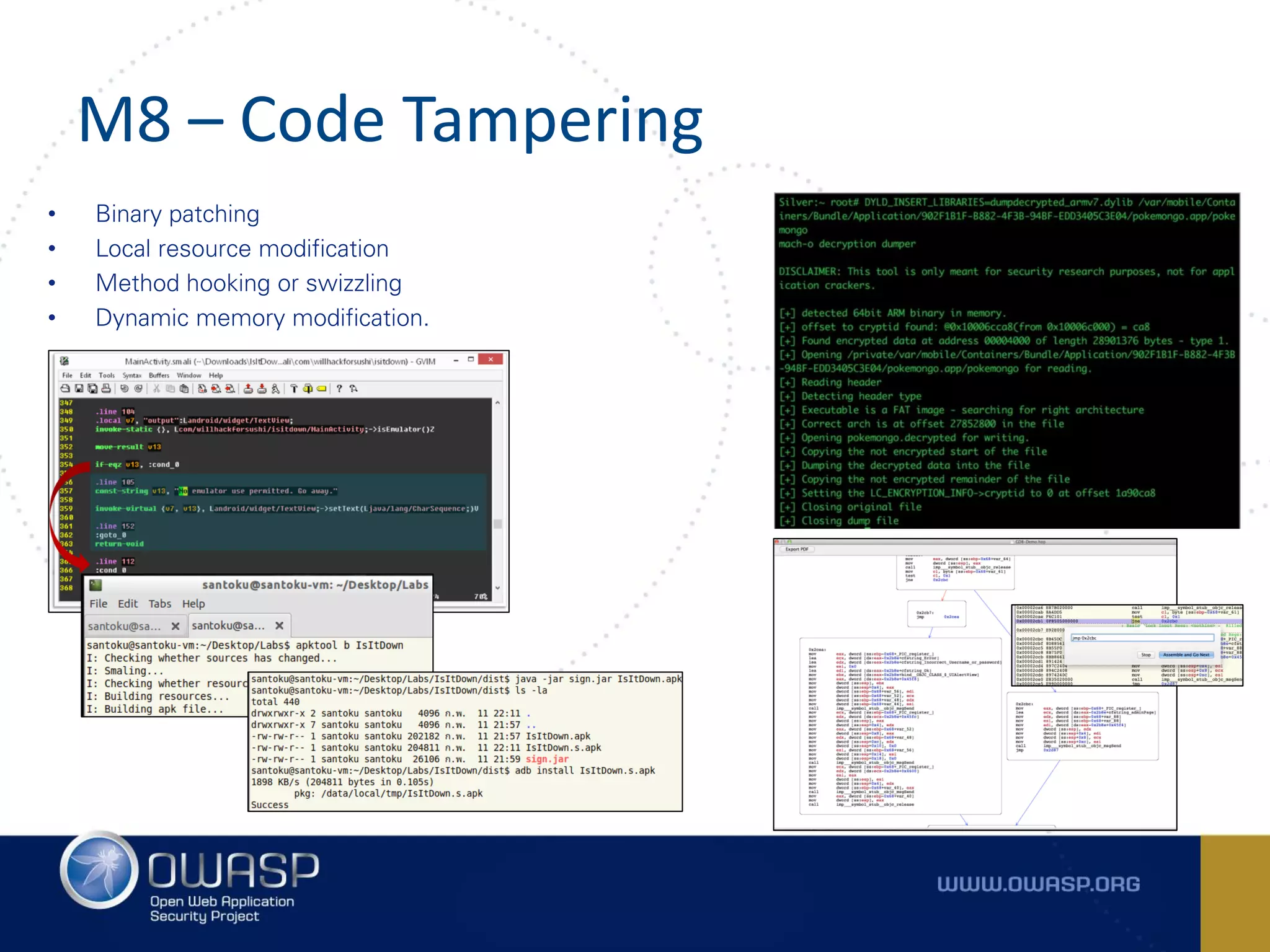
M8 – Code Tampering
• Binary patching
• Local resource modification
• Method hooking or swizzling
• Dynamic memory modification.
M8 – Code Tampering
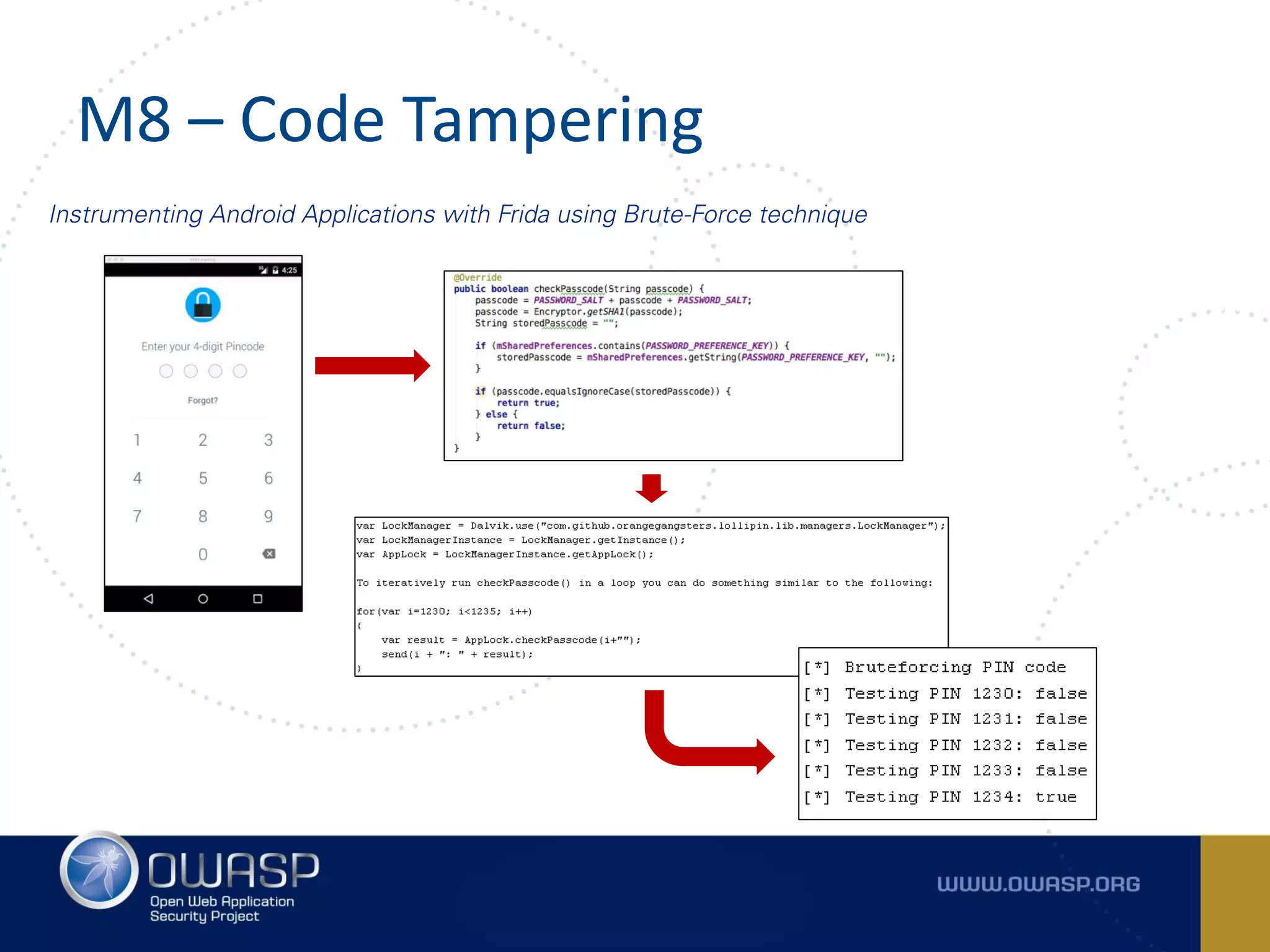
Instrumenting Android Applications with Frida using Brute-Force technique
M8 – Code Tampering
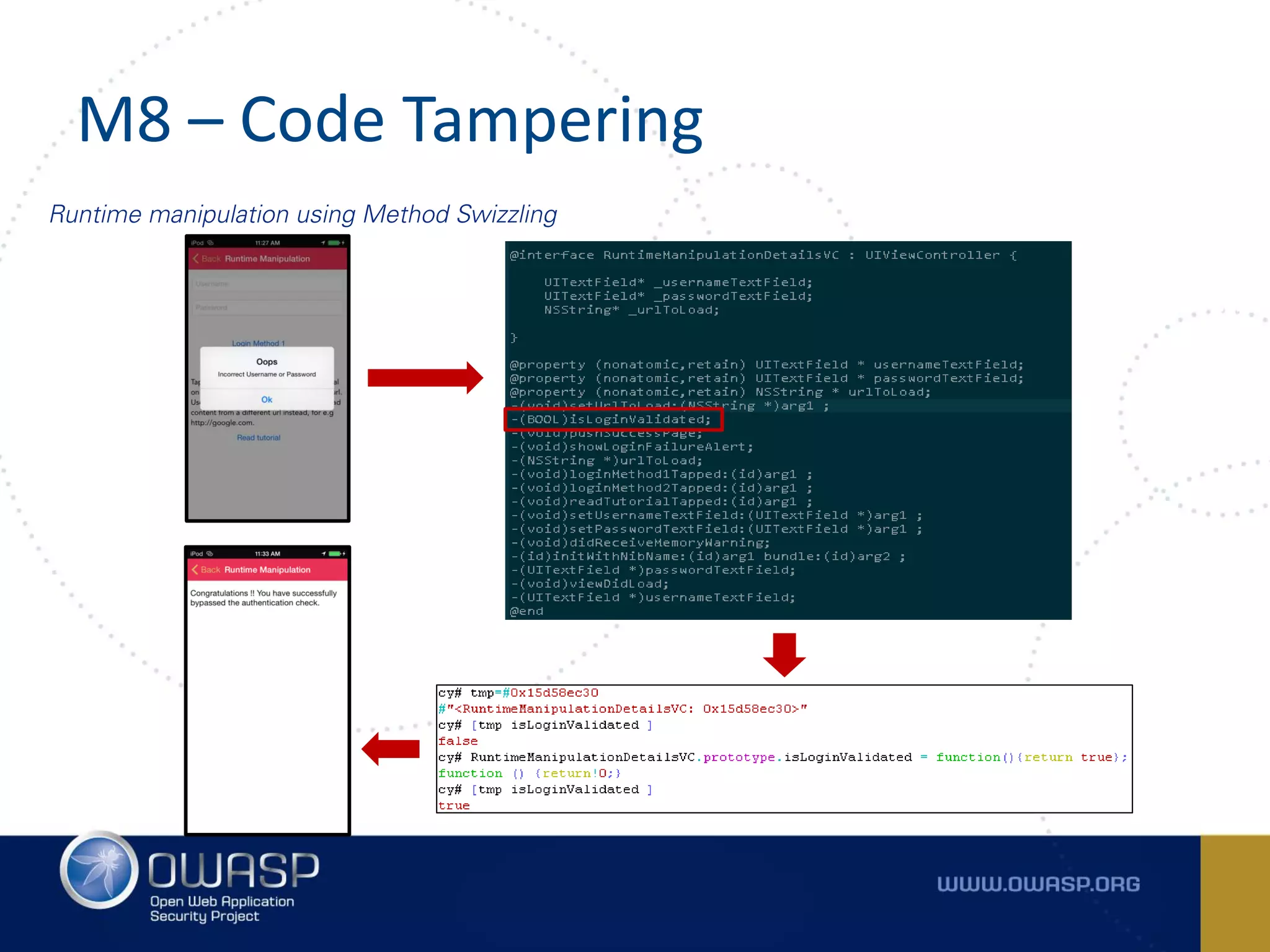
Runtime manipulation using Method Swizzling
M8 – Code Tampering
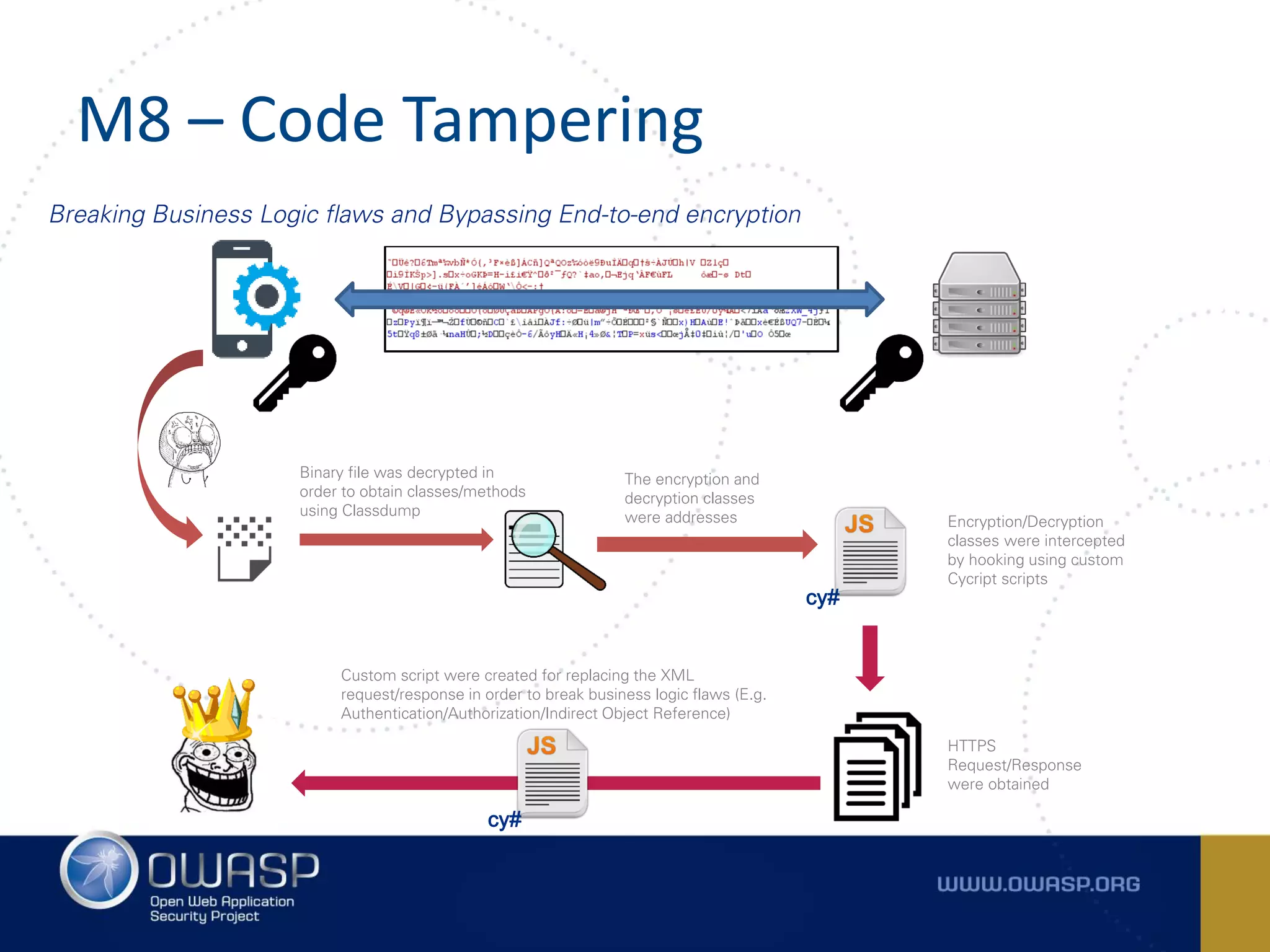
Breaking Business Logic flaws and Bypassing End-to-end encryption
Binary file was decrypted in
order to obtain classes/methods
using Classdump
The encryption and
decryption classes
were addresses
cy#
Encryption/Decryption
classes were intercepted
by hooking using custom
Cycript scripts
HTTPS
Request/Response
were obtained
cy#
Custom script were created for replacing the XML
request/response in order to break business logic flaws (E.g.
Authentication/Authorization/Indirect Object Reference)
M9 – REVERSE ENGINEERING
M9 – Reverse Engineering
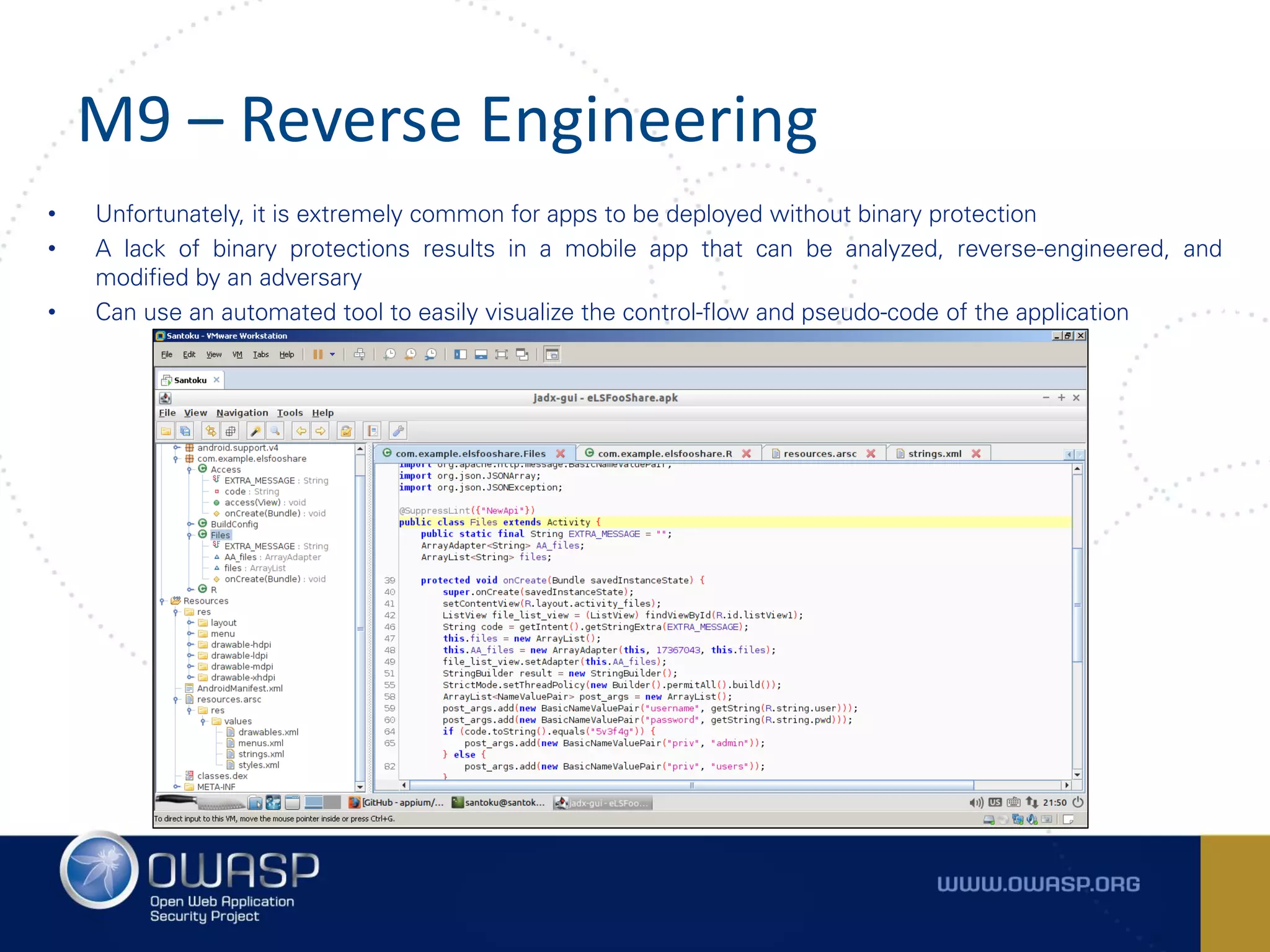
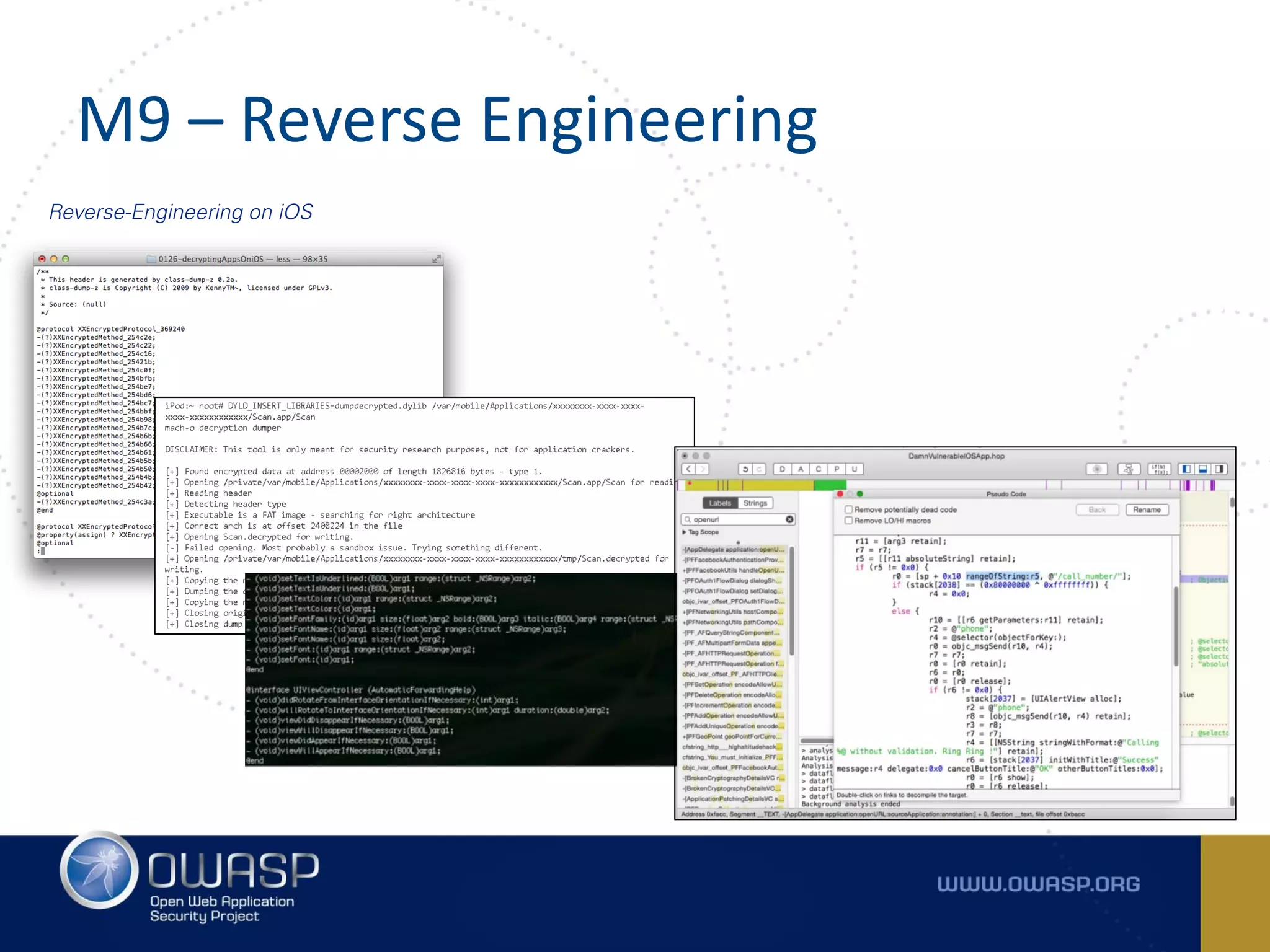
• Unfortunately, it is extremely common for apps to be deployed without binary protection
• A lack of binary protections results in a mobile app that can be analyzed, reverse-engineered, and
modified by an adversary
• Can use an automated tool to easily visualize the control-flow and pseudo-code of the application
M9 – Reverse Engineering
Reverse-Engineering on iOS
M10 – EXTRANEOUS FUNCTIONALITY
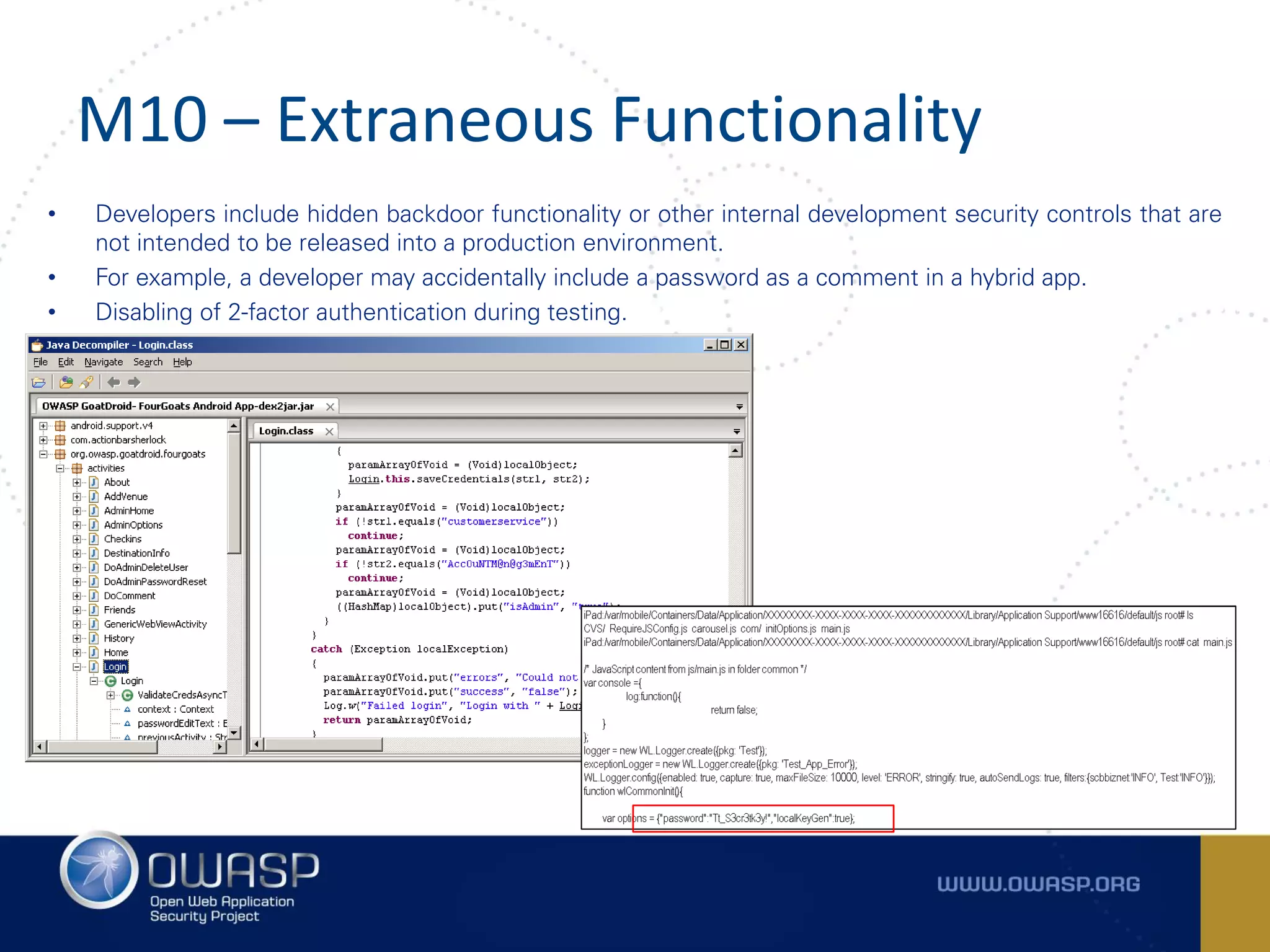
M10 – Extraneous Functionality
• Developers include hidden backdoor functionality or other internal development security controls that are
not intended to be released into a production environment.
• For example, a developer may accidentally include a password as a comment in a hybrid app.
• Disabling of 2-factor authentication during testing.
Thank you
Q&A
References
• https://www.owasp.org/index.php/Projects/OWASP_Mobile_Security_Project_-_Top_Ten_Mobile_Risks
• https://www.owasp.org/index.php/Mobile_Top_10_2016-Top_10
• https://www.owasp.org/index.php/OWASP_Mobile_Security_Project#tab=Top_10_Mobile_Controls
• https://github.com/OWASP/owasp-mstg
• https://github.com/OWASP/owasp-masvshttps://blog.ul-ts.com/posts/nist-to-deprecate-sms-for-out-of-
band-authentication-what-is-the-impact/
• http://integricell.com/sms-out-of-band-authentication-a-false-sense-of-security/

OWASP Day - OWASP Day - Lets secure!

  • 1.
    OWASP Top 10Mobile Risks 2016(RC) Prathan Phongthiproek OWASP Mobile Security Team
  • 2.
    Overview Arxan 5th AnnualState of Application Security report The new research analyzed 126 popular mobile health and finance apps from the US, UK, Germany, and Japan Key findings:  Consumers and app executives believe their mobile health and finance apps are secure. A combined 84 percent of mobile app users and mobile app executives believe that their mobile health and finance apps are “adequately secure,”  The majority of mobile health and finance apps contain critical security vulnerabilities. 90 percent of the mobile health and finance apps tested had at least two of the Open Web Application Security Project (OWASP) Mobile Top 10 Risks.  The security and safety risks are real and significant. 98 percent of the mobile apps tested lacked binary protection. 83 percent of the mobile apps had insufficient transport layer protection.  Most consumers would change providers if they knew their apps were not secure. 80 percent of mobile app users would change providers if they knew the apps they were using were not secure. 82 percent would change providers if they knew alternative apps offered by similar service providers were more secure.
  • 3.
    The Open WebApplication Security Project (OWASP) – OWASP Top 10 Mobile Risks 2014 and 2016(RC) https://www.owasp.org/index.php/Projects/OWASP_Mobile_Security_Project_-_Top_Ten_Mobile_Risks https://www.owasp.org/index.php/Mobile_Top_10_2016-Top_10 Guideline for Mobile Application Security OWASP Top 10 Mobile 2014 OWASP Top 10 Mobile 2016(RC) M1: Weak Server Side Controls M1 - Improper Platform Usage M2: Insecure Data Storage M2 - Insecure Data Storage M3: Insufficient Transport Layer Protection M3 - Insecure Communication M4: Unintended Data Leakage M4 - Insecure Authentication M5: Poor Authorization and Authentication M5 - Insufficient Cryptography M6: Broken Cryptography M6 - Insecure Authorization M7: Client Side Injection M7 - Client Code Quality M8: Security Decisions Via Untrusted Inputs M8 - Code Tampering M9: Improper Session Handling M9 - Reverse Engineering M10: Lack of Binary Protections M10 - Extraneous Functionality
  • 4.
    The Open WebApplication Security Project (OWASP) – OWASP Mobile Security Testing Guide (MSTG) https://github.com/OWASP/owasp-mstg Guideline for Mobile Application Security Ref: https://docs.google.com/document/d/132Ose0jdQwN6Z_Fp0VOJtVdGCufIwligwmf6oT0lmK8/edit
  • 5.
    The Open WebApplication Security Project (OWASP) – OWASP Mobile Top 10 Controls https://www.owasp.org/index.php/OWASP_Mobile_Security_Project#tab=Top_10_Mobile_Controls Guideline for Mobile Application Security
  • 6.
    The Open WebApplication Security Project (OWASP) – OWASP Mobile Application Security Verification Standard (MASVS) https://github.com/OWASP/owasp-masvs Guideline for Mobile Application Security V1: Architecture, Design and Threat Modelling Requirements V2: Data Storage and Privacy Requirements V3: Cryptography Verification Requirements V4: Authentication and Session Management Requirements V5: Network Communication Requirements V6: Environmental Interaction Requirements V7: Code Quality and Build Setting Requirements V8: Resiliency Against Reverse Engineering Requirements
  • 7.
    OWASP Top 10Mobile Risks – 2016 (RC) https://www.owasp.org/index.php/Mobile_Top_10_2016-Top_10
  • 8.
    M1 – IMPROPERPLATFORM USAGE
  • 9.
    M1 – ImproperPlatform Usage Misuse of a platform feature or failure to use platform security controls • Unintentional misuse of Android Intent, TouchID, Keychain • Requesting too many permissions, or the wrong permissions • Includes security control that is part of the mobile operating system
  • 10.
    M1 – ImproperPlatform Usage Abusing Android Content Provider for obtaining sensitive information from application database. Sensitive Information .DBContentProvider
  • 11.
    M1 – ImproperPlatform Usage CVE-2015-1835: Remote exploit of secondary configuration variables in Apache Cordova on Android
  • 12.
    M2 – INSECUREDATA STORAGE
  • 13.
    M2 – InsecureData Storage This covers insecure data storage (M2) and unintended data leakage (M4). 2014 M2 Insecure Data Storage 2014 M4 Unintended Data Leakage SQLite Databases URL Caching Log Files Keystroke logging Plist Files Screenshots (Task switcher) XML Data stores /Manifest Files Logs (system, crash) Binary data stores Copy/Paste buffer caching Cookie stores Temp directories SD card Keychain Cloud sync’d folders
  • 14.
    M2 – InsecureData Storage Insecure Data Storage lead to Client-side based authentication flaw and File manipulation
  • 15.
    M2 – InsecureData Storage Side-Channel Data Leakage through Android Clipboard and iOS generalPasteboard
  • 16.
    M2 – InsecureData Storage Information Leakage through Application backgrounding
  • 17.
    M3 – INSECURECOMMUNICATION
  • 18.
    M3 – InsecureCommunication • Poor handshaking • Incorrect SSL version • Weak negotiation • Clear-text communication of sensitive assets; IMEI and hardware addresses, phone number or home address • SSL certificate validity
  • 19.
    M3 – InsecureCommunication
  • 20.
    M4 – INSECUREAUTHENTICATION
  • 21.
    M4 – InsecureAuthentication Notions of authenticating the end user or bad session management. This can include: • Failure to identify the user at all when that should be required • Failure to maintain the user's identity when it is required • Weaknesses in session management • Lack of Adequate Timeout Protection • Using device identifier (UDID, IP, MAC address, IMEI) to identify a user or a session • Using SMS Out-of-Band Authentication (OOBA) which can be exploited based upon the fact that SMS was never designed to have the Confidentiality and Integrity that we as security professionals look for in systems. • NIST SP 800-63-3: Digital Authentication Guideline
  • 22.
    M4 – InsecureAuthentication Bypass Client-side authentication using AM
  • 23.
    M4 – InsecureAuthentication Bypass Client-side authentication using AM
  • 24.
    M5 – INSUFFICIENTCRYPTOGRAPHY
  • 25.
    M5 – InsufficientCryptography • Encoding != Encryption • Creation and Use of Custom Encryption Protocols • Use of Insecure and/or deprecated algorithms o RC2 o MD4 o MD5 o SHA1
  • 26.
    M5 – InsufficientCryptography
  • 27.
    M6 – INSECUREAUTHORIZATION
  • 28.
    M6 – InsecureAuthorization • Poor or missing authorization schemes allow an adversary to anonymously execute functionality within the mobile app or backend server used by the mobile app • If the app does not authenticate users at all in a situation where it should (e.g., granting anonymous access to some resource or service when authenticated and authorized access is required)
  • 29.
    M6 – InsecureAuthorization Breaking Business Logic Flaw #1 Breaking Business Logic Flaw #2
  • 30.
    M7 – CLIENTCODE QUALITY
  • 31.
    M7 – ClientCode Quality • Code-level implementation problems in the mobile client. That's distinct from server-side coding mistakes.
  • 32.
    M7 – ClientCode Quality Attacking Protocols Handlers (URL Scheme) - Sea Surf dvia://highaltitudehacks.com/ call_number/?phone=1234567890
  • 33.
    M7 – ClientCode Quality SQLite Injection
  • 34.
    M8 – CODETAMPERING
  • 35.
    M8 – CodeTampering • Binary patching • Local resource modification • Method hooking or swizzling • Dynamic memory modification.
  • 36.
    M8 – CodeTampering Instrumenting Android Applications with Frida using Brute-Force technique
  • 37.
    M8 – CodeTampering Runtime manipulation using Method Swizzling
  • 38.
    M8 – CodeTampering Breaking Business Logic flaws and Bypassing End-to-end encryption Binary file was decrypted in order to obtain classes/methods using Classdump The encryption and decryption classes were addresses cy# Encryption/Decryption classes were intercepted by hooking using custom Cycript scripts HTTPS Request/Response were obtained cy# Custom script were created for replacing the XML request/response in order to break business logic flaws (E.g. Authentication/Authorization/Indirect Object Reference)
  • 39.
    M9 – REVERSEENGINEERING
  • 40.
    M9 – ReverseEngineering • Unfortunately, it is extremely common for apps to be deployed without binary protection • A lack of binary protections results in a mobile app that can be analyzed, reverse-engineered, and modified by an adversary • Can use an automated tool to easily visualize the control-flow and pseudo-code of the application
  • 41.
    M9 – ReverseEngineering Reverse-Engineering on iOS
  • 42.
    M10 – EXTRANEOUSFUNCTIONALITY
  • 43.
    M10 – ExtraneousFunctionality • Developers include hidden backdoor functionality or other internal development security controls that are not intended to be released into a production environment. • For example, a developer may accidentally include a password as a comment in a hybrid app. • Disabling of 2-factor authentication during testing.
  • 44.
  • 45.
    References • https://www.owasp.org/index.php/Projects/OWASP_Mobile_Security_Project_-_Top_Ten_Mobile_Risks • https://www.owasp.org/index.php/Mobile_Top_10_2016-Top_10 •https://www.owasp.org/index.php/OWASP_Mobile_Security_Project#tab=Top_10_Mobile_Controls • https://github.com/OWASP/owasp-mstg • https://github.com/OWASP/owasp-masvshttps://blog.ul-ts.com/posts/nist-to-deprecate-sms-for-out-of- band-authentication-what-is-the-impact/ • http://integricell.com/sms-out-of-band-authentication-a-false-sense-of-security/