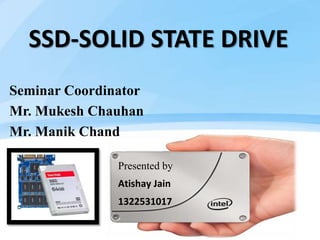
SSD-SOLID STATE DRIVE
Seminar Coordinator
Mr. Mukesh Chauhan
Mr. Manik Chand
Presented by
Atishay Jain
1322531017
CONTENTS
• WHAT IS HDD ?
• INTRODUCTION OF SSD
• THE PROBLEMS WITH TODAY’S HARD DISKS
• ARCHITECTURE OF SSD
• MEMORY
• CONTROLLER
• HOST INTERFACE
• COMPARISON OF SSD & HDD
• ADVANTAGES & DISSADVANTAGES
• APPLICATIONS OF SSD
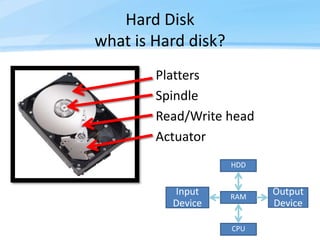
Hard Disk
what is Hard disk?
Platters
Spindle
Read/Write head
Actuator
Input
Device
CPU
RAM
Output
Device
HDD
Page  4
INTRODUCTION
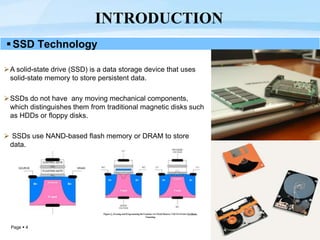
SSD Technology
A solid-state drive (SSD) is a data storage device that uses
solid-state memory to store persistent data.
SSDs do not have any moving mechanical components,
which distinguishes them from traditional magnetic disks such
as HDDs or floppy disks.
 SSDs use NAND-based flash memory or DRAM to store
data.
Page  5
The problems with today’s Hard Disks?
Hard Disk Drives
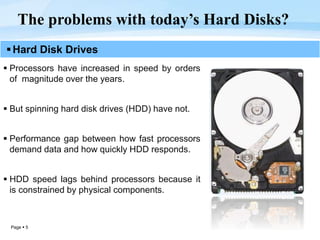
 Processors have increased in speed by orders
of magnitude over the years.
 But spinning hard disk drives (HDD) have not.
 Performance gap between how fast processors
demand data and how quickly HDD responds.
 HDD speed lags behind processors because it
is constrained by physical components.
Page  6
ARCHITECTURE OF SSD
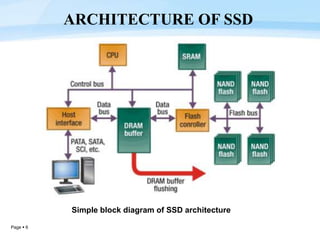
Simple block diagram of SSD architecture
Page  7
Memory
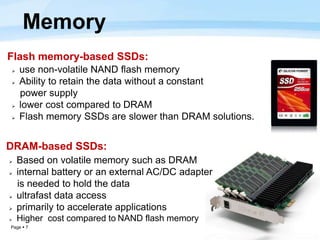
Flash memory-based SSDs:
 use non-volatile NAND flash memory
 Ability to retain the data without a constant
power supply
 lower cost compared to DRAM
 Flash memory SSDs are slower than DRAM solutions.
DRAM-based SSDs:
 Based on volatile memory such as DRAM
 internal battery or an external AC/DC adapter
is needed to hold the data
 ultrafast data access
 primarily to accelerate applications
 Higher cost compared to NAND flash memory
Page  8
CONTROLLER
 The controller is an embedded processor and executes
firmware-level code.
Functions:
 Error correction (ECC)
 Wear leveling
 Bad block mapping
 Read scrubbing and read disturb
management
 Read and write caching
 Garbage collection
 Encryption
Page  9
 Serial ATA (SATA)
 SAS - Serial attached SCSI (generally found on servers)
 PCI Express
 USB
 Parallel ATA (IDE) interface (mostly replaced by SATA)
HOST INTERFACE
Page  10
Technical Comparison of SSD & HDD
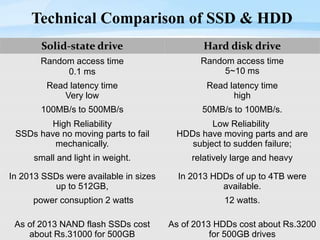
Solid-state drive Hard disk drive
Random access time
0.1 ms
Random access time
5~10 ms
Read latency time
Very low
Read latency time
high
100MB/s to 500MB/s 50MB/s to 100MB/s.
High Reliability
SSDs have no moving parts to fail
mechanically.
Low Reliability
HDDs have moving parts and are
subject to sudden failure;
small and light in weight. relatively large and heavy
In 2013 SSDs were available in sizes
up to 512GB,
In 2013 HDDs of up to 4TB were
available.
power consuption 2 watts 12 watts.
As of 2013 NAND flash SSDs cost
about Rs.31000 for 500GB
As of 2013 HDDs cost about Rs.3200
for 500GB drives
Page  11
 High performance – significantly faster than a standard HDD
 Faster seek time – up to 60x faster than HDD
 Lower power – Lesser power consumption ,cooler operation
 Silent operation – ideal for post production environments
 Lighter weight – perfect for portable devices.
 Ability to endure extreme shock, high altitude, vibration and
extremes of temperature.
 Immune to magnets.
 SSDs are random access by nature and can perform parallel
reads on multiple sections of the drive
ADVANTAGES OF SSD
Page  12
 They are more expensive than traditional hard drives.
 They currently offer less storage space than traditional hard
drives.
 Slower Write Speed on low-end Models(MLC based types).
DISSADVANTAGES OF SSD
Page  13
Servers
Hybrid SDD
Desktop computers
Laptops
Ultrabooks
HD Camcorders
Smart Tv
CCTV Digital Video Recorder (DVR)
Set-Top Boxes
Gaming Consoles
SSD APPLICATIONS
SSD - Solid State Drive PPT by Atishay Jain

SSD - Solid State Drive PPT by Atishay Jain

  • 1.
    SSD-SOLID STATE DRIVE SeminarCoordinator Mr. Mukesh Chauhan Mr. Manik Chand Presented by Atishay Jain 1322531017
  • 2.
    CONTENTS • WHAT ISHDD ? • INTRODUCTION OF SSD • THE PROBLEMS WITH TODAY’S HARD DISKS • ARCHITECTURE OF SSD • MEMORY • CONTROLLER • HOST INTERFACE • COMPARISON OF SSD & HDD • ADVANTAGES & DISSADVANTAGES • APPLICATIONS OF SSD
  • 3.
    Hard Disk what isHard disk? Platters Spindle Read/Write head Actuator Input Device CPU RAM Output Device HDD
  • 4.
    Page  4 INTRODUCTION SSDTechnology A solid-state drive (SSD) is a data storage device that uses solid-state memory to store persistent data. SSDs do not have any moving mechanical components, which distinguishes them from traditional magnetic disks such as HDDs or floppy disks.  SSDs use NAND-based flash memory or DRAM to store data.
  • 5.
    Page  5 Theproblems with today’s Hard Disks? Hard Disk Drives  Processors have increased in speed by orders of magnitude over the years.  But spinning hard disk drives (HDD) have not.  Performance gap between how fast processors demand data and how quickly HDD responds.  HDD speed lags behind processors because it is constrained by physical components.
  • 6.
    Page  6 ARCHITECTUREOF SSD Simple block diagram of SSD architecture
  • 7.
    Page  7 Memory Flashmemory-based SSDs:  use non-volatile NAND flash memory  Ability to retain the data without a constant power supply  lower cost compared to DRAM  Flash memory SSDs are slower than DRAM solutions. DRAM-based SSDs:  Based on volatile memory such as DRAM  internal battery or an external AC/DC adapter is needed to hold the data  ultrafast data access  primarily to accelerate applications  Higher cost compared to NAND flash memory
  • 8.
    Page  8 CONTROLLER The controller is an embedded processor and executes firmware-level code. Functions:  Error correction (ECC)  Wear leveling  Bad block mapping  Read scrubbing and read disturb management  Read and write caching  Garbage collection  Encryption
  • 9.
    Page  9 Serial ATA (SATA)  SAS - Serial attached SCSI (generally found on servers)  PCI Express  USB  Parallel ATA (IDE) interface (mostly replaced by SATA) HOST INTERFACE
  • 10.
    Page  10 TechnicalComparison of SSD & HDD Solid-state drive Hard disk drive Random access time 0.1 ms Random access time 5~10 ms Read latency time Very low Read latency time high 100MB/s to 500MB/s 50MB/s to 100MB/s. High Reliability SSDs have no moving parts to fail mechanically. Low Reliability HDDs have moving parts and are subject to sudden failure; small and light in weight. relatively large and heavy In 2013 SSDs were available in sizes up to 512GB, In 2013 HDDs of up to 4TB were available. power consuption 2 watts 12 watts. As of 2013 NAND flash SSDs cost about Rs.31000 for 500GB As of 2013 HDDs cost about Rs.3200 for 500GB drives
  • 11.
    Page  11 High performance – significantly faster than a standard HDD  Faster seek time – up to 60x faster than HDD  Lower power – Lesser power consumption ,cooler operation  Silent operation – ideal for post production environments  Lighter weight – perfect for portable devices.  Ability to endure extreme shock, high altitude, vibration and extremes of temperature.  Immune to magnets.  SSDs are random access by nature and can perform parallel reads on multiple sections of the drive ADVANTAGES OF SSD
  • 12.
    Page  12 They are more expensive than traditional hard drives.  They currently offer less storage space than traditional hard drives.  Slower Write Speed on low-end Models(MLC based types). DISSADVANTAGES OF SSD
  • 13.
    Page  13 Servers HybridSDD Desktop computers Laptops Ultrabooks HD Camcorders Smart Tv CCTV Digital Video Recorder (DVR) Set-Top Boxes Gaming Consoles SSD APPLICATIONS