Solid state Drive
(SSD)
Contents
 Hard Disk Drive
 What is SSD?
 Development and History
 SSD Structure
 Memory
 Controller
 Advantage
 Disadvantage
 SSD Applications
 SSD vs. HDD
 Conclusion
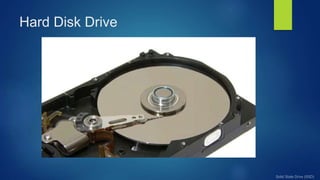
Hard Disk Drive
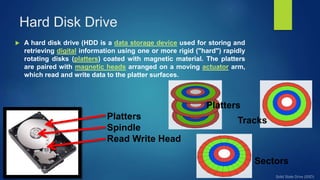
 A hard disk drive (HDD is a data storage device used for storing and
retrieving digital information using one or more rigid ("hard") rapidly
rotating disks (platters) coated with magnetic material. The platters
are paired with magnetic heads arranged on a moving actuator arm,
which read and write data to the platter surfaces.
Platters
Spindle
Read Write Head
Platters
Tracks
Sectors
Hard Disk Drive
What is SSD?
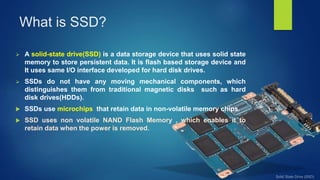
 A solid-state drive(SSD) is a data storage device that uses solid state
memory to store persistent data. It is flash based storage device and
It uses same I/O interface developed for hard disk drives.
 SSDs do not have any moving mechanical components, which
distinguishes them from traditional magnetic disks such as hard
disk drives(HDDs).
 SSDs use microchips that retain data in non-volatile memory chips.
 SSD uses non volatile NAND Flash Memory , which enables it to
retain data when the power is removed.
Development and History of Storage Media
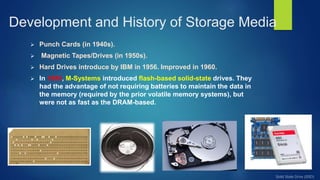
 Punch Cards (in 1940s).
 Magnetic Tapes/Drives (in 1950s).
 Hard Drives introduce by IBM in 1956. Improved in 1960.
 In 1995, M-Systems introduced flash-based solid-state drives. They
had the advantage of not requiring batteries to maintain the data in
the memory (required by the prior volatile memory systems), but
were not as fast as the DRAM-based.
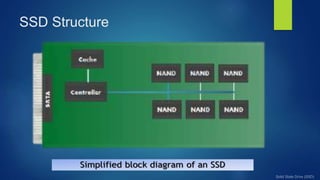
SSD Structure
Memory
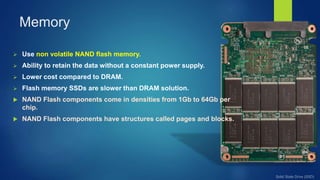
 Use non volatile NAND flash memory.
 Ability to retain the data without a constant power supply.
 Lower cost compared to DRAM.
 Flash memory SSDs are slower than DRAM solution.
 NAND Flash components come in densities from 1Gb to 64Gb per
chip.
 NAND Flash components have structures called pages and blocks.
Controller
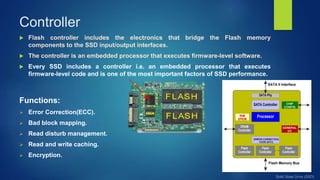
 Flash controller includes the electronics that bridge the Flash memory
components to the SSD input/output interfaces.
 The controller is an embedded processor that executes firmware-level software.
 Every SSD includes a controller i.e. an embedded processor that executes
firmware-level code and is one of the most important factors of SSD performance.
Functions:
 Error Correction(ECC).
 Bad block mapping.
 Read disturb management.
 Read and write caching.
 Encryption.
Advantage
 High performance-Significantly faster than a standard HDD.
 Faster seek time-Up to 60x faster than HDD.
 Higher reliability-No moving parts.
 Lower power-Lesser power consumption, cooler operation.
 Silent Operation-Ideal for post production environments.
 Light weight-Perfect for portable devices.
 Wider Operating Temp.
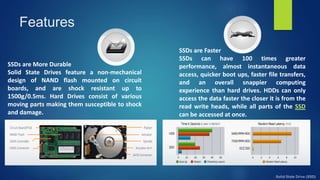
SSDs are More Durable
Solid State Drives feature a non-mechanical
design of NAND flash mounted on circuit
boards, and are shock resistant up to
1500g/0.5ms. Hard Drives consist of various
moving parts making them susceptible to shock
and damage.
SSDs are Faster
SSDs can have 100 times greater
performance, almost instantaneous data
access, quicker boot ups, faster file transfers,
and an overall snappier computing
experience than hard drives. HDDs can only
access the data faster the closer it is from the
read write heads, while all parts of the SSD
can be accessed at once.
Features
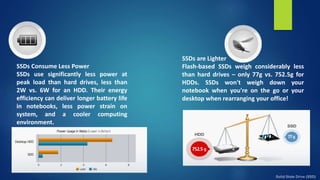
SSDs Consume Less Power
SSDs use significantly less power at
peak load than hard drives, less than
2W vs. 6W for an HDD. Their energy
efficiency can deliver longer battery life
in notebooks, less power strain on
system, and a cooler computing
environment.
SSDs are Lighter
Flash-based SSDs weigh considerably less
than hard drives – only 77g vs. 752.5g for
HDDs. SSDs won't weigh down your
notebook when you're on the go or your
desktop when rearranging your office!
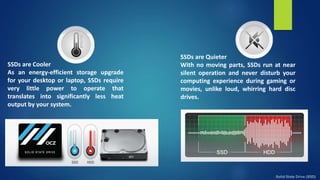
SSDs are Cooler
As an energy-efficient storage upgrade
for your desktop or laptop, SSDs require
very little power to operate that
translates into significantly less heat
output by your system.
SSDs are Quieter
With no moving parts, SSDs run at near
silent operation and never disturb your
computing experience during gaming or
movies, unlike loud, whirring hard disc
drives.
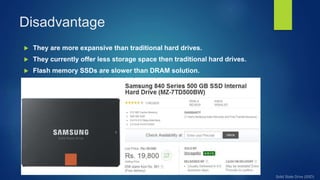
Disadvantage
 They are more expansive than traditional hard drives.
 They currently offer less storage space then traditional hard drives.
 Flash memory SSDs are slower than DRAM solution.
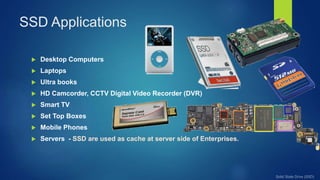
SSD Applications
 Desktop Computers
 Laptops
 Ultra books
 HD Camcorder, CCTV Digital Video Recorder (DVR)
 Smart TV
 Set Top Boxes
 Mobile Phones
 Servers - SSD are used as cache at server side of Enterprises.
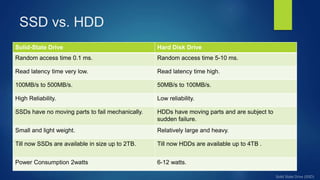
SSD vs. HDD
Solid-State Drive Hard Disk Drive
Random access time 0.1 ms. Random access time 5-10 ms.
Read latency time very low. Read latency time high.
100MB/s to 500MB/s. 50MB/s to 100MB/s.
High Reliability. Low reliability.
SSDs have no moving parts to fail mechanically. HDDs have moving parts and are subject to
sudden failure.
Small and light weight. Relatively large and heavy.
Till now SSDs are available in size up to 2TB. Till now HDDs are available up to 4TB .
Power Consumption 2watts 6-12 watts.
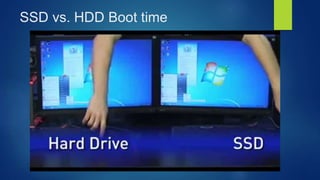
SSD vs. HDD Boot time
Conclusion
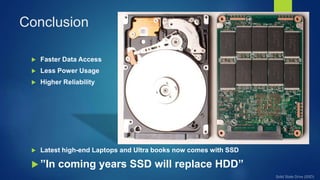
 Faster Data Access
 Less Power Usage
 Higher Reliability
 Latest high-end Laptops and Ultra books now comes with SSD
 ”In coming years SSD will replace HDD”
References
 http://www.slideshare.com
 http://www.storagesearch.com/ssd-storage-glossary.html
 http://en.wikipedia.org/wiki/Solid-state_%28electronics%29
 http://www.storagereview.com/reviews/consumer/ssd
 http://ocz.com/consumer/ssd-guide/ssd-vs-hdd
Solid state drive (ssd)

Solid state drive (ssd)

  • 1.
  • 2.
    Contents  Hard DiskDrive  What is SSD?  Development and History  SSD Structure  Memory  Controller  Advantage  Disadvantage  SSD Applications  SSD vs. HDD  Conclusion
  • 3.
    Hard Disk Drive A hard disk drive (HDD is a data storage device used for storing and retrieving digital information using one or more rigid ("hard") rapidly rotating disks (platters) coated with magnetic material. The platters are paired with magnetic heads arranged on a moving actuator arm, which read and write data to the platter surfaces. Platters Spindle Read Write Head Platters Tracks Sectors
  • 4.
  • 5.
    What is SSD? A solid-state drive(SSD) is a data storage device that uses solid state memory to store persistent data. It is flash based storage device and It uses same I/O interface developed for hard disk drives.  SSDs do not have any moving mechanical components, which distinguishes them from traditional magnetic disks such as hard disk drives(HDDs).  SSDs use microchips that retain data in non-volatile memory chips.  SSD uses non volatile NAND Flash Memory , which enables it to retain data when the power is removed.
  • 6.
    Development and Historyof Storage Media  Punch Cards (in 1940s).  Magnetic Tapes/Drives (in 1950s).  Hard Drives introduce by IBM in 1956. Improved in 1960.  In 1995, M-Systems introduced flash-based solid-state drives. They had the advantage of not requiring batteries to maintain the data in the memory (required by the prior volatile memory systems), but were not as fast as the DRAM-based.
  • 7.
  • 8.
    Memory  Use nonvolatile NAND flash memory.  Ability to retain the data without a constant power supply.  Lower cost compared to DRAM.  Flash memory SSDs are slower than DRAM solution.  NAND Flash components come in densities from 1Gb to 64Gb per chip.  NAND Flash components have structures called pages and blocks.
  • 9.
    Controller  Flash controllerincludes the electronics that bridge the Flash memory components to the SSD input/output interfaces.  The controller is an embedded processor that executes firmware-level software.  Every SSD includes a controller i.e. an embedded processor that executes firmware-level code and is one of the most important factors of SSD performance. Functions:  Error Correction(ECC).  Bad block mapping.  Read disturb management.  Read and write caching.  Encryption.
  • 10.
    Advantage  High performance-Significantlyfaster than a standard HDD.  Faster seek time-Up to 60x faster than HDD.  Higher reliability-No moving parts.  Lower power-Lesser power consumption, cooler operation.  Silent Operation-Ideal for post production environments.  Light weight-Perfect for portable devices.  Wider Operating Temp.
  • 11.
    SSDs are MoreDurable Solid State Drives feature a non-mechanical design of NAND flash mounted on circuit boards, and are shock resistant up to 1500g/0.5ms. Hard Drives consist of various moving parts making them susceptible to shock and damage. SSDs are Faster SSDs can have 100 times greater performance, almost instantaneous data access, quicker boot ups, faster file transfers, and an overall snappier computing experience than hard drives. HDDs can only access the data faster the closer it is from the read write heads, while all parts of the SSD can be accessed at once. Features
  • 12.
    SSDs Consume LessPower SSDs use significantly less power at peak load than hard drives, less than 2W vs. 6W for an HDD. Their energy efficiency can deliver longer battery life in notebooks, less power strain on system, and a cooler computing environment. SSDs are Lighter Flash-based SSDs weigh considerably less than hard drives – only 77g vs. 752.5g for HDDs. SSDs won't weigh down your notebook when you're on the go or your desktop when rearranging your office!
  • 13.
    SSDs are Cooler Asan energy-efficient storage upgrade for your desktop or laptop, SSDs require very little power to operate that translates into significantly less heat output by your system. SSDs are Quieter With no moving parts, SSDs run at near silent operation and never disturb your computing experience during gaming or movies, unlike loud, whirring hard disc drives.
  • 14.
    Disadvantage  They aremore expansive than traditional hard drives.  They currently offer less storage space then traditional hard drives.  Flash memory SSDs are slower than DRAM solution.
  • 15.
    SSD Applications  DesktopComputers  Laptops  Ultra books  HD Camcorder, CCTV Digital Video Recorder (DVR)  Smart TV  Set Top Boxes  Mobile Phones  Servers - SSD are used as cache at server side of Enterprises.
  • 16.
    SSD vs. HDD Solid-StateDrive Hard Disk Drive Random access time 0.1 ms. Random access time 5-10 ms. Read latency time very low. Read latency time high. 100MB/s to 500MB/s. 50MB/s to 100MB/s. High Reliability. Low reliability. SSDs have no moving parts to fail mechanically. HDDs have moving parts and are subject to sudden failure. Small and light weight. Relatively large and heavy. Till now SSDs are available in size up to 2TB. Till now HDDs are available up to 4TB . Power Consumption 2watts 6-12 watts.
  • 17.
    SSD vs. HDDBoot time
  • 18.
    Conclusion  Faster DataAccess  Less Power Usage  Higher Reliability  Latest high-end Laptops and Ultra books now comes with SSD  ”In coming years SSD will replace HDD”
  • 19.
    References  http://www.slideshare.com  http://www.storagesearch.com/ssd-storage-glossary.html http://en.wikipedia.org/wiki/Solid-state_%28electronics%29  http://www.storagereview.com/reviews/consumer/ssd  http://ocz.com/consumer/ssd-guide/ssd-vs-hdd