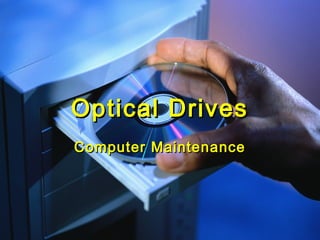
Optical DrivesOptical Drives
Computer MaintenanceComputer Maintenance
PurposePurpose
 Read and write data on discs thru the useRead and write data on discs thru the use
of a laser.of a laser.
 Install programsInstall programs
 Listen to musicListen to music
 Watch moviesWatch movies
 BackupsBackups
 Create music, photo, data, and movieCreate music, photo, data, and movie
discs.discs.
TypesTypes
CD-ROMCD-ROM
CD Burner (CD-RW)CD Burner (CD-RW)
DVD-ROMDVD-ROM
DVD Burner (DVD-RW)DVD Burner (DVD-RW)
Blu-RayBlu-Ray
Blu-Ray BurnerBlu-Ray Burner
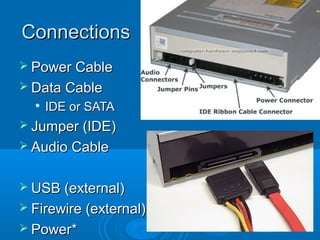
ConnectionsConnections
 Power CablePower Cable
 Data CableData Cable

IDE or SATAIDE or SATA
 Jumper (IDE)Jumper (IDE)
 Audio CableAudio Cable
 USB (external)USB (external)
 Firewire (external)Firewire (external)
 Power*Power*
TroubleshootingTroubleshooting
 Can not read discCan not read disc
 Can not write to discCan not write to disc
 Stuck drawerStuck drawer
 Noisy driveNoisy drive
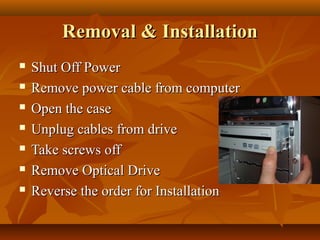
Removal & InstallationRemoval & Installation
 Shut Off PowerShut Off Power
 Remove power cable from computerRemove power cable from computer
 Open the caseOpen the case
 Unplug cables from driveUnplug cables from drive
 Take screws offTake screws off
 Remove Optical DriveRemove Optical Drive
 Reverse the order for InstallationReverse the order for Installation
Removal & InstallationRemoval & Installation
 Shut Off PowerShut Off Power
 Remove power cable from computerRemove power cable from computer
 Open the caseOpen the case
 Unplug cables from driveUnplug cables from drive
 Take screws offTake screws off
 Remove Optical DriveRemove Optical Drive
 Reverse the order for InstallationReverse the order for Installation

Optical drives

  • 1.
    Optical DrivesOptical Drives ComputerMaintenanceComputer Maintenance
  • 2.
    PurposePurpose  Read andwrite data on discs thru the useRead and write data on discs thru the use of a laser.of a laser.  Install programsInstall programs  Listen to musicListen to music  Watch moviesWatch movies  BackupsBackups  Create music, photo, data, and movieCreate music, photo, data, and movie discs.discs.
  • 3.
    TypesTypes CD-ROMCD-ROM CD Burner (CD-RW)CDBurner (CD-RW) DVD-ROMDVD-ROM DVD Burner (DVD-RW)DVD Burner (DVD-RW) Blu-RayBlu-Ray Blu-Ray BurnerBlu-Ray Burner
  • 4.
    ConnectionsConnections  Power CablePowerCable  Data CableData Cable  IDE or SATAIDE or SATA  Jumper (IDE)Jumper (IDE)  Audio CableAudio Cable  USB (external)USB (external)  Firewire (external)Firewire (external)  Power*Power*
  • 5.
    TroubleshootingTroubleshooting  Can notread discCan not read disc  Can not write to discCan not write to disc  Stuck drawerStuck drawer  Noisy driveNoisy drive
  • 6.
    Removal & InstallationRemoval& Installation  Shut Off PowerShut Off Power  Remove power cable from computerRemove power cable from computer  Open the caseOpen the case  Unplug cables from driveUnplug cables from drive  Take screws offTake screws off  Remove Optical DriveRemove Optical Drive  Reverse the order for InstallationReverse the order for Installation
  • 7.
    Removal & InstallationRemoval& Installation  Shut Off PowerShut Off Power  Remove power cable from computerRemove power cable from computer  Open the caseOpen the case  Unplug cables from driveUnplug cables from drive  Take screws offTake screws off  Remove Optical DriveRemove Optical Drive  Reverse the order for InstallationReverse the order for Installation