Web Technologies Web Administration © UNT in partnership with TEA
Topics to Cover Protocols & How the Web Works Setting up A Domain Name Understanding Web Servers Personal Web Server Professional Web Hosting Uploading Files to A Web Server © UNT in partnership with TEA IT: Web Technologies – Web Administration
Web Administration Knowing how to design a website is only part of the job of a Webmaster. Most clients expect their webmaster to also: How information is transferred from server to client. Acquire the Domain Name Setup the Web Hosting  Get the Site Online Knowing these processes will make you a much more valuable player in the web design industry. © UNT in partnership with TEA IT: Web Technologies – Web Administration
Protocols The Internet consists of two basic types of computers…  servers  &  clients . These computers often were of different types and used different operating systems.  All computers on the Internet must be able to communicate Protocol  is an agreed upon set of rules for successful communication among computers on the Internet. © UNT in partnership with TEA IT: Web Technologies – Web Administration
Protocols TCP/IP  (TCP) Transmission Control Protocol Was selected as the underlying method of communicating among computers on the Internet. Specifies how information is transferred. There are different rules for different types of information. Generally all information is: broken into small  packets  1500 characters in length. sent to its destination along different paths.  © UNT in partnership with TEA IT: Web Technologies – Web Administration
Protocols Under TCP, there are specific methods of communication for each type of information sent across the Internet: http – hypertext transfer protocol Communicates with browsers to send web page packets ftp – file transfer protocol Used by FTP Clients to transfer file packets pop – Post office protocol (email) Used by email clients to send/receive email © UNT in partnership with TEA IT: Web Technologies – Web Administration
Protocols (IP) Internet Protocol Specifies that every computer on the Internet must have a unique Internet Protocol Address. Packets of information contain the sending and receiving computers IP Address much like an letter. © UNT in partnership with TEA IT: Web Technologies – Web Administration
Protocols So how does the web page get from the server to your computer? Your computer send a request to the server for a specific page. The server get the page and breaks it into packets. Packets are send along different random paths to your computer. Your computer confirms that all packets have been received. Your computer reassembles the packets. © UNT in partnership with TEA IT: Web Technologies – Web Administration
Packet Illustration © UNT in partnership with TEA IT: Web Technologies – Web Administration Server Client How many different paths can you create from the Server to the Client? Any of these paths can be taken by a single data packet.
Acquiring a Domain Name Domain Name vs. Web Hosting Many people believe both are one in the same. Doman Name Registration  gives you exclusive rights to use a specific domain name AND specifies where the web site is stored. Web Hosting  is the physical storage of your website’s files on a web server © UNT in partnership with TEA IT: Web Technologies – Web Administration
Acquiring a Domain Name What is the process if setting up a domain name? Select an available domain name. www.whois.net Register the domain name. Enter Name Server addresses. Name Server addresses  © UNT in partnership with TEA IT: Web Technologies – Web Administration
Acquiring a Domain Name Guided Practice 1 From your computer, go to www.whois.net Find an available domain name for a website that you might use for a personal website. © UNT in partnership with TEA IT: Web Technologies – Web Administration
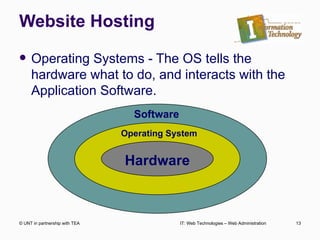
Website Hosting Operating Systems - The OS tells the hardware what to do, and interacts with the Application Software. © UNT in partnership with TEA IT: Web Technologies – Web Administration Hardware Software Operating System
Website Hosting Common Desktop Operating Systems Windows (various versions) Mac OS Various Linux Distributions Ubuntu Kubuntu Fedora © UNT in partnership with TEA IT: Web Technologies – Web Administration
Website Hosting Web Server Operating Systems Windows web hosting servers Macintosh web hosting servers Novell web hosting servers Unix, Linux and FreeBSD web hosting servers Most popular among web server administrators Very inexpensive or free Its fast Very reliable © UNT in partnership with TEA IT: Web Technologies – Web Administration
Website Hosting Professional Web Service Provider Professional web hosting company Entry level around $5 per month for basic hosting services. Will provide you with 2 Name Server addresses and access information. © UNT in partnership with TEA IT: Web Technologies – Web Administration
Website Hosting Shared vs. Dedicated Hosting Shared Hosting You share a server with other websites. Websites are typically small and would not come close to using the resources of an entire server. Price is usually very low starting around $5 per month. Dedicated Hosting The entire server is dedicated to your site.  Typically for site with high bandwidth or storage requirements. Usually expensive, starting around $300 per month © UNT in partnership with TEA IT: Web Technologies – Web Administration
Website Hosting What to consider when selecting a Web Service Provider Price Disk or Storage Space Bandwidth Scripting & Database Capabilities Control Panel  © UNT in partnership with TEA IT: Web Technologies – Web Administration
Website Hosting Personal Web Server A server running on your personal computer. Can be made out of any Desktop PC Not necessary to view basic HTML pages. Necessary for processing server side scripting, such as PHP, locally. Required Software Apache Web Server Optional Software for Server Side Scripting PHP – For PHP Scripting Capabilities MySQL – For Database Capabilities © UNT in partnership with TEA IT: Web Technologies – Web Administration
Website Hosting Guided Practice II Go to www.hostdime.com What identify the following information: Price of the cheapest shared server. Server space included in plan. Bandwidth included in plan. © UNT in partnership with TEA IT: Web Technologies – Web Administration
Getting Your Site Online Before your website can be accessible on the Internet it must be uploaded to a web server. You will need a program capable of transferring files from one computer to another, called an FTP client. Many programs, such as Dreamweaver, have an FTP client built in. FileZilla is a free FTP client that can be used to easily upload files to your web server. © UNT in partnership with TEA IT: Web Technologies – Web Administration
Getting Your Site Online When you register for web hosting, you will be provided with the following information. Name Servers Needed by your domain register FTP Username FTP Password Host Address Port – Usually 21 unless told otherwise by your host.  © UNT in partnership with TEA IT: Web Technologies – Web Administration
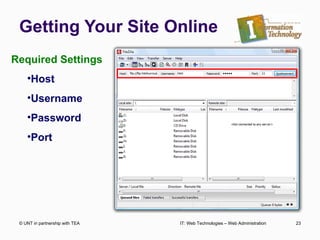
Getting Your Site Online © UNT in partnership with TEA IT: Web Technologies – Web Administration Required Settings Host Username Password Port
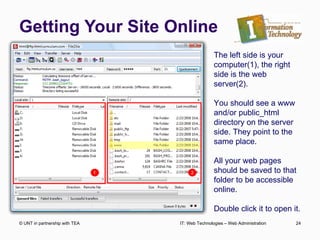
Getting Your Site Online © UNT in partnership with TEA IT: Web Technologies – Web Administration The left side is your computer(1), the right side is the web server(2). You should see a www and/or public_html directory on the server side. They point to the same place. All your web pages should be saved to that folder to be accessible online. Double click it to open it.
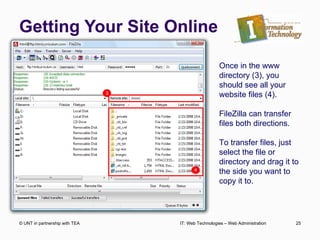
Getting Your Site Online © UNT in partnership with TEA IT: Web Technologies – Web Administration Once in the www directory (3), you should see all your website files (4). FileZilla can transfer files both directions. To transfer files, just select the file or directory and drag it to the side you want to copy it to.
Getting Your Site Online Once you have transferred your files from your computer to your web server, you can close FileZilla. If you cannot access your website, double check to make sure the files were transferred to the  www  or  public_html  folder. Both names point to the same directory.  If your files are uploaded to any other folder, or outside of one of these folders, they will not show up. © UNT in partnership with TEA IT: Web Technologies – Web Administration

Web admin

  • 1.
    Web Technologies WebAdministration © UNT in partnership with TEA
  • 2.
    Topics to CoverProtocols & How the Web Works Setting up A Domain Name Understanding Web Servers Personal Web Server Professional Web Hosting Uploading Files to A Web Server © UNT in partnership with TEA IT: Web Technologies – Web Administration
  • 3.
    Web Administration Knowinghow to design a website is only part of the job of a Webmaster. Most clients expect their webmaster to also: How information is transferred from server to client. Acquire the Domain Name Setup the Web Hosting Get the Site Online Knowing these processes will make you a much more valuable player in the web design industry. © UNT in partnership with TEA IT: Web Technologies – Web Administration
  • 4.
    Protocols The Internetconsists of two basic types of computers… servers & clients . These computers often were of different types and used different operating systems. All computers on the Internet must be able to communicate Protocol is an agreed upon set of rules for successful communication among computers on the Internet. © UNT in partnership with TEA IT: Web Technologies – Web Administration
  • 5.
    Protocols TCP/IP (TCP) Transmission Control Protocol Was selected as the underlying method of communicating among computers on the Internet. Specifies how information is transferred. There are different rules for different types of information. Generally all information is: broken into small packets 1500 characters in length. sent to its destination along different paths. © UNT in partnership with TEA IT: Web Technologies – Web Administration
  • 6.
    Protocols Under TCP,there are specific methods of communication for each type of information sent across the Internet: http – hypertext transfer protocol Communicates with browsers to send web page packets ftp – file transfer protocol Used by FTP Clients to transfer file packets pop – Post office protocol (email) Used by email clients to send/receive email © UNT in partnership with TEA IT: Web Technologies – Web Administration
  • 7.
    Protocols (IP) InternetProtocol Specifies that every computer on the Internet must have a unique Internet Protocol Address. Packets of information contain the sending and receiving computers IP Address much like an letter. © UNT in partnership with TEA IT: Web Technologies – Web Administration
  • 8.
    Protocols So howdoes the web page get from the server to your computer? Your computer send a request to the server for a specific page. The server get the page and breaks it into packets. Packets are send along different random paths to your computer. Your computer confirms that all packets have been received. Your computer reassembles the packets. © UNT in partnership with TEA IT: Web Technologies – Web Administration
  • 9.
    Packet Illustration ©UNT in partnership with TEA IT: Web Technologies – Web Administration Server Client How many different paths can you create from the Server to the Client? Any of these paths can be taken by a single data packet.
  • 10.
    Acquiring a DomainName Domain Name vs. Web Hosting Many people believe both are one in the same. Doman Name Registration gives you exclusive rights to use a specific domain name AND specifies where the web site is stored. Web Hosting is the physical storage of your website’s files on a web server © UNT in partnership with TEA IT: Web Technologies – Web Administration
  • 11.
    Acquiring a DomainName What is the process if setting up a domain name? Select an available domain name. www.whois.net Register the domain name. Enter Name Server addresses. Name Server addresses © UNT in partnership with TEA IT: Web Technologies – Web Administration
  • 12.
    Acquiring a DomainName Guided Practice 1 From your computer, go to www.whois.net Find an available domain name for a website that you might use for a personal website. © UNT in partnership with TEA IT: Web Technologies – Web Administration
  • 13.
    Website Hosting OperatingSystems - The OS tells the hardware what to do, and interacts with the Application Software. © UNT in partnership with TEA IT: Web Technologies – Web Administration Hardware Software Operating System
  • 14.
    Website Hosting CommonDesktop Operating Systems Windows (various versions) Mac OS Various Linux Distributions Ubuntu Kubuntu Fedora © UNT in partnership with TEA IT: Web Technologies – Web Administration
  • 15.
    Website Hosting WebServer Operating Systems Windows web hosting servers Macintosh web hosting servers Novell web hosting servers Unix, Linux and FreeBSD web hosting servers Most popular among web server administrators Very inexpensive or free Its fast Very reliable © UNT in partnership with TEA IT: Web Technologies – Web Administration
  • 16.
    Website Hosting ProfessionalWeb Service Provider Professional web hosting company Entry level around $5 per month for basic hosting services. Will provide you with 2 Name Server addresses and access information. © UNT in partnership with TEA IT: Web Technologies – Web Administration
  • 17.
    Website Hosting Sharedvs. Dedicated Hosting Shared Hosting You share a server with other websites. Websites are typically small and would not come close to using the resources of an entire server. Price is usually very low starting around $5 per month. Dedicated Hosting The entire server is dedicated to your site. Typically for site with high bandwidth or storage requirements. Usually expensive, starting around $300 per month © UNT in partnership with TEA IT: Web Technologies – Web Administration
  • 18.
    Website Hosting Whatto consider when selecting a Web Service Provider Price Disk or Storage Space Bandwidth Scripting & Database Capabilities Control Panel © UNT in partnership with TEA IT: Web Technologies – Web Administration
  • 19.
    Website Hosting PersonalWeb Server A server running on your personal computer. Can be made out of any Desktop PC Not necessary to view basic HTML pages. Necessary for processing server side scripting, such as PHP, locally. Required Software Apache Web Server Optional Software for Server Side Scripting PHP – For PHP Scripting Capabilities MySQL – For Database Capabilities © UNT in partnership with TEA IT: Web Technologies – Web Administration
  • 20.
    Website Hosting GuidedPractice II Go to www.hostdime.com What identify the following information: Price of the cheapest shared server. Server space included in plan. Bandwidth included in plan. © UNT in partnership with TEA IT: Web Technologies – Web Administration
  • 21.
    Getting Your SiteOnline Before your website can be accessible on the Internet it must be uploaded to a web server. You will need a program capable of transferring files from one computer to another, called an FTP client. Many programs, such as Dreamweaver, have an FTP client built in. FileZilla is a free FTP client that can be used to easily upload files to your web server. © UNT in partnership with TEA IT: Web Technologies – Web Administration
  • 22.
    Getting Your SiteOnline When you register for web hosting, you will be provided with the following information. Name Servers Needed by your domain register FTP Username FTP Password Host Address Port – Usually 21 unless told otherwise by your host. © UNT in partnership with TEA IT: Web Technologies – Web Administration
  • 23.
    Getting Your SiteOnline © UNT in partnership with TEA IT: Web Technologies – Web Administration Required Settings Host Username Password Port
  • 24.
    Getting Your SiteOnline © UNT in partnership with TEA IT: Web Technologies – Web Administration The left side is your computer(1), the right side is the web server(2). You should see a www and/or public_html directory on the server side. They point to the same place. All your web pages should be saved to that folder to be accessible online. Double click it to open it.
  • 25.
    Getting Your SiteOnline © UNT in partnership with TEA IT: Web Technologies – Web Administration Once in the www directory (3), you should see all your website files (4). FileZilla can transfer files both directions. To transfer files, just select the file or directory and drag it to the side you want to copy it to.
  • 26.
    Getting Your SiteOnline Once you have transferred your files from your computer to your web server, you can close FileZilla. If you cannot access your website, double check to make sure the files were transferred to the www or public_html folder. Both names point to the same directory. If your files are uploaded to any other folder, or outside of one of these folders, they will not show up. © UNT in partnership with TEA IT: Web Technologies – Web Administration

Editor's Notes

  • #2 Trade & Industrial Education