SSD(Solid state drive )
SUBMITTED BY
KARTHIK M
M.SC. COMPUTER SCIENCE
ZHAPMCS004
Introduction
•SSD can be thought of as an oversized and more
sophisticated version of the humble USB memory stick.
• SSDs can be used in place of hard disk drives (HDDs).
•Like a memory stick, there are no moving parts to an SSD.
•Information is stored in microchips
•A typical SSD uses what is called NAND based flash memory.
FLASH MEMORY
 There are two types of flash memory, NAND and NOR. The
names refer to the type of logic gate used in each memory
cell.
 Flash memory (both NOR and NAND types) was invented by
Fujio Masuoka while working for Toshiba
 NAND is a non volatile memory were as NOR is a volatile
memory
 NOR based memory is faster than NAND based memory
 SSD make use of NAND based flash memory to store data
External view of SSD
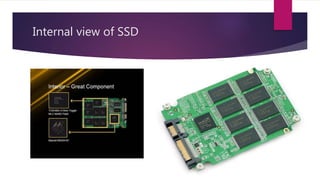
Internal view of SSD
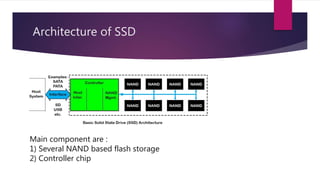
Architecture of SSD
Main component are :
1) Several NAND based flash storage
2) Controller chip
NAND Storage
 In flash memory, each memory cell resembles a standard MOSFET transistor but
with an extra gate called floating gate .
 Floating gate help to hold the charge for a long time
Types of NAND
Types of NAND used in SSD determines the characteristic of SSD .
Three popular NAND used in SSD are :
 SLC NAND(single level cell)
 MLC NAND(multi level cell)
 TLC NAND(three level cell)
This three types of NAND can be used for building the FLASH storage in SSD
Single Level Cell NAND
This type of NAND can store single bit per cell
The characteristic of SLC are:
 Highest performance, enterprise grade NAND
 Up to 100,000 program/erase cycles per cell (highest endurance)
 Lowest density (1 bit per cell, lower is better for endurance)
 Lower power consumption
 Faster write speeds
 Much higher cost (3 times higher than MLC)
 Good fit for industrial grade devices, critical applications
Multi Level cell NAND
This type of NAND can store two bit per cell. This type of SSD
are commonly used
The characteristic of MLC are:
 Average performance, consumer grade NAND
 Up to10,000 program/erase cycles per cell
 Higher density (2 or more bits per cell)
 Lower endurance limit than SLC
 Lower cost (3 times lower than SLC)
 Good fit for consumer products.
THREE Level cell NAND
This type of NAND can store three bit per cell. This type of SSD
are rarely used .
The characteristic of TLC are:
 Lower performance
 Up to 5,000 program/erase cycles per cell
 Highest density (3 bits per cell)
 Lower endurance limit than MLC and SLC
 Best price point (30% lower than MLC)
 Somewhat slower read and write speed than MLC
 Good fit for lower-end consumer products.
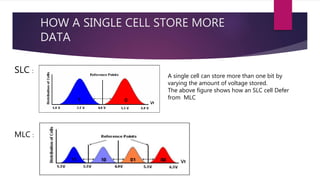
HOW A SINGLE CELL STORE MORE
DATA
SLC :
MLC :
A single cell can store more than one bit by
varying the amount of voltage stored.
The above figure shows how an SLC cell Defer
from MLC
Flash memory controller
A flash memory controller (or flash controller) manages the data stored on
flash memory and communicates with a computer or electronic device
Flash controller perform following tasks
 Wear leveling.
 Background Garbage collection.
 Defect Management.
 Host Interface.
 error correction
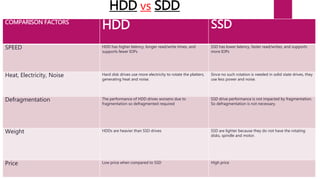
HDD vs SDD
COMPARISON FACTORS
HDD SSD
SPEED HDD has higher latency, longer read/write times, and
supports fewer IOPs
SSD has lower latency, faster read/writes, and supports
more IOPs
Heat, Electricity, Noise Hard disk drives use more electricity to rotate the platters,
generating heat and noise.
Since no such rotation is needed in solid state drives, they
use less power and noise.
Defragmentation The performance of HDD drives worsens due to
fragmentation so defragmented required
SSD drive performance is not impacted by fragmentation.
So defragmentation is not necessary.
Weight HDDs are heavier than SSD drives SSD are lighter because they do not have the rotating
disks, spindle and motor.
Price Low price when compared to SSD High price
Data Transfer in an SSD vs. HDD
HDD
 In an HDD, data transfer is sequential.
 In HDD the physical read/write head "seeks" an appropriate point in the hard drive
to execute the operation. This seek time can be significant.
SDD
 Data transfer is not sequential, it is random access so it is faster.
 There is consistent read performance because the physical location of data is
irrelevant
 SSDs have no read/write heads and thus no delays due to head motion (seeking).
APPLICATION OF SSD
 SSDs were mainly used in those, where the speed of the storage system needed to be
as fast as possible.
 Organizations that can benefit from faster access of system data include equity trading
companies, telecommunication corporations, and video streaming.
 SSD are used as cache at server side of Enterprises.
 Storing the operating system in SSD can improve the boot up speed and overall
performance of a Laptop or Desktop
 By storing the games in SSD , the loading time of games can be reduced
Disadvantage of SSD
 The most noticeable disadvantage of SSDs is limited storage capacity compared
to traditional hard drives .
 SSDs have high price per GB.
 If SSD is damaged it is nearly impossible to recover the data, but HDD's magnetic
disk may be safe even hard drive is damaged.
 Till now lifetime of SSD is not so much long.
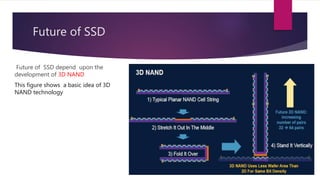
Future of SSD
Future of SSD depend upon the
development of 3D NAND
This figure shows a basic idea of 3D
NAND technology
Conclusion
 SSD is the best alternative technology for hard disk available in the market.
 A hard can never match the performance of an SSD even its spin at 7200 rpm
 Most of the problem SSD faced will be solved in near future and hard disk will be
completely replaced by SSD
Thank
you

Ssd(solid state drive )

  • 1.
    SSD(Solid state drive) SUBMITTED BY KARTHIK M M.SC. COMPUTER SCIENCE ZHAPMCS004
  • 2.
    Introduction •SSD can bethought of as an oversized and more sophisticated version of the humble USB memory stick. • SSDs can be used in place of hard disk drives (HDDs). •Like a memory stick, there are no moving parts to an SSD. •Information is stored in microchips •A typical SSD uses what is called NAND based flash memory.
  • 3.
    FLASH MEMORY  Thereare two types of flash memory, NAND and NOR. The names refer to the type of logic gate used in each memory cell.  Flash memory (both NOR and NAND types) was invented by Fujio Masuoka while working for Toshiba  NAND is a non volatile memory were as NOR is a volatile memory  NOR based memory is faster than NAND based memory  SSD make use of NAND based flash memory to store data
  • 4.
  • 5.
  • 6.
    Architecture of SSD Maincomponent are : 1) Several NAND based flash storage 2) Controller chip
  • 7.
    NAND Storage  Inflash memory, each memory cell resembles a standard MOSFET transistor but with an extra gate called floating gate .  Floating gate help to hold the charge for a long time
  • 8.
    Types of NAND Typesof NAND used in SSD determines the characteristic of SSD . Three popular NAND used in SSD are :  SLC NAND(single level cell)  MLC NAND(multi level cell)  TLC NAND(three level cell) This three types of NAND can be used for building the FLASH storage in SSD
  • 9.
    Single Level CellNAND This type of NAND can store single bit per cell The characteristic of SLC are:  Highest performance, enterprise grade NAND  Up to 100,000 program/erase cycles per cell (highest endurance)  Lowest density (1 bit per cell, lower is better for endurance)  Lower power consumption  Faster write speeds  Much higher cost (3 times higher than MLC)  Good fit for industrial grade devices, critical applications
  • 10.
    Multi Level cellNAND This type of NAND can store two bit per cell. This type of SSD are commonly used The characteristic of MLC are:  Average performance, consumer grade NAND  Up to10,000 program/erase cycles per cell  Higher density (2 or more bits per cell)  Lower endurance limit than SLC  Lower cost (3 times lower than SLC)  Good fit for consumer products.
  • 11.
    THREE Level cellNAND This type of NAND can store three bit per cell. This type of SSD are rarely used . The characteristic of TLC are:  Lower performance  Up to 5,000 program/erase cycles per cell  Highest density (3 bits per cell)  Lower endurance limit than MLC and SLC  Best price point (30% lower than MLC)  Somewhat slower read and write speed than MLC  Good fit for lower-end consumer products.
  • 12.
    HOW A SINGLECELL STORE MORE DATA SLC : MLC : A single cell can store more than one bit by varying the amount of voltage stored. The above figure shows how an SLC cell Defer from MLC
  • 13.
    Flash memory controller Aflash memory controller (or flash controller) manages the data stored on flash memory and communicates with a computer or electronic device Flash controller perform following tasks  Wear leveling.  Background Garbage collection.  Defect Management.  Host Interface.  error correction
  • 14.
    HDD vs SDD COMPARISONFACTORS HDD SSD SPEED HDD has higher latency, longer read/write times, and supports fewer IOPs SSD has lower latency, faster read/writes, and supports more IOPs Heat, Electricity, Noise Hard disk drives use more electricity to rotate the platters, generating heat and noise. Since no such rotation is needed in solid state drives, they use less power and noise. Defragmentation The performance of HDD drives worsens due to fragmentation so defragmented required SSD drive performance is not impacted by fragmentation. So defragmentation is not necessary. Weight HDDs are heavier than SSD drives SSD are lighter because they do not have the rotating disks, spindle and motor. Price Low price when compared to SSD High price
  • 15.
    Data Transfer inan SSD vs. HDD HDD  In an HDD, data transfer is sequential.  In HDD the physical read/write head "seeks" an appropriate point in the hard drive to execute the operation. This seek time can be significant. SDD  Data transfer is not sequential, it is random access so it is faster.  There is consistent read performance because the physical location of data is irrelevant  SSDs have no read/write heads and thus no delays due to head motion (seeking).
  • 16.
    APPLICATION OF SSD SSDs were mainly used in those, where the speed of the storage system needed to be as fast as possible.  Organizations that can benefit from faster access of system data include equity trading companies, telecommunication corporations, and video streaming.  SSD are used as cache at server side of Enterprises.  Storing the operating system in SSD can improve the boot up speed and overall performance of a Laptop or Desktop  By storing the games in SSD , the loading time of games can be reduced
  • 17.
    Disadvantage of SSD The most noticeable disadvantage of SSDs is limited storage capacity compared to traditional hard drives .  SSDs have high price per GB.  If SSD is damaged it is nearly impossible to recover the data, but HDD's magnetic disk may be safe even hard drive is damaged.  Till now lifetime of SSD is not so much long.
  • 18.
    Future of SSD Futureof SSD depend upon the development of 3D NAND This figure shows a basic idea of 3D NAND technology
  • 19.
    Conclusion  SSD isthe best alternative technology for hard disk available in the market.  A hard can never match the performance of an SSD even its spin at 7200 rpm  Most of the problem SSD faced will be solved in near future and hard disk will be completely replaced by SSD
  • 20.