
Sayam Asjad
TYPES
SOLID STATE DRIVES
MEMORY CARD
USB FLASH DRIVE
SOLID STATE DRIVES
 A solid state drive (SSD) is a storage device that
typically uses flash memory to store data,
instructions, and information.
Flash Memory Chips
 Flash memory chips are a type of solid state
media, which means they consist entirely of electronic
components, such as integrated circuits, and contain
no moving parts.
 Introduced in 1995.
 Capacity 1TB ( Maximum )
 High speed as compared to normal physical hard disk.
Available Sizes
 3.5 inches
 2.5 inches
 1.8 inches
SSDs are used in all types of computers including
servers, desktop computers, and mobile computers
and devices such as portable media players and digital
video cameras.
 Access times of SSDs are about 0.1 ms, which is more
than 80 times faster than a hard disk.
 Transfer rates of SSDs are faster than comparable hard
disks.
 SSDs generate less heat and consume less power than
hard disks.
Why SSDs are preferred over
Magnetic Hard Disk?
MEMORY CARD
 A memory card is
a removable flash memory device, that you
insert and remove from a slot in a computer, mobile
device, or card reader/writer
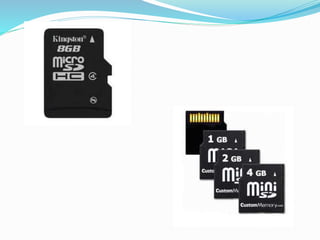
Types of Memory Card
 CompactFlash (CF)
 Secure Digital (SD)
 Secure Digital High Capacity (SDHC)
 Micro SD
 Micro SDHC
 xD Picture Card
 Memory Stick
 Memory Stick Micro (M2).
 Size normally 1.5 inches.
 Normally used for transferring media between
computer and cell phone.
 Memory cards enable mobile users easily to transport
digital photos, music, or files to and from
mobile devices and computers or other devices.
USB Flash Drive
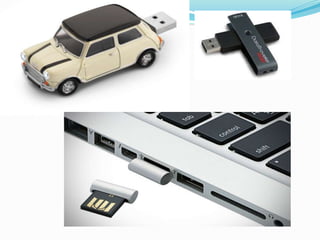
 A USB flash drive, sometimes called a thumb drive, is
a flash memory storage device that plugs
in a USB port on a computer or mobile device
Convenient source of storage
 USB flash drives are convenient for
mobile users because they are small and lightweight
enough to be transported on a keychain or in a
pocket.
Advantages
 Small size , huge data.
 Portable
 Can store up to 1TB
 Ideal solution for storing data
Advantages of Flash memory
devices
 Portable
 High capacity
 Excellent transferring speed
 Low power consumption
 No sound as compared to physical hard disk
Disadvantages of Flash memory
devices
 High price
 Easy to lose because of small size
 Not long lasting, limited number of read and writes.

Flash Memory Storage

  • 1.
  • 2.
  • 3.
    SOLID STATE DRIVES A solid state drive (SSD) is a storage device that typically uses flash memory to store data, instructions, and information.
  • 4.
    Flash Memory Chips Flash memory chips are a type of solid state media, which means they consist entirely of electronic components, such as integrated circuits, and contain no moving parts.
  • 5.
     Introduced in1995.  Capacity 1TB ( Maximum )  High speed as compared to normal physical hard disk.
  • 6.
    Available Sizes  3.5inches  2.5 inches  1.8 inches SSDs are used in all types of computers including servers, desktop computers, and mobile computers and devices such as portable media players and digital video cameras.
  • 7.
     Access timesof SSDs are about 0.1 ms, which is more than 80 times faster than a hard disk.  Transfer rates of SSDs are faster than comparable hard disks.  SSDs generate less heat and consume less power than hard disks. Why SSDs are preferred over Magnetic Hard Disk?
  • 9.
    MEMORY CARD  Amemory card is a removable flash memory device, that you insert and remove from a slot in a computer, mobile device, or card reader/writer
  • 10.
    Types of MemoryCard  CompactFlash (CF)  Secure Digital (SD)  Secure Digital High Capacity (SDHC)  Micro SD  Micro SDHC  xD Picture Card  Memory Stick  Memory Stick Micro (M2).
  • 11.
     Size normally1.5 inches.  Normally used for transferring media between computer and cell phone.  Memory cards enable mobile users easily to transport digital photos, music, or files to and from mobile devices and computers or other devices.
  • 13.
    USB Flash Drive A USB flash drive, sometimes called a thumb drive, is a flash memory storage device that plugs in a USB port on a computer or mobile device
  • 14.
    Convenient source ofstorage  USB flash drives are convenient for mobile users because they are small and lightweight enough to be transported on a keychain or in a pocket.
  • 15.
    Advantages  Small size, huge data.  Portable  Can store up to 1TB  Ideal solution for storing data
  • 17.
    Advantages of Flashmemory devices  Portable  High capacity  Excellent transferring speed  Low power consumption  No sound as compared to physical hard disk
  • 18.
    Disadvantages of Flashmemory devices  High price  Easy to lose because of small size  Not long lasting, limited number of read and writes.