Transport Layer Protocols
TCP/UDP
Overview
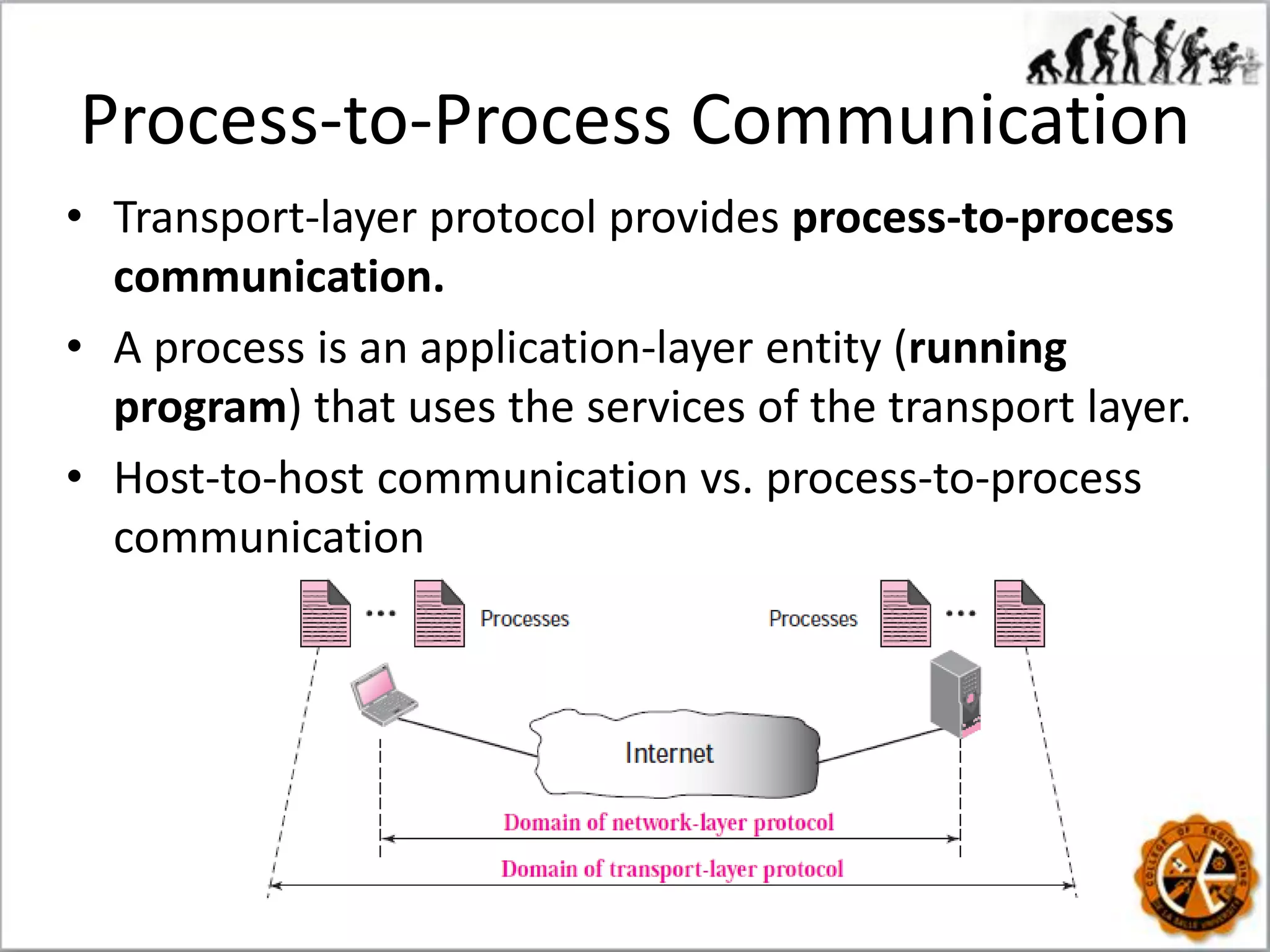
Process-to-Process Communication
• Transport-layer protocol provides process-to-process
communication.
• A process is an application-layer entity (running
program) that uses the services of the transport layer.
• Host-to-host communication vs. process-to-process
communication
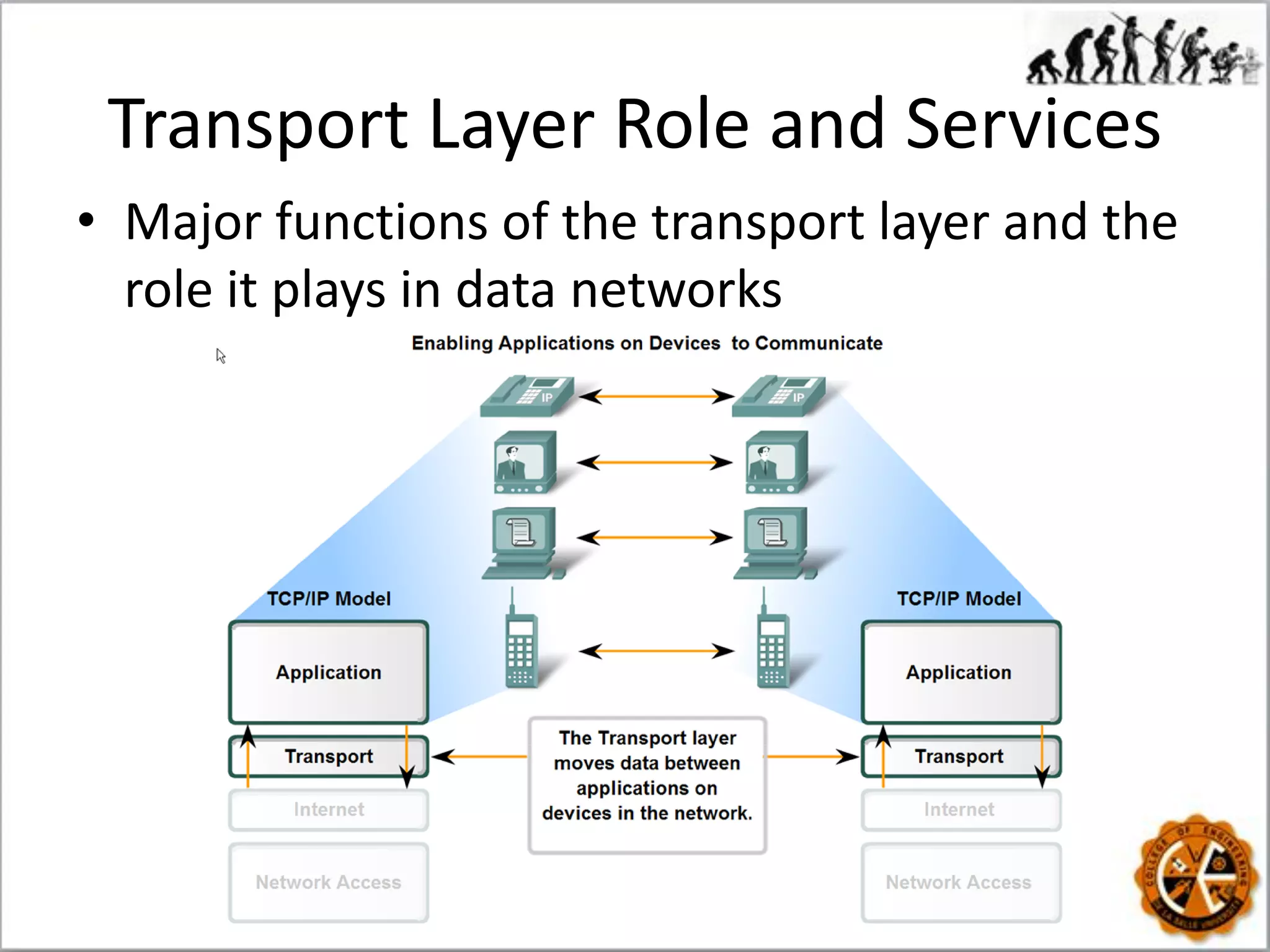
Transport Layer Role and Services
• Major functions of the transport layer and the
role it plays in data networks
Transport Layer Role and Services
Summary
Sample Question
• One of the responsibilities of the transport
layer protocol is to create a ______
communication.
A) host-to-host C) node-to-node
B) process-to-process D) none of the aboveB) process-to-process
Transport Layer Requirements
Addressing: Port Numbers
• Port address/number - in TCP/IP protocol, an
integer identifying a process; Port numbers are
integers between 0 and 65,535.
• TCP/IP has decided to use universal port
numbers for servers; called well-known port
numbers.
Port Numbers
• Internet Corporation for Assigned Names and
Numbers (ICANN) has divided the port
numbers into three ranges: well-known,
registered, and dynamic (or private).
• Socket address: combination of an IP address
and a port number.
Example
Encapsulation and Decapsulation
• To send a message from one process to
another, the transport layer protocol
encapsulates and decapsulates messages.
Multiplexing and Demultiplexing
• Multiplexing (many to one)-
an entity accepts items from more
than one source.
• Demultiplexing
(one to many) –
an entity delivers
items to more than one source.
Flow Control at Transport Layer
• In communication at the transport layer, we
are dealing with four entities: sender process,
sender transport layer, receiver transport
layer, and receiver process.
Error Control
• We need to make the transport layer reliable if
required by the application.
1. Detect and discard corrupted packets.
2. Keep track of lost and discarded packets and
resend them.
3. Recognize duplicate packets and discard them.
4. Buffer out-of-order packets until the missing
packets arrive.
Connectionless vs. Connection-
Oriented Service
• Connectionless service:
Connectionless vs. Connection-
Oriented Service
• Connectionless service:
• Connection-
oriented service
Finite State Machine (FSM)
Representation
Simple Protocol
• A connectionless protocol that provides neither
flow nor error control.
FSMs
Stop-and-Wait Protocol
• A connection-oriented protocol that provides
flow and error control.
• The sender sends one packet at a time and waits
for an acknowledgment before sending the next
one.
• To detect corrupted packets, we need to add a
checksum to each data packet.
• The silence of the receiver is a signal for the
sender that a packet was either corrupted or lost.
Stop-and-Wait Protocol
• Every time the sender sends a packet, it starts
a timer. If an acknowledgment arrives before
the timer expires, the timer is stopped and the
sender sends the next packet.
Understand
• How does Stop-and-Wait protocol provide
flow and error control?
• In Stop-and-Wait protocol, flow control is
achieved by forcing the sender to wait for an
acknowledgment, and
• Error control is achieved by discarding
corrupted packets and letting the sender
resend unacknowledged packets when the
timer expires.
Stop-and-Wait Protocol FSM
Two transport layer protocols
in the Internet
• Transmission Control Protocol (TCP) – “ a
connection-oriented, end-to-end reliable protocol
designed to fit into a layered hierarchy of
protocols which support multi-network
applications.” - RFC793
• User Datagram Protocol (UDP) – “ a minimal
protocol mechanism w/c is transaction oriented,
and delivery and duplicate protection are not
guaranteed”. –RFC768
Understand
User Datagram Protocol (UDP)
• A connectionless, unreliable transport protocol.
• UDP is an example of the connectionless simple
protocol with the exception of an optional
checksum added to packets for error detection.
User Datagram Protocol (UDP)
• UDP packets, called user datagrams, have a
fixed-size header of 8 bytes.
User Datagram Protocol (UDP)
• Source port number. This is the port number
used by the process running on the source host.
It is 16 bits long, which means that the port
number can range from 0 to 65,535.
• Destination port number. This is the port number
used by the process running on the destination
host. It is also 16 bits long.
• Length. This is a 16-bit field that defines the total
length of the user datagram, header plus data.
• Checksum. This field is used to detect errors over
the entire user datagram.
UDP length = IP length − IP header’s length
Example
• The following is a dump of a UDP header in
hexadecimal format.
CB84000D001C001C
a. What is the source port number?
b. What is the destination port number?
c. What is the total length of the user datagram?
d. What is the length of the data?
e. Is the packet directed from a client to a
server or vice versa?
f. What is the client process?
Answer
a. The source port number is the first four hexadecimal
digits (CB8416), which means that the source port number
is 52100.
b. The destination port number is the second four
hexadecimal digits (000D16), which means that the
destination port number is 13.
c. The third four hexadecimal digits (001C16) define the
length of the whole UDP packet as 28 bytes.
d. The length of the data is the length of the whole packet
minus the length of the header, or 28 – 8 = 20 bytes.
e. Since the destination port number is 13 (well-known
port), the packet is from the client to the server.
f. The client process is the Daytime.
Well-known Ports in UDP
UDP Encapsulation and Decapsulation
• When a process has a message to send through
UDP, it passes the message to UDP along with a
pair of socket addresses and the length of data.
UDP Queues
• If a process wants to communicate, it obtains
only one port number and one outgoing and
one incoming queue.
Multiplexing and Demultiplexing
• In a host running a TCP/IP protocol suite, there
is only one UDP but possibly several processes
that may want to use the services of UDP.
UDP Data Transfer
Typical Applications
• UDP is suitable for a process that requires
simple request-response communication with
little concern for flow and error control. It is
not usually used for a process such as FTP that
needs to send bulk data.
• UDP is suitable for a process with internal flow
and error-control mechanisms. For example,
the Trivial File Transfer Protocol (TFTP) process
includes flow and error control.
• UDP is used for management processes such
as SNMP.
Typical Applications
• UDP is a suitable transport protocol for
multicasting. Multicasting capability is
embedded in the UDP software but not in the
TCP software.
• UDP is normally used for real-time
applications that cannot tolerate uneven delay
between sections of a received message.
• UDP is used for some route updating protocols
such as Routing Information Protocol (RIP).
Transmission Control Protocol
• Connection-oriented, reliable
- Provides connection-oriented/stream-oriented
communication over a connectionless network
layer protocol (IP).
• End-to-end full duplex link
- Exactly two end points
- Multicasting or broadcasting is not supported
• Supports flow control and error control
• Described in RFCs 793, 1122, 5681
Transmission Control Protocol
• TCP lies between the application layer and the
network layer, and serves as the intermediary
between the application programs and the
network operations.
Process-to-Process Communication
• As with UDP, TCP provides process-to-process
communication using port numbers.
Stream Delivery Service
• TCP, unlike UDP, is a stream-oriented protocol.
• Recall: UDP does not recognize any relationship
between the datagrams (Connectionless)
• TCP creates an environment in which the two
processes seem to be connected by an
imaginary “tube” that carries their bytes across
the Internet.
Sending and Receiving Buffers
• Sending and the receiving processes may not
necessarily write or read data at the same
rate, thus, TCP needs buffers for storage.
Segmentation
• The IP layer, as a service provider for TCP,
needs to send data in packets, not as a stream
of bytes.
• At the transport layer, TCP groups a number of
bytes together into a packet called a segment.
Sequence Numbers
• TCP sequence numbers are used to reconstruct
the data stream with segments placed in the
correct order.
Other TCP Characteristics
• TCP offers full-duplex service, where data can
flow in both directions at the same time.
• Like UDP, TCP performs multiplexing at the
sender and demultiplexing at the receiver.
• TCP, unlike UDP, is a reliable transport protocol.
It uses an acknowledgment mechanism to check
the safe and sound arrival of data.
• TCP provides flow, error, and congestion control.
TCP Segment Format
• The segment consists of a header of 20 to 60
bytes, followed by data from the application.
TCP Segment
• Source port address. This is a 16-bit field that
defines the port number of the application
program in the host that is sending the segment.
• Destination port address. This is a 16-bit field
that defines the port number of the application
program in the host that is receiving the segment.
• Sequence number. This 32-bit field defines the
number assigned to the first byte of data
contained in this segment. To ensure connectivity,
each byte to be transmitted is numbered.
TCP Segment
• Acknowledgment number. This 32-bit field
defines the byte number that the receiver of
the segment is expecting to receive from the
other party.
• Header length. This 4-bit field indicates the
number of 4-byte words in the TCP header.
The length of the header can be between 20
and 60 bytes.
• Reserved. This is a 6-bit field reserved for
future use.
TCP Segment
• Control. enables flow control, connection
establishment and termination, connection
abortion, and the mode of data transfer in TCP.
TCP Segment
• Window size. This field defines the window size
of the sending TCP in bytes. (length = 16 bits,
maximum size of window is 65,535 bytes.)
• Checksum. This 16-bit field contains the
checksum.
• Urgent pointer. It defines a value that must be
added to the sequence number to obtain the
number of the last urgent byte in the data
section of the segment.
• Options. There can be up to 40 bytes of optional
information in the TCP header.
Encapsulation
• A TCP segment encapsulates the data received
from the application layer.
• The TCP segment is encapsulated in an IP
datagram, which in turn is encapsulated in a
frame at the data-link layer
TCP Connection Establishment
• The connection establishment in TCP is called
three-way handshaking.
A SYN segment cannot carry data, but it consumes one sequence number.
A SYN + ACK segment cannot carry data, but does consume one sequence number.
TCP Data Transfer
TCP Data Transfer Simplified
• Sequence numbers and acknowledgement
numbers are used to manage exchanges in a
conversation.
TCP Congestion and Flow Control
• TCP manages the window size, data loss and
congestion during a session.
TCP Connection Termination
Example
C:UsersUser>netstat -a
Active Connections
Proto Local Address Foreign Address State
TCP 0.0.0.0:135 User-PC:0 LISTENING
TCP 0.0.0.0:445 User-PC:0 LISTENING
TCP 0.0.0.0:1087 User-PC:0 LISTENING
TCP 0.0.0.0:1088 User-PC:0 LISTENING
TCP 10.1.1.101:1307 nk11p01st-hpaj392838-bz:5223 ESTABLISHED
TCP 10.1.1.101:1338 hg-in-f138:https ESTABLISHED
TCP 10.1.1.101:3880 User-PC:0 LISTENING
TCP 127.0.0.1:1029 User-PC:5354 ESTABLISHED
TCP 127.0.0.1:1030 User-PC:16384 ESTABLISHED
...
UDP 0.0.0.0:319 *:*
UDP 0.0.0.0:320 *:*
UDP 0.0.0.0:500 *:*
UDP 0.0.0.0:1434 *:*
UDP 0.0.0.0:2343 *:*
TCP State Transition Diagram
TCP States
TCP vs. UDP Comparison
End

Transport layer services

  • 1.
  • 2.
  • 3.
    Process-to-Process Communication • Transport-layerprotocol provides process-to-process communication. • A process is an application-layer entity (running program) that uses the services of the transport layer. • Host-to-host communication vs. process-to-process communication
  • 4.
    Transport Layer Roleand Services • Major functions of the transport layer and the role it plays in data networks
  • 5.
  • 6.
  • 7.
  • 8.
    Sample Question • Oneof the responsibilities of the transport layer protocol is to create a ______ communication. A) host-to-host C) node-to-node B) process-to-process D) none of the aboveB) process-to-process
  • 9.
  • 10.
    Addressing: Port Numbers •Port address/number - in TCP/IP protocol, an integer identifying a process; Port numbers are integers between 0 and 65,535. • TCP/IP has decided to use universal port numbers for servers; called well-known port numbers.
  • 11.
    Port Numbers • InternetCorporation for Assigned Names and Numbers (ICANN) has divided the port numbers into three ranges: well-known, registered, and dynamic (or private). • Socket address: combination of an IP address and a port number.
  • 12.
  • 13.
    Encapsulation and Decapsulation •To send a message from one process to another, the transport layer protocol encapsulates and decapsulates messages.
  • 14.
    Multiplexing and Demultiplexing •Multiplexing (many to one)- an entity accepts items from more than one source. • Demultiplexing (one to many) – an entity delivers items to more than one source.
  • 15.
    Flow Control atTransport Layer • In communication at the transport layer, we are dealing with four entities: sender process, sender transport layer, receiver transport layer, and receiver process.
  • 16.
    Error Control • Weneed to make the transport layer reliable if required by the application. 1. Detect and discard corrupted packets. 2. Keep track of lost and discarded packets and resend them. 3. Recognize duplicate packets and discard them. 4. Buffer out-of-order packets until the missing packets arrive.
  • 17.
    Connectionless vs. Connection- OrientedService • Connectionless service:
  • 18.
    Connectionless vs. Connection- OrientedService • Connectionless service:
  • 19.
  • 20.
    Finite State Machine(FSM) Representation
  • 21.
    Simple Protocol • Aconnectionless protocol that provides neither flow nor error control. FSMs
  • 22.
    Stop-and-Wait Protocol • Aconnection-oriented protocol that provides flow and error control. • The sender sends one packet at a time and waits for an acknowledgment before sending the next one. • To detect corrupted packets, we need to add a checksum to each data packet. • The silence of the receiver is a signal for the sender that a packet was either corrupted or lost.
  • 23.
    Stop-and-Wait Protocol • Everytime the sender sends a packet, it starts a timer. If an acknowledgment arrives before the timer expires, the timer is stopped and the sender sends the next packet.
  • 24.
    Understand • How doesStop-and-Wait protocol provide flow and error control? • In Stop-and-Wait protocol, flow control is achieved by forcing the sender to wait for an acknowledgment, and • Error control is achieved by discarding corrupted packets and letting the sender resend unacknowledged packets when the timer expires.
  • 25.
  • 26.
    Two transport layerprotocols in the Internet • Transmission Control Protocol (TCP) – “ a connection-oriented, end-to-end reliable protocol designed to fit into a layered hierarchy of protocols which support multi-network applications.” - RFC793 • User Datagram Protocol (UDP) – “ a minimal protocol mechanism w/c is transaction oriented, and delivery and duplicate protection are not guaranteed”. –RFC768
  • 27.
  • 28.
    User Datagram Protocol(UDP) • A connectionless, unreliable transport protocol. • UDP is an example of the connectionless simple protocol with the exception of an optional checksum added to packets for error detection.
  • 29.
  • 30.
    User Datagram Protocol(UDP) • UDP packets, called user datagrams, have a fixed-size header of 8 bytes.
  • 31.
    User Datagram Protocol(UDP) • Source port number. This is the port number used by the process running on the source host. It is 16 bits long, which means that the port number can range from 0 to 65,535. • Destination port number. This is the port number used by the process running on the destination host. It is also 16 bits long. • Length. This is a 16-bit field that defines the total length of the user datagram, header plus data. • Checksum. This field is used to detect errors over the entire user datagram. UDP length = IP length − IP header’s length
  • 32.
    Example • The followingis a dump of a UDP header in hexadecimal format. CB84000D001C001C a. What is the source port number? b. What is the destination port number? c. What is the total length of the user datagram? d. What is the length of the data? e. Is the packet directed from a client to a server or vice versa? f. What is the client process?
  • 33.
    Answer a. The sourceport number is the first four hexadecimal digits (CB8416), which means that the source port number is 52100. b. The destination port number is the second four hexadecimal digits (000D16), which means that the destination port number is 13. c. The third four hexadecimal digits (001C16) define the length of the whole UDP packet as 28 bytes. d. The length of the data is the length of the whole packet minus the length of the header, or 28 – 8 = 20 bytes. e. Since the destination port number is 13 (well-known port), the packet is from the client to the server. f. The client process is the Daytime.
  • 34.
  • 35.
    UDP Encapsulation andDecapsulation • When a process has a message to send through UDP, it passes the message to UDP along with a pair of socket addresses and the length of data.
  • 36.
    UDP Queues • Ifa process wants to communicate, it obtains only one port number and one outgoing and one incoming queue.
  • 37.
    Multiplexing and Demultiplexing •In a host running a TCP/IP protocol suite, there is only one UDP but possibly several processes that may want to use the services of UDP.
  • 38.
  • 39.
    Typical Applications • UDPis suitable for a process that requires simple request-response communication with little concern for flow and error control. It is not usually used for a process such as FTP that needs to send bulk data. • UDP is suitable for a process with internal flow and error-control mechanisms. For example, the Trivial File Transfer Protocol (TFTP) process includes flow and error control. • UDP is used for management processes such as SNMP.
  • 40.
    Typical Applications • UDPis a suitable transport protocol for multicasting. Multicasting capability is embedded in the UDP software but not in the TCP software. • UDP is normally used for real-time applications that cannot tolerate uneven delay between sections of a received message. • UDP is used for some route updating protocols such as Routing Information Protocol (RIP).
  • 41.
    Transmission Control Protocol •Connection-oriented, reliable - Provides connection-oriented/stream-oriented communication over a connectionless network layer protocol (IP). • End-to-end full duplex link - Exactly two end points - Multicasting or broadcasting is not supported • Supports flow control and error control • Described in RFCs 793, 1122, 5681
  • 42.
    Transmission Control Protocol •TCP lies between the application layer and the network layer, and serves as the intermediary between the application programs and the network operations.
  • 43.
    Process-to-Process Communication • Aswith UDP, TCP provides process-to-process communication using port numbers.
  • 44.
    Stream Delivery Service •TCP, unlike UDP, is a stream-oriented protocol. • Recall: UDP does not recognize any relationship between the datagrams (Connectionless) • TCP creates an environment in which the two processes seem to be connected by an imaginary “tube” that carries their bytes across the Internet.
  • 45.
    Sending and ReceivingBuffers • Sending and the receiving processes may not necessarily write or read data at the same rate, thus, TCP needs buffers for storage.
  • 46.
    Segmentation • The IPlayer, as a service provider for TCP, needs to send data in packets, not as a stream of bytes. • At the transport layer, TCP groups a number of bytes together into a packet called a segment.
  • 47.
    Sequence Numbers • TCPsequence numbers are used to reconstruct the data stream with segments placed in the correct order.
  • 48.
    Other TCP Characteristics •TCP offers full-duplex service, where data can flow in both directions at the same time. • Like UDP, TCP performs multiplexing at the sender and demultiplexing at the receiver. • TCP, unlike UDP, is a reliable transport protocol. It uses an acknowledgment mechanism to check the safe and sound arrival of data. • TCP provides flow, error, and congestion control.
  • 49.
    TCP Segment Format •The segment consists of a header of 20 to 60 bytes, followed by data from the application.
  • 50.
    TCP Segment • Sourceport address. This is a 16-bit field that defines the port number of the application program in the host that is sending the segment. • Destination port address. This is a 16-bit field that defines the port number of the application program in the host that is receiving the segment. • Sequence number. This 32-bit field defines the number assigned to the first byte of data contained in this segment. To ensure connectivity, each byte to be transmitted is numbered.
  • 51.
    TCP Segment • Acknowledgmentnumber. This 32-bit field defines the byte number that the receiver of the segment is expecting to receive from the other party. • Header length. This 4-bit field indicates the number of 4-byte words in the TCP header. The length of the header can be between 20 and 60 bytes. • Reserved. This is a 6-bit field reserved for future use.
  • 52.
    TCP Segment • Control.enables flow control, connection establishment and termination, connection abortion, and the mode of data transfer in TCP.
  • 53.
    TCP Segment • Windowsize. This field defines the window size of the sending TCP in bytes. (length = 16 bits, maximum size of window is 65,535 bytes.) • Checksum. This 16-bit field contains the checksum. • Urgent pointer. It defines a value that must be added to the sequence number to obtain the number of the last urgent byte in the data section of the segment. • Options. There can be up to 40 bytes of optional information in the TCP header.
  • 54.
    Encapsulation • A TCPsegment encapsulates the data received from the application layer. • The TCP segment is encapsulated in an IP datagram, which in turn is encapsulated in a frame at the data-link layer
  • 55.
    TCP Connection Establishment •The connection establishment in TCP is called three-way handshaking. A SYN segment cannot carry data, but it consumes one sequence number. A SYN + ACK segment cannot carry data, but does consume one sequence number.
  • 56.
  • 57.
    TCP Data TransferSimplified • Sequence numbers and acknowledgement numbers are used to manage exchanges in a conversation.
  • 58.
    TCP Congestion andFlow Control • TCP manages the window size, data loss and congestion during a session.
  • 59.
  • 60.
    Example C:UsersUser>netstat -a Active Connections ProtoLocal Address Foreign Address State TCP 0.0.0.0:135 User-PC:0 LISTENING TCP 0.0.0.0:445 User-PC:0 LISTENING TCP 0.0.0.0:1087 User-PC:0 LISTENING TCP 0.0.0.0:1088 User-PC:0 LISTENING TCP 10.1.1.101:1307 nk11p01st-hpaj392838-bz:5223 ESTABLISHED TCP 10.1.1.101:1338 hg-in-f138:https ESTABLISHED TCP 10.1.1.101:3880 User-PC:0 LISTENING TCP 127.0.0.1:1029 User-PC:5354 ESTABLISHED TCP 127.0.0.1:1030 User-PC:16384 ESTABLISHED ... UDP 0.0.0.0:319 *:* UDP 0.0.0.0:320 *:* UDP 0.0.0.0:500 *:* UDP 0.0.0.0:1434 *:* UDP 0.0.0.0:2343 *:*
  • 61.
  • 62.
  • 63.
    TCP vs. UDPComparison
  • 64.
    TCP vs. UDPComparison
  • 65.
    TCP vs. UDPComparison
  • 71.