1
TCP/IP Protocol Suite
Md.Sharif Uddin Shajib
Master of Engineering (M.Engg) in
Telecommunication
Roll:06
2
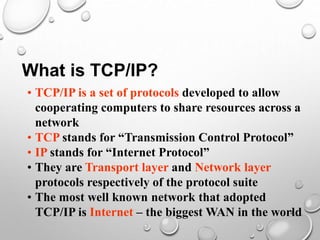
What is TCP/IP?
• TCP/IP is a set of protocols developed to allow
cooperating computers to share resources across a
network
• TCP stands for “Transmission Control Protocol”
• IP stands for “Internet Protocol”
• They are Transport layer and Network layer
protocols respectively of the protocol suite
• The most well known network that adopted
TCP/IP is Internet – the biggest WAN in the world
3
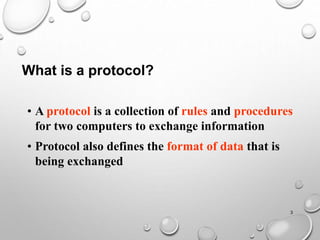
• A protocol is a collection of rules and procedures
for two computers to exchange information
• Protocol also defines the format of data that is
being exchanged
What is a protocol?
4
Why TCP/IP is so popular?
• TCP/IP was developed very early
• Technologies were widely discussed and circulated
in documents called “Request for Comments”
(RFC) – free of charge
• Supported by UNIX operating system
5
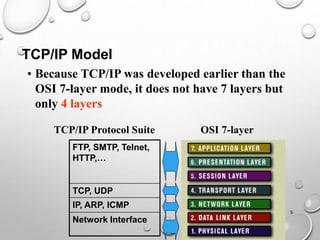
TCP/IP Model
• Because TCP/IP was developed earlier than the
OSI 7-layer mode, it does not have 7 layers but
only 4 layers
OSI 7-layer
TCP/IP Protocol Suite
FTP, SMTP, Telnet,
HTTP,…
TCP, UDP
IP, ARP, ICMP
Network Interface
6
• Application layer protocols define the rules when
implementing specific network applications
• Rely on the underlying layers to provide accurate
and efficient data delivery
• Typical protocols:
• FTP – File Transfer Protocol
• For file transfer
• Telnet – Remote terminal protocol
• For remote login on any other computer on the
network
• SMTP – Simple Mail Transfer Protocol
• For mail transfer
• HTTP – Hypertext Transfer Protocol
• For Web browsing
7
• TCP/IP is built on “connectionless” technology,
each datagram finds its own way to its destination
• Transport Layer protocols define the rules of
• Dividing a chunk of data into segments
• Reassemble segments into the original chunk
• Typical protocols:
• TCP – Transmission Control Protocol
• Provide further the functions such as reordering
and data resend
• UDP – User Datagram Service
• Use when the message to be sent fit exactly into a
datagram
• Use also when a more simplified data format is
required
8
• Network layer protocols define the rules of how to
find the routes for a packet to the destination
• It only gives best effort delivery. Packets can be
delayed, corrupted, lost, duplicated, out-of-order
• Typical protocols:
• IP – Internet Protocol
• Provide packet delivery
• ARP – Address Resolution Protocol
• Define the procedures of network address / MAC
address translation
• ICMP – Internet Control Message Protocol
• Define the procedures of error message transfer
9
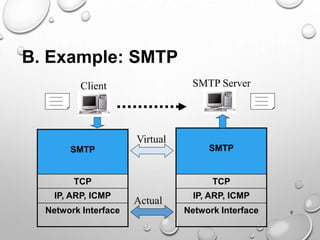
SMTP
TCP
IP, ARP, ICMP
Network Interface
SMTP
TCP
IP, ARP, ICMP
Network Interface
SMTP Server
Client
Actual
Virtual
B. Example: SMTP
10
• The underlying layers have guaranteed accurate
data delivery
• We need to make a lot agreements with the server
in application layer before sending mail
1. Agree on how data is represented
• Binary or ASCII
2. Ensure the right recipient
• There may be 1000 users served by the server
3. Ensure the client has the right to send mail
• Some clients are not welcome
4. How to tell the server it is the end of the message
• All mail looks the same
:
11
• The agreement made in the SMTP protocol
• All messages use normal text
• All ASCII characters
• The responses all begin with numbers
• To indicate the status when receiving the command
• Some words are reserved words
• HELO, MAIL, RCPT…
• Mail ends with a line that contains only a period
• The information passed with the SMTP messages
• The recipient name
• The sender name
• The mail
12
• An organization needs to register its domain name
• e.g. PolyU has registered its name to the domain
of edu.hk
• Once a domain name is assigned, the organization
is free to assign other names belong to its domain
• e.g. we can have
hkpu10.polyu.edu.hk
smtp.polyu.edu.hk
mail.polyu.edu.hk
13
Client
Domain Name Server
(DNS) of polyu.edu.hk
Address of
www.yahoo.com
Where is
www.yahoo.com?
usually UDP
DNS of com
DNS of Yahoo.com
Where is
www.yahoo.com?
Address of
www.Yahoo.com
Where is
yahoo.com? Address of the
DNS of
Yahoo.com
Become
client
14
• Nevertheless, such a complicated procedure needs
not perform in most cases
• Client computers usually remember the answers
that it got before
• It reduces the loading to the root DNS
• To further reduce loading, there can be many root
DNS on the Internet
• e.g. there are a few “com” root DNS
15
D. TCP and UDP
• TCP is a connection-oriented protocol
• Does not mean it has a physical connection between
sender and receiver
• TCP provides the function to allow a connection
virtually exists – also called virtual circuit
• TCP provides the functions:
• Dividing a chunk of data into segments
• Reassembly segments into the original chunk
• Provide further the functions such as reordering and
data resend
• Offering a reliable byte-stream delivery service
TCP – Transmission Control Protocol

TCP/IP Protocol Suite model Transmission Control Protocol

  • 1.
    1 TCP/IP Protocol Suite Md.SharifUddin Shajib Master of Engineering (M.Engg) in Telecommunication Roll:06
  • 2.
    2 What is TCP/IP? •TCP/IP is a set of protocols developed to allow cooperating computers to share resources across a network • TCP stands for “Transmission Control Protocol” • IP stands for “Internet Protocol” • They are Transport layer and Network layer protocols respectively of the protocol suite • The most well known network that adopted TCP/IP is Internet – the biggest WAN in the world
  • 3.
    3 • A protocolis a collection of rules and procedures for two computers to exchange information • Protocol also defines the format of data that is being exchanged What is a protocol?
  • 4.
    4 Why TCP/IP isso popular? • TCP/IP was developed very early • Technologies were widely discussed and circulated in documents called “Request for Comments” (RFC) – free of charge • Supported by UNIX operating system
  • 5.
    5 TCP/IP Model • BecauseTCP/IP was developed earlier than the OSI 7-layer mode, it does not have 7 layers but only 4 layers OSI 7-layer TCP/IP Protocol Suite FTP, SMTP, Telnet, HTTP,… TCP, UDP IP, ARP, ICMP Network Interface
  • 6.
    6 • Application layerprotocols define the rules when implementing specific network applications • Rely on the underlying layers to provide accurate and efficient data delivery • Typical protocols: • FTP – File Transfer Protocol • For file transfer • Telnet – Remote terminal protocol • For remote login on any other computer on the network • SMTP – Simple Mail Transfer Protocol • For mail transfer • HTTP – Hypertext Transfer Protocol • For Web browsing
  • 7.
    7 • TCP/IP isbuilt on “connectionless” technology, each datagram finds its own way to its destination • Transport Layer protocols define the rules of • Dividing a chunk of data into segments • Reassemble segments into the original chunk • Typical protocols: • TCP – Transmission Control Protocol • Provide further the functions such as reordering and data resend • UDP – User Datagram Service • Use when the message to be sent fit exactly into a datagram • Use also when a more simplified data format is required
  • 8.
    8 • Network layerprotocols define the rules of how to find the routes for a packet to the destination • It only gives best effort delivery. Packets can be delayed, corrupted, lost, duplicated, out-of-order • Typical protocols: • IP – Internet Protocol • Provide packet delivery • ARP – Address Resolution Protocol • Define the procedures of network address / MAC address translation • ICMP – Internet Control Message Protocol • Define the procedures of error message transfer
  • 9.
    9 SMTP TCP IP, ARP, ICMP NetworkInterface SMTP TCP IP, ARP, ICMP Network Interface SMTP Server Client Actual Virtual B. Example: SMTP
  • 10.
    10 • The underlyinglayers have guaranteed accurate data delivery • We need to make a lot agreements with the server in application layer before sending mail 1. Agree on how data is represented • Binary or ASCII 2. Ensure the right recipient • There may be 1000 users served by the server 3. Ensure the client has the right to send mail • Some clients are not welcome 4. How to tell the server it is the end of the message • All mail looks the same :
  • 11.
    11 • The agreementmade in the SMTP protocol • All messages use normal text • All ASCII characters • The responses all begin with numbers • To indicate the status when receiving the command • Some words are reserved words • HELO, MAIL, RCPT… • Mail ends with a line that contains only a period • The information passed with the SMTP messages • The recipient name • The sender name • The mail
  • 12.
    12 • An organizationneeds to register its domain name • e.g. PolyU has registered its name to the domain of edu.hk • Once a domain name is assigned, the organization is free to assign other names belong to its domain • e.g. we can have hkpu10.polyu.edu.hk smtp.polyu.edu.hk mail.polyu.edu.hk
  • 13.
    13 Client Domain Name Server (DNS)of polyu.edu.hk Address of www.yahoo.com Where is www.yahoo.com? usually UDP DNS of com DNS of Yahoo.com Where is www.yahoo.com? Address of www.Yahoo.com Where is yahoo.com? Address of the DNS of Yahoo.com Become client
  • 14.
    14 • Nevertheless, sucha complicated procedure needs not perform in most cases • Client computers usually remember the answers that it got before • It reduces the loading to the root DNS • To further reduce loading, there can be many root DNS on the Internet • e.g. there are a few “com” root DNS
  • 15.
    15 D. TCP andUDP • TCP is a connection-oriented protocol • Does not mean it has a physical connection between sender and receiver • TCP provides the function to allow a connection virtually exists – also called virtual circuit • TCP provides the functions: • Dividing a chunk of data into segments • Reassembly segments into the original chunk • Provide further the functions such as reordering and data resend • Offering a reliable byte-stream delivery service TCP – Transmission Control Protocol