
Email Technology Overview Ajit Dhumale
Contents How Email Works? Email Protocols SMTP POP3 IMAP Email Standards RFC822 MIME Email Server Products Cyrus, Sendmail, Exchange Resources for more information
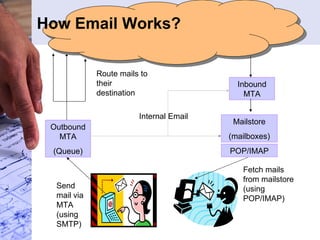
How Email Works? Outbound MTA (Queue) Inbound MTA Mailstore (mailboxes) POP/IMAP Send mail via MTA (using SMTP) Fetch mails from mailstore (using POP/IMAP) Route mails to their destination Internal Email
Email Protocols: SMTP (RFC 821) Simple Mail Transfer Protocol Users use SMTP to send out mails MTAs use SMTP to route mails to their destinations MTA: Mail Transfer Agent, accepts mails from the user MUAs (Mail User Agent   Email client) and then routes them to the appropriate destination. SMTP is the popular protocol implemented by MTAs
Typical tasks done by SMTP Server In nutshell make ‘best possible’ effort to deliver mail to appropriate destination once accepted Accept email from MUA and validate the fields Recipient/Sender resolution, expansion, translation Envelope splitting and email routing (DNS-MX Record lookup etc.) External Internal Queuing Bouncing Interact with systems like anti-spam, anti-virus, filtering, policy enforcement etc.
SMTP Protocol R: 220 smtp.pspl.co.in ESMTP Sendmail 8.12.9/8.12.9 S: HELO mymachine R: 250 smtp.pspl.co.in Hello [10.44.50.15], pleased to meet you S: MAIL FROM:<ajitd@persistent.co.in> R: 250 OK S: RCPT TO:<gtom@mirapoint.com> R: 250 OK S: RCPT TO:<ajitd@hotmail.com> R: 250 OK S: DATA R: 354 Start mail input; end with <CRLF>.<CRLF> S: Blah blah blah... S: ...etc. etc. etc. S: <CRLF>.<CRLF> R: 250 OK S: QUIT R: 221 2.0.0 smtp.pspl.co.in closing connection +----------+  +----------+ +------+  |  |  |  | | User |<-->|  |  SMTP  |  | +------+  |  Sender- |Commands/Replies| Receiver-| +------+  |  SMTP  |<-------------->|  SMTP  |  +------+ | mail |<-->|  |  and Mail  |  |<-->| Mail | | Store|  |  |  |  |  | Store| +------+  +----------+  +----------+  +------+ Sender-SMTP  Receiver-SMTP Model for SMTP Use Few corner cases: 1. Avoiding endless loop of bounced mails: MAIL FROM:<>
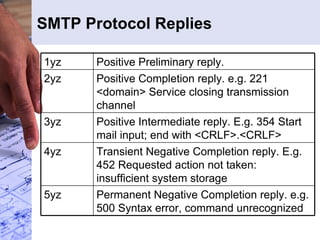
SMTP Protocol Replies Permanent Negative Completion reply. e.g. 500 Syntax error, command unrecognized 5yz  Transient Negative Completion reply. E.g. 452 Requested action not taken: insufficient system storage  4yz  Positive Intermediate reply. E.g. 354 Start mail input; end with <CRLF>.<CRLF>  3yz  Positive Completion reply. e.g. 221 <domain> Service closing transmission channel  2yz  Positive Preliminary reply.  1yz
Envelope splitting Envelope (as received): Rcpt to: gtom@mirapoint.com Rcpt to:  [email_address] Rcpt to:  [email_address] Rcpt to: a [email_address] Internal recipient Envelope (to mx1.mirapoint.com): Rcpt to: gtom@mirapoint.com Rcpt to:  [email_address] Envelope (to mx04.hotmail.com): Rcpt to:  [email_address]
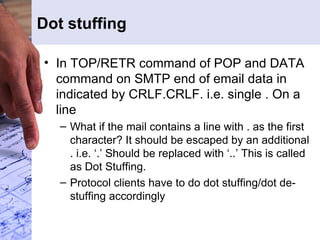
Dot stuffing In TOP/RETR command of POP and DATA command on SMTP end of email data in indicated by CRLF.CRLF. i.e. single . On a line What if the mail contains a line with . as the first character? It should be escaped by an additional . i.e. ‘.’ Should be replaced with ‘..’ This is called as Dot Stuffing. Protocol clients have to do dot stuffing/dot de-stuffing accordingly
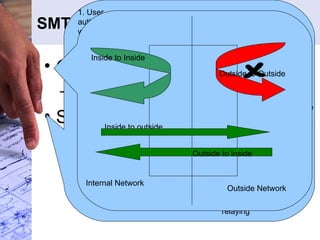
SMTP Security Issue Open reply problem Reply host file Solutions for roaming users POP before SMTP SMTP Authentication Outside to inside POP/IMAP Server SMTP Server Relay Host db 2. IP of the client machine is added to relay db 1. User authenticates with POP/IMAP server 3. User connects to SMTP server 4. SMTP Server checks for IP in relay host db and allows relaying 5. Entries from db are expired periodically Internal Network Outside Network Inside to Inside Inside to outside Outside to Outside
SMTP Extensions
SMTP server implementation consideration Must make ‘best effort’ to deliver accepted email High throughput Efficient Queuing of mail Graceful handing of overload Connection Caching, MX record caching etc. Security: SMTP servers are exposed to the world, must protect against DOS attacks , exploits, open relay
LMTP (RFC 2033) Local Mail Transfer Protocol:  The  Local Mail Transfer Protocol  or LMTP is a derivate of  SMTP , the  Simple Mail Transfer Protocol . It is designed as an alternative to normal  SMTP  for situations where the receiving side does not have a mail queue, such as a  Mail Delivery Agent   MDA  that understands SMTP conversations Main difference is that: The change is that after the final &quot;.&quot;, the server returns one reply for each previously successful RCPT command in the mail transaction, in the order that the RCPT commands were issued. Even if there were multiple successful RCPT commands giving the same forward-path, there must be one reply for each successful RCPT command.
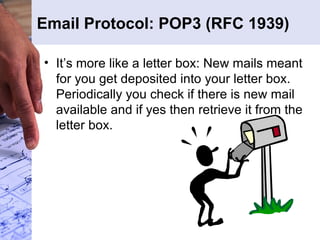
Email Protocol: POP3 (RFC 1939) It’s more like a letter box: New mails meant for you get deposited into your letter box. Periodically you check if there is new mail available and if yes then retrieve it from the letter box.
POP3 States & Commands TOP msg n, UIDL [msg], USER, PASS, APOP Optional  POP3  Commands  QUIT  UPDATE  STAT, LIST [msg], RETR msg, DELE msg, NOOP, RSET  TRANSACTION  QUIT AUTHORIZATION  Commands State
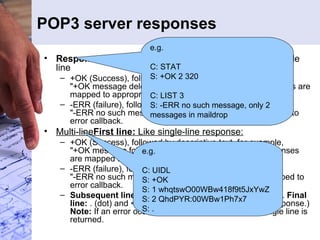
POP3 server responses Response Type Response Code and Description  Single line +OK (Success), followed by descriptive text, for example,  &quot;+OK message deleted&quot; for the delete operation. Responses are mapped to appropriate callbacks.  -ERR (failure), followed by descriptive text, for example,  &quot;-ERR no such message&quot; for the delete operation. Mapped to error callback.  Multi-line First line:  Like single-line response:   +OK (Success), followed by descriptive text, for example,  &quot;+OK message follows&quot; for the retrieve operation. Responses are mapped to appropriate callbacks.  -ERR (failure), followed by descriptive text, for example,  &quot;-ERR no such message&quot; for the retrieve operation. Mapped to error callback.  Subsequent lines:  More information about the condition.  Final line:  . (dot) and <CRLF>. (Not considered part of the response.)  Note:  If an error occurs on a multi-line response, a single line is returned. e.g. C: UIDL  S: +OK  S: 1 whqtswO00WBw418f9t5JxYwZ S: 2 QhdPYR:00WBw1Ph7x7  S: .  e.g. C: STAT  S: +OK 2 320 C: LIST 3  S: -ERR no such message, only 2 messages in maildrop
Typical POP Session
POP implementation considerations Quick response to frequent commands LIST, UIDL, STAT Mailbox locking during POP session Response to LIST, UIDL never change during a POP session DELE only marks message for deletion, QUIT actually deletes the messages POP3 protocol is not friendly for connection pooling You have to disconnect to change the user
Email Protocol: IMAP Internet Message Access Protocol  (IMAP) is an Internet protocol that allows a client to manipulate electronic mail messages that are stored on a mail server. It allows clients to manipulate a remote message folder (called a mailbox) in the same way they would manipulate local mailboxes. It supports mail operations that let users create, delete, and rename mailboxes; check for new messages; permanently remove messages; set and clear flags; and search.
IMAP Commands Mailbox Level SELECT, EXAMINE, STATUS, CREATE, DELETE, RENAME, EXPUNGE  Mail Listing LIST, SERCH Retrieval FETCH Modify flags STORE
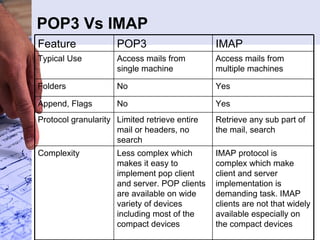
POP3 Vs IMAP Complexity Protocol granularity Append, Flags Folders Typical Use Feature IMAP protocol is complex which make client and server implementation is demanding task. IMAP clients are not that widely available especially on the compact devices Less complex which makes it easy to implement pop client and server. POP clients are available on wide variety of devices including most of the compact devices Retrieve any sub part of the mail, search Limited retrieve entire mail or headers, no search Yes No Yes No Access mails from multiple machines Access mails from single machine IMAP POP3
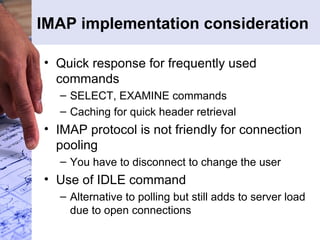
IMAP implementation consideration Quick response for frequently used commands SELECT, EXAMINE commands Caching for quick header retrieval IMAP protocol is not friendly for connection pooling You have to disconnect to change the user Use of IDLE command Alternative to polling but still adds to server load due to open connections
IMAP Extensions
Email Standards RFC 822/2822 (Internet Message Format) Defines overall message format: syntax and semantics Defines syntax and semantics for standard fields like To, Cc, Date etc. MIME Nested message component structure Content-Type indicates what’s the type of data MIME part is holding Overall message syntax: message  = *field *(CRLF *text)  field  = field-name &quot;:&quot; [field-body] CRLF  field-name  = 1*<any CHAR, excluding CTLs, SPACE, and &quot;:&quot;>  field-body  = *text [CRLF LWSP-char field-body]  e.g. From: John Doe <jdoe@machine.example>  To: Mary Smith < [email_address] >  Subject: Saying Hello  Date: Fri, 21 Nov 1997 09:55:06 -0600  Message-ID: <1234@local.machine.example>  This is a message just to say hello. So, &quot;Hello&quot;.  Header folding Subject: This is a test  Subject: This  is a test  From: &quot;Ajit Dhumale&quot; <ajitd@persistent.co.in> To: <ajitd@persistent.co.in> Subject: Sample Mail Date: Thu, 28 Oct 2004 10:26:38 +0530 MIME-Version: 1.0 Content-Type: multipart/alternative; boundary=&quot;----=_NextPart_000_0011_01C4BCD8.9BE9B8C0&quot; This is a multi-part message in MIME format. ------=_NextPart_000_0011_01C4BCD8.9BE9B8C0 Content-Type: text/plain; charset=&quot;iso-8859-1&quot; Content-Transfer-Encoding: quoted-printable Sample MIME mail. ------=_NextPart_000_0011_01C4BCD8.9BE9B8C0 Content-Type: text/html; charset=&quot;iso-8859-1&quot; Content-Transfer-Encoding: quoted-printable <!DOCTYPE HTML PUBLIC &quot;-//W3C//DTD HTML 4.0 Transitional//EN&quot;> <HTML><HEAD> <META http-equiv=3DContent-Type content=3D&quot;text/html; = charset=3Diso-8859-1&quot;> <META content=3D&quot;MSHTML 6.00.2800.1106&quot; name=3DGENERATOR> <STYLE></STYLE> </HEAD> <BODY bgColor=3D#ffffff> <DIV><FONT face=3DArial size=3D2>Sample <STRONG>MIME</STRONG>=20 mail.</FONT></DIV></BODY></HTML> ------=_NextPart_000_0011_01C4BCD8.9BE9B8C0--
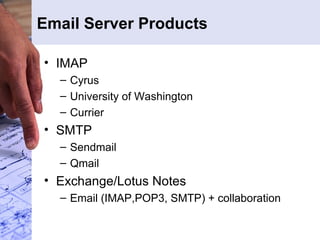
Email Server Products IMAP Cyrus University of Washington Currier SMTP Sendmail Qmail Exchange/Lotus Notes Email (IMAP,POP3, SMTP) + collaboration
Cyrus Internals Mailbox storage format Each mailbox is represented by a directory in the filesystem.  Within the directory, each message is stored in its own file in RFC 822 format.  The filenames of the message files are the sequentially-assigned UID's, with a period appended.  Lines are terminated by CRLF. In addition to message files there are 3 files () containing meta data, indexes and cached data. Typical mailbox directory looks like… cyrus.header cyrus.index cyrus.cache 1. 2. 3. cyrus.header :  Contains variable-length information about the mailbox itself. cyrus.index : Contains a header and a sequence of fixed-length records, one record per message in the mailbox.  The header contains: generation-no, format, minor-version, start-offset, record-size, exists, last-date, last-uid, quota-used, pop3-last, uidvalidity Each per-message record contains: uid, internaldate, sentdate, rfc822.size, header-size, body-offset, cache-offset(offset in cyrus.cache), last-updated, system-flags, user-flags cyrus.cache : Contains a header and a sequence of variable-length  records, one record per message in the mailbox.  The header contains a &quot;generation number&quot; corresponding to the one in cyrus.index.  Each record contains: IMAP &quot;envelope&quot;, in format suitable for use in FETCH reply IMAP &quot;bodystructure&quot;, in format suitable for use in FETCH reply IMAP &quot;body&quot;, in format suitable for use in FETCH reply size, file offsets, charsets, and encodings of the various MIME body sections From, To, Cc, and BCC strings for searching
Resources for more information Ton of information available at … http://athabasca.intranet.pspl.co.in/tw2/bin/view/Techexpertise/MessagingHome

E-Mail - Technical Overview

  • 1.
  • 2.
    Contents How EmailWorks? Email Protocols SMTP POP3 IMAP Email Standards RFC822 MIME Email Server Products Cyrus, Sendmail, Exchange Resources for more information
  • 3.
    How Email Works?Outbound MTA (Queue) Inbound MTA Mailstore (mailboxes) POP/IMAP Send mail via MTA (using SMTP) Fetch mails from mailstore (using POP/IMAP) Route mails to their destination Internal Email
  • 4.
    Email Protocols: SMTP(RFC 821) Simple Mail Transfer Protocol Users use SMTP to send out mails MTAs use SMTP to route mails to their destinations MTA: Mail Transfer Agent, accepts mails from the user MUAs (Mail User Agent  Email client) and then routes them to the appropriate destination. SMTP is the popular protocol implemented by MTAs
  • 5.
    Typical tasks doneby SMTP Server In nutshell make ‘best possible’ effort to deliver mail to appropriate destination once accepted Accept email from MUA and validate the fields Recipient/Sender resolution, expansion, translation Envelope splitting and email routing (DNS-MX Record lookup etc.) External Internal Queuing Bouncing Interact with systems like anti-spam, anti-virus, filtering, policy enforcement etc.
  • 6.
    SMTP Protocol R:220 smtp.pspl.co.in ESMTP Sendmail 8.12.9/8.12.9 S: HELO mymachine R: 250 smtp.pspl.co.in Hello [10.44.50.15], pleased to meet you S: MAIL FROM:<ajitd@persistent.co.in> R: 250 OK S: RCPT TO:<gtom@mirapoint.com> R: 250 OK S: RCPT TO:<ajitd@hotmail.com> R: 250 OK S: DATA R: 354 Start mail input; end with <CRLF>.<CRLF> S: Blah blah blah... S: ...etc. etc. etc. S: <CRLF>.<CRLF> R: 250 OK S: QUIT R: 221 2.0.0 smtp.pspl.co.in closing connection +----------+ +----------+ +------+ | | | | | User |<-->| | SMTP | | +------+ | Sender- |Commands/Replies| Receiver-| +------+ | SMTP |<-------------->| SMTP | +------+ | mail |<-->| | and Mail | |<-->| Mail | | Store| | | | | | Store| +------+ +----------+ +----------+ +------+ Sender-SMTP Receiver-SMTP Model for SMTP Use Few corner cases: 1. Avoiding endless loop of bounced mails: MAIL FROM:<>
  • 7.
    SMTP Protocol RepliesPermanent Negative Completion reply. e.g. 500 Syntax error, command unrecognized 5yz Transient Negative Completion reply. E.g. 452 Requested action not taken: insufficient system storage 4yz Positive Intermediate reply. E.g. 354 Start mail input; end with <CRLF>.<CRLF> 3yz Positive Completion reply. e.g. 221 <domain> Service closing transmission channel 2yz Positive Preliminary reply. 1yz
  • 8.
    Envelope splitting Envelope(as received): Rcpt to: gtom@mirapoint.com Rcpt to: [email_address] Rcpt to: [email_address] Rcpt to: a [email_address] Internal recipient Envelope (to mx1.mirapoint.com): Rcpt to: gtom@mirapoint.com Rcpt to: [email_address] Envelope (to mx04.hotmail.com): Rcpt to: [email_address]
  • 9.
    Dot stuffing InTOP/RETR command of POP and DATA command on SMTP end of email data in indicated by CRLF.CRLF. i.e. single . On a line What if the mail contains a line with . as the first character? It should be escaped by an additional . i.e. ‘.’ Should be replaced with ‘..’ This is called as Dot Stuffing. Protocol clients have to do dot stuffing/dot de-stuffing accordingly
  • 10.
    SMTP Security IssueOpen reply problem Reply host file Solutions for roaming users POP before SMTP SMTP Authentication Outside to inside POP/IMAP Server SMTP Server Relay Host db 2. IP of the client machine is added to relay db 1. User authenticates with POP/IMAP server 3. User connects to SMTP server 4. SMTP Server checks for IP in relay host db and allows relaying 5. Entries from db are expired periodically Internal Network Outside Network Inside to Inside Inside to outside Outside to Outside
  • 11.
  • 12.
    SMTP server implementationconsideration Must make ‘best effort’ to deliver accepted email High throughput Efficient Queuing of mail Graceful handing of overload Connection Caching, MX record caching etc. Security: SMTP servers are exposed to the world, must protect against DOS attacks , exploits, open relay
  • 13.
    LMTP (RFC 2033)Local Mail Transfer Protocol: The Local Mail Transfer Protocol or LMTP is a derivate of SMTP , the Simple Mail Transfer Protocol . It is designed as an alternative to normal SMTP for situations where the receiving side does not have a mail queue, such as a Mail Delivery Agent MDA that understands SMTP conversations Main difference is that: The change is that after the final &quot;.&quot;, the server returns one reply for each previously successful RCPT command in the mail transaction, in the order that the RCPT commands were issued. Even if there were multiple successful RCPT commands giving the same forward-path, there must be one reply for each successful RCPT command.
  • 14.
    Email Protocol: POP3(RFC 1939) It’s more like a letter box: New mails meant for you get deposited into your letter box. Periodically you check if there is new mail available and if yes then retrieve it from the letter box.
  • 15.
    POP3 States &Commands TOP msg n, UIDL [msg], USER, PASS, APOP Optional POP3 Commands QUIT UPDATE STAT, LIST [msg], RETR msg, DELE msg, NOOP, RSET TRANSACTION QUIT AUTHORIZATION Commands State
  • 16.
    POP3 server responsesResponse Type Response Code and Description Single line +OK (Success), followed by descriptive text, for example, &quot;+OK message deleted&quot; for the delete operation. Responses are mapped to appropriate callbacks. -ERR (failure), followed by descriptive text, for example, &quot;-ERR no such message&quot; for the delete operation. Mapped to error callback. Multi-line First line: Like single-line response: +OK (Success), followed by descriptive text, for example, &quot;+OK message follows&quot; for the retrieve operation. Responses are mapped to appropriate callbacks. -ERR (failure), followed by descriptive text, for example, &quot;-ERR no such message&quot; for the retrieve operation. Mapped to error callback. Subsequent lines: More information about the condition. Final line: . (dot) and <CRLF>. (Not considered part of the response.) Note: If an error occurs on a multi-line response, a single line is returned. e.g. C: UIDL S: +OK S: 1 whqtswO00WBw418f9t5JxYwZ S: 2 QhdPYR:00WBw1Ph7x7 S: . e.g. C: STAT S: +OK 2 320 C: LIST 3 S: -ERR no such message, only 2 messages in maildrop
  • 17.
  • 18.
    POP implementation considerationsQuick response to frequent commands LIST, UIDL, STAT Mailbox locking during POP session Response to LIST, UIDL never change during a POP session DELE only marks message for deletion, QUIT actually deletes the messages POP3 protocol is not friendly for connection pooling You have to disconnect to change the user
  • 19.
    Email Protocol: IMAPInternet Message Access Protocol (IMAP) is an Internet protocol that allows a client to manipulate electronic mail messages that are stored on a mail server. It allows clients to manipulate a remote message folder (called a mailbox) in the same way they would manipulate local mailboxes. It supports mail operations that let users create, delete, and rename mailboxes; check for new messages; permanently remove messages; set and clear flags; and search.
  • 20.
    IMAP Commands MailboxLevel SELECT, EXAMINE, STATUS, CREATE, DELETE, RENAME, EXPUNGE Mail Listing LIST, SERCH Retrieval FETCH Modify flags STORE
  • 21.
    POP3 Vs IMAPComplexity Protocol granularity Append, Flags Folders Typical Use Feature IMAP protocol is complex which make client and server implementation is demanding task. IMAP clients are not that widely available especially on the compact devices Less complex which makes it easy to implement pop client and server. POP clients are available on wide variety of devices including most of the compact devices Retrieve any sub part of the mail, search Limited retrieve entire mail or headers, no search Yes No Yes No Access mails from multiple machines Access mails from single machine IMAP POP3
  • 22.
    IMAP implementation considerationQuick response for frequently used commands SELECT, EXAMINE commands Caching for quick header retrieval IMAP protocol is not friendly for connection pooling You have to disconnect to change the user Use of IDLE command Alternative to polling but still adds to server load due to open connections
  • 23.
  • 24.
    Email Standards RFC822/2822 (Internet Message Format) Defines overall message format: syntax and semantics Defines syntax and semantics for standard fields like To, Cc, Date etc. MIME Nested message component structure Content-Type indicates what’s the type of data MIME part is holding Overall message syntax: message = *field *(CRLF *text) field = field-name &quot;:&quot; [field-body] CRLF field-name = 1*<any CHAR, excluding CTLs, SPACE, and &quot;:&quot;> field-body = *text [CRLF LWSP-char field-body] e.g. From: John Doe <jdoe@machine.example> To: Mary Smith < [email_address] > Subject: Saying Hello Date: Fri, 21 Nov 1997 09:55:06 -0600 Message-ID: <1234@local.machine.example> This is a message just to say hello. So, &quot;Hello&quot;. Header folding Subject: This is a test Subject: This is a test From: &quot;Ajit Dhumale&quot; <ajitd@persistent.co.in> To: <ajitd@persistent.co.in> Subject: Sample Mail Date: Thu, 28 Oct 2004 10:26:38 +0530 MIME-Version: 1.0 Content-Type: multipart/alternative; boundary=&quot;----=_NextPart_000_0011_01C4BCD8.9BE9B8C0&quot; This is a multi-part message in MIME format. ------=_NextPart_000_0011_01C4BCD8.9BE9B8C0 Content-Type: text/plain; charset=&quot;iso-8859-1&quot; Content-Transfer-Encoding: quoted-printable Sample MIME mail. ------=_NextPart_000_0011_01C4BCD8.9BE9B8C0 Content-Type: text/html; charset=&quot;iso-8859-1&quot; Content-Transfer-Encoding: quoted-printable <!DOCTYPE HTML PUBLIC &quot;-//W3C//DTD HTML 4.0 Transitional//EN&quot;> <HTML><HEAD> <META http-equiv=3DContent-Type content=3D&quot;text/html; = charset=3Diso-8859-1&quot;> <META content=3D&quot;MSHTML 6.00.2800.1106&quot; name=3DGENERATOR> <STYLE></STYLE> </HEAD> <BODY bgColor=3D#ffffff> <DIV><FONT face=3DArial size=3D2>Sample <STRONG>MIME</STRONG>=20 mail.</FONT></DIV></BODY></HTML> ------=_NextPart_000_0011_01C4BCD8.9BE9B8C0--
  • 25.
    Email Server ProductsIMAP Cyrus University of Washington Currier SMTP Sendmail Qmail Exchange/Lotus Notes Email (IMAP,POP3, SMTP) + collaboration
  • 26.
    Cyrus Internals Mailboxstorage format Each mailbox is represented by a directory in the filesystem. Within the directory, each message is stored in its own file in RFC 822 format. The filenames of the message files are the sequentially-assigned UID's, with a period appended. Lines are terminated by CRLF. In addition to message files there are 3 files () containing meta data, indexes and cached data. Typical mailbox directory looks like… cyrus.header cyrus.index cyrus.cache 1. 2. 3. cyrus.header : Contains variable-length information about the mailbox itself. cyrus.index : Contains a header and a sequence of fixed-length records, one record per message in the mailbox. The header contains: generation-no, format, minor-version, start-offset, record-size, exists, last-date, last-uid, quota-used, pop3-last, uidvalidity Each per-message record contains: uid, internaldate, sentdate, rfc822.size, header-size, body-offset, cache-offset(offset in cyrus.cache), last-updated, system-flags, user-flags cyrus.cache : Contains a header and a sequence of variable-length records, one record per message in the mailbox. The header contains a &quot;generation number&quot; corresponding to the one in cyrus.index. Each record contains: IMAP &quot;envelope&quot;, in format suitable for use in FETCH reply IMAP &quot;bodystructure&quot;, in format suitable for use in FETCH reply IMAP &quot;body&quot;, in format suitable for use in FETCH reply size, file offsets, charsets, and encodings of the various MIME body sections From, To, Cc, and BCC strings for searching
  • 27.
    Resources for moreinformation Ton of information available at … http://athabasca.intranet.pspl.co.in/tw2/bin/view/Techexpertise/MessagingHome