Seven Quality Tools
• The Seven Tools
  – Histograms, Pareto Charts, Cause and
    Effect Diagrams, Run Charts, Scatter
    Diagrams, Flow Charts, Control Charts
Ishikawa’s Basic Tools of Quality
• Kaoru Ishikawa developed seven basic visual
  tools of quality so that the average person
  could analyze and interpret data.

• These tools have been used worldwide by
  companies, managers of all levels and
  employees.
Histograms
                    Slide 1 of 3


• Histogram Defined
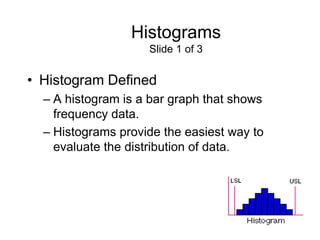
  – A histogram is a bar graph that shows
    frequency data.
  – Histograms provide the easiest way to
    evaluate the distribution of data.
Histograms
                        Slide 2 of 3

• Creating a Histogram
  – Collect data and sort it into categories.
  – Then label the data as the independent set or the
    dependent set.
     • The characteristic you grouped the data by would be the
       independent variable.
     • The frequency of that set would be the dependent variable.
  – Each mark on either axis should be in equal
    increments.
  – For each category, find the related frequency and
    make the horizontal marks to show that frequency.
Histograms
                   Slide 3 of 3


• Examples of How Histograms Can Be
  Used
  – Histograms can be used to determine
    distribution of sales.
  – Say for instance a company wanted to
    measure the revenues of other companies
    and wanted to compare numbers.
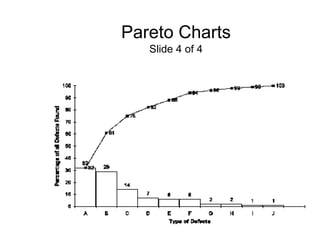
Pareto Charts
                           Slide 1 of 4

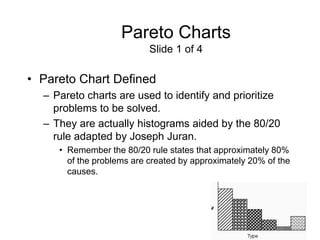
• Pareto Chart Defined
  – Pareto charts are used to identify and prioritize
    problems to be solved.
  – They are actually histograms aided by the 80/20
    rule adapted by Joseph Juran.
     • Remember the 80/20 rule states that approximately 80%
       of the problems are created by approximately 20% of the
       causes.
Pareto Charts
                      Slide 2 of 4

• Constructing a Pareto Chart
  – First, information must be selected based
    on types or classifications of defects that
    occur as a result of a process.
  – The data must be collected and classified
    into categories.
  – Then a histogram or frequency chart is
    constructed showing the number of
    occurrences.
Pareto Charts
                                 Slide 3 of 4

• An Example of How a Pareto Chart Can Be
  Used
  – Pareto Charts are used when products are suffering from
    different defects but the defects are occurring at a different
    frequency, or only a few account for most of the defects
    present, or different defects incur different costs. What we
    see from that is a product line may experience a range of
    defects. The manufacturer could concentrate on reducing
    the defects which make up a bigger percentage of all the
    defects or focus on eliminating the defect that causes
    monetary loss.
      • Actual chart is on the next slide
              » Example and chart were obtained from:
            <www.yourmba.co.uk/pareto_diagram.htm>
Pareto Charts
   Slide 4 of 4
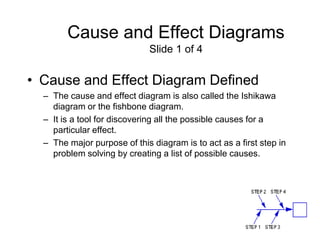
Cause and Effect Diagrams
                             Slide 1 of 4


• Cause and Effect Diagram Defined
  – The cause and effect diagram is also called the Ishikawa
    diagram or the fishbone diagram.
  – It is a tool for discovering all the possible causes for a
    particular effect.
  – The major purpose of this diagram is to act as a first step in
    problem solving by creating a list of possible causes.
Cause and Effect Diagrams
                             Slide 2 of 4

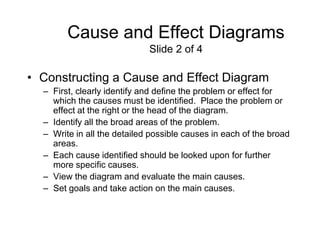
• Constructing a Cause and Effect Diagram
  – First, clearly identify and define the problem or effect for
    which the causes must be identified. Place the problem or
    effect at the right or the head of the diagram.
  – Identify all the broad areas of the problem.
  – Write in all the detailed possible causes in each of the broad
    areas.
  – Each cause identified should be looked upon for further
    more specific causes.
  – View the diagram and evaluate the main causes.
  – Set goals and take action on the main causes.
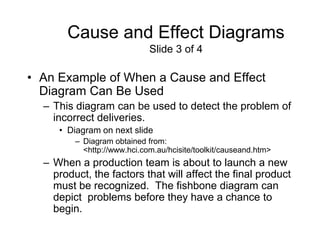
Cause and Effect Diagrams
                             Slide 3 of 4

• An Example of When a Cause and Effect
  Diagram Can Be Used
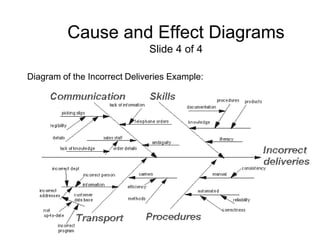
  – This diagram can be used to detect the problem of
    incorrect deliveries.
     • Diagram on next slide
         – Diagram obtained from:
           <http://www.hci.com.au/hcisite/toolkit/causeand.htm>
  – When a production team is about to launch a new
    product, the factors that will affect the final product
    must be recognized. The fishbone diagram can
    depict problems before they have a chance to
    begin.
Cause and Effect Diagrams
                              Slide 4 of 4

Diagram of the Incorrect Deliveries Example:
Scatter Diagrams
                     Slide 1 of 4


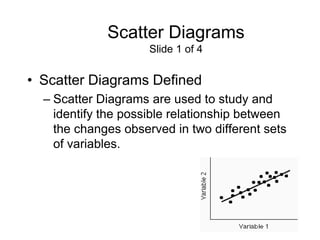
• Scatter Diagrams Defined
  – Scatter Diagrams are used to study and
    identify the possible relationship between
    the changes observed in two different sets
    of variables.
Scatter Diagrams
                               Slide 2 of 4

• Constructing a Scatter Diagram
   – First, collect two pieces of data and create a
     summary table of the data.
   – Draw a diagram labeling the horizontal and
     vertical axes.
      • It is common that the “cause” variable be labeled on the X axis
        and the “effect” variable be labeled on the Y axis.
   – Plot the data pairs on the diagram.
   – Interpret the scatter diagram for direction and
     strength.
Scatter Diagrams
                     Slide 3 of 4


• An Example of When a Scatter Diagram
  Can Be Used
  – A scatter diagram can be used to identify
    the relationship between the production
    speed of an operation and the number of
    defective parts made.
Scatter Diagrams
                               Slide 4 of 4

• An Example of When a Scatter Diagram Can Be
  Used (cont.)
   – Displaying the direction of the relationship will determine
     whether increasing the assembly line speed will increase or
     decrease the number of defective parts made. Also, the
     strength of the relationship between the assembly line speed
     and the number of defective parts produced is determined.

          – Example obtained from:
            <http://www.sytsma.com/tqmtools/Scat.html>
Flow Charts
                      Slide 1 of 3


• Flow Charts Defined
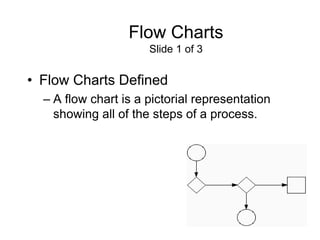
  – A flow chart is a pictorial representation
    showing all of the steps of a process.
Flow Charts
                          Slide 2 of 3

• Creating a Flow Chart
  – First, familiarize the participants with the flow chart
    symbols.
  – Draw the process flow chart and fill it out in detail
    about each element.
  – Analyze the flow chart. Determine which steps
    add value and which don’t in the process of
    simplifying the work.
Flow Charts
                      Slide 3 of 3


• Examples of When to Use a Flow Chart
  – Two separate stages of a process flow
    chart should be considered:
    • The making of the product
    • The finished product
Run Charts
                    Slide 1 of 3


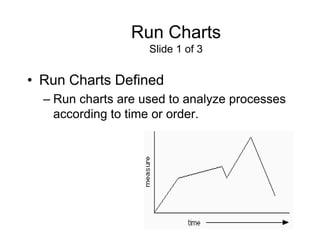
• Run Charts Defined
  – Run charts are used to analyze processes
    according to time or order.
Run Charts
                                 Slide 2 of 3

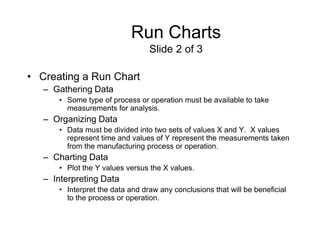
• Creating a Run Chart
   – Gathering Data
      • Some type of process or operation must be available to take
        measurements for analysis.
   – Organizing Data
      • Data must be divided into two sets of values X and Y. X values
        represent time and values of Y represent the measurements taken
        from the manufacturing process or operation.
   – Charting Data
      • Plot the Y values versus the X values.
   – Interpreting Data
      • Interpret the data and draw any conclusions that will be beneficial
        to the process or operation.
Run Charts
                         Slide 3 of 3

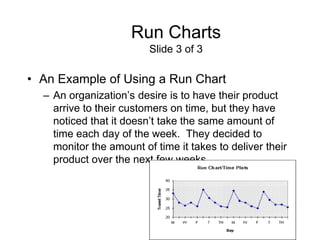
• An Example of Using a Run Chart
  – An organization’s desire is to have their product
    arrive to their customers on time, but they have
    noticed that it doesn’t take the same amount of
    time each day of the week. They decided to
    monitor the amount of time it takes to deliver their
    product over the next few weeks.
Control Charts
                    Slide 1 of 3


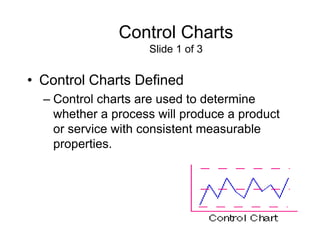
• Control Charts Defined
  – Control charts are used to determine
    whether a process will produce a product
    or service with consistent measurable
    properties.
Control Charts
                         Slide 2 of 3

• Steps Used in Developing Process Control
  Charts
  – Identify critical operations in the process where
    inspection might be needed.
  – Identify critical product characteristics.
  – Determine whether the critical product
    characteristic is a variable or an attribute.
  – Select the appropriate process control chart.
  – Establish the control limits and use the chart to
    monitor and improve.
  – Update the limits.
Control Charts
                      Slide 3 of 3


• An Example of When to Use a Control
  Chart
  – Counting the number of defective products
    or services
    • Do you count the number of defects in a given
      product or service?
    • Is the number of units checked or tested
      constant?
Activity
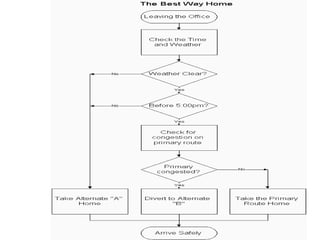
• Process Flow Chart for Finding the Best Way
  Home
  – Construct a process flow chart by making the best
    decisions in finding the best route home.
  – Refer to the prior notes on flowcharts.
     • Remember: Define and analyze the process, build a
       step-by step picture of the process, and define areas of
       improvement in the process.
             » Answer is on the next slide
             » Example obtained from:
               <http://deming.eng.clemson.edu/pub/tutorials/qctools/fl
               owm.htm#Example>
Summary
This presentation provided learning material for each of
Ishikawa’s seven basic tools of quality.

Each tool was clearly defined with definitions, a step-by-step
process and an example of how the tool can be used.

As seen through the presentation, these tools are rather simple
and effective.
Works - Cited
•   Histograms and Bar Graphs.
    <http://www.shodor.org/interactivate/lessons/sm3.html>
•   Your MBA: The Business Study Reference Site.
    http://yourmba.co.uk/pareto_diagram.htm
•   Hci Home Services. Cause and Effect Diagram.
    http://hci.com.au/hcisite/toolkit/causeand.htm
•   Scatter Diagram. http://sytsma.com/tqmtools/Scat.html
•   Flowchart.
    <http://http://deming.eng.clemson.edu/pub/tutorials/qctools/flowm.htm>
•   Run Charts/Time Plot/ Trend Chart.
    <http://www.deming.edu.clemson.edu/pub/tutorials/qctools/runm.htm>
•   Foster Thomas S. Managing Quality An Integrative Approach. New
    Jersey: Prentice Hall, 2001

Seven quality tools

  • 1.
    Seven Quality Tools •The Seven Tools – Histograms, Pareto Charts, Cause and Effect Diagrams, Run Charts, Scatter Diagrams, Flow Charts, Control Charts
  • 2.
    Ishikawa’s Basic Toolsof Quality • Kaoru Ishikawa developed seven basic visual tools of quality so that the average person could analyze and interpret data. • These tools have been used worldwide by companies, managers of all levels and employees.
  • 3.
    Histograms Slide 1 of 3 • Histogram Defined – A histogram is a bar graph that shows frequency data. – Histograms provide the easiest way to evaluate the distribution of data.
  • 4.
    Histograms Slide 2 of 3 • Creating a Histogram – Collect data and sort it into categories. – Then label the data as the independent set or the dependent set. • The characteristic you grouped the data by would be the independent variable. • The frequency of that set would be the dependent variable. – Each mark on either axis should be in equal increments. – For each category, find the related frequency and make the horizontal marks to show that frequency.
  • 5.
    Histograms Slide 3 of 3 • Examples of How Histograms Can Be Used – Histograms can be used to determine distribution of sales. – Say for instance a company wanted to measure the revenues of other companies and wanted to compare numbers.
  • 6.
    Pareto Charts Slide 1 of 4 • Pareto Chart Defined – Pareto charts are used to identify and prioritize problems to be solved. – They are actually histograms aided by the 80/20 rule adapted by Joseph Juran. • Remember the 80/20 rule states that approximately 80% of the problems are created by approximately 20% of the causes.
  • 7.
    Pareto Charts Slide 2 of 4 • Constructing a Pareto Chart – First, information must be selected based on types or classifications of defects that occur as a result of a process. – The data must be collected and classified into categories. – Then a histogram or frequency chart is constructed showing the number of occurrences.
  • 8.
    Pareto Charts Slide 3 of 4 • An Example of How a Pareto Chart Can Be Used – Pareto Charts are used when products are suffering from different defects but the defects are occurring at a different frequency, or only a few account for most of the defects present, or different defects incur different costs. What we see from that is a product line may experience a range of defects. The manufacturer could concentrate on reducing the defects which make up a bigger percentage of all the defects or focus on eliminating the defect that causes monetary loss. • Actual chart is on the next slide » Example and chart were obtained from: <www.yourmba.co.uk/pareto_diagram.htm>
  • 9.
    Pareto Charts Slide 4 of 4
  • 10.
    Cause and EffectDiagrams Slide 1 of 4 • Cause and Effect Diagram Defined – The cause and effect diagram is also called the Ishikawa diagram or the fishbone diagram. – It is a tool for discovering all the possible causes for a particular effect. – The major purpose of this diagram is to act as a first step in problem solving by creating a list of possible causes.
  • 11.
    Cause and EffectDiagrams Slide 2 of 4 • Constructing a Cause and Effect Diagram – First, clearly identify and define the problem or effect for which the causes must be identified. Place the problem or effect at the right or the head of the diagram. – Identify all the broad areas of the problem. – Write in all the detailed possible causes in each of the broad areas. – Each cause identified should be looked upon for further more specific causes. – View the diagram and evaluate the main causes. – Set goals and take action on the main causes.
  • 12.
    Cause and EffectDiagrams Slide 3 of 4 • An Example of When a Cause and Effect Diagram Can Be Used – This diagram can be used to detect the problem of incorrect deliveries. • Diagram on next slide – Diagram obtained from: <http://www.hci.com.au/hcisite/toolkit/causeand.htm> – When a production team is about to launch a new product, the factors that will affect the final product must be recognized. The fishbone diagram can depict problems before they have a chance to begin.
  • 13.
    Cause and EffectDiagrams Slide 4 of 4 Diagram of the Incorrect Deliveries Example:
  • 14.
    Scatter Diagrams Slide 1 of 4 • Scatter Diagrams Defined – Scatter Diagrams are used to study and identify the possible relationship between the changes observed in two different sets of variables.
  • 15.
    Scatter Diagrams Slide 2 of 4 • Constructing a Scatter Diagram – First, collect two pieces of data and create a summary table of the data. – Draw a diagram labeling the horizontal and vertical axes. • It is common that the “cause” variable be labeled on the X axis and the “effect” variable be labeled on the Y axis. – Plot the data pairs on the diagram. – Interpret the scatter diagram for direction and strength.
  • 16.
    Scatter Diagrams Slide 3 of 4 • An Example of When a Scatter Diagram Can Be Used – A scatter diagram can be used to identify the relationship between the production speed of an operation and the number of defective parts made.
  • 17.
    Scatter Diagrams Slide 4 of 4 • An Example of When a Scatter Diagram Can Be Used (cont.) – Displaying the direction of the relationship will determine whether increasing the assembly line speed will increase or decrease the number of defective parts made. Also, the strength of the relationship between the assembly line speed and the number of defective parts produced is determined. – Example obtained from: <http://www.sytsma.com/tqmtools/Scat.html>
  • 18.
    Flow Charts Slide 1 of 3 • Flow Charts Defined – A flow chart is a pictorial representation showing all of the steps of a process.
  • 19.
    Flow Charts Slide 2 of 3 • Creating a Flow Chart – First, familiarize the participants with the flow chart symbols. – Draw the process flow chart and fill it out in detail about each element. – Analyze the flow chart. Determine which steps add value and which don’t in the process of simplifying the work.
  • 20.
    Flow Charts Slide 3 of 3 • Examples of When to Use a Flow Chart – Two separate stages of a process flow chart should be considered: • The making of the product • The finished product
  • 21.
    Run Charts Slide 1 of 3 • Run Charts Defined – Run charts are used to analyze processes according to time or order.
  • 22.
    Run Charts Slide 2 of 3 • Creating a Run Chart – Gathering Data • Some type of process or operation must be available to take measurements for analysis. – Organizing Data • Data must be divided into two sets of values X and Y. X values represent time and values of Y represent the measurements taken from the manufacturing process or operation. – Charting Data • Plot the Y values versus the X values. – Interpreting Data • Interpret the data and draw any conclusions that will be beneficial to the process or operation.
  • 23.
    Run Charts Slide 3 of 3 • An Example of Using a Run Chart – An organization’s desire is to have their product arrive to their customers on time, but they have noticed that it doesn’t take the same amount of time each day of the week. They decided to monitor the amount of time it takes to deliver their product over the next few weeks.
  • 24.
    Control Charts Slide 1 of 3 • Control Charts Defined – Control charts are used to determine whether a process will produce a product or service with consistent measurable properties.
  • 25.
    Control Charts Slide 2 of 3 • Steps Used in Developing Process Control Charts – Identify critical operations in the process where inspection might be needed. – Identify critical product characteristics. – Determine whether the critical product characteristic is a variable or an attribute. – Select the appropriate process control chart. – Establish the control limits and use the chart to monitor and improve. – Update the limits.
  • 26.
    Control Charts Slide 3 of 3 • An Example of When to Use a Control Chart – Counting the number of defective products or services • Do you count the number of defects in a given product or service? • Is the number of units checked or tested constant?
  • 27.
    Activity • Process FlowChart for Finding the Best Way Home – Construct a process flow chart by making the best decisions in finding the best route home. – Refer to the prior notes on flowcharts. • Remember: Define and analyze the process, build a step-by step picture of the process, and define areas of improvement in the process. » Answer is on the next slide » Example obtained from: <http://deming.eng.clemson.edu/pub/tutorials/qctools/fl owm.htm#Example>
  • 29.
    Summary This presentation providedlearning material for each of Ishikawa’s seven basic tools of quality. Each tool was clearly defined with definitions, a step-by-step process and an example of how the tool can be used. As seen through the presentation, these tools are rather simple and effective.
  • 30.
    Works - Cited • Histograms and Bar Graphs. <http://www.shodor.org/interactivate/lessons/sm3.html> • Your MBA: The Business Study Reference Site. http://yourmba.co.uk/pareto_diagram.htm • Hci Home Services. Cause and Effect Diagram. http://hci.com.au/hcisite/toolkit/causeand.htm • Scatter Diagram. http://sytsma.com/tqmtools/Scat.html • Flowchart. <http://http://deming.eng.clemson.edu/pub/tutorials/qctools/flowm.htm> • Run Charts/Time Plot/ Trend Chart. <http://www.deming.edu.clemson.edu/pub/tutorials/qctools/runm.htm> • Foster Thomas S. Managing Quality An Integrative Approach. New Jersey: Prentice Hall, 2001