QUALITY CONTROL TOOLS
FOR
PROCESS IMPROVEMENT
Flow Chart Check Sheet Pareto Diagram Cause & Effect Histogram Scatter Diagram Control Chart
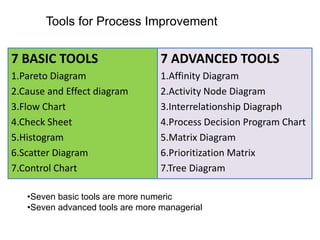
7 BASIC TOOLS
1.Pareto Diagram
2.Cause and Effect diagram
3.Flow Chart
4.Check Sheet
5.Histogram
6.Scatter Diagram
7.Control Chart
7 ADVANCED TOOLS
1.Affinity Diagram
2.Activity Node Diagram
3.Interrelationship Diagraph
4.Process Decision Program Chart
5.Matrix Diagram
6.Prioritization Matrix
7.Tree Diagram
Tools for Process Improvement
•Seven basic tools are more numeric
•Seven advanced tools are more managerial
Quality Tool
FLOW CHART
PROCESS FLOW CHART
Description :
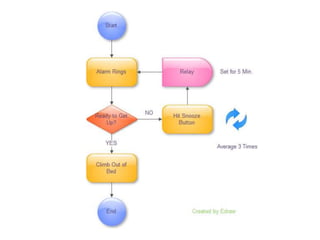
A process flow chart is a representation of sequences
of operation of a process from the beginning to the
end through certain symbols. It records the series of
events, activities and decisions in a form which can
be easily understood and communicated to all.
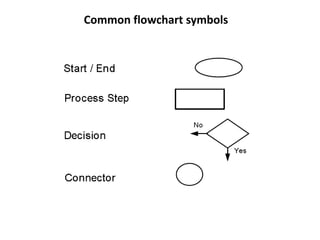
Common flowchart symbols
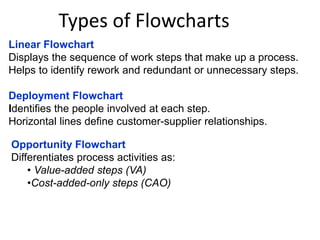
Types of Flowcharts
Linear Flowchart
Displays the sequence of work steps that make up a process.
Helps to identify rework and redundant or unnecessary steps.
Deployment Flowchart
Identifies the people involved at each step.
Horizontal lines define customer-supplier relationships.
Opportunity Flowchart
Differentiates process activities as:
• Value-added steps (VA)
•Cost-added-only steps (CAO)
Quality Tool
Check Sheet
When to use Check Sheet
•Use it when data is to be recorded manually, to ensure the data is accurately
recorded and is easy to use later
•Use it when the recording involves counting, classifying, checking or locating.
•Use it when it is useful to see the distribution of measures as they are built up.
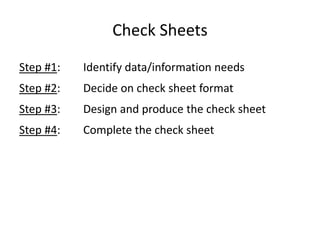
Check Sheets
Step #1: Identify data/information needs
Step #2: Decide on check sheet format
Step #3: Design and produce the check sheet
Step #4: Complete the check sheet
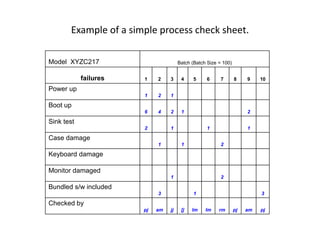
Example of a simple process check sheet.
Model XYZC217 Batch (Batch Size = 100)
failures 1 2 3 4 5 6 7 8 9 10
Power up
1 2 1
Boot up
6 4 2 1 2
Sink test
2 1 1 1
Case damage
1 1 2
Keyboard damage
Monitor damaged
1 2
Bundled s/w included
3 1 3
Checked by
pj am jj [j lm lm rm pj am pj
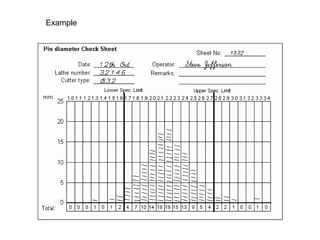
Example
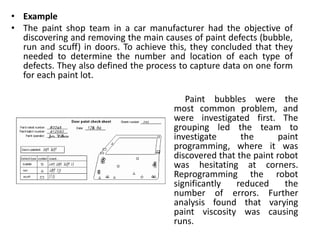
• Example
• The paint shop team in a car manufacturer had the objective of
discovering and removing the main causes of paint defects (bubble,
run and scuff) in doors. To achieve this, they concluded that they
needed to determine the number and location of each type of
defects. They also defined the process to capture data on one form
for each paint lot.
Paint bubbles were the
most common problem, and
were investigated first. The
grouping led the team to
investigate the paint
programming, where it was
discovered that the paint robot
was hesitating at corners.
Reprogramming the robot
significantly reduced the
number of errors. Further
analysis found that varying
paint viscosity was causing
runs.
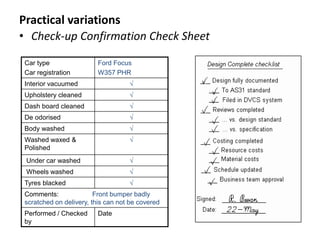
• Check-up Confirmation Check Sheet
Car type
Car registration
Ford Focus
W357 PHR
Interior vacuumed √
Upholstery cleaned √
Dash board cleaned √
De odorised √
Body washed √
Washed waxed &
Polished
√
Under car washed √
Wheels washed √
Tyres blacked √
Comments: Front bumper badly
scratched on delivery, this can not be covered
Performed / Checked
by
Date
Practical variations
Quality Tool
Histogram
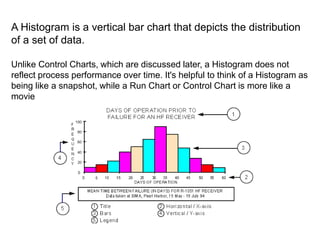
A Histogram is a vertical bar chart that depicts the distribution
of a set of data.
Unlike Control Charts, which are discussed later, a Histogram does not
reflect process performance over time. It's helpful to think of a Histogram as
being like a snapshot, while a Run Chart or Control Chart is more like a
movie
•Summarize large data sets graphically
When to use it
•Assist in decision making.
•Compare process results with specification limits
•Communicate information graphically.
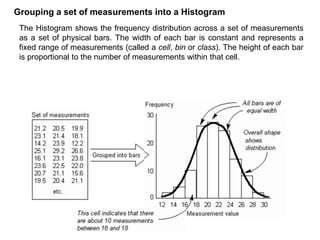
The Histogram shows the frequency distribution across a set of measurements
as a set of physical bars. The width of each bar is constant and represents a
fixed range of measurements (called a cell, bin or class). The height of each bar
is proportional to the number of measurements within that cell.
Grouping a set of measurements into a Histogram
Quality Tool
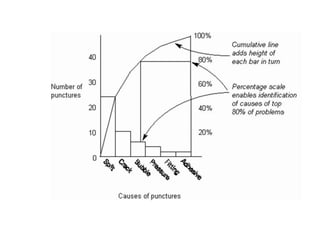
PARETO CHART
When to use it
• Use it when selecting the most important things on which to focus, thus
differentiating between the 'vital few' and the 'trivial many'.
• Use it, rather than a Bar Chart or Pie Chart to show the relative priority of a
set of numeric measurements.
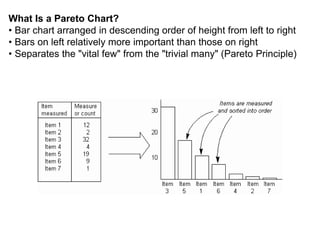
What Is a Pareto Chart?
• Bar chart arranged in descending order of height from left to right
• Bars on left relatively more important than those on right
• Separates the "vital few" from the "trivial many" (Pareto Principle)
Why Use a Pareto Chart?
• Breaks big problem into smaller pieces
• Identifies most significant factors
• Shows where to focus efforts
• Allows better use of limited resources
Quality Tool
Cause and Effect Diagram
(Fish Bone Diagram)
CAUSE & EFFECT DIAGRAM
Cause and Effect Diagram
• When to use it
• Use it when investigating a problem, to identify and select key problem
causes to investigate or address.
• Use it when working in a group, to gain a common understanding of
problem causes and their relationship.
The fishbone diagram identifies many possible causes for an effect
or problem. It can be used to structure a brainstorming session. It
immediately sorts ideas into useful categories.
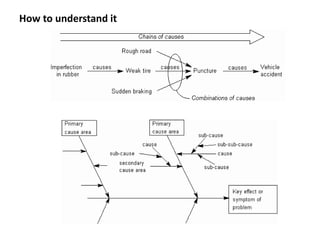
How to understand it
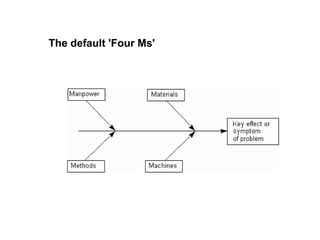
The default 'Four Ms'
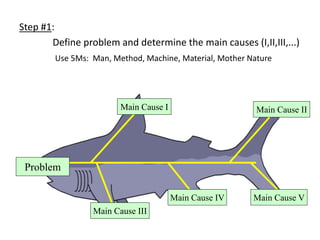
Step #1:
Define problem and determine the main causes (I,II,III,...)
Use 5Ms: Man, Method, Machine, Material, Mother Nature
Main Cause II
Main Cause I
Main Cause V
Main Cause IV
Main Cause III
Problem
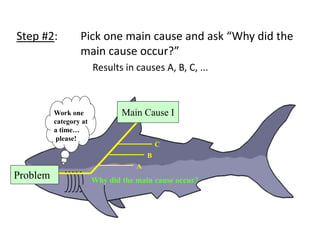
Step #2: Pick one main cause and ask “Why did the
main cause occur?”
Results in causes A, B, C, ...
Work one
category at
a time…
please!
Main Cause I
Why did the main cause occur?
C
A
B
Problem
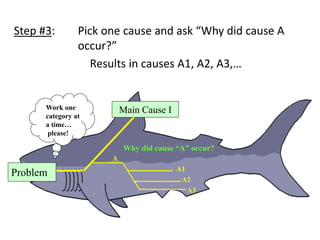
Step #3: Pick one cause and ask “Why did cause A
occur?”
Results in causes A1, A2, A3,…
Work one
category at
a time…
please!
Main Cause I
Why did cause “A” occur?
A
A1
A2
A3
Problem
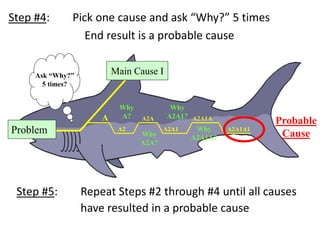
Step #4: Pick one cause and ask “Why?” 5 times
End result is a probable cause
Ask “Why?”
5 times?
Main Cause I
Why
A2A1?
A
A2
Why
A?
A2A1A1
A2A1
A2A
Why
A2A?
A2A1A
Why
A2A1A?
Probable
Cause
Problem
Step #5: Repeat Steps #2 through #4 until all causes
have resulted in a probable cause
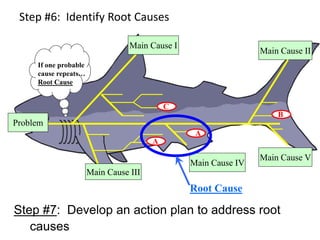
Step #6: Identify Root Causes
Main Cause II
Main Cause I
Main Cause V
Main Cause IV
Main Cause III
If one probable
cause repeats…
Root Cause
A
A
C
B
Root Cause
Problem
Step #7: Develop an action plan to address root
causes
Case Study
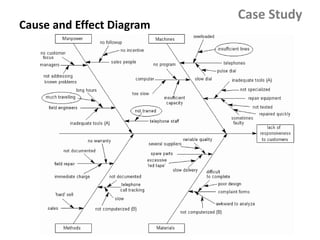
The managing director of a weighing machine company
received a number of irate letters, complaining of slow service
and a constantly engaged telephone. Rather surprised, he
asked his support and marketing managers to look into it. With
two other people, they first defined the key symptom as 'lack of
responsiveness to customers' and then met to brainstorm
possible causes, using a Cause-Effect Diagram, as illustrated.
Cause and Effect Diagram
Case Study
Quality Tool
SCATTER DIAGRAM
Scatter Diagram
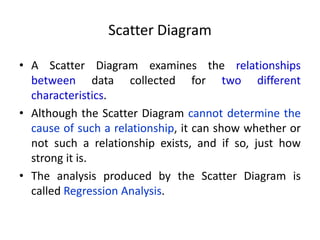
• A Scatter Diagram examines the relationships
between data collected for two different
characteristics.
• Although the Scatter Diagram cannot determine the
cause of such a relationship, it can show whether or
not such a relationship exists, and if so, just how
strong it is.
• The analysis produced by the Scatter Diagram is
called Regression Analysis.
When to use it
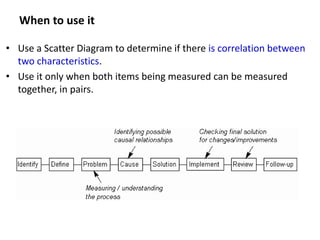
• Use a Scatter Diagram to determine if there is correlation between
two characteristics.
• Use it only when both items being measured can be measured
together, in pairs.
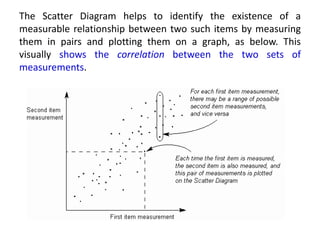
The Scatter Diagram helps to identify the existence of a
measurable relationship between two such items by measuring
them in pairs and plotting them on a graph, as below. This
visually shows the correlation between the two sets of
measurements.
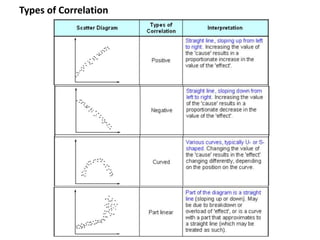
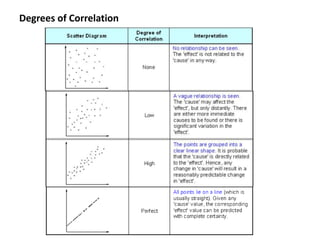
Degrees of Correlation
Types of Correlation
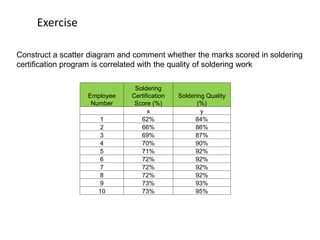
Exercise
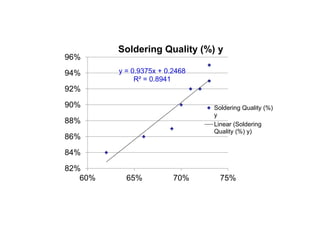
Construct a scatter diagram and comment whether the marks scored in soldering
certification program is correlated with the quality of soldering work
Employee
Number
Soldering
Certification
Score (%)
Soldering Quality
(%)
x y
1 62% 84%
2 66% 86%
3 69% 87%
4 70% 90%
5 71% 92%
6 72% 92%
7 72% 92%
8 72% 92%
9 73% 93%
10 73% 95%
y = 0.9375x + 0.2468
R² = 0.8941
82%
84%
86%
88%
90%
92%
94%
96%
60% 65% 70% 75%
Soldering Quality (%) y
Soldering Quality (%)
y
Linear (Soldering
Quality (%) y)
Quality Tool
CONTROL CHART
Control Chart
• The control chart is a graph used to study how a
process changes over time. Data are plotted in time
order.
• A control chart always has a central line for the
average, an upper line for the upper control limit and
a lower line for the lower control limit. These lines
are determined from historical data.
• By comparing current data to these lines, you can
draw conclusions about whether the process
variation is consistent (in control) or is unpredictable
(out of control, affected by special causes of
variation).
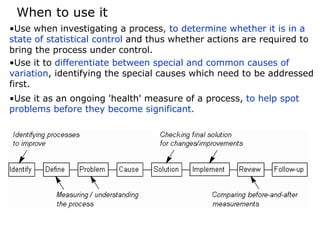
•Use when investigating a process, to determine whether it is in a
state of statistical control and thus whether actions are required to
bring the process under control.
•Use it to differentiate between special and common causes of
variation, identifying the special causes which need to be addressed
first.
•Use it as an ongoing 'health' measure of a process, to help spot
problems before they become significant.
When to use it
Concealed dynamics of Histogram
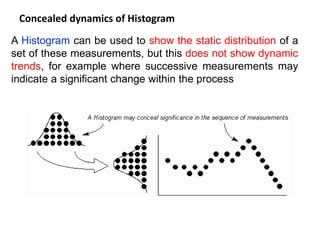
A Histogram can be used to show the static distribution of a
set of these measurements, but this does not show dynamic
trends, for example where successive measurements may
indicate a significant change within the process
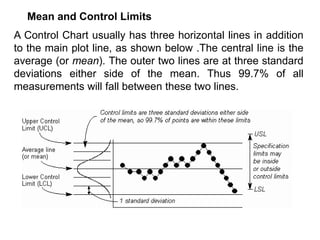
A Control Chart usually has three horizontal lines in addition
to the main plot line, as shown below .The central line is the
average (or mean). The outer two lines are at three standard
deviations either side of the mean. Thus 99.7% of all
measurements will fall between these two lines.
Mean and Control Limits
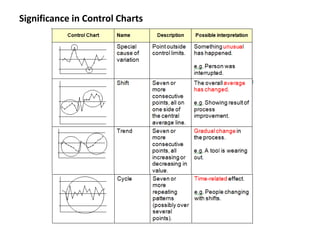
Significance in Control Charts
Creating a Control Chart
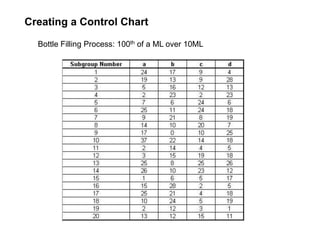
Bottle Filling Process: 100th of a ML over 10ML
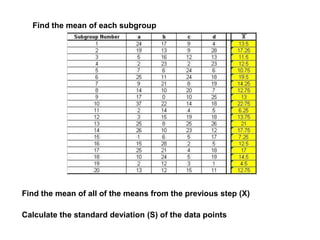
Find the mean of each subgroup
Find the mean of all of the means from the previous step (X)
Calculate the standard deviation (S) of the data points
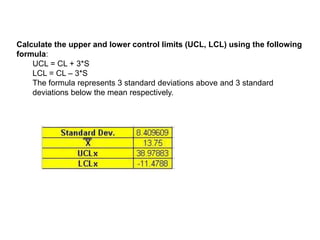
Calculate the upper and lower control limits (UCL, LCL) using the following
formula:
UCL = CL + 3*S
LCL = CL – 3*S
The formula represents 3 standard deviations above and 3 standard
deviations below the mean respectively.
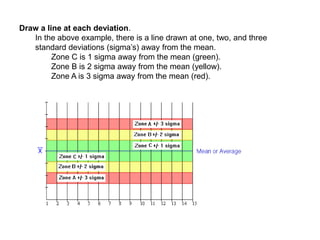
Draw a line at each deviation.
In the above example, there is a line drawn at one, two, and three
standard deviations (sigma’s) away from the mean.
Zone C is 1 sigma away from the mean (green).
Zone B is 2 sigma away from the mean (yellow).
Zone A is 3 sigma away from the mean (red).
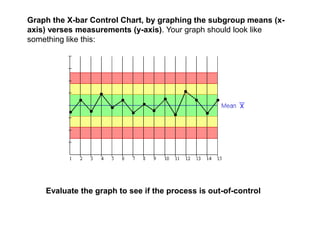
Graph the X-bar Control Chart, by graphing the subgroup means (x-
axis) verses measurements (y-axis). Your graph should look like
something like this:
Evaluate the graph to see if the process is out-of-control
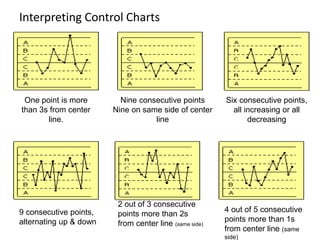
Interpreting Control Charts
One point is more
than 3s from center
line.
Nine consecutive points
Nine on same side of center
line
Six consecutive points,
all increasing or all
decreasing
9 consecutive points,
alternating up & down
2 out of 3 consecutive
points more than 2s
from center line (same side)
4 out of 5 consecutive
points more than 1s
from center line (same
side)

Quality_Control_Tools.ppt

  • 1.
    QUALITY CONTROL TOOLS FOR PROCESSIMPROVEMENT Flow Chart Check Sheet Pareto Diagram Cause & Effect Histogram Scatter Diagram Control Chart
  • 2.
    7 BASIC TOOLS 1.ParetoDiagram 2.Cause and Effect diagram 3.Flow Chart 4.Check Sheet 5.Histogram 6.Scatter Diagram 7.Control Chart 7 ADVANCED TOOLS 1.Affinity Diagram 2.Activity Node Diagram 3.Interrelationship Diagraph 4.Process Decision Program Chart 5.Matrix Diagram 6.Prioritization Matrix 7.Tree Diagram Tools for Process Improvement •Seven basic tools are more numeric •Seven advanced tools are more managerial
  • 3.
  • 4.
    PROCESS FLOW CHART Description: A process flow chart is a representation of sequences of operation of a process from the beginning to the end through certain symbols. It records the series of events, activities and decisions in a form which can be easily understood and communicated to all.
  • 5.
  • 7.
    Types of Flowcharts LinearFlowchart Displays the sequence of work steps that make up a process. Helps to identify rework and redundant or unnecessary steps. Deployment Flowchart Identifies the people involved at each step. Horizontal lines define customer-supplier relationships. Opportunity Flowchart Differentiates process activities as: • Value-added steps (VA) •Cost-added-only steps (CAO)
  • 8.
  • 9.
    When to useCheck Sheet •Use it when data is to be recorded manually, to ensure the data is accurately recorded and is easy to use later •Use it when the recording involves counting, classifying, checking or locating. •Use it when it is useful to see the distribution of measures as they are built up.
  • 10.
    Check Sheets Step #1:Identify data/information needs Step #2: Decide on check sheet format Step #3: Design and produce the check sheet Step #4: Complete the check sheet
  • 11.
    Example of asimple process check sheet. Model XYZC217 Batch (Batch Size = 100) failures 1 2 3 4 5 6 7 8 9 10 Power up 1 2 1 Boot up 6 4 2 1 2 Sink test 2 1 1 1 Case damage 1 1 2 Keyboard damage Monitor damaged 1 2 Bundled s/w included 3 1 3 Checked by pj am jj [j lm lm rm pj am pj
  • 12.
  • 13.
    • Example • Thepaint shop team in a car manufacturer had the objective of discovering and removing the main causes of paint defects (bubble, run and scuff) in doors. To achieve this, they concluded that they needed to determine the number and location of each type of defects. They also defined the process to capture data on one form for each paint lot. Paint bubbles were the most common problem, and were investigated first. The grouping led the team to investigate the paint programming, where it was discovered that the paint robot was hesitating at corners. Reprogramming the robot significantly reduced the number of errors. Further analysis found that varying paint viscosity was causing runs.
  • 14.
    • Check-up ConfirmationCheck Sheet Car type Car registration Ford Focus W357 PHR Interior vacuumed √ Upholstery cleaned √ Dash board cleaned √ De odorised √ Body washed √ Washed waxed & Polished √ Under car washed √ Wheels washed √ Tyres blacked √ Comments: Front bumper badly scratched on delivery, this can not be covered Performed / Checked by Date Practical variations
  • 15.
  • 16.
    A Histogram isa vertical bar chart that depicts the distribution of a set of data. Unlike Control Charts, which are discussed later, a Histogram does not reflect process performance over time. It's helpful to think of a Histogram as being like a snapshot, while a Run Chart or Control Chart is more like a movie
  • 17.
    •Summarize large datasets graphically When to use it •Assist in decision making. •Compare process results with specification limits •Communicate information graphically.
  • 18.
    The Histogram showsthe frequency distribution across a set of measurements as a set of physical bars. The width of each bar is constant and represents a fixed range of measurements (called a cell, bin or class). The height of each bar is proportional to the number of measurements within that cell. Grouping a set of measurements into a Histogram
  • 19.
  • 20.
    When to useit • Use it when selecting the most important things on which to focus, thus differentiating between the 'vital few' and the 'trivial many'. • Use it, rather than a Bar Chart or Pie Chart to show the relative priority of a set of numeric measurements.
  • 21.
    What Is aPareto Chart? • Bar chart arranged in descending order of height from left to right • Bars on left relatively more important than those on right • Separates the "vital few" from the "trivial many" (Pareto Principle)
  • 22.
    Why Use aPareto Chart? • Breaks big problem into smaller pieces • Identifies most significant factors • Shows where to focus efforts • Allows better use of limited resources
  • 24.
    Quality Tool Cause andEffect Diagram (Fish Bone Diagram) CAUSE & EFFECT DIAGRAM
  • 25.
    Cause and EffectDiagram • When to use it • Use it when investigating a problem, to identify and select key problem causes to investigate or address. • Use it when working in a group, to gain a common understanding of problem causes and their relationship. The fishbone diagram identifies many possible causes for an effect or problem. It can be used to structure a brainstorming session. It immediately sorts ideas into useful categories.
  • 26.
  • 27.
  • 28.
    Step #1: Define problemand determine the main causes (I,II,III,...) Use 5Ms: Man, Method, Machine, Material, Mother Nature Main Cause II Main Cause I Main Cause V Main Cause IV Main Cause III Problem
  • 29.
    Step #2: Pickone main cause and ask “Why did the main cause occur?” Results in causes A, B, C, ... Work one category at a time… please! Main Cause I Why did the main cause occur? C A B Problem
  • 30.
    Step #3: Pickone cause and ask “Why did cause A occur?” Results in causes A1, A2, A3,… Work one category at a time… please! Main Cause I Why did cause “A” occur? A A1 A2 A3 Problem
  • 31.
    Step #4: Pickone cause and ask “Why?” 5 times End result is a probable cause Ask “Why?” 5 times? Main Cause I Why A2A1? A A2 Why A? A2A1A1 A2A1 A2A Why A2A? A2A1A Why A2A1A? Probable Cause Problem Step #5: Repeat Steps #2 through #4 until all causes have resulted in a probable cause
  • 32.
    Step #6: IdentifyRoot Causes Main Cause II Main Cause I Main Cause V Main Cause IV Main Cause III If one probable cause repeats… Root Cause A A C B Root Cause Problem Step #7: Develop an action plan to address root causes
  • 33.
    Case Study The managingdirector of a weighing machine company received a number of irate letters, complaining of slow service and a constantly engaged telephone. Rather surprised, he asked his support and marketing managers to look into it. With two other people, they first defined the key symptom as 'lack of responsiveness to customers' and then met to brainstorm possible causes, using a Cause-Effect Diagram, as illustrated.
  • 34.
    Cause and EffectDiagram Case Study
  • 35.
  • 36.
    Scatter Diagram • AScatter Diagram examines the relationships between data collected for two different characteristics. • Although the Scatter Diagram cannot determine the cause of such a relationship, it can show whether or not such a relationship exists, and if so, just how strong it is. • The analysis produced by the Scatter Diagram is called Regression Analysis.
  • 37.
    When to useit • Use a Scatter Diagram to determine if there is correlation between two characteristics. • Use it only when both items being measured can be measured together, in pairs.
  • 38.
    The Scatter Diagramhelps to identify the existence of a measurable relationship between two such items by measuring them in pairs and plotting them on a graph, as below. This visually shows the correlation between the two sets of measurements.
  • 39.
  • 40.
  • 41.
    Exercise Construct a scatterdiagram and comment whether the marks scored in soldering certification program is correlated with the quality of soldering work Employee Number Soldering Certification Score (%) Soldering Quality (%) x y 1 62% 84% 2 66% 86% 3 69% 87% 4 70% 90% 5 71% 92% 6 72% 92% 7 72% 92% 8 72% 92% 9 73% 93% 10 73% 95%
  • 42.
    y = 0.9375x+ 0.2468 R² = 0.8941 82% 84% 86% 88% 90% 92% 94% 96% 60% 65% 70% 75% Soldering Quality (%) y Soldering Quality (%) y Linear (Soldering Quality (%) y)
  • 43.
  • 44.
    Control Chart • Thecontrol chart is a graph used to study how a process changes over time. Data are plotted in time order. • A control chart always has a central line for the average, an upper line for the upper control limit and a lower line for the lower control limit. These lines are determined from historical data. • By comparing current data to these lines, you can draw conclusions about whether the process variation is consistent (in control) or is unpredictable (out of control, affected by special causes of variation).
  • 45.
    •Use when investigatinga process, to determine whether it is in a state of statistical control and thus whether actions are required to bring the process under control. •Use it to differentiate between special and common causes of variation, identifying the special causes which need to be addressed first. •Use it as an ongoing 'health' measure of a process, to help spot problems before they become significant. When to use it
  • 46.
    Concealed dynamics ofHistogram A Histogram can be used to show the static distribution of a set of these measurements, but this does not show dynamic trends, for example where successive measurements may indicate a significant change within the process
  • 47.
    A Control Chartusually has three horizontal lines in addition to the main plot line, as shown below .The central line is the average (or mean). The outer two lines are at three standard deviations either side of the mean. Thus 99.7% of all measurements will fall between these two lines. Mean and Control Limits
  • 48.
  • 49.
    Creating a ControlChart Bottle Filling Process: 100th of a ML over 10ML
  • 50.
    Find the meanof each subgroup Find the mean of all of the means from the previous step (X) Calculate the standard deviation (S) of the data points
  • 51.
    Calculate the upperand lower control limits (UCL, LCL) using the following formula: UCL = CL + 3*S LCL = CL – 3*S The formula represents 3 standard deviations above and 3 standard deviations below the mean respectively.
  • 52.
    Draw a lineat each deviation. In the above example, there is a line drawn at one, two, and three standard deviations (sigma’s) away from the mean. Zone C is 1 sigma away from the mean (green). Zone B is 2 sigma away from the mean (yellow). Zone A is 3 sigma away from the mean (red).
  • 53.
    Graph the X-barControl Chart, by graphing the subgroup means (x- axis) verses measurements (y-axis). Your graph should look like something like this: Evaluate the graph to see if the process is out-of-control
  • 54.
    Interpreting Control Charts Onepoint is more than 3s from center line. Nine consecutive points Nine on same side of center line Six consecutive points, all increasing or all decreasing 9 consecutive points, alternating up & down 2 out of 3 consecutive points more than 2s from center line (same side) 4 out of 5 consecutive points more than 1s from center line (same side)