Digital Image Processing
III. Intensity transformations
Hamid Laga
Institut Telecom / Telecom Lille1

hamid@img.cs.titech.ac.jp
http://www.img.cs.titech.ac.jp/~hamid/
In the previous lecture
• Colors
• The results of the interaction of light with the surface as observed by a
sensor from a viewing point
(the surface absorbs some light, depending on the material properties)

• Image
• a 2D function which encodes the color at each location of the image plane

• Digital image
• a 2D matrix, each entry is called a pixel, it can have a single value
(grayscale) or a vector of 3 values (color)

• Color spaces
• There are many color spaces, from now we will use the RGB color space.
• If we need to use another color space I will mention it explicitly

2
In the this lecture
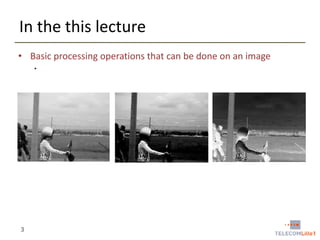
• Basic processing operations that can be done on an image
•

3
Intensity transformations
• Outline
– Basic intensity transformations
(Image negatives, log transformations, power-law or Gamma
transformations)

– Image histogram
(Definitions, histogram equalization, local histogram processing,
histogram statistics for image enhancement)

– Your first TP (to be done in Matlab)
(Introduction to Matlab, Image manipulation with Matlab, …)

– Summary

4
Some definitions
• Spatial domain
• The image plane itself
• Processing in the spatial domain deals with direct manipulation of the
image pixels

• Other domains
• Frequency domain
• Consider the image as a 2D signal and apply Fourier transform
• Process the image in the transformed domain
• Apply the inverse transform to return into the spatial domain.

• Types of transformations that can be applied to an image
• Intensity transformations (this lecture)
• Operate on single pixels

• Spatial filtering (next lecture)
• Working on a neighborhood of every pixel

5
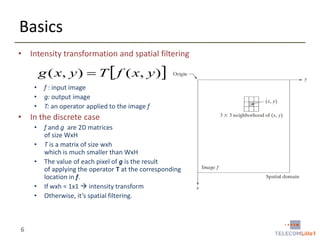
Basics
• Intensity transformation and spatial filtering

g ( x, y )  T  f ( x, y )
•
•
•

f : input image
g: output image
T: an operator applied to the image f

• In the discrete case
•
•
•
•
•

6

f and g are 2D matrices
of size WxH
T is a matrix of size wxh
which is much smaller than WxH
The value of each pixel of g is the result
of applying the operator T at the corresponding
location in f.
If wxh = 1x1  intensity transform
Otherwise, it’s spatial filtering.
Basic intensity transforms
• Definition
• g(x, y) = T (f(x, y))

• Examples
• Image negatives

• Log transformations
• Power-law (Gamma) transformations

• In the following
• Each image is represented with a 2D matrix of L intensity levels. That is each
pixel takes a value between 0 and L-1

7
Basic intensity transforms
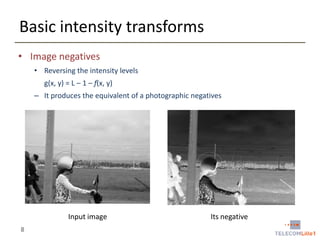
• Image negatives
• Reversing the intensity levels
g(x, y) = L – 1 – f(x, y)
– It produces the equivalent of a photographic negatives

Input image
8

Its negative
Basic intensity transforms
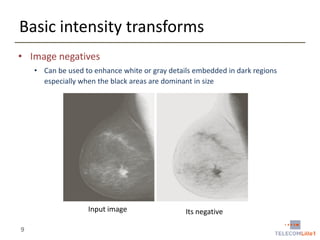
• Image negatives
• Can be used to enhance white or gray details embedded in dark regions
especially when the black areas are dominant in size

Input image
9

Its negative
Basic intensity transforms
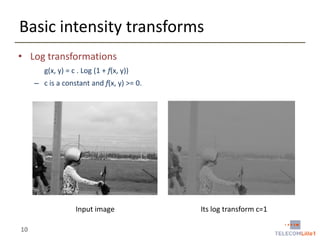
• Log transformations
g(x, y) = c . Log (1 + f(x, y))
– c is a constant and f(x, y) >= 0.

Input image
10

Its log transform c=1
Basic intensity transforms
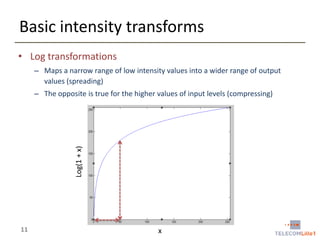
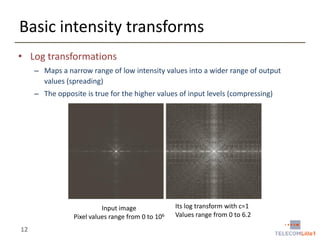
• Log transformations
– Maps a narrow range of low intensity values into a wider range of output
values (spreading)

Log(1 + x)

– The opposite is true for the higher values of input levels (compressing)

11

x
Basic intensity transforms
• Log transformations
– Maps a narrow range of low intensity values into a wider range of output
values (spreading)
– The opposite is true for the higher values of input levels (compressing)

Input image
Pixel values range from 0 to 106

12

Its log transform with c=1
Values range from 0 to 6.2
Basic intensity transforms
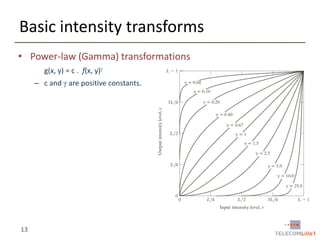
• Power-law (Gamma) transformations
g(x, y) = c . f(x, y)
– c and  are positive constants.

13
Basic intensity transforms
• Power-law (Gamma) transformations
g(x, y) = c . f(x, y)
– c and  are positive constants.

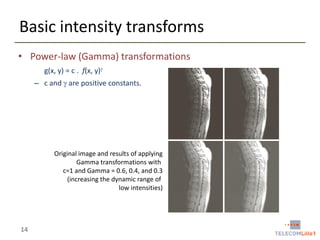
Original image and results of applying
Gamma transformations with
c=1 and Gamma = 0.6, 0.4, and 0.3
(increasing the dynamic range of
low intensities)

14
Basic intensity transforms
• Power-law (Gamma) transformations
g(x, y) = c . f(x, y)
– c and  are positive constants.

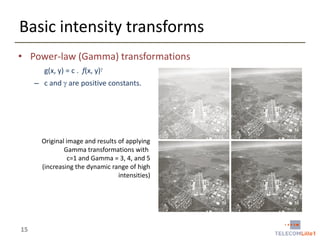
Original image and results of applying
Gamma transformations with
c=1 and Gamma = 3, 4, and 5
(increasing the dynamic range of high
intensities)

15
Basic intensity transforms
• Piecewise linear transformation functions
– Piecewise linear functions can be arbitrary complex
 more flexibility in the design of the transformation

16
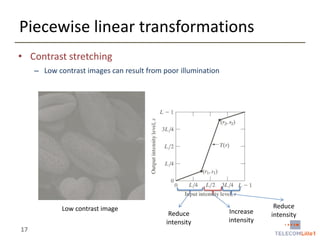
Piecewise linear transformations
• Contrast stretching
– Low contrast images can result from poor illumination

Low contrast image

17

Reduce
intensity

Increase
intensity

Reduce
intensity
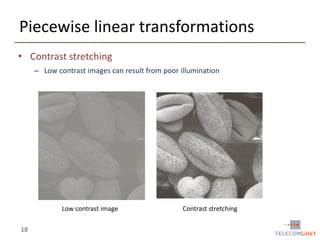
Piecewise linear transformations
• Contrast stretching
– Low contrast images can result from poor illumination

Low contrast image

18

Contrast stretching
Intensity transformations
• Outline
– Basic intensity transformations
(Image negatives, log transformations, power-law or Gamma
transformations, piecewise-linear transformation functions)

– Image histogram
(Definitions, histogram equalization, histogram matching)

– Your first TP (to be done in Matlab)
(Introduction to Matlab, Image manipulation with Matlab, …)

– Summary

19
Image histogram - definitions
• Histogram
– The histogram function is defined over all possible
intensity levels.
– For each intensity level, its value is equal to the number of
the pixels with that intensity.

• Applications
– Image enhancement, compression, segmentation
– Very popular tool for realtime image processing

20
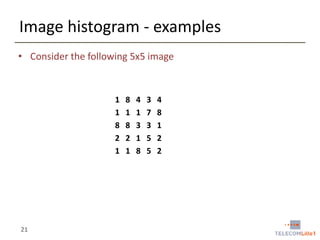
Image histogram - examples
• Consider the following 5x5 image

1
1
8
2
1

21

8
1
8
2
1

4
1
3
1
8

3
7
3
5
5

4
8
1
2
2
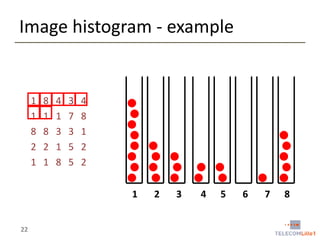
Image histogram - example

1
1
8
2
1

8
1
8
2
1

4
1
3
1
8

3
7
3
5
5

4
8
1
2
2
1

22

2

3

4

5

6

7

8
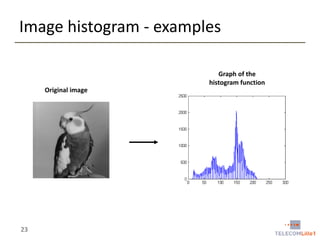
Image histogram - examples
Graph of the
histogram function
Original image

23
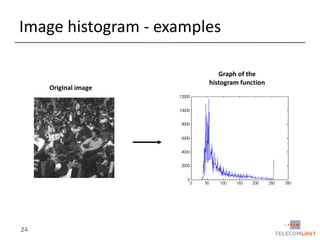
Image histogram - examples

Original image

24

Graph of the
histogram function
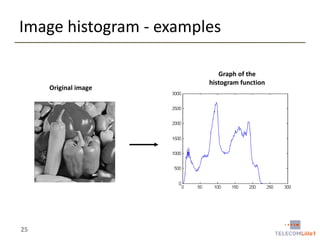
Image histogram - examples

Original image

25

Graph of the
histogram function
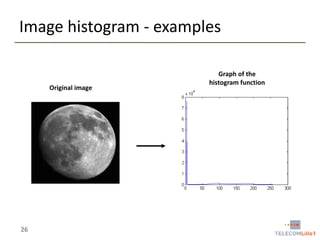
Image histogram - examples

Original image

26

Graph of the
histogram function
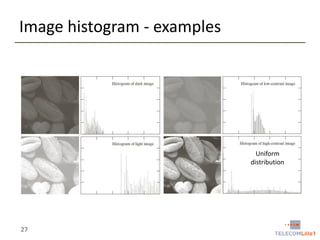
Image histogram - examples

Uniform
distribution

27
Image histogram - definitions
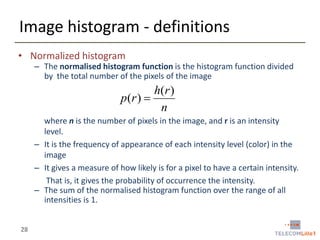
• Normalized histogram

– The normalised histogram function is the histogram function divided
by the total number of the pixels of the image

h( r )
p(r ) 
n
where n is the number of pixels in the image, and r is an intensity
level.
– It is the frequency of appearance of each intensity level (color) in the
image
– It gives a measure of how likely is for a pixel to have a certain intensity.
That is, it gives the probability of occurrence the intensity.
– The sum of the normalised histogram function over the range of all
intensities is 1.
28
Cumulative Distribution Function (CDF)
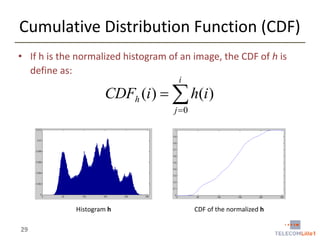
• If h is the normalized histogram of an image, the CDF of h is
define as:
i

CDFh (i )   h(i )
j 0

Histogram h

29

CDF of the normalized h
Histogram equalization
• Goal
• Increase the global contrast of an image by design a transformation (mapping) T
that that makes pixel intensities uniformly distributed over the whole range [0, L-1]

• Input
• An image f of intensity levels in [0, L-1]
• Intensity levels can be viewed as random variables
• Let’s hf be the normalized histogram of f.
hf is also the probability distribution function which we denote by Pf
• We denote by r intensity values of f

• Output
• An image g = T(f) such that the intensities of g are uniformly over the range [0, L1].
• This will improve the contrast by spreading out the most frequent intensity values

• We denote by s = T(r).

30
Review of probabilities
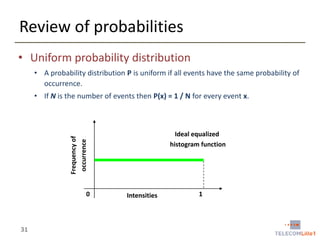
• Uniform probability distribution
• A probability distribution P is uniform if all events have the same probability of
occurrence.
• If N is the number of events then P(x) = 1 / N for every event x.

Frequency of
occurrence

Ideal equalized
histogram function

0

31

Intensities

1
Histogram equalization
• We want to compute
• An image g = T(f) such that the intensities of g are better distributed on the
histogram hg
• hg as a PDF, the intensities of g should follow a uniform distribution.

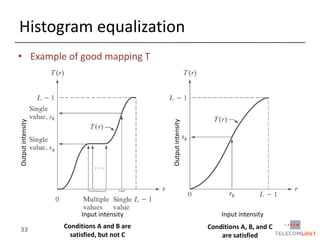
• Requirements for a good mapping T
• Condition A: T is required to be a monotonically increasing function in the
interval [0, L-1]
• That is if x < y  T(x) <= T(y)
• Avoids reversing intensities

• Condition B: x  [0, L-1]  T(x)  [0, L-1]
• This guarantees that the range of output intensities are the same as the range of input
intensities.

• Condition C: You may require strict monotonicity
• x < y  T(x) < T(y)
• This guarantees the mapping (or transformation )T is one-to-one.

32
Histogram equalization

Output intensity

Output intensity

• Example of good mapping T

Input intensity

33

Conditions A and B are
satisfied, but not C

Input intensity
Conditions A, B, and C
are satisfied
Histogram equalization
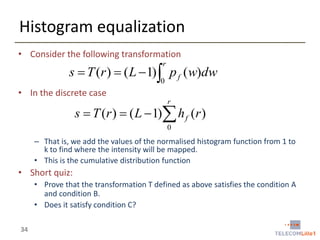
• Consider the following transformation
r

s  T (r )  ( L  1) p f (w)dw
0

• In the discrete case
r

s  T (r )  ( L  1) h f (r )
0

– That is, we add the values of the normalised histogram function from 1 to
k to find where the intensity will be mapped.
• This is the cumulative distribution function

• Short quiz:
• Prove that the transformation T defined as above satisfies the condition A
and condition B.
• Does it satisfy condition C?
34
Histogram equalization
• Solution to the Quiz

35
Histogram equalization
• Interesting property
• If we apply the transformation T to the image f we get an image g of
histogram hg such that

1
s [1, L  1], hg (s) 
L 1
• This is a uniform distribution !!!

36
Histogram equalization – Algorithm
• Input
• A discrete image f of L levels of intensity

• Algorithm
• Step1: Compute the normalized histogram hf of input image f
• Step 2: Compute the CDF of hf, denoted CDFhf
• Step 3: Find a transformation T: [0, L-1]  [0, L-1] such that
r

T (r )  ( L  1) h(q )  ( L  1)CDFhf (r )
q 0

• Step 4: Apply the transformation on each pixel of the input image f

• Propert ies
• The procedure is fully automatic and very fast
• Suitable for real-time applications
37
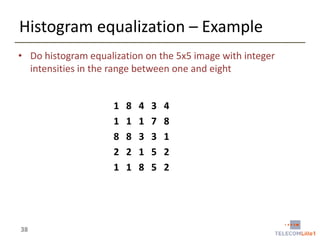
Histogram equalization – Example
• Do histogram equalization on the 5x5 image with integer
intensities in the range between one and eight
1
1
8
2
1

38

8
1
8
2
1

4
1
3
1
8

3
7
3
5
5

4
8
1
2
2
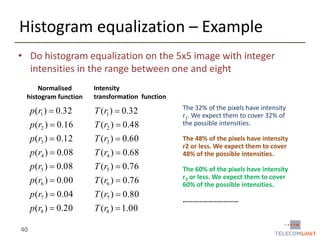
Histogram equalization – Example
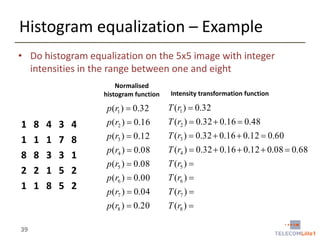
• Do histogram equalization on the 5x5 image with integer
intensities in the range between one and eight
Normalised
histogram function

Intensity transformation function

p (r1 )  0.32

39

8
1
8
2
1

4
1
3
1
8

3
7
3
5
5

4
8
1
2
2

p (r2 )  0.16

T (r2 )  0.32  0.16  0.48

p (r3 )  0.12

T (r3 )  0.32  0.16  0.12  0.60

p (r4 )  0.08

T (r4 )  0.32  0.16  0.12  0.08  0.68

p (r5 )  0.08

T (r5 ) 

p (r6 )  0.00

T (r6 ) 

p (r7 )  0.04

T (r7 ) 

p (r8 )  0.20

1
1
8
2
1

T (r1 )  0.32

T (r8 ) 
Histogram equalization – Example
• Do histogram equalization on the 5x5 image with integer
intensities in the range between one and eight
Normalised
histogram function

Intensity
transformation function

p (r1 )  0.32
p (r2 )  0.16

T (r2 )  0.48

p (r3 )  0.12

T (r3 )  0.60

p (r4 )  0.08

T (r4 )  0.68

p (r5 )  0.08

T (r5 )  0.76

p (r6 )  0.00

T (r6 )  0.76

p (r7 )  0.04

T (r7 )  0.80

p (r8 )  0.20
40

T (r1 )  0.32

T (r8 )  1.00

The 32% of the pixels have intensity
r1. We expect them to cover 32% of
the possible intensities.
The 48% of the pixels have intensity
r2 or less. We expect them to cover
48% of the possible intensities.
The 60% of the pixels have intensity
r3 or less. We expect them to cover
60% of the possible intensities.
……………………………
Histogram equalization – Example

41
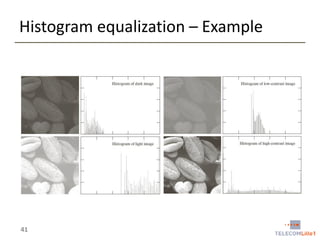
Histogram equalization – Example

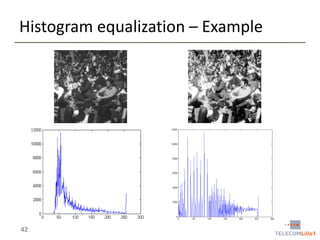
42
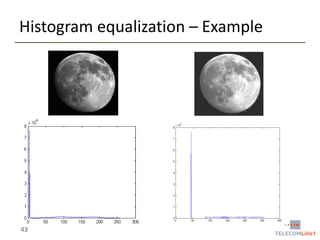
Histogram equalization – Example

43
Histogram equalization of color images
• The above procedure is for grayscale images
• For color images
• Apply separately the procedure to each of the three channels
•  will yield in a dramatic change in the color balance

• NOT RECOMMENED unless you have a good reason for doing that.

• Recommended method
• Convert the image into another color space such as the Lab color space OR
HSL/HSV color space

• Apply the histogram equalization on the Luminance channel
• Convert back into the RGB color space.

44
Lab color space
• Lab color space is designed to approximate the human vision
• The L component matches the human perception of lightness
• The Lab space is much larger than the gamut of computer displays.

• Conversions
• Will be covered in a special lecture on Colors.

45
Histogram matching
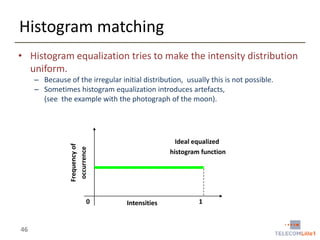
• Histogram equalization tries to make the intensity distribution
uniform.
– Because of the irregular initial distribution, usually this is not possible.
– Sometimes histogram equalization introduces artefacts,
(see the example with the photograph of the moon).

Frequency of
occurrence

Ideal equalized
histogram function

0

46

Intensities

1
Histogram matching
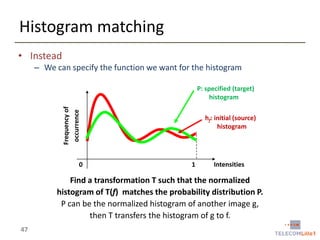
• Instead
– We can specify the function we want for the histogram

Frequency of
occurrence

P: specified (target)
histogram

0

hf: initial (source)
histogram

1

Intensities

Find a transformation T such that the normalized
histogram of T(f) matches the probability distribution P.
P can be the normalized histogram of another image g,
then T transfers the histogram of g to f.
47
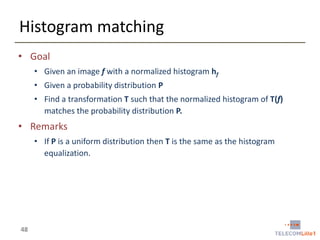
Histogram matching
• Goal
• Given an image f with a normalized histogram hf
• Given a probability distribution P
• Find a transformation T such that the normalized histogram of T(f)
matches the probability distribution P.

• Remarks
• If P is a uniform distribution then T is the same as the histogram
equalization.

48
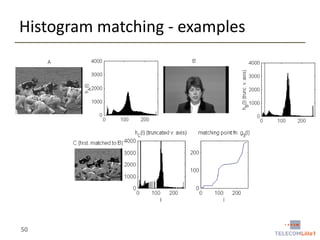
Histogram matching - procedure
• Input
• A source image f and a target distribution function P
• P can be the normalized histogram of another image g

• Procedure
• Calculate the histogram hf of f
• Calculate the CDFf of f and the CDFP of P
• For each gray level x  [0, L-1], find the gray level y for which
• CDFf(x) = CDFP(y)
• We denote this mapping by M
• Can be implemented as a lookup table

• Apply the mapping M to all pixels of the input image f

49
Histogram matching - examples

50
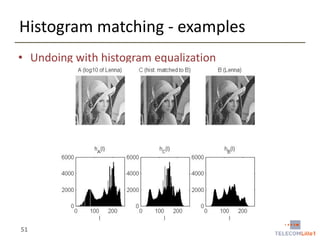
Histogram matching - examples
• Undoing with histogram equalization

51
Summary
• What we have seen
• Basic intensity transformations applied to individual pixels
• Histogram
• A very powerful tool in image processing
• A connection to probability and statistics

• Histogram equalization
• Histogram matching
• Enables the matching of the histogram of one image to the histogram of another
image

52
Next
• Spatial filtering, convolution, and enhancement
– Fundamentals
(Kernel, convolution, filtering)

– Smoothing
(Linear / non-linear filters)

– Sharpening
(The Laplacian - 2nd order derivatives, the gradient - first order
derivatives)

– Image pyramids
(The Gaussian pyramid)

– Filtering in the frequency domain
(just a short introduction)
53

4.intensity transformations

  • 1.
    Digital Image Processing III.Intensity transformations Hamid Laga Institut Telecom / Telecom Lille1 hamid@img.cs.titech.ac.jp http://www.img.cs.titech.ac.jp/~hamid/
  • 2.
    In the previouslecture • Colors • The results of the interaction of light with the surface as observed by a sensor from a viewing point (the surface absorbs some light, depending on the material properties) • Image • a 2D function which encodes the color at each location of the image plane • Digital image • a 2D matrix, each entry is called a pixel, it can have a single value (grayscale) or a vector of 3 values (color) • Color spaces • There are many color spaces, from now we will use the RGB color space. • If we need to use another color space I will mention it explicitly 2
  • 3.
    In the thislecture • Basic processing operations that can be done on an image • 3
  • 4.
    Intensity transformations • Outline –Basic intensity transformations (Image negatives, log transformations, power-law or Gamma transformations) – Image histogram (Definitions, histogram equalization, local histogram processing, histogram statistics for image enhancement) – Your first TP (to be done in Matlab) (Introduction to Matlab, Image manipulation with Matlab, …) – Summary 4
  • 5.
    Some definitions • Spatialdomain • The image plane itself • Processing in the spatial domain deals with direct manipulation of the image pixels • Other domains • Frequency domain • Consider the image as a 2D signal and apply Fourier transform • Process the image in the transformed domain • Apply the inverse transform to return into the spatial domain. • Types of transformations that can be applied to an image • Intensity transformations (this lecture) • Operate on single pixels • Spatial filtering (next lecture) • Working on a neighborhood of every pixel 5
  • 6.
    Basics • Intensity transformationand spatial filtering g ( x, y )  T  f ( x, y ) • • • f : input image g: output image T: an operator applied to the image f • In the discrete case • • • • • 6 f and g are 2D matrices of size WxH T is a matrix of size wxh which is much smaller than WxH The value of each pixel of g is the result of applying the operator T at the corresponding location in f. If wxh = 1x1  intensity transform Otherwise, it’s spatial filtering.
  • 7.
    Basic intensity transforms •Definition • g(x, y) = T (f(x, y)) • Examples • Image negatives • Log transformations • Power-law (Gamma) transformations • In the following • Each image is represented with a 2D matrix of L intensity levels. That is each pixel takes a value between 0 and L-1 7
  • 8.
    Basic intensity transforms •Image negatives • Reversing the intensity levels g(x, y) = L – 1 – f(x, y) – It produces the equivalent of a photographic negatives Input image 8 Its negative
  • 9.
    Basic intensity transforms •Image negatives • Can be used to enhance white or gray details embedded in dark regions especially when the black areas are dominant in size Input image 9 Its negative
  • 10.
    Basic intensity transforms •Log transformations g(x, y) = c . Log (1 + f(x, y)) – c is a constant and f(x, y) >= 0. Input image 10 Its log transform c=1
  • 11.
    Basic intensity transforms •Log transformations – Maps a narrow range of low intensity values into a wider range of output values (spreading) Log(1 + x) – The opposite is true for the higher values of input levels (compressing) 11 x
  • 12.
    Basic intensity transforms •Log transformations – Maps a narrow range of low intensity values into a wider range of output values (spreading) – The opposite is true for the higher values of input levels (compressing) Input image Pixel values range from 0 to 106 12 Its log transform with c=1 Values range from 0 to 6.2
  • 13.
    Basic intensity transforms •Power-law (Gamma) transformations g(x, y) = c . f(x, y) – c and  are positive constants. 13
  • 14.
    Basic intensity transforms •Power-law (Gamma) transformations g(x, y) = c . f(x, y) – c and  are positive constants. Original image and results of applying Gamma transformations with c=1 and Gamma = 0.6, 0.4, and 0.3 (increasing the dynamic range of low intensities) 14
  • 15.
    Basic intensity transforms •Power-law (Gamma) transformations g(x, y) = c . f(x, y) – c and  are positive constants. Original image and results of applying Gamma transformations with c=1 and Gamma = 3, 4, and 5 (increasing the dynamic range of high intensities) 15
  • 16.
    Basic intensity transforms •Piecewise linear transformation functions – Piecewise linear functions can be arbitrary complex  more flexibility in the design of the transformation 16
  • 17.
    Piecewise linear transformations •Contrast stretching – Low contrast images can result from poor illumination Low contrast image 17 Reduce intensity Increase intensity Reduce intensity
  • 18.
    Piecewise linear transformations •Contrast stretching – Low contrast images can result from poor illumination Low contrast image 18 Contrast stretching
  • 19.
    Intensity transformations • Outline –Basic intensity transformations (Image negatives, log transformations, power-law or Gamma transformations, piecewise-linear transformation functions) – Image histogram (Definitions, histogram equalization, histogram matching) – Your first TP (to be done in Matlab) (Introduction to Matlab, Image manipulation with Matlab, …) – Summary 19
  • 20.
    Image histogram -definitions • Histogram – The histogram function is defined over all possible intensity levels. – For each intensity level, its value is equal to the number of the pixels with that intensity. • Applications – Image enhancement, compression, segmentation – Very popular tool for realtime image processing 20
  • 21.
    Image histogram -examples • Consider the following 5x5 image 1 1 8 2 1 21 8 1 8 2 1 4 1 3 1 8 3 7 3 5 5 4 8 1 2 2
  • 22.
    Image histogram -example 1 1 8 2 1 8 1 8 2 1 4 1 3 1 8 3 7 3 5 5 4 8 1 2 2 1 22 2 3 4 5 6 7 8
  • 23.
    Image histogram -examples Graph of the histogram function Original image 23
  • 24.
    Image histogram -examples Original image 24 Graph of the histogram function
  • 25.
    Image histogram -examples Original image 25 Graph of the histogram function
  • 26.
    Image histogram -examples Original image 26 Graph of the histogram function
  • 27.
    Image histogram -examples Uniform distribution 27
  • 28.
    Image histogram -definitions • Normalized histogram – The normalised histogram function is the histogram function divided by the total number of the pixels of the image h( r ) p(r )  n where n is the number of pixels in the image, and r is an intensity level. – It is the frequency of appearance of each intensity level (color) in the image – It gives a measure of how likely is for a pixel to have a certain intensity. That is, it gives the probability of occurrence the intensity. – The sum of the normalised histogram function over the range of all intensities is 1. 28
  • 29.
    Cumulative Distribution Function(CDF) • If h is the normalized histogram of an image, the CDF of h is define as: i CDFh (i )   h(i ) j 0 Histogram h 29 CDF of the normalized h
  • 30.
    Histogram equalization • Goal •Increase the global contrast of an image by design a transformation (mapping) T that that makes pixel intensities uniformly distributed over the whole range [0, L-1] • Input • An image f of intensity levels in [0, L-1] • Intensity levels can be viewed as random variables • Let’s hf be the normalized histogram of f. hf is also the probability distribution function which we denote by Pf • We denote by r intensity values of f • Output • An image g = T(f) such that the intensities of g are uniformly over the range [0, L1]. • This will improve the contrast by spreading out the most frequent intensity values • We denote by s = T(r). 30
  • 31.
    Review of probabilities •Uniform probability distribution • A probability distribution P is uniform if all events have the same probability of occurrence. • If N is the number of events then P(x) = 1 / N for every event x. Frequency of occurrence Ideal equalized histogram function 0 31 Intensities 1
  • 32.
    Histogram equalization • Wewant to compute • An image g = T(f) such that the intensities of g are better distributed on the histogram hg • hg as a PDF, the intensities of g should follow a uniform distribution. • Requirements for a good mapping T • Condition A: T is required to be a monotonically increasing function in the interval [0, L-1] • That is if x < y  T(x) <= T(y) • Avoids reversing intensities • Condition B: x  [0, L-1]  T(x)  [0, L-1] • This guarantees that the range of output intensities are the same as the range of input intensities. • Condition C: You may require strict monotonicity • x < y  T(x) < T(y) • This guarantees the mapping (or transformation )T is one-to-one. 32
  • 33.
    Histogram equalization Output intensity Outputintensity • Example of good mapping T Input intensity 33 Conditions A and B are satisfied, but not C Input intensity Conditions A, B, and C are satisfied
  • 34.
    Histogram equalization • Considerthe following transformation r s  T (r )  ( L  1) p f (w)dw 0 • In the discrete case r s  T (r )  ( L  1) h f (r ) 0 – That is, we add the values of the normalised histogram function from 1 to k to find where the intensity will be mapped. • This is the cumulative distribution function • Short quiz: • Prove that the transformation T defined as above satisfies the condition A and condition B. • Does it satisfy condition C? 34
  • 35.
  • 36.
    Histogram equalization • Interestingproperty • If we apply the transformation T to the image f we get an image g of histogram hg such that 1 s [1, L  1], hg (s)  L 1 • This is a uniform distribution !!! 36
  • 37.
    Histogram equalization –Algorithm • Input • A discrete image f of L levels of intensity • Algorithm • Step1: Compute the normalized histogram hf of input image f • Step 2: Compute the CDF of hf, denoted CDFhf • Step 3: Find a transformation T: [0, L-1]  [0, L-1] such that r T (r )  ( L  1) h(q )  ( L  1)CDFhf (r ) q 0 • Step 4: Apply the transformation on each pixel of the input image f • Propert ies • The procedure is fully automatic and very fast • Suitable for real-time applications 37
  • 38.
    Histogram equalization –Example • Do histogram equalization on the 5x5 image with integer intensities in the range between one and eight 1 1 8 2 1 38 8 1 8 2 1 4 1 3 1 8 3 7 3 5 5 4 8 1 2 2
  • 39.
    Histogram equalization –Example • Do histogram equalization on the 5x5 image with integer intensities in the range between one and eight Normalised histogram function Intensity transformation function p (r1 )  0.32 39 8 1 8 2 1 4 1 3 1 8 3 7 3 5 5 4 8 1 2 2 p (r2 )  0.16 T (r2 )  0.32  0.16  0.48 p (r3 )  0.12 T (r3 )  0.32  0.16  0.12  0.60 p (r4 )  0.08 T (r4 )  0.32  0.16  0.12  0.08  0.68 p (r5 )  0.08 T (r5 )  p (r6 )  0.00 T (r6 )  p (r7 )  0.04 T (r7 )  p (r8 )  0.20 1 1 8 2 1 T (r1 )  0.32 T (r8 ) 
  • 40.
    Histogram equalization –Example • Do histogram equalization on the 5x5 image with integer intensities in the range between one and eight Normalised histogram function Intensity transformation function p (r1 )  0.32 p (r2 )  0.16 T (r2 )  0.48 p (r3 )  0.12 T (r3 )  0.60 p (r4 )  0.08 T (r4 )  0.68 p (r5 )  0.08 T (r5 )  0.76 p (r6 )  0.00 T (r6 )  0.76 p (r7 )  0.04 T (r7 )  0.80 p (r8 )  0.20 40 T (r1 )  0.32 T (r8 )  1.00 The 32% of the pixels have intensity r1. We expect them to cover 32% of the possible intensities. The 48% of the pixels have intensity r2 or less. We expect them to cover 48% of the possible intensities. The 60% of the pixels have intensity r3 or less. We expect them to cover 60% of the possible intensities. ……………………………
  • 41.
  • 42.
  • 43.
  • 44.
    Histogram equalization ofcolor images • The above procedure is for grayscale images • For color images • Apply separately the procedure to each of the three channels •  will yield in a dramatic change in the color balance • NOT RECOMMENED unless you have a good reason for doing that. • Recommended method • Convert the image into another color space such as the Lab color space OR HSL/HSV color space • Apply the histogram equalization on the Luminance channel • Convert back into the RGB color space. 44
  • 45.
    Lab color space •Lab color space is designed to approximate the human vision • The L component matches the human perception of lightness • The Lab space is much larger than the gamut of computer displays. • Conversions • Will be covered in a special lecture on Colors. 45
  • 46.
    Histogram matching • Histogramequalization tries to make the intensity distribution uniform. – Because of the irregular initial distribution, usually this is not possible. – Sometimes histogram equalization introduces artefacts, (see the example with the photograph of the moon). Frequency of occurrence Ideal equalized histogram function 0 46 Intensities 1
  • 47.
    Histogram matching • Instead –We can specify the function we want for the histogram Frequency of occurrence P: specified (target) histogram 0 hf: initial (source) histogram 1 Intensities Find a transformation T such that the normalized histogram of T(f) matches the probability distribution P. P can be the normalized histogram of another image g, then T transfers the histogram of g to f. 47
  • 48.
    Histogram matching • Goal •Given an image f with a normalized histogram hf • Given a probability distribution P • Find a transformation T such that the normalized histogram of T(f) matches the probability distribution P. • Remarks • If P is a uniform distribution then T is the same as the histogram equalization. 48
  • 49.
    Histogram matching -procedure • Input • A source image f and a target distribution function P • P can be the normalized histogram of another image g • Procedure • Calculate the histogram hf of f • Calculate the CDFf of f and the CDFP of P • For each gray level x  [0, L-1], find the gray level y for which • CDFf(x) = CDFP(y) • We denote this mapping by M • Can be implemented as a lookup table • Apply the mapping M to all pixels of the input image f 49
  • 50.
  • 51.
    Histogram matching -examples • Undoing with histogram equalization 51
  • 52.
    Summary • What wehave seen • Basic intensity transformations applied to individual pixels • Histogram • A very powerful tool in image processing • A connection to probability and statistics • Histogram equalization • Histogram matching • Enables the matching of the histogram of one image to the histogram of another image 52
  • 53.
    Next • Spatial filtering,convolution, and enhancement – Fundamentals (Kernel, convolution, filtering) – Smoothing (Linear / non-linear filters) – Sharpening (The Laplacian - 2nd order derivatives, the gradient - first order derivatives) – Image pyramids (The Gaussian pyramid) – Filtering in the frequency domain (just a short introduction) 53