Tools for Process Improvement
P i r z a d a
.
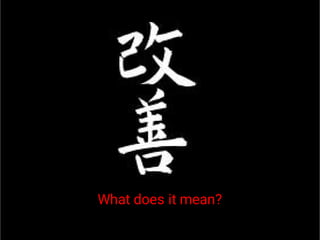
What does it mean?
Process Improvement
Methodologies
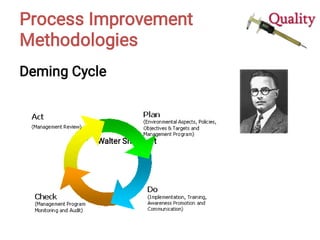
Deming Cycle
Walter Shewhart
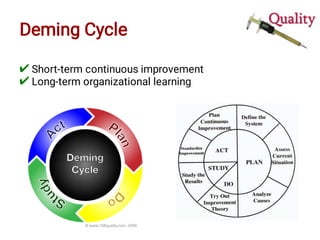
Deming Cycle
✔
✔
Short-term continuous improvement
Long-term organizational learning
Deming Cycle
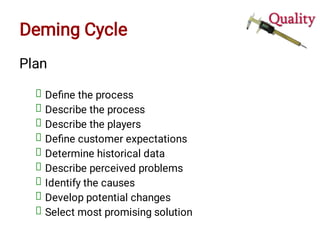
Plan
Define the process
Describe the process
Describe the players
Define customer expectations
Determine historical data
Describe perceived problems
Identify the causes
Develop potential changes
Select most promising solution
Deming Cycle
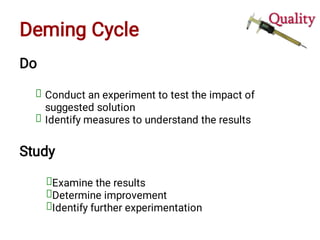
Do
Conduct an experiment to test the impact of
suggested solution
Identify measures to understand the results
Study
Examine the results
Determine improvement
Identify further experimentation
Deming Cycle
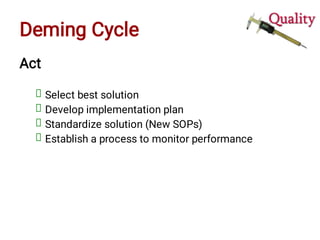
Act
Select best solution
Develop implementation plan
Standardize solution (New SOPs)
Establish a process to monitor performance
Other Tools
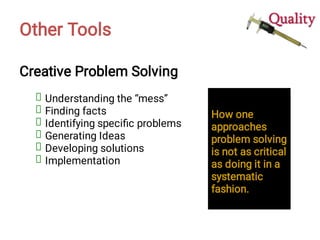
Creative Problem Solving
Understanding the “mess”
Finding facts
Identifying specific problems
Generating Ideas
Developing solutions
Implementation
How one
approaches
problem solving
is not as critical
as doing it in a
systematic
fashion.
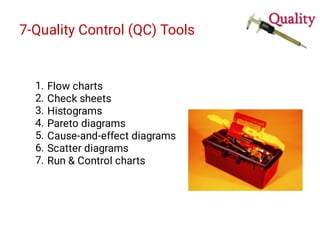
7-Quality Control (QC) Tools
1.
2.
3.
4.
5.
6.
7.
Flow charts
Check sheets
Histograms
Pareto diagrams
Cause-and-effect diagrams
Scatter diagrams
Run & Control charts
Tools for Process Improvement
Basic Tools
Tool DMAIC Application CPS Application
Flowcharts Define, Control Mess-finding
Check sheets Measure, Analyze Fact-finding
Histograms Measure, Analyze Problem-finding
Cause-and-effect
diagrams
Analyze Idea-finding
Pareto diagrams Analyze Problem-finding
Scatter diagrams Analyze., Improve Solution-finding
Control charts Control Implementation
1. Flowcharts
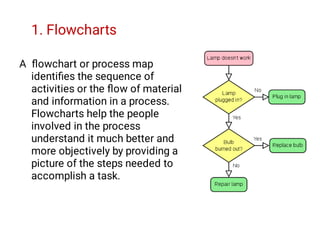
A flowchart or process map
identifies the sequence of
activities or the flow of material
and information in a process.
Flowcharts help the people
involved in the process
understand it much better and
more objectively by providing a
picture of the steps needed to
accomplish a task.
1. Flowcharts
1.
2.
3.
4.
5.
6.
7.
8.
Identifies:
Critical-to-quality issues
Selecting measurements
Root causes
Non-value added steps
How one fit into a process
Suppliers/ customers
Places of measurements or
Step addition or deletion (non-value added step)
1. Flowcharts
1.
2.
3.
4.
5.
6.
7.
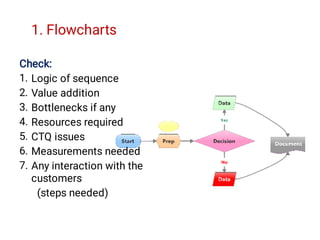
Check:
Logic of sequence
Value addition
Bottlenecks if any
Resources required
CTQ issues
Measurements needed
Any interaction with the
customers
(steps needed)
2. Check Sheets
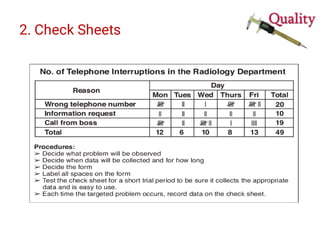
Check sheets are special type of data collection forms in
which the results may be interpreted on the form directly
without additional processing. Further processing is
generally necessary to draw useful information
2. Check Sheets: Defect Map
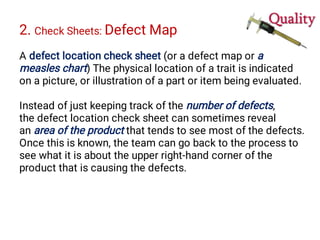
A defect location check sheet (or a defect map or a
measles chart) The physical location of a trait is indicated
on a picture, or illustration of a part or item being evaluated.
Instead of just keeping track of the number of defects,
the defect location check sheet can sometimes reveal
an area of the product that tends to see most of the defects.
Once this is known, the team can go back to the process to
see what it is about the upper right-hand corner of the
product that is causing the defects.
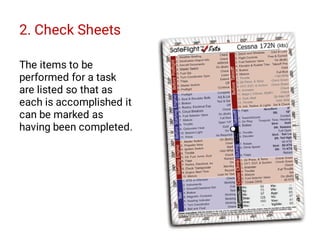
2. Check Sheets
The items to be
performed for a task
are listed so that as
each is accomplished it
can be marked as
having been completed.
2. Check Sheets
3. Histograms
When the data are numerical.
When you want to see the shape of the data’s distribution,
especially when determining whether the output of a
process is distributed approximately normally.
When analyzing whether a process can meet the customer’s
requirements.
When analyzing what the output from a supplier’s process
looks like.
When seeing whether a process change has occurred from
one time period to another.
When determining whether the outputs of two or more
processes are different.
When you wish to communicate the distribution of data
quickly and easily to others.
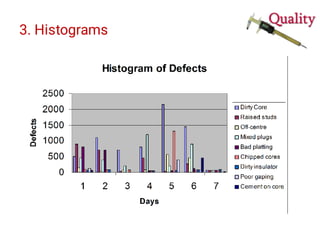
3. Histograms
Graphical frequency distribution
Provides clues about the characteristics of the parent
population from which a sample is taken. Patterns that
would be difficult to see in an ordinary table of numbers
become apparent.
[Condition of data collection should ne mentioned]
3. Histograms
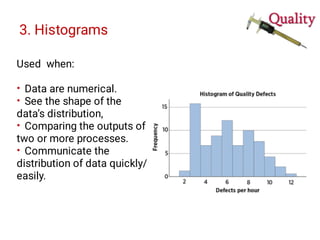
•
•
•
•
Used when:
Data are numerical.
See the shape of the
data’s distribution,
Comparing the outputs of
two or more processes.
Communicate the
distribution of data quickly/
easily.
3. Histograms
4. Pareto Diagrams
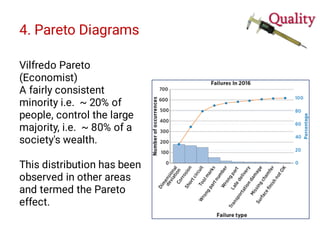
Vilfredo Pareto
(Economist)
A fairly consistent
minority i.e. ~ 20% of
people, control the large
majority, i.e. ~ 80% of a
society's wealth.
This distribution has been
observed in other areas
and termed the Pareto
effect.
4. Pareto Diagrams
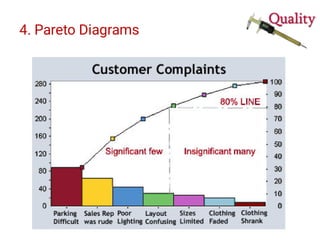
Pareto Effect
Pareto charts are used to display the
few vital factors that are causing
most of the problems reveal
themselves.
Concentrating improvement efforts
on these few issues will have a
greater impact and be more cost-
effective than undirected efforts.
80% of
problems
usually stem
from 20% of
the causes.
4. Pareto Diagrams
4. Pareto Diagrams
1.
2.
3.
4.
5.
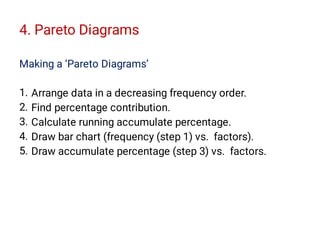
Making a ‘Pareto Diagrams’
Arrange data in a decreasing frequency order.
Find percentage contribution.
Calculate running accumulate percentage.
Draw bar chart (frequency (step 1) vs. factors).
Draw accumulate percentage (step 3) vs. factors.
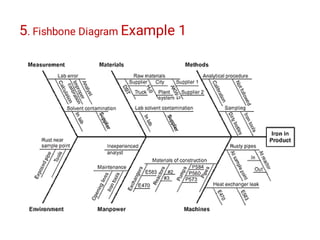
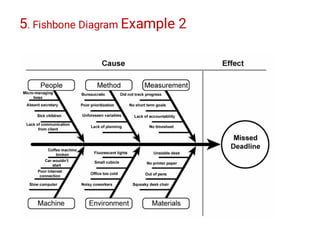
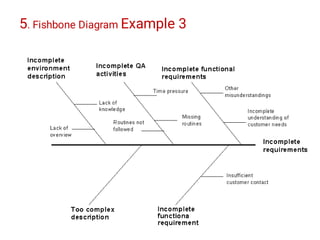
5. Cause-and-Effect Diagram
Ishikawa diagrams (also called fishbone diagrams,
herringbone diagrams, cause-and-effect diagrams,
or Fishikawa) are causal diagrams that show the causes of
a specific event.
Common uses of the Ishikawa diagram are product
design and quality defect prevention to identify potential
factors causing an overall effect. Causes are usually
grouped into major categories to identify and classify these
sources of variation.
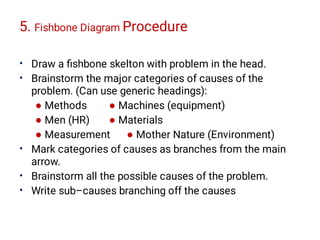
5. Fishbone Diagram Procedure
•
•
•
•
•
Draw a fishbone skelton with problem in the head.
Brainstorm the major categories of causes of the
problem. (Can use generic headings):
● Methods ● Machines (equipment)
● Men (HR) ● Materials
● Measurement ● Mother Nature (Environment)
Mark categories of causes as branches from the main
arrow.
Brainstorm all the possible causes of the problem.
Write sub–causes branching off the causes
5. Fishbone Diagram Example 1
5. Fishbone Diagram Example 2
5. Fishbone Diagram Example 3
6. Scatter Diagrams
Also called: scatter plot, X–Y graph
The scatter diagram graphs pairs of numerical data, with
one variable on each axis, to look for a relationship
between them.
If the variables are correlated, the points will fall along a
line or curve. The better the correlation, the tighter the
points will hug the line.
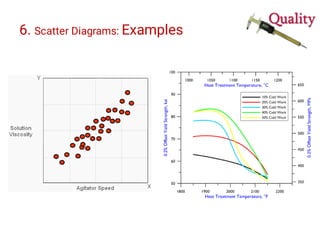
Example: Effect on an element of hardness of an alloy.
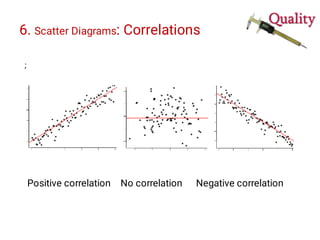
6. Scatter Diagrams: Correlations
;
Positive correlation No correlation Negative correlation
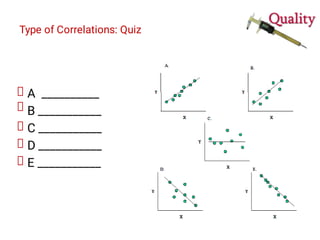
Type of Correlations: Quiz
A __________
B ___________
C ___________
D ___________
E ___________
6. Scatter Diagrams: Examples
7. Run Charts and Control Charts
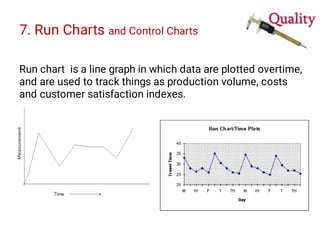
Run chart is a line graph in which data are plotted overtime,
and are used to track things as production volume, costs
and customer satisfaction indexes.
7. Run Charts and Control Charts
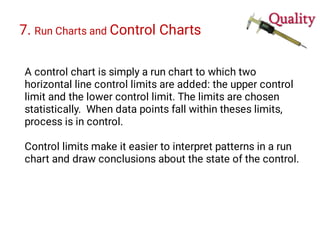
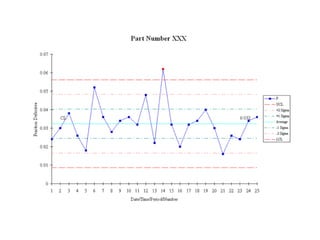
A control chart is simply a run chart to which two
horizontal line control limits are added: the upper control
limit and the lower control limit. The limits are chosen
statistically. When data points fall within theses limits,
process is in control.
Control limits make it easier to interpret patterns in a run
chart and draw conclusions about the state of the control.
Other
T o o l s
Kaizen Blitz
Kaizen Blitz
Poka-Yoke
Mistake Proofing
Inadvertent
Mistakes
Processing errors
Setup errors
Wrong parts
Adjustment errors
•
•
•
•
Forgetfulness
Misunderstanding
Poor Identification
Lack of Experience
Absentmindedness
Delays in judgment
Equipment malfunction
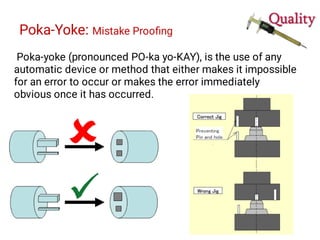
Poka-Yoke: Mistake Proofing
Poka-yoke (pronounced PO-ka yo-KAY), is the use of any
automatic device or method that either makes it impossible
for an error to occur or makes the error immediately
obvious once it has occurred.
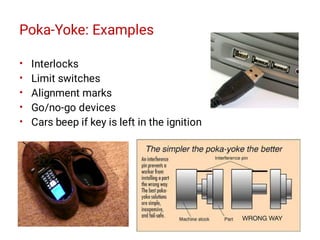
Poka-Yoke: Examples
•
•
•
•
•
Interlocks
Limit switches
Alignment marks
Go/no-go devices
Cars beep if key is left in the ignition
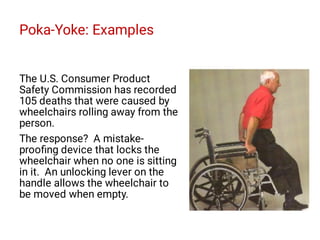
Poka-Yoke: Examples
The U.S. Consumer Product
Safety Commission has recorded
105 deaths that were caused by
wheelchairs rolling away from the
person.
The response? A mistake-
proofing device that locks the
wheelchair when no one is sitting
in it. An unlocking lever on the
handle allows the wheelchair to
be moved when empty.
Process Simulation
An approach to building a logical model of a real process,
and experimenting with the model to obtain insight about
the behavior of the process or to evaluate the impact of
changes in assumptions or potential improvements to it.
Skills for Team Leaders
•
•
•
•
•
•
•
Conflict management
Team management
Leadership skills
Decision making
Communication
Negotiation
Cross-cultural training
Skills for Team Members
•
•
•
•
•
•
Use agendas
Have a facilitator
Take minutes
Draft the next agenda
Evaluate the meeting
Adhere to the “100 mile”
rule
The 100-mile rule for
meetings or projects is a
mental tool for deciding
whether to interrupt a person
for a problem.
In a nutshell, if the issue is big
enough that you would call
the person back to handle it if
the meeting was a hundred
miles away, it is OK to
interrupt. If not, wait for a
break or handle the problem
on your own
Process Improvement Tools Daniel Pirzada

Process Improvement Tools Daniel Pirzada

  • 1.
    Tools for ProcessImprovement P i r z a d a
  • 2.
  • 3.
  • 4.
    Deming Cycle ✔ ✔ Short-term continuousimprovement Long-term organizational learning
  • 5.
    Deming Cycle Plan Define theprocess Describe the process Describe the players Define customer expectations Determine historical data Describe perceived problems Identify the causes Develop potential changes Select most promising solution
  • 6.
    Deming Cycle Do Conduct anexperiment to test the impact of suggested solution Identify measures to understand the results Study Examine the results Determine improvement Identify further experimentation
  • 7.
    Deming Cycle Act Select bestsolution Develop implementation plan Standardize solution (New SOPs) Establish a process to monitor performance
  • 8.
    Other Tools Creative ProblemSolving Understanding the “mess” Finding facts Identifying specific problems Generating Ideas Developing solutions Implementation How one approaches problem solving is not as critical as doing it in a systematic fashion.
  • 9.
    7-Quality Control (QC)Tools 1. 2. 3. 4. 5. 6. 7. Flow charts Check sheets Histograms Pareto diagrams Cause-and-effect diagrams Scatter diagrams Run & Control charts
  • 10.
    Tools for ProcessImprovement Basic Tools Tool DMAIC Application CPS Application Flowcharts Define, Control Mess-finding Check sheets Measure, Analyze Fact-finding Histograms Measure, Analyze Problem-finding Cause-and-effect diagrams Analyze Idea-finding Pareto diagrams Analyze Problem-finding Scatter diagrams Analyze., Improve Solution-finding Control charts Control Implementation
  • 11.
    1. Flowcharts A flowchartor process map identifies the sequence of activities or the flow of material and information in a process. Flowcharts help the people involved in the process understand it much better and more objectively by providing a picture of the steps needed to accomplish a task.
  • 12.
    1. Flowcharts 1. 2. 3. 4. 5. 6. 7. 8. Identifies: Critical-to-quality issues Selectingmeasurements Root causes Non-value added steps How one fit into a process Suppliers/ customers Places of measurements or Step addition or deletion (non-value added step)
  • 13.
    1. Flowcharts 1. 2. 3. 4. 5. 6. 7. Check: Logic ofsequence Value addition Bottlenecks if any Resources required CTQ issues Measurements needed Any interaction with the customers (steps needed)
  • 14.
    2. Check Sheets Checksheets are special type of data collection forms in which the results may be interpreted on the form directly without additional processing. Further processing is generally necessary to draw useful information
  • 15.
    2. Check Sheets:Defect Map A defect location check sheet (or a defect map or a measles chart) The physical location of a trait is indicated on a picture, or illustration of a part or item being evaluated. Instead of just keeping track of the number of defects, the defect location check sheet can sometimes reveal an area of the product that tends to see most of the defects. Once this is known, the team can go back to the process to see what it is about the upper right-hand corner of the product that is causing the defects.
  • 18.
    2. Check Sheets Theitems to be performed for a task are listed so that as each is accomplished it can be marked as having been completed.
  • 19.
  • 20.
    3. Histograms When thedata are numerical. When you want to see the shape of the data’s distribution, especially when determining whether the output of a process is distributed approximately normally. When analyzing whether a process can meet the customer’s requirements. When analyzing what the output from a supplier’s process looks like. When seeing whether a process change has occurred from one time period to another. When determining whether the outputs of two or more processes are different. When you wish to communicate the distribution of data quickly and easily to others.
  • 21.
    3. Histograms Graphical frequencydistribution Provides clues about the characteristics of the parent population from which a sample is taken. Patterns that would be difficult to see in an ordinary table of numbers become apparent. [Condition of data collection should ne mentioned]
  • 22.
    3. Histograms • • • • Used when: Dataare numerical. See the shape of the data’s distribution, Comparing the outputs of two or more processes. Communicate the distribution of data quickly/ easily.
  • 23.
  • 24.
    4. Pareto Diagrams VilfredoPareto (Economist) A fairly consistent minority i.e. ~ 20% of people, control the large majority, i.e. ~ 80% of a society's wealth. This distribution has been observed in other areas and termed the Pareto effect.
  • 25.
    4. Pareto Diagrams ParetoEffect Pareto charts are used to display the few vital factors that are causing most of the problems reveal themselves. Concentrating improvement efforts on these few issues will have a greater impact and be more cost- effective than undirected efforts. 80% of problems usually stem from 20% of the causes.
  • 26.
  • 27.
    4. Pareto Diagrams 1. 2. 3. 4. 5. Makinga ‘Pareto Diagrams’ Arrange data in a decreasing frequency order. Find percentage contribution. Calculate running accumulate percentage. Draw bar chart (frequency (step 1) vs. factors). Draw accumulate percentage (step 3) vs. factors.
  • 28.
    5. Cause-and-Effect Diagram Ishikawadiagrams (also called fishbone diagrams, herringbone diagrams, cause-and-effect diagrams, or Fishikawa) are causal diagrams that show the causes of a specific event. Common uses of the Ishikawa diagram are product design and quality defect prevention to identify potential factors causing an overall effect. Causes are usually grouped into major categories to identify and classify these sources of variation.
  • 29.
    5. Fishbone DiagramProcedure • • • • • Draw a fishbone skelton with problem in the head. Brainstorm the major categories of causes of the problem. (Can use generic headings): ● Methods ● Machines (equipment) ● Men (HR) ● Materials ● Measurement ● Mother Nature (Environment) Mark categories of causes as branches from the main arrow. Brainstorm all the possible causes of the problem. Write sub–causes branching off the causes
  • 30.
  • 31.
  • 32.
  • 33.
    6. Scatter Diagrams Alsocalled: scatter plot, X–Y graph The scatter diagram graphs pairs of numerical data, with one variable on each axis, to look for a relationship between them. If the variables are correlated, the points will fall along a line or curve. The better the correlation, the tighter the points will hug the line. Example: Effect on an element of hardness of an alloy.
  • 34.
    6. Scatter Diagrams:Correlations ; Positive correlation No correlation Negative correlation
  • 35.
    Type of Correlations:Quiz A __________ B ___________ C ___________ D ___________ E ___________
  • 36.
  • 37.
    7. Run Chartsand Control Charts Run chart is a line graph in which data are plotted overtime, and are used to track things as production volume, costs and customer satisfaction indexes.
  • 38.
    7. Run Chartsand Control Charts A control chart is simply a run chart to which two horizontal line control limits are added: the upper control limit and the lower control limit. The limits are chosen statistically. When data points fall within theses limits, process is in control. Control limits make it easier to interpret patterns in a run chart and draw conclusions about the state of the control.
  • 40.
  • 41.
  • 42.
    Poka-Yoke Mistake Proofing Inadvertent Mistakes Processing errors Setuperrors Wrong parts Adjustment errors • • • • Forgetfulness Misunderstanding Poor Identification Lack of Experience Absentmindedness Delays in judgment Equipment malfunction
  • 43.
    Poka-Yoke: Mistake Proofing Poka-yoke(pronounced PO-ka yo-KAY), is the use of any automatic device or method that either makes it impossible for an error to occur or makes the error immediately obvious once it has occurred.
  • 44.
    Poka-Yoke: Examples • • • • • Interlocks Limit switches Alignmentmarks Go/no-go devices Cars beep if key is left in the ignition
  • 45.
    Poka-Yoke: Examples The U.S.Consumer Product Safety Commission has recorded 105 deaths that were caused by wheelchairs rolling away from the person. The response? A mistake- proofing device that locks the wheelchair when no one is sitting in it. An unlocking lever on the handle allows the wheelchair to be moved when empty.
  • 46.
    Process Simulation An approachto building a logical model of a real process, and experimenting with the model to obtain insight about the behavior of the process or to evaluate the impact of changes in assumptions or potential improvements to it.
  • 47.
    Skills for TeamLeaders • • • • • • • Conflict management Team management Leadership skills Decision making Communication Negotiation Cross-cultural training
  • 48.
    Skills for TeamMembers • • • • • • Use agendas Have a facilitator Take minutes Draft the next agenda Evaluate the meeting Adhere to the “100 mile” rule The 100-mile rule for meetings or projects is a mental tool for deciding whether to interrupt a person for a problem. In a nutshell, if the issue is big enough that you would call the person back to handle it if the meeting was a hundred miles away, it is OK to interrupt. If not, wait for a break or handle the problem on your own