PARALLEL PROCESSING
DONE BY,
S.PRAVEENKUMAR.
Decomposition
• One of the first steps in designing a parallel
program is to break the problem into discrete
"chunks" of work that can be distributed to
multiple tasks. This is known as decomposition or
partitioning.
• There are two basic ways to partition
computational work among parallel tasks:
– domain decomposition
and
– functional decomposition
Domain Decomposition
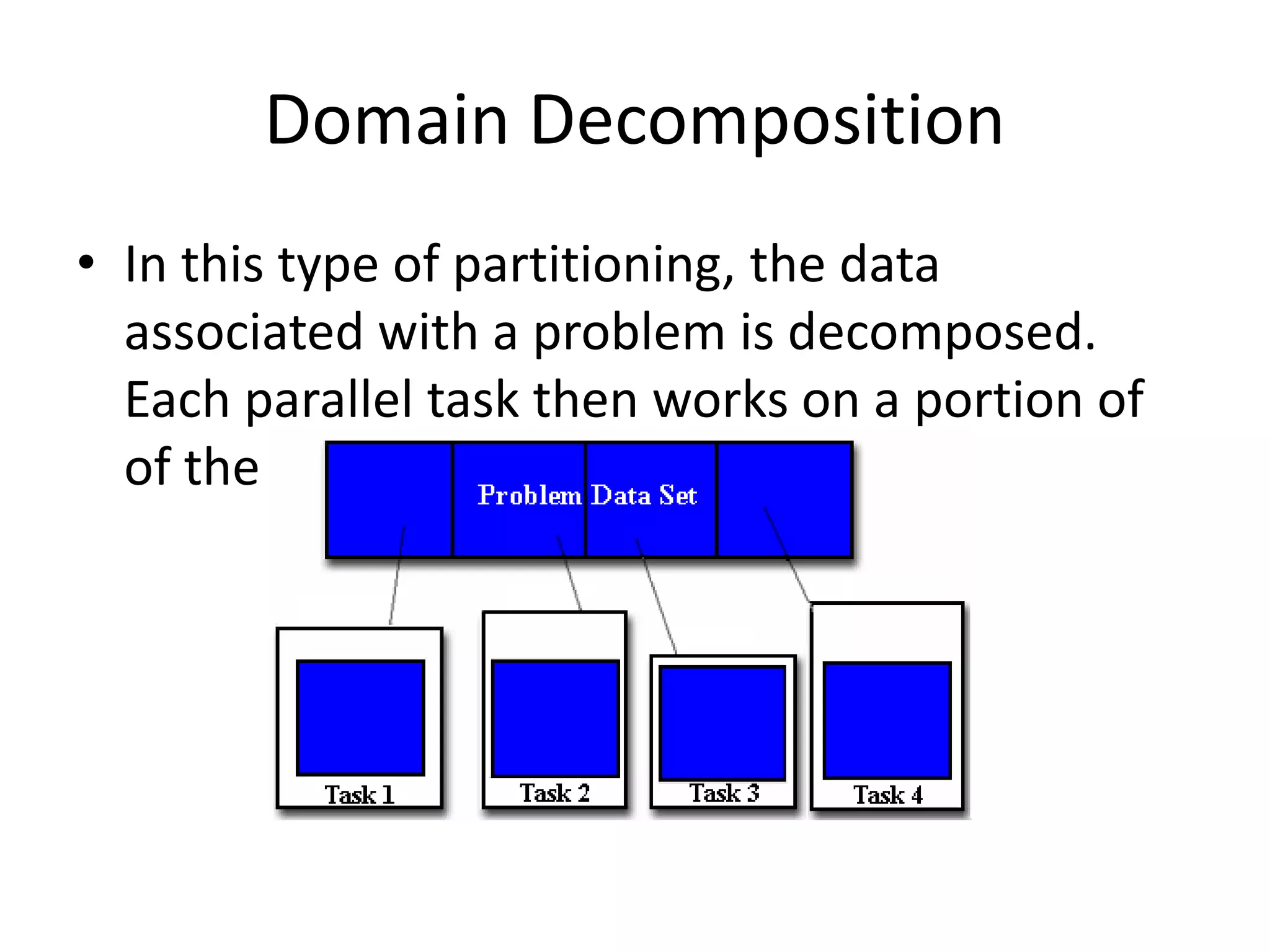
• In this type of partitioning, the data
associated with a problem is decomposed.
Each parallel task then works on a portion of
of the data.
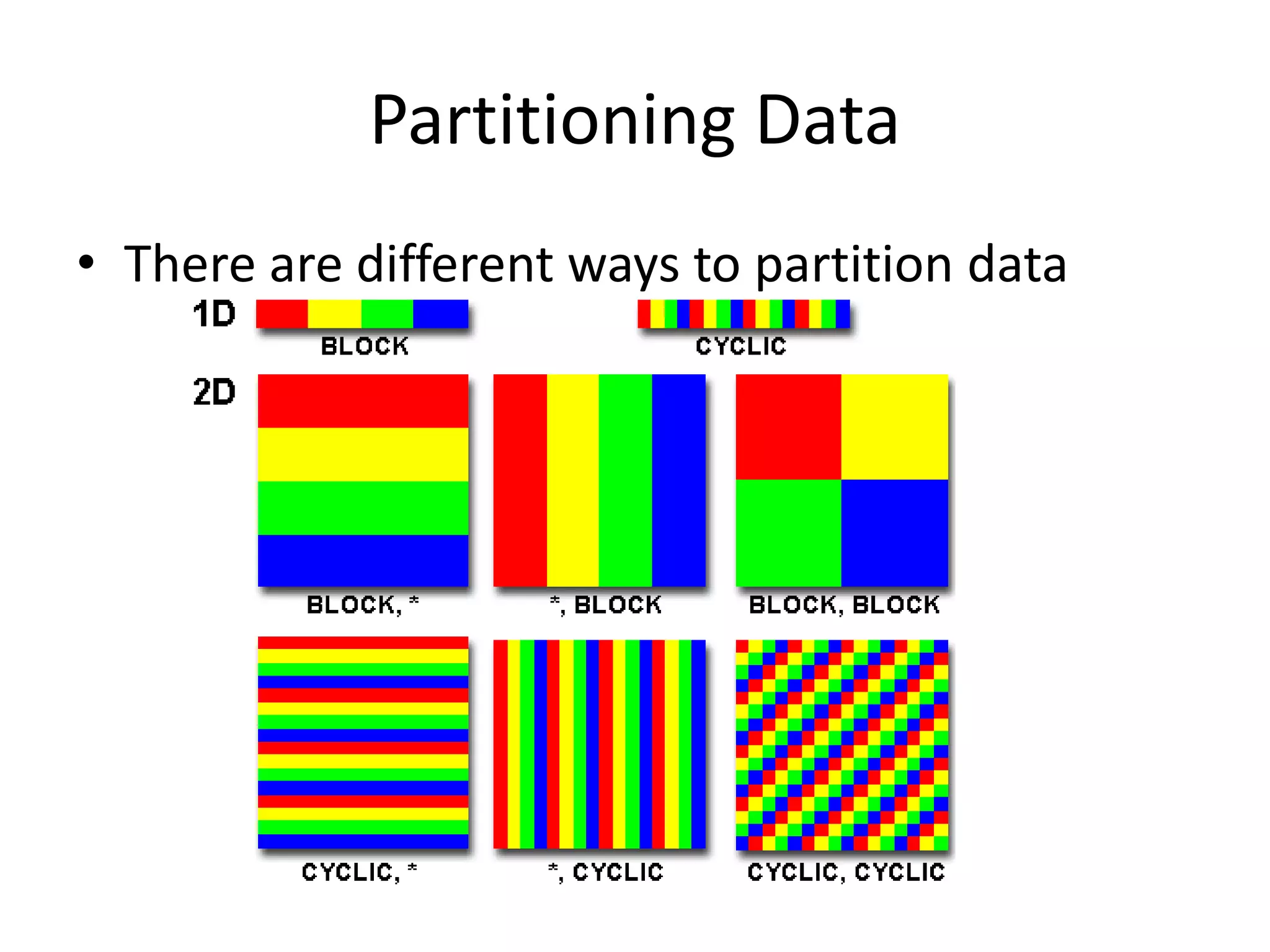
Partitioning Data
• There are different ways to partition data
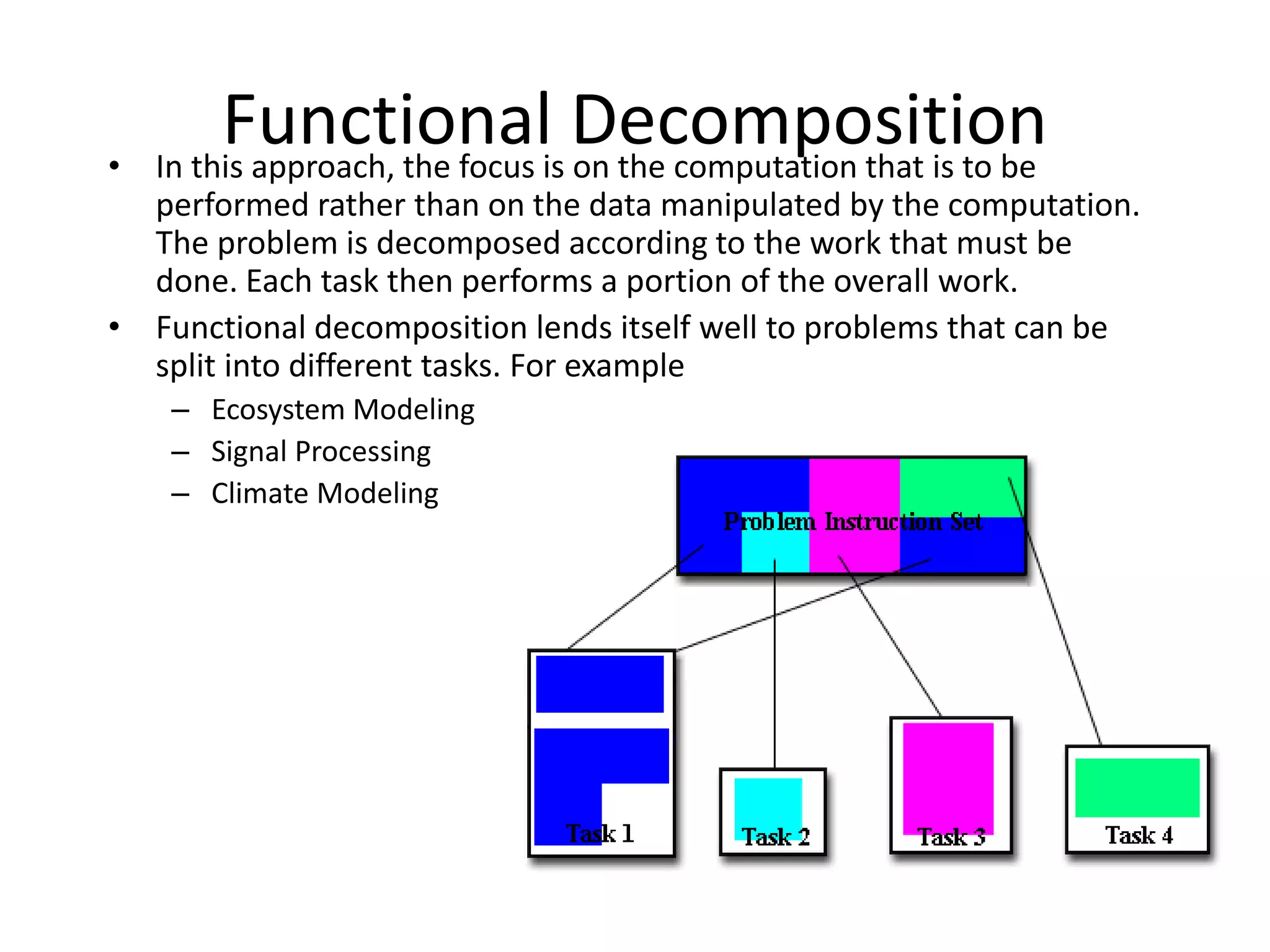
Functional Decomposition• In this approach, the focus is on the computation that is to be
performed rather than on the data manipulated by the computation.
The problem is decomposed according to the work that must be
done. Each task then performs a portion of the overall work.
• Functional decomposition lends itself well to problems that can be
split into different tasks. For example
– Ecosystem Modeling
– Signal Processing
– Climate Modeling
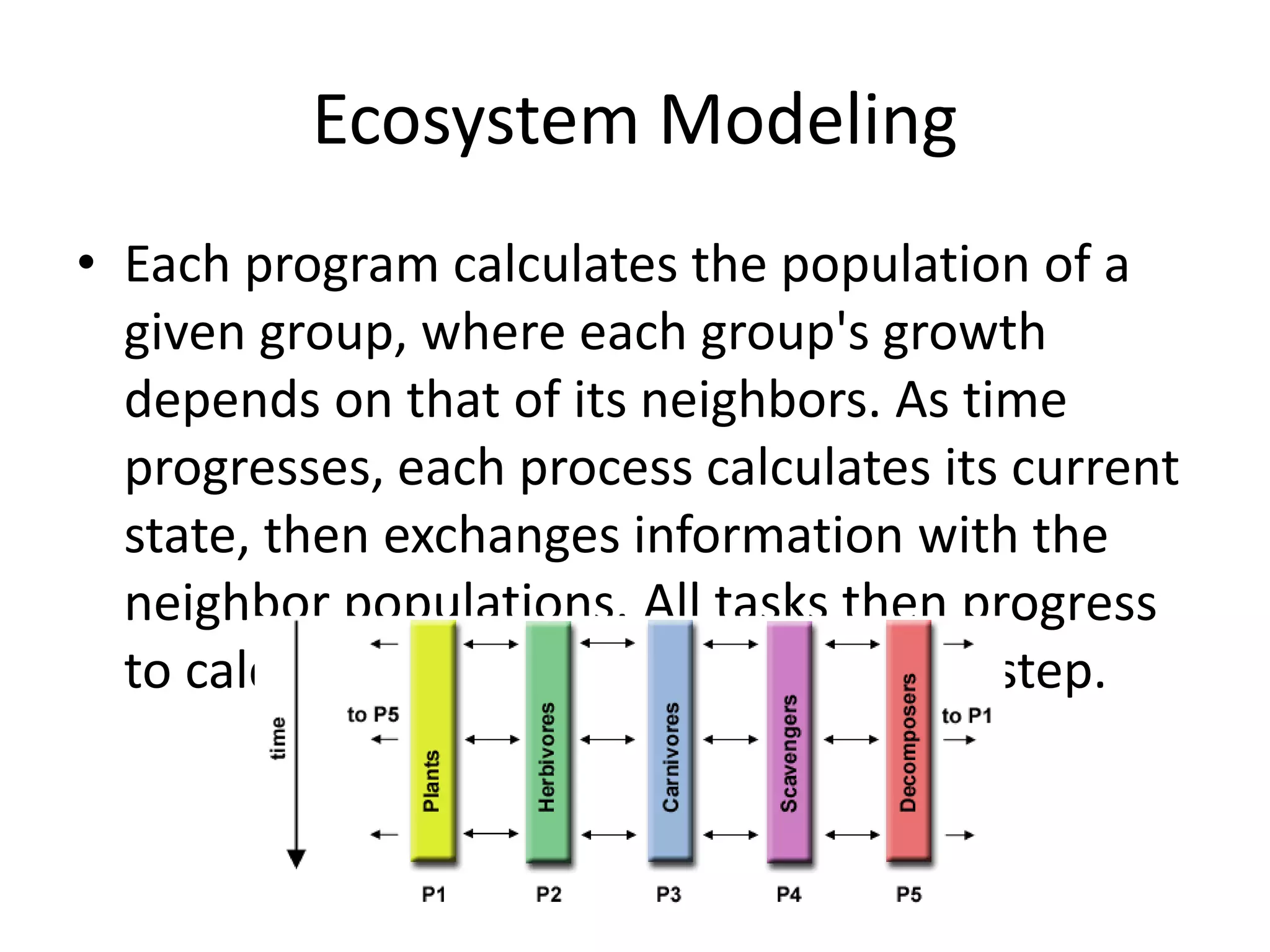
Ecosystem Modeling
• Each program calculates the population of a
given group, where each group's growth
depends on that of its neighbors. As time
progresses, each process calculates its current
state, then exchanges information with the
neighbor populations. All tasks then progress
to calculate the state at the next time step.
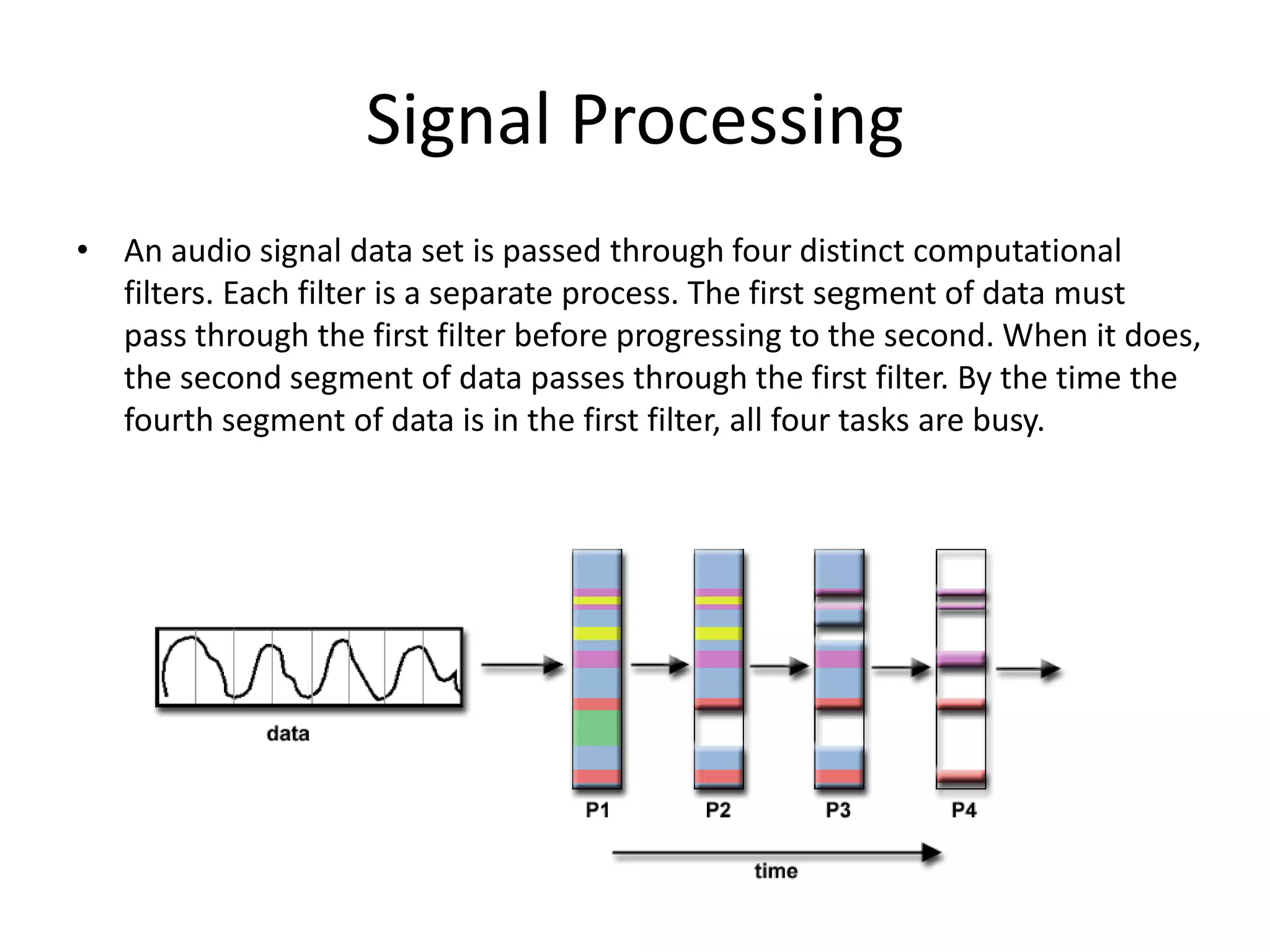
Signal Processing
• An audio signal data set is passed through four distinct computational
filters. Each filter is a separate process. The first segment of data must
pass through the first filter before progressing to the second. When it does,
the second segment of data passes through the first filter. By the time the
fourth segment of data is in the first filter, all four tasks are busy.
What is Parallel Processing?
Parallel processing is another method used
to improve performance in a computer
system, when a system
processes two different instructions
simultaneously,
it is performing parallel processing
Topics Include
• Parallelism in Uniprocessor Systems
• Parallelism in Multiprocessor Systems
– Flynn’s Classification
– System Topologies
– MIMD System Architectures
Parallelism in Uniprocessor Systems
A uniprocessor (one CPU) system can perform
two or more tasks simultaneously. The tasks are
not related to each other. So, a system that
processes two different instructions
simultaneouly could be condsidered to perform
parallel processing
Example of Uniprocessor System
Recall in Chapter 11, the instruction pipeline is similar to a manufacturing
assembly line. If the assembly line is partitioned into four stages: The first
stage receives some parts, performs its assembly task, and passes the results
to the second stage; the second stage takes the partially assembled product
from the first stage, performs its task, and passes its work to the third stage;
the third stage does its work, passing the results to the last stage, which
completes the task and outputs its results. As the first piece moves from the
first stage to the second stage, a new set of parts for a new piece enters the
first stage. Ultimately, every staged processes a piece simultaneously. This is
how time is saved and this is an example of parallelism in uniprocessor
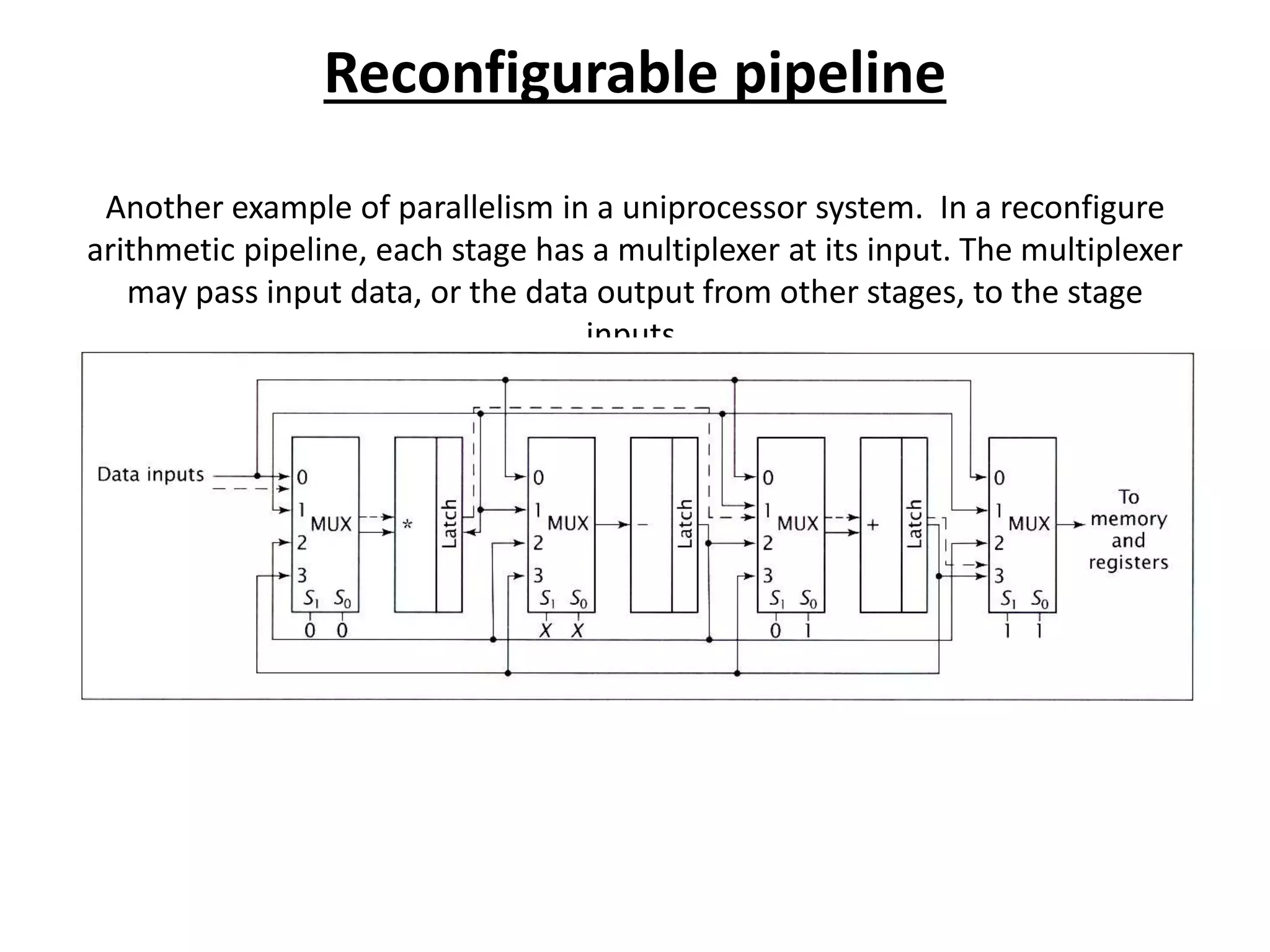
Reconfigurable pipeline
Another example of parallelism in a uniprocessor system. In a reconfigure
arithmetic pipeline, each stage has a multiplexer at its input. The multiplexer
may pass input data, or the data output from other stages, to the stage
inputs.
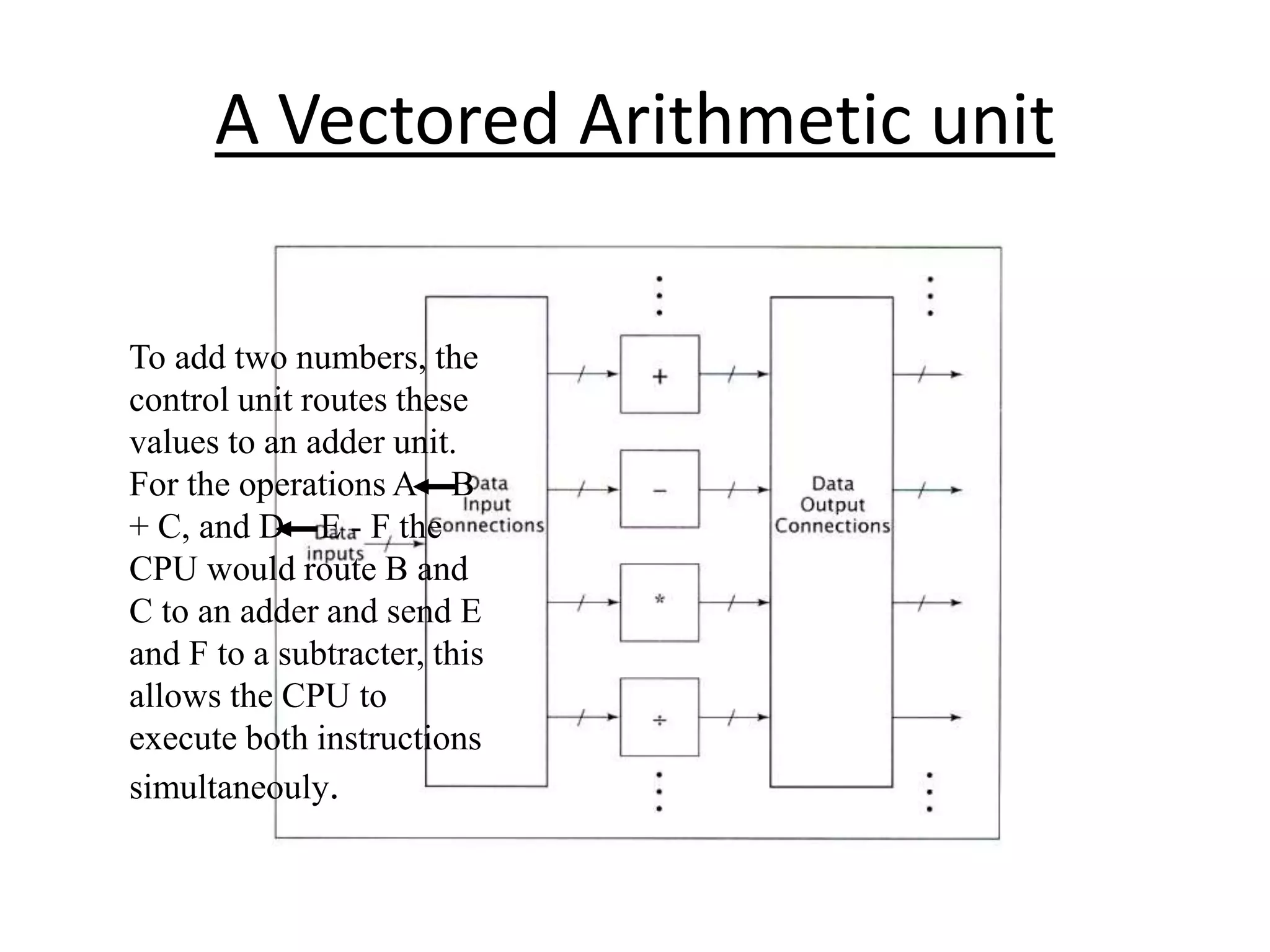
Vector Arithmetic unit
Vector Arithmetic unit is used to perform
different arithmetic operations in parallel. A
vector arithmetic unit contains multiple
functional units. Some perform addition, others
subtraction, and others perform different
functions.
A Vectored Arithmetic unit
To add two numbers, the
control unit routes these
values to an adder unit.
For the operations A B
+ C, and D E - F the
CPU would route B and
C to an adder and send E
and F to a subtracter, this
allows the CPU to
execute both instructions
simultaneouly.
Parallelism in Multiprocessor Systems
Parallel processing systems achieve parallelism by having
more than one processor performing tasks simultaneously.
Since multiprocessor systems are more complicated than
uniprocessor systems, there are many different ways to
organize the processors and memory, so a researcher, Michael
J. Flynn proposed a classification based on the flow of
instructions and data within the computer called Flynn’s
classification
Flynn’s Classification
It is based on instruction and data processing. A
computer is classified by whether it processes a single
instruction at a time or multiple instructions
simultaneously, and whether it operates on one or
multiple data sets.
Categories of Flynn’s Classification
• SISD: Single instruction with single data
• SIMD: Single instruction with multiple data
• MISD: Multiple instruction with single data
• MIMD: Multiple instruction with multiple data
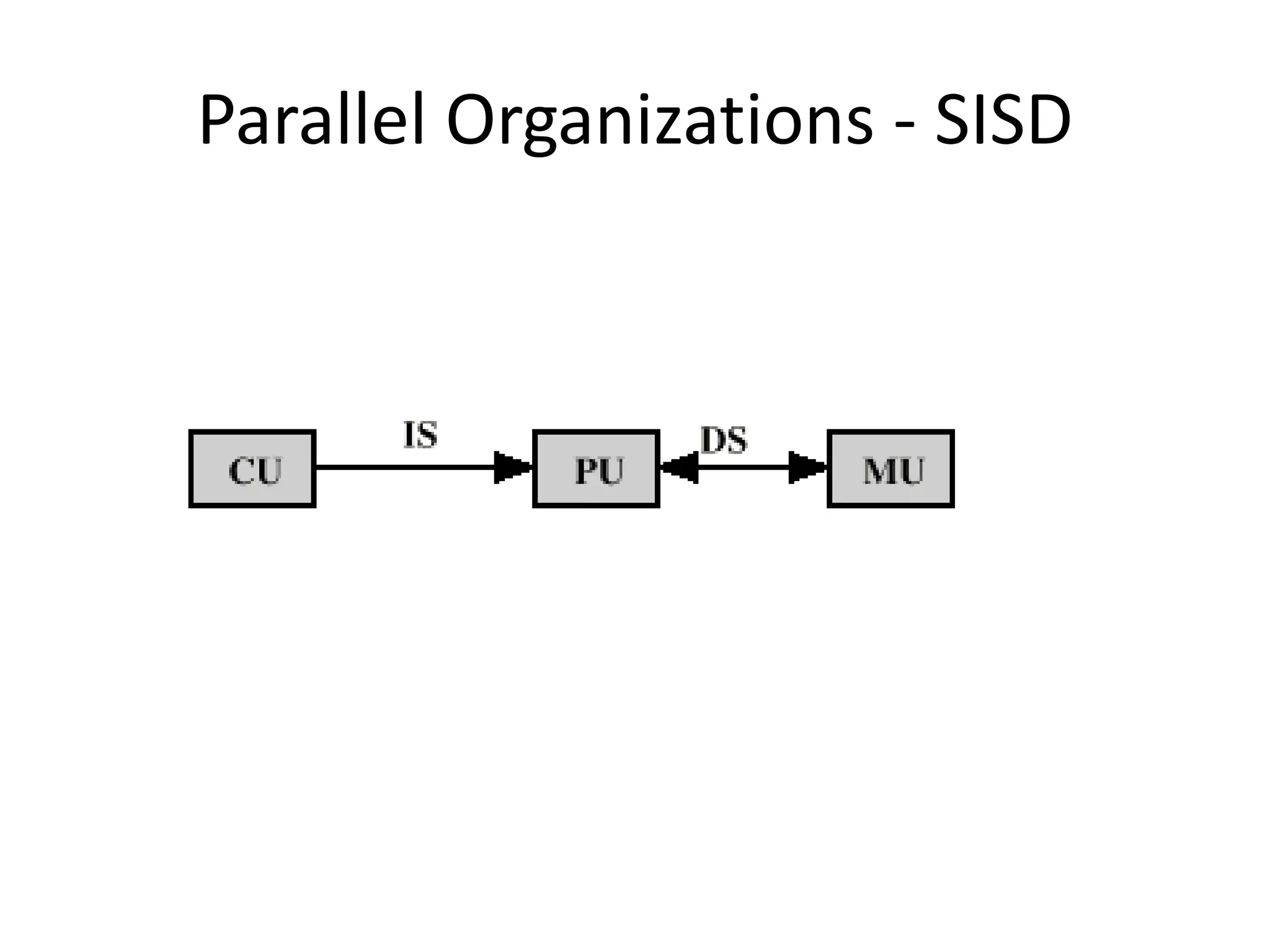
Single Instruction Single Data
(SISD)
SISD machines executes a single instruction on
individual data values using a single processor. Even if
the processor incorporates internal parallelism, such
as an instruction pipeline, the computer would still be
classified as SISD
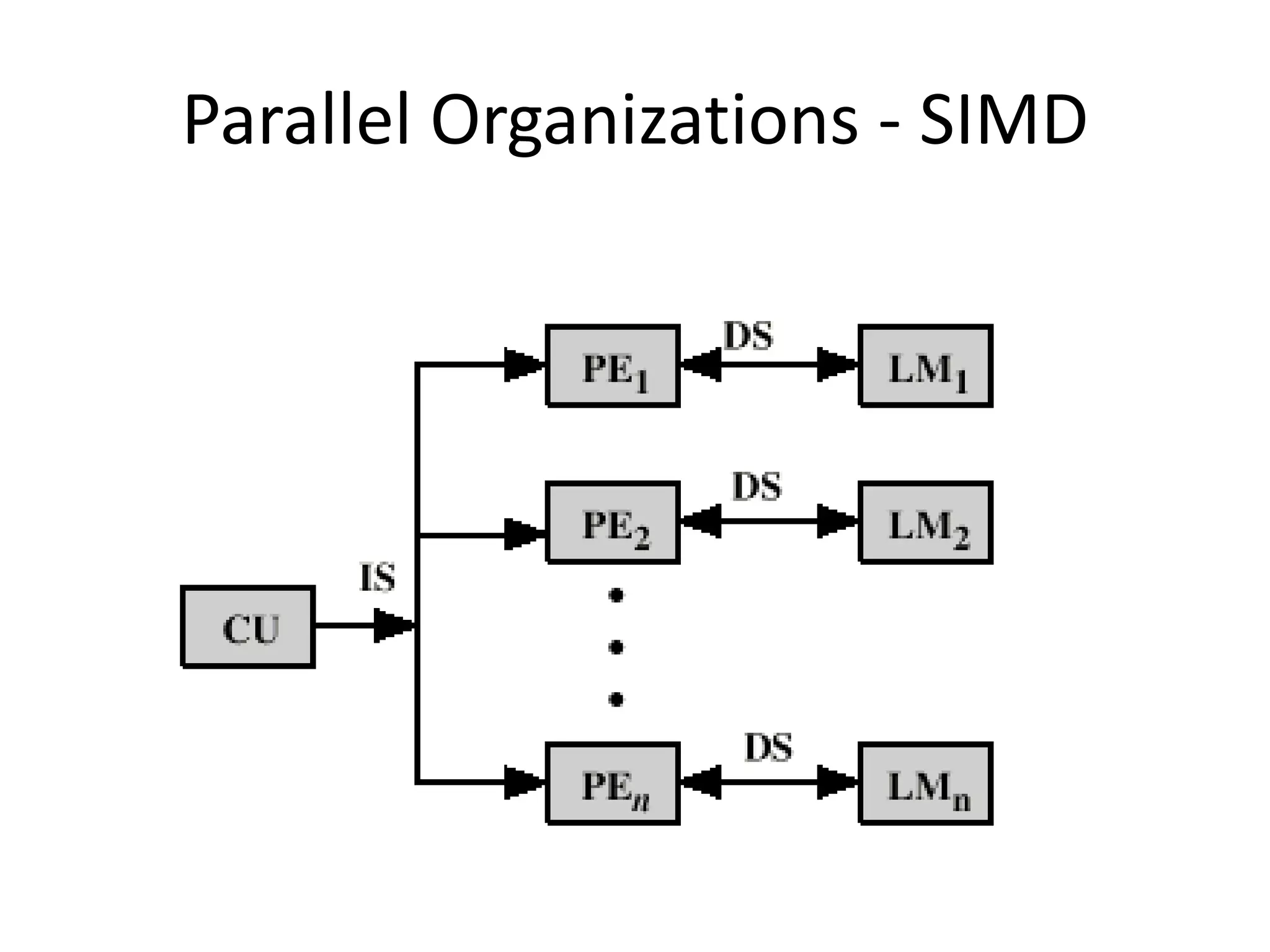
(SIMD) Single Instruction Multiple Data
As its name implies, an SIMD machine executes a single
instruction on multiple data values simultaneously using
many processors. Since there is only one instruction, each
processor does not have to fetch and decode each
instruction. Instead a single control unit handles this task
for all processors within the SIMD computer
(MISD) Multiple Instruction Single Data
This classification is not practical to
implement. So, no significant MISD
computers have ever been built. It is
included for completeness of the
classification.
Introduction to Parallel
Computing
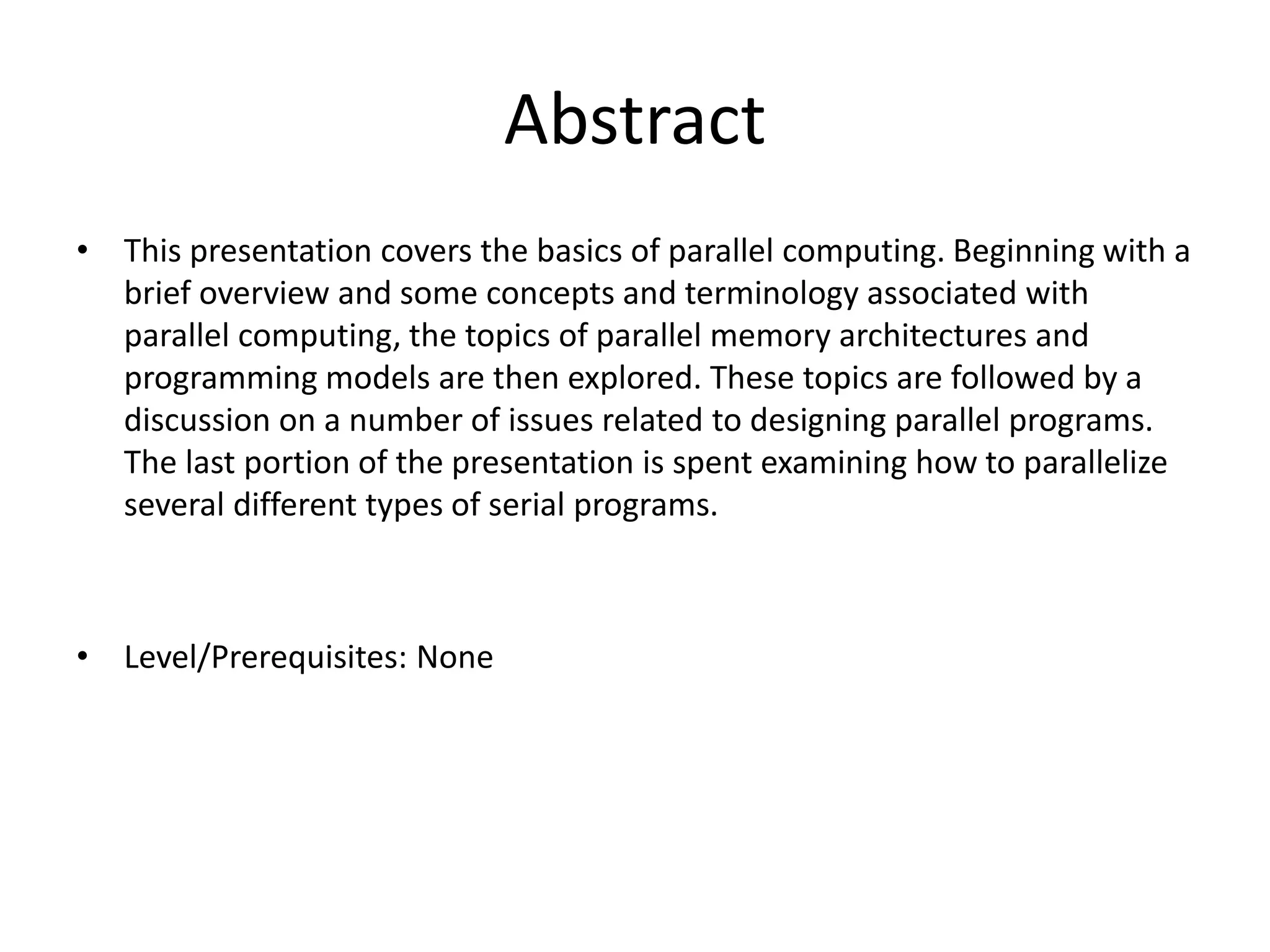
Abstract
• This presentation covers the basics of parallel computing. Beginning with a
brief overview and some concepts and terminology associated with
parallel computing, the topics of parallel memory architectures and
programming models are then explored. These topics are followed by a
discussion on a number of issues related to designing parallel programs.
The last portion of the presentation is spent examining how to parallelize
several different types of serial programs.
• Level/Prerequisites: None
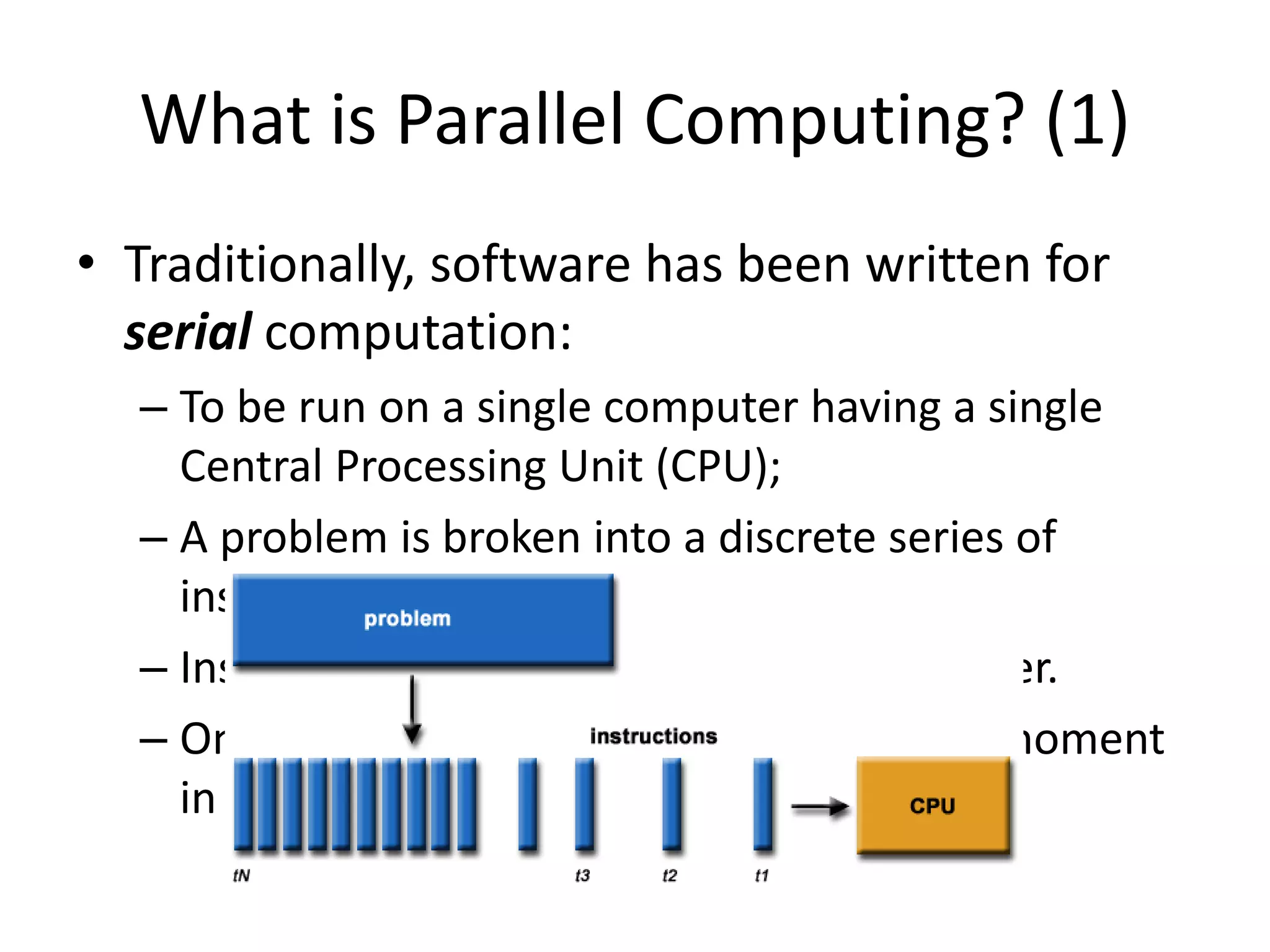
What is Parallel Computing? (1)
• Traditionally, software has been written for
serial computation:
– To be run on a single computer having a single
Central Processing Unit (CPU);
– A problem is broken into a discrete series of
instructions.
– Instructions are executed one after another.
– Only one instruction may execute at any moment
in time.
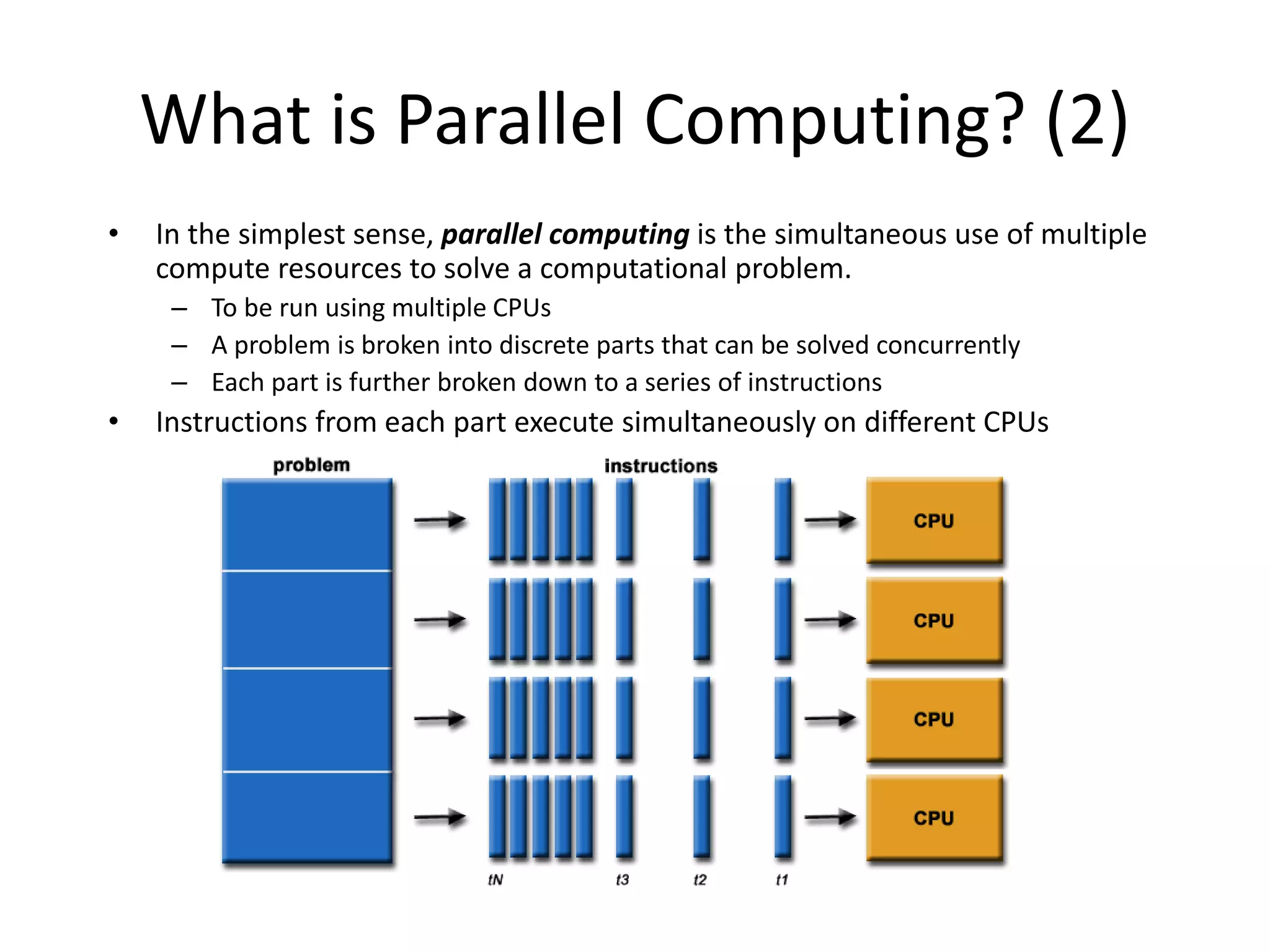
What is Parallel Computing? (2)
• In the simplest sense, parallel computing is the simultaneous use of multiple
compute resources to solve a computational problem.
– To be run using multiple CPUs
– A problem is broken into discrete parts that can be solved concurrently
– Each part is further broken down to a series of instructions
• Instructions from each part execute simultaneously on different CPUs
Parallel Computing: Resources
• The compute resources can include:
– A single computer with multiple processors;
– A single computer with (multiple) processor(s) and
some specialized computer resources (GPU, FPGA
…)
– An arbitrary number of computers connected by a
network;
– A combination of both.
Parallel Computing: The computational
problem
• The computational problem usually
demonstrates characteristics such as the
ability to be:
– Broken apart into discrete pieces of work that can
be solved simultaneously;
– Execute multiple program instructions at any
moment in time;
– Solved in less time with multiple compute
resources than with a single compute resource.
Parallel Computing: what for? (1)
• Parallel computing is an evolution of serial computing that attempts to
emulate what has always been the state of affairs in the natural world:
many complex, interrelated events happening at the same time, yet within
a sequence.
• Some examples:
– Planetary and galactic orbits
– Weather and ocean patterns
– Tectonic plate drift
– Rush hour traffic in Paris
– Automobile assembly line
– Daily operations within a business
– Building a shopping mall
– Ordering a hamburger at the drive through.
Parallel Computing: what for? (2)
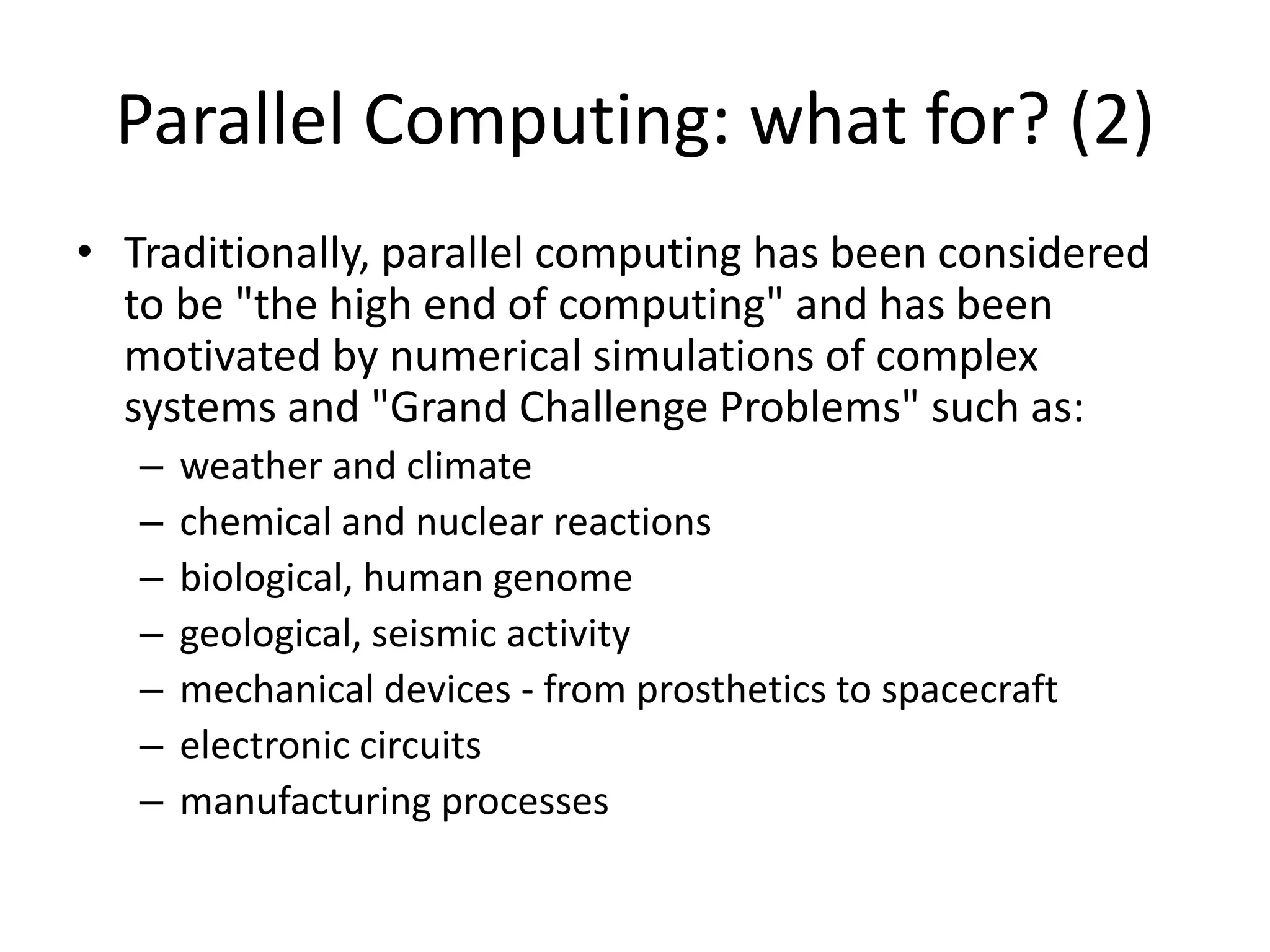
• Traditionally, parallel computing has been considered
to be "the high end of computing" and has been
motivated by numerical simulations of complex
systems and "Grand Challenge Problems" such as:
– weather and climate
– chemical and nuclear reactions
– biological, human genome
– geological, seismic activity
– mechanical devices - from prosthetics to spacecraft
– electronic circuits
– manufacturing processes
Parallel Computing: what for? (3)
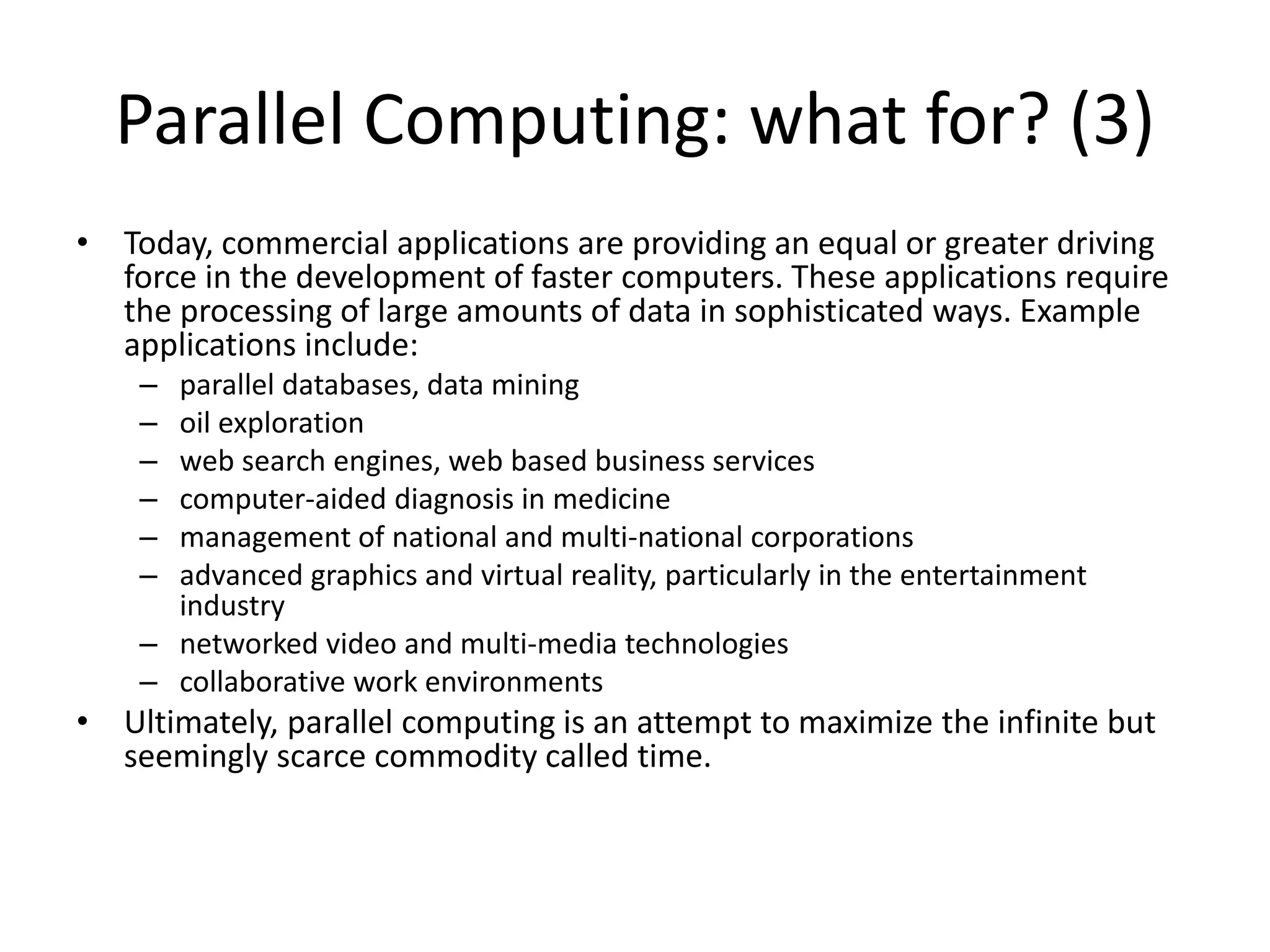
• Today, commercial applications are providing an equal or greater driving
force in the development of faster computers. These applications require
the processing of large amounts of data in sophisticated ways. Example
applications include:
– parallel databases, data mining
– oil exploration
– web search engines, web based business services
– computer-aided diagnosis in medicine
– management of national and multi-national corporations
– advanced graphics and virtual reality, particularly in the entertainment
industry
– networked video and multi-media technologies
– collaborative work environments
• Ultimately, parallel computing is an attempt to maximize the infinite but
seemingly scarce commodity called time.
Why Parallel Computing? (1)
• This is a legitime question! Parallel computing
is complex on any aspect!
• The primary reasons for using parallel
computing:
– Save time - wall clock time
– Solve larger problems
– Provide concurrency (do multiple things at the
same time)
Why Parallel Computing? (2)
• Other reasons might include:
– Taking advantage of non-local resources - using
available compute resources on a wide area network,
or even the Internet when local compute resources
are scarce.
– Cost savings - using multiple "cheap" computing
resources instead of paying for time on a
supercomputer.
– Overcoming memory constraints - single computers
have very finite memory resources. For large
problems, using the memories of multiple computers
may overcome this obstacle.
Limitations of Serial Computing
• Limits to serial computing - both physical and practical reasons pose significant
constraints to simply building ever faster serial computers.
• Transmission speeds - the speed of a serial computer is directly dependent upon
how fast data can move through hardware. Absolute limits are the speed of light
(30 cm/nanosecond) and the transmission limit of copper wire (9
cm/nanosecond). Increasing speeds necessitate increasing proximity of processing
elements.
• Limits to miniaturization - processor technology is allowing an increasing number
of transistors to be placed on a chip. However, even with molecular or atomic-level
components, a limit will be reached on how small components can be.
• Economic limitations - it is increasingly expensive to make a single processor faster.
Using a larger number of moderately fast commodity processors to achieve the
same (or better) performance is less expensive.
Multiple Processor Organization
• Single instruction, single data stream - SISD
• Single instruction, multiple data stream - SIMD
• Multiple instruction, single data stream - MISD
• Multiple instruction, multiple data stream-
MIMD
Single Instruction, Single Data Stream -
SISD
• Single processor
• Single instruction stream
• Data stored in single memory
• Uni-processor
Single Instruction, Multiple Data
Stream - SIMD
• Single machine instruction
• Controls simultaneous execution
• Number of processing elements
• Lockstep basis
• Each processing element has associated data
memory
• Each instruction executed on different set of data
by different processors
• Vector and array processors
Multiple Instruction, Single Data
Stream - MISD
• Sequence of data
• Transmitted to set of processors
• Each processor executes different instruction
sequence
• Never been implemented
Multiple Instruction, Multiple Data
Stream- MIMD
• Set of processors
• Simultaneously execute different instruction
sequences
• Different sets of data
• SMPs, clusters and NUMA systems
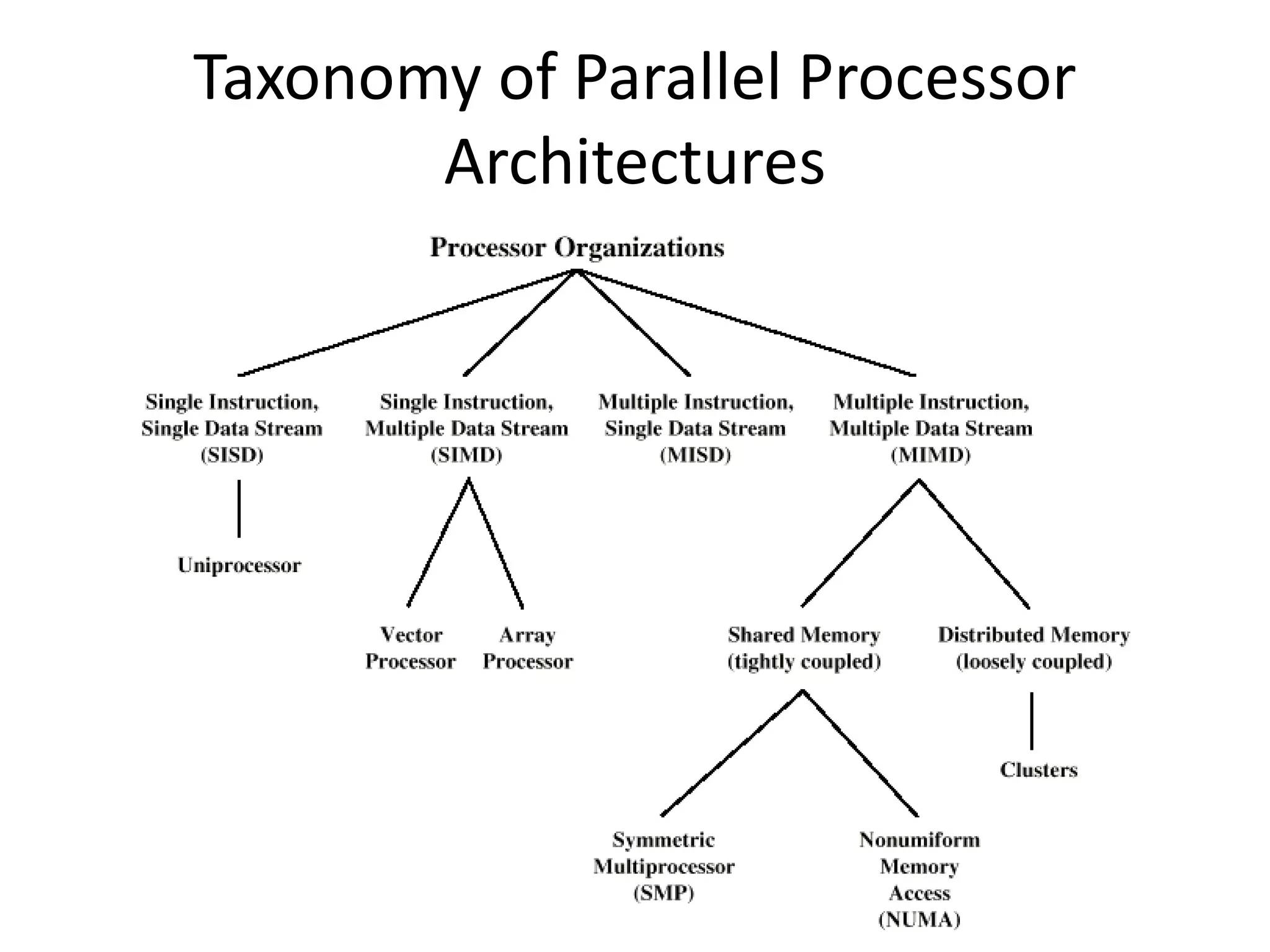
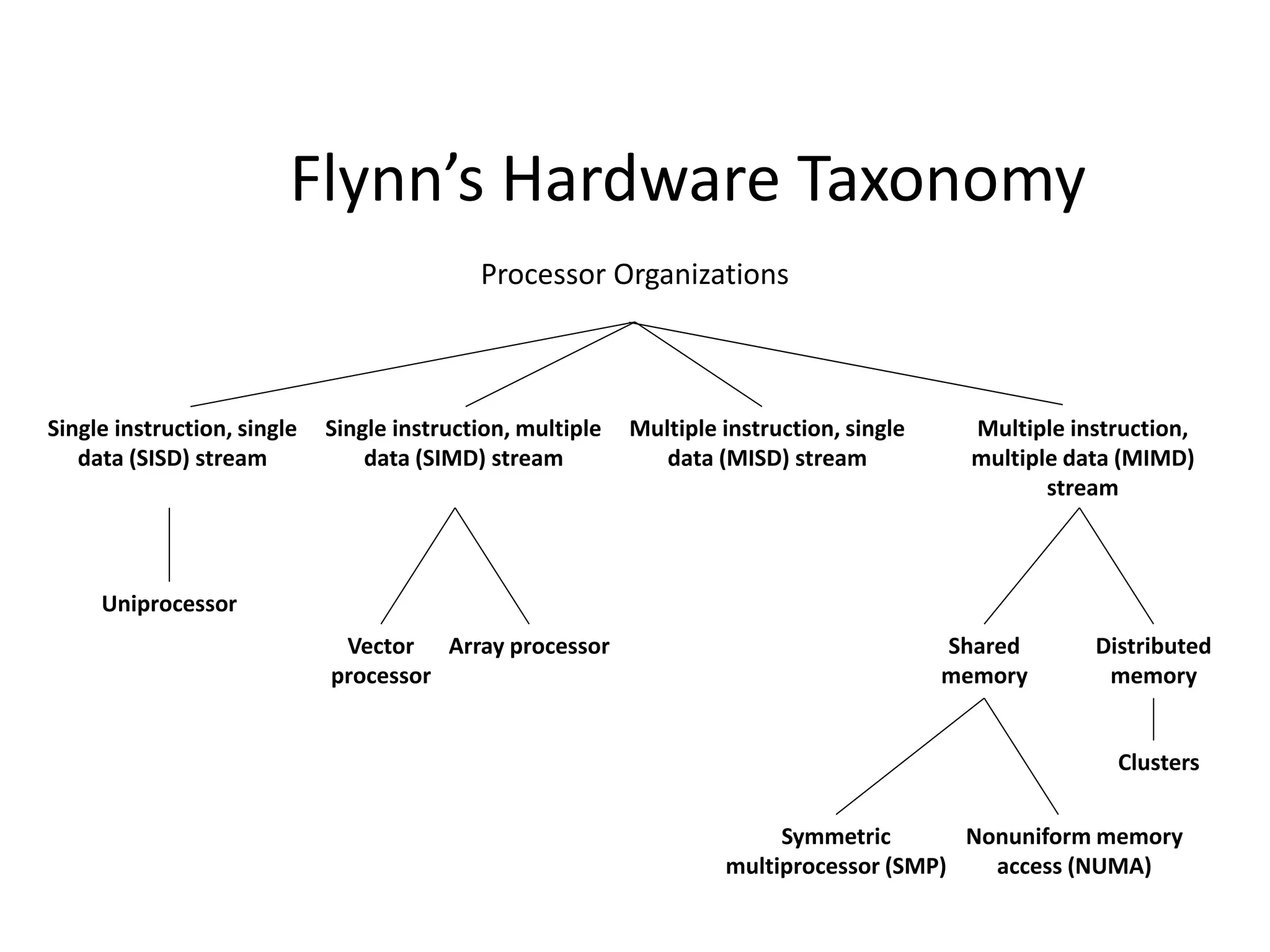
Taxonomy of Parallel Processor
Architectures
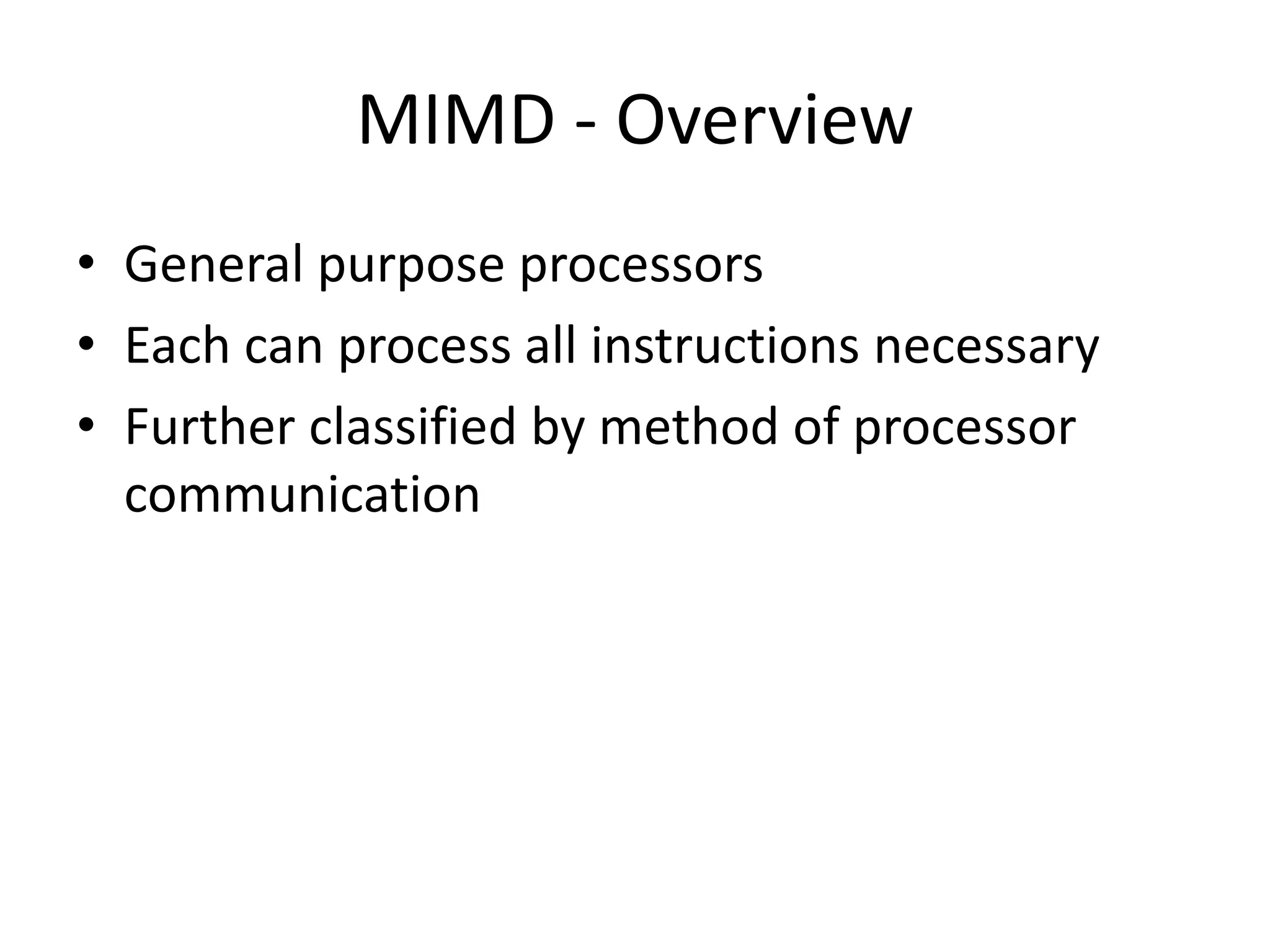
MIMD - Overview
• General purpose processors
• Each can process all instructions necessary
• Further classified by method of processor
communication
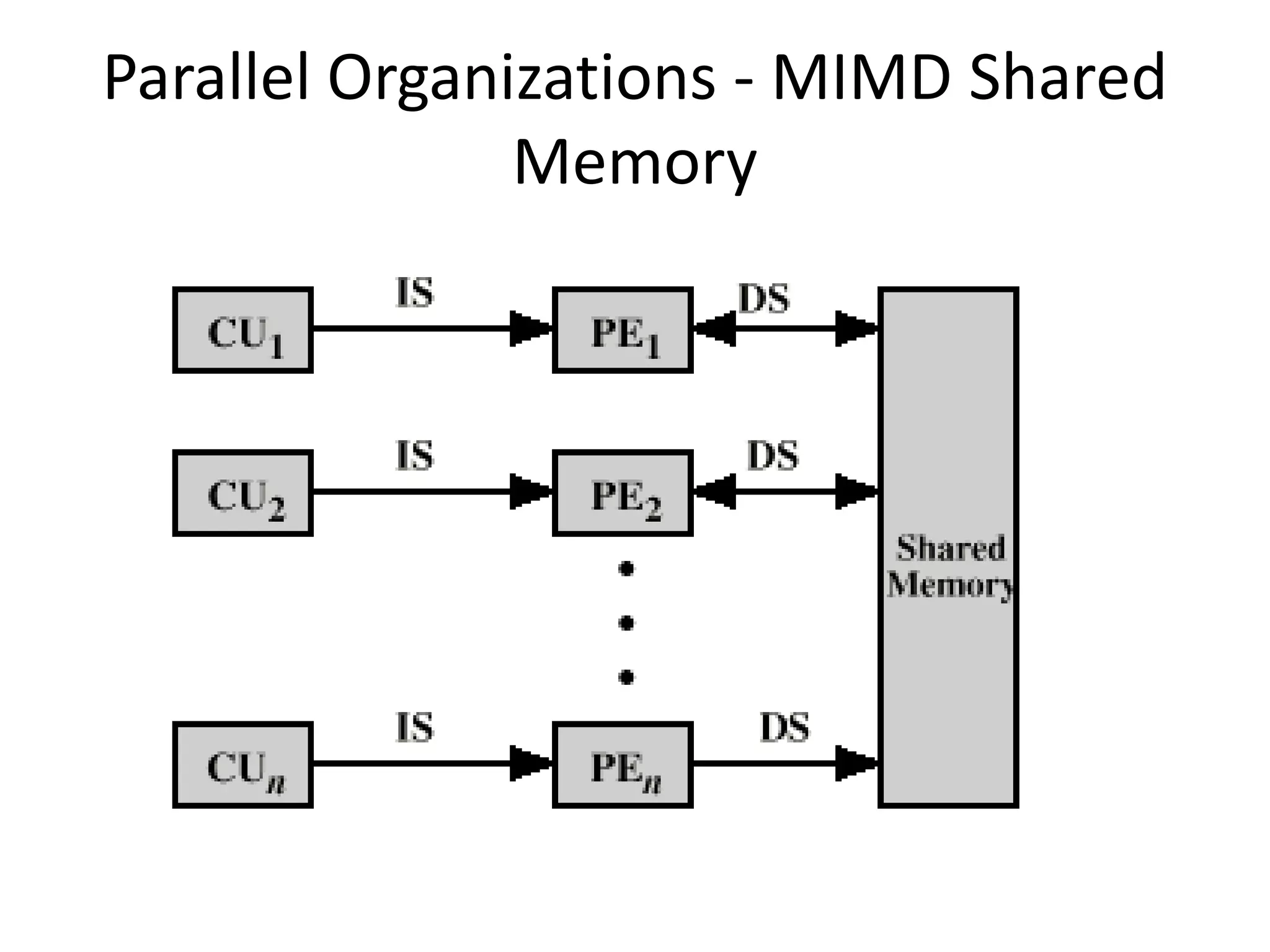
Tightly Coupled - SMP
• Processors share memory
• Communicate via that shared memory
• Symmetric Multiprocessor (SMP)
– Share single memory or pool
– Shared bus to access memory
– Memory access time to given area of memory is
approximately the same for each processor
Tightly Coupled - NUMA
• Nonuniform memory access
• Access times to different regions of memory
may differ
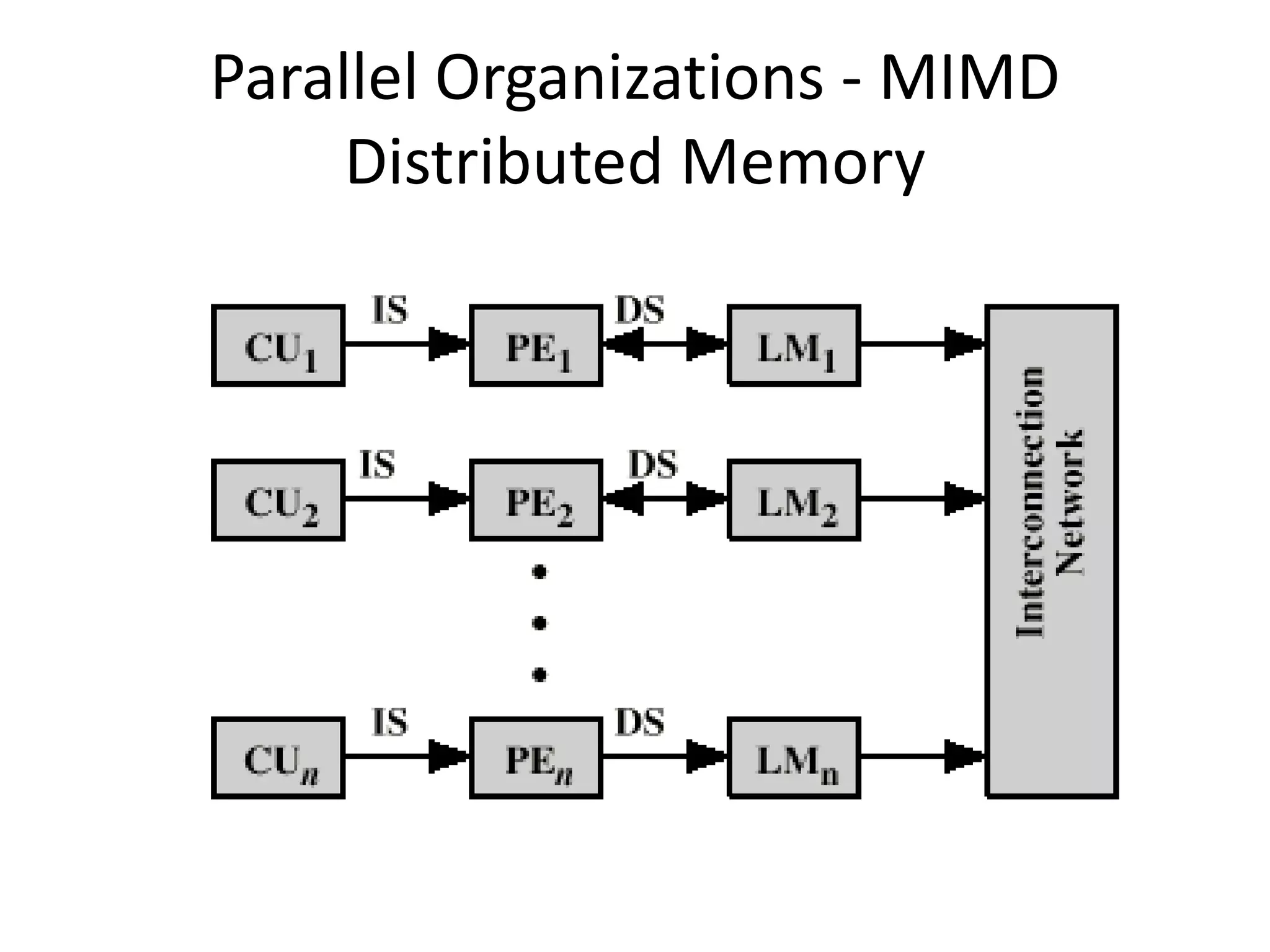
Loosely Coupled - Clusters
• Collection of independent uniprocessors or
SMPs
• Interconnected to form a cluster
• Communication via fixed path or network
connections
Parallel Organizations - SISD
Parallel Organizations - SIMD
Parallel Organizations - MIMD Shared
Memory
Parallel Organizations - MIMD
Distributed Memory
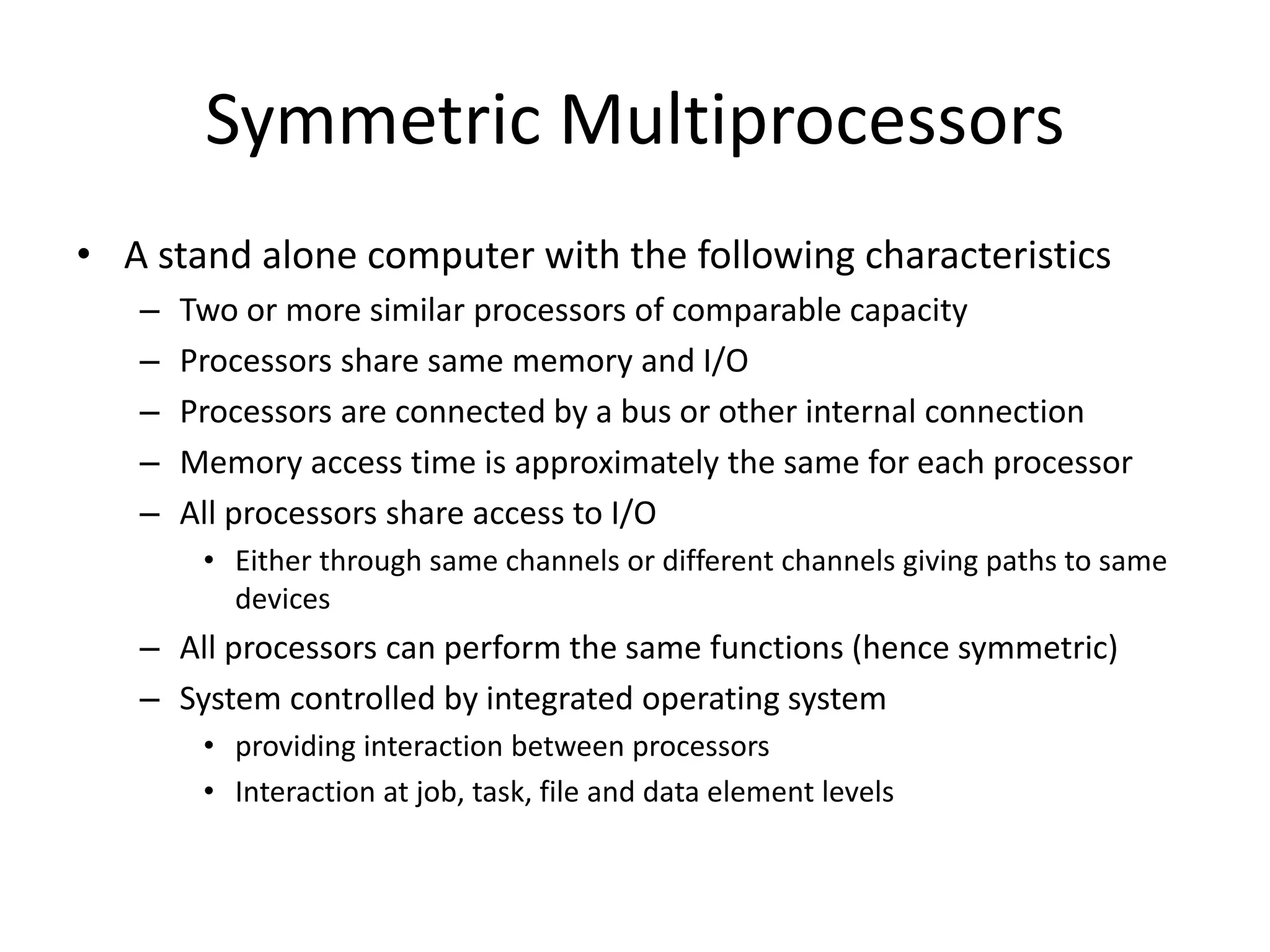
Symmetric Multiprocessors
• A stand alone computer with the following characteristics
– Two or more similar processors of comparable capacity
– Processors share same memory and I/O
– Processors are connected by a bus or other internal connection
– Memory access time is approximately the same for each processor
– All processors share access to I/O
• Either through same channels or different channels giving paths to same
devices
– All processors can perform the same functions (hence symmetric)
– System controlled by integrated operating system
• providing interaction between processors
• Interaction at job, task, file and data element levels
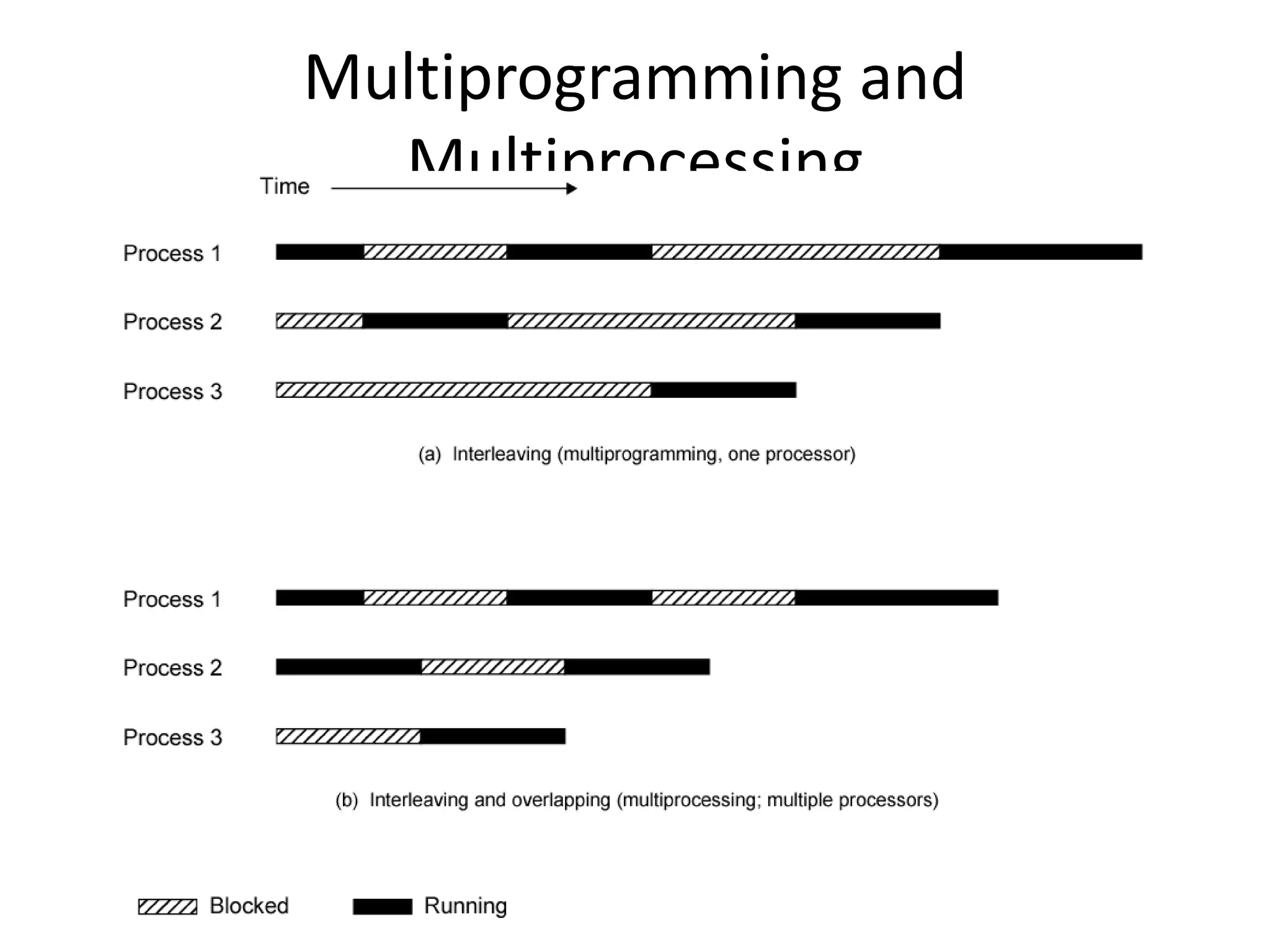
Multiprogramming and
Multiprocessing
Flynn’s Hardware Taxonomy
Processor Organizations
Single instruction, single
data (SISD) stream
Multiple instruction, single
data (MISD) stream
Single instruction, multiple
data (SIMD) stream
Multiple instruction,
multiple data (MIMD)
stream
Uniprocessor
Vector
processor
Array processor Shared
memory
Distributed
memory
Symmetric
multiprocessor (SMP)
Nonuniform memory
access (NUMA)
Clusters

Parallel processing

  • 1.
  • 2.
    Decomposition • One ofthe first steps in designing a parallel program is to break the problem into discrete "chunks" of work that can be distributed to multiple tasks. This is known as decomposition or partitioning. • There are two basic ways to partition computational work among parallel tasks: – domain decomposition and – functional decomposition
  • 3.
    Domain Decomposition • Inthis type of partitioning, the data associated with a problem is decomposed. Each parallel task then works on a portion of of the data.
  • 4.
    Partitioning Data • Thereare different ways to partition data
  • 5.
    Functional Decomposition• Inthis approach, the focus is on the computation that is to be performed rather than on the data manipulated by the computation. The problem is decomposed according to the work that must be done. Each task then performs a portion of the overall work. • Functional decomposition lends itself well to problems that can be split into different tasks. For example – Ecosystem Modeling – Signal Processing – Climate Modeling
  • 6.
    Ecosystem Modeling • Eachprogram calculates the population of a given group, where each group's growth depends on that of its neighbors. As time progresses, each process calculates its current state, then exchanges information with the neighbor populations. All tasks then progress to calculate the state at the next time step.
  • 7.
    Signal Processing • Anaudio signal data set is passed through four distinct computational filters. Each filter is a separate process. The first segment of data must pass through the first filter before progressing to the second. When it does, the second segment of data passes through the first filter. By the time the fourth segment of data is in the first filter, all four tasks are busy.
  • 8.
    What is ParallelProcessing? Parallel processing is another method used to improve performance in a computer system, when a system processes two different instructions simultaneously, it is performing parallel processing
  • 9.
    Topics Include • Parallelismin Uniprocessor Systems • Parallelism in Multiprocessor Systems – Flynn’s Classification – System Topologies – MIMD System Architectures
  • 10.
    Parallelism in UniprocessorSystems A uniprocessor (one CPU) system can perform two or more tasks simultaneously. The tasks are not related to each other. So, a system that processes two different instructions simultaneouly could be condsidered to perform parallel processing
  • 11.
    Example of UniprocessorSystem Recall in Chapter 11, the instruction pipeline is similar to a manufacturing assembly line. If the assembly line is partitioned into four stages: The first stage receives some parts, performs its assembly task, and passes the results to the second stage; the second stage takes the partially assembled product from the first stage, performs its task, and passes its work to the third stage; the third stage does its work, passing the results to the last stage, which completes the task and outputs its results. As the first piece moves from the first stage to the second stage, a new set of parts for a new piece enters the first stage. Ultimately, every staged processes a piece simultaneously. This is how time is saved and this is an example of parallelism in uniprocessor
  • 12.
    Reconfigurable pipeline Another exampleof parallelism in a uniprocessor system. In a reconfigure arithmetic pipeline, each stage has a multiplexer at its input. The multiplexer may pass input data, or the data output from other stages, to the stage inputs.
  • 13.
    Vector Arithmetic unit VectorArithmetic unit is used to perform different arithmetic operations in parallel. A vector arithmetic unit contains multiple functional units. Some perform addition, others subtraction, and others perform different functions.
  • 14.
    A Vectored Arithmeticunit To add two numbers, the control unit routes these values to an adder unit. For the operations A B + C, and D E - F the CPU would route B and C to an adder and send E and F to a subtracter, this allows the CPU to execute both instructions simultaneouly.
  • 15.
    Parallelism in MultiprocessorSystems Parallel processing systems achieve parallelism by having more than one processor performing tasks simultaneously. Since multiprocessor systems are more complicated than uniprocessor systems, there are many different ways to organize the processors and memory, so a researcher, Michael J. Flynn proposed a classification based on the flow of instructions and data within the computer called Flynn’s classification
  • 16.
    Flynn’s Classification It isbased on instruction and data processing. A computer is classified by whether it processes a single instruction at a time or multiple instructions simultaneously, and whether it operates on one or multiple data sets.
  • 17.
    Categories of Flynn’sClassification • SISD: Single instruction with single data • SIMD: Single instruction with multiple data • MISD: Multiple instruction with single data • MIMD: Multiple instruction with multiple data
  • 18.
    Single Instruction SingleData (SISD) SISD machines executes a single instruction on individual data values using a single processor. Even if the processor incorporates internal parallelism, such as an instruction pipeline, the computer would still be classified as SISD
  • 19.
    (SIMD) Single InstructionMultiple Data As its name implies, an SIMD machine executes a single instruction on multiple data values simultaneously using many processors. Since there is only one instruction, each processor does not have to fetch and decode each instruction. Instead a single control unit handles this task for all processors within the SIMD computer
  • 20.
    (MISD) Multiple InstructionSingle Data This classification is not practical to implement. So, no significant MISD computers have ever been built. It is included for completeness of the classification.
  • 21.
  • 22.
    Abstract • This presentationcovers the basics of parallel computing. Beginning with a brief overview and some concepts and terminology associated with parallel computing, the topics of parallel memory architectures and programming models are then explored. These topics are followed by a discussion on a number of issues related to designing parallel programs. The last portion of the presentation is spent examining how to parallelize several different types of serial programs. • Level/Prerequisites: None
  • 23.
    What is ParallelComputing? (1) • Traditionally, software has been written for serial computation: – To be run on a single computer having a single Central Processing Unit (CPU); – A problem is broken into a discrete series of instructions. – Instructions are executed one after another. – Only one instruction may execute at any moment in time.
  • 24.
    What is ParallelComputing? (2) • In the simplest sense, parallel computing is the simultaneous use of multiple compute resources to solve a computational problem. – To be run using multiple CPUs – A problem is broken into discrete parts that can be solved concurrently – Each part is further broken down to a series of instructions • Instructions from each part execute simultaneously on different CPUs
  • 25.
    Parallel Computing: Resources •The compute resources can include: – A single computer with multiple processors; – A single computer with (multiple) processor(s) and some specialized computer resources (GPU, FPGA …) – An arbitrary number of computers connected by a network; – A combination of both.
  • 26.
    Parallel Computing: Thecomputational problem • The computational problem usually demonstrates characteristics such as the ability to be: – Broken apart into discrete pieces of work that can be solved simultaneously; – Execute multiple program instructions at any moment in time; – Solved in less time with multiple compute resources than with a single compute resource.
  • 27.
    Parallel Computing: whatfor? (1) • Parallel computing is an evolution of serial computing that attempts to emulate what has always been the state of affairs in the natural world: many complex, interrelated events happening at the same time, yet within a sequence. • Some examples: – Planetary and galactic orbits – Weather and ocean patterns – Tectonic plate drift – Rush hour traffic in Paris – Automobile assembly line – Daily operations within a business – Building a shopping mall – Ordering a hamburger at the drive through.
  • 28.
    Parallel Computing: whatfor? (2) • Traditionally, parallel computing has been considered to be "the high end of computing" and has been motivated by numerical simulations of complex systems and "Grand Challenge Problems" such as: – weather and climate – chemical and nuclear reactions – biological, human genome – geological, seismic activity – mechanical devices - from prosthetics to spacecraft – electronic circuits – manufacturing processes
  • 29.
    Parallel Computing: whatfor? (3) • Today, commercial applications are providing an equal or greater driving force in the development of faster computers. These applications require the processing of large amounts of data in sophisticated ways. Example applications include: – parallel databases, data mining – oil exploration – web search engines, web based business services – computer-aided diagnosis in medicine – management of national and multi-national corporations – advanced graphics and virtual reality, particularly in the entertainment industry – networked video and multi-media technologies – collaborative work environments • Ultimately, parallel computing is an attempt to maximize the infinite but seemingly scarce commodity called time.
  • 30.
    Why Parallel Computing?(1) • This is a legitime question! Parallel computing is complex on any aspect! • The primary reasons for using parallel computing: – Save time - wall clock time – Solve larger problems – Provide concurrency (do multiple things at the same time)
  • 31.
    Why Parallel Computing?(2) • Other reasons might include: – Taking advantage of non-local resources - using available compute resources on a wide area network, or even the Internet when local compute resources are scarce. – Cost savings - using multiple "cheap" computing resources instead of paying for time on a supercomputer. – Overcoming memory constraints - single computers have very finite memory resources. For large problems, using the memories of multiple computers may overcome this obstacle.
  • 32.
    Limitations of SerialComputing • Limits to serial computing - both physical and practical reasons pose significant constraints to simply building ever faster serial computers. • Transmission speeds - the speed of a serial computer is directly dependent upon how fast data can move through hardware. Absolute limits are the speed of light (30 cm/nanosecond) and the transmission limit of copper wire (9 cm/nanosecond). Increasing speeds necessitate increasing proximity of processing elements. • Limits to miniaturization - processor technology is allowing an increasing number of transistors to be placed on a chip. However, even with molecular or atomic-level components, a limit will be reached on how small components can be. • Economic limitations - it is increasingly expensive to make a single processor faster. Using a larger number of moderately fast commodity processors to achieve the same (or better) performance is less expensive.
  • 33.
    Multiple Processor Organization •Single instruction, single data stream - SISD • Single instruction, multiple data stream - SIMD • Multiple instruction, single data stream - MISD • Multiple instruction, multiple data stream- MIMD
  • 34.
    Single Instruction, SingleData Stream - SISD • Single processor • Single instruction stream • Data stored in single memory • Uni-processor
  • 35.
    Single Instruction, MultipleData Stream - SIMD • Single machine instruction • Controls simultaneous execution • Number of processing elements • Lockstep basis • Each processing element has associated data memory • Each instruction executed on different set of data by different processors • Vector and array processors
  • 36.
    Multiple Instruction, SingleData Stream - MISD • Sequence of data • Transmitted to set of processors • Each processor executes different instruction sequence • Never been implemented
  • 37.
    Multiple Instruction, MultipleData Stream- MIMD • Set of processors • Simultaneously execute different instruction sequences • Different sets of data • SMPs, clusters and NUMA systems
  • 38.
    Taxonomy of ParallelProcessor Architectures
  • 39.
    MIMD - Overview •General purpose processors • Each can process all instructions necessary • Further classified by method of processor communication
  • 40.
    Tightly Coupled -SMP • Processors share memory • Communicate via that shared memory • Symmetric Multiprocessor (SMP) – Share single memory or pool – Shared bus to access memory – Memory access time to given area of memory is approximately the same for each processor
  • 41.
    Tightly Coupled -NUMA • Nonuniform memory access • Access times to different regions of memory may differ
  • 42.
    Loosely Coupled -Clusters • Collection of independent uniprocessors or SMPs • Interconnected to form a cluster • Communication via fixed path or network connections
  • 43.
  • 44.
  • 45.
    Parallel Organizations -MIMD Shared Memory
  • 46.
    Parallel Organizations -MIMD Distributed Memory
  • 47.
    Symmetric Multiprocessors • Astand alone computer with the following characteristics – Two or more similar processors of comparable capacity – Processors share same memory and I/O – Processors are connected by a bus or other internal connection – Memory access time is approximately the same for each processor – All processors share access to I/O • Either through same channels or different channels giving paths to same devices – All processors can perform the same functions (hence symmetric) – System controlled by integrated operating system • providing interaction between processors • Interaction at job, task, file and data element levels
  • 48.
  • 49.
    Flynn’s Hardware Taxonomy ProcessorOrganizations Single instruction, single data (SISD) stream Multiple instruction, single data (MISD) stream Single instruction, multiple data (SIMD) stream Multiple instruction, multiple data (MIMD) stream Uniprocessor Vector processor Array processor Shared memory Distributed memory Symmetric multiprocessor (SMP) Nonuniform memory access (NUMA) Clusters