CS9222 Advanced Operating
System
Unit – I
Dr.A.Kathirvel
Professor & Head/IT - VCEW
Unit - I
Overview - Functions of an Operating System – Design
Approaches – Types of Advanced Operating System -
Synchronization Mechanisms – Concept of a Process,
Concurrent Processes – The Critical Section Problem,
Other Synchronization Problems – Language
Mechanisms for Synchronization – Axiomatic
Verification of Parallel Programs – Process Deadlocks
- Preliminaries – Models of Deadlocks, Resources,
System State – Necessary and Sufficient conditions
for a Deadlock – Systems with Single-Unit Requests,
Consumable Resources, Reusable Resources.
What is OS?
• Operating System is a software, which makes a
computer to actually work.
• It is the software the enables all the programs we
use.
• The OS organizes and controls the hardware.
• OS acts as an interface between the application
programs and the machine hardware.
• Examples: Windows, Linux, Unix and Mac OS,
etc.,
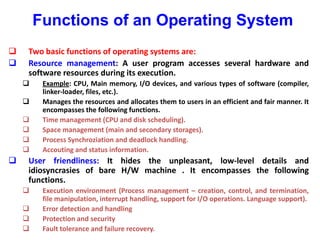
Functions of an Operating System
 Two basic functions of operating systems are:
 Resource management: A user program accesses several hardware and
software resources during its execution.
 Example: CPU, Main memory, I/O devices, and various types of software (compiler,
linker-loader, files, etc.).
 Manages the resources and allocates them to users in an efficient and fair manner. It
encompasses the following functions.
 Time management (CPU and disk scheduling).
 Space management (main and secondary storages).
 Process Synchroziation and deadlock handling.
 Accouting and status information.
 User friendliness: It hides the unpleasant, low-level details and
idiosyncrasies of bare H/W machine . It encompasses the following
functions.
 Execution environment (Process management – creation, control, and termination,
file manipulation, interrupt handling, support for I/O operations. Language support).
 Error detection and handling
 Protection and security
 Fault tolerance and failure recovery.
Design Approaches
Deal with complexities of modern systems
Separation of Policies and Mechanisms
Policies - What should be done
Mechanisms - How it should be done
Three common approaches:
Layered Approach
Kernel Approach
Virtual Machine Approach
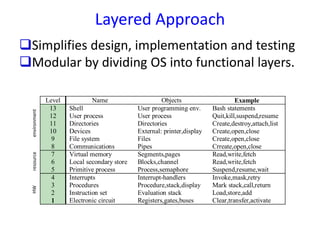
Layered Approach
Level Name Objects Example
13 Shell User programming env. Bash statements
12 User process User process Quit,kill,suspend,resume
11 Directories Directories Create,destroy,attach,list
10 Devices External: printer,display Create,open,close
9 File system Files Create,open,close
8 Communications Pipes Crreate,open,close
7 Virtual memory Segments,pages Read,write,fetch
6 Local secondary store Blocks,channel Read,write,fetch
5 Primitive process Process,semaphore Suspend,resume,wait
4 Interrupts Interrupt-handlers Invoke,mask,retry
3 Procedures Procedure,stack,display Mark stack,call,return
2 Instruction set Evaluation stack Load,store,add
1 Electronic circuit Registers,gates,buses Clear,transfer,activate
Simplifies design, implementation and testing
Modular by dividing OS into functional layers.
HWresourceenvironment
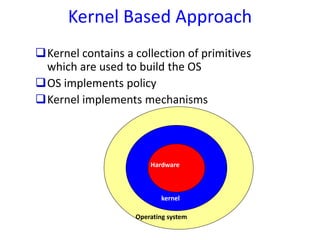
Kernel Based Approach
Kernel contains a collection of primitives
which are used to build the OS
OS implements policy
Kernel implements mechanisms
Hardware
kernel
Operating system
Virtual Machine Approach
Virtual software layer over hardware
Illusion of multiple instances of hardware
Supports multiple instances of OSs
Hardware
Virtual machine software
VM1 VM2 VM3 VM4
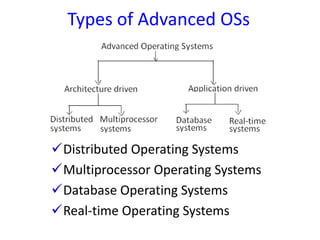
Types of Advanced OSs
Distributed Operating Systems
Multiprocessor Operating Systems
Database Operating Systems
Real-time Operating Systems
Distributed Operating Systems
Controls and manages resources for a network
of autonomous computers
manage both hardware and software resources
behaves as a single monolithic system.
User not aware of program or resource location
Design issues same as traditional systems
Practical issues:
lack of shared memory
lack of global clock
unpredictable communication delays.
Multiprocessor Operating Systems
Consists of a set of processors that
share a set of physical memory blocks
share a common clock
"share" over an interconnection network.
Control and manage resources
hardware and software resources
viewed as a uniprocessor system.
Design issues same as traditional system.
Practical issues:
increased complexity of synchronization, scheduling,
memory management, protection and security.
Database Operating Systems
Database systems place increased demands on an
operating system to efficiently support:
concept of a transactions
manage large volumes of data
concurrency control
system failure control
Real-time Operating Systems
Place application specific special requirements
on an operating system.
Policies and mechanisms are geared to
ensuring jobs meet their deadlines.
Problem is one of resource scheduling and
overall system utilization.
Traditional Kernel Architecture
libraries
System call interface
application
File subsystem
Buffer cache
IPC
scheduler
memory
Process
control
subsystem
char block
Device drivers
hardware
trap
kernel
user
execution
environment
System
Services
Basic Concepts and Terminology
Two privilege level: user and system
each process has own "protected" address space
all process share same kernel space
kernel space protected: requires special
instruction sequence to change from user to
kernel mode
per process state (u_area) in kernel space
per process kernel stack; kernel is re-entrant
system (Interrupt) versus process context
Mode, Space and Context
user
context
mode
kernel
process
kernel
Application
(user code)
X
not allowed
Interrupts
System tasks
System calls
Exceptions
Privileged
UNIX uses only two privilege levels
system
space
Overview
Process
compete for system resources
blocks if can not acquire a resource
Kernel
manages resource - allocate resource to processes
"optimally"
implements policy for resource allocation (sharing)
provide high-level abstract interface to resources
centralized management simplifies synchronization
and error recovery
The Process
Fundamental abstraction
Executes a sequence of instructions
Competes for resources
Address space - memory locations accessible
to process
virtual address space: memory, disk, swap or
remote devices
System provides features of a virtual machine
shared resources (I/O, CPU etc)
dedicated registers and memory
The Process
Most created by fork or vfork
well defined hierarchy: one parent and zero
or more child processes. The init process is at
the root of this tree
different programs may be run during the life
of a process by calling exec
processes typically terminate by calling exit
Process states
swtch()
stop
exit
continue
fork
fork
wait
wakeup
wakeup
stop
continuesleep()
swtch()
return
system call,
interrupt
User
Running
Kernel
Running
Zombie Runnable
Initial
Idle
Stopped
Stopped
Asleep
Asleep
stop
Process Context
Address Space
text, data, stack, shared memory ...
Control information (u area, proc)
u area, proc structure, maps
kernel stack
Address translation maps
Credentials
user and group ids
Environment variables
variable=value
typically stored at bottom of stack
Process Context (cont)
Hardware context
program counter
stack pointer
processor status word
memory management registers
FPU registers
Machine registers saved in u area's process
control block (PCB) during context switch to
another process.
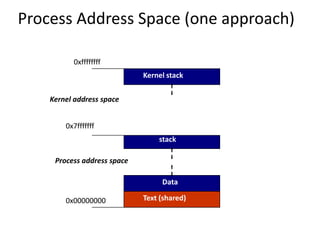
Process Address Space (one approach)
Kernel stack
Kernel address space
Data
stack
Text (shared)
Process address space
0x00000000
0x7fffffff
0xffffffff
Big Picture: Another look
Data
Stack
Text (shared)
kernel stack/u area
Data
Stack
Text (shared)
kernel stack/u area
Data
Stack
Text (shared)
kernel stack/u area
proc struct
kernel memory
Process Control Information
U area.
Part of user space (above stack).
typically mapped to a fixed address.
contains info needed while running.
Can be swapped
Proc
contains info needed when not running.
Not swapped out.
traditionally fixed size table
U area and Proc structures
U Area
PCB - HW context
pointer to proc
real/effective ids
args, return values or
errors to current syscall.
Signal info
file descriptor table
controlling terminal
vnode
Proc structure
process ID and group
u area pointer
process state
queue pointers -
scheduler, sleep, etc.
Priority
memory management info
flags
User Credentials
Every user is assigned a unique user id
(uid) and group id (gid).
Superuser (root) has uid == 0 and gid == 0
every process both a real and effective pair
of Ids.
– effective id => file creation and access,
real id => real owner of process. Used when
sending signals.
Senders real or effective id must equal receivers
real id
The Kernel
. program that runs directly on the hardware
loaded at boot time and initializes system,
creates some initial system processes.
remains in memory and manages the system
Resource manager/mediator - process is key abstraction.
Time share (time-slice) the CPU,
coordinate access to peripherals,
manage virtual memory.
Synchronization primitives.
Well defined entry points:
syscalls, exceptions or interrupts.
Performs privileged operations
Entry into Kernel
Synchronous - kernel performs work on behalf of the
process:
System call interface (UNIX API): central component of the
UNIX API
Hardware exceptions - unusual action of process
Asynchronous - kernel performs tasks that are possibly
unrelated to current process.
Hardware interrupts - devices assert hardware interrupt
mechanism to notify kernel of events which require attention
(I/O completion, status change, real-time clock etc)
System processes - scheduled by OS
 swapper and pagedaemon.
Trap or Interrupt Processing
Hardware switches to kernel mode, using
the per/process kernel stack.
HW saves PC, Status word and possibly
other state on kernel stack.
Assembly routine saves any other
information necessary and dispatches
event.
On completion a return from interrupt
(RFI) instruction is performed.
Interrupt handling
Asynchronous event such as disk I/O, network
packet reception or clock “tick”.
Must be serviced in system context.
Must not block.
This does take CPU time away from the currently
running process!
Interrupt handling (cont)
Multiple interrupt priority levels (ipl),
traditionally 0-7.
User processes and kernel operate at the
lowest ipl level.
Higher level Interrupts can preempt lower
priority ones.
 The current ipl level may be set while
executing critical code.
Exception handling
Synchronous to the currently running process
for example divide by zero or invalid memory
access.
Must run the the current processes context.
An Interrupt can occur during the processing
of an exception or trap.
Software Interrupts
Interrupts typically have the highest priority in
a system.
Software interrupts are assigned priorities
above that of user processes but below that of
interrupts.
Software interrupts are typically implemented
in software.
Examples are callout queue processing and
network packet processing.
System Call Interface
Implemented as an assembly language stub.
Trap into kernel dispatch routine which may
save additional state and invoke the high-
level system call.
User privileges are verified and any data is
copied into kernel (copyin()).
On return, copy out any user data
(copyout()), check for an Asynchronous
System Trap (signal, preemption, etc).
Synchronization
Kernel is re-entrant.
only one active process at any given time
(others are blocked).
Nonpreemptive.
Blocking operations
masking interrupts
Blocking Operations
When resource is unavailable (possibly
locked), process sets flag and calls sleep()
sleep places process blocked queue, sets state
to asleep and calls swtch()
when resource released wakeup() is called
all sleep processes are woken and state set to
runnable (placed on the runnable queues).
When running, process must verify resource is
available.
Process Scheduling
Preemptive round-robin scheduling
fixed time quantums
priority is adjusted by nice value and usage
factor.
Processes in the kernel are assigned a kernel
priority (sleep priority) which is higher than
user priorities.
Kernel 0-49, user 50-127.
Signals
Asynchronous events and exceptions
Signal generation using the kill() system call
Default operation or user specific handlers
sets a bit in the pending signals mask in the
proc structure
All signals are handled before return to
normal processing
System calls can be restarted
Process creation
Fork
create a new process
copy of parents virtual memory
parent return value is child’s PID
child return value is 0
exec
overwrite with new program
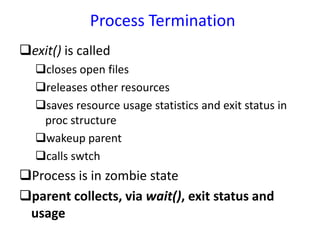
Process Termination
exit() is called
closes open files
releases other resources
saves resource usage statistics and exit status in
proc structure
wakeup parent
calls swtch
Process is in zombie state
parent collects, via wait(), exit status and
usage
42
Synchronization Mechanisms
Common element in all synchronization
schemes is to allow a process to finish work on
a critical region of program before other
processes have access to it.
Applicable both to multiprocessors and to 2+
processes in a single-processor (time-shared)
processing system.
Called a critical region because its execution
must be handled as a unit.
43
Lock-and-Key Synchronization
Process first checks if key is available
If it is available, process must pick it up and
put it in lock to make it unavailable to all other
processes.
For this scheme to work both actions must be
performed in a single machine cycle.
Several locking mechanisms have been
developed including test-and-set, WAIT and
SIGNAL, and semaphores.
44
Test-And-Set (TS) Locking
Test-and-set is a single indivisible machine
instruction (TS).
In a single machine cycle it tests to see if key is
available and, if it is, sets it to “unavailable.”
Actual key is a single bit in a storage location
that can contain a zero (if it’s free) or a one (if
busy).
Simple procedure to implement.
Works well for a small number of processes.
45
Problems with Test-And-Set
 When many processes are waiting to enter a critical region,
starvation could occur because processes gain access in an
arbitrary fashion.
Unless a first-come first-served policy were set up, some
processes could be favored over others.
 Waiting processes remain in unproductive, resource-
consuming wait loops (busy waiting).
Consumes valuable processor time.
Relies on the competing processes to test key.
46
WAIT and SIGNAL Locking
• Modification of test-and-set.
• Adds 2 new operations, which are mutually
exclusive and become part of the process
scheduler’s set of operations
– WAIT
– SIGNAL
• Operations WAIT and SIGNAL frees processes
from “busy waiting” dilemma and returns
control to OS which can then run other jobs
while waiting processes are idle.
47
WAIT
Activated when process encounters a busy
condition code.
Sets process control block (PCB) to the
blocked state
Links it to the queue of processes waiting to
enter this particular critical region.
Process Scheduler then selects another
process for execution.
48
SIGNAL
Activated when a process exits the critical
region and the condition code is set to “free.”
Checks queue of processes waiting to enter
this critical region and selects one, setting it to
the READY state.
Process Scheduler selects this process for
running.
49
Semaphores
 Semaphore -- nonnegative integer variable used as a flag.
 Signals if & when a resource is free & can be used by a process.
 Most well-known semaphores are signaling devices used by
railroads to indicate if a section of track is clear.
 Dijkstra (1965) -- 2 operations to operate semaphore to
overcome the process synchronization problem.
P stands for the Dutch word proberen (to test)
V stands for verhogen (to increment)
50
P (Test) and V (Increment)
If we let s be a semaphore variable, then the V
operation on s is simply to increment s by 1.
V(s): s: = s + 1
Operation P on s is to test value of s and, if it’s
not zero, to decrement it by one.
P(s): If s > 0 then s: = s – 1
 P and V are executed by OS in response to
calls issued by any one process naming a
semaphore as parameter.
51
MUTual EXclusion (Mutex)
P and V operations on semaphore s enforce
concept of mutual exclusion, which is
necessary to avoid having 2 operations
attempt to execute at same time.
Called mutex ( MUTual EXclusion)
P(mutex): if mutex > 0 then mutex: = mutex – 1
V(mutex): mutex: = mutex + 1
52
Process Cooperation
Occasions when several processes work
directly together to complete a common task.
Two famous examples are problems of
“producers and consumers” and “readers and
writers.”
Each case requires both mutual exclusion and
synchronization, and they are implemented by
using semaphores.
53
Producers and Consumers
One Process Produces Some Data That Another Process Consumes Later.
Producer Consumer
Buffer
Consumer
Consumer
Producer
Producer
Buffer
Buffer
54
Producers and Consumers - 2
Because buffer holds finite amount of data,
synchronization process must delay producer from
generating more data when buffer is full.
Delay consumer from retrieving data when buffer is
empty.
This task can be implemented by 3 semaphores:
Indicate number of full positions in buffer.
Indicate number of empty positions in buffer.
Mutex, will ensure mutual exclusion between
processes
55
Definitions of Producer &
Consumer Processes
Producer Consumer
produce data P (full)
P (empty) P (mutex)
P (mutex) read data from buffer
write data into buffer V (mutex)
V (mutex) V (empty)
V (full) consume data
56
Definitions of Variables and Functions
Used in Producers and Consumers
Given: Full, Empty, Mutex defined as semaphores
n: maximum number of positions in the buffer
V (x): x: = x + 1 (x is any variable defined as a semaphore)
P (x): if x > 0 then x: = x – 1
mutex = 1 means the process is allowed to enter critical region
57
Producers and Consumers
Algorithm
empty:= n
full:= 0
mutex:= 1
COBEGIN
repeat until no more data PRODUCER
repeat until buffer is empty CONSUMER
COEND
58
Readers and Writers
Readers and writers -- arises when 2 types of
processes need to access a shared resource such as a
file or database.
E.g., airline reservations systems.
Two solutions using P and V operations:
1. Give priority to readers over writers so readers
are kept waiting only if a writer is actually modifying
the data.
However, this policy results in writer starvation if
there is a continuous stream of readers.
59
Reader & Writer Solutions
Using P and V Operations
2. Give priority to the writers.
In this case, as soon as a writer arrives, any
readers that are already active are allowed to
finish processing, but all additional readers are
put on hold until the writer is done.
Obviously this policy results in reader
starvation if a continuous stream of writers is
present
60
State of System Summarized By 4 Counters
Number of readers who have requested a resource
and haven’t yet released it (R1=0);
Number of readers who are using a resource and
haven’t yet released it (R2=0);
Number of writers who have requested a resource
and haven’t yet released it (W1=0);
Number of writers who are using a resource and
haven’t yet released it (W2=0).
Implemented using 2 semaphores to ensure mutual
exclusion between readers and writers.
61
Concurrent Programming
Concurrent processing system -- one job uses several
processors to execute sets of instructions in parallel.
Requires a programming language and a computer
system that can support this type of construct.
Increases computation speed.
Increases complexity of programming language and
hardware (machinery & communication among machines).
Reduces complexity of working with array operations
within loops, of performing matrix multiplication, of
conducting parallel searches in databases, and of sorting or
merging files.
62
Explicit & Implicit Parallelism
Explicit parallelism -- programmer must
explicitly state which instructions can be
executed in parallel.
Implicit parallelism -- automatic detection by
compiler of instructions that can be
performed in parallel.
High Level Synchronization
Mechanisms
 Several high-level mechanisms that are easier to use
have been proposed.
Monitors
Critical Regions
Read/Write locks
 We will study monitors (Java and Pthreads provide
synchronization mechanisms based on monitors)
 They were suggested by Dijkstra, developed more
thoroughly by Brinch Hansen, and formalized nicely by
Tony Hoare in the early 1970s
 Several parallel programming languages have
incorporated some version of monitors as their
fundamental synchronization mechanism
Monitors
 A monitor is a shared object
with operations, internal state,
and a number of condition
queues. Only one operation of
a given monitor may be active
at a given point in time
 A process that calls a busy
monitor is delayed until the
monitor is free
 On behalf of its calling
process, any operation
may suspend itself by
waiting on a condition
 An operation may also
signal a condition, in
which case one of the
waiting processes is
resumed, usually the one
that waited first
Monitors
 Condition (cooperation)
Synchronization with
Monitors:
 Access to the shared data in
the monitor is limited by the
implementation to a single
process at a time; therefore,
mutually exclusive access is
inherent in the semantic
definition of the monitor
 Multiple calls are queued
 Mutual Exclusion (competition)
Synchronization with Monitors:
 delay takes a queue type
parameter; it puts the process
that calls it in the specified
queue and removes its
exclusive access rights to the
monitor’s data structure
 continue takes a queue type
parameter; it disconnects the
caller from the monitor, thus
freeing the monitor for use by
another process. It also takes
a process from the parameter
queue (if the queue isn’t empty)
and starts it
Shared Data with Monitors
Monitor SharedData
{ int balance;
void updateBalance(int amount);
int getBalance();
void init(int startValue) { balance =
startValue; }
void updateBalance(int amount)
{ balance += amount; }
int getBalance()
{ return balance; }
}
Monitors
• To allow a process to wait within the monitor, a condition
variable must be declared, as
condition x, y;
• Condition variable can only be used with the operations wait
and signal.
– The operation
x.wait();
means that the process invoking this operation is suspended until
another process invokes
x.signal();
– The x.signal operation resumes exactly one suspended process on
condition variable x. If no process is suspended on condition
variable x, then the signal operation has no effect.
• Wait and signal operations of the monitors are not the same as
semaphore wait and signal operations!
Monitor with Condition Variables
 When a process P “signals” to wake up the process Q that was
waiting on a condition, potentially both of them can be active.
 However, monitor rules require that at most one process can be
active within the monitor.
Who will go first?
Signal-and-wait: P waits until Q leaves the monitor
(or, until Q waits for another condition).
Signal-and-continue: Q waits until P leaves the monitor (or,
until P waits for another condition).
Signal-and-leave: P has to leave the monitor after signaling
(Concurrent Pascal)
 The design decision is different for different programming
languages
Monitor with Condition Variables
Producer-Consumer Problem
with Monitors
Monitor Producer-consumer
{
condition full, empty;
int count;
void insert(int item); //the following slide
int remove(); //the following slide
void init() {
count = 0;
}
}
Producer-Consumer Problem
with Monitors (Cont.)
void insert(int item)
{
if (count == N) full.wait();
insert_item(item); // Add the new
item
count ++;
if (count == 1) empty.signal();
}
int remove()
{ int m;
if (count == 0) empty.wait();
m = remove_item(); // Retrieve one item
count --;
if (count == N–1) full.signal();
return m; }
Producer-Consumer Problem
with Monitors (Cont.)
void producer() { //Producer process
while (1) {
item = Produce_Item();
Producer-consumer.insert(item);
}
}
void consumer() { //Consumer process
while (1) {
item = Producer-consumer.remove(item);
consume_item(item);
}
}
Monitors
 Evaluation of monitors:
 Strong support for mutual exclusion synchronization
 Support for condition synchronization is very similar as with
semaphores, so it has the same problems
 Building a correct monitor requires that one think about the
"monitor invariant“. The monitor invariant is a predicate that
captures the notion "the state of the monitor is consistent."
It needs to be true initially, and at monitor exit
It also needs to be true at every wait statement
 Can implement monitors in terms of semaphores  that
semaphores can do anything monitors can.
 The inverse is also true; it is trivial to build a semaphores from
monitors
Serializers
Only 1 active process
Multiple active processes
join-crowd (<crowd>) then
(<body>) end
enqueue (<priority>,<qname>)
until (<condition>)
serializer vs. monitor
 difference from monitor
resource ops can be inside the serializer (***)
no explicit signaling
explicit enqueuing on queues
automatic thread resumption (dequeue)
Serializers are similar to monitors with two main
differences:
they allow concurrency
they have an automatic signalling mechanism
A serializer allows access to a resource without mutual
exclusion, although the resource is inside the serializer
built in priorities:
threads on queue when condition true
threads leaving crowd
threads entering crowd
Operation semantics:
enqueue is like Wait, only the Signal happens
automatically when condition is true, the thread is at
the head of the queue, and some other thread leaves
the serializer
join_crowd leaves the serializer, executes a block
without mutual exclusion, but returns to the serializer
when the block finishes
Use of Serializers
Usual sequence of events for a thread:
enter serializer
enqueue waiting for event (if needed)
dequeue (automatic)
join crowd to start using resource
leave crowd (automatic)
exit serializer
Reader’s Priority: Serializers
Readerwriter: serializer
var
readq: queue; writeq: queue;
rcrowd: crowd; wcrowd: crowd;
db: database;
procedure read(k:key; var data: datatype);
begin
enqueue (readq) until empty(wcrowd);
joincrowd (rcrowd) then
data:= read-db(db[key]);
end
return (data);
end read;
procedure write(k:key, data:datatype);
begin
enqueue(writeq) until
(empty(rcrowd) AND empty(wcrowd) AND
empty(readq));
joincrowd (wcrowd) then write-db(db[key], data);
end
end write;
Readers-Writers in Serializers ...
 Weak reader’s priority
enqueue(writeq) until
(empty(wcrowd) AND empty(rcrowd));
 A writer does not wait until readq becomes empty
 Writer’s priority
enqueue(writeq) until
(empty(wcrowd) AND empty(rcrowd));
enqueue(readq) until
(empty(wcrowd) AND empty(writeq));
Serializers: Drawbacks
• More complex, may be less efficient
• More work to be done by serializers
• “crowd” : complex data structure; stores identity of
processes,…
• “queue”: count, semaphore, predicate…
• Assumes automatic signaling feature: test conditions of
every process at the head of every queue every time a
process comes out of a serializer.
• Though it (automatic signalling) helps in avoiding
deadlocks and race conditions.
Serializers: pros and cons
• Pros:
– clean and powerful model addresses monitors’
drawbacks
– allows concurrency of encapsulated resources
– automatic signaling simplifies programming
• Cons
– more complex so less efficient
– automatic signaling requires testing conditions
every time possession of serializer is relinquished
• scorecard for serializer
– modularity and correctness (high); ease of use (high)
– modifiability (OK); expr. power (OK)
– efficiency (low)
Path Expressions
 Path expressions are declarative specifications of allowed
behaviors of a concurrent program
 synchronization is a mere side-effect of ordering the executions of
operations on a resource
 To implement path expressions, a run-time system (path
controller for each instance of shared resource) is needed to
check the validity of orderings
 it keeps track of operation start and end
 it blocks threads if their execution of an operation will violate the path
expression
 important: automatically unblocks when execution can go on
 Path expressions do not cause the operations to be executed
and do not determine who executes the operations
Path Expressions
sync for data abstraction part of definition
path expression specifies allowed orderings
syntax: path S end;
S is an expression whose variables are the
operations on the resource, and the
operators are
; (sequencing)
+ (selection)
{ } (concurrency)
path-end (repetition)
unsynch. access to ops not in path
Operator semantic
; (sequencing) defines a obliged sequencing
order between operations.
no concurrency between operations
+ (selection) means only one of the operations
can be executed at a time
the order of executions does not matter
{ } (concurrency) means any number of
instances of the embraced operations can be
executing at a time
example
path {read} + write end
multiple readers or single writer
priority?
none
path expression does not cause op invocation
several path expressions in a module; the
ordering has to be consistent with all paths
after a legal execution, another legal execution
may follow
path open; read; close; end
sequentially one after the other
no mention of WHO executes the op in path expr.
path A end
a sequence of As (the path between path and end can
be repeated)
path {A} end
concurrent As
path {A;B}+C end
the nth B can start only after n As have finished
any C will be preceded by zero or n concurrent A;B,
where all As and Bs have finished
path {A + B};C end
the nth B can start independent of how many As have
started or finished before it
all the As and Bs that have started have to complete
before a C is allowed to go
Readers/Writer (basic):
path { read } + write end
Writes and reads interleaved (at least 1 read):
path write ; { read } end
path a + b; c end
path a + (b; c) end;
path {a} + {b} end;
path {a + b} end;
path {a; b} end;
path {(a;b) + c} end
path {a; b+c} end
87
Communicating Sequential Processes (CSP)
 single thread of control
 autonomous
 encapsulated
 named
 static
 synchronous
 reliable
 unidirectional
 point-to-point
 fixed topology
sequential
process
communication
channel
88
Operators
A B
B!x A?y
x y
operators:
? (receive)
! (send)
usage:
Send to
message
Receive from
buffer
B!x A?y
89
Semantics and Type Matching
 rendezvous semantics: senders (receivers) remain blocked at
send (receive) operation until a matching receive (send)
operation is made.
 typed messages: the type of the message sent by the sender and
the type of the message expected by the receiver must match
(otherwise abort).
A!vec(x,y) B?vec(s,t)
OK
A!count(x) B?index(y)
NO
90
Guarded Commands
Guarded Commands
<guard> <command list>
boolean expression
at most one ? , must be at end of guard,
considered true iff
message pending
Examples
n < 10 A!index(n); n := n + 1;
n < 10; A?index(n) next = MyArray(n);
91
Alternative/Repetitive Commands
Alternative Command
[ G1 S1 [] G2 S2 [] ... [] Gn Sn ]
1. evaluate all guards
2. if more than on guard is true, nondeterministically select one.
3. if no guard is true, terminate.
Note: if all true guards end with an input command for which there is no
pending message, then delay the evaluation until a message arrives. If all
senders have terminated, then the alternative command terminates.
Repetitive Command
* [ G1 S1 [] G2 S2 [] ... [] Gn Sn ]
repeatedly execute the alternative command until it terminates
92
Examples
Examples:
[x >= y --> m := x [] y >= x --> m := y ]
assign x to m if x is greater than or equal to y
assign y to m if y is greater than or equal to x
assign either x or y to m if x equals y
* [ c: character; west?c --> east!c ]
Transmit to the process named east a character received
from the process named west until the process named west
terminates.
93
Examples
SEARCH
i := 0; * [ i < size; content(i) != n --> i := i + 1 ]
Scan the array context until the value n is found or until the end
of the array of length size is reached
LISTMAN:: *[ n : integer; X?insert(n) --> INSERT
[]
n : integer; X?has(n) --> SEARCH; X!(i < size)
]
LISTMAN has a simple protocol defined by two messages - an insert
message and a has message. The types insert and has are used to
disambiguate the integer value passed on each communication with X.
INSERT is code (not shown) that adds the value of n to the array
content. SEARCH is the code shown above. LISTMAN replies with a
boolean value to each has message.
94
Signals between Processes
A message bearing a type but no data may be used to convey
a “signal” between processes. For example:
Semaphore::
val:integer; val = 0;
*[ X?V()--> val = val + 1
[]
val > 0; Y?P()--> val = val - 1
]
95
Bounded Buffer Example
BoundedBuffer::
buffer: (0..9) portion;
in, out : integer; in := 0; out := 0;
* [ in < out + 10; producer?buffer(in mod 10)
--> in := in + 1;
[]
out < in; consumer?more()
--> consumer!buffer(out mod 10);
out := out + 1;
]
Implements a bounded buffer process using the array buffer
to hold up to a maximum of 10 values of type portion. Note
how the guarded commands do not accept producer messages when
the buffer is full and do not accept consumer messages when
the buffer is empty.
96
Example
lineimage:(1..125) character;
i: integer; i:=1;
* [ c:character; X?c -->
lineimage(i);+ c;
[ i <= 124 --> i := i+1;
[]
i = 125 --> lineprinter!lineimage; i:=1;
]
]
[ I = 1 --> skip
[]
i>1 --> *[i <= 125 --> lineimage(i):= space; i:= i+1;]
lineprinter!lineimage
]
Read a stream of characters from X and print them in lines of 125
characters on a lineprinter completing thelast line with spaces if
necessary.
CS 5204 – Operating Systems 97
Arrays of Processes
X(i: 1..100):: […process definition…]
declares an array of processes all with the same code but with different names
(e.g., X(1), X(2),…, X(100))
Communication among processes in the array is facilitated by the use of
input/output commands as illustrated in this code fragment:
*[ (i:1..100)X(i)?(params) --> …; X(i)!(result) ]
where the bound variable i is used to identify the communicating partner process
CS 5204 – Operating Systems 98
CSP - Comparison with Monitors
Guarded Commands
Monitor: begin executing every call as soon as possible,
waiting if the object is not in a proper state and signaling
when the state is proper
CSP: the called object establishes conditions under which
the call is accepted; calls not satisfying these conditions
are held pending (no need for programmed wait/signal
operations).
Rendezvous
Monitor: the monitor is passive (has no independent
task/thread/activity)
CSP: synchronization between peer, autonomous
activities.
99
Comparison
Distribution:
Monitor: inherently non-distributed in outlook
and implementation
 CSP: possibility for distributed programming
using synchronous message passing
send
receivesend
receive
reply message
call message
Axiomatic Verification of Parallel Programs
Axiomatic method was developed by owicki and gries
and is based on Hoare axioms for parallel programs.
Language – Algol 60 – 2 spl s/m for parallelism
Cobegin statement. –execute in parallel
resource r1 (variable list), .., tm (variable list):
cobegin S1 || S2 || … || Sn coend
With-when statement – synchronization and protection
of shared variables
with r when B ( Boolean) do S
Axiomatic Verification of Parallel Programs
The Axioms
The axioms are statements that are accepted
without proof.
 The axioms are given meaning to undefined
terms.
Auxiliary Variables
Powerful tools in verifying the properties of
parallel programs
In the verification not change the program
behavior
102
DEADLOCKS
EXAMPLES:
• "It takes money to make money".
• You can't get a job without experience; you can't get experience without a job.
BACKGROUND:
The cause of deadlocks: Each process needing what another process has. This results
from sharing resources such as memory, devices, links.
Under normal operation, a resource allocations proceed like this::
1. Request a resource (suspend until available if necessary ).
2. Use the resource.
3. Release the resource.
103
• Traffic only in one direction.
• Each section of a bridge can be viewed as a resource.
• If a deadlock occurs, it can be resolved if one car backs up (preempt
resources and rollback).
• Several cars may have to be backed up if a deadlock occurs.
• Starvation is possible.
DEADLOCKS Bridge Crossing
Example
104
DEADLOCKS
NECESSARY CONDITIONS
ALL of these four must happen simultaneously for a deadlock to occur:
DEADLOCK
CHARACTERISATION
Mutual exclusion
One or more than one resource must be held by a process in a non-sharable
(exclusive) mode.
Hold and Wait
A process holds a resource while waiting for another resource.
No Preemption
There is only voluntary release of a resource - nobody else can make a process
give up a resource.
Circular Wait
Process A waits for Process B waits for Process C .... waits for Process A.
105
DEADLOCKS
A visual ( mathematical ) way to determine if a deadlock has, or may occur.
G = ( V, E ) The graph contains nodes and edges.
V Nodes consist of processes = { P1, P2, P3, ...} and resource types
{ R1, R2, ...}
E Edges are ( Pi, Rj ) or ( Ri, Pj )
An arrow from the process to resource indicates the process is requesting the resource.
An arrow from resource to process shows an instance of the resource has been allocated
to the process.
Process is a circle, resource type is square; dots represent number of instances of resource
in type. Request points to square, assignment comes from dot.
RESOURCE
ALLOCATION GRAPH
Pi
Rj
Pi
Rj
Pi
106
• If the graph contains no cycles, then no process is deadlocked.
• If there is a cycle, then:
a) If resource types have multiple instances, then deadlock MAY exist.
b) If each resource type has 1 instance, then deadlock has occurred.
DEADLOCKS RESOURCE
ALLOCATION GRAPH
Resource allocation graph
P2 Requests P3
R3 Assigned to P
107
DEADLOCKS RESOURCE
ALLOCATION GRAPH
Resource allocation graph
with a deadlock.
Resource allocation graph
with a cycle but no deadlock.
108
HOW TO HANDLE DEADLOCKS – GENERAL STRATEGIES
There are three methods:
Ignore Deadlocks:
Ensure deadlock never occurs using either
Prevention Prevent any one of the 4 conditions from happening.
Avoidance Allow all deadlock conditions, but calculate cycles about to happen
and stop dangerous operations..
Allow deadlock to happen. This requires using both:
Detection Know a deadlock has occurred.
Recovery Regain the resources.
DEADLOCKS Strategy
Most Operating systems do this!!
109
Do not allow one of the four conditions to occur.
Mutual exclusion:
a) Automatically holds for printers and other non-sharables.
b) Shared entities (read only files) don't need mutual exclusion (and aren’t
susceptible to deadlock.)
c) Prevention not possible, since some devices are intrinsically non-sharable.
Hold and wait:
a) Collect all resources before execution.
b) A particular resource can only be requested when no others are being held. A
sequence of resources is always collected beginning with the same one.
c) Utilization is low, starvation possible.
DEADLOCKS Deadlock
Prevention
7: Deadlocks 110
Do not allow one of the four conditions to occur.
No preemption:
a) Release any resource already being held if the process can't get an additional
resource.
b) Allow preemption - if a needed resource is held by another process, which is also
waiting on some resource, steal it. Otherwise wait.
Circular wait:
a) Number resources and only request in ascending order.
EACH of these prevention techniques may cause a decrease in utilization
and/or resources. For this reason, prevention isn't necessarily the best
technique.
Prevention is generally the easiest to implement.
DEADLOCKS Deadlock
Prevention
111
If we have prior knowledge of how resources will be requested, it's possible to determine if
we are entering an "unsafe" state.
Possible states are:
Deadlock No forward progress can be made.
Unsafe state A state that may allow deadlock.
Safe state A state is safe if a sequence of processes exist such that there are
enough resources for the first to finish, and as each finishes and
releases its resources there are enough for the next to finish.
The rule is simple: If a request allocation would cause an unsafe state, do not honor that
request.
NOTE: All deadlocks are unsafe, but all unsafes are NOT deadlocks.
DEADLOCKS Deadlock
Avoidance
112
NOTE: All deadlocks are unsafe, but all unsafes are NOT deadlocks.
SAFE
DEADLOCK
UNSAFE
Only with luck will
processes avoid
deadlock.
O.S. can avoid
deadlock.
DEADLOCKS Deadlock
Avoidance
113
Let's assume a very simple model: each process declares its maximum needs. In
this case, algorithms exist that will ensure that no unsafe state is reached.
Maximum needs does NOT mean it must use that many resources – simply that it
might do so under some circumstances.
EXAMPLE:
There exists a total of 12 resources. Each resource is used exclusively by a
process. The current state looks like this:
In this example, < p1, p0, p2 >
is a workable sequence.
Suppose p2 requests and is
given one more resource.
What happens then?
Process Max Needs Allocated Current
Needs
P0 10 5 5
P1 4 2 2
P2 9 3 7
DEADLOCKS Deadlock Avoidance
There are multiple instances
of the resource in these
examples.
114
A method used to determine if a particular state is safe. It's safe if there exists a sequence
of processes such that for all the processes, there’s a way to avoid deadlock:
The algorithm uses these variables:
Need[I] – the remaining resource needs of each process.
Work - Temporary variable – how many of the resource are currently available.
Finish[I] – flag for each process showing we’ve analyzed that process or not.
need <= available + allocated[0] + .. + allocated[I-1]  Sign of success
Let work and finish be vectors of length m and n respectively.
DEADLOCKS
Safety Algorithm
Deadlock
Avoidance
115
1. Initialize work = available
Initialize finish[i] = false, for i = 1,2,3,..n
2. Find an i such that:
finish[i] == false and need[i] <= work
If no such i exists, go to step 4.
3. work = work + allocation[i]
finish[i] = true
goto step 2
4. if finish[i] == true for all i, then the system is in a safe state.
DEADLOCKS Deadlock
Avoidance
Safety Algorithm
116
Do these examples:
Consider a system with: five processes, P0  P4, three resource types, A, B, C.
Type A has 10 instances, B has 5 instances, C has 7 instances.
At time T0 the following snapshot of the system is taken.
Is the system
in a safe state?
DEADLOCKS Deadlock
AvoidanceSafety Algorithm
134200P4
110112P3
006203P2
020002P1
233347010P0
CBACBACBA
AvailRe
q
Alloc
Max Needs = allocated + can-be-requested
7: Deadlocks 117
Do these examples:
Now try it again with only a slight change in the request by P1.
P1 requests one additional resource of type A, and two more of type C.
Request1 = (1,0,2).
Is Request1 < available?
 Alloc   Req   Avail 
A B C A B C A B C
P0 0 1 0 7 4 3 1# 3 0#
P1 3# 0 2# 0 2 0
P2 3 0 2 6 0 0
P3 2 1 1 0 1 1
P4 0 0 2 4 3 1
Produce the state
chart as if the
request is
Granted and see
if it’s safe.
(We’ve drawn the
chart as if it’s
granted.
DEADLOCKS Deadlock
AvoidanceSafety Algorithm
Can the request
be granted?
118
Need an algorithm that determines if
deadlock occurred.
Also need a means of recovering from
that deadlock.
DEADLOCKS Deadlock Detection
SINGLE INSTANCE OF A RESOURCE TYPE
• Wait-for graph == remove the resources
from the usual graph and collapse edges.
• An edge from p(j) to p(i) implies that p(j) is
waiting for p(i) to release.
119
SEVERAL INSTANCES OF A RESOURCE TYPE
Complexity is of order m * n * n.
We need to keep track of:
available - records how many resources of each type are available.
allocation - number of resources of type m allocated to process n.
request - number of resources of type m requested by process n.
Let work and finish be vectors of length m and n respectively.
DEADLOCKS Deadlock Detection
120
1. Initialize work[ ] = available[ ]
For i = 1,2,...n, if allocation[i] != 0 then // For all n processes
finish[i] = false; otherwise, finish[i] = true;
2. Find an i process such that:
finish[i] == false and request[i] <= work
If no such i exists, go to step 4.
3. work = work + allocation[i]
finish[i] = true
goto step 2
4. if finish[i] == false for some i, then the system is in deadlock state.
IF finish[i] == false, then process p[i] is deadlocked.
DEADLOCKS Deadlock Detection
121
EXAMPLE
We have three resources, A, B, and C. A has 7 instances, B has 2 instances, and C has 6 instances. At
this time, the allocation, etc. looks like this:
Is there a
sequence that
will allow
deadlock to be
avoided?
Is there more
than one
sequence that
will work? 200200P4
001112P3
000303P2
202002P1
000000010P0
CBACBACBA
AvailRe
q
Alloc
DEADLOCKS Deadlock Detection
122
EXAMPLE
Suppose the Request matrix is changed like this. In other words, the maximum amounts to be
allocated are initially declared so that this request matrix results.
USAGE OF THIS
DETECTION
ALGORITHM
Frequency of check
depends on how often a
deadlock occurs and
how many processes
will be affected.
Is there now a
sequence that will
allow deadlock to be
avoided?
200200P4
001112P3
1#00303P2
202002P1
000000010P0
CBACBACBA
AvailRe
q
Alloc
DEADLOCKS Deadlock Detection
123
So, the deadlock has occurred. Now, how do we get the resources back and gain forward progress?
PROCESS TERMINATION:
 Could delete all the processes in the deadlock -- this is expensive.
 Delete one at a time until deadlock is broken ( time consuming ).
 Select who to terminate based on priority, time executed, time to completion, needs for
completion, or depth of rollback
 In general, it's easier to preempt the resource, than to terminate the process.
RESOURCE PREEMPTION:
 Select a victim - which process and which resource to preempt.
 Rollback to previously defined "safe" state.
 Prevent one process from always being the one preempted ( starvation ).
DEADLOCKS Deadlock Recovery
124
COMBINED APPROACH TO DEADLOCK HANDLING:
• Type of resource may dictate best deadlock handling. Look at ease of implementation, and effect
on performance.
• In other words, there is no one best technique.
• Cases include:
Preemption for memory,
Preallocation for swap space,
Avoidance for devices ( can extract Needs from process. )
DEADLOCKS Deadlock Recovery
Thank U

CS9222 Advanced Operating System

  • 1.
    CS9222 Advanced Operating System Unit– I Dr.A.Kathirvel Professor & Head/IT - VCEW
  • 2.
    Unit - I Overview- Functions of an Operating System – Design Approaches – Types of Advanced Operating System - Synchronization Mechanisms – Concept of a Process, Concurrent Processes – The Critical Section Problem, Other Synchronization Problems – Language Mechanisms for Synchronization – Axiomatic Verification of Parallel Programs – Process Deadlocks - Preliminaries – Models of Deadlocks, Resources, System State – Necessary and Sufficient conditions for a Deadlock – Systems with Single-Unit Requests, Consumable Resources, Reusable Resources.
  • 3.
    What is OS? •Operating System is a software, which makes a computer to actually work. • It is the software the enables all the programs we use. • The OS organizes and controls the hardware. • OS acts as an interface between the application programs and the machine hardware. • Examples: Windows, Linux, Unix and Mac OS, etc.,
  • 4.
    Functions of anOperating System  Two basic functions of operating systems are:  Resource management: A user program accesses several hardware and software resources during its execution.  Example: CPU, Main memory, I/O devices, and various types of software (compiler, linker-loader, files, etc.).  Manages the resources and allocates them to users in an efficient and fair manner. It encompasses the following functions.  Time management (CPU and disk scheduling).  Space management (main and secondary storages).  Process Synchroziation and deadlock handling.  Accouting and status information.  User friendliness: It hides the unpleasant, low-level details and idiosyncrasies of bare H/W machine . It encompasses the following functions.  Execution environment (Process management – creation, control, and termination, file manipulation, interrupt handling, support for I/O operations. Language support).  Error detection and handling  Protection and security  Fault tolerance and failure recovery.
  • 5.
    Design Approaches Deal withcomplexities of modern systems Separation of Policies and Mechanisms Policies - What should be done Mechanisms - How it should be done Three common approaches: Layered Approach Kernel Approach Virtual Machine Approach
  • 6.
    Layered Approach Level NameObjects Example 13 Shell User programming env. Bash statements 12 User process User process Quit,kill,suspend,resume 11 Directories Directories Create,destroy,attach,list 10 Devices External: printer,display Create,open,close 9 File system Files Create,open,close 8 Communications Pipes Crreate,open,close 7 Virtual memory Segments,pages Read,write,fetch 6 Local secondary store Blocks,channel Read,write,fetch 5 Primitive process Process,semaphore Suspend,resume,wait 4 Interrupts Interrupt-handlers Invoke,mask,retry 3 Procedures Procedure,stack,display Mark stack,call,return 2 Instruction set Evaluation stack Load,store,add 1 Electronic circuit Registers,gates,buses Clear,transfer,activate Simplifies design, implementation and testing Modular by dividing OS into functional layers. HWresourceenvironment
  • 7.
    Kernel Based Approach Kernelcontains a collection of primitives which are used to build the OS OS implements policy Kernel implements mechanisms Hardware kernel Operating system
  • 8.
    Virtual Machine Approach Virtualsoftware layer over hardware Illusion of multiple instances of hardware Supports multiple instances of OSs Hardware Virtual machine software VM1 VM2 VM3 VM4
  • 9.
    Types of AdvancedOSs Distributed Operating Systems Multiprocessor Operating Systems Database Operating Systems Real-time Operating Systems
  • 10.
    Distributed Operating Systems Controlsand manages resources for a network of autonomous computers manage both hardware and software resources behaves as a single monolithic system. User not aware of program or resource location Design issues same as traditional systems Practical issues: lack of shared memory lack of global clock unpredictable communication delays.
  • 11.
    Multiprocessor Operating Systems Consistsof a set of processors that share a set of physical memory blocks share a common clock "share" over an interconnection network. Control and manage resources hardware and software resources viewed as a uniprocessor system. Design issues same as traditional system. Practical issues: increased complexity of synchronization, scheduling, memory management, protection and security.
  • 12.
    Database Operating Systems Databasesystems place increased demands on an operating system to efficiently support: concept of a transactions manage large volumes of data concurrency control system failure control
  • 13.
    Real-time Operating Systems Placeapplication specific special requirements on an operating system. Policies and mechanisms are geared to ensuring jobs meet their deadlines. Problem is one of resource scheduling and overall system utilization.
  • 14.
    Traditional Kernel Architecture libraries Systemcall interface application File subsystem Buffer cache IPC scheduler memory Process control subsystem char block Device drivers hardware trap kernel user execution environment System Services
  • 15.
    Basic Concepts andTerminology Two privilege level: user and system each process has own "protected" address space all process share same kernel space kernel space protected: requires special instruction sequence to change from user to kernel mode per process state (u_area) in kernel space per process kernel stack; kernel is re-entrant system (Interrupt) versus process context
  • 16.
    Mode, Space andContext user context mode kernel process kernel Application (user code) X not allowed Interrupts System tasks System calls Exceptions Privileged UNIX uses only two privilege levels system space
  • 17.
    Overview Process compete for systemresources blocks if can not acquire a resource Kernel manages resource - allocate resource to processes "optimally" implements policy for resource allocation (sharing) provide high-level abstract interface to resources centralized management simplifies synchronization and error recovery
  • 18.
    The Process Fundamental abstraction Executesa sequence of instructions Competes for resources Address space - memory locations accessible to process virtual address space: memory, disk, swap or remote devices System provides features of a virtual machine shared resources (I/O, CPU etc) dedicated registers and memory
  • 19.
    The Process Most createdby fork or vfork well defined hierarchy: one parent and zero or more child processes. The init process is at the root of this tree different programs may be run during the life of a process by calling exec processes typically terminate by calling exit
  • 20.
  • 21.
    Process Context Address Space text,data, stack, shared memory ... Control information (u area, proc) u area, proc structure, maps kernel stack Address translation maps Credentials user and group ids Environment variables variable=value typically stored at bottom of stack
  • 22.
    Process Context (cont) Hardwarecontext program counter stack pointer processor status word memory management registers FPU registers Machine registers saved in u area's process control block (PCB) during context switch to another process.
  • 23.
    Process Address Space(one approach) Kernel stack Kernel address space Data stack Text (shared) Process address space 0x00000000 0x7fffffff 0xffffffff
  • 24.
    Big Picture: Anotherlook Data Stack Text (shared) kernel stack/u area Data Stack Text (shared) kernel stack/u area Data Stack Text (shared) kernel stack/u area proc struct kernel memory
  • 25.
    Process Control Information Uarea. Part of user space (above stack). typically mapped to a fixed address. contains info needed while running. Can be swapped Proc contains info needed when not running. Not swapped out. traditionally fixed size table
  • 26.
    U area andProc structures U Area PCB - HW context pointer to proc real/effective ids args, return values or errors to current syscall. Signal info file descriptor table controlling terminal vnode Proc structure process ID and group u area pointer process state queue pointers - scheduler, sleep, etc. Priority memory management info flags
  • 27.
    User Credentials Every useris assigned a unique user id (uid) and group id (gid). Superuser (root) has uid == 0 and gid == 0 every process both a real and effective pair of Ids. – effective id => file creation and access, real id => real owner of process. Used when sending signals. Senders real or effective id must equal receivers real id
  • 28.
    The Kernel . programthat runs directly on the hardware loaded at boot time and initializes system, creates some initial system processes. remains in memory and manages the system Resource manager/mediator - process is key abstraction. Time share (time-slice) the CPU, coordinate access to peripherals, manage virtual memory. Synchronization primitives. Well defined entry points: syscalls, exceptions or interrupts. Performs privileged operations
  • 29.
    Entry into Kernel Synchronous- kernel performs work on behalf of the process: System call interface (UNIX API): central component of the UNIX API Hardware exceptions - unusual action of process Asynchronous - kernel performs tasks that are possibly unrelated to current process. Hardware interrupts - devices assert hardware interrupt mechanism to notify kernel of events which require attention (I/O completion, status change, real-time clock etc) System processes - scheduled by OS  swapper and pagedaemon.
  • 30.
    Trap or InterruptProcessing Hardware switches to kernel mode, using the per/process kernel stack. HW saves PC, Status word and possibly other state on kernel stack. Assembly routine saves any other information necessary and dispatches event. On completion a return from interrupt (RFI) instruction is performed.
  • 31.
    Interrupt handling Asynchronous eventsuch as disk I/O, network packet reception or clock “tick”. Must be serviced in system context. Must not block. This does take CPU time away from the currently running process!
  • 32.
    Interrupt handling (cont) Multipleinterrupt priority levels (ipl), traditionally 0-7. User processes and kernel operate at the lowest ipl level. Higher level Interrupts can preempt lower priority ones.  The current ipl level may be set while executing critical code.
  • 33.
    Exception handling Synchronous tothe currently running process for example divide by zero or invalid memory access. Must run the the current processes context. An Interrupt can occur during the processing of an exception or trap.
  • 34.
    Software Interrupts Interrupts typicallyhave the highest priority in a system. Software interrupts are assigned priorities above that of user processes but below that of interrupts. Software interrupts are typically implemented in software. Examples are callout queue processing and network packet processing.
  • 35.
    System Call Interface Implementedas an assembly language stub. Trap into kernel dispatch routine which may save additional state and invoke the high- level system call. User privileges are verified and any data is copied into kernel (copyin()). On return, copy out any user data (copyout()), check for an Asynchronous System Trap (signal, preemption, etc).
  • 36.
    Synchronization Kernel is re-entrant. onlyone active process at any given time (others are blocked). Nonpreemptive. Blocking operations masking interrupts
  • 37.
    Blocking Operations When resourceis unavailable (possibly locked), process sets flag and calls sleep() sleep places process blocked queue, sets state to asleep and calls swtch() when resource released wakeup() is called all sleep processes are woken and state set to runnable (placed on the runnable queues). When running, process must verify resource is available.
  • 38.
    Process Scheduling Preemptive round-robinscheduling fixed time quantums priority is adjusted by nice value and usage factor. Processes in the kernel are assigned a kernel priority (sleep priority) which is higher than user priorities. Kernel 0-49, user 50-127.
  • 39.
    Signals Asynchronous events andexceptions Signal generation using the kill() system call Default operation or user specific handlers sets a bit in the pending signals mask in the proc structure All signals are handled before return to normal processing System calls can be restarted
  • 40.
    Process creation Fork create anew process copy of parents virtual memory parent return value is child’s PID child return value is 0 exec overwrite with new program
  • 41.
    Process Termination exit() iscalled closes open files releases other resources saves resource usage statistics and exit status in proc structure wakeup parent calls swtch Process is in zombie state parent collects, via wait(), exit status and usage
  • 42.
    42 Synchronization Mechanisms Common elementin all synchronization schemes is to allow a process to finish work on a critical region of program before other processes have access to it. Applicable both to multiprocessors and to 2+ processes in a single-processor (time-shared) processing system. Called a critical region because its execution must be handled as a unit.
  • 43.
    43 Lock-and-Key Synchronization Process firstchecks if key is available If it is available, process must pick it up and put it in lock to make it unavailable to all other processes. For this scheme to work both actions must be performed in a single machine cycle. Several locking mechanisms have been developed including test-and-set, WAIT and SIGNAL, and semaphores.
  • 44.
    44 Test-And-Set (TS) Locking Test-and-setis a single indivisible machine instruction (TS). In a single machine cycle it tests to see if key is available and, if it is, sets it to “unavailable.” Actual key is a single bit in a storage location that can contain a zero (if it’s free) or a one (if busy). Simple procedure to implement. Works well for a small number of processes.
  • 45.
    45 Problems with Test-And-Set When many processes are waiting to enter a critical region, starvation could occur because processes gain access in an arbitrary fashion. Unless a first-come first-served policy were set up, some processes could be favored over others.  Waiting processes remain in unproductive, resource- consuming wait loops (busy waiting). Consumes valuable processor time. Relies on the competing processes to test key.
  • 46.
    46 WAIT and SIGNALLocking • Modification of test-and-set. • Adds 2 new operations, which are mutually exclusive and become part of the process scheduler’s set of operations – WAIT – SIGNAL • Operations WAIT and SIGNAL frees processes from “busy waiting” dilemma and returns control to OS which can then run other jobs while waiting processes are idle.
  • 47.
    47 WAIT Activated when processencounters a busy condition code. Sets process control block (PCB) to the blocked state Links it to the queue of processes waiting to enter this particular critical region. Process Scheduler then selects another process for execution.
  • 48.
    48 SIGNAL Activated when aprocess exits the critical region and the condition code is set to “free.” Checks queue of processes waiting to enter this critical region and selects one, setting it to the READY state. Process Scheduler selects this process for running.
  • 49.
    49 Semaphores  Semaphore --nonnegative integer variable used as a flag.  Signals if & when a resource is free & can be used by a process.  Most well-known semaphores are signaling devices used by railroads to indicate if a section of track is clear.  Dijkstra (1965) -- 2 operations to operate semaphore to overcome the process synchronization problem. P stands for the Dutch word proberen (to test) V stands for verhogen (to increment)
  • 50.
    50 P (Test) andV (Increment) If we let s be a semaphore variable, then the V operation on s is simply to increment s by 1. V(s): s: = s + 1 Operation P on s is to test value of s and, if it’s not zero, to decrement it by one. P(s): If s > 0 then s: = s – 1  P and V are executed by OS in response to calls issued by any one process naming a semaphore as parameter.
  • 51.
    51 MUTual EXclusion (Mutex) Pand V operations on semaphore s enforce concept of mutual exclusion, which is necessary to avoid having 2 operations attempt to execute at same time. Called mutex ( MUTual EXclusion) P(mutex): if mutex > 0 then mutex: = mutex – 1 V(mutex): mutex: = mutex + 1
  • 52.
    52 Process Cooperation Occasions whenseveral processes work directly together to complete a common task. Two famous examples are problems of “producers and consumers” and “readers and writers.” Each case requires both mutual exclusion and synchronization, and they are implemented by using semaphores.
  • 53.
    53 Producers and Consumers OneProcess Produces Some Data That Another Process Consumes Later. Producer Consumer Buffer Consumer Consumer Producer Producer Buffer Buffer
  • 54.
    54 Producers and Consumers- 2 Because buffer holds finite amount of data, synchronization process must delay producer from generating more data when buffer is full. Delay consumer from retrieving data when buffer is empty. This task can be implemented by 3 semaphores: Indicate number of full positions in buffer. Indicate number of empty positions in buffer. Mutex, will ensure mutual exclusion between processes
  • 55.
    55 Definitions of Producer& Consumer Processes Producer Consumer produce data P (full) P (empty) P (mutex) P (mutex) read data from buffer write data into buffer V (mutex) V (mutex) V (empty) V (full) consume data
  • 56.
    56 Definitions of Variablesand Functions Used in Producers and Consumers Given: Full, Empty, Mutex defined as semaphores n: maximum number of positions in the buffer V (x): x: = x + 1 (x is any variable defined as a semaphore) P (x): if x > 0 then x: = x – 1 mutex = 1 means the process is allowed to enter critical region
  • 57.
    57 Producers and Consumers Algorithm empty:=n full:= 0 mutex:= 1 COBEGIN repeat until no more data PRODUCER repeat until buffer is empty CONSUMER COEND
  • 58.
    58 Readers and Writers Readersand writers -- arises when 2 types of processes need to access a shared resource such as a file or database. E.g., airline reservations systems. Two solutions using P and V operations: 1. Give priority to readers over writers so readers are kept waiting only if a writer is actually modifying the data. However, this policy results in writer starvation if there is a continuous stream of readers.
  • 59.
    59 Reader & WriterSolutions Using P and V Operations 2. Give priority to the writers. In this case, as soon as a writer arrives, any readers that are already active are allowed to finish processing, but all additional readers are put on hold until the writer is done. Obviously this policy results in reader starvation if a continuous stream of writers is present
  • 60.
    60 State of SystemSummarized By 4 Counters Number of readers who have requested a resource and haven’t yet released it (R1=0); Number of readers who are using a resource and haven’t yet released it (R2=0); Number of writers who have requested a resource and haven’t yet released it (W1=0); Number of writers who are using a resource and haven’t yet released it (W2=0). Implemented using 2 semaphores to ensure mutual exclusion between readers and writers.
  • 61.
    61 Concurrent Programming Concurrent processingsystem -- one job uses several processors to execute sets of instructions in parallel. Requires a programming language and a computer system that can support this type of construct. Increases computation speed. Increases complexity of programming language and hardware (machinery & communication among machines). Reduces complexity of working with array operations within loops, of performing matrix multiplication, of conducting parallel searches in databases, and of sorting or merging files.
  • 62.
    62 Explicit & ImplicitParallelism Explicit parallelism -- programmer must explicitly state which instructions can be executed in parallel. Implicit parallelism -- automatic detection by compiler of instructions that can be performed in parallel.
  • 63.
    High Level Synchronization Mechanisms Several high-level mechanisms that are easier to use have been proposed. Monitors Critical Regions Read/Write locks  We will study monitors (Java and Pthreads provide synchronization mechanisms based on monitors)  They were suggested by Dijkstra, developed more thoroughly by Brinch Hansen, and formalized nicely by Tony Hoare in the early 1970s  Several parallel programming languages have incorporated some version of monitors as their fundamental synchronization mechanism
  • 64.
    Monitors  A monitoris a shared object with operations, internal state, and a number of condition queues. Only one operation of a given monitor may be active at a given point in time  A process that calls a busy monitor is delayed until the monitor is free  On behalf of its calling process, any operation may suspend itself by waiting on a condition  An operation may also signal a condition, in which case one of the waiting processes is resumed, usually the one that waited first
  • 65.
    Monitors  Condition (cooperation) Synchronizationwith Monitors:  Access to the shared data in the monitor is limited by the implementation to a single process at a time; therefore, mutually exclusive access is inherent in the semantic definition of the monitor  Multiple calls are queued  Mutual Exclusion (competition) Synchronization with Monitors:  delay takes a queue type parameter; it puts the process that calls it in the specified queue and removes its exclusive access rights to the monitor’s data structure  continue takes a queue type parameter; it disconnects the caller from the monitor, thus freeing the monitor for use by another process. It also takes a process from the parameter queue (if the queue isn’t empty) and starts it
  • 66.
    Shared Data withMonitors Monitor SharedData { int balance; void updateBalance(int amount); int getBalance(); void init(int startValue) { balance = startValue; } void updateBalance(int amount) { balance += amount; } int getBalance() { return balance; } }
  • 67.
    Monitors • To allowa process to wait within the monitor, a condition variable must be declared, as condition x, y; • Condition variable can only be used with the operations wait and signal. – The operation x.wait(); means that the process invoking this operation is suspended until another process invokes x.signal(); – The x.signal operation resumes exactly one suspended process on condition variable x. If no process is suspended on condition variable x, then the signal operation has no effect. • Wait and signal operations of the monitors are not the same as semaphore wait and signal operations!
  • 68.
    Monitor with ConditionVariables  When a process P “signals” to wake up the process Q that was waiting on a condition, potentially both of them can be active.  However, monitor rules require that at most one process can be active within the monitor. Who will go first? Signal-and-wait: P waits until Q leaves the monitor (or, until Q waits for another condition). Signal-and-continue: Q waits until P leaves the monitor (or, until P waits for another condition). Signal-and-leave: P has to leave the monitor after signaling (Concurrent Pascal)  The design decision is different for different programming languages
  • 69.
  • 70.
    Producer-Consumer Problem with Monitors MonitorProducer-consumer { condition full, empty; int count; void insert(int item); //the following slide int remove(); //the following slide void init() { count = 0; } }
  • 71.
    Producer-Consumer Problem with Monitors(Cont.) void insert(int item) { if (count == N) full.wait(); insert_item(item); // Add the new item count ++; if (count == 1) empty.signal(); } int remove() { int m; if (count == 0) empty.wait(); m = remove_item(); // Retrieve one item count --; if (count == N–1) full.signal(); return m; }
  • 72.
    Producer-Consumer Problem with Monitors(Cont.) void producer() { //Producer process while (1) { item = Produce_Item(); Producer-consumer.insert(item); } } void consumer() { //Consumer process while (1) { item = Producer-consumer.remove(item); consume_item(item); } }
  • 73.
    Monitors  Evaluation ofmonitors:  Strong support for mutual exclusion synchronization  Support for condition synchronization is very similar as with semaphores, so it has the same problems  Building a correct monitor requires that one think about the "monitor invariant“. The monitor invariant is a predicate that captures the notion "the state of the monitor is consistent." It needs to be true initially, and at monitor exit It also needs to be true at every wait statement  Can implement monitors in terms of semaphores  that semaphores can do anything monitors can.  The inverse is also true; it is trivial to build a semaphores from monitors
  • 74.
    Serializers Only 1 activeprocess Multiple active processes join-crowd (<crowd>) then (<body>) end enqueue (<priority>,<qname>) until (<condition>)
  • 75.
    serializer vs. monitor difference from monitor resource ops can be inside the serializer (***) no explicit signaling explicit enqueuing on queues automatic thread resumption (dequeue) Serializers are similar to monitors with two main differences: they allow concurrency they have an automatic signalling mechanism A serializer allows access to a resource without mutual exclusion, although the resource is inside the serializer built in priorities: threads on queue when condition true threads leaving crowd threads entering crowd
  • 76.
    Operation semantics: enqueue islike Wait, only the Signal happens automatically when condition is true, the thread is at the head of the queue, and some other thread leaves the serializer join_crowd leaves the serializer, executes a block without mutual exclusion, but returns to the serializer when the block finishes Use of Serializers Usual sequence of events for a thread: enter serializer enqueue waiting for event (if needed) dequeue (automatic) join crowd to start using resource leave crowd (automatic) exit serializer
  • 77.
    Reader’s Priority: Serializers Readerwriter:serializer var readq: queue; writeq: queue; rcrowd: crowd; wcrowd: crowd; db: database; procedure read(k:key; var data: datatype); begin enqueue (readq) until empty(wcrowd); joincrowd (rcrowd) then data:= read-db(db[key]); end return (data); end read; procedure write(k:key, data:datatype); begin enqueue(writeq) until (empty(rcrowd) AND empty(wcrowd) AND empty(readq)); joincrowd (wcrowd) then write-db(db[key], data); end end write;
  • 78.
    Readers-Writers in Serializers...  Weak reader’s priority enqueue(writeq) until (empty(wcrowd) AND empty(rcrowd));  A writer does not wait until readq becomes empty  Writer’s priority enqueue(writeq) until (empty(wcrowd) AND empty(rcrowd)); enqueue(readq) until (empty(wcrowd) AND empty(writeq));
  • 79.
    Serializers: Drawbacks • Morecomplex, may be less efficient • More work to be done by serializers • “crowd” : complex data structure; stores identity of processes,… • “queue”: count, semaphore, predicate… • Assumes automatic signaling feature: test conditions of every process at the head of every queue every time a process comes out of a serializer. • Though it (automatic signalling) helps in avoiding deadlocks and race conditions.
  • 80.
    Serializers: pros andcons • Pros: – clean and powerful model addresses monitors’ drawbacks – allows concurrency of encapsulated resources – automatic signaling simplifies programming • Cons – more complex so less efficient – automatic signaling requires testing conditions every time possession of serializer is relinquished • scorecard for serializer – modularity and correctness (high); ease of use (high) – modifiability (OK); expr. power (OK) – efficiency (low)
  • 81.
    Path Expressions  Pathexpressions are declarative specifications of allowed behaviors of a concurrent program  synchronization is a mere side-effect of ordering the executions of operations on a resource  To implement path expressions, a run-time system (path controller for each instance of shared resource) is needed to check the validity of orderings  it keeps track of operation start and end  it blocks threads if their execution of an operation will violate the path expression  important: automatically unblocks when execution can go on  Path expressions do not cause the operations to be executed and do not determine who executes the operations
  • 82.
    Path Expressions sync fordata abstraction part of definition path expression specifies allowed orderings syntax: path S end; S is an expression whose variables are the operations on the resource, and the operators are ; (sequencing) + (selection) { } (concurrency) path-end (repetition) unsynch. access to ops not in path
  • 83.
    Operator semantic ; (sequencing)defines a obliged sequencing order between operations. no concurrency between operations + (selection) means only one of the operations can be executed at a time the order of executions does not matter { } (concurrency) means any number of instances of the embraced operations can be executing at a time
  • 84.
    example path {read} +write end multiple readers or single writer priority? none path expression does not cause op invocation several path expressions in a module; the ordering has to be consistent with all paths after a legal execution, another legal execution may follow path open; read; close; end sequentially one after the other no mention of WHO executes the op in path expr.
  • 85.
    path A end asequence of As (the path between path and end can be repeated) path {A} end concurrent As path {A;B}+C end the nth B can start only after n As have finished any C will be preceded by zero or n concurrent A;B, where all As and Bs have finished path {A + B};C end the nth B can start independent of how many As have started or finished before it all the As and Bs that have started have to complete before a C is allowed to go
  • 86.
    Readers/Writer (basic): path {read } + write end Writes and reads interleaved (at least 1 read): path write ; { read } end path a + b; c end path a + (b; c) end; path {a} + {b} end; path {a + b} end; path {a; b} end; path {(a;b) + c} end path {a; b+c} end
  • 87.
    87 Communicating Sequential Processes(CSP)  single thread of control  autonomous  encapsulated  named  static  synchronous  reliable  unidirectional  point-to-point  fixed topology sequential process communication channel
  • 88.
    88 Operators A B B!x A?y xy operators: ? (receive) ! (send) usage: Send to message Receive from buffer B!x A?y
  • 89.
    89 Semantics and TypeMatching  rendezvous semantics: senders (receivers) remain blocked at send (receive) operation until a matching receive (send) operation is made.  typed messages: the type of the message sent by the sender and the type of the message expected by the receiver must match (otherwise abort). A!vec(x,y) B?vec(s,t) OK A!count(x) B?index(y) NO
  • 90.
    90 Guarded Commands Guarded Commands <guard><command list> boolean expression at most one ? , must be at end of guard, considered true iff message pending Examples n < 10 A!index(n); n := n + 1; n < 10; A?index(n) next = MyArray(n);
  • 91.
    91 Alternative/Repetitive Commands Alternative Command [G1 S1 [] G2 S2 [] ... [] Gn Sn ] 1. evaluate all guards 2. if more than on guard is true, nondeterministically select one. 3. if no guard is true, terminate. Note: if all true guards end with an input command for which there is no pending message, then delay the evaluation until a message arrives. If all senders have terminated, then the alternative command terminates. Repetitive Command * [ G1 S1 [] G2 S2 [] ... [] Gn Sn ] repeatedly execute the alternative command until it terminates
  • 92.
    92 Examples Examples: [x >= y--> m := x [] y >= x --> m := y ] assign x to m if x is greater than or equal to y assign y to m if y is greater than or equal to x assign either x or y to m if x equals y * [ c: character; west?c --> east!c ] Transmit to the process named east a character received from the process named west until the process named west terminates.
  • 93.
    93 Examples SEARCH i := 0;* [ i < size; content(i) != n --> i := i + 1 ] Scan the array context until the value n is found or until the end of the array of length size is reached LISTMAN:: *[ n : integer; X?insert(n) --> INSERT [] n : integer; X?has(n) --> SEARCH; X!(i < size) ] LISTMAN has a simple protocol defined by two messages - an insert message and a has message. The types insert and has are used to disambiguate the integer value passed on each communication with X. INSERT is code (not shown) that adds the value of n to the array content. SEARCH is the code shown above. LISTMAN replies with a boolean value to each has message.
  • 94.
    94 Signals between Processes Amessage bearing a type but no data may be used to convey a “signal” between processes. For example: Semaphore:: val:integer; val = 0; *[ X?V()--> val = val + 1 [] val > 0; Y?P()--> val = val - 1 ]
  • 95.
    95 Bounded Buffer Example BoundedBuffer:: buffer:(0..9) portion; in, out : integer; in := 0; out := 0; * [ in < out + 10; producer?buffer(in mod 10) --> in := in + 1; [] out < in; consumer?more() --> consumer!buffer(out mod 10); out := out + 1; ] Implements a bounded buffer process using the array buffer to hold up to a maximum of 10 values of type portion. Note how the guarded commands do not accept producer messages when the buffer is full and do not accept consumer messages when the buffer is empty.
  • 96.
    96 Example lineimage:(1..125) character; i: integer;i:=1; * [ c:character; X?c --> lineimage(i);+ c; [ i <= 124 --> i := i+1; [] i = 125 --> lineprinter!lineimage; i:=1; ] ] [ I = 1 --> skip [] i>1 --> *[i <= 125 --> lineimage(i):= space; i:= i+1;] lineprinter!lineimage ] Read a stream of characters from X and print them in lines of 125 characters on a lineprinter completing thelast line with spaces if necessary.
  • 97.
    CS 5204 –Operating Systems 97 Arrays of Processes X(i: 1..100):: […process definition…] declares an array of processes all with the same code but with different names (e.g., X(1), X(2),…, X(100)) Communication among processes in the array is facilitated by the use of input/output commands as illustrated in this code fragment: *[ (i:1..100)X(i)?(params) --> …; X(i)!(result) ] where the bound variable i is used to identify the communicating partner process
  • 98.
    CS 5204 –Operating Systems 98 CSP - Comparison with Monitors Guarded Commands Monitor: begin executing every call as soon as possible, waiting if the object is not in a proper state and signaling when the state is proper CSP: the called object establishes conditions under which the call is accepted; calls not satisfying these conditions are held pending (no need for programmed wait/signal operations). Rendezvous Monitor: the monitor is passive (has no independent task/thread/activity) CSP: synchronization between peer, autonomous activities.
  • 99.
    99 Comparison Distribution: Monitor: inherently non-distributedin outlook and implementation  CSP: possibility for distributed programming using synchronous message passing send receivesend receive reply message call message
  • 100.
    Axiomatic Verification ofParallel Programs Axiomatic method was developed by owicki and gries and is based on Hoare axioms for parallel programs. Language – Algol 60 – 2 spl s/m for parallelism Cobegin statement. –execute in parallel resource r1 (variable list), .., tm (variable list): cobegin S1 || S2 || … || Sn coend With-when statement – synchronization and protection of shared variables with r when B ( Boolean) do S
  • 101.
    Axiomatic Verification ofParallel Programs The Axioms The axioms are statements that are accepted without proof.  The axioms are given meaning to undefined terms. Auxiliary Variables Powerful tools in verifying the properties of parallel programs In the verification not change the program behavior
  • 102.
    102 DEADLOCKS EXAMPLES: • "It takesmoney to make money". • You can't get a job without experience; you can't get experience without a job. BACKGROUND: The cause of deadlocks: Each process needing what another process has. This results from sharing resources such as memory, devices, links. Under normal operation, a resource allocations proceed like this:: 1. Request a resource (suspend until available if necessary ). 2. Use the resource. 3. Release the resource.
  • 103.
    103 • Traffic onlyin one direction. • Each section of a bridge can be viewed as a resource. • If a deadlock occurs, it can be resolved if one car backs up (preempt resources and rollback). • Several cars may have to be backed up if a deadlock occurs. • Starvation is possible. DEADLOCKS Bridge Crossing Example
  • 104.
    104 DEADLOCKS NECESSARY CONDITIONS ALL ofthese four must happen simultaneously for a deadlock to occur: DEADLOCK CHARACTERISATION Mutual exclusion One or more than one resource must be held by a process in a non-sharable (exclusive) mode. Hold and Wait A process holds a resource while waiting for another resource. No Preemption There is only voluntary release of a resource - nobody else can make a process give up a resource. Circular Wait Process A waits for Process B waits for Process C .... waits for Process A.
  • 105.
    105 DEADLOCKS A visual (mathematical ) way to determine if a deadlock has, or may occur. G = ( V, E ) The graph contains nodes and edges. V Nodes consist of processes = { P1, P2, P3, ...} and resource types { R1, R2, ...} E Edges are ( Pi, Rj ) or ( Ri, Pj ) An arrow from the process to resource indicates the process is requesting the resource. An arrow from resource to process shows an instance of the resource has been allocated to the process. Process is a circle, resource type is square; dots represent number of instances of resource in type. Request points to square, assignment comes from dot. RESOURCE ALLOCATION GRAPH Pi Rj Pi Rj Pi
  • 106.
    106 • If thegraph contains no cycles, then no process is deadlocked. • If there is a cycle, then: a) If resource types have multiple instances, then deadlock MAY exist. b) If each resource type has 1 instance, then deadlock has occurred. DEADLOCKS RESOURCE ALLOCATION GRAPH Resource allocation graph P2 Requests P3 R3 Assigned to P
  • 107.
    107 DEADLOCKS RESOURCE ALLOCATION GRAPH Resourceallocation graph with a deadlock. Resource allocation graph with a cycle but no deadlock.
  • 108.
    108 HOW TO HANDLEDEADLOCKS – GENERAL STRATEGIES There are three methods: Ignore Deadlocks: Ensure deadlock never occurs using either Prevention Prevent any one of the 4 conditions from happening. Avoidance Allow all deadlock conditions, but calculate cycles about to happen and stop dangerous operations.. Allow deadlock to happen. This requires using both: Detection Know a deadlock has occurred. Recovery Regain the resources. DEADLOCKS Strategy Most Operating systems do this!!
  • 109.
    109 Do not allowone of the four conditions to occur. Mutual exclusion: a) Automatically holds for printers and other non-sharables. b) Shared entities (read only files) don't need mutual exclusion (and aren’t susceptible to deadlock.) c) Prevention not possible, since some devices are intrinsically non-sharable. Hold and wait: a) Collect all resources before execution. b) A particular resource can only be requested when no others are being held. A sequence of resources is always collected beginning with the same one. c) Utilization is low, starvation possible. DEADLOCKS Deadlock Prevention
  • 110.
    7: Deadlocks 110 Donot allow one of the four conditions to occur. No preemption: a) Release any resource already being held if the process can't get an additional resource. b) Allow preemption - if a needed resource is held by another process, which is also waiting on some resource, steal it. Otherwise wait. Circular wait: a) Number resources and only request in ascending order. EACH of these prevention techniques may cause a decrease in utilization and/or resources. For this reason, prevention isn't necessarily the best technique. Prevention is generally the easiest to implement. DEADLOCKS Deadlock Prevention
  • 111.
    111 If we haveprior knowledge of how resources will be requested, it's possible to determine if we are entering an "unsafe" state. Possible states are: Deadlock No forward progress can be made. Unsafe state A state that may allow deadlock. Safe state A state is safe if a sequence of processes exist such that there are enough resources for the first to finish, and as each finishes and releases its resources there are enough for the next to finish. The rule is simple: If a request allocation would cause an unsafe state, do not honor that request. NOTE: All deadlocks are unsafe, but all unsafes are NOT deadlocks. DEADLOCKS Deadlock Avoidance
  • 112.
    112 NOTE: All deadlocksare unsafe, but all unsafes are NOT deadlocks. SAFE DEADLOCK UNSAFE Only with luck will processes avoid deadlock. O.S. can avoid deadlock. DEADLOCKS Deadlock Avoidance
  • 113.
    113 Let's assume avery simple model: each process declares its maximum needs. In this case, algorithms exist that will ensure that no unsafe state is reached. Maximum needs does NOT mean it must use that many resources – simply that it might do so under some circumstances. EXAMPLE: There exists a total of 12 resources. Each resource is used exclusively by a process. The current state looks like this: In this example, < p1, p0, p2 > is a workable sequence. Suppose p2 requests and is given one more resource. What happens then? Process Max Needs Allocated Current Needs P0 10 5 5 P1 4 2 2 P2 9 3 7 DEADLOCKS Deadlock Avoidance There are multiple instances of the resource in these examples.
  • 114.
    114 A method usedto determine if a particular state is safe. It's safe if there exists a sequence of processes such that for all the processes, there’s a way to avoid deadlock: The algorithm uses these variables: Need[I] – the remaining resource needs of each process. Work - Temporary variable – how many of the resource are currently available. Finish[I] – flag for each process showing we’ve analyzed that process or not. need <= available + allocated[0] + .. + allocated[I-1]  Sign of success Let work and finish be vectors of length m and n respectively. DEADLOCKS Safety Algorithm Deadlock Avoidance
  • 115.
    115 1. Initialize work= available Initialize finish[i] = false, for i = 1,2,3,..n 2. Find an i such that: finish[i] == false and need[i] <= work If no such i exists, go to step 4. 3. work = work + allocation[i] finish[i] = true goto step 2 4. if finish[i] == true for all i, then the system is in a safe state. DEADLOCKS Deadlock Avoidance Safety Algorithm
  • 116.
    116 Do these examples: Considera system with: five processes, P0  P4, three resource types, A, B, C. Type A has 10 instances, B has 5 instances, C has 7 instances. At time T0 the following snapshot of the system is taken. Is the system in a safe state? DEADLOCKS Deadlock AvoidanceSafety Algorithm 134200P4 110112P3 006203P2 020002P1 233347010P0 CBACBACBA AvailRe q Alloc Max Needs = allocated + can-be-requested
  • 117.
    7: Deadlocks 117 Dothese examples: Now try it again with only a slight change in the request by P1. P1 requests one additional resource of type A, and two more of type C. Request1 = (1,0,2). Is Request1 < available?  Alloc   Req   Avail  A B C A B C A B C P0 0 1 0 7 4 3 1# 3 0# P1 3# 0 2# 0 2 0 P2 3 0 2 6 0 0 P3 2 1 1 0 1 1 P4 0 0 2 4 3 1 Produce the state chart as if the request is Granted and see if it’s safe. (We’ve drawn the chart as if it’s granted. DEADLOCKS Deadlock AvoidanceSafety Algorithm Can the request be granted?
  • 118.
    118 Need an algorithmthat determines if deadlock occurred. Also need a means of recovering from that deadlock. DEADLOCKS Deadlock Detection SINGLE INSTANCE OF A RESOURCE TYPE • Wait-for graph == remove the resources from the usual graph and collapse edges. • An edge from p(j) to p(i) implies that p(j) is waiting for p(i) to release.
  • 119.
    119 SEVERAL INSTANCES OFA RESOURCE TYPE Complexity is of order m * n * n. We need to keep track of: available - records how many resources of each type are available. allocation - number of resources of type m allocated to process n. request - number of resources of type m requested by process n. Let work and finish be vectors of length m and n respectively. DEADLOCKS Deadlock Detection
  • 120.
    120 1. Initialize work[] = available[ ] For i = 1,2,...n, if allocation[i] != 0 then // For all n processes finish[i] = false; otherwise, finish[i] = true; 2. Find an i process such that: finish[i] == false and request[i] <= work If no such i exists, go to step 4. 3. work = work + allocation[i] finish[i] = true goto step 2 4. if finish[i] == false for some i, then the system is in deadlock state. IF finish[i] == false, then process p[i] is deadlocked. DEADLOCKS Deadlock Detection
  • 121.
    121 EXAMPLE We have threeresources, A, B, and C. A has 7 instances, B has 2 instances, and C has 6 instances. At this time, the allocation, etc. looks like this: Is there a sequence that will allow deadlock to be avoided? Is there more than one sequence that will work? 200200P4 001112P3 000303P2 202002P1 000000010P0 CBACBACBA AvailRe q Alloc DEADLOCKS Deadlock Detection
  • 122.
    122 EXAMPLE Suppose the Requestmatrix is changed like this. In other words, the maximum amounts to be allocated are initially declared so that this request matrix results. USAGE OF THIS DETECTION ALGORITHM Frequency of check depends on how often a deadlock occurs and how many processes will be affected. Is there now a sequence that will allow deadlock to be avoided? 200200P4 001112P3 1#00303P2 202002P1 000000010P0 CBACBACBA AvailRe q Alloc DEADLOCKS Deadlock Detection
  • 123.
    123 So, the deadlockhas occurred. Now, how do we get the resources back and gain forward progress? PROCESS TERMINATION:  Could delete all the processes in the deadlock -- this is expensive.  Delete one at a time until deadlock is broken ( time consuming ).  Select who to terminate based on priority, time executed, time to completion, needs for completion, or depth of rollback  In general, it's easier to preempt the resource, than to terminate the process. RESOURCE PREEMPTION:  Select a victim - which process and which resource to preempt.  Rollback to previously defined "safe" state.  Prevent one process from always being the one preempted ( starvation ). DEADLOCKS Deadlock Recovery
  • 124.
    124 COMBINED APPROACH TODEADLOCK HANDLING: • Type of resource may dictate best deadlock handling. Look at ease of implementation, and effect on performance. • In other words, there is no one best technique. • Cases include: Preemption for memory, Preallocation for swap space, Avoidance for devices ( can extract Needs from process. ) DEADLOCKS Deadlock Recovery
  • 125.