1
OPNET Technologies, Inc.
OPNET Modeler
Presented By : Eng. Sherif Belal
Supervised By : Dr. Nabil Hamdy Shaker
2
Content
1-Introduction :
a- What is Modeler ?
b- Questions and Goals.
c- OPNET Suites.
2-OPNET Modeler Architecture :
a- Model Specification
1) Specification Editors.
2) Modeling Domains.
3) Models, Objects, and Attributes.
b- Data Collection and Simulation .
c- Analysis.
3- Projects and Scenarios :
4- Locating the Right Models and Components :
a- Model Library
b- Organization of the Model Library
5- OPNET Features :
3
Content
1-Introduction :
a- What is Modeler ?
b- Questions and Goals.
c- OPNET Suites.
2-OPNET Modeler Architecture :
a- Model Specification
1) Specification Editors.
2) Modeling Domains.
3) Models, Objects, and Attributes.
b- Data Collection and Simulation .
c- Analysis.
3- Projects and Scenarios :
4- Locating the Right Models and Components :
a- Model Library
b- Organization of the Model Library
5- OPNET Features :
4
OPNET Technologies, Inc.
1-Introduction
5
Content
1-Introduction :
a- What is Modeler ?
b- Questions and Goals.
c- OPNET Suites.
2-OPNET Modeler Architecture :
a- Model Specification
1) Specification Editors.
2) Modeling Domains.
3) Models, Objects, and Attributes.
b- Data Collection and Simulation .
c- Analysis.
3- Projects and Scenarios :
4- Locating the Right Models and Components :
a- Model Library
b- Organization of the Model Library
5- OPNET Features :
6
a- What is Modeler?
• OPNET stands for Optimum Network Performance .
• OPNET is a network simulation tool .
• OPNET Modeler, in particular, is a research oriented
package .
7
a- What is Modeler? (Cont. )
• An environment for building protocols and device models.
• An environment to plan changes by illustrating how the
networked environment will perform.
• An environment that includes hundreds of pre-built models,
used to study performance changes of your network:
organizational scaling, technology changes, and
application deployment.
8
Content
1-Introduction :
a- What is Modeler ?
b- Questions and Goals.
c- OPNET Suites.
2-OPNET Modeler Architecture :
a- Model Specification
1) Specification Editors.
2) Modeling Domains.
3) Models, Objects, and Attributes.
b- Data Collection and Simulation .
c- Analysis.
3- Projects and Scenarios :
4- Locating the Right Models and Components :
a- Model Library
b- Organization of the Model Library
5- OPNET Features :
9
b- Questions and Goals
•Questions to be answered :
–What does Modeler do?
–How can it help me?
–How easy is it to use?
–How can I get started?
•Goals :
–Learn what problems can be solved with Modeler
–Learn how to use the Modeler software in a hands-on environment
–Use Modeler to solve real problems
10
Content
1-Introduction :
a- What is Modeler ?
b- Questions and Goals.
c- OPNET Suites.
2-OPNET Modeler Architecture :
a- Model Specification
1) Specification Editors.
2) Modeling Domains.
3) Models, Objects, and Attributes.
b- Data Collection and Simulation .
c- Analysis.
3- Projects and Scenarios :
4- Locating the Right Models and Components :
a- Model Library
b- Organization of the Model Library
5- OPNET Features :
11
c- OPNET Suites
12
Content
1-Introduction :
a- What is Modeler ?
b- Questions and Goals.
c- OPNET Suites.
2-OPNET Modeler Architecture :
a- Model Specification
1) Specification Editors.
2) Modeling Domains.
3) Models, Objects, and Attributes.
b- Data Collection and Simulation .
c- Analysis.
3- Projects and Scenarios :
4- Locating the Right Models and Components :
a- Model Library
b- Organization of the Model Library
5- OPNET Features :
13
OPNET Technologies, Inc.
2-OPNET Modeler Architecture
14
2- OPNET Modeler Architecture
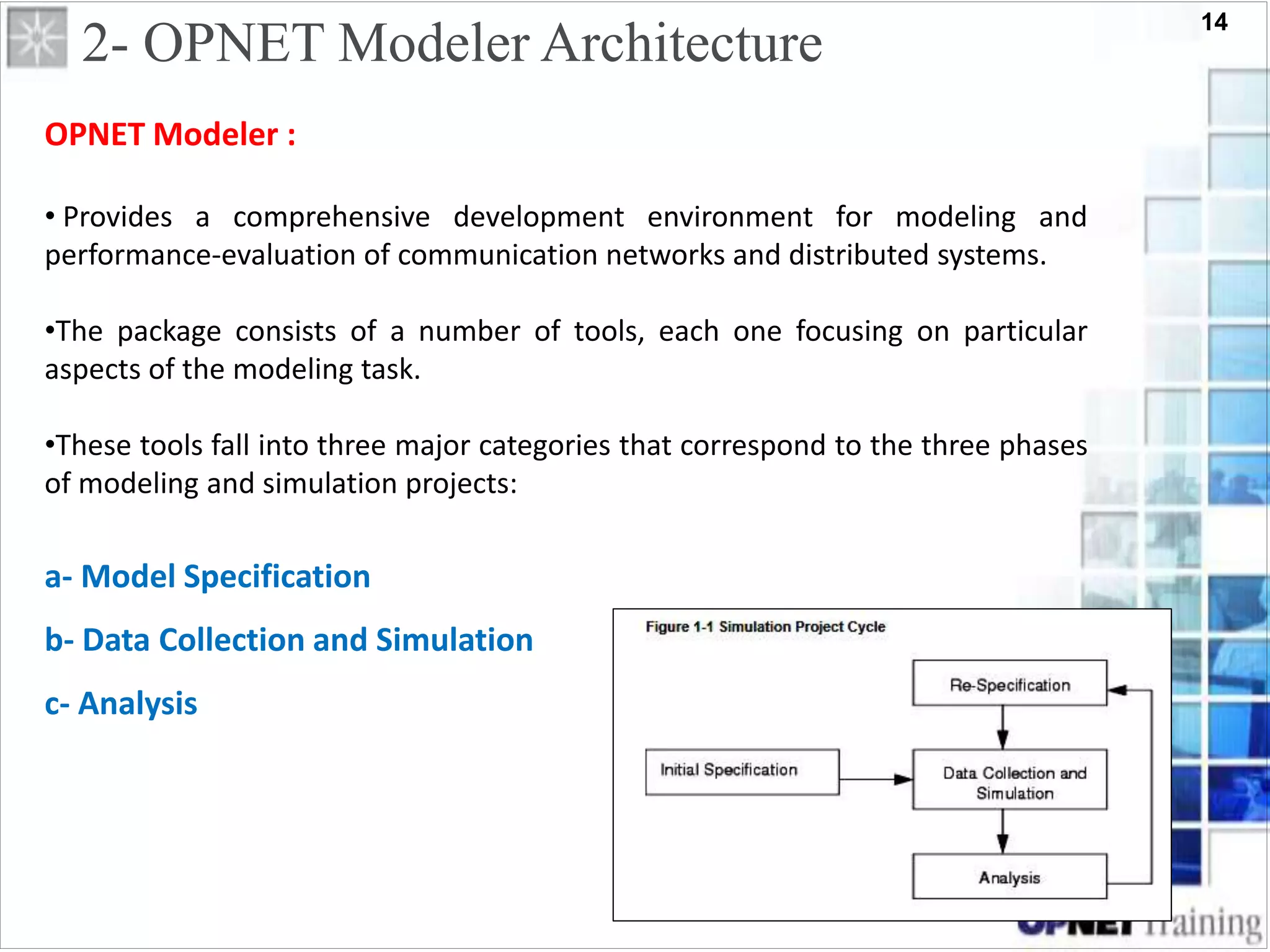
OPNET Modeler :
• Provides a comprehensive development environment for modeling and
performance-evaluation of communication networks and distributed systems.
•The package consists of a number of tools, each one focusing on particular
aspects of the modeling task.
•These tools fall into three major categories that correspond to the three phases
of modeling and simulation projects:
a- Model Specification
b- Data Collection and Simulation
c- Analysis
15
1-Introduction :
a- What is Modeler ?
b- Questions and Goals.
c- OPNET Suites.
2-OPNET Modeler Architecture :
a- Model Specification
1) Specification Editors.
2) Modeling Domains.
3) Models, Objects, and Attributes.
b- Data Collection and Simulation .
c- Analysis.
3- Projects and Scenarios :
4- Locating the Right Models and Components :
a- Model Library
b- Organization of the Model Library
5- OPNET Features :
Content
16
a. Model Specification
OPNET Modeler supports the concept of model reuse so that most models are
based on lower level models developed beforehand and stored in model libraries
1) Specification Editors
2) Modeling Domains
3) Models, Objects, and Attributes
17
Content
1-Introduction :
a- What is Modeler ?
b- Questions and Goals.
c- OPNET Suites.
2-OPNET Modeler Architecture :
a- Model Specification
1) Specification Editors.
2) Modeling Domains.
3) Models, Objects, and Attributes.
b- Data Collection and Simulation .
c- Analysis.
3- Projects and Scenarios :
4- Locating the Right Models and Components :
a- Model Library
b- Organization of the Model Library
5- OPNET Features :
18
1) Specification Editors
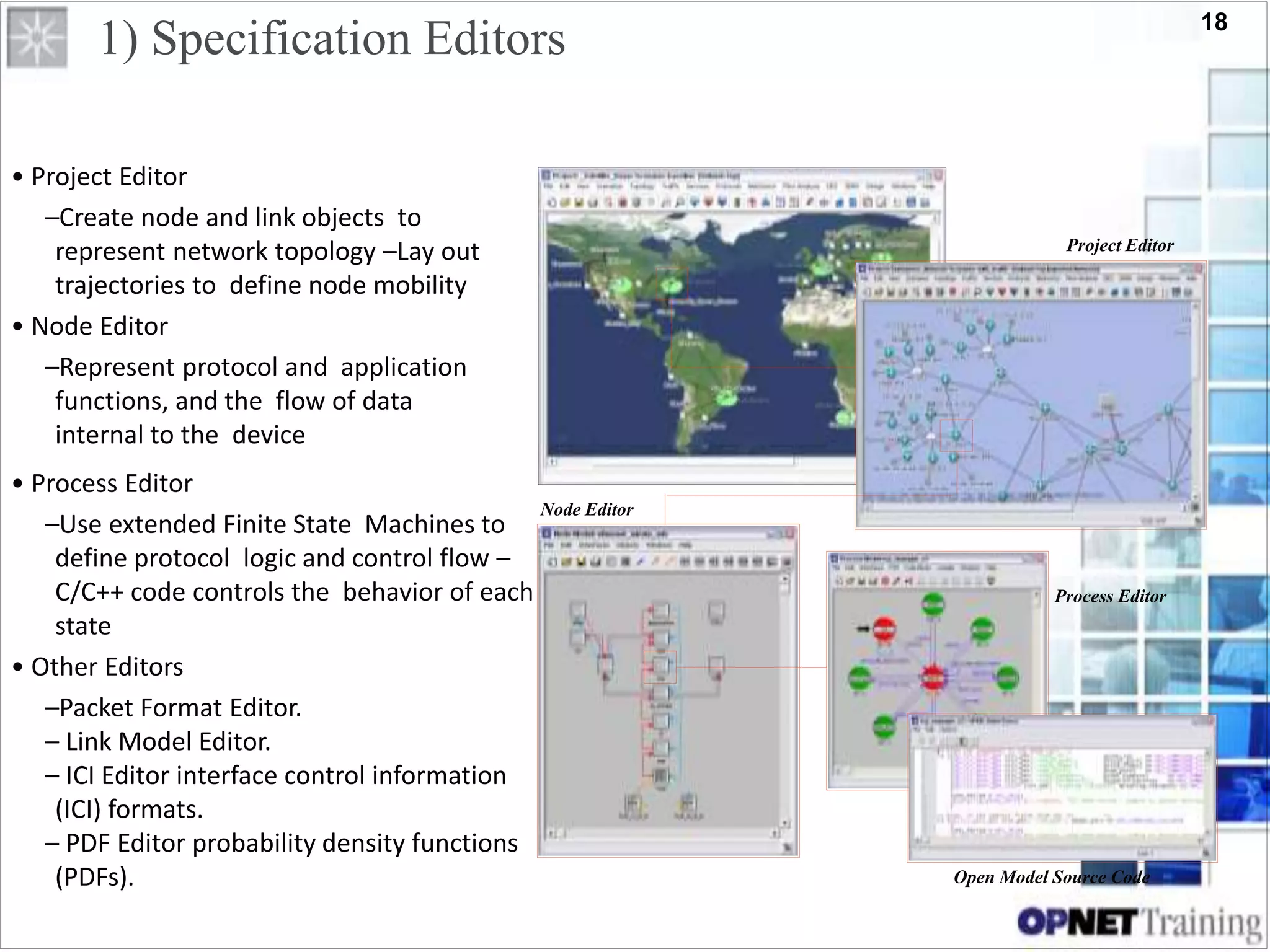
• Project Editor
–Create node and link objects to
represent network topology –Lay out
trajectories to define node mobility
• Node Editor
–Represent protocol and application
functions, and the flow of data
internal to the device
Project Editor
Node Editor
• Process Editor
–Use extended Finite State Machines to
define protocol logic and control flow –
C/C++ code controls the behavior of each
state
• Other Editors
–Packet Format Editor.
– Link Model Editor.
– ICI Editor interface control information
(ICI) formats.
– PDF Editor probability density functions
(PDFs).
Process Editor
Open Model Source Code
19
Content
1-Introduction :
a- What is Modeler ?
b- Questions and Goals.
c- OPNET Suites.
2-OPNET Modeler Architecture :
a- Model Specification
1) Specification Editors.
2) Modeling Domains.
3) Models, Objects, and Attributes.
b- Data Collection and Simulation .
c- Analysis.
3- Projects and Scenarios :
4- Locating the Right Models and Components :
a- Model Library
b- Organization of the Model Library
5- OPNET Features :
20
2) Modeling Domains
The Network, Node, Process, and External System modeling environments
are sometimes referred to as the modeling domains of OPNET Modeler
because they span all the hierarchical levels of a model.
Domain Editor Modeling Focus
Network Domain Project Network topology described in terms of subnetworks,
nodes, links, and geographical context.
Node Domain Node Node internal architecture described in terms of
functional elements and data flow between them.
Process Domain Process Behavior of processes (protocols, algorithms,
applications), specified using finite state machines and
extended high-level language.
21
Content
1-Introduction :
a- What is Modeler ?
b- Questions and Goals.
c- OPNET Suites.
2-OPNET Modeler Architecture :
a- Model Specification
1) Specification Editors.
2) Modeling Domains.
3) Models, Objects, and Attributes.
b- Data Collection and Simulation .
c- Analysis.
3- Projects and Scenarios :
4- Locating the Right Models and Components :
a- Model Library
b- Organization of the Model Library
5- OPNET Features :
22
3) Models, Objects, and Attributes
Objects
Objects represent entities that are part of the system
of interest.
Node Editor
Typical roles of an object in a model :
• Specify behavior
• Create information
• Store and manage information
• Process, modify, or relay information
• Respond to events
• Contain other objects
23
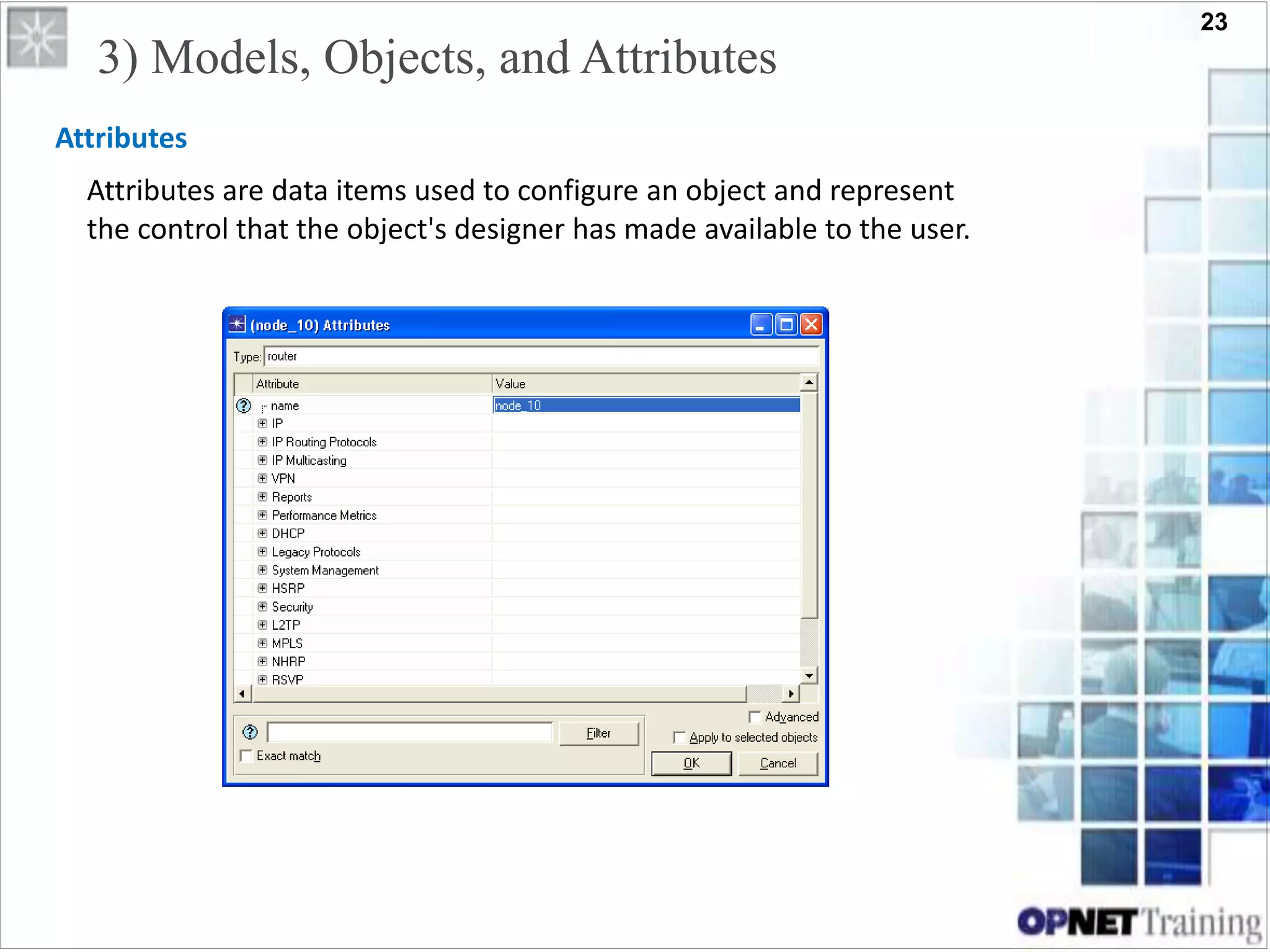
Attributes
Attributes are data items used to configure an object and represent
the control that the object's designer has made available to the user.
3) Models, Objects, and Attributes
24
Content
1-Introduction :
a- What is Modeler ?
b- Questions and Goals.
c- OPNET Suites.
2-OPNET Modeler Architecture :
a- Model Specification
1) Specification Editors.
2) Modeling Domains.
3) Models, Objects, and Attributes.
b- Data Collection and Simulation .
c- Analysis.
3- Projects and Scenarios :
4- Locating the Right Models and Components :
a- Model Library
b- Organization of the Model Library
5- OPNET Features :
25
b- Data Collection and Simulation
•The objective of most modeling efforts is to obtain measures of a system's
performance or to make observations concerning a system's behavior.
•OPNET Modeler supports these activities by creating an executable model of the
system.
• Provided that the model is sufficiently representative of the actual system,
OPNET Modeler allows realistic estimates of performance and behavior to be
obtained by executing simulations.
•Several mechanisms are provided to collect the desired data from one or more
simulations of a system.
26
• Several mechanisms are provided to collect the desired data from
one or more simulations of a system :
1) Simulation Output Data Types.
- Output Vectors
- Output Scalars
- Animations
2) Selecting Data for Collection.
b- Data Collection and Simulation
• Discrete event simulations are capable of producing many types of output.
because of the general programmability of process models and link models
• Because standard models typically contain a very large number of
potential statistics and animations of interest, collection mechanisms are
not active by default when a simulation is executed.
• Instead, OPNET Modeler provides a mechanism to explicitly activate
particular statistics or animations so that they will be recorded in
appropriate output files.
27
Content
1-Introduction :
a- What is Modeler ?
b- Questions and Goals.
c- OPNET Suites.
2-OPNET Modeler Architecture :
a- Model Specification
1) Specification Editors.
2) Modeling Domains.
3) Models, Objects, and Attributes.
b- Data Collection and Simulation .
c- Analysis.
3- Projects and Scenarios :
4- Locating the Right Models and Components :
a- Model Library
b- Organization of the Model Library
5- OPNET Features :
28
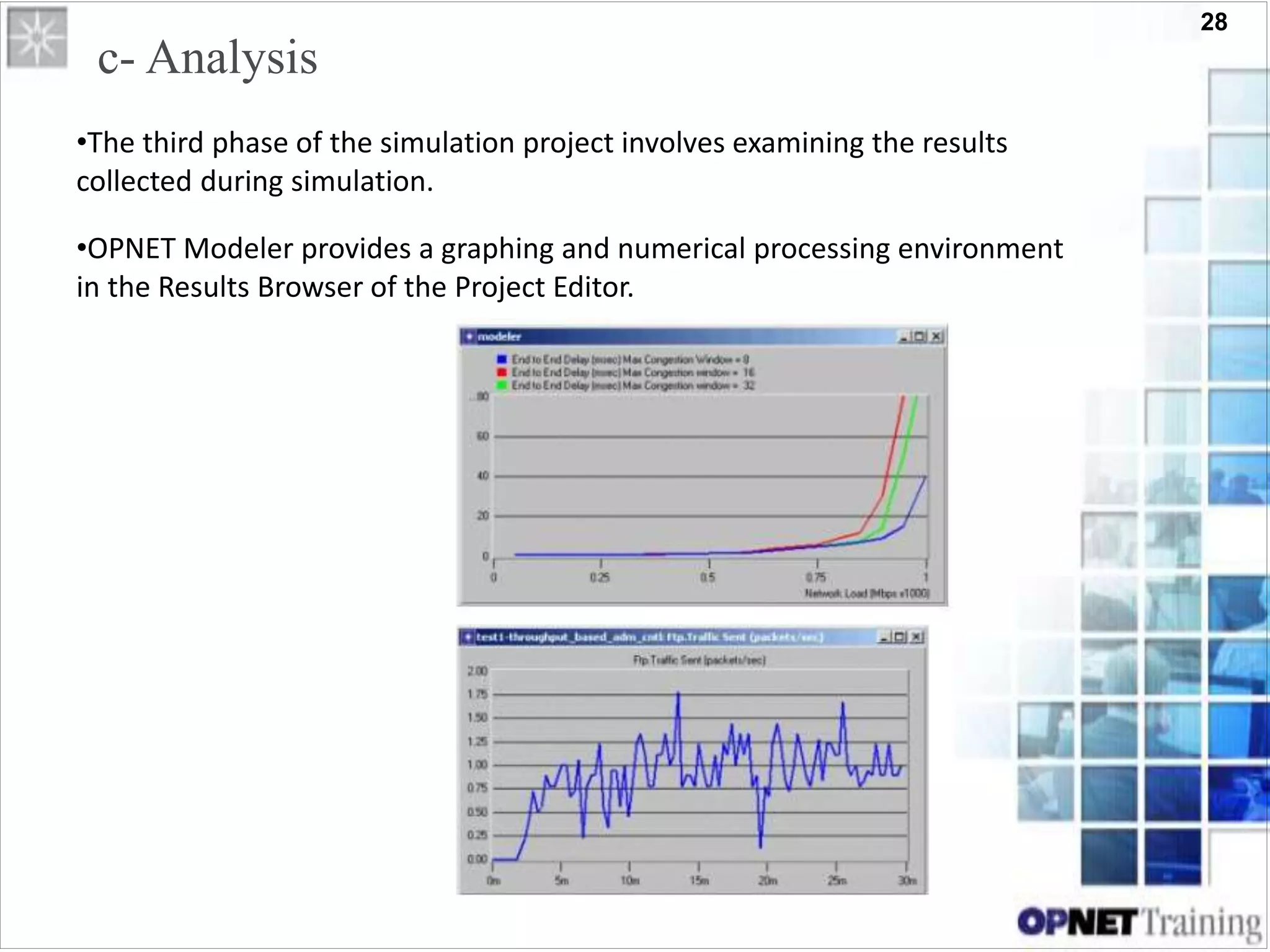
c- Analysis
•The third phase of the simulation project involves examining the results
collected during simulation.
•OPNET Modeler provides a graphing and numerical processing environment
in the Results Browser of the Project Editor.
29
Content
1-Introduction :
a- What is Modeler ?
b- Questions and Goals.
c- OPNET Suites.
2-OPNET Modeler Architecture :
a- Model Specification
1) Specification Editors.
2) Modeling Domains.
3) Models, Objects, and Attributes.
b- Data Collection and Simulation .
c- Analysis.
3- Projects and Scenarios :
4- Locating the Right Models and Components :
a- Model Library
b- Organization of the Model Library
5- OPNET Features :
30
OPNET Technologies, Inc.
3- Projects and Scenarios
31
• Project-and-Scenario approach to modeling network
– Project: collection of related network scenarios , All projects
contain at least one scenario
3- Projects and Scenarios
– Scenario: is a single instance of the
network. Typically, a scenario
represents a unique configuration
of the network, where
configuration can refer to aspects
such as topology, protocols,
applications, baseline traffic, and
simulation settings.
32
OPNET Modeler: Main
33
• Create project
• Create baseline scenario
–Import or create topology
–Import or create traffic
–Choose results and reports to be collected
–Run simulation
–View results
• Duplicate scenario
–Make changes
–Re-run simulation
–Compare results
Project/Scenario Workflow
34
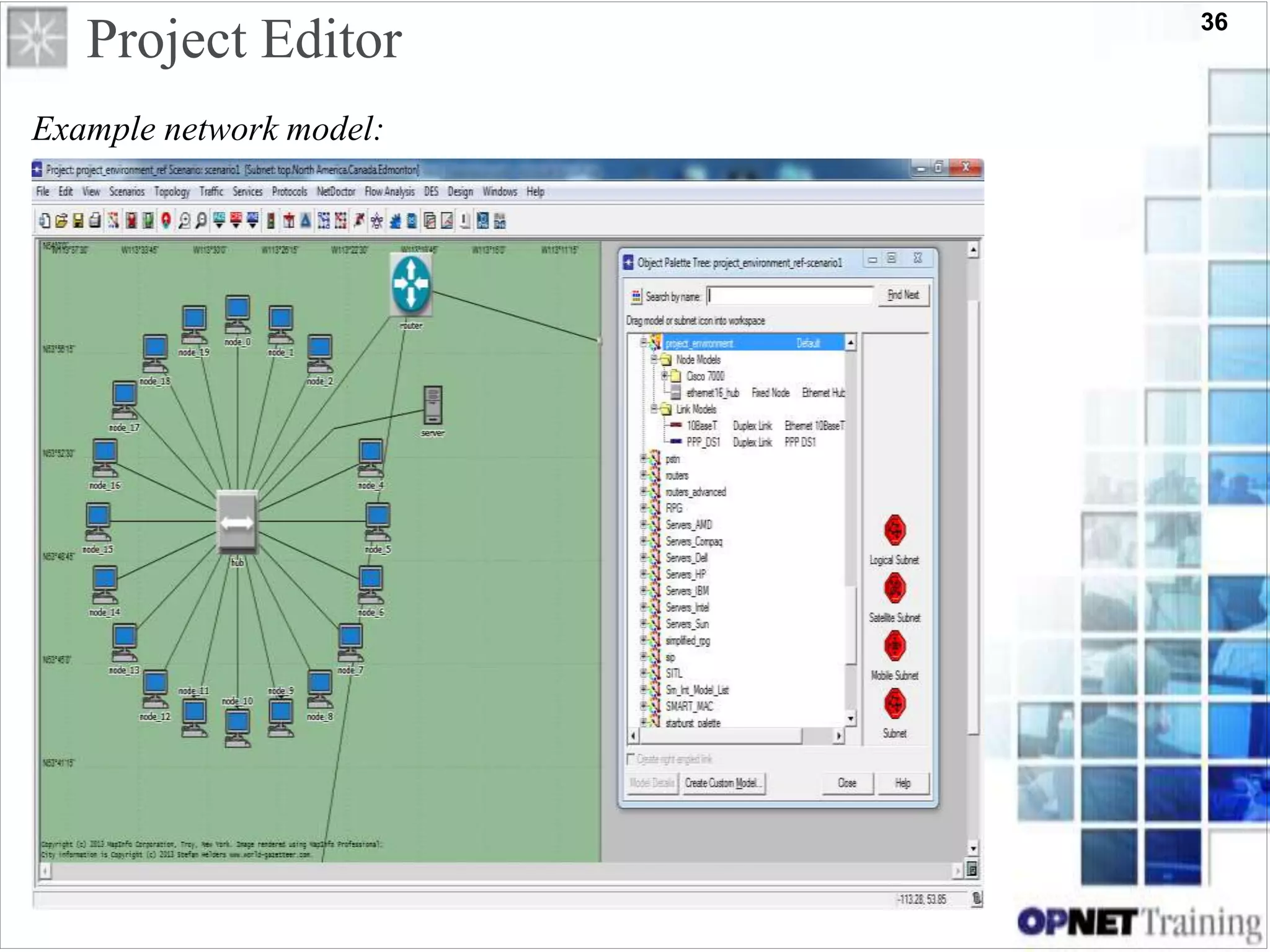
Project Editor
•Several tools are included in Modeler to intuitively map from network
specifications to a modeled network.
Example network model:
–Use the Startup Wizard to specify the
initial environment of a scenario.
–Select objects from an Object Palette.
–Use Node and Link objects to represent
actual topology.
OR
–Use Rapid Configuration to quickly
deploy common network topologies.
–Edit the Attributes of nodes and links
to customize their behavior.
35
Project Editor
Example network model:
36
Project Editor
Example network model:
37
Subnets
4 Subnet Types
•A subnet object abstracts network components specified within it
into a single container
•Subnet objects:
–Are simply containers used to organize your nodes
–Can represent identical constructs in an actual network.
–Have no behavioral aspects, but simplify representation of
large networks.
–May be stationary or mobile.
38
Why Use Subnets?
• Subnets are a powerful mechanism for breaking down a system’s
complexity through abstraction.
39
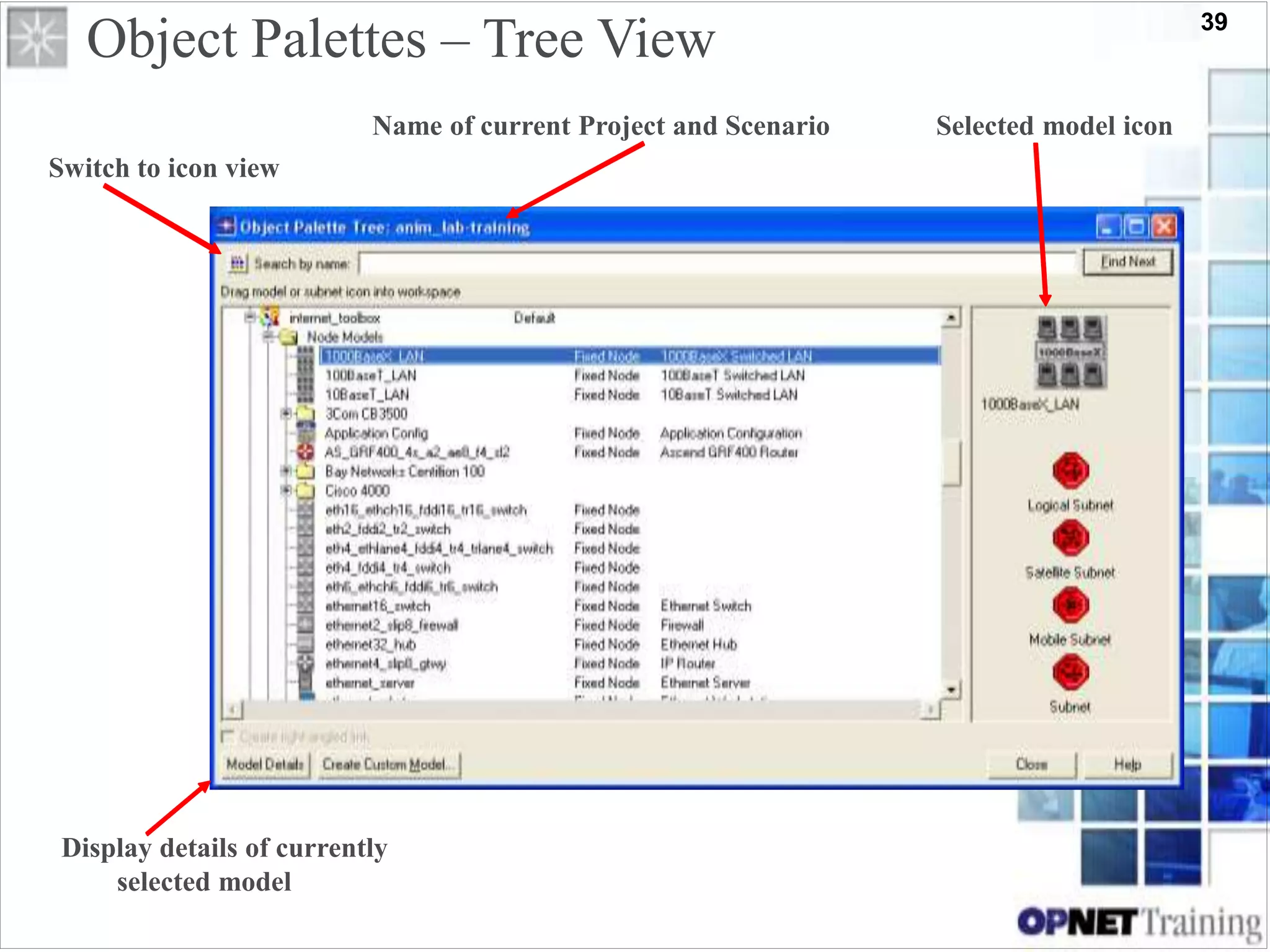
Object Palettes – Tree View
Name of current Project and Scenario Selected model icon
Switch to icon view
Display details of currently
selected model
40
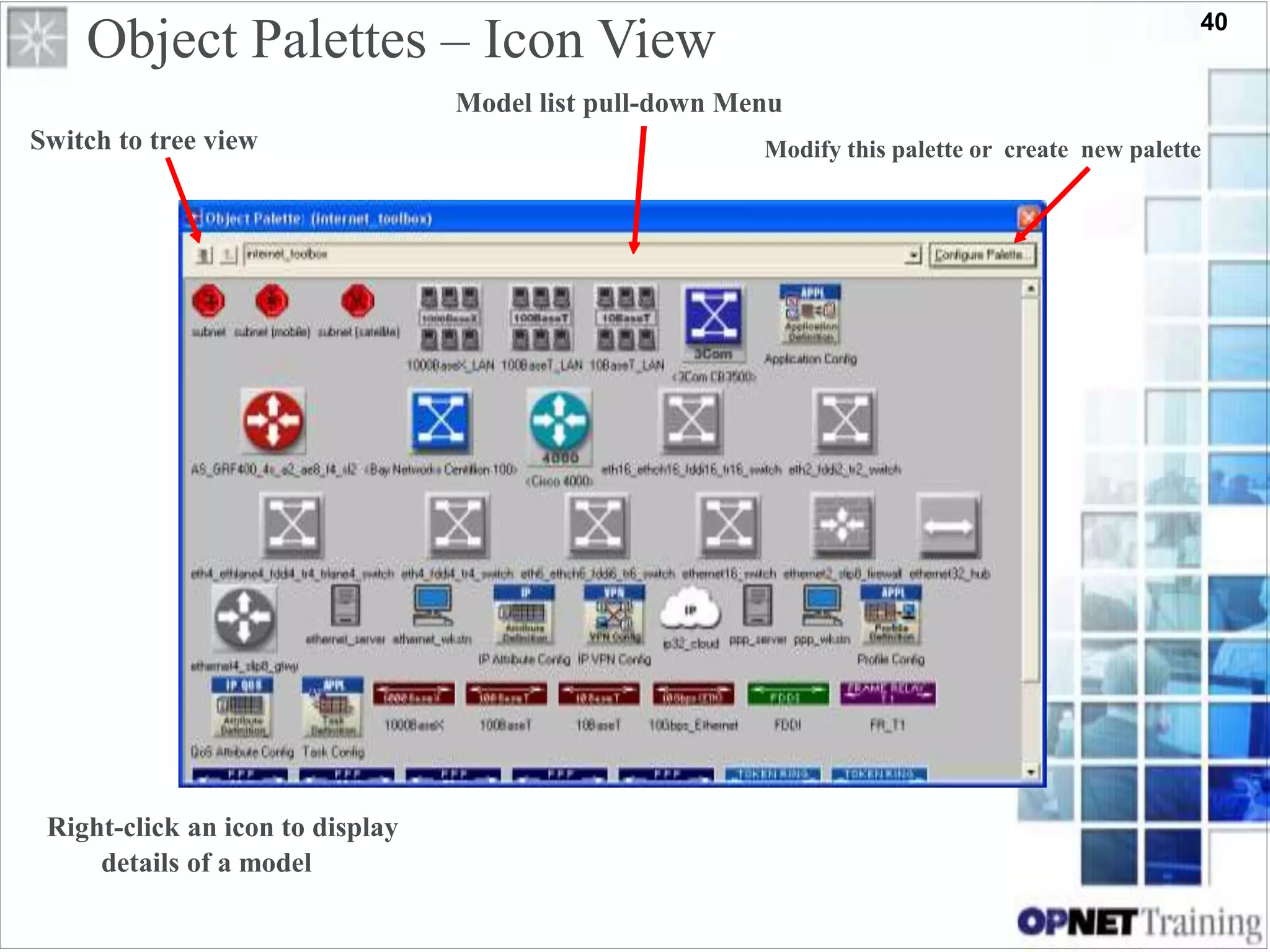
Object Palettes – Icon View
Model list pull-down Menu
Switch to tree view
Right-click an icon to display
details of a model
Modify this palette or create new palette
41
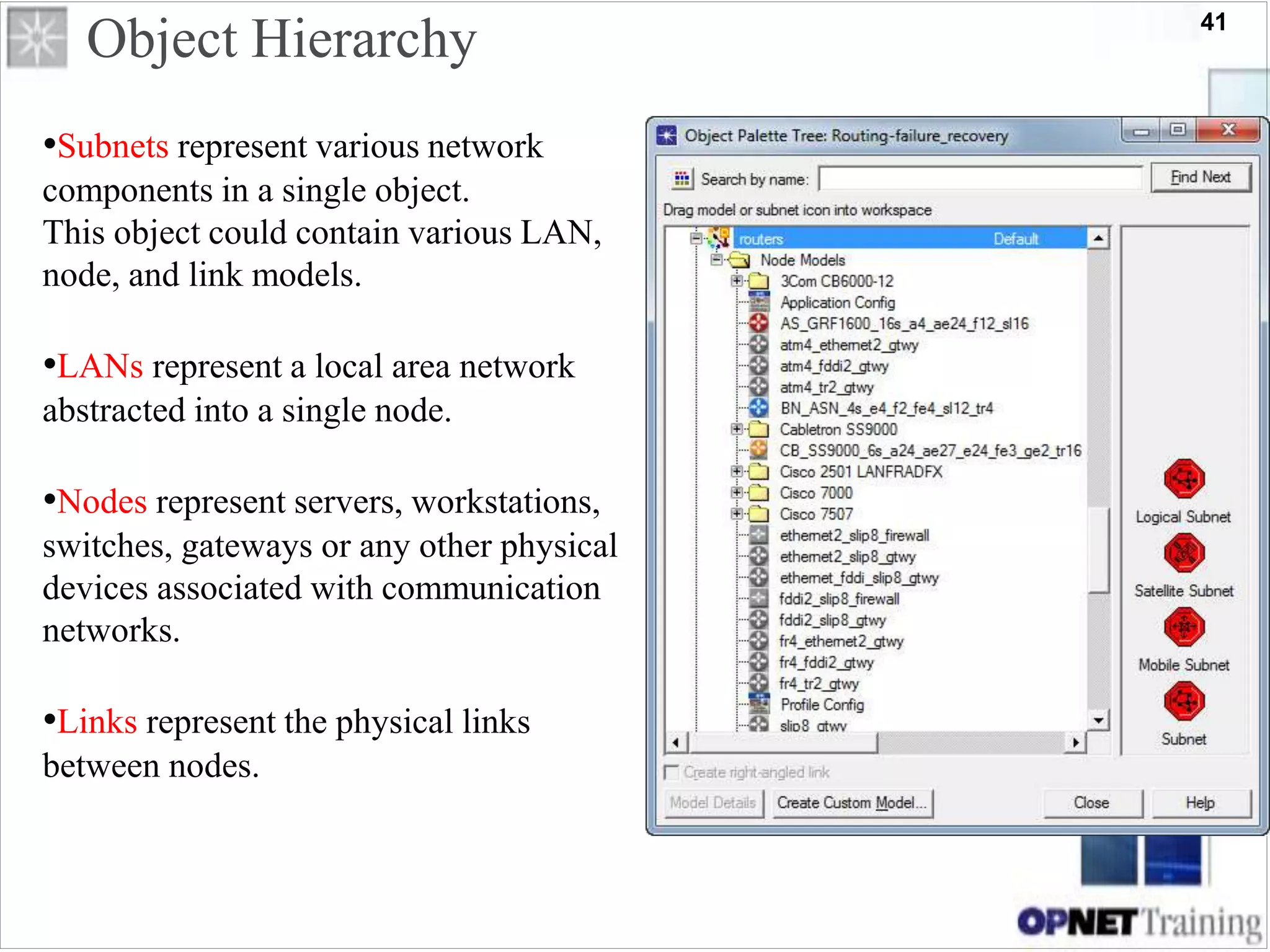
Object Hierarchy
•Subnets represent various network
components in a single object.
This object could contain various LAN,
node, and link models.
•LANs represent a local area network
abstracted into a single node.
•Nodes represent servers, workstations,
switches, gateways or any other physical
devices associated with communication
networks.
•Links represent the physical links
between nodes.
42
Object Attributes (cont.)
• All objects have attributes that
control aspects of their behavior.
• Attributes may vary from one model
to the next.
• Attribute values may vary between
objects of the same model type.
• Right click on an object and select
“Edit Attributes” to view or change its
attributes
• Click the “Advanced” checkbox to
see built-in attributes
–Position on map
–icon
–Model type
–Etc.
43
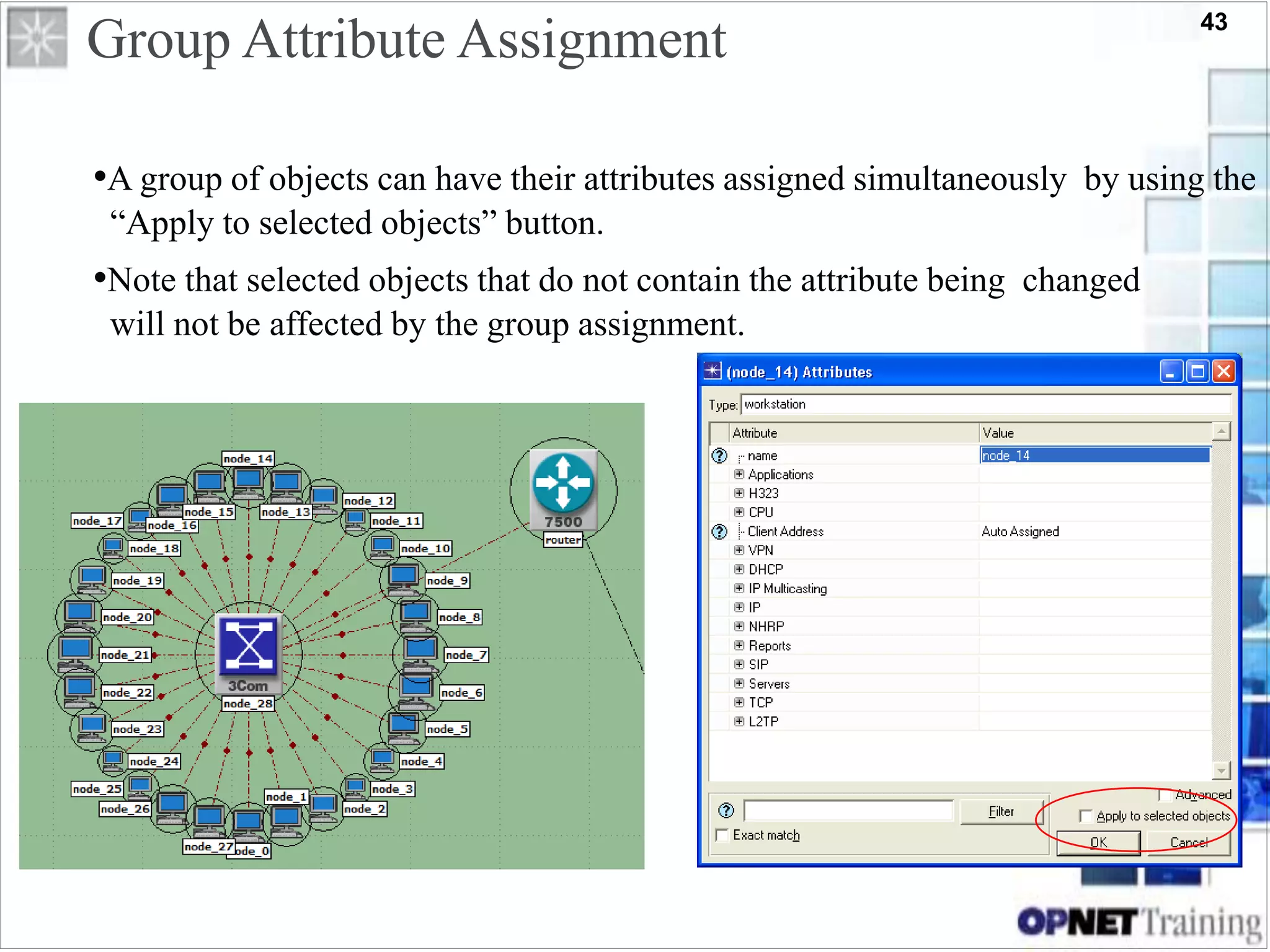
Group Attribute Assignment
•A group of objects can have their attributes assigned simultaneously by using the
“Apply to selected objects” button.
•Note that selected objects that do not contain the attribute being changed
will not be affected by the group assignment.
44
Content
1-Introduction :
a- What is Modeler ?
b- Questions and Goals.
c- OPNET Suites.
2-OPNET Modeler Architecture :
a- Model Specification
1) Specification Editors.
2) Modeling Domains.
3) Models, Objects, and Attributes.
b- Data Collection and Simulation .
c- Analysis.
3- Projects and Scenarios :
4- Locating the Right Models and Components :
a- Model Library
b- Organization of the Model Library
5- OPNET Features :
45
OPNET Technologies, Inc.
4- Locating the Right Models and Components
46
4- Locating the Right Models and Components
•Selecting the right models and components is essential to accurate modeling.
•Modeler provides a suite of standard and vendor models.
•You can also create new models or derive models from an existing database.
•Modeler’s naming conventions, custom palettes, icons, and derived
models all facilitate your selection of the correct components for your network.
47
Content
1-Introduction :
a- What is Modeler ?
b- Questions and Goals.
c- OPNET Suites.
2-OPNET Modeler Architecture :
a- Model Specification
1) Specification Editors.
2) Modeling Domains.
3) Models, Objects, and Attributes.
b- Data Collection and Simulation .
c- Analysis.
3- Projects and Scenarios :
4- Locating the Right Models and Components :
a- Model Library
b- Organization of the Model Library
5- OPNET Features :
48
a- Model Library
• OPNET Modeler provides an extensive library of models that you can use to
build networks.
• These models are called standard models because users can also develop their
own models.
• Models are created using published protocol standards and other widely used
vendor implementations.
–IEEE Specifications (e.g., 802.1q, 802.3, 802.11, etc.)
–ANSI Standards (e.g., X3.139, T1.513, etc.)
–ATM Forum Specifications (e.g, UNI 3.1, TM 4.0, etc.)
–RFC Documents (e.g., RFC-793, RFC-1058, RFC-1771, etc.)
–Vendor Technologies (e.g., VLAN tagging, EIGRP, etc.)
49
Content
1-Introduction :
a- What is Modeler ?
b- Questions and Goals.
c- OPNET Suites.
2-OPNET Modeler Architecture :
a- Model Specification
1) Specification Editors.
2) Modeling Domains.
3) Models, Objects, and Attributes.
b- Data Collection and Simulation .
c- Analysis.
3- Projects and Scenarios :
4- Locating the Right Models and Components :
a- Model Library
b- Organization of the Model Library
5- OPNET Features :
50
The standard model library consists of the following types of objects :
Organization of the Model Library
•Device Models
•Link Models
•LAN and Cloud Models
•Utility Objects
51
Routers – Switches – Hubs – Workstations – Servers – Firewalls – Printers
Device Models
52
Vendor Models
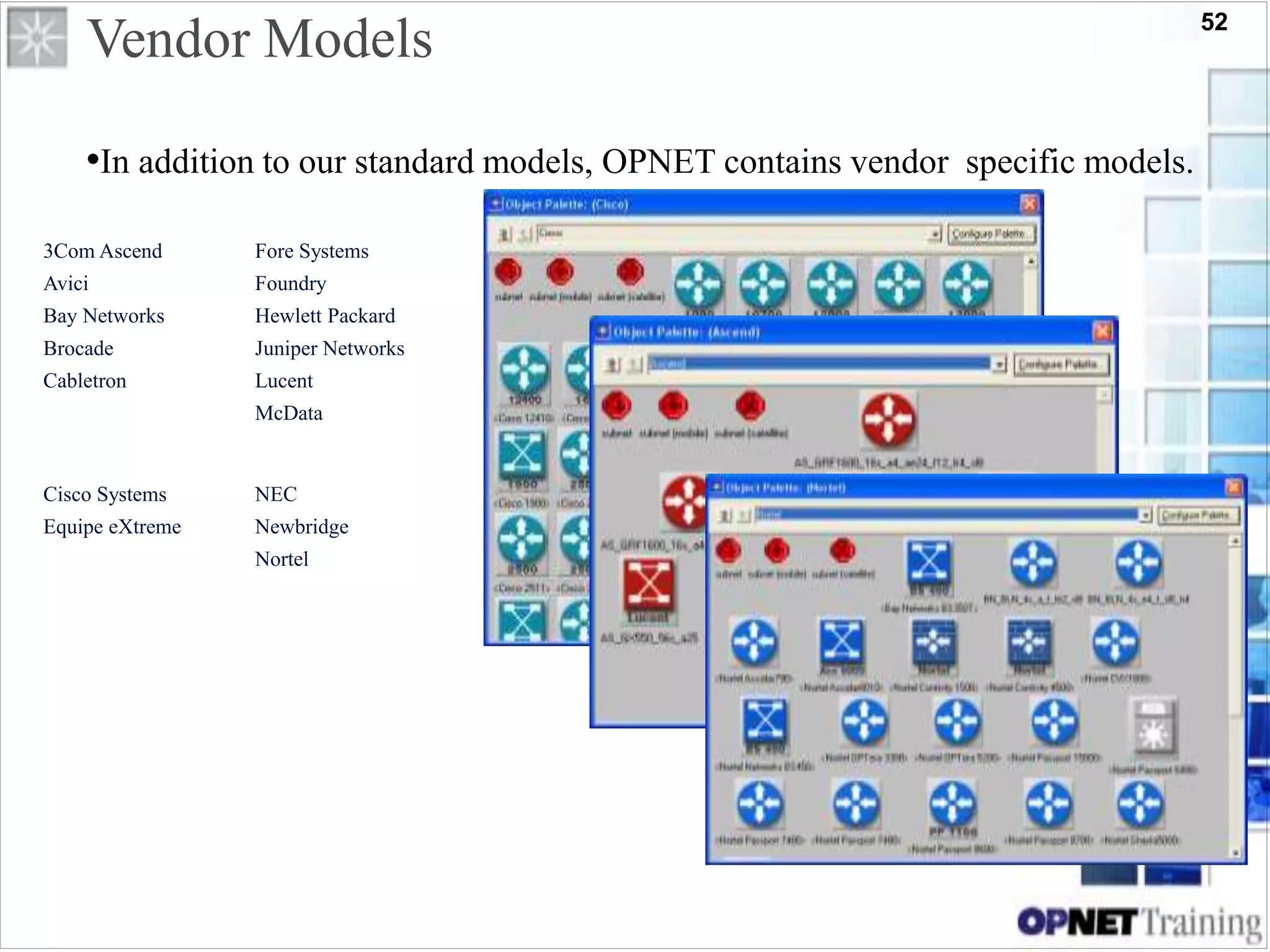
•In addition to our standard models, OPNET contains vendor specific models.
3Com Ascend
Avici
Bay Networks
Brocade
Cabletron
Fore Systems
Foundry
Hewlett Packard
Juniper Networks
Lucent
McData
Cisco Systems
Equipe eXtreme
NEC
Newbridge
Nortel
53
Link Models
• An appropriate link must be chosen to match interfaces on connected devices.
• Data rate, protocol, and number of available interfaces are the requirements
that must be met.
• Link model naming convention:
–<protocol>_<modifier>
• Example:
–100BaseT_int
54
LAN and Cloud Models
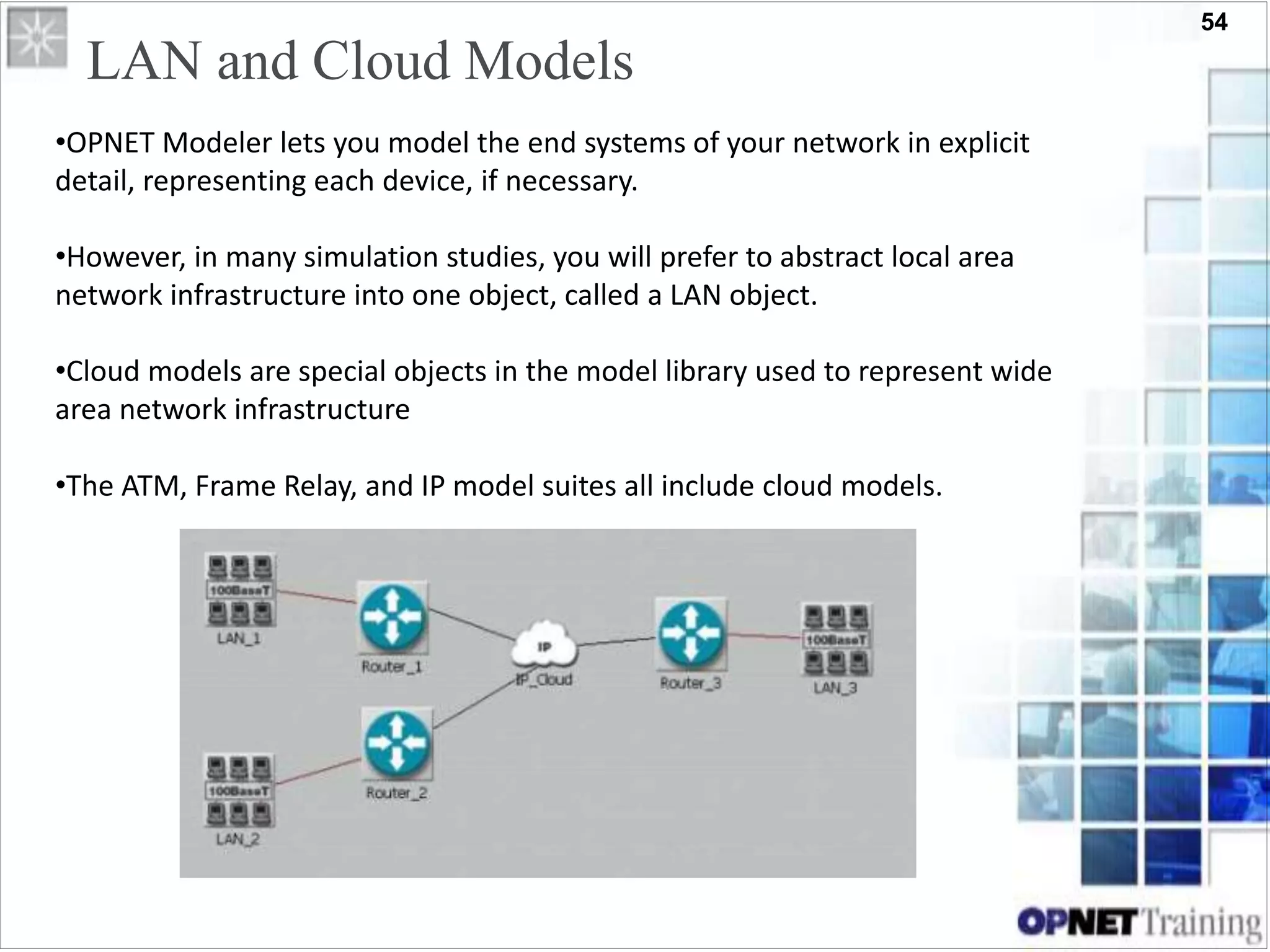
•OPNET Modeler lets you model the end systems of your network in explicit
detail, representing each device, if necessary.
•However, in many simulation studies, you will prefer to abstract local area
network infrastructure into one object, called a LAN object.
•Cloud models are special objects in the model library used to represent wide
area network infrastructure
•The ATM, Frame Relay, and IP model suites all include cloud models.
55
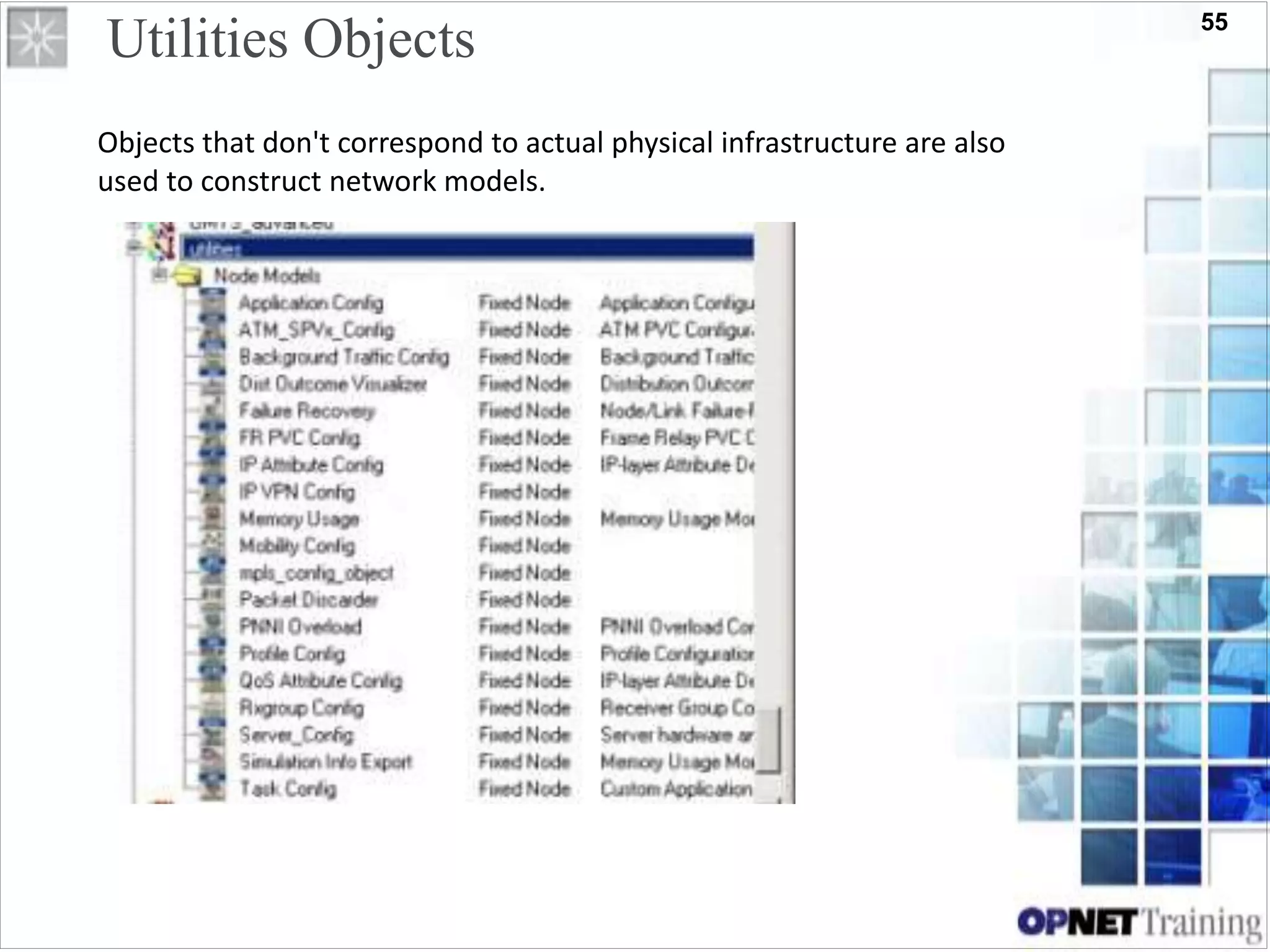
Utilities Objects
Objects that don't correspond to actual physical infrastructure are also
used to construct network models.
56
Content
1-Introduction :
a- What is Modeler ?
b- Questions and Goals.
c- OPNET Suites.
2-OPNET Modeler Architecture :
a- Model Specification
1) Specification Editors.
2) Modeling Domains.
3) Models, Objects, and Attributes.
b- Data Collection and Simulation .
c- Analysis.
3- Projects and Scenarios :
4- Locating the Right Models and Components :
a- Model Library
b- Organization of the Model Library
5- OPNET Features :
57
OPNET Technologies, Inc.
5- OPNET Features
58
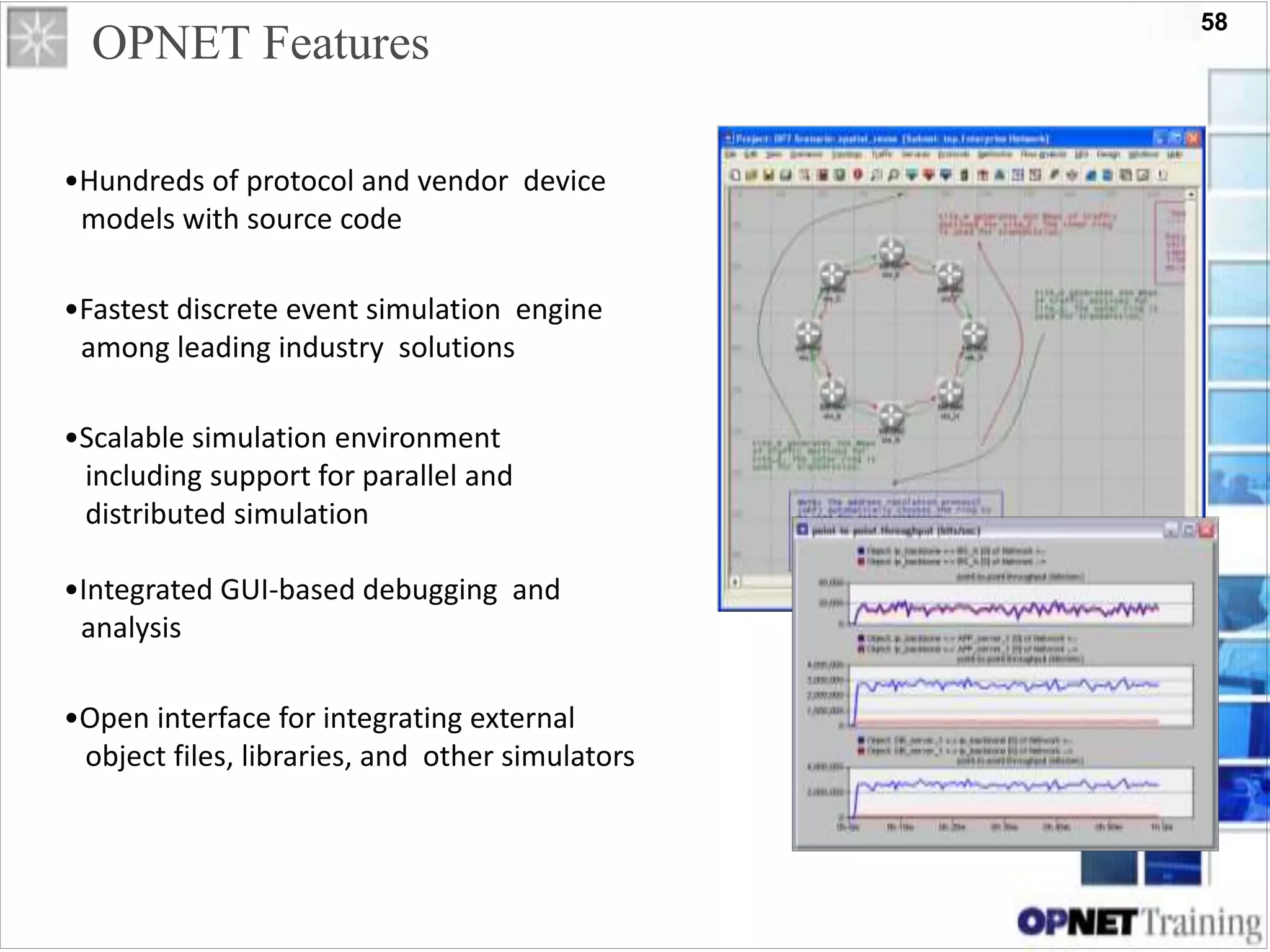
OPNET Features
•Hundreds of protocol and vendor device
models with source code
•Fastest discrete event simulation engine
among leading industry solutions
•Scalable simulation environment
including support for parallel and
distributed simulation
•Integrated GUI-based debugging and
analysis
•Open interface for integrating external
object files, libraries, and other simulators
59

opnet

  • 1.
    1 OPNET Technologies, Inc. OPNETModeler Presented By : Eng. Sherif Belal Supervised By : Dr. Nabil Hamdy Shaker
  • 2.
    2 Content 1-Introduction : a- Whatis Modeler ? b- Questions and Goals. c- OPNET Suites. 2-OPNET Modeler Architecture : a- Model Specification 1) Specification Editors. 2) Modeling Domains. 3) Models, Objects, and Attributes. b- Data Collection and Simulation . c- Analysis. 3- Projects and Scenarios : 4- Locating the Right Models and Components : a- Model Library b- Organization of the Model Library 5- OPNET Features :
  • 3.
    3 Content 1-Introduction : a- Whatis Modeler ? b- Questions and Goals. c- OPNET Suites. 2-OPNET Modeler Architecture : a- Model Specification 1) Specification Editors. 2) Modeling Domains. 3) Models, Objects, and Attributes. b- Data Collection and Simulation . c- Analysis. 3- Projects and Scenarios : 4- Locating the Right Models and Components : a- Model Library b- Organization of the Model Library 5- OPNET Features :
  • 4.
  • 5.
    5 Content 1-Introduction : a- Whatis Modeler ? b- Questions and Goals. c- OPNET Suites. 2-OPNET Modeler Architecture : a- Model Specification 1) Specification Editors. 2) Modeling Domains. 3) Models, Objects, and Attributes. b- Data Collection and Simulation . c- Analysis. 3- Projects and Scenarios : 4- Locating the Right Models and Components : a- Model Library b- Organization of the Model Library 5- OPNET Features :
  • 6.
    6 a- What isModeler? • OPNET stands for Optimum Network Performance . • OPNET is a network simulation tool . • OPNET Modeler, in particular, is a research oriented package .
  • 7.
    7 a- What isModeler? (Cont. ) • An environment for building protocols and device models. • An environment to plan changes by illustrating how the networked environment will perform. • An environment that includes hundreds of pre-built models, used to study performance changes of your network: organizational scaling, technology changes, and application deployment.
  • 8.
    8 Content 1-Introduction : a- Whatis Modeler ? b- Questions and Goals. c- OPNET Suites. 2-OPNET Modeler Architecture : a- Model Specification 1) Specification Editors. 2) Modeling Domains. 3) Models, Objects, and Attributes. b- Data Collection and Simulation . c- Analysis. 3- Projects and Scenarios : 4- Locating the Right Models and Components : a- Model Library b- Organization of the Model Library 5- OPNET Features :
  • 9.
    9 b- Questions andGoals •Questions to be answered : –What does Modeler do? –How can it help me? –How easy is it to use? –How can I get started? •Goals : –Learn what problems can be solved with Modeler –Learn how to use the Modeler software in a hands-on environment –Use Modeler to solve real problems
  • 10.
    10 Content 1-Introduction : a- Whatis Modeler ? b- Questions and Goals. c- OPNET Suites. 2-OPNET Modeler Architecture : a- Model Specification 1) Specification Editors. 2) Modeling Domains. 3) Models, Objects, and Attributes. b- Data Collection and Simulation . c- Analysis. 3- Projects and Scenarios : 4- Locating the Right Models and Components : a- Model Library b- Organization of the Model Library 5- OPNET Features :
  • 11.
  • 12.
    12 Content 1-Introduction : a- Whatis Modeler ? b- Questions and Goals. c- OPNET Suites. 2-OPNET Modeler Architecture : a- Model Specification 1) Specification Editors. 2) Modeling Domains. 3) Models, Objects, and Attributes. b- Data Collection and Simulation . c- Analysis. 3- Projects and Scenarios : 4- Locating the Right Models and Components : a- Model Library b- Organization of the Model Library 5- OPNET Features :
  • 13.
  • 14.
    14 2- OPNET ModelerArchitecture OPNET Modeler : • Provides a comprehensive development environment for modeling and performance-evaluation of communication networks and distributed systems. •The package consists of a number of tools, each one focusing on particular aspects of the modeling task. •These tools fall into three major categories that correspond to the three phases of modeling and simulation projects: a- Model Specification b- Data Collection and Simulation c- Analysis
  • 15.
    15 1-Introduction : a- Whatis Modeler ? b- Questions and Goals. c- OPNET Suites. 2-OPNET Modeler Architecture : a- Model Specification 1) Specification Editors. 2) Modeling Domains. 3) Models, Objects, and Attributes. b- Data Collection and Simulation . c- Analysis. 3- Projects and Scenarios : 4- Locating the Right Models and Components : a- Model Library b- Organization of the Model Library 5- OPNET Features : Content
  • 16.
    16 a. Model Specification OPNETModeler supports the concept of model reuse so that most models are based on lower level models developed beforehand and stored in model libraries 1) Specification Editors 2) Modeling Domains 3) Models, Objects, and Attributes
  • 17.
    17 Content 1-Introduction : a- Whatis Modeler ? b- Questions and Goals. c- OPNET Suites. 2-OPNET Modeler Architecture : a- Model Specification 1) Specification Editors. 2) Modeling Domains. 3) Models, Objects, and Attributes. b- Data Collection and Simulation . c- Analysis. 3- Projects and Scenarios : 4- Locating the Right Models and Components : a- Model Library b- Organization of the Model Library 5- OPNET Features :
  • 18.
    18 1) Specification Editors •Project Editor –Create node and link objects to represent network topology –Lay out trajectories to define node mobility • Node Editor –Represent protocol and application functions, and the flow of data internal to the device Project Editor Node Editor • Process Editor –Use extended Finite State Machines to define protocol logic and control flow – C/C++ code controls the behavior of each state • Other Editors –Packet Format Editor. – Link Model Editor. – ICI Editor interface control information (ICI) formats. – PDF Editor probability density functions (PDFs). Process Editor Open Model Source Code
  • 19.
    19 Content 1-Introduction : a- Whatis Modeler ? b- Questions and Goals. c- OPNET Suites. 2-OPNET Modeler Architecture : a- Model Specification 1) Specification Editors. 2) Modeling Domains. 3) Models, Objects, and Attributes. b- Data Collection and Simulation . c- Analysis. 3- Projects and Scenarios : 4- Locating the Right Models and Components : a- Model Library b- Organization of the Model Library 5- OPNET Features :
  • 20.
    20 2) Modeling Domains TheNetwork, Node, Process, and External System modeling environments are sometimes referred to as the modeling domains of OPNET Modeler because they span all the hierarchical levels of a model. Domain Editor Modeling Focus Network Domain Project Network topology described in terms of subnetworks, nodes, links, and geographical context. Node Domain Node Node internal architecture described in terms of functional elements and data flow between them. Process Domain Process Behavior of processes (protocols, algorithms, applications), specified using finite state machines and extended high-level language.
  • 21.
    21 Content 1-Introduction : a- Whatis Modeler ? b- Questions and Goals. c- OPNET Suites. 2-OPNET Modeler Architecture : a- Model Specification 1) Specification Editors. 2) Modeling Domains. 3) Models, Objects, and Attributes. b- Data Collection and Simulation . c- Analysis. 3- Projects and Scenarios : 4- Locating the Right Models and Components : a- Model Library b- Organization of the Model Library 5- OPNET Features :
  • 22.
    22 3) Models, Objects,and Attributes Objects Objects represent entities that are part of the system of interest. Node Editor Typical roles of an object in a model : • Specify behavior • Create information • Store and manage information • Process, modify, or relay information • Respond to events • Contain other objects
  • 23.
    23 Attributes Attributes are dataitems used to configure an object and represent the control that the object's designer has made available to the user. 3) Models, Objects, and Attributes
  • 24.
    24 Content 1-Introduction : a- Whatis Modeler ? b- Questions and Goals. c- OPNET Suites. 2-OPNET Modeler Architecture : a- Model Specification 1) Specification Editors. 2) Modeling Domains. 3) Models, Objects, and Attributes. b- Data Collection and Simulation . c- Analysis. 3- Projects and Scenarios : 4- Locating the Right Models and Components : a- Model Library b- Organization of the Model Library 5- OPNET Features :
  • 25.
    25 b- Data Collectionand Simulation •The objective of most modeling efforts is to obtain measures of a system's performance or to make observations concerning a system's behavior. •OPNET Modeler supports these activities by creating an executable model of the system. • Provided that the model is sufficiently representative of the actual system, OPNET Modeler allows realistic estimates of performance and behavior to be obtained by executing simulations. •Several mechanisms are provided to collect the desired data from one or more simulations of a system.
  • 26.
    26 • Several mechanismsare provided to collect the desired data from one or more simulations of a system : 1) Simulation Output Data Types. - Output Vectors - Output Scalars - Animations 2) Selecting Data for Collection. b- Data Collection and Simulation • Discrete event simulations are capable of producing many types of output. because of the general programmability of process models and link models • Because standard models typically contain a very large number of potential statistics and animations of interest, collection mechanisms are not active by default when a simulation is executed. • Instead, OPNET Modeler provides a mechanism to explicitly activate particular statistics or animations so that they will be recorded in appropriate output files.
  • 27.
    27 Content 1-Introduction : a- Whatis Modeler ? b- Questions and Goals. c- OPNET Suites. 2-OPNET Modeler Architecture : a- Model Specification 1) Specification Editors. 2) Modeling Domains. 3) Models, Objects, and Attributes. b- Data Collection and Simulation . c- Analysis. 3- Projects and Scenarios : 4- Locating the Right Models and Components : a- Model Library b- Organization of the Model Library 5- OPNET Features :
  • 28.
    28 c- Analysis •The thirdphase of the simulation project involves examining the results collected during simulation. •OPNET Modeler provides a graphing and numerical processing environment in the Results Browser of the Project Editor.
  • 29.
    29 Content 1-Introduction : a- Whatis Modeler ? b- Questions and Goals. c- OPNET Suites. 2-OPNET Modeler Architecture : a- Model Specification 1) Specification Editors. 2) Modeling Domains. 3) Models, Objects, and Attributes. b- Data Collection and Simulation . c- Analysis. 3- Projects and Scenarios : 4- Locating the Right Models and Components : a- Model Library b- Organization of the Model Library 5- OPNET Features :
  • 30.
    30 OPNET Technologies, Inc. 3-Projects and Scenarios
  • 31.
    31 • Project-and-Scenario approachto modeling network – Project: collection of related network scenarios , All projects contain at least one scenario 3- Projects and Scenarios – Scenario: is a single instance of the network. Typically, a scenario represents a unique configuration of the network, where configuration can refer to aspects such as topology, protocols, applications, baseline traffic, and simulation settings.
  • 32.
  • 33.
    33 • Create project •Create baseline scenario –Import or create topology –Import or create traffic –Choose results and reports to be collected –Run simulation –View results • Duplicate scenario –Make changes –Re-run simulation –Compare results Project/Scenario Workflow
  • 34.
    34 Project Editor •Several toolsare included in Modeler to intuitively map from network specifications to a modeled network. Example network model: –Use the Startup Wizard to specify the initial environment of a scenario. –Select objects from an Object Palette. –Use Node and Link objects to represent actual topology. OR –Use Rapid Configuration to quickly deploy common network topologies. –Edit the Attributes of nodes and links to customize their behavior.
  • 35.
  • 36.
  • 37.
    37 Subnets 4 Subnet Types •Asubnet object abstracts network components specified within it into a single container •Subnet objects: –Are simply containers used to organize your nodes –Can represent identical constructs in an actual network. –Have no behavioral aspects, but simplify representation of large networks. –May be stationary or mobile.
  • 38.
    38 Why Use Subnets? •Subnets are a powerful mechanism for breaking down a system’s complexity through abstraction.
  • 39.
    39 Object Palettes –Tree View Name of current Project and Scenario Selected model icon Switch to icon view Display details of currently selected model
  • 40.
    40 Object Palettes –Icon View Model list pull-down Menu Switch to tree view Right-click an icon to display details of a model Modify this palette or create new palette
  • 41.
    41 Object Hierarchy •Subnets representvarious network components in a single object. This object could contain various LAN, node, and link models. •LANs represent a local area network abstracted into a single node. •Nodes represent servers, workstations, switches, gateways or any other physical devices associated with communication networks. •Links represent the physical links between nodes.
  • 42.
    42 Object Attributes (cont.) •All objects have attributes that control aspects of their behavior. • Attributes may vary from one model to the next. • Attribute values may vary between objects of the same model type. • Right click on an object and select “Edit Attributes” to view or change its attributes • Click the “Advanced” checkbox to see built-in attributes –Position on map –icon –Model type –Etc.
  • 43.
    43 Group Attribute Assignment •Agroup of objects can have their attributes assigned simultaneously by using the “Apply to selected objects” button. •Note that selected objects that do not contain the attribute being changed will not be affected by the group assignment.
  • 44.
    44 Content 1-Introduction : a- Whatis Modeler ? b- Questions and Goals. c- OPNET Suites. 2-OPNET Modeler Architecture : a- Model Specification 1) Specification Editors. 2) Modeling Domains. 3) Models, Objects, and Attributes. b- Data Collection and Simulation . c- Analysis. 3- Projects and Scenarios : 4- Locating the Right Models and Components : a- Model Library b- Organization of the Model Library 5- OPNET Features :
  • 45.
    45 OPNET Technologies, Inc. 4-Locating the Right Models and Components
  • 46.
    46 4- Locating theRight Models and Components •Selecting the right models and components is essential to accurate modeling. •Modeler provides a suite of standard and vendor models. •You can also create new models or derive models from an existing database. •Modeler’s naming conventions, custom palettes, icons, and derived models all facilitate your selection of the correct components for your network.
  • 47.
    47 Content 1-Introduction : a- Whatis Modeler ? b- Questions and Goals. c- OPNET Suites. 2-OPNET Modeler Architecture : a- Model Specification 1) Specification Editors. 2) Modeling Domains. 3) Models, Objects, and Attributes. b- Data Collection and Simulation . c- Analysis. 3- Projects and Scenarios : 4- Locating the Right Models and Components : a- Model Library b- Organization of the Model Library 5- OPNET Features :
  • 48.
    48 a- Model Library •OPNET Modeler provides an extensive library of models that you can use to build networks. • These models are called standard models because users can also develop their own models. • Models are created using published protocol standards and other widely used vendor implementations. –IEEE Specifications (e.g., 802.1q, 802.3, 802.11, etc.) –ANSI Standards (e.g., X3.139, T1.513, etc.) –ATM Forum Specifications (e.g, UNI 3.1, TM 4.0, etc.) –RFC Documents (e.g., RFC-793, RFC-1058, RFC-1771, etc.) –Vendor Technologies (e.g., VLAN tagging, EIGRP, etc.)
  • 49.
    49 Content 1-Introduction : a- Whatis Modeler ? b- Questions and Goals. c- OPNET Suites. 2-OPNET Modeler Architecture : a- Model Specification 1) Specification Editors. 2) Modeling Domains. 3) Models, Objects, and Attributes. b- Data Collection and Simulation . c- Analysis. 3- Projects and Scenarios : 4- Locating the Right Models and Components : a- Model Library b- Organization of the Model Library 5- OPNET Features :
  • 50.
    50 The standard modellibrary consists of the following types of objects : Organization of the Model Library •Device Models •Link Models •LAN and Cloud Models •Utility Objects
  • 51.
    51 Routers – Switches– Hubs – Workstations – Servers – Firewalls – Printers Device Models
  • 52.
    52 Vendor Models •In additionto our standard models, OPNET contains vendor specific models. 3Com Ascend Avici Bay Networks Brocade Cabletron Fore Systems Foundry Hewlett Packard Juniper Networks Lucent McData Cisco Systems Equipe eXtreme NEC Newbridge Nortel
  • 53.
    53 Link Models • Anappropriate link must be chosen to match interfaces on connected devices. • Data rate, protocol, and number of available interfaces are the requirements that must be met. • Link model naming convention: –<protocol>_<modifier> • Example: –100BaseT_int
  • 54.
    54 LAN and CloudModels •OPNET Modeler lets you model the end systems of your network in explicit detail, representing each device, if necessary. •However, in many simulation studies, you will prefer to abstract local area network infrastructure into one object, called a LAN object. •Cloud models are special objects in the model library used to represent wide area network infrastructure •The ATM, Frame Relay, and IP model suites all include cloud models.
  • 55.
    55 Utilities Objects Objects thatdon't correspond to actual physical infrastructure are also used to construct network models.
  • 56.
    56 Content 1-Introduction : a- Whatis Modeler ? b- Questions and Goals. c- OPNET Suites. 2-OPNET Modeler Architecture : a- Model Specification 1) Specification Editors. 2) Modeling Domains. 3) Models, Objects, and Attributes. b- Data Collection and Simulation . c- Analysis. 3- Projects and Scenarios : 4- Locating the Right Models and Components : a- Model Library b- Organization of the Model Library 5- OPNET Features :
  • 57.
  • 58.
    58 OPNET Features •Hundreds ofprotocol and vendor device models with source code •Fastest discrete event simulation engine among leading industry solutions •Scalable simulation environment including support for parallel and distributed simulation •Integrated GUI-based debugging and analysis •Open interface for integrating external object files, libraries, and other simulators
  • 59.

Editor's Notes

  • #19 Project Editor—Develop network models. Network models are made up of subnets and node models. This editor also includes basic simulation and analysis capabilities. Node Editor—Develop node models. Node models are objects in a network model. Node models are made up of modules with process models. Modules may also include parameter models. Process Editor—Develop process models. Process models control module behavior and may reference parameter models. External System Editor—Develop external system definitions. External system definitions are necessary for cosimulation. Link Model Editor—Create, edit, and view link models. Packet Format Editor—Develop packet formats models. Packet formats dictate the structure and order of information stored in a packet. ICI Editor—Create, edit, and view interface control information (ICI) formats. ICIs are used to communicate control information between processes. PDF Editor—Create, edit, and view probability density functions (PDFs). PDFs can be used to control certain events, such as the frequency of packet generation in a source module.