UNIVERSITY OF WAH
PRESENTATION OF COMPUTER NETWORKS
PRESENTATION TOPIC:
SWITCH
PRESENTED BY:
ZEESHAN HANIF
WAQAS SHAH
SYED AJLAAL HAIDER
PRESENTED TO:
SIR MUDASSIR HUSSAIN
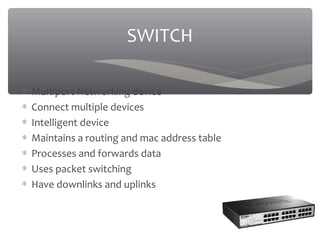
∗ Multiport Networking device
∗ Connect multiple devices
∗ Intelligent device
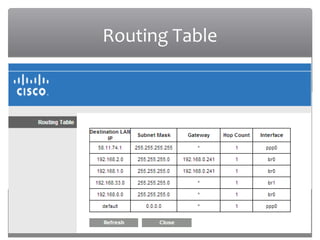
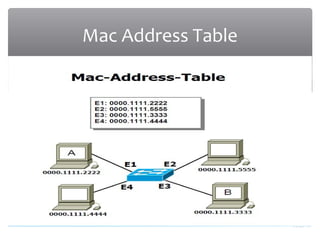
∗ Maintains a routing and mac address table
∗ Processes and forwards data
∗ Uses packet switching
∗ Have downlinks and uplinks
SWITCH
03/20/16
Routing Table
03/20/16
Mac Address Table
03/20/16
Why We Need A Switch????
∗ Used hubs which were non intelligent
∗ A faster way was needed for communication
∗ A device which will have less collisions
∗ Security and privacy
∗ Reliability
∗ High performance
03/20/16
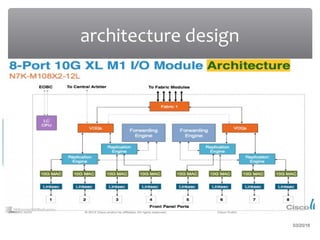
architecture design
03/20/16
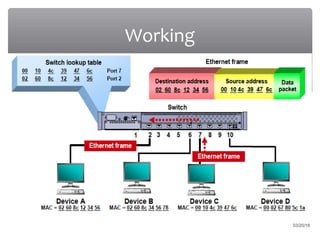
Working
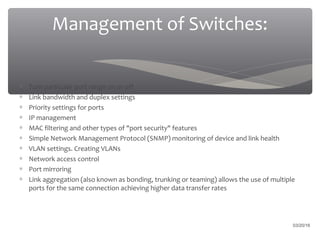
Management of Switches:
∗ Turn particular port range on or off
∗ Link bandwidth and duplex settings
∗ Priority settings for ports
∗ IP management
∗ MAC filtering and other types of "port security" features
∗ Simple Network Management Protocol (SNMP) monitoring of device and link health
∗ VLAN settings. Creating VLANs
∗ Network access control
∗ Port mirroring
∗ Link aggregation (also known as bonding, trunking or teaming) allows the use of multiple
ports for the same connection achieving higher data transfer rates
03/20/16
03/20/16
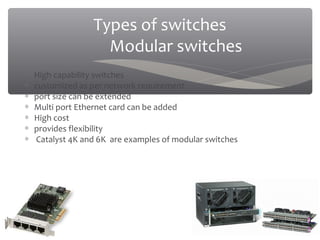
Types of switches
Modular switches
∗ High capability switches
∗ customized as per network requirement
∗ port size can be extended
∗ Multi port Ethernet card can be added
∗ High cost
∗ provides flexibility
∗ Catalyst 4K and 6K are examples of modular switches
03/20/16
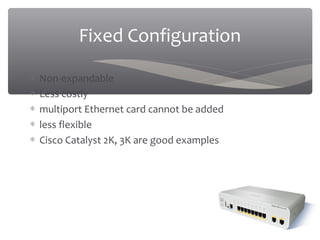
Fixed Configuration
∗ Non-expandable
∗ Less costly
∗ multiport Ethernet card cannot be added
∗ less flexible
∗ Cisco Catalyst 2K, 3K are good examples
03/20/16
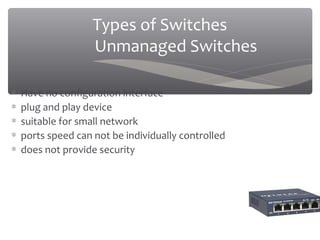
Types of Switches
Unmanaged Switches
∗ Have no configuration interface
∗ plug and play device
∗ suitable for small network
∗ ports speed can not be individually controlled
∗ does not provide security
03/20/16
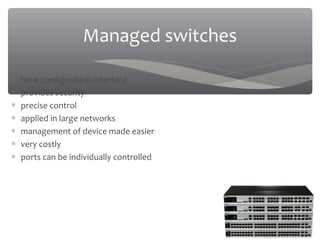
Managed switches
∗ have configuration interface
∗ provides security
∗ precise control
∗ applied in large networks
∗ management of device made easier
∗ very costly
∗ ports can be individually controlled
03/20/16
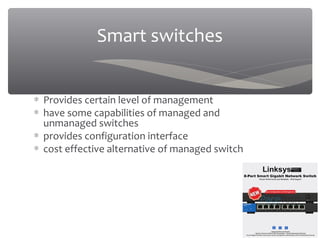
Smart switches
∗ Provides certain level of management
∗ have some capabilities of managed and
unmanaged switches
∗ provides configuration interface
∗ cost effective alternative of managed switch
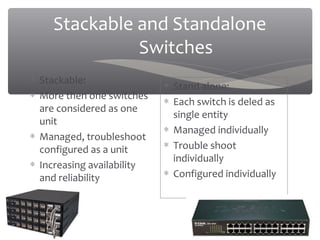
Stackable and Standalone
Switches
∗ Stackable:
∗ More then one switches
are considered as one
unit
∗ Managed, troubleshoot
configured as a unit
∗ Increasing availability
and reliability
∗ Stand alone:
∗ Each switch is deled as
single entity
∗ Managed individually
∗ Trouble shoot
individually
∗ Configured individually
03/20/16
Layer 1 switches
∗ Works at first layer of
the OSI model
∗ Acts like hubs
∗ But have more then one
collision domains
∗ One collision domain
per port
Collision domain:
∗Network section where
data packets can collide
with one another.
03/20/16
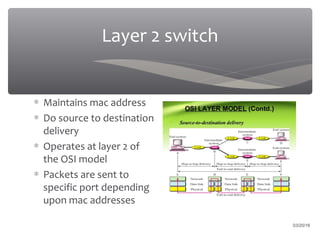
Layer 2 switch
∗ Maintains mac address
∗ Do source to destination
delivery
∗ Operates at layer 2 of
the OSI model
∗ Packets are sent to
specific port depending
upon mac addresses
03/20/16
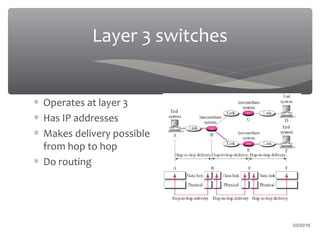
Layer 3 switches
∗ Operates at layer 3
∗ Has IP addresses
∗ Makes delivery possible
from hop to hop
∗ Do routing
03/20/16
Future planning
∗ The network visionaries are planning about making a switch
that will automatically determine an applications network
requirements and will automatically set the network
characteristics that the application would need moreover
the switch it self will decide the access limits of the
application which means that the switches will first learn
about the applications requirement and then provide
network accordingly
03/20/16
References
03/20/16
∗ http://www.ieee802.org/1/pages/802.121/1/2016D.html
∗ Retrieved 18/1/2016
∗ http://www.ccontrols.com/pdf/Extv3n3.pdf
∗ Retrieved 18/1/2016
∗ http://blogs.cisco.com/smallbusiness/understanding-the-different-types-of-ethernet-switches
∗ Retrieved 19/1/2016
∗ http://blogs.cisco.com/smallbusiness/understanding-the-different-types-of-ethernet-switches
∗ Retrieved 19/1/2016
∗ https://learningnetwork.cisco.com/thread/79585
∗ Retrieved 21/1/2016
∗ http://serverfault.com/questions/123726/whats-the-difference-between-a-layer-2-layer-3-switch
∗ Retrieved 21/1/2016
∗ https://documentation.meraki.com/MS/Layer_3_Switching/Layer_3_versus_Layer_2_Switch_for_VLANs
∗ Retrieved 21/1/2016
∗ http://www.networkcomputing.com/networking/5-basic-switch-settings-you-must-know/879127198
∗ Retrieved 21/1/2016
∗ http://www.cisco.com/c/en/us/products/collateral/switches/nexus-7000-series-switches/data_sheet_c78-
574915.html.
∗ Retrieved 21/1/2016
∗ http://etherealmind.com/whats-happening-inside-an-ethernet-switch-or-network-switches-for-virtualization-
people/
∗ Retrieved 21/1/2016
03/20/16
03/20/16

network Switch

  • 1.
    UNIVERSITY OF WAH PRESENTATIONOF COMPUTER NETWORKS PRESENTATION TOPIC: SWITCH PRESENTED BY: ZEESHAN HANIF WAQAS SHAH SYED AJLAAL HAIDER PRESENTED TO: SIR MUDASSIR HUSSAIN
  • 2.
    ∗ Multiport Networkingdevice ∗ Connect multiple devices ∗ Intelligent device ∗ Maintains a routing and mac address table ∗ Processes and forwards data ∗ Uses packet switching ∗ Have downlinks and uplinks SWITCH
  • 3.
  • 4.
  • 5.
    03/20/16 Why We NeedA Switch???? ∗ Used hubs which were non intelligent ∗ A faster way was needed for communication ∗ A device which will have less collisions ∗ Security and privacy ∗ Reliability ∗ High performance
  • 6.
  • 7.
  • 8.
    Management of Switches: ∗Turn particular port range on or off ∗ Link bandwidth and duplex settings ∗ Priority settings for ports ∗ IP management ∗ MAC filtering and other types of "port security" features ∗ Simple Network Management Protocol (SNMP) monitoring of device and link health ∗ VLAN settings. Creating VLANs ∗ Network access control ∗ Port mirroring ∗ Link aggregation (also known as bonding, trunking or teaming) allows the use of multiple ports for the same connection achieving higher data transfer rates 03/20/16
  • 9.
    03/20/16 Types of switches Modularswitches ∗ High capability switches ∗ customized as per network requirement ∗ port size can be extended ∗ Multi port Ethernet card can be added ∗ High cost ∗ provides flexibility ∗ Catalyst 4K and 6K are examples of modular switches
  • 10.
    03/20/16 Fixed Configuration ∗ Non-expandable ∗Less costly ∗ multiport Ethernet card cannot be added ∗ less flexible ∗ Cisco Catalyst 2K, 3K are good examples
  • 11.
    03/20/16 Types of Switches UnmanagedSwitches ∗ Have no configuration interface ∗ plug and play device ∗ suitable for small network ∗ ports speed can not be individually controlled ∗ does not provide security
  • 12.
    03/20/16 Managed switches ∗ haveconfiguration interface ∗ provides security ∗ precise control ∗ applied in large networks ∗ management of device made easier ∗ very costly ∗ ports can be individually controlled
  • 13.
    03/20/16 Smart switches ∗ Providescertain level of management ∗ have some capabilities of managed and unmanaged switches ∗ provides configuration interface ∗ cost effective alternative of managed switch
  • 14.
    Stackable and Standalone Switches ∗Stackable: ∗ More then one switches are considered as one unit ∗ Managed, troubleshoot configured as a unit ∗ Increasing availability and reliability ∗ Stand alone: ∗ Each switch is deled as single entity ∗ Managed individually ∗ Trouble shoot individually ∗ Configured individually 03/20/16
  • 15.
    Layer 1 switches ∗Works at first layer of the OSI model ∗ Acts like hubs ∗ But have more then one collision domains ∗ One collision domain per port Collision domain: ∗Network section where data packets can collide with one another. 03/20/16
  • 16.
    Layer 2 switch ∗Maintains mac address ∗ Do source to destination delivery ∗ Operates at layer 2 of the OSI model ∗ Packets are sent to specific port depending upon mac addresses 03/20/16
  • 17.
    Layer 3 switches ∗Operates at layer 3 ∗ Has IP addresses ∗ Makes delivery possible from hop to hop ∗ Do routing 03/20/16
  • 18.
    Future planning ∗ Thenetwork visionaries are planning about making a switch that will automatically determine an applications network requirements and will automatically set the network characteristics that the application would need moreover the switch it self will decide the access limits of the application which means that the switches will first learn about the applications requirement and then provide network accordingly 03/20/16
  • 19.
    References 03/20/16 ∗ http://www.ieee802.org/1/pages/802.121/1/2016D.html ∗ Retrieved18/1/2016 ∗ http://www.ccontrols.com/pdf/Extv3n3.pdf ∗ Retrieved 18/1/2016 ∗ http://blogs.cisco.com/smallbusiness/understanding-the-different-types-of-ethernet-switches ∗ Retrieved 19/1/2016 ∗ http://blogs.cisco.com/smallbusiness/understanding-the-different-types-of-ethernet-switches ∗ Retrieved 19/1/2016 ∗ https://learningnetwork.cisco.com/thread/79585 ∗ Retrieved 21/1/2016 ∗ http://serverfault.com/questions/123726/whats-the-difference-between-a-layer-2-layer-3-switch ∗ Retrieved 21/1/2016 ∗ https://documentation.meraki.com/MS/Layer_3_Switching/Layer_3_versus_Layer_2_Switch_for_VLANs ∗ Retrieved 21/1/2016 ∗ http://www.networkcomputing.com/networking/5-basic-switch-settings-you-must-know/879127198 ∗ Retrieved 21/1/2016 ∗ http://www.cisco.com/c/en/us/products/collateral/switches/nexus-7000-series-switches/data_sheet_c78- 574915.html. ∗ Retrieved 21/1/2016 ∗ http://etherealmind.com/whats-happening-inside-an-ethernet-switch-or-network-switches-for-virtualization- people/ ∗ Retrieved 21/1/2016
  • 20.
  • 21.