Computer Networks and Information Security
24BIT4C30
UNIT-I
SURESH KUMAR S
Assistant Prof, IT Department,
STC, Pollachi
Topic 1- Introduction to
Network
Technology Revolution
• 18th Century - The great mechanical systems
accompanying the Industrial Revolution
•19th Century - The age of the steam engine
• 20th Century - The key technology was
information gathering, processing, and
distribution
Technology Revolution
•During the first two decades of their
existence, computer systems were highly
centralized, usually within a single large room.
•A medium-sized company or university might
have had one or two computers
•While very large institutions had at most a
few dozen.
Technology Revolution
The old model of a single computer serving all
of the organization’s computational needs
has been replaced by
one in which a large number of separate but
interconnected computers do the job.
These systems are called computer networks.
What is a Computer Network
The term ‘‘computer network’’ to mean a
collection of autonomous computers
interconnected by a single technology.
Two computers are said to be interconnected if
they are able to exchange information.
A set of communication elements connected by
communication links
➭ Communication elements
• Computers, printers, mobile phones, …
• Routers, switches, ...
➭ Communication links
• optic fiber
• coaxial cable
• twisted pair
• wireless (radio, microwave, satellite)
➭ Topologies
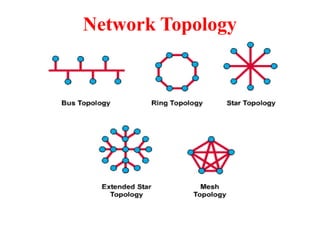
• Ring, Star, Bus, Tree, Mesh
What is a Computer Network
A software/hardware infrastructure
➭ Share resources
• data, files, computing power, video,…
➭ Information highway
• communication between geographically dispersed users
➭ Electronic Society
•Cyberspace
•Virtual global nation
What is a Computer Network
Introduction
 Computer Network
– an interconnected collection of autonomous computers
Internet: “network of networks”
– loosely hierarchical
– public Internet versus private intranet
WWW a distributed systems run on the top of Internet
 Distributed System
– High degree of cohesiveness and transparency
– A software system built on top of a network
Uses of Computer Networks
• Business Applications
• Home Applications
• Mobile Users
• Social Issues
Business Applications of Networks
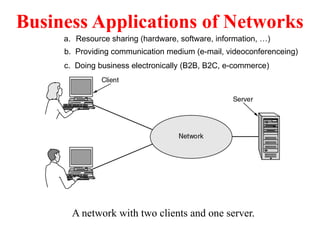
A network with two clients and one server.
a. Resource sharing (hardware, software, information, …)
c. Doing business electronically (B2B, B2C, e-commerce)
b. Providing communication medium (e-mail, videoconferenceing)
Goals of Networks for Companies
 Resource sharing: equipment, programs, data
 high reliability
– replicated data
– hardware
 Saving money
– mainframe: 10 times faster, but 1000 times more
expensive than PC
– client-server model
 Scalability
– mainframe: replace a larger one
– client-server model: add more servers
 Communication medium for separated employees
Business Applications of Networks (2)
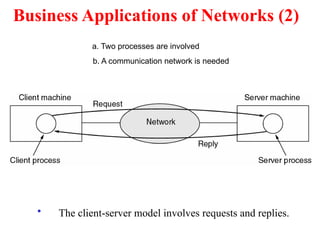
• The client-server model involves requests and replies.
a. Two processes are involved
b. A communication network is needed
Home Network Applications
• Access to remote information
• Person-to-person communication
• Interactive entertainment
• Electronic commerce
 Networks for People
– Access to remote information
• e.g.: financial, shopping, customized newspapers,
on-line digital library, WWW
– Person-to-person communication
• email, video conference, newsgroup
– Interactive entertainment
• interactive movies or TVs, game playing
Home Network Applications (2)
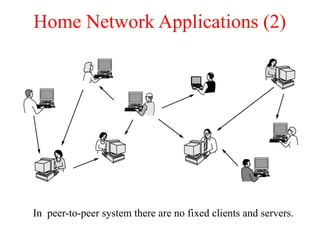
In peer-to-peer system there are no fixed clients and servers.
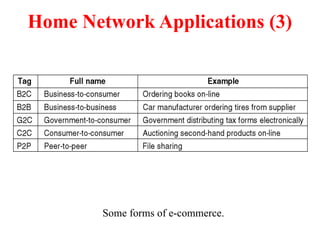
Home Network Applications (3)
Some forms of e-commerce.
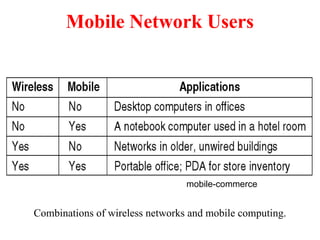
Mobile Network Users
Combinations of wireless networks and mobile computing.
mobile-commerce
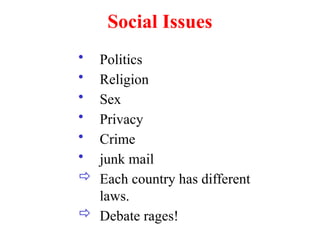
Social Issues
• Politics
• Religion
• Sex
• Privacy
• Crime
• junk mail
 Each country has different
laws.
 Debate rages!
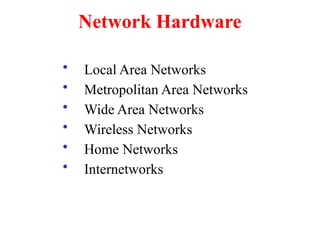
Network Hardware
• Local Area Networks
• Metropolitan Area Networks
• Wide Area Networks
• Wireless Networks
• Home Networks
• Internetworks
Types of transmission technology
• Broadcast links
• Point-to-point links
Network Hardware
Network Hardware
– Broadcast networks
• single communication channel shared by all
machines
• broadcasting or multicasting (via packets)
– broadcasting: a special code in address field
– multicasting: reserve one bit to indicate multicasting, the
remaining n-1address bits can hold a group number. Each
machine can subscribe to any groups
• used by localized networks (or satellites)
– point-to-point networks
• many hops
• routing algorithms: multiple routes are possible
• used by large networks
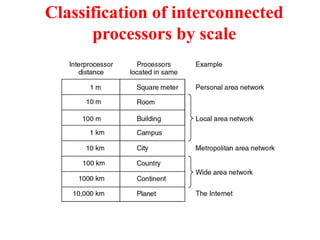
Classification of interconnected
processors by scale
Local Area Networks (LANs)
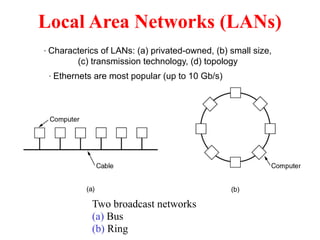
Two broadcast networks
(a) Bus
(b) Ring
· Characterics of LANs: (a) privated-owned, (b) small size,
(c) transmission technology, (d) topology
· Ethernets are most popular (up to 10 Gb/s)
Local Area Networks
 Characteristics
– small size
– transmission technology
• single cable
• 10Mbps ~ 10Gb/s
• 10Gb/s : 10,000,000.000 bps
– topology:
• bus
– Ethernet (IEEE 802.3): 10 or 100 Mbps (10Gb/s)
• ring
– IBM token ring (IEEE 802.5): 4 or 16 Mbps
 Channel allocation of broadcast networks
– static: each machine has an allocated time slot
– dynamic
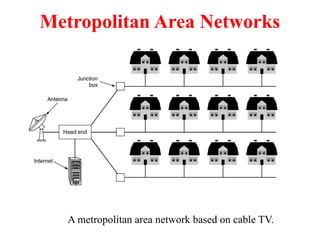
Metropolitan Area Networks
A metropolitan area network based on cable TV.
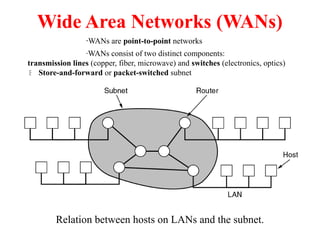
Wide Area Networks (WANs)
Relation between hosts on LANs and the subnet.
·WANs are point-to-point networks
·WANs consist of two distinct components:
transmission lines (copper, fiber, microwave) and switches (electronics, optics)
 Store-and-forward or packet-switched subnet
Network Topology
Subnet (WANs)
Subnet (WANs) is consists of two components:
– transmission lines (circuits, channels, trunks)
• move bits between machines
– switching elements
• connect transmission lines
• Router: also called packet switching nodes,
intermediate systems, and data switching exchanges
• Operate in store-and-forward, or packet-switched
mode.
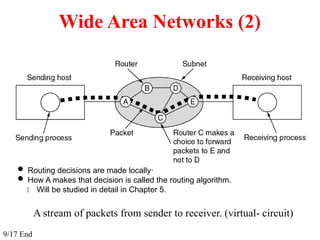
Wide Area Networks (2)
A stream of packets from sender to receiver. (virtual- circuit)
 Routing decisions are made locally·
 How A makes that decision is called the routing algorithm.
 Will be studied in detail in Chapter 5.
9/17 End
Wireless Networks
Categories of wireless networks:
• System interconnection
(short-range radio, e.g. Bluetooth)
• Wireless LANs
(802.11a, 802.11b, 802.11g)
• Wireless WANs
(802.16, Cellular telephones, Satellites)
• Wireless sensor networks
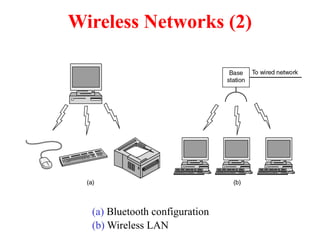
Wireless Networks (2)
(a) Bluetooth configuration
(b) Wireless LAN
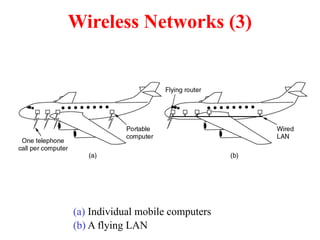
Wireless Networks (3)
(a) Individual mobile computers
(b) A flying LAN
Home Network Categories
 Computers (desktop PC, PDA, shared peripherals)
 Entertainment (TV, DVD, VCR, camera, stereo, MP3)
 Telecomm (telephone, cell phone, intercom, fax)
 Appliances (microwave, fridge, clock, furnace, airco.,
light)
 Telemetry (utility meter, smoke/burglar alarm,
babycam).
 Fundamentally different properties
1. Devices have to be easy to install
2. The network and devices have to be foolproof in
operation
3. Low price is essential
4. The network needs sufficient capacity ( for multimedia
application)
5. The network interface and wiring have to be stable for
many years
6. Security and reliability will be very important
(minimize false alarm or misalarm)
 Home networks may be wired or wireless
Internetworks
• Internetworks connect networks with different hardware
and software
• A collection of interconnected networks is called
an internetwork or internet
• Internet is one specific internet
• Gateways are used to make the connection and to
provide the necessary translation (protocol convertion)
Network Software
Network Software
• Protocol Hierarchies (Layer structure)
• Design Issues for the Layers
• Connection-Oriented and Connectionless Services
• Service Primitives
• The Relationship of Services to Protocols
Network Software
Protocol Hierarchies
– a series of layers (levels)
– lower layer provides service to higher layers
– protocol:
• an agreement between the communication parties on how
communication is to proceed
– Peers:
• the corresponding layers on different machines.
– Network architecture: a set of layers and protocols
– Protocol stack:
• a list of protocols used by a certain system, one protocol per
layer
Network Software
Protocol Hierarchies
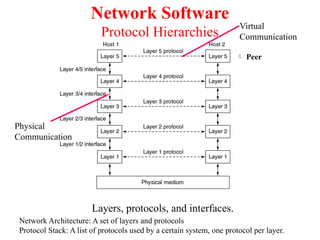
Layers, protocols, and interfaces.
 Peer
Network Architecture: A set of layers and protocols
Protocol Stack: A list of protocols used by a certain system, one protocol per layer.
Virtual
Communication
Physical
Communication
Layering
➭ To make things simple: modularization
➭ Different layer has different functions
➭ Create layer boundary such that
• description of services can be small
• number of interactions across boundary are minimized
• potential for interface standardized
➭ Different level of abstraction in the handling of data (e.g.,
syntax, semantics)
➭ Provide appropriate services to upper layer
➭ Use service primitives of lower layer
Network Software
Protocol Hierarchies (2)
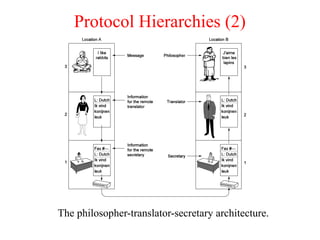
The philosopher-translator-secretary architecture.
Protocol Hierarchies (3)
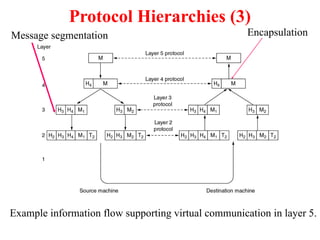
Example information flow supporting virtual communication in layer 5.
Message segmentation Encapsulation
Design Issues for the Layers
• Addressing (telephone number, e-mail address, IP
address,…)
• Error Control (error correction codes, ARQ, HARQ,…)
• Flow Control (feedback-based, rate-based)
• Multiplexing (gathering several small messages with the
same destination into a single large message or vice
versa  Demultiplexing)
• Routing (directing traffic to the destination)
Design Issues for Layers
 Identify senders and receivers
– multiple computers and processes: addressing
 Data transfer
– simplex, half-duplex, full-duplex communication
– # of logical channels per connections, priorities
 Error control
– error detection
– error correction
 Sequencing of pieces
Design Issues for Layers
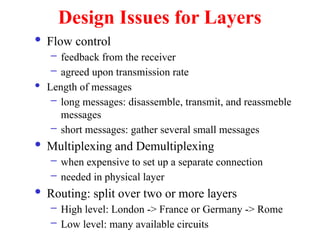
 Flow control
– feedback from the receiver
– agreed upon transmission rate
 Length of messages
– long messages: disassemble, transmit, and reassmeble
messages
– short messages: gather several small messages
 Multiplexing and Demultiplexing
– when expensive to set up a separate connection
– needed in physical layer
 Routing: split over two or more layers
– High level: London -> France or Germany -> Rome
– Low level: many available circuits
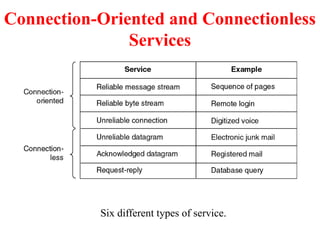
Connection-Oriented and Connectionless
Services
Six different types of service.
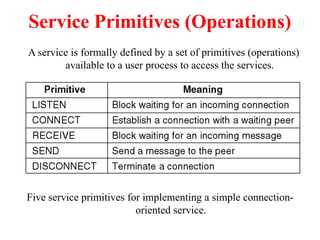
Service Primitives (Operations)
Five service primitives for implementing a simple connection-
oriented service.
A service is formally defined by a set of primitives (operations)
available to a user process to access the services.
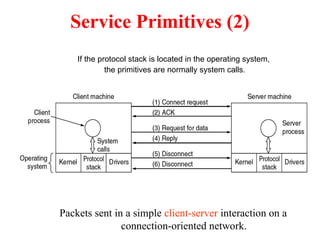
Service Primitives (2)
Packets sent in a simple client-server interaction on a
connection-oriented network.
If the protocol stack is located in the operating system,
the primitives are normally system calls.
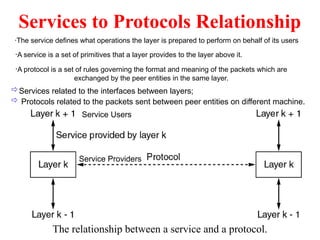
Services to Protocols Relationship
The relationship between a service and a protocol.
·The service defines what operations the layer is prepared to perform on behalf of its users
·A service is a set of primitives that a layer provides to the layer above it.
·A protocol is a set of rules governing the format and meaning of the packets which are
exchanged by the peer entities in the same layer.
Service Providers
Service Users
Services related to the interfaces between layers;
 Protocols related to the packets sent between peer entities on different machine.
Reference Models
• The OSI Reference Model
• The TCP/IP Reference Model
• A Comparison of OSI and TCP/IP
• A Critique of the OSI Model and Protocols
• A Critique of the TCP/IP Reference Model
OSI Reference Model
• Reference Model gives a conceptual framework that standardizes
communication between heterogeneous networks.
•OSI Reference model is based on a proposal developed by the
International Standards Organization (ISO) as a first step toward
international standardization of the protocols used in the various layers
(Day and Zimmermann, 1983).
• It was revised in 1995 (Day, 1995).
• The model is called the ISO-OSI (Open Systems Interconnection)
Reference Model because it deals with connecting open systems, i.e.
systems that are open for communication with other systems.
Principles that were applied to arrive at
the seven layers
• A layer should be created where a different abstraction is needed.
• Each layer should perform a well-defined function.
• The function of each layer should be chosen with an eye toward
defining internationally standardized protocols.
• The layer boundaries should be chosen to minimize the
information
flow across the interfaces.
• The number of layers should be large enough that distinct
functions
need not be thrown together in the same layer out of necessity and
small enough that the architecture does not become unwieldy.
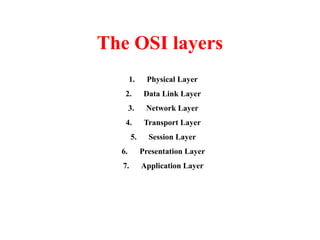
The OSI layers
1. Physical Layer
2. Data Link Layer
3. Network Layer
4. Transport Layer
5. Session Layer
6. Presentation Layer
7. Application Layer
The Physical Layer
•Tansmits raw bits over a communication channel.
•Design issue :
To make sure that when one side sends a 1 bit, it is
received by the other side as a 1 bit, not as a 0 bit.
The Data Link Layer
•The sender break up the input data into data frames and transmits the frames
sequentially. If the service is reliable, the receiver confirms correct receipt of
each frame by sending back an acknowledgement frame.
•Design Issues:
Error Handling - To transform a raw transmission facility into a line that
appears free of undetected transmission errors to the network layer.
Flow Control - To keep a fast transmitter from drowning a slow receiver in
data - Some traffic regulation mechanism is needed to let the transmitter
know how much buffer space the receiver has at the moment.
These two issues are frequently integrated.
The Network Layer
The network layer controls the operation of the subnet.
Design issues:
• How packets are routed from source to destination.
•Routes can also be determined at the start of each conversation,
•Routes can be highly dynamic, based on the current network load.
• To control congestion in the network layer
• Quality of service provided
•When a packet has to travel from one network to
another to get to its destination, many problems can
arise.
The addressing used may be different
The packet size may vary
The protocols may differ, and so on. ..
Other Issues in the Network Layer
•When a packet has to travel from one network to
another to get to its destination, many problems can
arise.
•The addressing used may be different
•The packet size may vary
•The protocols may differ, and so on. ..
•The network layer have to overcome all these problems to
allow heterogeneous networks to be interconnected.
•In broadcast networks, the routing problem is simple, so
the network layer is thin or nonexistent.
The Transport Layer
•The basic function is to accept data from above, split it up into smaller units
if needed and pass these to the network layer.
Design Issues:
•To ensure that the pieces arrive correctly at the other end.
•To determine what type of service to provide to the session layer, and,
also to the users of the network.
The most popular type - an error-free point-to-point channel.
Transporting of isolated messages.
Broadcasting of messages to multiple destinations.
(The type of service is determined when the connection is established.)
The transport layer is a true end-to-end layer, all the way from the source to
the destination.
•A program on the source machine carries on a conversation with
a similar program on the destination machine, using the message
headers and control messages.
•In the lower layers, the protocols are between each machine and
its immediate neighbours, and not between the ultimate source
and destination machines, which may be separated by many
routers.
The Session Layer
To establish sessions between users on different
machines.
Sessions offer various services:
•Dialog Control - keeping track of whose turn it is
to transmit
•Token Management - preventing two parties from
attempting the same critical operation at the same
time
•Synchronization - check pointing long
transmissions to allow them to continue from where
they were after a crash
The Presentation Layer
•It is concerned with the syntax and semantics of the information
transmitted.
• For computers with different data representations to communicate,
abstract data structures can be defined along with a standard encoding
to be used.
•This layer manages these abstract data structures and allows higher-level
data structures to be defined and exchanged.
The Application Layer
•The application layer contains a variety of protocols that are commonly
needed by users.
•One widely-used application protocol is HTTP (Hypertext Transfer
Protocol), which is the basis for the World Wide Web. When a browser
wants a Web page, it sends the name of the page it wants to the server
using HTTP. The server then sends the page back.
•Other application protocols are used for file transfer, electronic mail,
and network news.
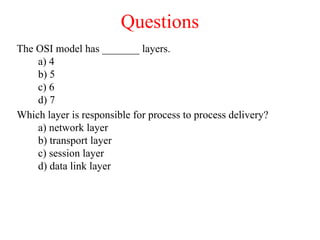
Questions
The OSI model has _______ layers.
a) 4
b) 5
c) 6
d) 7
Which layer is responsible for process to process delivery?
a) network layer
b) transport layer
c) session layer
d) data link layer
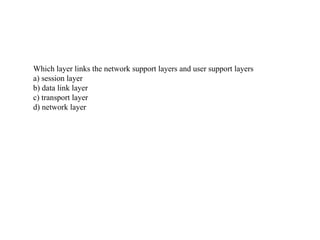
Which layer links the network support layers and user support layers
a) session layer
b) data link layer
c) transport layer
d) network layer
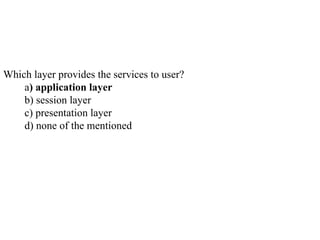
Which layer provides the services to user?
a) application layer
b) session layer
c) presentation layer
d) none of the mentioned
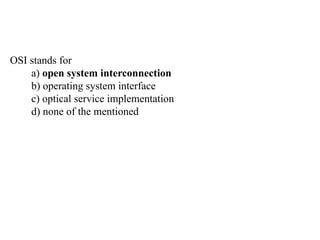
OSI stands for
a) open system interconnection
b) operating system interface
c) optical service implementation
d) none of the mentioned
The TCP/IP Protocol Suite
•The TCP/IP protocol suite was developed prior to the OSI model.
•Therefore, the layers in the TCP/IP protocol suite do not match
exactly with those in the OSI model.
•The original TCP/IP protocol suite was defined as four software
layers built upon the hardware.
•Today, however, TCP/IP is thought of as a five-layer model with
the layers named similarly to the ones in the OSI model.
Layers in the TCP/IP Protocol
Suite
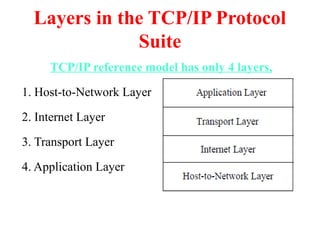
TCP/IP reference model has only 4 layers,
1. Host-to-Network Layer
2. Internet Layer
3. Transport Layer
4. Application Layer
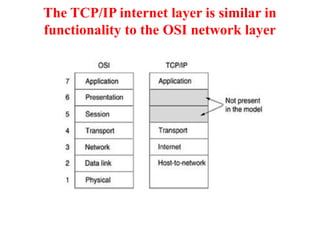
The TCP/IP internet layer is similar in
functionality to the OSI network layer
Host-to-Network Layer
•The host has to connect to the network using some
protocol so it can send IP packets to it.
•This protocol is not defined and varies from host to
host and network to network.
Internet Layer
•This layer holds the whole architecture together.
•It allows hosts to inject packets into any network and let them travel
independently to the destination (potentially on a different network). They may
even arrive in a different order than they were sent, in which case it is the job of
higher layers to rearrange them, if in-order delivery is desired.
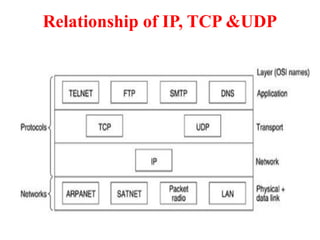
•The internet layer defines an official packet format and protocol called IP
(Internet Protocol) - It delivers IP packets to their respective destinations.
Major issues:
Packet Routing
Congestion Control
The Transport Layer
•It is designed to allow peer entities on the source and
destination hosts to carry on a conversation, just as in the OSI
transport layer.
•Two end-to-end transport protocols are defined here:
TCP (Transmission Control Protocol) - Reliable
Connection-oriented Protocol
UDP (User Datagram Protocol) – Unreliable
Connectionless Protocol
TCP (Transmission Control
Protocol)
• It is a reliable connection-oriented protocol that allows a byte
stream originating on one machine to be delivered without error on
any other machine in the internet.
• It fragments the incoming byte stream into discrete messages
and passes each one on to the internet layer.
• At the destination, the receiving TCP process reassembles the
received messages into the output stream.
• TCP also handles flow control to make sure a fast sender cannot
swamp a slow receiver with more messages than it can handle.
UDP (User Datagram Protocol)
• It is an unreliable, connectionless protocol for
applications that do not want TCP's sequencing or
flow control and wish to provide their own.
• It is also widely used for client-server-type request
reply queries and applications in which prompt
delivery is more important than accurate delivery,
such as transmitting speech or video.
Relationship of IP, TCP &UDP
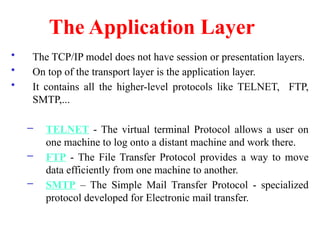
The Application Layer
• The TCP/IP model does not have session or presentation layers.
• On top of the transport layer is the application layer.
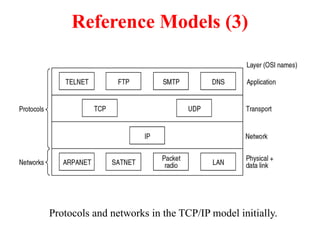
• It contains all the higher-level protocols like TELNET, FTP,
SMTP,...
– TELNET - The virtual terminal Protocol allows a user on
one machine to log onto a distant machine and work there.
– FTP - The File Transfer Protocol provides a way to move
data efficiently from one machine to another.
– SMTP – The Simple Mail Transfer Protocol - specialized
protocol developed for Electronic mail transfer.
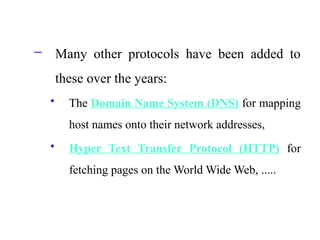
– Many other protocols have been added to
these over the years:
• The Domain Name System (DNS) for mapping
host names onto their network addresses,
• Hyper Text Transfer Protocol (HTTP) for
fetching pages on the World Wide Web, .....
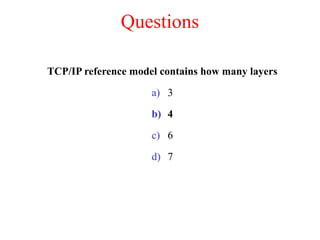
Questions
TCP/IP reference model contains how many layers
a) 3
b) 4
c) 6
d) 7
Which layer is responsible for process to process delivery?
a) network layer
b) transport layer
c) session layer
d) data link layer
TCP/IP model was developed _____ the OSI model.
a) prior to
b) after
c) simultaneous to
d) none of the mentioned
TCP/IP model does not have ______ layer but OSI model have
this layer.
a) session layer
b) presentation layer
c) application layer
d) both (a) and (b)
Telnet
A)allows user to connect client machine
B)transferring files
C)sharing files
D)none of above
The design principle of the OSI reference
model
• A layer should be created where a different
abstraction is needed
• Each layer should perform a well defined function
• The function of each layer can be chosen as an
international standard
• The layer boundaries should be chosen to
minimize the information flow across the
interfaces
• The number of layers should be not too large or
not too small
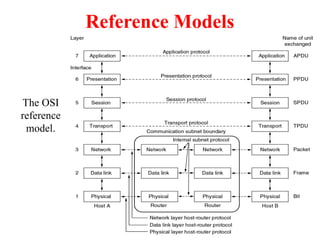
Reference Models
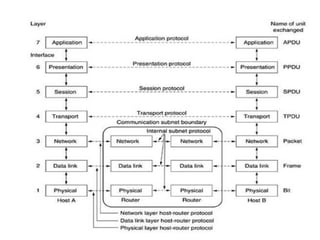
The OSI
reference
model.
The functions of the seven layers
• The physical layer is concerned with transmitting raw bits over a
communication channel
• The data link layer performs flow control and also transforms a
raw transmission facility into a line that appears error free (ARQ)
• The network layer controls the operation of the subnet, e.g.
routing, flow control, internetworking,…
• The transport layer performs assembling and disassembling,
isolates the upper layers from the changes in the network hardware,
and determines the type of services
• The session layer establishes sessions (dialog control, …)
• The presentation layer is concerned with the syntax and semantics
• The application layer contains a variety of commonly used
protocols (e.g. Hyper Text Transfer Protocol for WWW, file
transfer, e-mail, network news,…)
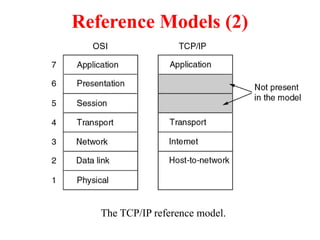
Reference Models (2)
The TCP/IP reference model.
Reference Models (3)
Protocols and networks in the TCP/IP model initially.
Comparing OSI and TCP/IP Models
Concepts central to the OSI model
• Services: defines layer’s semantics
• Interfaces: tells the processes above it
how to access it.
• Protocols
Probably the biggest contribution of the OSI model is to make the
distinction between these three concepts explicit.
A Critique of the OSI Model and Protocols
Why OSI did not take over the world
• Bad timing
• Bad technology
• Bad implementations
• Bad politics
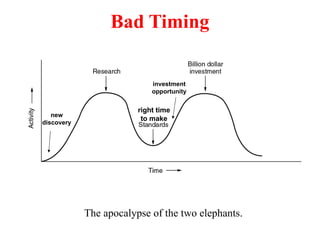
Bad Timing
The apocalypse of the two elephants.
new
discovery
investment
opportunity
right time
to make
Bad Technology
• The choice of seven layers was political
- session and presentation layers are nearly empty
- Data and network layers are overfull
• The OSI model is extraordinarily complex
• Some functions e.g. addressing, flow control,
error control reappear again and again
Bad Implementations
• Huge, Unwieldy, and Slow
Bad Politics
• bureaucrats involved too much (European
telecommunication ministries, community, us
government)
A Critique of the TCP/IP Reference Model
Problems:
• Service, interface, and protocol not distinguished
• Not a general model
• Host-to-network “layer” not really a layer (is an interface)
• No mention of physical and data link layers
• Minor protocols deeply entrenched, hard to replace
(The virtual terminal protocol, TELNET, was designed for
mechanical teletype terminal)
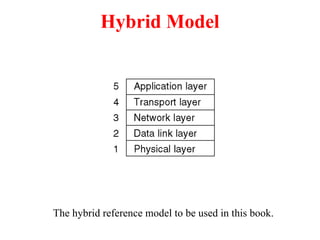
Hybrid Model
The hybrid reference model to be used in this book.

Andrew S. Tanenbaum - Computer Networks.

  • 1.
    Computer Networks andInformation Security 24BIT4C30 UNIT-I SURESH KUMAR S Assistant Prof, IT Department, STC, Pollachi
  • 2.
  • 3.
    Technology Revolution • 18thCentury - The great mechanical systems accompanying the Industrial Revolution •19th Century - The age of the steam engine • 20th Century - The key technology was information gathering, processing, and distribution
  • 4.
    Technology Revolution •During thefirst two decades of their existence, computer systems were highly centralized, usually within a single large room. •A medium-sized company or university might have had one or two computers •While very large institutions had at most a few dozen.
  • 5.
    Technology Revolution The oldmodel of a single computer serving all of the organization’s computational needs has been replaced by one in which a large number of separate but interconnected computers do the job. These systems are called computer networks.
  • 6.
    What is aComputer Network The term ‘‘computer network’’ to mean a collection of autonomous computers interconnected by a single technology. Two computers are said to be interconnected if they are able to exchange information.
  • 7.
    A set ofcommunication elements connected by communication links ➭ Communication elements • Computers, printers, mobile phones, … • Routers, switches, ... ➭ Communication links • optic fiber • coaxial cable • twisted pair • wireless (radio, microwave, satellite) ➭ Topologies • Ring, Star, Bus, Tree, Mesh What is a Computer Network
  • 8.
    A software/hardware infrastructure ➭Share resources • data, files, computing power, video,… ➭ Information highway • communication between geographically dispersed users ➭ Electronic Society •Cyberspace •Virtual global nation What is a Computer Network
  • 9.
    Introduction  Computer Network –an interconnected collection of autonomous computers Internet: “network of networks” – loosely hierarchical – public Internet versus private intranet WWW a distributed systems run on the top of Internet  Distributed System – High degree of cohesiveness and transparency – A software system built on top of a network
  • 10.
    Uses of ComputerNetworks • Business Applications • Home Applications • Mobile Users • Social Issues
  • 11.
    Business Applications ofNetworks A network with two clients and one server. a. Resource sharing (hardware, software, information, …) c. Doing business electronically (B2B, B2C, e-commerce) b. Providing communication medium (e-mail, videoconferenceing)
  • 12.
    Goals of Networksfor Companies  Resource sharing: equipment, programs, data  high reliability – replicated data – hardware  Saving money – mainframe: 10 times faster, but 1000 times more expensive than PC – client-server model  Scalability – mainframe: replace a larger one – client-server model: add more servers  Communication medium for separated employees
  • 13.
    Business Applications ofNetworks (2) • The client-server model involves requests and replies. a. Two processes are involved b. A communication network is needed
  • 14.
    Home Network Applications •Access to remote information • Person-to-person communication • Interactive entertainment • Electronic commerce
  • 15.
     Networks forPeople – Access to remote information • e.g.: financial, shopping, customized newspapers, on-line digital library, WWW – Person-to-person communication • email, video conference, newsgroup – Interactive entertainment • interactive movies or TVs, game playing
  • 16.
    Home Network Applications(2) In peer-to-peer system there are no fixed clients and servers.
  • 17.
    Home Network Applications(3) Some forms of e-commerce.
  • 18.
    Mobile Network Users Combinationsof wireless networks and mobile computing. mobile-commerce
  • 19.
    Social Issues • Politics •Religion • Sex • Privacy • Crime • junk mail  Each country has different laws.  Debate rages!
  • 20.
    Network Hardware • LocalArea Networks • Metropolitan Area Networks • Wide Area Networks • Wireless Networks • Home Networks • Internetworks
  • 21.
    Types of transmissiontechnology • Broadcast links • Point-to-point links Network Hardware
  • 22.
    Network Hardware – Broadcastnetworks • single communication channel shared by all machines • broadcasting or multicasting (via packets) – broadcasting: a special code in address field – multicasting: reserve one bit to indicate multicasting, the remaining n-1address bits can hold a group number. Each machine can subscribe to any groups • used by localized networks (or satellites) – point-to-point networks • many hops • routing algorithms: multiple routes are possible • used by large networks
  • 23.
  • 24.
    Local Area Networks(LANs) Two broadcast networks (a) Bus (b) Ring · Characterics of LANs: (a) privated-owned, (b) small size, (c) transmission technology, (d) topology · Ethernets are most popular (up to 10 Gb/s)
  • 25.
    Local Area Networks Characteristics – small size – transmission technology • single cable • 10Mbps ~ 10Gb/s • 10Gb/s : 10,000,000.000 bps – topology: • bus – Ethernet (IEEE 802.3): 10 or 100 Mbps (10Gb/s) • ring – IBM token ring (IEEE 802.5): 4 or 16 Mbps  Channel allocation of broadcast networks – static: each machine has an allocated time slot – dynamic
  • 26.
    Metropolitan Area Networks Ametropolitan area network based on cable TV.
  • 27.
    Wide Area Networks(WANs) Relation between hosts on LANs and the subnet. ·WANs are point-to-point networks ·WANs consist of two distinct components: transmission lines (copper, fiber, microwave) and switches (electronics, optics)  Store-and-forward or packet-switched subnet
  • 28.
  • 29.
    Subnet (WANs) Subnet (WANs)is consists of two components: – transmission lines (circuits, channels, trunks) • move bits between machines – switching elements • connect transmission lines • Router: also called packet switching nodes, intermediate systems, and data switching exchanges • Operate in store-and-forward, or packet-switched mode.
  • 30.
    Wide Area Networks(2) A stream of packets from sender to receiver. (virtual- circuit)  Routing decisions are made locally·  How A makes that decision is called the routing algorithm.  Will be studied in detail in Chapter 5. 9/17 End
  • 31.
    Wireless Networks Categories ofwireless networks: • System interconnection (short-range radio, e.g. Bluetooth) • Wireless LANs (802.11a, 802.11b, 802.11g) • Wireless WANs (802.16, Cellular telephones, Satellites) • Wireless sensor networks
  • 32.
    Wireless Networks (2) (a)Bluetooth configuration (b) Wireless LAN
  • 33.
    Wireless Networks (3) (a)Individual mobile computers (b) A flying LAN
  • 34.
    Home Network Categories Computers (desktop PC, PDA, shared peripherals)  Entertainment (TV, DVD, VCR, camera, stereo, MP3)  Telecomm (telephone, cell phone, intercom, fax)  Appliances (microwave, fridge, clock, furnace, airco., light)  Telemetry (utility meter, smoke/burglar alarm, babycam).
  • 35.
     Fundamentally differentproperties 1. Devices have to be easy to install 2. The network and devices have to be foolproof in operation 3. Low price is essential 4. The network needs sufficient capacity ( for multimedia application) 5. The network interface and wiring have to be stable for many years 6. Security and reliability will be very important (minimize false alarm or misalarm)  Home networks may be wired or wireless
  • 36.
    Internetworks • Internetworks connectnetworks with different hardware and software • A collection of interconnected networks is called an internetwork or internet • Internet is one specific internet • Gateways are used to make the connection and to provide the necessary translation (protocol convertion)
  • 37.
  • 38.
    Network Software • ProtocolHierarchies (Layer structure) • Design Issues for the Layers • Connection-Oriented and Connectionless Services • Service Primitives • The Relationship of Services to Protocols
  • 39.
    Network Software Protocol Hierarchies –a series of layers (levels) – lower layer provides service to higher layers – protocol: • an agreement between the communication parties on how communication is to proceed – Peers: • the corresponding layers on different machines. – Network architecture: a set of layers and protocols – Protocol stack: • a list of protocols used by a certain system, one protocol per layer
  • 40.
    Network Software Protocol Hierarchies Layers,protocols, and interfaces.  Peer Network Architecture: A set of layers and protocols Protocol Stack: A list of protocols used by a certain system, one protocol per layer. Virtual Communication Physical Communication
  • 41.
    Layering ➭ To makethings simple: modularization ➭ Different layer has different functions ➭ Create layer boundary such that • description of services can be small • number of interactions across boundary are minimized • potential for interface standardized ➭ Different level of abstraction in the handling of data (e.g., syntax, semantics) ➭ Provide appropriate services to upper layer ➭ Use service primitives of lower layer Network Software
  • 42.
    Protocol Hierarchies (2) Thephilosopher-translator-secretary architecture.
  • 43.
    Protocol Hierarchies (3) Exampleinformation flow supporting virtual communication in layer 5. Message segmentation Encapsulation
  • 44.
    Design Issues forthe Layers • Addressing (telephone number, e-mail address, IP address,…) • Error Control (error correction codes, ARQ, HARQ,…) • Flow Control (feedback-based, rate-based) • Multiplexing (gathering several small messages with the same destination into a single large message or vice versa  Demultiplexing) • Routing (directing traffic to the destination)
  • 45.
    Design Issues forLayers  Identify senders and receivers – multiple computers and processes: addressing  Data transfer – simplex, half-duplex, full-duplex communication – # of logical channels per connections, priorities  Error control – error detection – error correction  Sequencing of pieces
  • 46.
    Design Issues forLayers  Flow control – feedback from the receiver – agreed upon transmission rate  Length of messages – long messages: disassemble, transmit, and reassmeble messages – short messages: gather several small messages  Multiplexing and Demultiplexing – when expensive to set up a separate connection – needed in physical layer  Routing: split over two or more layers – High level: London -> France or Germany -> Rome – Low level: many available circuits
  • 47.
  • 48.
    Service Primitives (Operations) Fiveservice primitives for implementing a simple connection- oriented service. A service is formally defined by a set of primitives (operations) available to a user process to access the services.
  • 49.
    Service Primitives (2) Packetssent in a simple client-server interaction on a connection-oriented network. If the protocol stack is located in the operating system, the primitives are normally system calls.
  • 50.
    Services to ProtocolsRelationship The relationship between a service and a protocol. ·The service defines what operations the layer is prepared to perform on behalf of its users ·A service is a set of primitives that a layer provides to the layer above it. ·A protocol is a set of rules governing the format and meaning of the packets which are exchanged by the peer entities in the same layer. Service Providers Service Users Services related to the interfaces between layers;  Protocols related to the packets sent between peer entities on different machine.
  • 51.
    Reference Models • TheOSI Reference Model • The TCP/IP Reference Model • A Comparison of OSI and TCP/IP • A Critique of the OSI Model and Protocols • A Critique of the TCP/IP Reference Model
  • 52.
    OSI Reference Model •Reference Model gives a conceptual framework that standardizes communication between heterogeneous networks. •OSI Reference model is based on a proposal developed by the International Standards Organization (ISO) as a first step toward international standardization of the protocols used in the various layers (Day and Zimmermann, 1983). • It was revised in 1995 (Day, 1995). • The model is called the ISO-OSI (Open Systems Interconnection) Reference Model because it deals with connecting open systems, i.e. systems that are open for communication with other systems.
  • 53.
    Principles that wereapplied to arrive at the seven layers • A layer should be created where a different abstraction is needed. • Each layer should perform a well-defined function. • The function of each layer should be chosen with an eye toward defining internationally standardized protocols. • The layer boundaries should be chosen to minimize the information flow across the interfaces. • The number of layers should be large enough that distinct functions need not be thrown together in the same layer out of necessity and small enough that the architecture does not become unwieldy.
  • 54.
    The OSI layers 1.Physical Layer 2. Data Link Layer 3. Network Layer 4. Transport Layer 5. Session Layer 6. Presentation Layer 7. Application Layer
  • 56.
    The Physical Layer •Tansmitsraw bits over a communication channel. •Design issue : To make sure that when one side sends a 1 bit, it is received by the other side as a 1 bit, not as a 0 bit.
  • 57.
    The Data LinkLayer •The sender break up the input data into data frames and transmits the frames sequentially. If the service is reliable, the receiver confirms correct receipt of each frame by sending back an acknowledgement frame. •Design Issues: Error Handling - To transform a raw transmission facility into a line that appears free of undetected transmission errors to the network layer. Flow Control - To keep a fast transmitter from drowning a slow receiver in data - Some traffic regulation mechanism is needed to let the transmitter know how much buffer space the receiver has at the moment. These two issues are frequently integrated.
  • 58.
    The Network Layer Thenetwork layer controls the operation of the subnet. Design issues: • How packets are routed from source to destination. •Routes can also be determined at the start of each conversation, •Routes can be highly dynamic, based on the current network load. • To control congestion in the network layer • Quality of service provided
  • 59.
    •When a packethas to travel from one network to another to get to its destination, many problems can arise. The addressing used may be different The packet size may vary The protocols may differ, and so on. ..
  • 60.
    Other Issues inthe Network Layer •When a packet has to travel from one network to another to get to its destination, many problems can arise. •The addressing used may be different •The packet size may vary •The protocols may differ, and so on. .. •The network layer have to overcome all these problems to allow heterogeneous networks to be interconnected. •In broadcast networks, the routing problem is simple, so the network layer is thin or nonexistent.
  • 61.
    The Transport Layer •Thebasic function is to accept data from above, split it up into smaller units if needed and pass these to the network layer. Design Issues: •To ensure that the pieces arrive correctly at the other end. •To determine what type of service to provide to the session layer, and, also to the users of the network. The most popular type - an error-free point-to-point channel. Transporting of isolated messages. Broadcasting of messages to multiple destinations. (The type of service is determined when the connection is established.) The transport layer is a true end-to-end layer, all the way from the source to the destination.
  • 62.
    •A program onthe source machine carries on a conversation with a similar program on the destination machine, using the message headers and control messages. •In the lower layers, the protocols are between each machine and its immediate neighbours, and not between the ultimate source and destination machines, which may be separated by many routers.
  • 63.
    The Session Layer Toestablish sessions between users on different machines. Sessions offer various services: •Dialog Control - keeping track of whose turn it is to transmit •Token Management - preventing two parties from attempting the same critical operation at the same time •Synchronization - check pointing long transmissions to allow them to continue from where they were after a crash
  • 64.
    The Presentation Layer •Itis concerned with the syntax and semantics of the information transmitted. • For computers with different data representations to communicate, abstract data structures can be defined along with a standard encoding to be used. •This layer manages these abstract data structures and allows higher-level data structures to be defined and exchanged.
  • 65.
    The Application Layer •Theapplication layer contains a variety of protocols that are commonly needed by users. •One widely-used application protocol is HTTP (Hypertext Transfer Protocol), which is the basis for the World Wide Web. When a browser wants a Web page, it sends the name of the page it wants to the server using HTTP. The server then sends the page back. •Other application protocols are used for file transfer, electronic mail, and network news.
  • 66.
    Questions The OSI modelhas _______ layers. a) 4 b) 5 c) 6 d) 7 Which layer is responsible for process to process delivery? a) network layer b) transport layer c) session layer d) data link layer
  • 67.
    Which layer linksthe network support layers and user support layers a) session layer b) data link layer c) transport layer d) network layer
  • 68.
    Which layer providesthe services to user? a) application layer b) session layer c) presentation layer d) none of the mentioned
  • 69.
    OSI stands for a)open system interconnection b) operating system interface c) optical service implementation d) none of the mentioned
  • 70.
    The TCP/IP ProtocolSuite •The TCP/IP protocol suite was developed prior to the OSI model. •Therefore, the layers in the TCP/IP protocol suite do not match exactly with those in the OSI model. •The original TCP/IP protocol suite was defined as four software layers built upon the hardware. •Today, however, TCP/IP is thought of as a five-layer model with the layers named similarly to the ones in the OSI model.
  • 71.
    Layers in theTCP/IP Protocol Suite TCP/IP reference model has only 4 layers, 1. Host-to-Network Layer 2. Internet Layer 3. Transport Layer 4. Application Layer
  • 72.
    The TCP/IP internetlayer is similar in functionality to the OSI network layer
  • 73.
    Host-to-Network Layer •The hosthas to connect to the network using some protocol so it can send IP packets to it. •This protocol is not defined and varies from host to host and network to network.
  • 74.
    Internet Layer •This layerholds the whole architecture together. •It allows hosts to inject packets into any network and let them travel independently to the destination (potentially on a different network). They may even arrive in a different order than they were sent, in which case it is the job of higher layers to rearrange them, if in-order delivery is desired. •The internet layer defines an official packet format and protocol called IP (Internet Protocol) - It delivers IP packets to their respective destinations. Major issues: Packet Routing Congestion Control
  • 75.
    The Transport Layer •Itis designed to allow peer entities on the source and destination hosts to carry on a conversation, just as in the OSI transport layer. •Two end-to-end transport protocols are defined here: TCP (Transmission Control Protocol) - Reliable Connection-oriented Protocol UDP (User Datagram Protocol) – Unreliable Connectionless Protocol
  • 76.
    TCP (Transmission Control Protocol) •It is a reliable connection-oriented protocol that allows a byte stream originating on one machine to be delivered without error on any other machine in the internet. • It fragments the incoming byte stream into discrete messages and passes each one on to the internet layer. • At the destination, the receiving TCP process reassembles the received messages into the output stream. • TCP also handles flow control to make sure a fast sender cannot swamp a slow receiver with more messages than it can handle.
  • 77.
    UDP (User DatagramProtocol) • It is an unreliable, connectionless protocol for applications that do not want TCP's sequencing or flow control and wish to provide their own. • It is also widely used for client-server-type request reply queries and applications in which prompt delivery is more important than accurate delivery, such as transmitting speech or video.
  • 78.
  • 79.
    The Application Layer •The TCP/IP model does not have session or presentation layers. • On top of the transport layer is the application layer. • It contains all the higher-level protocols like TELNET, FTP, SMTP,... – TELNET - The virtual terminal Protocol allows a user on one machine to log onto a distant machine and work there. – FTP - The File Transfer Protocol provides a way to move data efficiently from one machine to another. – SMTP – The Simple Mail Transfer Protocol - specialized protocol developed for Electronic mail transfer.
  • 80.
    – Many otherprotocols have been added to these over the years: • The Domain Name System (DNS) for mapping host names onto their network addresses, • Hyper Text Transfer Protocol (HTTP) for fetching pages on the World Wide Web, .....
  • 81.
    Questions TCP/IP reference modelcontains how many layers a) 3 b) 4 c) 6 d) 7
  • 82.
    Which layer isresponsible for process to process delivery? a) network layer b) transport layer c) session layer d) data link layer
  • 83.
    TCP/IP model wasdeveloped _____ the OSI model. a) prior to b) after c) simultaneous to d) none of the mentioned
  • 84.
    TCP/IP model doesnot have ______ layer but OSI model have this layer. a) session layer b) presentation layer c) application layer d) both (a) and (b)
  • 85.
    Telnet A)allows user toconnect client machine B)transferring files C)sharing files D)none of above
  • 86.
    The design principleof the OSI reference model • A layer should be created where a different abstraction is needed • Each layer should perform a well defined function • The function of each layer can be chosen as an international standard • The layer boundaries should be chosen to minimize the information flow across the interfaces • The number of layers should be not too large or not too small
  • 87.
  • 88.
    The functions ofthe seven layers • The physical layer is concerned with transmitting raw bits over a communication channel • The data link layer performs flow control and also transforms a raw transmission facility into a line that appears error free (ARQ) • The network layer controls the operation of the subnet, e.g. routing, flow control, internetworking,… • The transport layer performs assembling and disassembling, isolates the upper layers from the changes in the network hardware, and determines the type of services • The session layer establishes sessions (dialog control, …) • The presentation layer is concerned with the syntax and semantics • The application layer contains a variety of commonly used protocols (e.g. Hyper Text Transfer Protocol for WWW, file transfer, e-mail, network news,…)
  • 89.
    Reference Models (2) TheTCP/IP reference model.
  • 90.
    Reference Models (3) Protocolsand networks in the TCP/IP model initially.
  • 91.
    Comparing OSI andTCP/IP Models Concepts central to the OSI model • Services: defines layer’s semantics • Interfaces: tells the processes above it how to access it. • Protocols Probably the biggest contribution of the OSI model is to make the distinction between these three concepts explicit.
  • 92.
    A Critique ofthe OSI Model and Protocols Why OSI did not take over the world • Bad timing • Bad technology • Bad implementations • Bad politics
  • 93.
    Bad Timing The apocalypseof the two elephants. new discovery investment opportunity right time to make
  • 94.
    Bad Technology • Thechoice of seven layers was political - session and presentation layers are nearly empty - Data and network layers are overfull • The OSI model is extraordinarily complex • Some functions e.g. addressing, flow control, error control reappear again and again
  • 95.
    Bad Implementations • Huge,Unwieldy, and Slow Bad Politics • bureaucrats involved too much (European telecommunication ministries, community, us government)
  • 96.
    A Critique ofthe TCP/IP Reference Model Problems: • Service, interface, and protocol not distinguished • Not a general model • Host-to-network “layer” not really a layer (is an interface) • No mention of physical and data link layers • Minor protocols deeply entrenched, hard to replace (The virtual terminal protocol, TELNET, was designed for mechanical teletype terminal)
  • 97.
    Hybrid Model The hybridreference model to be used in this book.

Editor's Notes

  • #52 Instructor: Often multiple variables must be passed from one function to another, and often these variables have different data types. Thus it is useful to have a container to store various types of variables in. Structs allow the programmer to do just that.
  • #53 Structs can contain variables of any variable type previously mentioned as well as more structs. Thus a hierarchical tree can be created out of the user’s data via structs.
  • #54 Instructor: A structure can be defined in two ways. The first method gives the compiler the layout or structure of the struct, but does not actually create one for use. This is useful when the programmer wishes to create global definitions for structs that he or she wishes to use later. The second method varies only in that a variable name now exists after the closing brace of the structure. This variable is now a struct which contains all the variables within the struct definition. Accessing the data in this variable will be discussed in a few slides.
  • #58 Instructor: The most common method of accessing a struct is with the structure member operator as shown. Pointers can also be used with structs. The structure pointer operator must then be used to access struct members. Another method is to first dereference the structure pointer and then use the structure member operator to access the members.
  • #61 Instructor: This program shows simple definitions and operations on structures. The struct identity contains the struct personal and a string name. One can see how structures and variable can be mixed during declaration.
  • #62 Instructor: In the main() function when the struct “js” is created with the structure “identity” a default value for the variable name[30] in the struct “identity” is given. The programmer knows this value will be assigned to name[30] since it is the first and only basic data type in the top-level structure. Following this, a struct pointer is assigned the address of the struct “js.” The program then shows how values can be assigned and used in multi-level structs given both the struct and a pointer to the struct.
  • #63 Instructor: When structures become large, it may be necessary to take memory usage into account. Some defined structures may not always use all variables inside of the structure depending on what function or subsection of code is currently using the structure. Thus a way of allowing variables to “share” memory and reduce struct size is with a union. The struct definition is given on the next slide.
  • #64 Instructor: Here a multi-level struct is defined. Within the struct personal is a union level with the type status. In the union status is a series of variables, one of type int and one of type char. As pointed out on the previous slide the variables in this union use the same memory. When using unions it is important to be sure the variables in the union won’t be required at the same time, otherwise data will be overwritten.
  • #65 Instructor: This program simulates the entering of student information for both undergrad and graduate students. Undergrad students require a rank, which is an integer from 1 to 5. Grad students require the degree sought (MS or PhD) instead of a rank. Since a student cannot be both undergrad AND grad at the same time only the rank OR deg (degree) variable will be used at any one time. Thus this set of data is a perfect candidate for a union. The structure is defined in the same manner as the previous example, but this time depending on the user’s input the undergrad or grad (on the next slide) input code will be executed. Notice the undergrad code requires the input of jb.person.level.rank, and one can see on the next slide the input of jb.person.level.deg instead.
  • #70 Instructor: Often multiple variables must be passed from one function to another, and often these variables have different data types. Thus it is useful to have a container to store various types of variables in. Structs allow the programmer to do just that.
  • #71 Structs can contain variables of any variable type previously mentioned as well as more structs. Thus a hierarchical tree can be created out of the user’s data via structs.
  • #73 Instructor: A structure can be defined in two ways. The first method gives the compiler the layout or structure of the struct, but does not actually create one for use. This is useful when the programmer wishes to create global definitions for structs that he or she wishes to use later. The second method varies only in that a variable name now exists after the closing brace of the structure. This variable is now a struct which contains all the variables within the struct definition. Accessing the data in this variable will be discussed in a few slides.