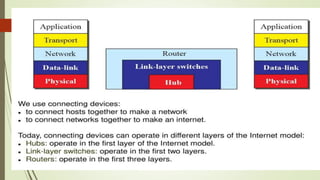
Network Connecting Devices
UNIT O5
HUB:
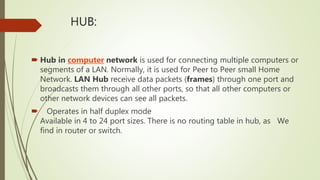
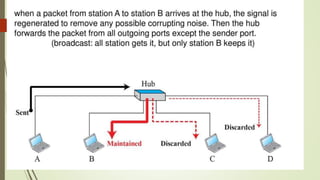
 Hub in computer network is used for connecting multiple computers or
segments of a LAN. Normally, it is used for Peer to Peer small Home
Network. LAN Hub receive data packets (frames) through one port and
broadcasts them through all other ports, so that all other computers or
other network devices can see all packets.
 Operates in half duplex mode
Available in 4 to 24 port sizes. There is no routing table in hub, as We
find in router or switch.
Benefits or advantages of Hubs
Following are the benefits or advantages of Hubs:
➨It can extend total distance of the network.
➨It does not affect performance of the network
seriously.
➨It is cheaper.
➨It can connect different media types.
 Drawbacks or disadvantages of Hubs
 Following are the disadvantages of Hubs:
➨It does not have mechanisms such as collision detection and
retransmission of packets.
➨It does not operate in full duplex mode.
 Dedicated Bandwidth
 Network hubs share all their bandwidth between every connected
 Network Size
 Hubs are unable to support networks that are as large as switches
because hubs send all traffic to all devices on the network. The more
devices you add, the slower the network gets, eventually becoming
unusable.
 It can not connect different network architectures such as token ring and
ethernet etc.
Types of Hub
Hubs (Passive and Active)
ACTIVE HUBS
An active hub is actually a multiport repeater. It is
normally used to create connections between
stations in a physical star topology. (10Base-T, for
example). However, hubs can also be used to
create multiple levels of hierarchy,. The
hierarchical use of hubs removes the length
limitation of 10Base-T (100 m).
Passive Hubs
A passive hub is just a connector. It connects the wires
coming from diferent branches. In a star topology Ethernet
LAN, a passive hub is just a point where the signals coming
from different stations collide; the hub is the collision point.
This type of a hub is part of the media; its location in the
Internet model is below the physical layer.

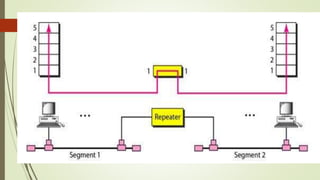
Repeaters
A repeater is a device that operates only in the physical
layer. Signals that carry information within a network can
travel a fixed distance before attenuation endangers the
integrity of the data. A repeater receives a signal and,
before it becomes too weak or corrupted, regenerates the
original bit pattern. The repeater then sends the refreshed
signal. A repeater can extend the physical length of a LAN,
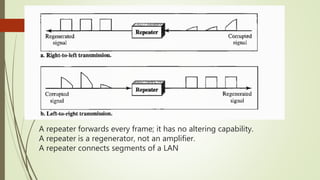
A repeater forwards every frame; it has no altering capability.
A repeater is a regenerator, not an amplifier.
A repeater connects segments of a LAN
Bridges
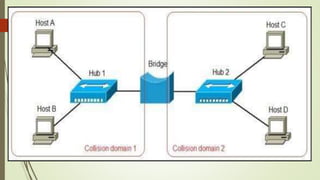
A bridge operates in both the physical and the data link
layer. As a physical layer device, it regenerates the signal
it receives. As a data link layer device, the bridge can
check the physical (MAC) addresses (source and
destination) contained in the frame.
A bridge has filtering capability. It can check the
destination address of a frame and decide if the frame
should be forwarded or dropped.
Bridges are also known as Layer 2 switches.
Types of Bridges
Transparent basic bridge
Source routing bridge
Transparent spanning bridge
The Transparent Basic Bridge
The simplest type of bridge is the transparent basic bridge. It
stores the traffic until it can transmit it to the next network.
The amount of time the data is stored is very brief. Traffic is
sent to all ports except the port from which the bridge
received the data. No conversion of traffic is performed by a
bridge. In this regard, the bridge is similar to a repeaters
Source Routing Bridge
 The route through the LAN is determined by the source (originator) of
the traffic hence this bridge is called as source routing bridge. The
routing information field (RIF) in the LAN frame header, contains the
information of route followed by the LAN network.
 The frames of the source routing protocol are different from the other
bridge frames because the source routing information must be
contained within the frame. The architecture of the other bridges and
the source routing bridges are similar. Both uses MAC relay entity at the
LAN node. Interfaces are provided through MAC relay entity and LLC
The Transparent Spanning Tree Bridge
These bridges use a subnet of the full topology to create
a loop free operation.
The received frame is checked by the bridge in following
manner. The destination address of arrived frame is
checked with routing table in the database.
This information is known as port state information and it
helps in deciding that, a port can be used for this
destination address or not.
Some site uses two or more bridges in parallel between
the pair of LANs to increase the reliability of the network
 The solution to this looping problem is bridges should
communicate with each other and change their actual
topology with spanning tree that reaches to each LAN in the
network. In the spanning tree some bridges in the network are
discarded as we want to construct the loop free topology.
 The advantages of bridging over routing are as follows:
 Transparent bridges are plug and play as they are self learning
and do not require any configuration. For the assignment of
network address routers require definition for each interface.
These addresses should be unique.
 Bridging has less overhead for handling packets as compared
to routing.
 Bridging is protocol independent while routing is protocol
dependent.

Switches (2-Layer Switch, 3-Layer Switch)
A two-layer switch is a bridge, a bridge with many
ports and a design that allows better (faster)
performance. A bridge with a few ports can connect
a few LANs together. A bridge with many ports may
be able to allocate a unique port to each station,
with each station on its own independent entity. This
means no competing traffic (no collision,
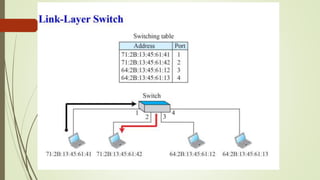
 layer 2 or Link layer switch has a table used in
filtering decisions.
A two-layer switch, as a bridge does, makes a filtering
decision based on the MAC address of the frame it
received. However, a two-layer switch can be more
sophisticated. It can have a buffer to hold the frames for
processing. It can have a switching factor that forwards
the frames faster.
Layer 2 switches operate using the data link (MAC) layer
addresses. Link-layer, hardware, or MAC-layer addresses
identify individual devices. Most hardware devices are
permanently assigned this number during the
manufacturing process.
Layer 3 Switches (The Network Layer)
 Layer 3 switches use network or IP addresses that identify
locations on the network. A location can be a LAN
workstation, a location in a computer‟s memory, or even a
different packet of data traveling through a network.
 Switches operating at Layer 3 take more time examining
packets than Layer 2 devices and incorporate routing
functions to actively calculate the best way to send a packet
to its destination.
Advantages :

1) Reduces the number of Broadcast domains
2) Supports VLAN's which can help in Logical segmentation
of ports[physical ports].Splitting up the broadcast domain.
3) Intellegent device[compared to Hub's] which can make use table
for Port to MAC mapping
4) Compared to Bridges ,Switches are more H/w oriented
therefore operations are less CPU intense[Basic operations]
Disadvantages :
1) Not as good as a router in limiting Broadcasts
2) Communication b/w VLAN's need interVLAN
routing [Router]
,but these days there are a number of Multilayer
switches available in the market.
3) Handling Multicast packets needs quite a bit
of configuration & proper designing.
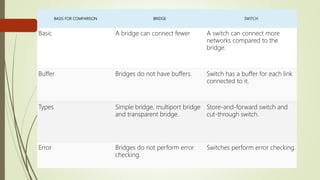
BASIS FOR COMPARISON BRIDGE SWITCH
Basic A bridge can connect fewer A switch can connect more
networks compared to the
bridge.
Buffer Bridges do not have buffers. Switch has a buffer for each link
connected to it.
Types Simple bridge, multiport bridge
and transparent bridge.
Store-and-forward switch and
cut-through switch.
Error Bridges do not perform error
checking.
Switches perform error checking.
Routers
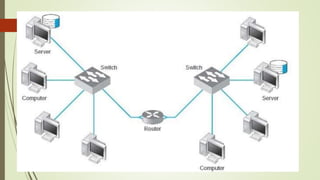
A router is a three-layer device that routes packets based on
their logical addresses (host-to host addressing).
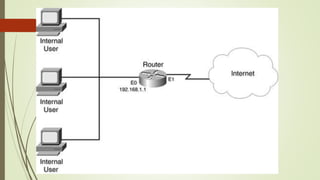
A router normally connects LANs and WANs in the Internet and
has a routing table that is used for making decisions about the
route. The routing tables are normally dynamic and are
updated using routing protocols.
The primary function of a router is to
connect networks together and keep certain kinds of broadcast
traffic under control. There are several companies that make
routers: Cisco, Linksys, Juniper, Netgear, Nortel (Bay Networks),
Redback, Lucent, 3Com, HP, Dlink.
FUNCTIONS OF A ROUTER
Restrict broadcasts to the LAN
Act as the default gateway.
Perform Protocol Translation (Wired Ethernet to
Wireless/WiFi, or Ethernet to CATV)
Move (route) data between networks
Learn and advertise loop free paths
Calculate 'best paths' to reach network destinations.
Routers can only learn and advertise routes
dynamically if they are using a routing protocol such
as RIP, OSPF, EIGRP, IS-IS or BGP. Otherwise, a
human has to configure the routes by hand, which is
called static routing.
Routing moves data on a hop-by-hop basis, what is
often called 'hot potato' routing. If a set of routers
ends up passing the data around in a circle, without
reaching the destination, it's calleda a 'routing loop'.
The most common gateway is a router that connects
a home or enterprise network to the internet. In
most IP-based networks, the only traffic that doesn't
go through at least one gateway is traffic flowing
among nodes on the same local area network (LAN)
segment -- for example, computers connected to the
same switch.
Gateway:
A gateway is a network node that connects two
networks using different protocols together. While
a bridge is used to join two similar types of
networks, a gateway is used to join two dissimilar
networks.
Gateways can take several forms and perform a
variety of tasks. These include:
Web application firewall - filters traffic to and from
a web server and look at application-layer data.
API, SOA or XML gateway - manages traffic
flowing into and out of a service, microservices-
oriented
architecture or an XML-based web service.
Network Security Devices
 Assurance of network security is one of the most important moments for safe
and correct working of the computer systems and networks. The network
security includes assurance of the limited access to sensitive information, the
protection from unauthorized access, risks and potential security threats, and
enhancement of network performance.
 There are few types of network security devices:
 active devices - firewalls, antivirus scanning devices, content filtering devices,
which block the surplus traffic;
 passive devices, such as intrusion detection appliances, which identify and
report on unwanted traffic;
 preventative devices - penetration testing devices and vulnerability
assessment appliances, which scan the networks and identify potential
security problems;
 Unified Threat Management (UTM) devices, such as firewalls, content
filtering, web caching, which serve as all-in-one security devices.
Network Security Devices(firewall)
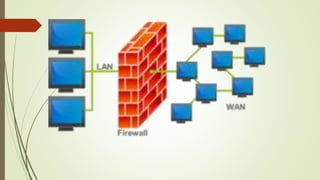
 A firewall is a network security system designed to prevent
unauthorized access to or from a private network. Firewalls can
be implemented as both hardware and software, or a
combination of both.
 Its primary objective is to control the incoming and outgoing
network traffic by analyzing the data packets and determining
whether it should be allowed through or not, based on a
predetermined rule set.
 All messages entering or leaving the intranet pass through the
firewall, which examines each message and blocks those that do
not meet the specified security criteria.
Firewall Filtering Techniques
 There are several types of firewall techniques that will prevent potentially harmful information
from getting through:
 Packet Filter: Looks at each packet entering or leaving the network and accepts or
rejects it based on user-defined rules. Packet filtering is fairly effective and transparent
to users, but it is difficult to configure. In addition, it is susceptible to IP spoofing.
Application Gateway: Applies security mechanisms to specific applications, such
as FTP and Telnet servers. This is very effective, but can impose a performance
degradation.
Circuit-level Gateway: Applies security mechanisms when a TCP or UDP connection is
established. Once the connection has been made, packets can flow between the hosts
without further checking.
Proxy Server: Intercepts all messages entering and leaving the network. The proxy
server effectively hides the true network addresses.
 Stateful Multilayer Inspection Firewall
Stateful multilayer Inspection Firewall is a combination of all the firewalls that
mentioned above.
They can Filter packets at Network layer using ACLs, check for legitimate
sessions on the Session Layers and they also evaluate packets on the
Application layer (ALG).
Stateful Multilayer Inspection Firewall can work on a Transparent mode
allowing direct connections between the client and the server which was
earlier not possible.
 Next Generation Firewall (NGFW)
 Firewalls called next generation firewalls (NGFW), work by filtering network and
Internet traffic based upon the applications or traffic types using specific ports.
Next Generation Firewalls (NGFWs) blend the features of a standard firewall with
quality of service (QoS) functionalities in order to provide smarter and deeper
inspection.
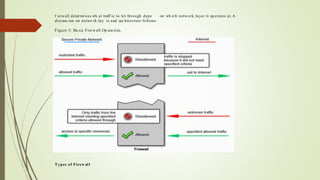
How does a firewall work?
There are two access denial methodologies used
by firewalls. A firewall may allow all traffic
through unless it meets certain criteria, or it may
deny all traffic unless it meets certain criteria
(see figure 3). The type of criteria used to
determine whether traffic should be allowed
through varies from one type of firewall to
another.
f rewall determi nes wh at traff ic to let through depe on wh ich network layer it op erates at. A
discuss ion on netwo rk lay rs and arc hitecture follows.
Figure 3: Ba sic Firewall Op era tion.
Types of Firew all
VPN
 A VPN is a virtual private network, which is a dedicated and encrypted
connection between the host computer to a secure server. A VPN
connects your personal computer to the proxy server within your
organisation. Effectively, everything you do online, if connected through
a VPN, will send the encrypted request to a proxy server. The proxy will
then send the request to the internet and send the encrypted response
back to you.
IDS/IPS
 Intrusion detection systems (IDS) and intrusion prevention
systems (IPS) are reporting tools that identify and protect
networks from intrusion.
 IDS and IPS are network monitors. They analyse all network
traffic based on a set of rules defined by the administrator.
The main difference between IDS and IPS is that IDS just flags
the administrator whenever a problem is detected whereas an
IPS will attempt to prevent the intrusion once it’s identified.

Network Connecting Devices UNIT 5

  • 1.
  • 3.
    HUB:  Hub incomputer network is used for connecting multiple computers or segments of a LAN. Normally, it is used for Peer to Peer small Home Network. LAN Hub receive data packets (frames) through one port and broadcasts them through all other ports, so that all other computers or other network devices can see all packets.  Operates in half duplex mode Available in 4 to 24 port sizes. There is no routing table in hub, as We find in router or switch.
  • 5.
    Benefits or advantagesof Hubs Following are the benefits or advantages of Hubs: ➨It can extend total distance of the network. ➨It does not affect performance of the network seriously. ➨It is cheaper. ➨It can connect different media types.
  • 6.
     Drawbacks ordisadvantages of Hubs  Following are the disadvantages of Hubs: ➨It does not have mechanisms such as collision detection and retransmission of packets. ➨It does not operate in full duplex mode.  Dedicated Bandwidth  Network hubs share all their bandwidth between every connected  Network Size  Hubs are unable to support networks that are as large as switches because hubs send all traffic to all devices on the network. The more devices you add, the slower the network gets, eventually becoming unusable.  It can not connect different network architectures such as token ring and ethernet etc.
  • 7.
    Types of Hub Hubs(Passive and Active) ACTIVE HUBS An active hub is actually a multiport repeater. It is normally used to create connections between stations in a physical star topology. (10Base-T, for example). However, hubs can also be used to create multiple levels of hierarchy,. The hierarchical use of hubs removes the length limitation of 10Base-T (100 m).
  • 8.
    Passive Hubs A passivehub is just a connector. It connects the wires coming from diferent branches. In a star topology Ethernet LAN, a passive hub is just a point where the signals coming from different stations collide; the hub is the collision point. This type of a hub is part of the media; its location in the Internet model is below the physical layer. 
  • 9.
    Repeaters A repeater isa device that operates only in the physical layer. Signals that carry information within a network can travel a fixed distance before attenuation endangers the integrity of the data. A repeater receives a signal and, before it becomes too weak or corrupted, regenerates the original bit pattern. The repeater then sends the refreshed signal. A repeater can extend the physical length of a LAN,
  • 11.
    A repeater forwardsevery frame; it has no altering capability. A repeater is a regenerator, not an amplifier. A repeater connects segments of a LAN
  • 12.
    Bridges A bridge operatesin both the physical and the data link layer. As a physical layer device, it regenerates the signal it receives. As a data link layer device, the bridge can check the physical (MAC) addresses (source and destination) contained in the frame. A bridge has filtering capability. It can check the destination address of a frame and decide if the frame should be forwarded or dropped. Bridges are also known as Layer 2 switches.
  • 14.
    Types of Bridges Transparentbasic bridge Source routing bridge Transparent spanning bridge
  • 15.
    The Transparent BasicBridge The simplest type of bridge is the transparent basic bridge. It stores the traffic until it can transmit it to the next network. The amount of time the data is stored is very brief. Traffic is sent to all ports except the port from which the bridge received the data. No conversion of traffic is performed by a bridge. In this regard, the bridge is similar to a repeaters
  • 16.
    Source Routing Bridge The route through the LAN is determined by the source (originator) of the traffic hence this bridge is called as source routing bridge. The routing information field (RIF) in the LAN frame header, contains the information of route followed by the LAN network.  The frames of the source routing protocol are different from the other bridge frames because the source routing information must be contained within the frame. The architecture of the other bridges and the source routing bridges are similar. Both uses MAC relay entity at the LAN node. Interfaces are provided through MAC relay entity and LLC
  • 17.
    The Transparent SpanningTree Bridge These bridges use a subnet of the full topology to create a loop free operation. The received frame is checked by the bridge in following manner. The destination address of arrived frame is checked with routing table in the database. This information is known as port state information and it helps in deciding that, a port can be used for this destination address or not. Some site uses two or more bridges in parallel between the pair of LANs to increase the reliability of the network
  • 18.
     The solutionto this looping problem is bridges should communicate with each other and change their actual topology with spanning tree that reaches to each LAN in the network. In the spanning tree some bridges in the network are discarded as we want to construct the loop free topology.  The advantages of bridging over routing are as follows:  Transparent bridges are plug and play as they are self learning and do not require any configuration. For the assignment of network address routers require definition for each interface. These addresses should be unique.  Bridging has less overhead for handling packets as compared to routing.  Bridging is protocol independent while routing is protocol dependent. 
  • 19.
    Switches (2-Layer Switch,3-Layer Switch) A two-layer switch is a bridge, a bridge with many ports and a design that allows better (faster) performance. A bridge with a few ports can connect a few LANs together. A bridge with many ports may be able to allocate a unique port to each station, with each station on its own independent entity. This means no competing traffic (no collision,  layer 2 or Link layer switch has a table used in filtering decisions.
  • 21.
    A two-layer switch,as a bridge does, makes a filtering decision based on the MAC address of the frame it received. However, a two-layer switch can be more sophisticated. It can have a buffer to hold the frames for processing. It can have a switching factor that forwards the frames faster. Layer 2 switches operate using the data link (MAC) layer addresses. Link-layer, hardware, or MAC-layer addresses identify individual devices. Most hardware devices are permanently assigned this number during the manufacturing process.
  • 22.
    Layer 3 Switches(The Network Layer)  Layer 3 switches use network or IP addresses that identify locations on the network. A location can be a LAN workstation, a location in a computer‟s memory, or even a different packet of data traveling through a network.  Switches operating at Layer 3 take more time examining packets than Layer 2 devices and incorporate routing functions to actively calculate the best way to send a packet to its destination.
  • 23.
    Advantages :  1) Reducesthe number of Broadcast domains 2) Supports VLAN's which can help in Logical segmentation of ports[physical ports].Splitting up the broadcast domain. 3) Intellegent device[compared to Hub's] which can make use table for Port to MAC mapping 4) Compared to Bridges ,Switches are more H/w oriented therefore operations are less CPU intense[Basic operations]
  • 24.
    Disadvantages : 1) Notas good as a router in limiting Broadcasts 2) Communication b/w VLAN's need interVLAN routing [Router] ,but these days there are a number of Multilayer switches available in the market. 3) Handling Multicast packets needs quite a bit of configuration & proper designing.
  • 25.
    BASIS FOR COMPARISONBRIDGE SWITCH Basic A bridge can connect fewer A switch can connect more networks compared to the bridge. Buffer Bridges do not have buffers. Switch has a buffer for each link connected to it. Types Simple bridge, multiport bridge and transparent bridge. Store-and-forward switch and cut-through switch. Error Bridges do not perform error checking. Switches perform error checking.
  • 26.
    Routers A router isa three-layer device that routes packets based on their logical addresses (host-to host addressing). A router normally connects LANs and WANs in the Internet and has a routing table that is used for making decisions about the route. The routing tables are normally dynamic and are updated using routing protocols. The primary function of a router is to connect networks together and keep certain kinds of broadcast traffic under control. There are several companies that make routers: Cisco, Linksys, Juniper, Netgear, Nortel (Bay Networks), Redback, Lucent, 3Com, HP, Dlink.
  • 29.
    FUNCTIONS OF AROUTER Restrict broadcasts to the LAN Act as the default gateway. Perform Protocol Translation (Wired Ethernet to Wireless/WiFi, or Ethernet to CATV) Move (route) data between networks Learn and advertise loop free paths Calculate 'best paths' to reach network destinations.
  • 30.
    Routers can onlylearn and advertise routes dynamically if they are using a routing protocol such as RIP, OSPF, EIGRP, IS-IS or BGP. Otherwise, a human has to configure the routes by hand, which is called static routing. Routing moves data on a hop-by-hop basis, what is often called 'hot potato' routing. If a set of routers ends up passing the data around in a circle, without reaching the destination, it's calleda a 'routing loop'.
  • 31.
    The most commongateway is a router that connects a home or enterprise network to the internet. In most IP-based networks, the only traffic that doesn't go through at least one gateway is traffic flowing among nodes on the same local area network (LAN) segment -- for example, computers connected to the same switch. Gateway: A gateway is a network node that connects two networks using different protocols together. While a bridge is used to join two similar types of networks, a gateway is used to join two dissimilar networks.
  • 32.
    Gateways can takeseveral forms and perform a variety of tasks. These include: Web application firewall - filters traffic to and from a web server and look at application-layer data. API, SOA or XML gateway - manages traffic flowing into and out of a service, microservices- oriented architecture or an XML-based web service.
  • 33.
    Network Security Devices Assurance of network security is one of the most important moments for safe and correct working of the computer systems and networks. The network security includes assurance of the limited access to sensitive information, the protection from unauthorized access, risks and potential security threats, and enhancement of network performance.  There are few types of network security devices:  active devices - firewalls, antivirus scanning devices, content filtering devices, which block the surplus traffic;  passive devices, such as intrusion detection appliances, which identify and report on unwanted traffic;  preventative devices - penetration testing devices and vulnerability assessment appliances, which scan the networks and identify potential security problems;  Unified Threat Management (UTM) devices, such as firewalls, content filtering, web caching, which serve as all-in-one security devices.
  • 34.
    Network Security Devices(firewall) A firewall is a network security system designed to prevent unauthorized access to or from a private network. Firewalls can be implemented as both hardware and software, or a combination of both.  Its primary objective is to control the incoming and outgoing network traffic by analyzing the data packets and determining whether it should be allowed through or not, based on a predetermined rule set.  All messages entering or leaving the intranet pass through the firewall, which examines each message and blocks those that do not meet the specified security criteria.
  • 37.
    Firewall Filtering Techniques There are several types of firewall techniques that will prevent potentially harmful information from getting through:  Packet Filter: Looks at each packet entering or leaving the network and accepts or rejects it based on user-defined rules. Packet filtering is fairly effective and transparent to users, but it is difficult to configure. In addition, it is susceptible to IP spoofing. Application Gateway: Applies security mechanisms to specific applications, such as FTP and Telnet servers. This is very effective, but can impose a performance degradation. Circuit-level Gateway: Applies security mechanisms when a TCP or UDP connection is established. Once the connection has been made, packets can flow between the hosts without further checking. Proxy Server: Intercepts all messages entering and leaving the network. The proxy server effectively hides the true network addresses.
  • 38.
     Stateful MultilayerInspection Firewall Stateful multilayer Inspection Firewall is a combination of all the firewalls that mentioned above. They can Filter packets at Network layer using ACLs, check for legitimate sessions on the Session Layers and they also evaluate packets on the Application layer (ALG). Stateful Multilayer Inspection Firewall can work on a Transparent mode allowing direct connections between the client and the server which was earlier not possible.  Next Generation Firewall (NGFW)  Firewalls called next generation firewalls (NGFW), work by filtering network and Internet traffic based upon the applications or traffic types using specific ports. Next Generation Firewalls (NGFWs) blend the features of a standard firewall with quality of service (QoS) functionalities in order to provide smarter and deeper inspection.
  • 39.
    How does afirewall work? There are two access denial methodologies used by firewalls. A firewall may allow all traffic through unless it meets certain criteria, or it may deny all traffic unless it meets certain criteria (see figure 3). The type of criteria used to determine whether traffic should be allowed through varies from one type of firewall to another.
  • 40.
    f rewall determines wh at traff ic to let through depe on wh ich network layer it op erates at. A discuss ion on netwo rk lay rs and arc hitecture follows. Figure 3: Ba sic Firewall Op era tion. Types of Firew all
  • 41.
    VPN  A VPNis a virtual private network, which is a dedicated and encrypted connection between the host computer to a secure server. A VPN connects your personal computer to the proxy server within your organisation. Effectively, everything you do online, if connected through a VPN, will send the encrypted request to a proxy server. The proxy will then send the request to the internet and send the encrypted response back to you.
  • 42.
    IDS/IPS  Intrusion detectionsystems (IDS) and intrusion prevention systems (IPS) are reporting tools that identify and protect networks from intrusion.  IDS and IPS are network monitors. They analyse all network traffic based on a set of rules defined by the administrator. The main difference between IDS and IPS is that IDS just flags the administrator whenever a problem is detected whereas an IPS will attempt to prevent the intrusion once it’s identified.