COMPUTER HARDWARE AND SERVICING
MODULE 3, LESSON 4
NETWORK
MA. RACHEL B. ESPINO
Buhatan National High School
Purok Marcos, Buhatan, SorsogonCity, Philippines
What is a network?
 A network consists of two or more computers
that are linked in order to share resources (such
as printers and CD-ROMs), exchange files, or
allow electronic communications.The computers
on a network may be linked through cables,
telephone lines, radio waves, satellites, or
infrared light beams.
 There are three basic types of networks which
includes the following:
Local Area Network (LAN)
Wide Area Network (WAN)
Local Area Network
 A LocalArea Network (LAN) is a network that is confined
to a relatively small area. It is generally limited to a
geographic area such as a writing lab, school, or building.
Rarely are LAN computers more than a mile apart.
 In a typical LAN configuration, one computer is
designated as the file server. It stores all of the software
that controls the network, as well as the software that
can be shared by the computers attached to the network.
Computers connected to the file server are called
workstations.The workstations can be less powerful than
the file server, and they may have additional software on
their hard drives. On most LANs, cables are used to
connect the network interface cards in each computer.
Wide Area Network
 Wide Area Networks (WANs) connect larger
geographic areas, such as Florida, the United
States, or the world. Dedicated transoceanic
cabling or satellite uplinks may be used to
connect this type of network.
Networking Devices
 Consist of, but are not limited to non-local
printers, workstations, servers, webcams,
data loggers, instruments, dial-in devices,
and, in general anything that requires an
Ethernet connection.These devices are
supported on a best-effort basis limited by
the staffing and equipment level available.
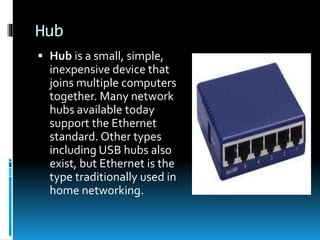
Hub
 Hub is a small, simple,
inexpensive device that
joins multiple computers
together. Many network
hubs available today
support the Ethernet
standard. Other types
including USB hubs also
exist, but Ethernet is the
type traditionally used in
home networking.
Ethernet Switch
 Ethernet switch is a device that gathers the
signals from devices that are connected to it,
and then regenerates a new copy of each
signal
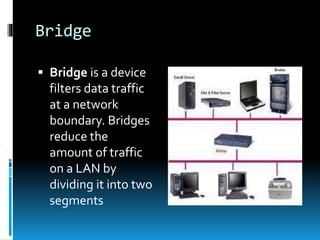
Bridge
 Bridge is a device
filters data traffic
at a network
boundary. Bridges
reduce the
amount of traffic
on a LAN by
dividing it into two
segments
Routers
 Routers are
small physical
devices that
join multiple
networks
together.
Network Gateway
 Network gateway is an
internetworking system
capable of joining
together two networks
that use different base
protocols. A network
gateway can be
implemented completely
in software, completely in
hardware, or as a
combination of both.
Modem
 Modem is a contraction of the terms
modulator and demodulator. Modems
perform a simple function:They translate
digital signals from a computer into analog
signals that can travel across conventional
phone lines.The modem modulates the
signal at the sending end and demodulates at
the receiving end.
Network Interface
 Network interface is a device that connects a
client computer, server, printer or other
component to your network. Most often, a
network interface consists of a small
electronic circuit board that is inserted into a
slot inside a computer or printer.
Alternatively, some computers, printers, or
other services include network interfaces as
part of their main circuit boards
(motherboards).
Network Firewall
 Network firewall protects a computer
network from unauthorized access. Network
firewalls may be hardware devices, software
programs, or a combination of the two.
Network firewalls guard an internal computer
network (home, school, business intranet)
against malicious access from the outside.
Network firewalls may also be configured to
limit access to the outside from internal
users.
QUIZ:
 Direction: Identify what is being described in
the following sentences and write your
answer on a separate sheet of paper.
 1. It protects a computer network from
unauthorized access.
 2.Type of network that connect larger
geographic areas, such as Florida, the United
States, or the world.
 3.This is an internetworking system capable of
joining together two networks that use different
base protocols.
 4. It consists of two or more computers that are
linked in order to share resources (such as
printers and CD-ROMs), exchange files, or allow
electronic communications.
 5.They translate digital signals from a
computer into analog signals that can travel
across conventional phone lines.
 6. It is a device that connects a client
computer, server, printer or other component
to your network.
 7. A device that filters data traffic at a network
boundary.
 8. It is a device that gathers the signals from
devices that are connected to it, and then
regenerates a new copy of each signal.
 9. It is a small, simple, inexpensive device that
joins multiple computers together.
 10.Type of network that is confined to a
relatively small area.
 1. computer firewall
 2.WAN orWideArea Network
 3. network gateway
 4. network
 5. modem
 6. network interface
 7. bridge
 8. Ethernet switch
 9. hub
 10. LAN or LocalArea Network
QUIZ
 Identify the name of the following
networking devices and describe its function.
1.
2.
3.
4.
5.
ANSWERS:
1. Network interface is a device that
connects a client computer, server,
printer or other component to your
network.
2. Modem translate digital signals from
a computer into analog signals that can
travel across conventional phone lines.
3. Routers are small
physical devices that join
multiple networks together.
4. Ethernet switch is a device that
gathers the signals from devices that
are connected to it, and then
regenerates a new copy of each signal.
5. Hub is a small, simple,
inexpensive device that joins
multiple computers together.
Remedial Quiz:
1. What is the difference between LAN and WAN? (2
points)
2. What networking device will you use if you want to
limit access of your internal network computer to
the outside internal users? (1 point)
3. What is the difference between a modem and a
router? (2 points)
4. A school has an ICT laboratory consisting of 5
computers and one server. If the school decided to
subscribe on an ISP, what networking devices will
you suggest they need to use so that not only the 5
computers will be connected but also other devices
such as laptops, printers and IPod?
MATERIALS, TOOLS, EQUIPMENT and
TESTING DEVICES
COMPUTER HARDWARE AND SERVICING
MODULE 3, LESSON 5
The following tools and equipment are
classified according to their functions and
uses.
QUIZ:
 Direction: Identify the tools and materials,
described on each items.
 1. Use to drive or fasten positive slotted screws
 2. Use for holding, bending and stretching the
lead of electronics component or connecting
wire
 3. Use inside the computer to hold programs and
data while it is running
 4. Chip that controls the most basic functions of
the computer and performs a self-test every time
you turn it on
 5. It is an input device that read text or
illustration printed on paper, translates the
information into a form that a computer can use
 6. It is a special computer that users on the
network can access to carry out a particular job.
 7. A computer circuit board or card that is
installed in a computer so that it can be
connected to a network
 8. A connector on the back of a computer or
other device
 9. used to unsolder unwanted parts or
component in the circuit with the support of
soldering pencil
 10. A hardware interface for low-speed
peripherals such as the keyboard, mouse,
joystick, scanner, printer and telephony
devices.
 1. Philips head screwdriver
 2. Long nose pliers
 3. RAM or Random Access Memory
 4. BIOS or Basic Input/ Output System
 5. scanner
ANSWERS:
 6. server
 7. LAN card
 8. Port hub or port
 9. Desoldering tool
 10. USB or Universal Serial Bus
QUIZ:
 Classify the following items as EQUIPMENT
AND ACCESSORIES,TOOLS OR MATERIALS
EQUIPMENT
AND
ACCESSORIES
TOOLS MATERIALS
1. Pliers
2. Modem
3. Motherboard installer
4. LAN card
5. Screwdrivers
6. Crimping tool
7. LAN tester
8. Network OS software
9. USB flash drive
10. RJ 45
1. Pliers (TOOLS)
2. Modem (EQUIPMENT & ACCESSORIES)
3. Motherboard installer (MATERIALS)
4. LAN card (EQUIPMET & ACCESSORIES)
5. Screwdrivers (TOOLS)
6. Crimping tool (TOOLS)
7. LAN tester (TOOLS)
8. Network OS software (MATERIALS)
9. USB flash drive (EQUIPMENT & ACCESSORIES)
10. RJ 45 (MATERIALS)
ANSWERS:
SAFETY PRECAUTIONS
COMPUTER HARDWARE AND SERVICING
MODULE 3, LESSON 5
 Personal Protective Equipment refers to protective
clothing, helmets, goggles, or other gear designed
to protect the wearer's body or clothing from injury
by electrical hazards, heat, chemicals, and infection,
for job-related occupational safety and health
purposes.
 PPE can also be used to protect the working
environment from pesticide application, pollution or
infection from the worker (for example in a
microchipfactory).
 It is important that students and teachers during
their laboratory period should be required to use
personal protective equipment. Some of these are:
Personal Protective Equipment
Anti-Static and Safety
Precautions
 The little shock you experience while you are walking
across a carpeted floor or when you touched a door knob,
table, counter or even another person is a result of static
electricity. Static electricity is the discharge of electricity
between two objects with different electrical potential.
Humans can't feel a static shock until it is several thousand
volts strong, but it takes less than 30 volts to fry a sensitive
computer component, such as a stick of RAM or a
processor.
 That's why computer technicians and home computer
builders have to guard their computers against the deadly
ravages of static electricity, as well as take steps to avoid
injury.
Safety and Anti-Static Rules
 Always use an anti-static wrist strap when
working on a computer (except when working
on monitors)
 Always disconnect a computer from the AC
power and from any powered peripherals
while you are working on it.
 Always grasp a metal part of the computer
chassis with your bare hand before you touch
anything inside. Do this even if you are
wearing an anti-static wristband.
 Always handle electronic components by a
non-conducting (non-metallic) edge. Don't
touch the pins or other connectors.
 Never plug an ATX power supply into AC
power unless it is connected either to a
computer's motherboard or to a dummy test
load.
 Always use a UL-approved surge protector
or an Uninterruptible Power Supply that
incorporates surge and spike protection.
 Never eat, drink, or smoke while working on
a computer.
QUIZ: TRUE OR FALSE
 1. Always disconnect a computer from the AC
power and from any powered peripherals
while you are working on it.
 2. Always grasp a metal part of the computer
chassis with your bare hand before you touch
anything inside. Do this even if you are
wearing an anti-static wristband.
 3. Always handle electronic components by a
non-conducting (non-metallic) edge. Don't
touch the pins or other connectors.
QUIZ: TRUE OR FALSE
 4. Always use a UL-approved surge protector or
an Uninterruptible Power Supply that
incorporates surge and spike protection.
 5. Never use an anti-static wrist strap when
working on a computer (except when working on
monitors)
 6. Everyone is allowed to eat, drink, or smoke
while working on a computer.
 7. Never plug an ATX power supply into AC
power unless it is connected either to a
computer's motherboard or to a dummy test
load.
QUIZ: TRUE OR FALSE
 8. Static electricity is the discharge of
electricity between two objects with different
electrical potential.
 9. Apron is a garment worn over the front of
the body as a protection for one’s cloth.
 10. PPE can also be used to protect the
working environment from pesticide
application, pollution or infection from the
worker.
ANSWERS:
 1. Always disconnect a computer from the AC
power and from any powered peripherals
while you are working on it. (TRUE)
 2. Always grasp a metal part of the computer
chassis with your bare hand before you touch
anything inside. Do this even if you are
wearing an anti-static wristband. (TRUE)
 3. Always handle electronic components by a
non-conducting (non-metallic) edge. Don't
touch the pins or other connectors. (TRUE)
 4. Always use a UL-approved surge protector or
an Uninterruptible Power Supply that
incorporates surge and spike protection. (TRUE)
 5. Never use an anti-static wrist strap when
working on a computer (except when working on
monitors). (FALSE)
 6. Everyone is allowed to eat, drink, or smoke
while working on a computer. (FALSE)
 7. Never plug an ATX power supply into AC
power unless it is connected either to a
computer's motherboard or to a dummy test
load. (TRUE)
 8. Static electricity is the discharge of
electricity between two objects with different
electrical potential. (TRUE)
 9. Apron is a garment worn over the front of
the body as a protection for one’s cloth.
(TRUE)
 10. PPE can also be used to protect the
working environment from pesticide
application, pollution or infection from the
worker. (TRUE)

Network

  • 1.
    COMPUTER HARDWARE ANDSERVICING MODULE 3, LESSON 4 NETWORK MA. RACHEL B. ESPINO Buhatan National High School Purok Marcos, Buhatan, SorsogonCity, Philippines
  • 2.
    What is anetwork?  A network consists of two or more computers that are linked in order to share resources (such as printers and CD-ROMs), exchange files, or allow electronic communications.The computers on a network may be linked through cables, telephone lines, radio waves, satellites, or infrared light beams.  There are three basic types of networks which includes the following: Local Area Network (LAN) Wide Area Network (WAN)
  • 3.
    Local Area Network A LocalArea Network (LAN) is a network that is confined to a relatively small area. It is generally limited to a geographic area such as a writing lab, school, or building. Rarely are LAN computers more than a mile apart.  In a typical LAN configuration, one computer is designated as the file server. It stores all of the software that controls the network, as well as the software that can be shared by the computers attached to the network. Computers connected to the file server are called workstations.The workstations can be less powerful than the file server, and they may have additional software on their hard drives. On most LANs, cables are used to connect the network interface cards in each computer.
  • 5.
    Wide Area Network Wide Area Networks (WANs) connect larger geographic areas, such as Florida, the United States, or the world. Dedicated transoceanic cabling or satellite uplinks may be used to connect this type of network.
  • 7.
    Networking Devices  Consistof, but are not limited to non-local printers, workstations, servers, webcams, data loggers, instruments, dial-in devices, and, in general anything that requires an Ethernet connection.These devices are supported on a best-effort basis limited by the staffing and equipment level available.
  • 8.
    Hub  Hub isa small, simple, inexpensive device that joins multiple computers together. Many network hubs available today support the Ethernet standard. Other types including USB hubs also exist, but Ethernet is the type traditionally used in home networking.
  • 10.
    Ethernet Switch  Ethernetswitch is a device that gathers the signals from devices that are connected to it, and then regenerates a new copy of each signal
  • 12.
    Bridge  Bridge isa device filters data traffic at a network boundary. Bridges reduce the amount of traffic on a LAN by dividing it into two segments
  • 14.
    Routers  Routers are smallphysical devices that join multiple networks together.
  • 16.
    Network Gateway  Networkgateway is an internetworking system capable of joining together two networks that use different base protocols. A network gateway can be implemented completely in software, completely in hardware, or as a combination of both.
  • 18.
    Modem  Modem isa contraction of the terms modulator and demodulator. Modems perform a simple function:They translate digital signals from a computer into analog signals that can travel across conventional phone lines.The modem modulates the signal at the sending end and demodulates at the receiving end.
  • 20.
    Network Interface  Networkinterface is a device that connects a client computer, server, printer or other component to your network. Most often, a network interface consists of a small electronic circuit board that is inserted into a slot inside a computer or printer. Alternatively, some computers, printers, or other services include network interfaces as part of their main circuit boards (motherboards).
  • 22.
    Network Firewall  Networkfirewall protects a computer network from unauthorized access. Network firewalls may be hardware devices, software programs, or a combination of the two. Network firewalls guard an internal computer network (home, school, business intranet) against malicious access from the outside. Network firewalls may also be configured to limit access to the outside from internal users.
  • 25.
    QUIZ:  Direction: Identifywhat is being described in the following sentences and write your answer on a separate sheet of paper.
  • 26.
     1. Itprotects a computer network from unauthorized access.  2.Type of network that connect larger geographic areas, such as Florida, the United States, or the world.  3.This is an internetworking system capable of joining together two networks that use different base protocols.  4. It consists of two or more computers that are linked in order to share resources (such as printers and CD-ROMs), exchange files, or allow electronic communications.
  • 27.
     5.They translatedigital signals from a computer into analog signals that can travel across conventional phone lines.  6. It is a device that connects a client computer, server, printer or other component to your network.  7. A device that filters data traffic at a network boundary.
  • 28.
     8. Itis a device that gathers the signals from devices that are connected to it, and then regenerates a new copy of each signal.  9. It is a small, simple, inexpensive device that joins multiple computers together.  10.Type of network that is confined to a relatively small area.
  • 29.
     1. computerfirewall  2.WAN orWideArea Network  3. network gateway  4. network  5. modem  6. network interface  7. bridge  8. Ethernet switch  9. hub  10. LAN or LocalArea Network
  • 30.
    QUIZ  Identify thename of the following networking devices and describe its function.
  • 31.
  • 32.
  • 33.
  • 34.
    ANSWERS: 1. Network interfaceis a device that connects a client computer, server, printer or other component to your network.
  • 35.
    2. Modem translatedigital signals from a computer into analog signals that can travel across conventional phone lines.
  • 36.
    3. Routers aresmall physical devices that join multiple networks together.
  • 37.
    4. Ethernet switchis a device that gathers the signals from devices that are connected to it, and then regenerates a new copy of each signal.
  • 38.
    5. Hub isa small, simple, inexpensive device that joins multiple computers together.
  • 39.
    Remedial Quiz: 1. Whatis the difference between LAN and WAN? (2 points) 2. What networking device will you use if you want to limit access of your internal network computer to the outside internal users? (1 point) 3. What is the difference between a modem and a router? (2 points) 4. A school has an ICT laboratory consisting of 5 computers and one server. If the school decided to subscribe on an ISP, what networking devices will you suggest they need to use so that not only the 5 computers will be connected but also other devices such as laptops, printers and IPod?
  • 40.
    MATERIALS, TOOLS, EQUIPMENTand TESTING DEVICES COMPUTER HARDWARE AND SERVICING MODULE 3, LESSON 5
  • 41.
    The following toolsand equipment are classified according to their functions and uses.
  • 49.
    QUIZ:  Direction: Identifythe tools and materials, described on each items.
  • 50.
     1. Useto drive or fasten positive slotted screws  2. Use for holding, bending and stretching the lead of electronics component or connecting wire  3. Use inside the computer to hold programs and data while it is running  4. Chip that controls the most basic functions of the computer and performs a self-test every time you turn it on
  • 51.
     5. Itis an input device that read text or illustration printed on paper, translates the information into a form that a computer can use  6. It is a special computer that users on the network can access to carry out a particular job.  7. A computer circuit board or card that is installed in a computer so that it can be connected to a network  8. A connector on the back of a computer or other device
  • 52.
     9. usedto unsolder unwanted parts or component in the circuit with the support of soldering pencil  10. A hardware interface for low-speed peripherals such as the keyboard, mouse, joystick, scanner, printer and telephony devices.
  • 53.
     1. Philipshead screwdriver  2. Long nose pliers  3. RAM or Random Access Memory  4. BIOS or Basic Input/ Output System  5. scanner ANSWERS:
  • 54.
     6. server 7. LAN card  8. Port hub or port  9. Desoldering tool  10. USB or Universal Serial Bus
  • 55.
    QUIZ:  Classify thefollowing items as EQUIPMENT AND ACCESSORIES,TOOLS OR MATERIALS EQUIPMENT AND ACCESSORIES TOOLS MATERIALS
  • 56.
    1. Pliers 2. Modem 3.Motherboard installer 4. LAN card 5. Screwdrivers 6. Crimping tool 7. LAN tester 8. Network OS software 9. USB flash drive 10. RJ 45
  • 57.
    1. Pliers (TOOLS) 2.Modem (EQUIPMENT & ACCESSORIES) 3. Motherboard installer (MATERIALS) 4. LAN card (EQUIPMET & ACCESSORIES) 5. Screwdrivers (TOOLS) 6. Crimping tool (TOOLS) 7. LAN tester (TOOLS) 8. Network OS software (MATERIALS) 9. USB flash drive (EQUIPMENT & ACCESSORIES) 10. RJ 45 (MATERIALS) ANSWERS:
  • 58.
    SAFETY PRECAUTIONS COMPUTER HARDWAREAND SERVICING MODULE 3, LESSON 5
  • 59.
     Personal ProtectiveEquipment refers to protective clothing, helmets, goggles, or other gear designed to protect the wearer's body or clothing from injury by electrical hazards, heat, chemicals, and infection, for job-related occupational safety and health purposes.  PPE can also be used to protect the working environment from pesticide application, pollution or infection from the worker (for example in a microchipfactory).  It is important that students and teachers during their laboratory period should be required to use personal protective equipment. Some of these are: Personal Protective Equipment
  • 61.
    Anti-Static and Safety Precautions The little shock you experience while you are walking across a carpeted floor or when you touched a door knob, table, counter or even another person is a result of static electricity. Static electricity is the discharge of electricity between two objects with different electrical potential. Humans can't feel a static shock until it is several thousand volts strong, but it takes less than 30 volts to fry a sensitive computer component, such as a stick of RAM or a processor.  That's why computer technicians and home computer builders have to guard their computers against the deadly ravages of static electricity, as well as take steps to avoid injury.
  • 62.
    Safety and Anti-StaticRules  Always use an anti-static wrist strap when working on a computer (except when working on monitors)  Always disconnect a computer from the AC power and from any powered peripherals while you are working on it.  Always grasp a metal part of the computer chassis with your bare hand before you touch anything inside. Do this even if you are wearing an anti-static wristband.
  • 63.
     Always handleelectronic components by a non-conducting (non-metallic) edge. Don't touch the pins or other connectors.  Never plug an ATX power supply into AC power unless it is connected either to a computer's motherboard or to a dummy test load.  Always use a UL-approved surge protector or an Uninterruptible Power Supply that incorporates surge and spike protection.  Never eat, drink, or smoke while working on a computer.
  • 64.
    QUIZ: TRUE ORFALSE  1. Always disconnect a computer from the AC power and from any powered peripherals while you are working on it.  2. Always grasp a metal part of the computer chassis with your bare hand before you touch anything inside. Do this even if you are wearing an anti-static wristband.  3. Always handle electronic components by a non-conducting (non-metallic) edge. Don't touch the pins or other connectors.
  • 65.
    QUIZ: TRUE ORFALSE  4. Always use a UL-approved surge protector or an Uninterruptible Power Supply that incorporates surge and spike protection.  5. Never use an anti-static wrist strap when working on a computer (except when working on monitors)  6. Everyone is allowed to eat, drink, or smoke while working on a computer.  7. Never plug an ATX power supply into AC power unless it is connected either to a computer's motherboard or to a dummy test load.
  • 66.
    QUIZ: TRUE ORFALSE  8. Static electricity is the discharge of electricity between two objects with different electrical potential.  9. Apron is a garment worn over the front of the body as a protection for one’s cloth.  10. PPE can also be used to protect the working environment from pesticide application, pollution or infection from the worker.
  • 67.
    ANSWERS:  1. Alwaysdisconnect a computer from the AC power and from any powered peripherals while you are working on it. (TRUE)  2. Always grasp a metal part of the computer chassis with your bare hand before you touch anything inside. Do this even if you are wearing an anti-static wristband. (TRUE)  3. Always handle electronic components by a non-conducting (non-metallic) edge. Don't touch the pins or other connectors. (TRUE)
  • 68.
     4. Alwaysuse a UL-approved surge protector or an Uninterruptible Power Supply that incorporates surge and spike protection. (TRUE)  5. Never use an anti-static wrist strap when working on a computer (except when working on monitors). (FALSE)  6. Everyone is allowed to eat, drink, or smoke while working on a computer. (FALSE)  7. Never plug an ATX power supply into AC power unless it is connected either to a computer's motherboard or to a dummy test load. (TRUE)
  • 69.
     8. Staticelectricity is the discharge of electricity between two objects with different electrical potential. (TRUE)  9. Apron is a garment worn over the front of the body as a protection for one’s cloth. (TRUE)  10. PPE can also be used to protect the working environment from pesticide application, pollution or infection from the worker. (TRUE)