NETWORK
A network consistsof two or more computers that
are linked in order to share resources (such as
printers and CD-ROMs),exchange files, or allow
electronic communications. The computers on a
network may be linked through cables, telephone
lines, radio waves, satelites, or
infrared light beams.
3.
THERE ARE THREETYPES OF NETWORKS WHICH
INCLUDES THE FOLLOWING:
• Local Area Network (LAN)
• Wide Area Network (WAN)
4.
Local Area Network
ALocal Area Network (LAN) is a network that is
confined to a relatively small area. It is generally
limited to a geographic area such as a writing
lab, school, or building. Rarely are LAN
computers more than a mile apart.
5.
Local Area Network
Ina typical LAN configuration, one computer is
designated as the file server. It stores all of the
software that controls the network, as well as the
software that can be shared by the computers
attached to the network. Computers connected to the
file server are called workstations. The workstations
can be less powerful than the file server, and they may
have additional software on their hard drives. On
most LANs, cables are used to connect the network
interface cards in each computer.
6.
WIDE AREA NETWORK
WideArea Networks (WANs) connect
larger geographic areas all over the
world. Dedicated transoceanic cabling or
satellite uplinks may be used to connect
this type of network.
7.
NETWORKING DEVICES
Consist of,but are not limited to non-local printers,
workstations, servers, and in general anything that
requires an Ethernet connection. These devices are
supported on a best-effort basis limited by the
staffing and equipment level available.
8.
is a small,simple, inexpensive
device that joins multiple
computers together. Many
network hubs available today
support the Ethernet standard.
Other types including USB hubs
also exist, but Ethernet is the
type traditionally used in home
networking.
HUB
9.
is a devicethat gathers the
signals from devices that
are connected to it, and
then regenerates a new
copy of each signal
ETHERNET SWITCH
Network gateway isan
internetworking system capable of
joining together, two networks
that use different base protocols. A
network gateway can be
implemented completely in
software, completely in hardware,
or as a combination of both.
NETWORK GATEWAY
12.
MODEM
Modem is acontraction of the terms
modulator and demodulator.
Modems perform a simple
function:
They translate digital signals from a
computer into analog signals that
can travel across conventional
phone lines.
13.
Network interface isa device that
connects a client computer, server,
printer or other component to your
network.A network interface consists of
a small electronic circuit board that is
inserted into a slot inside a computer or
printer.Some computers, printers, or
other services include network
interfaces as part of their main circuit
boards
NETWORK INTERFACE
14.
Network firewall protectsa computer
network from unauthorized access.
Network firewalls may be hardware
devices, software programs, or a
combination of the two. Network
firewalls guard an internal computer
network (home, school, business
intranet) against malicious access from
the outside.
NETWORK FIREWALL
Is a networkinterface card.
This is a computer circuit
board or card that is
installed in a computer so
that it can be connected to
a network.
LAN CARD
7
IS A CONNECTORON THE BACK OF A
COMPUTER OR OTHER DEVICE. A
PORT IS EITHER A SERIAL PORT OR A
PARALLEL PORT.
Port hub/ Port
20.
7
Is a partof a network. It is
a special computer that
users on the network can
access to carry out a
particular job.
SERVER
21.
7
The modem isa device that
allows a given computer to
share data or otherwise a
device which let computers
exchange information
Modem
Modulator-Demodulator
22.
7
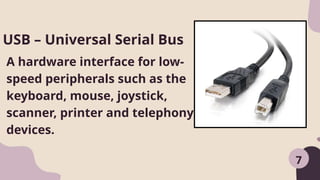
A hardware interfacefor low-
speed peripherals such as the
keyboard, mouse, joystick,
scanner, printer and telephony
devices.
USB – Universal Serial Bus
23.
7
Is a pieceof hardware
that produces a paper
copy (also known as
‘hardcopy’) of the
information generated
by the computer.
Printer
24.
7
RAM that canretain data
without electrical power. It is
widely used for BIOS chips and
for digital camera and digital
music storage
FLASH DRIVE
25.
7
it is aninput device that read
text or illustration printed on
paper, translates the
information into a form that a
computer can use
Scanner
26.
7
Is a primarymemory. This
memory is used inside the
computer to hold programs
and data while it is running.
RAM – Random Access
Memory
7
Is used forholding, bending
and stretching the lead of
electronics component or
connecting wire
Long Nose Pliers
32.
for RJ11,12,45 &BNC w/ Remote
Unit This ergonomic tester is
designed to test most network
cable wiring. You can either
conduct an auto or manual test.
7
LAN Tester
33.
7
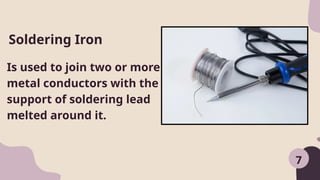
Is used tojoin two or more
metal conductors with the
support of soldering lead
melted around it.
Soldering Iron
34.
7
Used to driveor fasten
negative slotted
screws.
Flat Screw Driver
35.
7
Is used tounsolder unwanted
parts or component in the
circuit with the support of
soldering pencil
Desoldering Tool
36.
7
Is used todrive or fasten
positive slotted screws
Philips Screw Driver
37.
Equipment and AccessoriesTools Materials
LAN Card
UPS
Server
24 port-hub
Modem
Fax machine
PC Video camera
USB External CD
writer
USB scanner
USB printers
USB Flash Drive
Screwdriver(standard)
Screwdriver(Philips)
Long Nose pliers
Mechanical pliers Allen
wrench
Multitester
Crimping tools
Soldering iron (30
watts)
Wire stripper
LAN Tester
Anti-static wrist wrap
Device drivers/installers
Software applications
Network OS Software
RJ 45
UTP Cat 5 cable
Motherboard’s manual
and installer
Sound device driver
installer
8
Personal Protective Equipment(PPE) - It refers to
protective clothing, helmets, goggles, or other gear
designed to protect the wearer's body or clothing
from injury by electrical hazards, heat, chemicals, and
infection, for job-related occupational safety and
health purposes.
PPE can also be used to protect the working environment
from pesticide application, pollution or infection from the
worker (for example in a microchipfactory).
40.
9
It is importantthat students and
teachers
during their laboratory period should
be required to use personal protective
equipment.
Some of these are:
41.
Goggles - Alarge
spectacles, with shields
around the rims, for
protecting the eyes
from dust, excessive
light, wind, etc.
42.
Rubber Sole -A special
type of shoes used to
prevent electrical shock
and for waterproofing
and insulating
purposes.
43.
Apron - Agarment
worn over the front of
the body as a
protection for one’s
cloth.
44.
Face Mask -A covering
for the face to prevent
the inhaling or absorbing
dust and other
chemicals.
45.
Gloves - Thecovering
material with a
separate sheath for
each finger used for
hand protection.
46.
9
Static electricity cancause shocks when you
touch objects after walking on a carpet, and
even low voltages (under 30 volts) can damage
sensitive computer components like RAM or
processors. To protect these components and
ensure safety, computer technicians and
builders must take precautions against static
electricity and potential injuries.
Anti-Static and Safety Precautions
47.
9
-Always use ananti-static wrist strap when working on a computer
(except when working on monitors)
-Always disconnect a computer from the AC power and from any
powered peripherals while you are working on it.
-Always grasp a metal part of the computer chassis with your bare
hand before you touch anything inside. Do this even if you are
wearing an anti-static wristband.
-Always handle electronic components by a non-conducting (non-
metallic) edge. Don't touch the pins or other connectors.
Safety and Anti-Static Rules
48.
9
-Never plug anATX power supply into AC power
unless it is connected either to a computer's
motherboard or to a dummy test load.
-Always use a UL-approved surge protector or an
Uninterruptible Power Supply that incorporates
surge and spike protection.
-Never eat, drink, or smoke while working on a
computer
49.
Before purchasing softwareor hardware, ensure
your computer meets the system requirements,
which are the specifications needed for proper
functionality. For example, a game may require
Windows XP or later, a 2.0 GHz processor, 512 MB
of RAM, a 64 MB graphics card, and 500 MB of
hard drive space. Similarly, a printer might need
Windows XP or Mac OS X 10.3 or later, a USB port,
and 80 MB of available hard drive space.
SYSTEM SPECIFICATION
50.
Always check productpackaging
for requirements and note your
system's specifications before
shopping.
If your system lacks these
specifications, compatibility issues
may arise.
SYSTEM SPECIFICATION
51.
1. Operating System(i.e. Windows XP, SP 2 or
Mac OS X 10.3.
2. Processor Speed (i.e. Pentium 4, 3.2 GHz or
Power PC G5, 2.0 GHz)
3. Memory, a.k.a. RAM (i.e. 512 MB)
4. Graphics Card (i.e. ATI Radeon 9800 w/ 256
MB video memory)
5. Hard Disk Space (i.e. 80 GB available)
6. I/O Ports (i.e. USB, Firewire, Serial, Parallel,
SCSI, VGA, DVI ports)
52.
-Recording your computer'sspecifications ensures
compatibility with new products. Key factors
influencing performance include the processor
speed and architecture (CPU), amount of RAM,
graphics system, and hard drive speed and
capacity. Additionally, the Internet connection
specification is crucial for most users. Those
handling large files, such as photos or videos,
should also consider appropriate storage devices
for data backup and management.
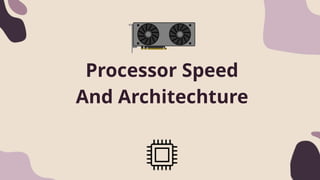
The speed ofa computer's processor chip
(technically known as its "clock speed") in
measured in gigahertz (GHz), with the fastest
modern processors currently running at up
to 4.7GHz. However, for most computing
tasks, including web browsing, sending e-
mails, word processing and spreadsheet
work any processor running at 1GHz or more
remains perfectly sufficient.
Processor Speed
55.
The architecture ofa processor is the most
important factor to determine its performance,
indicating its design and complexity. Processors
vary in sophistication; for instance, Intel offers
basic models like Celerons and Pentiums, along
with more advanced options in its "Core" family,
which includes Core 2, Core i3, Core i5, and the
most powerful, Core i7.
11
Architechture
56.
-In addition toclock speed and architecture, a
processor's cache and front side bus (FSB) speed also
determine a computer's overall power. Cache is a
form of very fast memory integrated into the
processor chip, and used to store up instructions
(work for the processor) so that it has to slow down
as little as possible between tasks. Cache is
measured in megabytes (MB), with (for example) low-
end Celeron processors having as little as 0.25MB of
cache (256KB), and high-end Itaniums having up to
24MB. The simple message is, the more cache the
better- though high levels of cache still come at a
very significant price
57.
Its speed indicateshow quickly a microprocessor
communicates with the motherboard. Higher FSB
speeds lead to better overall performance, with
current speeds ranging from 533 MHz—adequate
for most applications—to 1600 MHz.
Front side bus (FSB)
58.
A computer's performanceis largely dependent
on its RAM; more RAM allows for faster and more
effective operation. Computers with insufficient
RAM must frequently access the hard disk,
leading to slow and inconsistent performance.
RAM is measured in megabytes (MB) and
gigabytes (GB). For example, a computer running
Windows XP typically requires 1 GB of RAM, while
Windows 7 generally needs at least 2 GB for
optimal performance.
RAM-RANDOM ACCES MEMORY
59.
A computer's graphicssystem affects visual
output. Graphics can be onboard (integrated) or
via a separate video card. Onboard graphics are
adequate for most tasks but may struggle with
gaming and advanced editing. Separate cards
handle high-definition playback and multiple
displays but consume more power. For typical use,
onboard graphics are usually enough.
GRAPHIC SYSTEM
60.
For a Windows7 computer, a minimum hard
drive size of 40 GB is needed, with larger sizes
recommended for demanding software. Video
editing requires a second internal drive for
stability, while professionals may need three
drives: one for the OS, one for project files, and
one for video media. Hard disk speed varies by
rotational velocity, ranging from 4200 to 15000
RPM, with faster speeds improving performance.
11
HARD RIVE SPEED AND CAPACITY
61.
The performance oftraditional internal hard disks is also
influenced by the interface connecting them to the
motherboard. The three main types are:
1.SATA - the most modern and standard for new PCs.
2.IDE (UDMA) - an older and slower interface.
3.SCSI - the oldest, but its modern variants are the
fastest.
12