1
Introduction to Data
Communication & Networking
Anjan Mahanta
anjan_mahanta@hotmail.com
CopyrightMr.Anjan Mahanta LCCTInternational Studies Program
2
Data & Signals
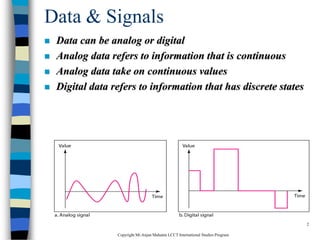
 Data can be analog or digital
 Analog data refers to information that is continuous
 Analog data take on continuous values
 Digital data refers to information that has discrete states
CopyrightMr.Anjan Mahanta LCCTInternational Studies Program
3
Data Communication
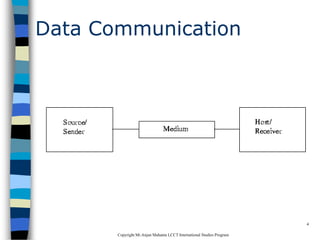
 Data Communications is the transfer of data or
information between a source and a receiver.
 The source transmits the data and the receiver
receives it.
 The purpose of data communications is to
provide the rules and regulations that allow
computers with different disk operating systems,
languages, cabling and locations to share
resources.
 The rules and regulations are called protocols
and standards in data communications.
CopyrightMr.Anjan Mahanta LCCTInternational Studies Program
4
Data Communication
CopyrightMr.Anjan Mahanta LCCTInternational Studies Program
5
Data Flow
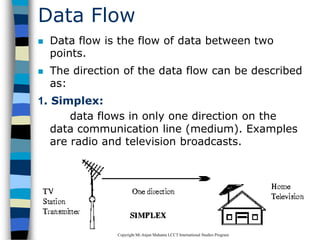
 Data flow is the flow of data between two
points.
 The direction of the data flow can be described
as:
1. Simplex:
data flows in only one direction on the
data communication line (medium). Examples
are radio and television broadcasts.
CopyrightMr.Anjan Mahanta LCCTInternational Studies Program
6
2. Half-Duplex
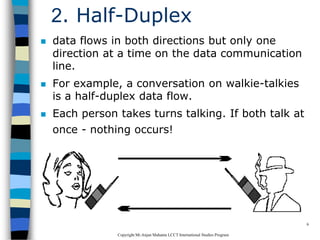
 data flows in both directions but only one
direction at a time on the data communication
line.
 For example, a conversation on walkie-talkies
is a half-duplex data flow.
 Each person takes turns talking. If both talk at
once - nothing occurs!
CopyrightMr.Anjan Mahanta LCCTInternational Studies Program
7
3. Full Duplex
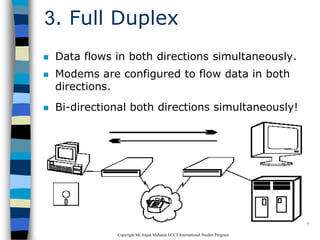
 Data flows in both directions simultaneously.
 Modems are configured to flow data in both
directions.
 Bi-directional both directions simultaneously!
CopyrightMr.Anjan Mahanta LCCTInternational Studies Program
8
Modems
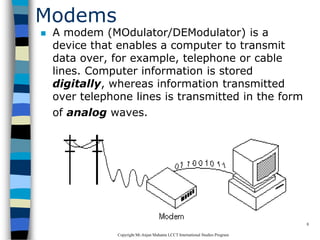
 A modem (MOdulator/DEModulator) is a
device that enables a computer to transmit
data over, for example, telephone or cable
lines. Computer information is stored
digitally, whereas information transmitted
over telephone lines is transmitted in the form
of analog waves.
CopyrightMr.Anjan Mahanta LCCTInternational Studies Program
9
How fast the modem can
transmit and receive data?
 At slow rates, modems are measured in terms
of baud rates
 The slowest rate is 300 baud
 At higher speeds, modems are measured in
terms of bits per second (bps)
 The fastest modems run at 57,600 bps
 The faster the transmission rate, the faster
you can send and receive data
 For example, if the device sending data to
your computer is sending it at 2,400 bps, you
must receive it at 2,400 bps
CopyrightMr.Anjan Mahanta LCCTInternational Studies Program
10
About Voice/Data
 Many modems support a switch to change
between voice and data modes
 In data mode, the modem acts like a regular
modem
 In voice mode, the modem acts like a regular
telephone
 Modems that support a voice/data switch have
a built-in loudspeaker and microphone for
voice communication
CopyrightMr.Anjan Mahanta LCCTInternational Studies Program
11
Auto-answer modem
 An auto-answer modem enables your
computer to receive calls in your
absence.
CopyrightMr.Anjan Mahanta LCCTInternational Studies Program
12
Data Compression modem
 Some modems perform data compression,
which enables them to send data at faster
rates
 However, the modem at the receiving end
must be able to decompress the data using
the same compression technique.
CopyrightMr.Anjan Mahanta LCCTInternational Studies Program
13
Fax Capability modem
 Most modern modems are fax modems, which
means that they can send and receive faxes.
CopyrightMr.Anjan Mahanta LCCTInternational Studies Program
14
Digital Connection
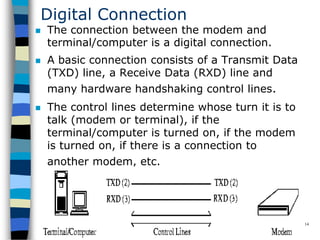
 The connection between the modem and
terminal/computer is a digital connection.
 A basic connection consists of a Transmit Data
(TXD) line, a Receive Data (RXD) line and
many hardware handshaking control lines.
 The control lines determine whose turn it is to
talk (modem or terminal), if the
terminal/computer is turned on, if the modem
is turned on, if there is a connection to
another modem, etc.
CopyrightMr.Anjan Mahanta LCCTInternational Studies Program
15
Analog Connection
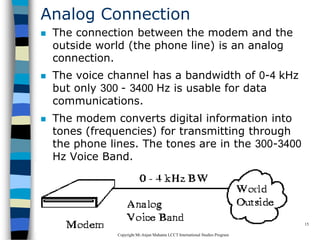
 The connection between the modem and the
outside world (the phone line) is an analog
connection.
 The voice channel has a bandwidth of 0-4 kHz
but only 300 - 3400 Hz is usable for data
communications.
 The modem converts digital information into
tones (frequencies) for transmitting through
the phone lines. The tones are in the 300-3400
Hz Voice Band.
CopyrightMr.Anjan Mahanta LCCTInternational Studies Program
16
Types of Modems
 External Modem
– External modems sit next to the computer
and connect to the serial port using a
straight-through serial cable.
 Internal Modem
– An internal modems is a plug-in circuit
board that sits inside the computer. It
incorporates the serial port on-board.
– They are less expensive than external
modems because they do not require a
case, power supply and serial cable.
CopyrightMr.Anjan Mahanta LCCTInternational Studies Program
17
Telecommunications
 Telephones and networking work hand in hand.
 The common goal is to join distantly located
Local Area Networks into Metropolitan and Wide
Area Networks (MANs and WANs).
 Talking to someone on the phone uses voice
channels.
 We use voice channels for modem
communications to connect to the Internet.
 Due to the bandwidth limits on voice channels,
the data transfer rate is relatively slow.
CopyrightMr.Anjan Mahanta LCCTInternational Studies Program
18
Voice Channels
 Voice Channel: Dial-up connection through a
modem using standard telephone lines.
 Typical voice channel communication rates
are: 300, 1200, 2400, 9600, 14.4k, 19.2k, 28.8k,
33.6k and 56 kbps (bits per second).
CopyrightMr.Anjan Mahanta LCCTInternational Studies Program
19
Data Channels
 Data channels are dedicated lines for
communicating digitized voice and data.
 At the end of 1996, there was a major milestone
when more data was communicated in North
America's telecommunications system than
voice.
 Data Channels are special communications
channels provided by "common carriers" such as
Telus, Sprint, Bell Canada, AT&T, etc. for
transferring digital data.
 Data Channels are also called "Leased Lines".
CopyrightMr.Anjan Mahanta LCCTInternational Studies Program
20
Data Channels(Contd.)
 They are "directly" connected: you don't have
to dial a connection number.
 The connections are up and running 24 hours
per day.
 They appear to work as if there were a wire
running directly between the source and the
destination.
 Typical transfer rates for data channels are: 56
k, 128k, 1.544 M, 2.08 M, 45M and 155 Mbps.
CopyrightMr.Anjan Mahanta LCCTInternational Studies Program
21
Data Channels(Contd.)
 Common carriers charge for data
connections by:
–The amount of data transferred
(megabytes per month)
–The transfer rate (bits per second)
–The amount of use (time per month)
CopyrightMr.Anjan Mahanta LCCTInternational Studies Program
22
What is a network?
 A network can consist of two computers
connected together on a desk or it can consist
of many Local Area Networks (LANs)
connected together to form a Wide Area
Network (WAN) across a continent.
 The key is that two or more computers are
connected together by a medium and are
sharing resource.
 These resources can be files, printers,
hard-drives, or CPU number-crunching power.
CopyrightMr.Anjan Mahanta LCCTInternational Studies Program
23
CopyrightMr.Anjan Mahanta LCCTInternational Studies Program
24
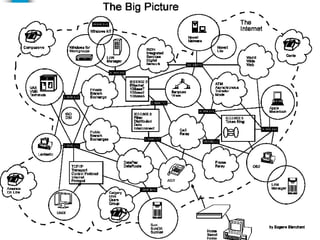
Breaking the big picture
 Local loops
 LANs
 MANs
 WANs
CopyrightMr.Anjan Mahanta LCCTInternational Studies Program
25
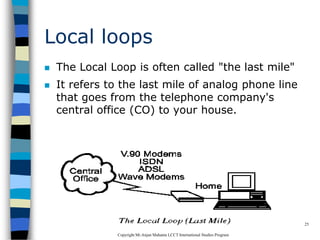
Local loops
 The Local Loop is often called "the last mile"
 It refers to the last mile of analog phone line
that goes from the telephone company's
central office (CO) to your house.
CopyrightMr.Anjan Mahanta LCCTInternational Studies Program
26
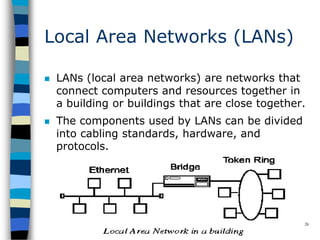
Local Area Networks (LANs)
 LANs (local area networks) are networks that
connect computers and resources together in
a building or buildings that are close together.
 The components used by LANs can be divided
into cabling standards, hardware, and
protocols.
CopyrightMr.Anjan Mahanta LCCTInternational Studies Program
27
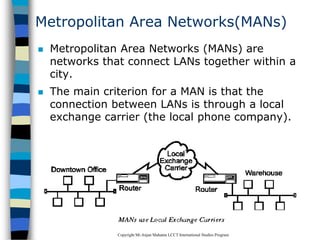
Metropolitan Area Networks(MANs)
 Metropolitan Area Networks (MANs) are
networks that connect LANs together within a
city.
 The main criterion for a MAN is that the
connection between LANs is through a local
exchange carrier (the local phone company).
CopyrightMr.Anjan Mahanta LCCTInternational Studies Program
28
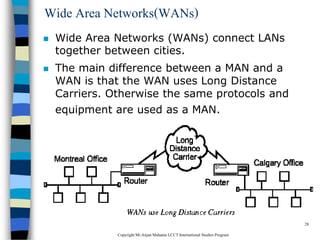
Wide Area Networks(WANs)
 Wide Area Networks (WANs) connect LANs
together between cities.
 The main difference between a MAN and a
WAN is that the WAN uses Long Distance
Carriers. Otherwise the same protocols and
equipment are used as a MAN.
CopyrightMr.Anjan Mahanta LCCTInternational Studies Program
29
Network Topology
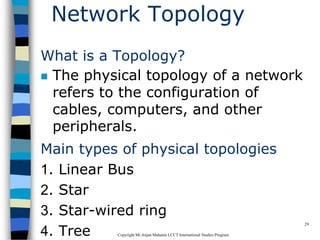
What is a Topology?
 The physical topology of a network
refers to the configuration of
cables, computers, and other
peripherals.
Main types of physical topologies
1. Linear Bus
2. Star
3. Star-wired ring
4. Tree
CopyrightMr.Anjan Mahanta LCCTInternational Studies Program
30
Linear Bus
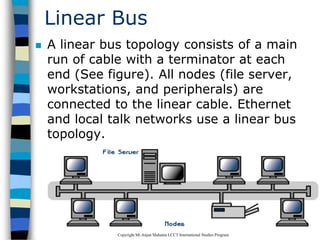
 A linear bus topology consists of a main
run of cable with a terminator at each
end (See figure). All nodes (file server,
workstations, and peripherals) are
connected to the linear cable. Ethernet
and local talk networks use a linear bus
topology.
CopyrightMr.Anjan Mahanta LCCTInternational Studies Program
31
Linear Bus
Advantages of linear bus
 Easy to connect a computer or peripheral to a
linear bus.
 Requires less cable length than a star
topology.
Disadvantages of linear bus
 Entire network shuts down if there is a break
in the main cable.
 Terminators are required at both ends of the
backbone cable.
 Difficult to identify the problem if the entire
network shuts down.
 Not meant to be used as a stand-alone
solution in a large building.
CopyrightMr.Anjan Mahanta LCCTInternational Studies Program
32
Star
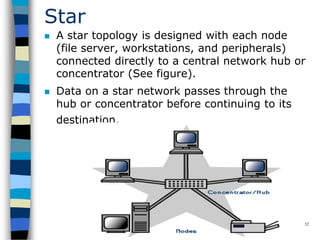
 A star topology is designed with each node
(file server, workstations, and peripherals)
connected directly to a central network hub or
concentrator (See figure).
 Data on a star network passes through the
hub or concentrator before continuing to its
destination.
CopyrightMr.Anjan Mahanta LCCTInternational Studies Program
33
Star
Advantages of star
 Easy to install and wire.
 No disruptions to the network then connecting
or removing devices.
 Easy to detect faults and to remove parts.
Disadvantages of star
 Requires more cable length than a linear
topology.
 If the hub or concentrator fails, nodes
attached are disabled.
 More expensive than linear bus topologies
because of the cost of the concentrators.
CopyrightMr.Anjan Mahanta LCCTInternational Studies Program
34
Star-Wired Ring
 A star-wired ring topology may appear
(externally) to be the same as a star topology.
 Internally, the MAU (multistation access unit)
of a star-wired ring contains wiring that allows
information to pass from one device to
another in a circle or ring
CopyrightMr.Anjan Mahanta LCCTInternational Studies Program
35
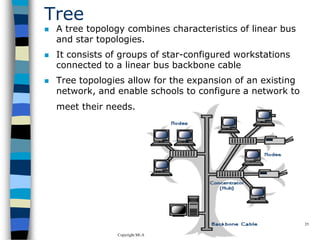
Tree
 A tree topology combines characteristics of linear bus
and star topologies.
 It consists of groups of star-configured workstations
connected to a linear bus backbone cable
 Tree topologies allow for the expansion of an existing
network, and enable schools to configure a network to
meet their needs.
CopyrightMr.Anjan Mahanta LCCTInternational Studies Program
36
Tree
 Advantages
– Point-to-point wiring for individual segments.
– Supported by several hardware and software
vendors.
 Disadvantages
– Overall length of each segment is limited by the type
of cabling used.
– If the backbone line breaks, the entire segment goes
down.
– More difficult to configure and wire than other
topologies.
CopyrightMr.Anjan Mahanta LCCTInternational Studies Program
37
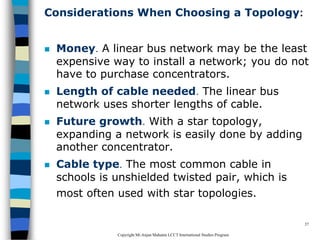
Considerations When Choosing a Topology:
 Money. A linear bus network may be the least
expensive way to install a network; you do not
have to purchase concentrators.
 Length of cable needed. The linear bus
network uses shorter lengths of cable.
 Future growth. With a star topology,
expanding a network is easily done by adding
another concentrator.
 Cable type. The most common cable in
schools is unshielded twisted pair, which is
most often used with star topologies.
CopyrightMr.Anjan Mahanta LCCTInternational Studies Program
38
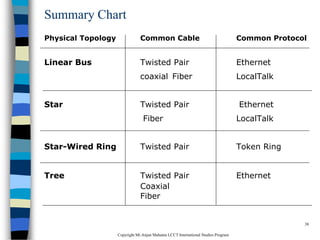
Summary Chart
Physical Topology Common Cable Common Protocol
Linear Bus Twisted Pair Ethernet
coaxial Fiber LocalTalk
Star Twisted Pair Ethernet
Fiber LocalTalk
Star-Wired Ring Twisted Pair Token Ring
Tree Twisted Pair Ethernet
Coaxial
Fiber
CopyrightMr.Anjan Mahanta LCCTInternational Studies Program
39
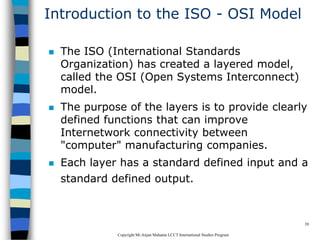
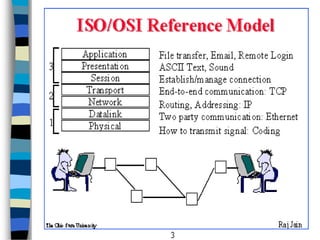
Introduction to the ISO - OSI Model
 The ISO (International Standards
Organization) has created a layered model,
called the OSI (Open Systems Interconnect)
model.
 The purpose of the layers is to provide clearly
defined functions that can improve
Internetwork connectivity between
"computer" manufacturing companies.
 Each layer has a standard defined input and a
standard defined output.
CopyrightMr.Anjan Mahanta LCCTInternational Studies Program
40
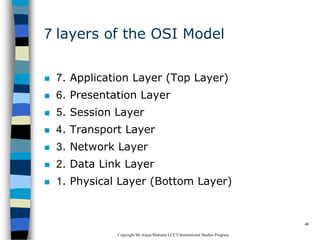
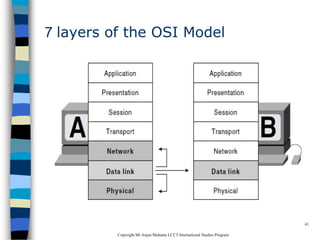
7 layers of the OSI Model
 7. Application Layer (Top Layer)
 6. Presentation Layer
 5. Session Layer
 4. Transport Layer
 3. Network Layer
 2. Data Link Layer
 1. Physical Layer (Bottom Layer)
CopyrightMr.Anjan Mahanta LCCTInternational Studies Program
41
7 layers of the OSI Model
CopyrightMr.Anjan Mahanta LCCTInternational Studies Program
42
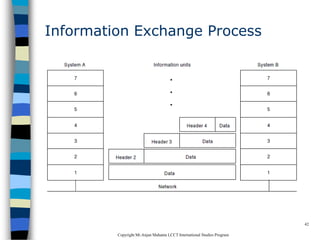
Information Exchange Process
CopyrightMr.Anjan Mahanta LCCTInternational Studies Program
43
CopyrightMr.Anjan Mahanta LCCTInternational Studies Program
44
Data Communication Network
 The major criteria that a data communication
network must meet are:
–Performance
–Consistency
–Reliability
–Recovery
–Security
CopyrightMr.Anjan Mahanta LCCTInternational Studies Program
45
Performance
 Performance is the defined as the rate of
transference of error-free data.
 It is measured by the response time.
 Response time is the elapsed time between
the end of an inquiry and the beginning of a
response
– Example requesting a file transfer and starting the
file transfer.
 Factors that affect response time are:
– Number of Users:
– Transmission Speed:
– Hardware Type:
– Software Program:
CopyrightMr.Anjan Mahanta LCCTInternational Studies Program
46
Consistency
 Consistency is the predictability of response
time and accuracy of data.
– For example, if the "normal" response time is 3
seconds for printing to a network printer but a
response time of over 30 seconds occurs, we know
that there is a problem in the system!
CopyrightMr.Anjan Mahanta LCCTInternational Studies Program
47
Reliability
 Reliability is the measure of how often a
network is usable.
 MTBF (Mean Time Between Failures) is a
measure of the average time a component is
expected to operate between failures, and is
normally provided by the manufacturer.
 A network failure can be caused by a problem
with the hardware, the data carrying medium,
or the Network Operating System.
CopyrightMr.Anjan Mahanta LCCTInternational Studies Program
48
Recovery
 Recovery is the network's ability to return to a
prescribed level of operation after a network
failure.
 This level is where the amount of lost data is
nonexistent or at a minimum. Recovery is
based on having back-up files.
CopyrightMr.Anjan Mahanta LCCTInternational Studies Program
49
Security
 Security is the protection of hardware,
software and data from unauthorized access.
 Restricted physical access to computers,
password protection, limiting user privileges
and data encryption are common security
methods.
 Anti-virus monitoring programs to defend
against computer viruses are also a security
measure.
CopyrightMr.Anjan Mahanta LCCTInternational Studies Program
50
Application
 Electronic Mail (e-mail or Email)
 Teleconferencing allows people in different
regions to "attend" meetings using telephone
lines.
 Automated Banking Machines allow banking
transactions to be performed everywhere
 Groupware is the latest network application. It
allows user groups to share documents,
schedules databases, etc. (ex. Lotus Notes)
CopyrightMr.Anjan Mahanta LCCTInternational Studies Program
51
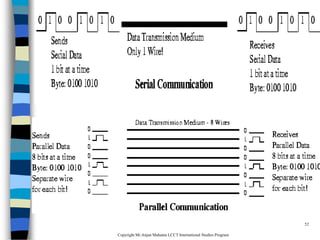
Physical Connection
 The physical connection determines how many
bits (1's or 0's) can be transmitted in a single
instance of time.
 If only 1 bit of information can be transmitted
over the data transmission medium at a time
then it is considered a serial communication.
 If more than 1 bit of information is transmitted
over the data transmission medium at a time
then it is considered a parallel communication.
CopyrightMr.Anjan Mahanta LCCTInternational Studies Program
52
CopyrightMr.Anjan Mahanta LCCTInternational Studies Program
53
Communications
Advantages
 Parallel : faster
transfer rates
 Serial : long
distances
Disadvantages
 Parallel: short
distance only
 Serial : slow transfer
rates
CopyrightMr.Anjan Mahanta LCCTInternational Studies Program
54
Transmission Media- Guided
There are 2 basic categories of transmission
media: guided and unguided.
 Guided transmission media uses a cabling
system that guides the data signals along a
specific path.
 Unguided transmission media consists of a
means for the data signals to travel but
nothing to guide them along a specific path.
CopyrightMr.Anjan Mahanta LCCTInternational Studies Program
55
Transmission Media- Guided
There 4 basic types of guided media:
 Open Wire
 Twisted Pair
 Coaxial Cable
 Optical Fiber
CopyrightMr.Anjan Mahanta LCCTInternational Studies Program
56
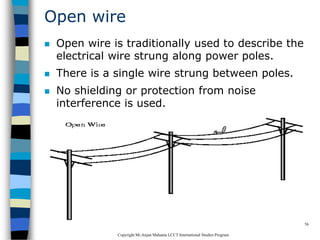
Open wire
 Open wire is traditionally used to describe the
electrical wire strung along power poles.
 There is a single wire strung between poles.
 No shielding or protection from noise
interference is used.
CopyrightMr.Anjan Mahanta LCCTInternational Studies Program
57
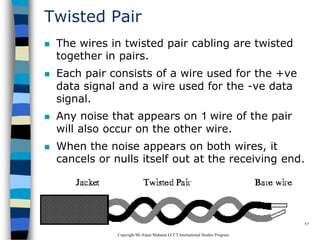
Twisted Pair
 The wires in twisted pair cabling are twisted
together in pairs.
 Each pair consists of a wire used for the +ve
data signal and a wire used for the -ve data
signal.
 Any noise that appears on 1 wire of the pair
will also occur on the other wire.
 When the noise appears on both wires, it
cancels or nulls itself out at the receiving end.
CopyrightMr.Anjan Mahanta LCCTInternational Studies Program
58
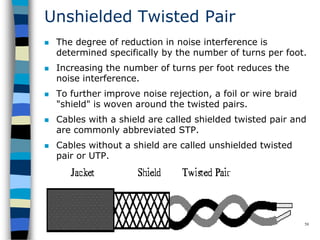
Unshielded Twisted Pair
 The degree of reduction in noise interference is
determined specifically by the number of turns per foot.
 Increasing the number of turns per foot reduces the
noise interference.
 To further improve noise rejection, a foil or wire braid
"shield" is woven around the twisted pairs.
 Cables with a shield are called shielded twisted pair and
are commonly abbreviated STP.
 Cables without a shield are called unshielded twisted
pair or UTP.
CopyrightMr.Anjan Mahanta LCCTInternational Studies Program
59
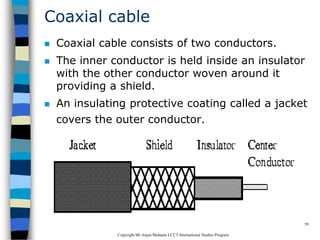
Coaxial cable
 Coaxial cable consists of two conductors.
 The inner conductor is held inside an insulator
with the other conductor woven around it
providing a shield.
 An insulating protective coating called a jacket
covers the outer conductor.
CopyrightMr.Anjan Mahanta LCCTInternational Studies Program
60
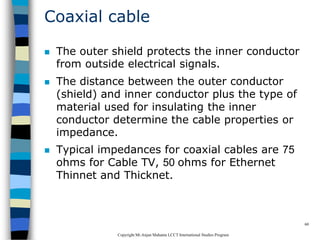
Coaxial cable
 The outer shield protects the inner conductor
from outside electrical signals.
 The distance between the outer conductor
(shield) and inner conductor plus the type of
material used for insulating the inner
conductor determine the cable properties or
impedance.
 Typical impedances for coaxial cables are 75
ohms for Cable TV, 50 ohms for Ethernet
Thinnet and Thicknet.
CopyrightMr.Anjan Mahanta LCCTInternational Studies Program
61
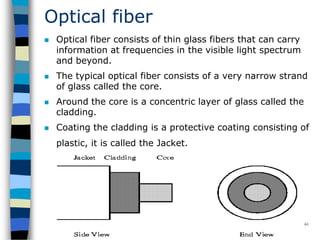
Optical fiber
 Optical fiber consists of thin glass fibers that can carry
information at frequencies in the visible light spectrum
and beyond.
 The typical optical fiber consists of a very narrow strand
of glass called the core.
 Around the core is a concentric layer of glass called the
cladding.
 Coating the cladding is a protective coating consisting of
plastic, it is called the Jacket.
CopyrightMr.Anjan Mahanta LCCTInternational Studies Program
62
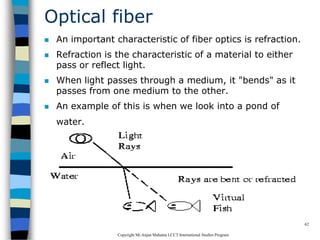
Optical fiber
 An important characteristic of fiber optics is refraction.
 Refraction is the characteristic of a material to either
pass or reflect light.
 When light passes through a medium, it "bends" as it
passes from one medium to the other.
 An example of this is when we look into a pond of
water.
CopyrightMr.Anjan Mahanta LCCTInternational Studies Program
63
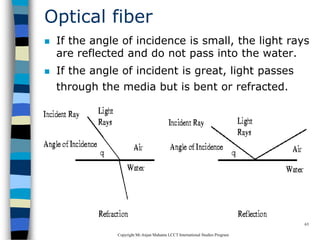
Optical fiber
 If the angle of incidence is small, the light rays
are reflected and do not pass into the water.
 If the angle of incident is great, light passes
through the media but is bent or refracted.
CopyrightMr.Anjan Mahanta LCCTInternational Studies Program
64
Advantages of Optical fiber
 Noise immunity: RFI and EMI immune
(RFI - Radio Frequency Interference,
EMI -Electromagnetic Interference)
 Security: cannot tap into cable.
 Large Capacity due to BW (bandwidth)
 No corrosion (destroy metal)
 Longer distances than copper wire
 Smaller and lighter than copper wire
 Faster transmission rate
CopyrightMr.Anjan Mahanta LCCTInternational Studies Program
65
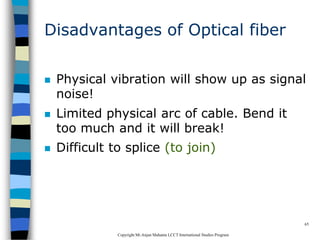
Disadvantages of Optical fiber
 Physical vibration will show up as signal
noise!
 Limited physical arc of cable. Bend it
too much and it will break!
 Difficult to splice (to join)
CopyrightMr.Anjan Mahanta LCCTInternational Studies Program
66
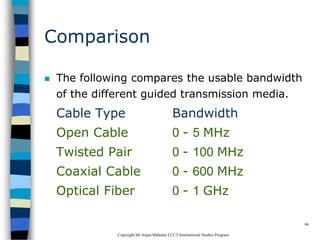
Comparison
 The following compares the usable bandwidth
of the different guided transmission media.
Cable Type Bandwidth
Open Cable 0 - 5 MHz
Twisted Pair 0 - 100 MHz
Coaxial Cable 0 - 600 MHz
Optical Fiber 0 - 1 GHz
CopyrightMr.Anjan Mahanta LCCTInternational Studies Program
67
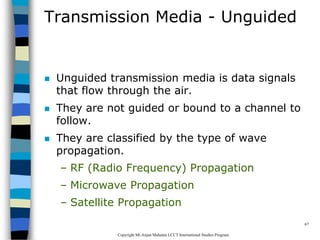
Transmission Media - Unguided
 Unguided transmission media is data signals
that flow through the air.
 They are not guided or bound to a channel to
follow.
 They are classified by the type of wave
propagation.
– RF (Radio Frequency) Propagation
– Microwave Propagation
– Satellite Propagation
CopyrightMr.Anjan Mahanta LCCTInternational Studies Program
68
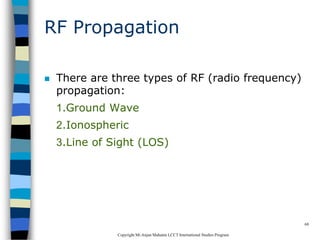
RF Propagation
 There are three types of RF (radio frequency)
propagation:
1.Ground Wave
2.Ionospheric
3.Line of Sight (LOS)
CopyrightMr.Anjan Mahanta LCCTInternational Studies Program
69
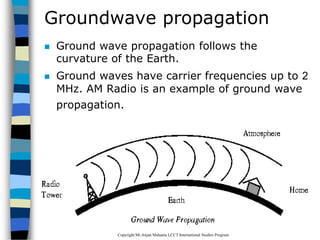
Groundwave propagation
 Ground wave propagation follows the
curvature of the Earth.
 Ground waves have carrier frequencies up to 2
MHz. AM Radio is an example of ground wave
propagation.
CopyrightMr.Anjan Mahanta LCCTInternational Studies Program
70
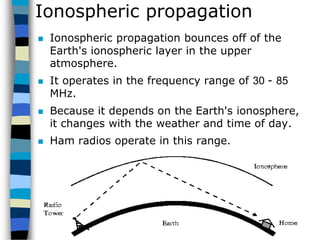
Ionospheric propagation
 Ionospheric propagation bounces off of the
Earth's ionospheric layer in the upper
atmosphere.
 It operates in the frequency range of 30 - 85
MHz.
 Because it depends on the Earth's ionosphere,
it changes with the weather and time of day.
 Ham radios operate in this range.
CopyrightMr.Anjan Mahanta LCCTInternational Studies Program
71
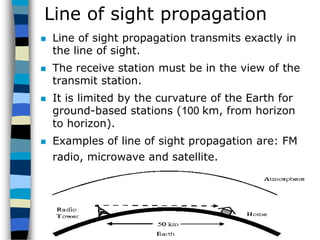
Line of sight propagation
 Line of sight propagation transmits exactly in
the line of sight.
 The receive station must be in the view of the
transmit station.
 It is limited by the curvature of the Earth for
ground-based stations (100 km, from horizon
to horizon).
 Examples of line of sight propagation are: FM
radio, microwave and satellite.
CopyrightMr.Anjan Mahanta LCCTInternational Studies Program
72
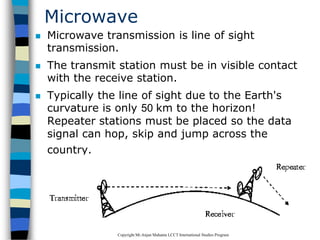
Microwave
 Microwave transmission is line of sight
transmission.
 The transmit station must be in visible contact
with the receive station.
 Typically the line of sight due to the Earth's
curvature is only 50 km to the horizon!
Repeater stations must be placed so the data
signal can hop, skip and jump across the
country.
CopyrightMr.Anjan Mahanta LCCTInternational Studies Program
73
Microwave
 Microwaves operate at high operating
frequencies of 3 to 10 GHz.
 This allows them to carry large quantities of
data due to their large bandwidth.
 Advantages:
– They can carry high quantities of information due to
their high operating frequencies.
– Low cost land purchase: each tower occupies only a
small area.
– High frequency/short wavelength signals require
small antennae.
CopyrightMr.Anjan Mahanta LCCTInternational Studies Program
74
Microwave
 Disadvantages
– Attenuation by solid objects: birds, rain, snow and
fog.
– Reflected from flat surfaces like water and metal.
– Diffracted (split) around solid objects.
– Refracted by atmosphere, thus causing beam to be
projected away from receiver.
CopyrightMr.Anjan Mahanta LCCTInternational Studies Program
75
Satellite
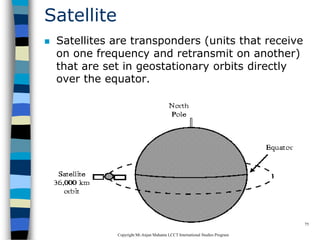
 Satellites are transponders (units that receive
on one frequency and retransmit on another)
that are set in geostationary orbits directly
over the equator.
CopyrightMr.Anjan Mahanta LCCTInternational Studies Program
76
Satellite
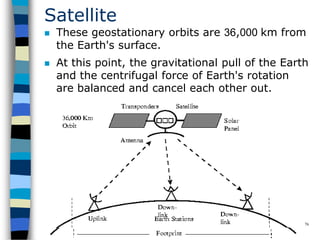
 These geostationary orbits are 36,000 km from
the Earth's surface.
 At this point, the gravitational pull of the Earth
and the centrifugal force of Earth's rotation
are balanced and cancel each other out.
CopyrightMr.Anjan Mahanta LCCTInternational Studies Program
77
Satellite
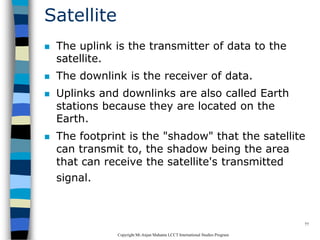
 The uplink is the transmitter of data to the
satellite.
 The downlink is the receiver of data.
 Uplinks and downlinks are also called Earth
stations because they are located on the
Earth.
 The footprint is the "shadow" that the satellite
can transmit to, the shadow being the area
that can receive the satellite's transmitted
signal.
CopyrightMr.Anjan Mahanta LCCTInternational Studies Program
78
Networking Devices
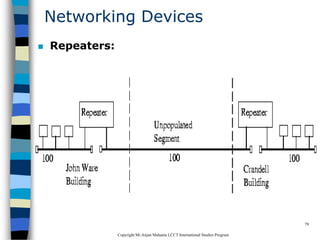
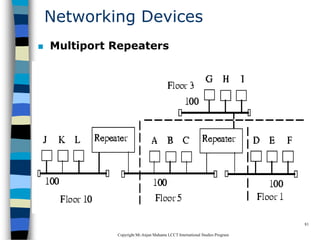
 Repeaters:Repeaters are physical hardware devices:
they have a primary function to regenerate the
electrical signal
 The purpose of a repeater is to extend the LAN Segment
beyond its physical limits
 Typically, repeaters are used to connect two physically
close buildings together (when they are too far apart to
just extend the segment).
 They can be used to connect floors of a building that
would normally surpass the maximum allowable
segment length.
 For large extensions two Repeaters are required but for
shorter extensions, only one Repeater may be required.
CopyrightMr.Anjan Mahanta LCCTInternational Studies Program
79
Networking Devices
 Repeaters:
CopyrightMr.Anjan Mahanta LCCTInternational Studies Program
80
Networking Devices
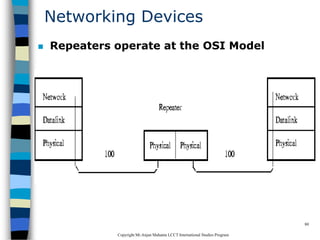
 Repeaters operate at the OSI Model
CopyrightMr.Anjan Mahanta LCCTInternational Studies Program
81
Networking Devices
 Multiport Repeaters
CopyrightMr.Anjan Mahanta LCCTInternational Studies Program
82
Networking Devices
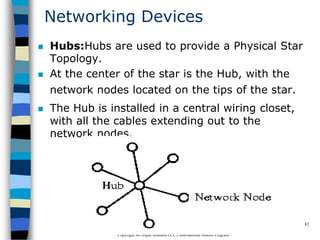
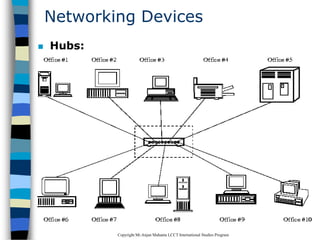
 Hubs:Hubs are used to provide a Physical Star
Topology.
 At the center of the star is the Hub, with the
network nodes located on the tips of the star.
 The Hub is installed in a central wiring closet,
with all the cables extending out to the
network nodes.
CopyrightMr.Anjan Mahanta LCCTInternational Studies Program
83
Networking Devices
 Hubs:
CopyrightMr.Anjan Mahanta LCCTInternational Studies Program
84
Networking Devices
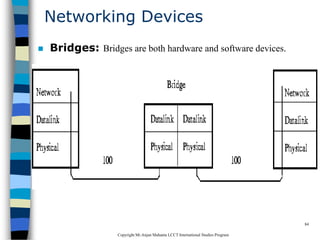
 Bridges: Bridges are both hardware and software devices.
CopyrightMr.Anjan Mahanta LCCTInternational Studies Program
85
Networking Devices
 Purpose of a Bridge
 The purposes of a Bridge are the
following:
– Isolates networks by MAC addresses
– Manages network traffic by filtering
packets
– Translates from one protocol to
another
CopyrightMr.Anjan Mahanta LCCTInternational Studies Program
86
Networking Devices
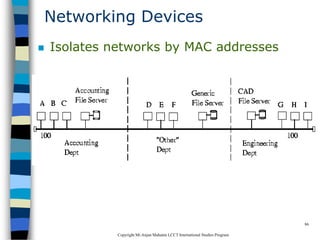
 Isolates networks by MAC addresses
CopyrightMr.Anjan Mahanta LCCTInternational Studies Program
87
Networking Devices
Manages network traffic by filtering packets
 Bridges listen to the network traffic, and build
an image of the network on each side of the
bridge.
 This image of the network indicates the
location of each node
 With this information, a bridge can make a
decision whether to forward the packet across
the bridge
 This process of deciding whether or not to
forward a packet is termed "filtering packets."
CopyrightMr.Anjan Mahanta LCCTInternational Studies Program
88
Networking Devices
Translates from one protocol to another
 Bridges are store and forward devices.
 They receive a packet on the local segment,
store it, and wait for the remote segments to
be clear before forwarding the packet.
CopyrightMr.Anjan Mahanta LCCTInternational Studies Program
89
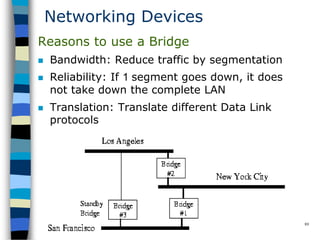
Networking Devices
Reasons to use a Bridge
 Bandwidth: Reduce traffic by segmentation
 Reliability: If 1 segment goes down, it does
not take down the complete LAN
 Translation: Translate different Data Link
protocols
CopyrightMr.Anjan Mahanta LCCTInternational Studies Program
90
Networking Devices
 Gateways
 A Gateway is the Hardware/Software device
that is used to interconnect LANs & WANs
using mainframe computers
 Example: DECnet and IBM's SNA
 Often, the router that is used to connect a LAN
to the Internet will be called a gateway.
 It will have added capability to direct and filter
higher layer protocols (layer 4 and up) to
specific devices (such as web servers, ftp
servers and e-mail servers).
CopyrightMr.Anjan Mahanta LCCTInternational Studies Program
91
Protocol IEEE-802.3
 The IEEE-802.3 Protocol is based on the Xerox
Network Standard (XNS) called Ethernet
 These are the four versions of the Ethernet
frame
– Ethernet_802.2
– Ethernet_802.3
– Ethernet_II
– Ethernet_SNAP
 NOTE: The Source and Destination must have
the same Ethernet Frame type in order to
communicate.
CopyrightMr.Anjan Mahanta LCCTInternational Studies Program
92
Protocol IEEE-802.3
 IEEE 802.3 defines five media types of
IEEE 802.3 Ethernet Types shown
below:
1. IEEE 802.3 - 10Base5 (Thick Coax) is used
only as backbones to networks. Backbones are
lines that connect buildings & network
equipment together (such as Bridges, Routers,
Hubs, Concentrators, Gateways, etc.).
10Base5 is now being replaced by either Thin
Coax or fiber optics.
CopyrightMr.Anjan Mahanta LCCTInternational Studies Program
93
Protocol IEEE-802.3
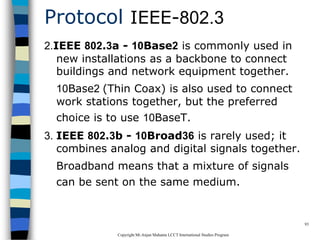
2.IEEE 802.3a - 10Base2 is commonly used in
new installations as a backbone to connect
buildings and network equipment together.
10Base2 (Thin Coax) is also used to connect
work stations together, but the preferred
choice is to use 10BaseT.
3. IEEE 802.3b - 10Broad36 is rarely used; it
combines analog and digital signals together.
Broadband means that a mixture of signals
can be sent on the same medium.
CopyrightMr.Anjan Mahanta LCCTInternational Studies Program
94
Protocol IEEE-802.3
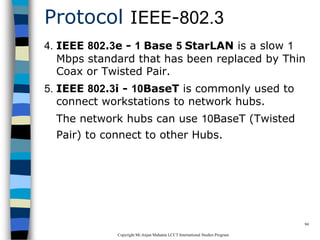
4. IEEE 802.3e - 1 Base 5 StarLAN is a slow 1
Mbps standard that has been replaced by Thin
Coax or Twisted Pair.
5. IEEE 802.3i - 10BaseT is commonly used to
connect workstations to network hubs.
The network hubs can use 10BaseT (Twisted
Pair) to connect to other Hubs.
CopyrightMr.Anjan Mahanta LCCTInternational Studies Program
95
10 Base T (Twisted Pair Cable)
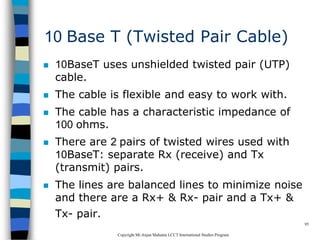
 10BaseT uses unshielded twisted pair (UTP)
cable.
 The cable is flexible and easy to work with.
 The cable has a characteristic impedance of
100 ohms.
 There are 2 pairs of twisted wires used with
10BaseT: separate Rx (receive) and Tx
(transmit) pairs.
 The lines are balanced lines to minimize noise
and there are a Rx+ & Rx- pair and a Tx+ &
Tx- pair.
CopyrightMr.Anjan Mahanta LCCTInternational Studies Program
96
10 Base T (Twisted Pair Cable)
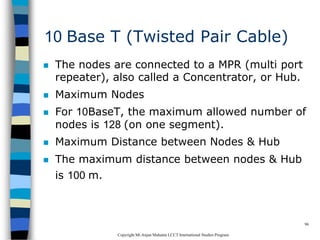
 The nodes are connected to a MPR (multi port
repeater), also called a Concentrator, or Hub.
 Maximum Nodes
 For 10BaseT, the maximum allowed number of
nodes is 128 (on one segment).
 Maximum Distance between Nodes & Hub
 The maximum distance between nodes & Hub
is 100 m.
CopyrightMr.Anjan Mahanta LCCTInternational Studies Program
97
Cable Termination and Connector
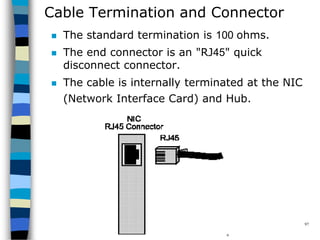
 The standard termination is 100 ohms.
 The end connector is an "RJ45" quick
disconnect connector.
 The cable is internally terminated at the NIC
(Network Interface Card) and Hub.
CopyrightMr.Anjan Mahanta LCCTInternational Studies Program
98
TCP/IP Protocols
CopyrightMr.Anjan Mahanta LCCTInternational Studies Program
99
TCP/IP Protocols
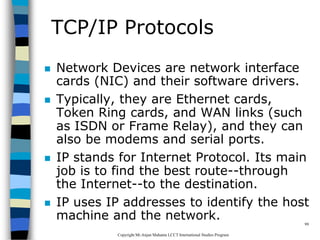
 Network Devices are network interface
cards (NIC) and their software drivers.
 Typically, they are Ethernet cards,
Token Ring cards, and WAN links (such
as ISDN or Frame Relay), and they can
also be modems and serial ports.
 IP stands for Internet Protocol. Its main
job is to find the best route--through
the Internet--to the destination.
 IP uses IP addresses to identify the host
machine and the network.
CopyrightMr.Anjan Mahanta LCCTInternational Studies Program
100
TCP/IP Protocols
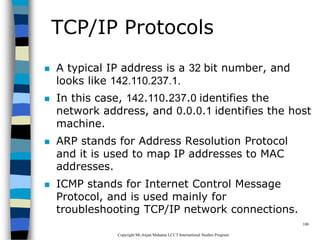
 A typical IP address is a 32 bit number, and
looks like 142.110.237.1.
 In this case, 142.110.237.0 identifies the
network address, and 0.0.0.1 identifies the host
machine.
 ARP stands for Address Resolution Protocol
and it is used to map IP addresses to MAC
addresses.
 ICMP stands for Internet Control Message
Protocol, and is used mainly for
troubleshooting TCP/IP network connections.
CopyrightMr.Anjan Mahanta LCCTInternational Studies Program
101
TCP/IP Protocols
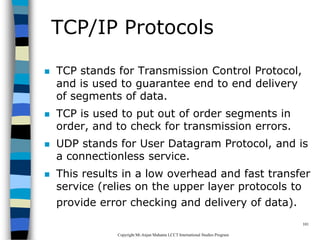
 TCP stands for Transmission Control Protocol,
and is used to guarantee end to end delivery
of segments of data.
 TCP is used to put out of order segments in
order, and to check for transmission errors.
 UDP stands for User Datagram Protocol, and is
a connectionless service.
 This results in a low overhead and fast transfer
service (relies on the upper layer protocols to
provide error checking and delivery of data).
CopyrightMr.Anjan Mahanta LCCTInternational Studies Program
102
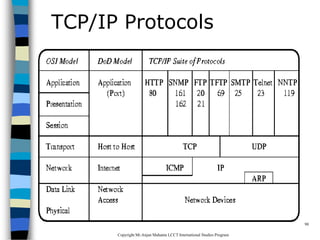
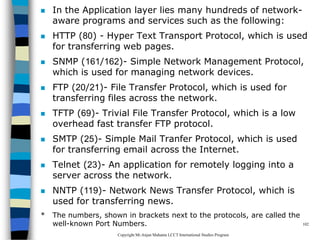
 In the Application layer lies many hundreds of network-
aware programs and services such as the following:
 HTTP (80) - Hyper Text Transport Protocol, which is used
for transferring web pages.
 SNMP (161/162)- Simple Network Management Protocol,
which is used for managing network devices.
 FTP (20/21)- File Transfer Protocol, which is used for
transferring files across the network.
 TFTP (69)- Trivial File Transfer Protocol, which is a low
overhead fast transfer FTP protocol.
 SMTP (25)- Simple Mail Tranfer Protocol, which is used
for transferring email across the Internet.
 Telnet (23)- An application for remotely logging into a
server across the network.
 NNTP (119)- Network News Transfer Protocol, which is
used for transferring news.
* The numbers, shown in brackets next to the protocols, are called the
well-known Port Numbers.
CopyrightMr.Anjan Mahanta LCCTInternational Studies Program
103
Wireless Network
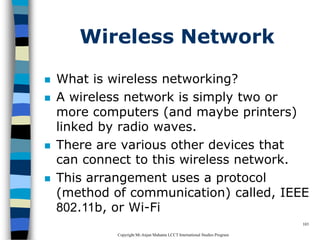
 What is wireless networking?
 A wireless network is simply two or
more computers (and maybe printers)
linked by radio waves.
 There are various other devices that
can connect to this wireless network.
 This arrangement uses a protocol
(method of communication) called, IEEE
802.11b, or Wi-Fi
CopyrightMr.Anjan Mahanta LCCTInternational Studies Program
104
Range & Performance
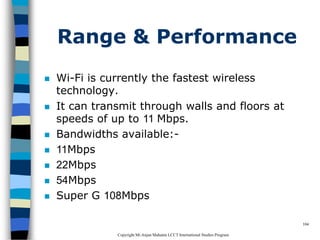
 Wi-Fi is currently the fastest wireless
technology.
 It can transmit through walls and floors at
speeds of up to 11 Mbps.
 Bandwidths available:-
 11Mbps
 22Mbps
 54Mbps
 Super G 108Mbps
CopyrightMr.Anjan Mahanta LCCTInternational Studies Program
105
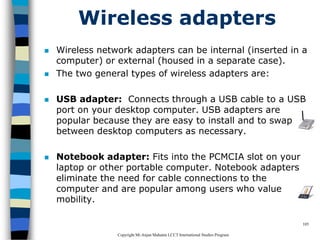
Wireless adapters
 Wireless network adapters can be internal (inserted in a
computer) or external (housed in a separate case).
 The two general types of wireless adapters are:
 USB adapter: Connects through a USB cable to a USB
port on your desktop computer. USB adapters are
popular because they are easy to install and to swap
between desktop computers as necessary.
 Notebook adapter: Fits into the PCMCIA slot on your
laptop or other portable computer. Notebook adapters
eliminate the need for cable connections to the
computer and are popular among users who value
mobility.
CopyrightMr.Anjan Mahanta LCCTInternational Studies Program
106
Benefits of wireless network
 Convenience: You can set up wireless
connections without having to run cables or
open computer cases.
 Mobility: Mobility might be relatively
unimportant for a desktop computer but can
be an important benefit if you have a laptop or
notebook computer.
CopyrightMr.Anjan Mahanta LCCTInternational Studies Program
107
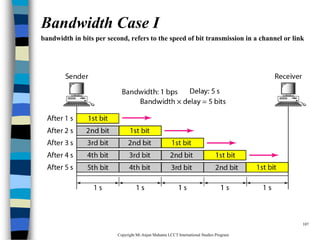
Bandwidth Case I
bandwidth in bits per second, refersto the speed of bit transmission in a channel or link
CopyrightMr.Anjan Mahanta LCCTInternational Studies Program
108
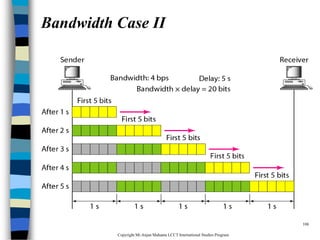
Bandwidth Case II

Data Communication and Networking

  • 1.
    1 Introduction to Data Communication& Networking Anjan Mahanta anjan_mahanta@hotmail.com
  • 2.
    CopyrightMr.Anjan Mahanta LCCTInternationalStudies Program 2 Data & Signals  Data can be analog or digital  Analog data refers to information that is continuous  Analog data take on continuous values  Digital data refers to information that has discrete states
  • 3.
    CopyrightMr.Anjan Mahanta LCCTInternationalStudies Program 3 Data Communication  Data Communications is the transfer of data or information between a source and a receiver.  The source transmits the data and the receiver receives it.  The purpose of data communications is to provide the rules and regulations that allow computers with different disk operating systems, languages, cabling and locations to share resources.  The rules and regulations are called protocols and standards in data communications.
  • 4.
    CopyrightMr.Anjan Mahanta LCCTInternationalStudies Program 4 Data Communication
  • 5.
    CopyrightMr.Anjan Mahanta LCCTInternationalStudies Program 5 Data Flow  Data flow is the flow of data between two points.  The direction of the data flow can be described as: 1. Simplex: data flows in only one direction on the data communication line (medium). Examples are radio and television broadcasts.
  • 6.
    CopyrightMr.Anjan Mahanta LCCTInternationalStudies Program 6 2. Half-Duplex  data flows in both directions but only one direction at a time on the data communication line.  For example, a conversation on walkie-talkies is a half-duplex data flow.  Each person takes turns talking. If both talk at once - nothing occurs!
  • 7.
    CopyrightMr.Anjan Mahanta LCCTInternationalStudies Program 7 3. Full Duplex  Data flows in both directions simultaneously.  Modems are configured to flow data in both directions.  Bi-directional both directions simultaneously!
  • 8.
    CopyrightMr.Anjan Mahanta LCCTInternationalStudies Program 8 Modems  A modem (MOdulator/DEModulator) is a device that enables a computer to transmit data over, for example, telephone or cable lines. Computer information is stored digitally, whereas information transmitted over telephone lines is transmitted in the form of analog waves.
  • 9.
    CopyrightMr.Anjan Mahanta LCCTInternationalStudies Program 9 How fast the modem can transmit and receive data?  At slow rates, modems are measured in terms of baud rates  The slowest rate is 300 baud  At higher speeds, modems are measured in terms of bits per second (bps)  The fastest modems run at 57,600 bps  The faster the transmission rate, the faster you can send and receive data  For example, if the device sending data to your computer is sending it at 2,400 bps, you must receive it at 2,400 bps
  • 10.
    CopyrightMr.Anjan Mahanta LCCTInternationalStudies Program 10 About Voice/Data  Many modems support a switch to change between voice and data modes  In data mode, the modem acts like a regular modem  In voice mode, the modem acts like a regular telephone  Modems that support a voice/data switch have a built-in loudspeaker and microphone for voice communication
  • 11.
    CopyrightMr.Anjan Mahanta LCCTInternationalStudies Program 11 Auto-answer modem  An auto-answer modem enables your computer to receive calls in your absence.
  • 12.
    CopyrightMr.Anjan Mahanta LCCTInternationalStudies Program 12 Data Compression modem  Some modems perform data compression, which enables them to send data at faster rates  However, the modem at the receiving end must be able to decompress the data using the same compression technique.
  • 13.
    CopyrightMr.Anjan Mahanta LCCTInternationalStudies Program 13 Fax Capability modem  Most modern modems are fax modems, which means that they can send and receive faxes.
  • 14.
    CopyrightMr.Anjan Mahanta LCCTInternationalStudies Program 14 Digital Connection  The connection between the modem and terminal/computer is a digital connection.  A basic connection consists of a Transmit Data (TXD) line, a Receive Data (RXD) line and many hardware handshaking control lines.  The control lines determine whose turn it is to talk (modem or terminal), if the terminal/computer is turned on, if the modem is turned on, if there is a connection to another modem, etc.
  • 15.
    CopyrightMr.Anjan Mahanta LCCTInternationalStudies Program 15 Analog Connection  The connection between the modem and the outside world (the phone line) is an analog connection.  The voice channel has a bandwidth of 0-4 kHz but only 300 - 3400 Hz is usable for data communications.  The modem converts digital information into tones (frequencies) for transmitting through the phone lines. The tones are in the 300-3400 Hz Voice Band.
  • 16.
    CopyrightMr.Anjan Mahanta LCCTInternationalStudies Program 16 Types of Modems  External Modem – External modems sit next to the computer and connect to the serial port using a straight-through serial cable.  Internal Modem – An internal modems is a plug-in circuit board that sits inside the computer. It incorporates the serial port on-board. – They are less expensive than external modems because they do not require a case, power supply and serial cable.
  • 17.
    CopyrightMr.Anjan Mahanta LCCTInternationalStudies Program 17 Telecommunications  Telephones and networking work hand in hand.  The common goal is to join distantly located Local Area Networks into Metropolitan and Wide Area Networks (MANs and WANs).  Talking to someone on the phone uses voice channels.  We use voice channels for modem communications to connect to the Internet.  Due to the bandwidth limits on voice channels, the data transfer rate is relatively slow.
  • 18.
    CopyrightMr.Anjan Mahanta LCCTInternationalStudies Program 18 Voice Channels  Voice Channel: Dial-up connection through a modem using standard telephone lines.  Typical voice channel communication rates are: 300, 1200, 2400, 9600, 14.4k, 19.2k, 28.8k, 33.6k and 56 kbps (bits per second).
  • 19.
    CopyrightMr.Anjan Mahanta LCCTInternationalStudies Program 19 Data Channels  Data channels are dedicated lines for communicating digitized voice and data.  At the end of 1996, there was a major milestone when more data was communicated in North America's telecommunications system than voice.  Data Channels are special communications channels provided by "common carriers" such as Telus, Sprint, Bell Canada, AT&T, etc. for transferring digital data.  Data Channels are also called "Leased Lines".
  • 20.
    CopyrightMr.Anjan Mahanta LCCTInternationalStudies Program 20 Data Channels(Contd.)  They are "directly" connected: you don't have to dial a connection number.  The connections are up and running 24 hours per day.  They appear to work as if there were a wire running directly between the source and the destination.  Typical transfer rates for data channels are: 56 k, 128k, 1.544 M, 2.08 M, 45M and 155 Mbps.
  • 21.
    CopyrightMr.Anjan Mahanta LCCTInternationalStudies Program 21 Data Channels(Contd.)  Common carriers charge for data connections by: –The amount of data transferred (megabytes per month) –The transfer rate (bits per second) –The amount of use (time per month)
  • 22.
    CopyrightMr.Anjan Mahanta LCCTInternationalStudies Program 22 What is a network?  A network can consist of two computers connected together on a desk or it can consist of many Local Area Networks (LANs) connected together to form a Wide Area Network (WAN) across a continent.  The key is that two or more computers are connected together by a medium and are sharing resource.  These resources can be files, printers, hard-drives, or CPU number-crunching power.
  • 23.
  • 24.
    CopyrightMr.Anjan Mahanta LCCTInternationalStudies Program 24 Breaking the big picture  Local loops  LANs  MANs  WANs
  • 25.
    CopyrightMr.Anjan Mahanta LCCTInternationalStudies Program 25 Local loops  The Local Loop is often called "the last mile"  It refers to the last mile of analog phone line that goes from the telephone company's central office (CO) to your house.
  • 26.
    CopyrightMr.Anjan Mahanta LCCTInternationalStudies Program 26 Local Area Networks (LANs)  LANs (local area networks) are networks that connect computers and resources together in a building or buildings that are close together.  The components used by LANs can be divided into cabling standards, hardware, and protocols.
  • 27.
    CopyrightMr.Anjan Mahanta LCCTInternationalStudies Program 27 Metropolitan Area Networks(MANs)  Metropolitan Area Networks (MANs) are networks that connect LANs together within a city.  The main criterion for a MAN is that the connection between LANs is through a local exchange carrier (the local phone company).
  • 28.
    CopyrightMr.Anjan Mahanta LCCTInternationalStudies Program 28 Wide Area Networks(WANs)  Wide Area Networks (WANs) connect LANs together between cities.  The main difference between a MAN and a WAN is that the WAN uses Long Distance Carriers. Otherwise the same protocols and equipment are used as a MAN.
  • 29.
    CopyrightMr.Anjan Mahanta LCCTInternationalStudies Program 29 Network Topology What is a Topology?  The physical topology of a network refers to the configuration of cables, computers, and other peripherals. Main types of physical topologies 1. Linear Bus 2. Star 3. Star-wired ring 4. Tree
  • 30.
    CopyrightMr.Anjan Mahanta LCCTInternationalStudies Program 30 Linear Bus  A linear bus topology consists of a main run of cable with a terminator at each end (See figure). All nodes (file server, workstations, and peripherals) are connected to the linear cable. Ethernet and local talk networks use a linear bus topology.
  • 31.
    CopyrightMr.Anjan Mahanta LCCTInternationalStudies Program 31 Linear Bus Advantages of linear bus  Easy to connect a computer or peripheral to a linear bus.  Requires less cable length than a star topology. Disadvantages of linear bus  Entire network shuts down if there is a break in the main cable.  Terminators are required at both ends of the backbone cable.  Difficult to identify the problem if the entire network shuts down.  Not meant to be used as a stand-alone solution in a large building.
  • 32.
    CopyrightMr.Anjan Mahanta LCCTInternationalStudies Program 32 Star  A star topology is designed with each node (file server, workstations, and peripherals) connected directly to a central network hub or concentrator (See figure).  Data on a star network passes through the hub or concentrator before continuing to its destination.
  • 33.
    CopyrightMr.Anjan Mahanta LCCTInternationalStudies Program 33 Star Advantages of star  Easy to install and wire.  No disruptions to the network then connecting or removing devices.  Easy to detect faults and to remove parts. Disadvantages of star  Requires more cable length than a linear topology.  If the hub or concentrator fails, nodes attached are disabled.  More expensive than linear bus topologies because of the cost of the concentrators.
  • 34.
    CopyrightMr.Anjan Mahanta LCCTInternationalStudies Program 34 Star-Wired Ring  A star-wired ring topology may appear (externally) to be the same as a star topology.  Internally, the MAU (multistation access unit) of a star-wired ring contains wiring that allows information to pass from one device to another in a circle or ring
  • 35.
    CopyrightMr.Anjan Mahanta LCCTInternationalStudies Program 35 Tree  A tree topology combines characteristics of linear bus and star topologies.  It consists of groups of star-configured workstations connected to a linear bus backbone cable  Tree topologies allow for the expansion of an existing network, and enable schools to configure a network to meet their needs.
  • 36.
    CopyrightMr.Anjan Mahanta LCCTInternationalStudies Program 36 Tree  Advantages – Point-to-point wiring for individual segments. – Supported by several hardware and software vendors.  Disadvantages – Overall length of each segment is limited by the type of cabling used. – If the backbone line breaks, the entire segment goes down. – More difficult to configure and wire than other topologies.
  • 37.
    CopyrightMr.Anjan Mahanta LCCTInternationalStudies Program 37 Considerations When Choosing a Topology:  Money. A linear bus network may be the least expensive way to install a network; you do not have to purchase concentrators.  Length of cable needed. The linear bus network uses shorter lengths of cable.  Future growth. With a star topology, expanding a network is easily done by adding another concentrator.  Cable type. The most common cable in schools is unshielded twisted pair, which is most often used with star topologies.
  • 38.
    CopyrightMr.Anjan Mahanta LCCTInternationalStudies Program 38 Summary Chart Physical Topology Common Cable Common Protocol Linear Bus Twisted Pair Ethernet coaxial Fiber LocalTalk Star Twisted Pair Ethernet Fiber LocalTalk Star-Wired Ring Twisted Pair Token Ring Tree Twisted Pair Ethernet Coaxial Fiber
  • 39.
    CopyrightMr.Anjan Mahanta LCCTInternationalStudies Program 39 Introduction to the ISO - OSI Model  The ISO (International Standards Organization) has created a layered model, called the OSI (Open Systems Interconnect) model.  The purpose of the layers is to provide clearly defined functions that can improve Internetwork connectivity between "computer" manufacturing companies.  Each layer has a standard defined input and a standard defined output.
  • 40.
    CopyrightMr.Anjan Mahanta LCCTInternationalStudies Program 40 7 layers of the OSI Model  7. Application Layer (Top Layer)  6. Presentation Layer  5. Session Layer  4. Transport Layer  3. Network Layer  2. Data Link Layer  1. Physical Layer (Bottom Layer)
  • 41.
    CopyrightMr.Anjan Mahanta LCCTInternationalStudies Program 41 7 layers of the OSI Model
  • 42.
    CopyrightMr.Anjan Mahanta LCCTInternationalStudies Program 42 Information Exchange Process
  • 43.
  • 44.
    CopyrightMr.Anjan Mahanta LCCTInternationalStudies Program 44 Data Communication Network  The major criteria that a data communication network must meet are: –Performance –Consistency –Reliability –Recovery –Security
  • 45.
    CopyrightMr.Anjan Mahanta LCCTInternationalStudies Program 45 Performance  Performance is the defined as the rate of transference of error-free data.  It is measured by the response time.  Response time is the elapsed time between the end of an inquiry and the beginning of a response – Example requesting a file transfer and starting the file transfer.  Factors that affect response time are: – Number of Users: – Transmission Speed: – Hardware Type: – Software Program:
  • 46.
    CopyrightMr.Anjan Mahanta LCCTInternationalStudies Program 46 Consistency  Consistency is the predictability of response time and accuracy of data. – For example, if the "normal" response time is 3 seconds for printing to a network printer but a response time of over 30 seconds occurs, we know that there is a problem in the system!
  • 47.
    CopyrightMr.Anjan Mahanta LCCTInternationalStudies Program 47 Reliability  Reliability is the measure of how often a network is usable.  MTBF (Mean Time Between Failures) is a measure of the average time a component is expected to operate between failures, and is normally provided by the manufacturer.  A network failure can be caused by a problem with the hardware, the data carrying medium, or the Network Operating System.
  • 48.
    CopyrightMr.Anjan Mahanta LCCTInternationalStudies Program 48 Recovery  Recovery is the network's ability to return to a prescribed level of operation after a network failure.  This level is where the amount of lost data is nonexistent or at a minimum. Recovery is based on having back-up files.
  • 49.
    CopyrightMr.Anjan Mahanta LCCTInternationalStudies Program 49 Security  Security is the protection of hardware, software and data from unauthorized access.  Restricted physical access to computers, password protection, limiting user privileges and data encryption are common security methods.  Anti-virus monitoring programs to defend against computer viruses are also a security measure.
  • 50.
    CopyrightMr.Anjan Mahanta LCCTInternationalStudies Program 50 Application  Electronic Mail (e-mail or Email)  Teleconferencing allows people in different regions to "attend" meetings using telephone lines.  Automated Banking Machines allow banking transactions to be performed everywhere  Groupware is the latest network application. It allows user groups to share documents, schedules databases, etc. (ex. Lotus Notes)
  • 51.
    CopyrightMr.Anjan Mahanta LCCTInternationalStudies Program 51 Physical Connection  The physical connection determines how many bits (1's or 0's) can be transmitted in a single instance of time.  If only 1 bit of information can be transmitted over the data transmission medium at a time then it is considered a serial communication.  If more than 1 bit of information is transmitted over the data transmission medium at a time then it is considered a parallel communication.
  • 52.
  • 53.
    CopyrightMr.Anjan Mahanta LCCTInternationalStudies Program 53 Communications Advantages  Parallel : faster transfer rates  Serial : long distances Disadvantages  Parallel: short distance only  Serial : slow transfer rates
  • 54.
    CopyrightMr.Anjan Mahanta LCCTInternationalStudies Program 54 Transmission Media- Guided There are 2 basic categories of transmission media: guided and unguided.  Guided transmission media uses a cabling system that guides the data signals along a specific path.  Unguided transmission media consists of a means for the data signals to travel but nothing to guide them along a specific path.
  • 55.
    CopyrightMr.Anjan Mahanta LCCTInternationalStudies Program 55 Transmission Media- Guided There 4 basic types of guided media:  Open Wire  Twisted Pair  Coaxial Cable  Optical Fiber
  • 56.
    CopyrightMr.Anjan Mahanta LCCTInternationalStudies Program 56 Open wire  Open wire is traditionally used to describe the electrical wire strung along power poles.  There is a single wire strung between poles.  No shielding or protection from noise interference is used.
  • 57.
    CopyrightMr.Anjan Mahanta LCCTInternationalStudies Program 57 Twisted Pair  The wires in twisted pair cabling are twisted together in pairs.  Each pair consists of a wire used for the +ve data signal and a wire used for the -ve data signal.  Any noise that appears on 1 wire of the pair will also occur on the other wire.  When the noise appears on both wires, it cancels or nulls itself out at the receiving end.
  • 58.
    CopyrightMr.Anjan Mahanta LCCTInternationalStudies Program 58 Unshielded Twisted Pair  The degree of reduction in noise interference is determined specifically by the number of turns per foot.  Increasing the number of turns per foot reduces the noise interference.  To further improve noise rejection, a foil or wire braid "shield" is woven around the twisted pairs.  Cables with a shield are called shielded twisted pair and are commonly abbreviated STP.  Cables without a shield are called unshielded twisted pair or UTP.
  • 59.
    CopyrightMr.Anjan Mahanta LCCTInternationalStudies Program 59 Coaxial cable  Coaxial cable consists of two conductors.  The inner conductor is held inside an insulator with the other conductor woven around it providing a shield.  An insulating protective coating called a jacket covers the outer conductor.
  • 60.
    CopyrightMr.Anjan Mahanta LCCTInternationalStudies Program 60 Coaxial cable  The outer shield protects the inner conductor from outside electrical signals.  The distance between the outer conductor (shield) and inner conductor plus the type of material used for insulating the inner conductor determine the cable properties or impedance.  Typical impedances for coaxial cables are 75 ohms for Cable TV, 50 ohms for Ethernet Thinnet and Thicknet.
  • 61.
    CopyrightMr.Anjan Mahanta LCCTInternationalStudies Program 61 Optical fiber  Optical fiber consists of thin glass fibers that can carry information at frequencies in the visible light spectrum and beyond.  The typical optical fiber consists of a very narrow strand of glass called the core.  Around the core is a concentric layer of glass called the cladding.  Coating the cladding is a protective coating consisting of plastic, it is called the Jacket.
  • 62.
    CopyrightMr.Anjan Mahanta LCCTInternationalStudies Program 62 Optical fiber  An important characteristic of fiber optics is refraction.  Refraction is the characteristic of a material to either pass or reflect light.  When light passes through a medium, it "bends" as it passes from one medium to the other.  An example of this is when we look into a pond of water.
  • 63.
    CopyrightMr.Anjan Mahanta LCCTInternationalStudies Program 63 Optical fiber  If the angle of incidence is small, the light rays are reflected and do not pass into the water.  If the angle of incident is great, light passes through the media but is bent or refracted.
  • 64.
    CopyrightMr.Anjan Mahanta LCCTInternationalStudies Program 64 Advantages of Optical fiber  Noise immunity: RFI and EMI immune (RFI - Radio Frequency Interference, EMI -Electromagnetic Interference)  Security: cannot tap into cable.  Large Capacity due to BW (bandwidth)  No corrosion (destroy metal)  Longer distances than copper wire  Smaller and lighter than copper wire  Faster transmission rate
  • 65.
    CopyrightMr.Anjan Mahanta LCCTInternationalStudies Program 65 Disadvantages of Optical fiber  Physical vibration will show up as signal noise!  Limited physical arc of cable. Bend it too much and it will break!  Difficult to splice (to join)
  • 66.
    CopyrightMr.Anjan Mahanta LCCTInternationalStudies Program 66 Comparison  The following compares the usable bandwidth of the different guided transmission media. Cable Type Bandwidth Open Cable 0 - 5 MHz Twisted Pair 0 - 100 MHz Coaxial Cable 0 - 600 MHz Optical Fiber 0 - 1 GHz
  • 67.
    CopyrightMr.Anjan Mahanta LCCTInternationalStudies Program 67 Transmission Media - Unguided  Unguided transmission media is data signals that flow through the air.  They are not guided or bound to a channel to follow.  They are classified by the type of wave propagation. – RF (Radio Frequency) Propagation – Microwave Propagation – Satellite Propagation
  • 68.
    CopyrightMr.Anjan Mahanta LCCTInternationalStudies Program 68 RF Propagation  There are three types of RF (radio frequency) propagation: 1.Ground Wave 2.Ionospheric 3.Line of Sight (LOS)
  • 69.
    CopyrightMr.Anjan Mahanta LCCTInternationalStudies Program 69 Groundwave propagation  Ground wave propagation follows the curvature of the Earth.  Ground waves have carrier frequencies up to 2 MHz. AM Radio is an example of ground wave propagation.
  • 70.
    CopyrightMr.Anjan Mahanta LCCTInternationalStudies Program 70 Ionospheric propagation  Ionospheric propagation bounces off of the Earth's ionospheric layer in the upper atmosphere.  It operates in the frequency range of 30 - 85 MHz.  Because it depends on the Earth's ionosphere, it changes with the weather and time of day.  Ham radios operate in this range.
  • 71.
    CopyrightMr.Anjan Mahanta LCCTInternationalStudies Program 71 Line of sight propagation  Line of sight propagation transmits exactly in the line of sight.  The receive station must be in the view of the transmit station.  It is limited by the curvature of the Earth for ground-based stations (100 km, from horizon to horizon).  Examples of line of sight propagation are: FM radio, microwave and satellite.
  • 72.
    CopyrightMr.Anjan Mahanta LCCTInternationalStudies Program 72 Microwave  Microwave transmission is line of sight transmission.  The transmit station must be in visible contact with the receive station.  Typically the line of sight due to the Earth's curvature is only 50 km to the horizon! Repeater stations must be placed so the data signal can hop, skip and jump across the country.
  • 73.
    CopyrightMr.Anjan Mahanta LCCTInternationalStudies Program 73 Microwave  Microwaves operate at high operating frequencies of 3 to 10 GHz.  This allows them to carry large quantities of data due to their large bandwidth.  Advantages: – They can carry high quantities of information due to their high operating frequencies. – Low cost land purchase: each tower occupies only a small area. – High frequency/short wavelength signals require small antennae.
  • 74.
    CopyrightMr.Anjan Mahanta LCCTInternationalStudies Program 74 Microwave  Disadvantages – Attenuation by solid objects: birds, rain, snow and fog. – Reflected from flat surfaces like water and metal. – Diffracted (split) around solid objects. – Refracted by atmosphere, thus causing beam to be projected away from receiver.
  • 75.
    CopyrightMr.Anjan Mahanta LCCTInternationalStudies Program 75 Satellite  Satellites are transponders (units that receive on one frequency and retransmit on another) that are set in geostationary orbits directly over the equator.
  • 76.
    CopyrightMr.Anjan Mahanta LCCTInternationalStudies Program 76 Satellite  These geostationary orbits are 36,000 km from the Earth's surface.  At this point, the gravitational pull of the Earth and the centrifugal force of Earth's rotation are balanced and cancel each other out.
  • 77.
    CopyrightMr.Anjan Mahanta LCCTInternationalStudies Program 77 Satellite  The uplink is the transmitter of data to the satellite.  The downlink is the receiver of data.  Uplinks and downlinks are also called Earth stations because they are located on the Earth.  The footprint is the "shadow" that the satellite can transmit to, the shadow being the area that can receive the satellite's transmitted signal.
  • 78.
    CopyrightMr.Anjan Mahanta LCCTInternationalStudies Program 78 Networking Devices  Repeaters:Repeaters are physical hardware devices: they have a primary function to regenerate the electrical signal  The purpose of a repeater is to extend the LAN Segment beyond its physical limits  Typically, repeaters are used to connect two physically close buildings together (when they are too far apart to just extend the segment).  They can be used to connect floors of a building that would normally surpass the maximum allowable segment length.  For large extensions two Repeaters are required but for shorter extensions, only one Repeater may be required.
  • 79.
    CopyrightMr.Anjan Mahanta LCCTInternationalStudies Program 79 Networking Devices  Repeaters:
  • 80.
    CopyrightMr.Anjan Mahanta LCCTInternationalStudies Program 80 Networking Devices  Repeaters operate at the OSI Model
  • 81.
    CopyrightMr.Anjan Mahanta LCCTInternationalStudies Program 81 Networking Devices  Multiport Repeaters
  • 82.
    CopyrightMr.Anjan Mahanta LCCTInternationalStudies Program 82 Networking Devices  Hubs:Hubs are used to provide a Physical Star Topology.  At the center of the star is the Hub, with the network nodes located on the tips of the star.  The Hub is installed in a central wiring closet, with all the cables extending out to the network nodes.
  • 83.
    CopyrightMr.Anjan Mahanta LCCTInternationalStudies Program 83 Networking Devices  Hubs:
  • 84.
    CopyrightMr.Anjan Mahanta LCCTInternationalStudies Program 84 Networking Devices  Bridges: Bridges are both hardware and software devices.
  • 85.
    CopyrightMr.Anjan Mahanta LCCTInternationalStudies Program 85 Networking Devices  Purpose of a Bridge  The purposes of a Bridge are the following: – Isolates networks by MAC addresses – Manages network traffic by filtering packets – Translates from one protocol to another
  • 86.
    CopyrightMr.Anjan Mahanta LCCTInternationalStudies Program 86 Networking Devices  Isolates networks by MAC addresses
  • 87.
    CopyrightMr.Anjan Mahanta LCCTInternationalStudies Program 87 Networking Devices Manages network traffic by filtering packets  Bridges listen to the network traffic, and build an image of the network on each side of the bridge.  This image of the network indicates the location of each node  With this information, a bridge can make a decision whether to forward the packet across the bridge  This process of deciding whether or not to forward a packet is termed "filtering packets."
  • 88.
    CopyrightMr.Anjan Mahanta LCCTInternationalStudies Program 88 Networking Devices Translates from one protocol to another  Bridges are store and forward devices.  They receive a packet on the local segment, store it, and wait for the remote segments to be clear before forwarding the packet.
  • 89.
    CopyrightMr.Anjan Mahanta LCCTInternationalStudies Program 89 Networking Devices Reasons to use a Bridge  Bandwidth: Reduce traffic by segmentation  Reliability: If 1 segment goes down, it does not take down the complete LAN  Translation: Translate different Data Link protocols
  • 90.
    CopyrightMr.Anjan Mahanta LCCTInternationalStudies Program 90 Networking Devices  Gateways  A Gateway is the Hardware/Software device that is used to interconnect LANs & WANs using mainframe computers  Example: DECnet and IBM's SNA  Often, the router that is used to connect a LAN to the Internet will be called a gateway.  It will have added capability to direct and filter higher layer protocols (layer 4 and up) to specific devices (such as web servers, ftp servers and e-mail servers).
  • 91.
    CopyrightMr.Anjan Mahanta LCCTInternationalStudies Program 91 Protocol IEEE-802.3  The IEEE-802.3 Protocol is based on the Xerox Network Standard (XNS) called Ethernet  These are the four versions of the Ethernet frame – Ethernet_802.2 – Ethernet_802.3 – Ethernet_II – Ethernet_SNAP  NOTE: The Source and Destination must have the same Ethernet Frame type in order to communicate.
  • 92.
    CopyrightMr.Anjan Mahanta LCCTInternationalStudies Program 92 Protocol IEEE-802.3  IEEE 802.3 defines five media types of IEEE 802.3 Ethernet Types shown below: 1. IEEE 802.3 - 10Base5 (Thick Coax) is used only as backbones to networks. Backbones are lines that connect buildings & network equipment together (such as Bridges, Routers, Hubs, Concentrators, Gateways, etc.). 10Base5 is now being replaced by either Thin Coax or fiber optics.
  • 93.
    CopyrightMr.Anjan Mahanta LCCTInternationalStudies Program 93 Protocol IEEE-802.3 2.IEEE 802.3a - 10Base2 is commonly used in new installations as a backbone to connect buildings and network equipment together. 10Base2 (Thin Coax) is also used to connect work stations together, but the preferred choice is to use 10BaseT. 3. IEEE 802.3b - 10Broad36 is rarely used; it combines analog and digital signals together. Broadband means that a mixture of signals can be sent on the same medium.
  • 94.
    CopyrightMr.Anjan Mahanta LCCTInternationalStudies Program 94 Protocol IEEE-802.3 4. IEEE 802.3e - 1 Base 5 StarLAN is a slow 1 Mbps standard that has been replaced by Thin Coax or Twisted Pair. 5. IEEE 802.3i - 10BaseT is commonly used to connect workstations to network hubs. The network hubs can use 10BaseT (Twisted Pair) to connect to other Hubs.
  • 95.
    CopyrightMr.Anjan Mahanta LCCTInternationalStudies Program 95 10 Base T (Twisted Pair Cable)  10BaseT uses unshielded twisted pair (UTP) cable.  The cable is flexible and easy to work with.  The cable has a characteristic impedance of 100 ohms.  There are 2 pairs of twisted wires used with 10BaseT: separate Rx (receive) and Tx (transmit) pairs.  The lines are balanced lines to minimize noise and there are a Rx+ & Rx- pair and a Tx+ & Tx- pair.
  • 96.
    CopyrightMr.Anjan Mahanta LCCTInternationalStudies Program 96 10 Base T (Twisted Pair Cable)  The nodes are connected to a MPR (multi port repeater), also called a Concentrator, or Hub.  Maximum Nodes  For 10BaseT, the maximum allowed number of nodes is 128 (on one segment).  Maximum Distance between Nodes & Hub  The maximum distance between nodes & Hub is 100 m.
  • 97.
    CopyrightMr.Anjan Mahanta LCCTInternationalStudies Program 97 Cable Termination and Connector  The standard termination is 100 ohms.  The end connector is an "RJ45" quick disconnect connector.  The cable is internally terminated at the NIC (Network Interface Card) and Hub.
  • 98.
    CopyrightMr.Anjan Mahanta LCCTInternationalStudies Program 98 TCP/IP Protocols
  • 99.
    CopyrightMr.Anjan Mahanta LCCTInternationalStudies Program 99 TCP/IP Protocols  Network Devices are network interface cards (NIC) and their software drivers.  Typically, they are Ethernet cards, Token Ring cards, and WAN links (such as ISDN or Frame Relay), and they can also be modems and serial ports.  IP stands for Internet Protocol. Its main job is to find the best route--through the Internet--to the destination.  IP uses IP addresses to identify the host machine and the network.
  • 100.
    CopyrightMr.Anjan Mahanta LCCTInternationalStudies Program 100 TCP/IP Protocols  A typical IP address is a 32 bit number, and looks like 142.110.237.1.  In this case, 142.110.237.0 identifies the network address, and 0.0.0.1 identifies the host machine.  ARP stands for Address Resolution Protocol and it is used to map IP addresses to MAC addresses.  ICMP stands for Internet Control Message Protocol, and is used mainly for troubleshooting TCP/IP network connections.
  • 101.
    CopyrightMr.Anjan Mahanta LCCTInternationalStudies Program 101 TCP/IP Protocols  TCP stands for Transmission Control Protocol, and is used to guarantee end to end delivery of segments of data.  TCP is used to put out of order segments in order, and to check for transmission errors.  UDP stands for User Datagram Protocol, and is a connectionless service.  This results in a low overhead and fast transfer service (relies on the upper layer protocols to provide error checking and delivery of data).
  • 102.
    CopyrightMr.Anjan Mahanta LCCTInternationalStudies Program 102  In the Application layer lies many hundreds of network- aware programs and services such as the following:  HTTP (80) - Hyper Text Transport Protocol, which is used for transferring web pages.  SNMP (161/162)- Simple Network Management Protocol, which is used for managing network devices.  FTP (20/21)- File Transfer Protocol, which is used for transferring files across the network.  TFTP (69)- Trivial File Transfer Protocol, which is a low overhead fast transfer FTP protocol.  SMTP (25)- Simple Mail Tranfer Protocol, which is used for transferring email across the Internet.  Telnet (23)- An application for remotely logging into a server across the network.  NNTP (119)- Network News Transfer Protocol, which is used for transferring news. * The numbers, shown in brackets next to the protocols, are called the well-known Port Numbers.
  • 103.
    CopyrightMr.Anjan Mahanta LCCTInternationalStudies Program 103 Wireless Network  What is wireless networking?  A wireless network is simply two or more computers (and maybe printers) linked by radio waves.  There are various other devices that can connect to this wireless network.  This arrangement uses a protocol (method of communication) called, IEEE 802.11b, or Wi-Fi
  • 104.
    CopyrightMr.Anjan Mahanta LCCTInternationalStudies Program 104 Range & Performance  Wi-Fi is currently the fastest wireless technology.  It can transmit through walls and floors at speeds of up to 11 Mbps.  Bandwidths available:-  11Mbps  22Mbps  54Mbps  Super G 108Mbps
  • 105.
    CopyrightMr.Anjan Mahanta LCCTInternationalStudies Program 105 Wireless adapters  Wireless network adapters can be internal (inserted in a computer) or external (housed in a separate case).  The two general types of wireless adapters are:  USB adapter: Connects through a USB cable to a USB port on your desktop computer. USB adapters are popular because they are easy to install and to swap between desktop computers as necessary.  Notebook adapter: Fits into the PCMCIA slot on your laptop or other portable computer. Notebook adapters eliminate the need for cable connections to the computer and are popular among users who value mobility.
  • 106.
    CopyrightMr.Anjan Mahanta LCCTInternationalStudies Program 106 Benefits of wireless network  Convenience: You can set up wireless connections without having to run cables or open computer cases.  Mobility: Mobility might be relatively unimportant for a desktop computer but can be an important benefit if you have a laptop or notebook computer.
  • 107.
    CopyrightMr.Anjan Mahanta LCCTInternationalStudies Program 107 Bandwidth Case I bandwidth in bits per second, refersto the speed of bit transmission in a channel or link
  • 108.
    CopyrightMr.Anjan Mahanta LCCTInternationalStudies Program 108 Bandwidth Case II