KEMENTERIAN PELAJARAN MALAYSIA


Self Access Learning Module


          ICT Literacy for
        Secondary School
                        Programme

 Computer Hardware
        System Unit


   PUSAT PERKEMBANGAN KURIKULUM
   KEMENTERIAN PELAJARAN MALAYSIA
ICTL For Secondary School - Computer Hardware Module


   MODULE 3


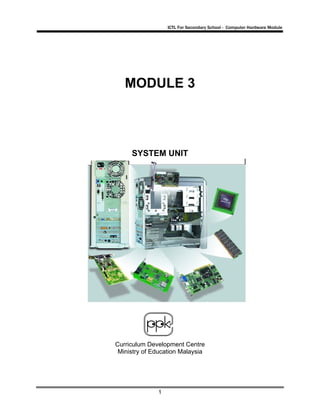
     SYSTEM UNIT


Curriculum Development Centre
 Ministry of Education Malaysia


              1
ICTL For Secondary School - Computer Hardware Module


1.     Name of Module :       System Unit


2.     Learning Outcomes: The students should be able to:

                      •       identify the components of a system unit
                      •       state the functions of the main components of a system unit
                      •       state the functions of cpu, ram, rom and expansions slots found
                              on the motherboard

3.     Knowledge and Skills:
                   •      main components in the computer system


4.     Module Summary:        At the end of the module, a student is able to :

                      •       identify main components of system unit and motherboard
                      •       state the functions of main components of system unit
                      •       state the functions of CPU, RAM, ROM and expansion slot


This module contains 2 activities:

               Activity 1 : Identify the components of a system unit
               Activity 2 : Identify the components of a motherboard


As you are doing this module, use the computer in the lab to identify the components in the
system unit.


                                                2
ICTL For Secondary School - Computer Hardware Module


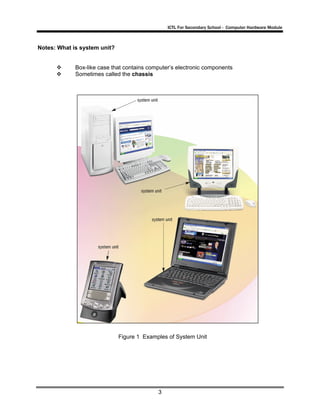
Notes: What is system unit?


             Box-like case that contains computer’s electronic components
             Sometimes called the chassis


                              Figure 1 Examples of System Unit


                                            3
ICTL For Secondary School - Computer Hardware Module


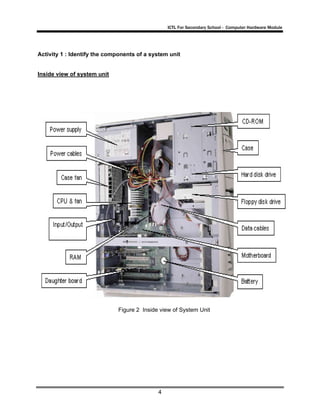
Activity 1 : Identify the components of a system unit


Inside view of system unit


                             Figure 2 Inside view of System Unit


                                            4
ICTL For Secondary School - Computer Hardware Module


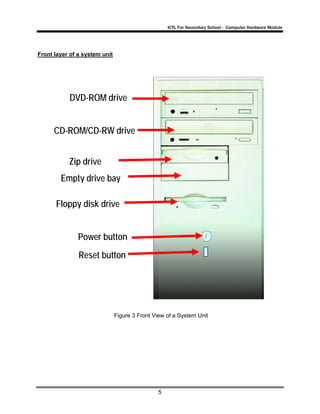
Front layer of a system unit


           DVD-ROM drive


      CD-ROM/CD-RW drive


           Zip drive
        Empty drive bay

      Floppy disk drive


               Power button
               Reset button


                               Figure 3 Front View of a System Unit


                                               5
ICTL For Secondary School - Computer Hardware Module


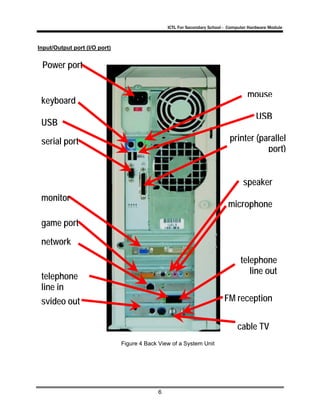
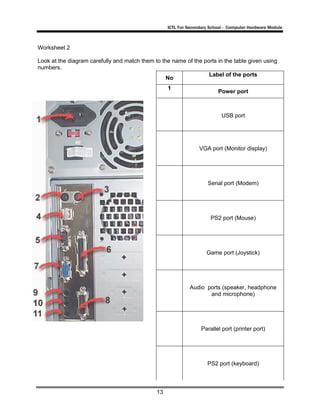
Input/Output port (I/O port)


 Power port


                                                                                    mouse
 keyboard
                                                                                        USB
 USB
 serial port                                                                printer (parallel
                                                                                       port)


                                                                                  speaker
 monitor
                                                                           microphone

 game port
 network
                                                                                 telephone
                                                                                    line out
 telephone
 line in
 svideo out                                                              FM reception


                                                                               cable TV
                               Figure 4 Back View of a System Unit


                                            6
ICTL For Secondary School - Computer Hardware Module


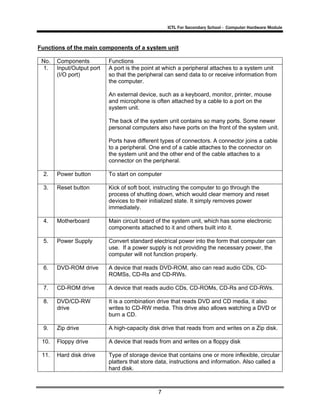
Functions of the main components of a system unit

 No.   Components          Functions
 1.    Input/Output port   A port is the point at which a peripheral attaches to a system unit
       (I/O port)          so that the peripheral can send data to or receive information from
                           the computer.

                           An external device, such as a keyboard, monitor, printer, mouse
                           and microphone is often attached by a cable to a port on the
                           system unit.

                           The back of the system unit contains so many ports. Some newer
                           personal computers also have ports on the front of the system unit.

                           Ports have different types of connectors. A connector joins a cable
                           to a peripheral. One end of a cable attaches to the connector on
                           the system unit and the other end of the cable attaches to a
                           connector on the peripheral.

  2.   Power button        To start on computer

  3.   Reset button        Kick of soft boot, instructing the computer to go through the
                           process of shutting down, which would clear memory and reset
                           devices to their initialized state. It simply removes power
                           immediately.

  4.   Motherboard         Main circuit board of the system unit, which has some electronic
                           components attached to it and others built into it.

  5.   Power Supply        Convert standard electrical power into the form that computer can
                           use. If a power supply is not providing the necessary power, the
                           computer will not function properly.

  6.   DVD-ROM drive       A device that reads DVD-ROM, also can read audio CDs, CD-
                           ROMSs, CD-Rs and CD-RWs.

  7.   CD-ROM drive        A device that reads audio CDs, CD-ROMs, CD-Rs and CD-RWs.

  8.   DVD/CD-RW           It is a combination drive that reads DVD and CD media, it also
       drive               writes to CD-RW media. This drive also allows watching a DVD or
                           burn a CD.

  9.   Zip drive           A high-capacity disk drive that reads from and writes on a Zip disk.

 10.   Floppy drive        A device that reads from and writes on a floppy disk

 11.   Hard disk drive     Type of storage device that contains one or more inflexible, circular
                           platters that store data, instructions and information. Also called a
                           hard disk.


                                               7
ICTL For Secondary School - Computer Hardware Module


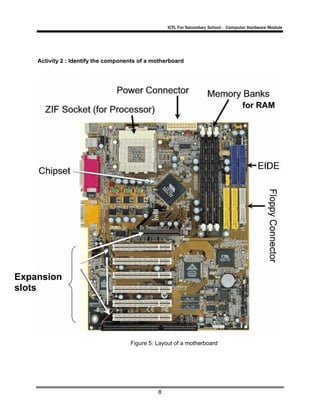
    Activity 2 : Identify the components of a motherboard


                                                                                    for RAM


Expansion
slots


                                     Figure 5: Layout of a motherboard


                                               8
ICTL For Secondary School - Computer Hardware Module


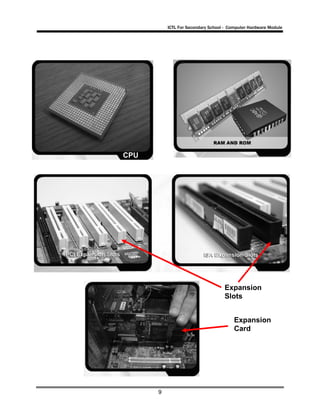
CPU


                                   Expansion
                                   Slots


                                        Expansion
                                        Card


      9
ICTL For Secondary School - Computer Hardware Module


Functions of the components of the motherboard


 No.   Components   Functions
 1.
       Central      A Central Processing Unit or CPU is a microprocessor (or processor
       Processing   for short). It is an integrated circuit chip that is capable of processing
       Unit (CPU)   electronic signals. The CPU is the most important element in a
                    computer system.

                    A CPU interprets instructions given by the software and carries out
                    those instructions by processing data and controlling the rest of the
                    computer’s components.

 2.
       Random               RAM is installed inside computers. RAM is also known as a
       Access               working memory.
       Memory               The data in RAM can be read (retrieved) or written (stored).
       (RAM)                RAM is volatile which means the programs and data in RAM
                            are lost when the computer is powered off.
                            A computer uses RAM to hold temporary instructions and data
                            needed to complete tasks. This enables the computer's CPU
                            (Central Processing Unit) to access instructions and data
                            stored in the memory very quickly.
                            RAM stores data during and after processing.

 3.
       Read Only            ROM is another type of memory permanently stored inside the
       Memory               computer.
       (ROM)                ROM is non-volatile. It holds the programs and data when the
                            computer is powered off.
                            Programs in ROM have been pre-recorded. It can only be
                            stored by the manufacturer; once it is done, it cannot be
                            changed.
                            Many complex functions, such as start up operating
                            instructions, translators for high-level languages and operating
                            systems are placed in ROM memory.
                            All the contents in ROM can be accessed and read but cannot
                            be changed.

 4.
       Expansion    Expansion slots are the sockets where the circuit boards or the
       Slots        adapter cards can be inserted into the motherboard. It is a place to fit
                    an expansion card containing the circuitry that provides some
                    specialised capability, such as video acceleration, sound or disk drive
                    control.


                                             10
ICTL For Secondary School - Computer Hardware Module


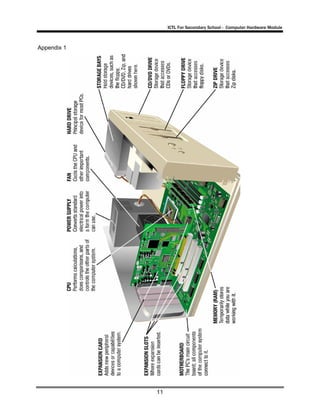
Appendix 1


             11
ICTL For Secondary School - Computer Hardware Module


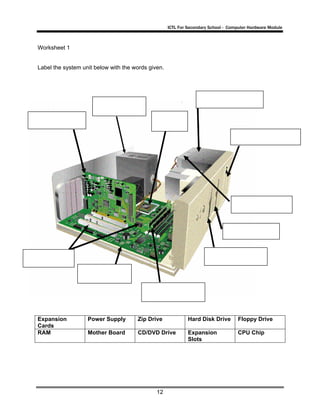
Worksheet 1


Label the system unit below with the words given.


Expansion          Power Supply       Zip Drive              Hard Disk Drive       Floppy Drive
Cards
RAM                Mother Board       CD/DVD Drive           Expansion             CPU Chip
                                                             Slots


                                              12
ICTL For Secondary School - Computer Hardware Module


Worksheet 2

Look at the diagram carefully and match them to the name of the ports in the table given using
numbers.
                                                                  Label of the ports
                                                  No
                                                   1
                                                                         Power port


                                                                           USB port


                                                                 VGA port (Monitor display)


                                                                     Serial port (Modem)


                                                                      PS2 port (Mouse)


                                                                    Game port (Joystick)


                                                             Audio ports (speaker, headphone
                                                                    and microphone)


                                                                  Parallel port (printer port)


                                                                     PS2 port (keyboard)


                                              13
ICTL For Secondary School - Computer Hardware Module


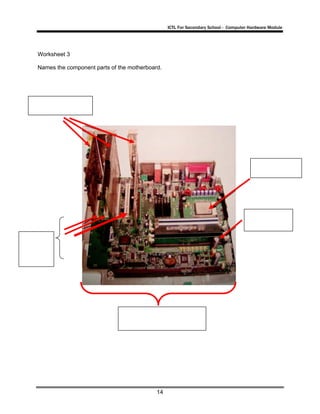
Worksheet 3

Names the component parts of the motherboard.


                                           14
ICTL For Secondary School - Computer Hardware Module


Worksheet 4


Mark T for True and F for False

              1. The processor (CPU) interprets and carries out the basic instructions that
                  operate a computer.

              2. Computers can use only one processor at a time.

              3. ROM is the main circuit board of the system unit.

              4. Expansion slot is a socket on the motherboard that can hold an adapter card.

              5. RAM is non-volatile

              6. The most important chip on the main circuit board is the microprocessor chip.

              7. I/O port is the point at which a peripheral attaches to a system unit so that the
                 peripheral can send data to or receive information from the computer.

              8. Reset button is to start on computer.

              9. A device that reads from and writes on a floppy disk is called hard disk drives.

              10. Power supply convert standard electrical power into the form that computer
                  can use.


                                               15
ICTL For Secondary School - Computer Hardware Module


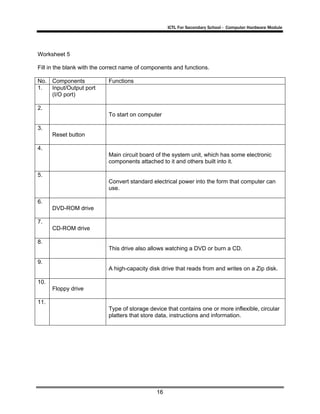
Worksheet 5

Fill in the blank with the correct name of components and functions.

No. Components              Functions
1.  Input/Output port
    (I/O port)

2.
                            To start on computer

3.
      Reset button

4.
                            Main circuit board of the system unit, which has some electronic
                            components attached to it and others built into it.

5.
                            Convert standard electrical power into the form that computer can
                            use.

6.
      DVD-ROM drive

7.
      CD-ROM drive

8.
                            This drive also allows watching a DVD or burn a CD.

9.
                            A high-capacity disk drive that reads from and writes on a Zip disk.

10.
      Floppy drive

11.
                            Type of storage device that contains one or more inflexible, circular
                            platters that store data, instructions and information.


                                               16
ICTL For Secondary School - Computer Hardware Module


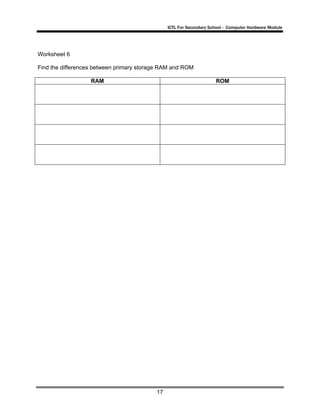
Worksheet 6

Find the differences between primary storage RAM and ROM

                   RAM                                              ROM


                                          17
ICTL For Secondary School - Computer Hardware Module


Reference

Cashman, S. (2006) Discovering Computers 2006. USA : Thomson Course Technology.

Ibrahim Ahmad, Mohd Hafiz et al (2007) Information and Communication Technology (ICT)
Based on SPM Syllabus. Selangor: Venton Publishing (M) Sdn Bhd.

NCC Education (2002) Computer Studies, Computer Ace. Sri Lanka : Computer Pioneers.

IBasic Computing (2003) by TMEdu Tech (M) Sdn Bhd

http://www.wikipedia.org

http://images.search.yahoo.com

http://www.google.com.my

CD courseware ICT


                                          18

Module3 system unit

  • 1.
    KEMENTERIAN PELAJARAN MALAYSIA SelfAccess Learning Module ICT Literacy for Secondary School Programme Computer Hardware System Unit PUSAT PERKEMBANGAN KURIKULUM KEMENTERIAN PELAJARAN MALAYSIA
  • 2.
    ICTL For SecondarySchool - Computer Hardware Module MODULE 3 SYSTEM UNIT Curriculum Development Centre Ministry of Education Malaysia 1
  • 3.
    ICTL For SecondarySchool - Computer Hardware Module 1. Name of Module : System Unit 2. Learning Outcomes: The students should be able to: • identify the components of a system unit • state the functions of the main components of a system unit • state the functions of cpu, ram, rom and expansions slots found on the motherboard 3. Knowledge and Skills: • main components in the computer system 4. Module Summary: At the end of the module, a student is able to : • identify main components of system unit and motherboard • state the functions of main components of system unit • state the functions of CPU, RAM, ROM and expansion slot This module contains 2 activities: Activity 1 : Identify the components of a system unit Activity 2 : Identify the components of a motherboard As you are doing this module, use the computer in the lab to identify the components in the system unit. 2
  • 4.
    ICTL For SecondarySchool - Computer Hardware Module Notes: What is system unit? Box-like case that contains computer’s electronic components Sometimes called the chassis Figure 1 Examples of System Unit 3
  • 5.
    ICTL For SecondarySchool - Computer Hardware Module Activity 1 : Identify the components of a system unit Inside view of system unit Figure 2 Inside view of System Unit 4
  • 6.
    ICTL For SecondarySchool - Computer Hardware Module Front layer of a system unit DVD-ROM drive CD-ROM/CD-RW drive Zip drive Empty drive bay Floppy disk drive Power button Reset button Figure 3 Front View of a System Unit 5
  • 7.
    ICTL For SecondarySchool - Computer Hardware Module Input/Output port (I/O port) Power port mouse keyboard USB USB serial port printer (parallel port) speaker monitor microphone game port network telephone line out telephone line in svideo out FM reception cable TV Figure 4 Back View of a System Unit 6
  • 8.
    ICTL For SecondarySchool - Computer Hardware Module Functions of the main components of a system unit No. Components Functions 1. Input/Output port A port is the point at which a peripheral attaches to a system unit (I/O port) so that the peripheral can send data to or receive information from the computer. An external device, such as a keyboard, monitor, printer, mouse and microphone is often attached by a cable to a port on the system unit. The back of the system unit contains so many ports. Some newer personal computers also have ports on the front of the system unit. Ports have different types of connectors. A connector joins a cable to a peripheral. One end of a cable attaches to the connector on the system unit and the other end of the cable attaches to a connector on the peripheral. 2. Power button To start on computer 3. Reset button Kick of soft boot, instructing the computer to go through the process of shutting down, which would clear memory and reset devices to their initialized state. It simply removes power immediately. 4. Motherboard Main circuit board of the system unit, which has some electronic components attached to it and others built into it. 5. Power Supply Convert standard electrical power into the form that computer can use. If a power supply is not providing the necessary power, the computer will not function properly. 6. DVD-ROM drive A device that reads DVD-ROM, also can read audio CDs, CD- ROMSs, CD-Rs and CD-RWs. 7. CD-ROM drive A device that reads audio CDs, CD-ROMs, CD-Rs and CD-RWs. 8. DVD/CD-RW It is a combination drive that reads DVD and CD media, it also drive writes to CD-RW media. This drive also allows watching a DVD or burn a CD. 9. Zip drive A high-capacity disk drive that reads from and writes on a Zip disk. 10. Floppy drive A device that reads from and writes on a floppy disk 11. Hard disk drive Type of storage device that contains one or more inflexible, circular platters that store data, instructions and information. Also called a hard disk. 7
  • 9.
    ICTL For SecondarySchool - Computer Hardware Module Activity 2 : Identify the components of a motherboard for RAM Expansion slots Figure 5: Layout of a motherboard 8
  • 10.
    ICTL For SecondarySchool - Computer Hardware Module CPU Expansion Slots Expansion Card 9
  • 11.
    ICTL For SecondarySchool - Computer Hardware Module Functions of the components of the motherboard No. Components Functions 1. Central A Central Processing Unit or CPU is a microprocessor (or processor Processing for short). It is an integrated circuit chip that is capable of processing Unit (CPU) electronic signals. The CPU is the most important element in a computer system. A CPU interprets instructions given by the software and carries out those instructions by processing data and controlling the rest of the computer’s components. 2. Random RAM is installed inside computers. RAM is also known as a Access working memory. Memory The data in RAM can be read (retrieved) or written (stored). (RAM) RAM is volatile which means the programs and data in RAM are lost when the computer is powered off. A computer uses RAM to hold temporary instructions and data needed to complete tasks. This enables the computer's CPU (Central Processing Unit) to access instructions and data stored in the memory very quickly. RAM stores data during and after processing. 3. Read Only ROM is another type of memory permanently stored inside the Memory computer. (ROM) ROM is non-volatile. It holds the programs and data when the computer is powered off. Programs in ROM have been pre-recorded. It can only be stored by the manufacturer; once it is done, it cannot be changed. Many complex functions, such as start up operating instructions, translators for high-level languages and operating systems are placed in ROM memory. All the contents in ROM can be accessed and read but cannot be changed. 4. Expansion Expansion slots are the sockets where the circuit boards or the Slots adapter cards can be inserted into the motherboard. It is a place to fit an expansion card containing the circuitry that provides some specialised capability, such as video acceleration, sound or disk drive control. 10
  • 12.
    ICTL For SecondarySchool - Computer Hardware Module Appendix 1 11
  • 13.
    ICTL For SecondarySchool - Computer Hardware Module Worksheet 1 Label the system unit below with the words given. Expansion Power Supply Zip Drive Hard Disk Drive Floppy Drive Cards RAM Mother Board CD/DVD Drive Expansion CPU Chip Slots 12
  • 14.
    ICTL For SecondarySchool - Computer Hardware Module Worksheet 2 Look at the diagram carefully and match them to the name of the ports in the table given using numbers. Label of the ports No 1 Power port USB port VGA port (Monitor display) Serial port (Modem) PS2 port (Mouse) Game port (Joystick) Audio ports (speaker, headphone and microphone) Parallel port (printer port) PS2 port (keyboard) 13
  • 15.
    ICTL For SecondarySchool - Computer Hardware Module Worksheet 3 Names the component parts of the motherboard. 14
  • 16.
    ICTL For SecondarySchool - Computer Hardware Module Worksheet 4 Mark T for True and F for False 1. The processor (CPU) interprets and carries out the basic instructions that operate a computer. 2. Computers can use only one processor at a time. 3. ROM is the main circuit board of the system unit. 4. Expansion slot is a socket on the motherboard that can hold an adapter card. 5. RAM is non-volatile 6. The most important chip on the main circuit board is the microprocessor chip. 7. I/O port is the point at which a peripheral attaches to a system unit so that the peripheral can send data to or receive information from the computer. 8. Reset button is to start on computer. 9. A device that reads from and writes on a floppy disk is called hard disk drives. 10. Power supply convert standard electrical power into the form that computer can use. 15
  • 17.
    ICTL For SecondarySchool - Computer Hardware Module Worksheet 5 Fill in the blank with the correct name of components and functions. No. Components Functions 1. Input/Output port (I/O port) 2. To start on computer 3. Reset button 4. Main circuit board of the system unit, which has some electronic components attached to it and others built into it. 5. Convert standard electrical power into the form that computer can use. 6. DVD-ROM drive 7. CD-ROM drive 8. This drive also allows watching a DVD or burn a CD. 9. A high-capacity disk drive that reads from and writes on a Zip disk. 10. Floppy drive 11. Type of storage device that contains one or more inflexible, circular platters that store data, instructions and information. 16
  • 18.
    ICTL For SecondarySchool - Computer Hardware Module Worksheet 6 Find the differences between primary storage RAM and ROM RAM ROM 17
  • 19.
    ICTL For SecondarySchool - Computer Hardware Module Reference Cashman, S. (2006) Discovering Computers 2006. USA : Thomson Course Technology. Ibrahim Ahmad, Mohd Hafiz et al (2007) Information and Communication Technology (ICT) Based on SPM Syllabus. Selangor: Venton Publishing (M) Sdn Bhd. NCC Education (2002) Computer Studies, Computer Ace. Sri Lanka : Computer Pioneers. IBasic Computing (2003) by TMEdu Tech (M) Sdn Bhd http://www.wikipedia.org http://images.search.yahoo.com http://www.google.com.my CD courseware ICT 18