ICT 9:
Computer Hardware Servicing
Module 3, Lesson 2: Install Equipment/ Devices and Systems
SAFETY PRECAUTIONS
Module 3, Lesson 2:
InstallEquipment/Devices
andSystems
SAFETYPRECAUTIONS
This lesson is designed to give you the
proper procedures used in installing
devices and operating system of a personal
computer, alongside with it is the basic
computer configuration set up. At the end
of this lesson you should be able to:
a) Apply OHS procedures in installing
devices, systems, networking devices,
and peripherals;
b) Comply with the requirements in
installing devices,/systems, networking
devices, and peripherals;
Module 3, Lesson 2:
InstallEquipment/Devices
andSystems
SAFETYPRECAUTIONS
This lesson is designed to give you the
proper procedures used in installing
devices and operating system of a personal
computer, alongside with it is the basic
computer configuration set up. At the end
of this lesson you should be able to:
c) Install computer systems, networking
devices and peripherals in accordance
with job requirements;
d) Perform variations in installing devices
and systems in accordance with
customer/client’s requirements;
Module 3, Lesson 2:
InstallEquipment/Devices
andSystems
SAFETYPRECAUTIONS
This lesson is designed to give you the
proper procedures used in installing
devices and operating system of a personal
computer, alongside with it is the basic
computer configuration set up. At the end
of this lesson you should be able to:
e) Obtain approval from appropriate
personnel before implementing
contingency procedures;
f) Respond to unplanned events or
conditions in accordance to established
procedures; and
Module 3, Lesson 2:
InstallEquipment/Devices
andSystems
SAFETYPRECAUTIONS
This lesson is designed to give you the
proper procedures used in installing
devices and operating system of a personal
computer, alongside with it is the basic
computer configuration set up. At the end
of this lesson you should be able to:
g) Check the quality of the work
undertaken in accordance with the
established procedures.
Module 3, Lesson 2:
InstallEquipment/Devices
andSystems
SAFETYPRECAUTIONS
Personal Protective Equipment
ď‚§ refers to protective clothing, helmets,
goggles, or other gear designed to protect
the wearer's body or clothing from injury
by electrical hazards, heat, chemicals,
and infection, for job-related occupational
safety and health purposes.
Module 3, Lesson 2:
InstallEquipment/Devices
andSystems
SAFETYPRECAUTIONS
Personal Protective Equipment
ď‚§ PPE can also be used to protect the
working environment from pesticide
application, pollution or infection from
the worker (for example in a microchip
factory).
ď‚§ It is important that students and
teachers during their laboratory period
should be required to use personal
protective equipment.
Module 3, Lesson 2:
InstallEquipment/Devices
andSystems
SAFETYPRECAUTIONS
Personal Protective Equipment
ď‚§ Some of these are:
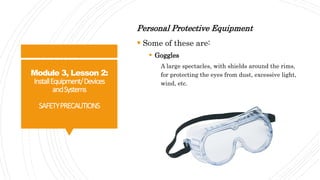
ď‚§ Goggles
A large spectacles, with shields around the rims,
for protecting the eyes from dust, excessive light,
wind, etc.
Module 3, Lesson 2:
InstallEquipment/Devices
andSystems
SAFETYPRECAUTIONS
Personal Protective Equipment
ď‚§ Some of these are:
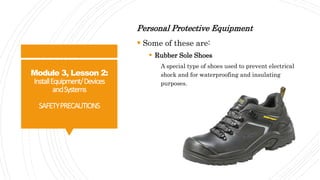
ď‚§ Rubber Sole Shoes
A special type of shoes used to prevent electrical
shock and for waterproofing and insulating
purposes.
Module 3, Lesson 2:
InstallEquipment/Devices
andSystems
SAFETYPRECAUTIONS
Personal Protective Equipment
ď‚§ Some of these are:
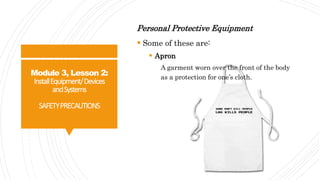
ď‚§ Apron
A garment worn over the front of the body
as a protection for one’s cloth.
Module 3, Lesson 2:
InstallEquipment/Devices
andSystems
SAFETYPRECAUTIONS
Personal Protective Equipment
ď‚§ Some of these are:
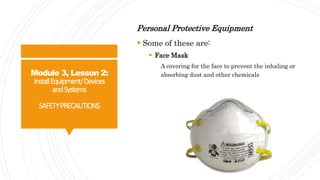
ď‚§ Face Mask
A covering for the face to prevent the inhaling or
absorbing dust and other chemicals
Module 3, Lesson 2:
InstallEquipment/Devices
andSystems
SAFETYPRECAUTIONS
Personal Protective Equipment
ď‚§ Some of these are:
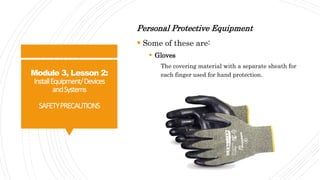
ď‚§ Gloves
The covering material with a separate sheath for
each finger used for hand protection.
Module 3, Lesson 2:
InstallEquipment/Devices
andSystems
SAFETYPRECAUTIONS
Anti-Static and Safety Precautions
ď‚§ Static electricity is the discharge of
electricity between two objects with
different electrical potential.
ď‚§ Humans can't feel a static shock until it
is several thousand volts strong, but it
takes less than 30 volts to fry a sensitive
computer component, such as a stick of
RAM or a processor.
Module 3, Lesson 2:
InstallEquipment/Devices
andSystems
SAFETYPRECAUTIONS
Anti-Static and Safety Precautions
ď‚§ That's why computer technicians and
home computer builders have to guard
their computers against the deadly
ravages of static electricity, as well as
take steps to avoid injury.
Module 3, Lesson 2:
InstallEquipment/Devices
andSystems
SAFETYPRECAUTIONS
Anti-Static and Safety Precautions
Safety and Anti-Static Rules
ď‚§ Always use an anti-static wrist strap
when working on a computer (except
when working on monitors)
ď‚§ Always disconnect a computer from the
AC power and from any powered
peripherals while you are working on it.
Module 3, Lesson 2:
InstallEquipment/Devices
andSystems
SAFETYPRECAUTIONS
Anti-Static and Safety Precautions
Safety and Anti-Static Rules
ď‚§ Always grasp a metal part of the
computer chassis with your bare hand
before you touch anything inside. Do this
even if you are wearing an anti-static
wristband.
Module 3, Lesson 2:
InstallEquipment/Devices
andSystems
SAFETYPRECAUTIONS
Anti-Static and Safety Precautions
Safety and Anti-Static Rules
ď‚§ Always handle electronic components by
a non-conducting (non-metallic) edge.
Don't touch the pins or other connectors.
ď‚§ Never plug an ATX power supply into AC
power unless it is connected either to a
computer's motherboard or to a dummy
test load.
Module 3, Lesson 2:
InstallEquipment/Devices
andSystems
SAFETYPRECAUTIONS
Anti-Static and Safety Precautions
Safety and Anti-Static Rules
ď‚§ Always use a UL-approved surge
protector or an Uninterruptible Power
Supply that incorporates surge and spike
protection.
ď‚§ Never eat, drink, or smoke while working
on a computer.
Module 3, Lesson 2:
InstallEquipment/Devices
andSystems
SAFETYPRECAUTIONS
QUIZ
Module 3, Lesson 2:
InstallEquipment/Devices
andSystems
SAFETYPRECAUTIONS
QUIZ
True or False
Direction: Write TRUE if the statement is
correct and FALSE otherwise.
1. Always disconnect a computer from the
AC power and from any powered
peripherals while you are working on it.
Module 3, Lesson 2:
InstallEquipment/Devices
andSystems
SAFETYPRECAUTIONS
QUIZ
True or False
Direction: Write TRUE if the statement is
correct and FALSE otherwise.
2. Always grasp a metal part of the
computer chassis with your bare hand
before you touch anything inside. Do
this even if you are wearing an anti-
static wristband.
Module 3, Lesson 2:
InstallEquipment/Devices
andSystems
SAFETYPRECAUTIONS
QUIZ
True or False
Direction: Write TRUE if the statement is
correct and FALSE otherwise.
3. Always handle electronic components by
a non-conducting (non-metallic) edge.
Don't touch the pins or other connectors.
Module 3, Lesson 2:
InstallEquipment/Devices
andSystems
SAFETYPRECAUTIONS
QUIZ
True or False
Direction: Write TRUE if the statement is
correct and FALSE otherwise.
4. Always use a UL-approved surge
protector or an Uninterruptible Power
Supply that incorporates surge and
spike protection.
Module 3, Lesson 2:
InstallEquipment/Devices
andSystems
SAFETYPRECAUTIONS
QUIZ
True or False
Direction: Write TRUE if the statement is
correct and FALSE otherwise.
5. Never use an anti-static wrist strap
when working on a computer (except
when working on monitors
Module 3, Lesson 2:
InstallEquipment/Devices
andSystems
SAFETYPRECAUTIONS
QUIZ
True or False
Direction: Write TRUE if the statement is
correct and FALSE otherwise.
6. Everyone is allowed to eat, drink, or
smoke while working on a computer.
Module 3, Lesson 2:
InstallEquipment/Devices
andSystems
SAFETYPRECAUTIONS
QUIZ
True or False
Direction: Write TRUE if the statement is
correct and FALSE otherwise.
7. Never plug an ATX power supply into
AC power unless it is connected either to
a computer's motherboard or to a
dummy test load.
Module 3, Lesson 2:
InstallEquipment/Devices
andSystems
SAFETYPRECAUTIONS
QUIZ
True or False
Direction: Write TRUE if the statement is
correct and FALSE otherwise.
8. Static electricity is the discharge of
electricity between two objects with
different electrical potential.
Module 3, Lesson 2:
InstallEquipment/Devices
andSystems
SAFETYPRECAUTIONS
QUIZ
True or False
Direction: Write TRUE if the statement is
correct and FALSE otherwise.
9. Apron is a garment worn over the front
of the body as a protection for one’s
cloth.
Module 3, Lesson 2:
InstallEquipment/Devices
andSystems
SAFETYPRECAUTIONS
QUIZ
True or False
Direction: Write TRUE if the statement is
correct and FALSE otherwise.
10. PPE can also be used to protect the
working environment from pesticide
application, pollution or infection from
the worker.
Module 3, Lesson 2:
InstallEquipment/Devices
andSystems
SAFETYPRECAUTIONS
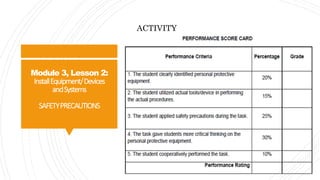
ACTIVITY
Module 3, Lesson 2:
InstallEquipment/Devices
andSystems
SAFETYPRECAUTIONS
ACTIVITY
Directions:
The class will be divided into five (5)
groups.
Each group has its own respective leader.
The group will perform a task regarding
familiarizing the personal protective
equipment.
Module 3, Lesson 2:
InstallEquipment/Devices
andSystems
SAFETYPRECAUTIONS
ACTIVITY
Module 3, Lesson 2:
InstallEquipment/Devices
andSystems
SAFETYPRECAUTIONS
End of
Module 3, Lesson 2:
Install Equipment/ Devices
and Systems
SAFETY PRECAUTIONS

Ict 9 module 3, lesson 2.1 safety precautions

  • 1.
    ICT 9: Computer HardwareServicing Module 3, Lesson 2: Install Equipment/ Devices and Systems SAFETY PRECAUTIONS
  • 2.
    Module 3, Lesson2: InstallEquipment/Devices andSystems SAFETYPRECAUTIONS This lesson is designed to give you the proper procedures used in installing devices and operating system of a personal computer, alongside with it is the basic computer configuration set up. At the end of this lesson you should be able to: a) Apply OHS procedures in installing devices, systems, networking devices, and peripherals; b) Comply with the requirements in installing devices,/systems, networking devices, and peripherals;
  • 3.
    Module 3, Lesson2: InstallEquipment/Devices andSystems SAFETYPRECAUTIONS This lesson is designed to give you the proper procedures used in installing devices and operating system of a personal computer, alongside with it is the basic computer configuration set up. At the end of this lesson you should be able to: c) Install computer systems, networking devices and peripherals in accordance with job requirements; d) Perform variations in installing devices and systems in accordance with customer/client’s requirements;
  • 4.
    Module 3, Lesson2: InstallEquipment/Devices andSystems SAFETYPRECAUTIONS This lesson is designed to give you the proper procedures used in installing devices and operating system of a personal computer, alongside with it is the basic computer configuration set up. At the end of this lesson you should be able to: e) Obtain approval from appropriate personnel before implementing contingency procedures; f) Respond to unplanned events or conditions in accordance to established procedures; and
  • 5.
    Module 3, Lesson2: InstallEquipment/Devices andSystems SAFETYPRECAUTIONS This lesson is designed to give you the proper procedures used in installing devices and operating system of a personal computer, alongside with it is the basic computer configuration set up. At the end of this lesson you should be able to: g) Check the quality of the work undertaken in accordance with the established procedures.
  • 6.
    Module 3, Lesson2: InstallEquipment/Devices andSystems SAFETYPRECAUTIONS Personal Protective Equipment ď‚§ refers to protective clothing, helmets, goggles, or other gear designed to protect the wearer's body or clothing from injury by electrical hazards, heat, chemicals, and infection, for job-related occupational safety and health purposes.
  • 7.
    Module 3, Lesson2: InstallEquipment/Devices andSystems SAFETYPRECAUTIONS Personal Protective Equipment ď‚§ PPE can also be used to protect the working environment from pesticide application, pollution or infection from the worker (for example in a microchip factory). ď‚§ It is important that students and teachers during their laboratory period should be required to use personal protective equipment.
  • 8.
    Module 3, Lesson2: InstallEquipment/Devices andSystems SAFETYPRECAUTIONS Personal Protective Equipment ď‚§ Some of these are: ď‚§ Goggles A large spectacles, with shields around the rims, for protecting the eyes from dust, excessive light, wind, etc.
  • 9.
    Module 3, Lesson2: InstallEquipment/Devices andSystems SAFETYPRECAUTIONS Personal Protective Equipment ď‚§ Some of these are: ď‚§ Rubber Sole Shoes A special type of shoes used to prevent electrical shock and for waterproofing and insulating purposes.
  • 10.
    Module 3, Lesson2: InstallEquipment/Devices andSystems SAFETYPRECAUTIONS Personal Protective Equipment  Some of these are:  Apron A garment worn over the front of the body as a protection for one’s cloth.
  • 11.
    Module 3, Lesson2: InstallEquipment/Devices andSystems SAFETYPRECAUTIONS Personal Protective Equipment ď‚§ Some of these are: ď‚§ Face Mask A covering for the face to prevent the inhaling or absorbing dust and other chemicals
  • 12.
    Module 3, Lesson2: InstallEquipment/Devices andSystems SAFETYPRECAUTIONS Personal Protective Equipment ď‚§ Some of these are: ď‚§ Gloves The covering material with a separate sheath for each finger used for hand protection.
  • 13.
    Module 3, Lesson2: InstallEquipment/Devices andSystems SAFETYPRECAUTIONS Anti-Static and Safety Precautions ď‚§ Static electricity is the discharge of electricity between two objects with different electrical potential. ď‚§ Humans can't feel a static shock until it is several thousand volts strong, but it takes less than 30 volts to fry a sensitive computer component, such as a stick of RAM or a processor.
  • 14.
    Module 3, Lesson2: InstallEquipment/Devices andSystems SAFETYPRECAUTIONS Anti-Static and Safety Precautions ď‚§ That's why computer technicians and home computer builders have to guard their computers against the deadly ravages of static electricity, as well as take steps to avoid injury.
  • 15.
    Module 3, Lesson2: InstallEquipment/Devices andSystems SAFETYPRECAUTIONS Anti-Static and Safety Precautions Safety and Anti-Static Rules ď‚§ Always use an anti-static wrist strap when working on a computer (except when working on monitors) ď‚§ Always disconnect a computer from the AC power and from any powered peripherals while you are working on it.
  • 16.
    Module 3, Lesson2: InstallEquipment/Devices andSystems SAFETYPRECAUTIONS Anti-Static and Safety Precautions Safety and Anti-Static Rules ď‚§ Always grasp a metal part of the computer chassis with your bare hand before you touch anything inside. Do this even if you are wearing an anti-static wristband.
  • 17.
    Module 3, Lesson2: InstallEquipment/Devices andSystems SAFETYPRECAUTIONS Anti-Static and Safety Precautions Safety and Anti-Static Rules ď‚§ Always handle electronic components by a non-conducting (non-metallic) edge. Don't touch the pins or other connectors. ď‚§ Never plug an ATX power supply into AC power unless it is connected either to a computer's motherboard or to a dummy test load.
  • 18.
    Module 3, Lesson2: InstallEquipment/Devices andSystems SAFETYPRECAUTIONS Anti-Static and Safety Precautions Safety and Anti-Static Rules ď‚§ Always use a UL-approved surge protector or an Uninterruptible Power Supply that incorporates surge and spike protection. ď‚§ Never eat, drink, or smoke while working on a computer.
  • 19.
    Module 3, Lesson2: InstallEquipment/Devices andSystems SAFETYPRECAUTIONS QUIZ
  • 20.
    Module 3, Lesson2: InstallEquipment/Devices andSystems SAFETYPRECAUTIONS QUIZ True or False Direction: Write TRUE if the statement is correct and FALSE otherwise. 1. Always disconnect a computer from the AC power and from any powered peripherals while you are working on it.
  • 21.
    Module 3, Lesson2: InstallEquipment/Devices andSystems SAFETYPRECAUTIONS QUIZ True or False Direction: Write TRUE if the statement is correct and FALSE otherwise. 2. Always grasp a metal part of the computer chassis with your bare hand before you touch anything inside. Do this even if you are wearing an anti- static wristband.
  • 22.
    Module 3, Lesson2: InstallEquipment/Devices andSystems SAFETYPRECAUTIONS QUIZ True or False Direction: Write TRUE if the statement is correct and FALSE otherwise. 3. Always handle electronic components by a non-conducting (non-metallic) edge. Don't touch the pins or other connectors.
  • 23.
    Module 3, Lesson2: InstallEquipment/Devices andSystems SAFETYPRECAUTIONS QUIZ True or False Direction: Write TRUE if the statement is correct and FALSE otherwise. 4. Always use a UL-approved surge protector or an Uninterruptible Power Supply that incorporates surge and spike protection.
  • 24.
    Module 3, Lesson2: InstallEquipment/Devices andSystems SAFETYPRECAUTIONS QUIZ True or False Direction: Write TRUE if the statement is correct and FALSE otherwise. 5. Never use an anti-static wrist strap when working on a computer (except when working on monitors
  • 25.
    Module 3, Lesson2: InstallEquipment/Devices andSystems SAFETYPRECAUTIONS QUIZ True or False Direction: Write TRUE if the statement is correct and FALSE otherwise. 6. Everyone is allowed to eat, drink, or smoke while working on a computer.
  • 26.
    Module 3, Lesson2: InstallEquipment/Devices andSystems SAFETYPRECAUTIONS QUIZ True or False Direction: Write TRUE if the statement is correct and FALSE otherwise. 7. Never plug an ATX power supply into AC power unless it is connected either to a computer's motherboard or to a dummy test load.
  • 27.
    Module 3, Lesson2: InstallEquipment/Devices andSystems SAFETYPRECAUTIONS QUIZ True or False Direction: Write TRUE if the statement is correct and FALSE otherwise. 8. Static electricity is the discharge of electricity between two objects with different electrical potential.
  • 28.
    Module 3, Lesson2: InstallEquipment/Devices andSystems SAFETYPRECAUTIONS QUIZ True or False Direction: Write TRUE if the statement is correct and FALSE otherwise. 9. Apron is a garment worn over the front of the body as a protection for one’s cloth.
  • 29.
    Module 3, Lesson2: InstallEquipment/Devices andSystems SAFETYPRECAUTIONS QUIZ True or False Direction: Write TRUE if the statement is correct and FALSE otherwise. 10. PPE can also be used to protect the working environment from pesticide application, pollution or infection from the worker.
  • 30.
    Module 3, Lesson2: InstallEquipment/Devices andSystems SAFETYPRECAUTIONS ACTIVITY
  • 31.
    Module 3, Lesson2: InstallEquipment/Devices andSystems SAFETYPRECAUTIONS ACTIVITY Directions: The class will be divided into five (5) groups. Each group has its own respective leader. The group will perform a task regarding familiarizing the personal protective equipment.
  • 32.
    Module 3, Lesson2: InstallEquipment/Devices andSystems SAFETYPRECAUTIONS ACTIVITY
  • 33.
    Module 3, Lesson2: InstallEquipment/Devices andSystems SAFETYPRECAUTIONS End of Module 3, Lesson 2: Install Equipment/ Devices and Systems SAFETY PRECAUTIONS