COMPUTER
SYSTEM
AND
NETWORK
CONFIGURATION
Computer
Networks
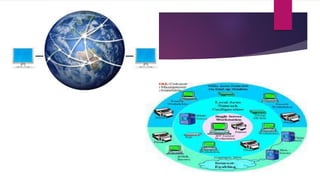
 Networks are collections of computers, software, and
hardware that are all connected to help their users work
together.
 A network connects computers by means of cabling systems,
specialized software, and devices that manage data traffic.
 A network enables users to share files and resources, such
as printers, as well as send messages electronically (e-mail)
to each other.
Different Types of
Networks
Local Area Network (LAN)
Metropolitan Area Network (MAN)
Wide Area Network (WAN)
Personal Area Network (PAN)
Local Area Network (LAN)
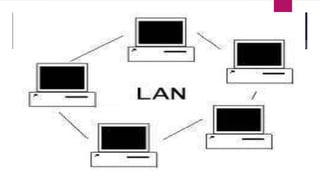
 A LAN is a network that is used for communicating among computer
devices, usually within an office building or home.
 LAN’s enable the sharing of resources such as files or hardware
devices that may be needed by multiple users
 LAN’s can be either wired or wireless. Twisted pair, coax or fibre optic
cable can be used in wired LAN’s.
 LANs are capable of very high transmission rates (100s Mb/s to G b/s).
 Every LAN uses a protocol – a set of rules that governs how packets
are configured and transmitted.
Advantages of Local Area
Network (LAN)
Speed
 Cost
 Security
 E-mail
 Resource Sharing
Disadvantages of Local
Area Network (LAN)
Expensive To Install
 Requires Administrative Time
 File Server May Fail
 Cables May Break
Metropolitan Area
Network (MAN)
 A metropolitan area network (MAN) is a large computer network that
usually spans a city or alarge campus.
 A MAN is optimized for a larger geographical area than a LAN, ranging
from several blocks of buildings to entire cities.
 A MAN might be owned and operated by a single organization, but it
usually will be used by many individuals and organizations.
 A MAN typically covers an area of between 5 and 50 km diameter.
 Examples of MAN: Telephone company network that provides a high
speed DSL to customers and cable TV network.
Wireless Local Area Network
(WLAN)
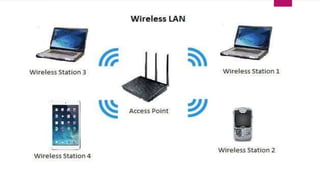
A wireless local area network (WLAN) is a
wireless distribution method for two or more
devices. WLANs use high-frequency radio waves
and often include an access point to the Internet.
A WLAN allows users to move around the
coverage area, often a home or small office,
while maintaining a network connection.
Wide Area Network (WAN)
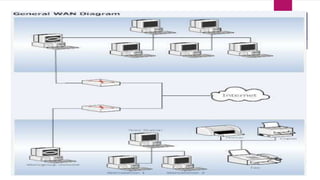
 WAN covers a large geographic area such as country, continent
or even whole of the world.
 A WAN is two or more LANs connected together. The LANs can
be many miles apart.
 To cover great distances, WANs may transmit data over leased
high-speed phone lines or wireless links such as satellites.
 Multiple LANs can be connected together using devices such as
bridges, routers, or gateways, which enable them to share data.
 The world's most popular WAN is the Internet.
Personal Area Network
(PAN)
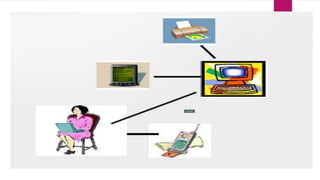
 A PAN is a network that is used for communicating among computers
and computer devices (including telephones) in close proximity of
around a few meters within a room
 It can be used for communicating between the devices themselves, or
for connecting to a larger network such as the internet.
 PAN’s can be wired or wireless
 A personal area network (PAN) is a computer network used for
communication among computer devices, including telephones and
personal digital assistants, in proximity to an individual's body.
ACTIVITY
Create a brochure about Computer System
and Network Configuration . Relate all the
contents to the most treasured skills you
acquired in the lesson. Give also your own
Brochure title.

Computer System and Network Configurations.pptx

  • 1.
  • 2.
    Computer Networks  Networks arecollections of computers, software, and hardware that are all connected to help their users work together.  A network connects computers by means of cabling systems, specialized software, and devices that manage data traffic.  A network enables users to share files and resources, such as printers, as well as send messages electronically (e-mail) to each other.
  • 3.
    Different Types of Networks LocalArea Network (LAN) Metropolitan Area Network (MAN) Wide Area Network (WAN) Personal Area Network (PAN)
  • 4.
    Local Area Network(LAN)  A LAN is a network that is used for communicating among computer devices, usually within an office building or home.  LAN’s enable the sharing of resources such as files or hardware devices that may be needed by multiple users  LAN’s can be either wired or wireless. Twisted pair, coax or fibre optic cable can be used in wired LAN’s.  LANs are capable of very high transmission rates (100s Mb/s to G b/s).  Every LAN uses a protocol – a set of rules that governs how packets are configured and transmitted.
  • 6.
    Advantages of LocalArea Network (LAN) Speed  Cost  Security  E-mail  Resource Sharing
  • 7.
    Disadvantages of Local AreaNetwork (LAN) Expensive To Install  Requires Administrative Time  File Server May Fail  Cables May Break
  • 8.
    Metropolitan Area Network (MAN) A metropolitan area network (MAN) is a large computer network that usually spans a city or alarge campus.  A MAN is optimized for a larger geographical area than a LAN, ranging from several blocks of buildings to entire cities.  A MAN might be owned and operated by a single organization, but it usually will be used by many individuals and organizations.  A MAN typically covers an area of between 5 and 50 km diameter.  Examples of MAN: Telephone company network that provides a high speed DSL to customers and cable TV network.
  • 10.
    Wireless Local AreaNetwork (WLAN) A wireless local area network (WLAN) is a wireless distribution method for two or more devices. WLANs use high-frequency radio waves and often include an access point to the Internet. A WLAN allows users to move around the coverage area, often a home or small office, while maintaining a network connection.
  • 12.
    Wide Area Network(WAN)  WAN covers a large geographic area such as country, continent or even whole of the world.  A WAN is two or more LANs connected together. The LANs can be many miles apart.  To cover great distances, WANs may transmit data over leased high-speed phone lines or wireless links such as satellites.  Multiple LANs can be connected together using devices such as bridges, routers, or gateways, which enable them to share data.  The world's most popular WAN is the Internet.
  • 14.
    Personal Area Network (PAN) A PAN is a network that is used for communicating among computers and computer devices (including telephones) in close proximity of around a few meters within a room  It can be used for communicating between the devices themselves, or for connecting to a larger network such as the internet.  PAN’s can be wired or wireless  A personal area network (PAN) is a computer network used for communication among computer devices, including telephones and personal digital assistants, in proximity to an individual's body.
  • 17.
    ACTIVITY Create a brochureabout Computer System and Network Configuration . Relate all the contents to the most treasured skills you acquired in the lesson. Give also your own Brochure title.