

Welcome
Everybody
Topic
Presented By:
Nayem Musaddik
ID: 142-15-3740
Umme Habiba Madhobi
ID: 142-15-3677
MD. Najmul Haque Noyon
ID: 142-15-3511
MD Abid Hossain
ID: 142-15-3683
How To Insert Video
How To Save a File
How To Insert Table
Contents:
 Microsoft word and PowerPoint are two very
important Software for every day use.
Learning the basic elements of these Software is
essential for everybody.
Introduction:
How to Insert Image:
1.First click the Insert tab on the toolbar of Microsoft
Word.
2.Then select Picture option from the following
menu.
How to Insert Image:
At last select the desired image from the hard disk
and click on Insert.
How to Insert Image:
Then the selected picture will be added.
How to Insert Table:
1.First click the Insert tab on the toolbar of Microsoft
Word.
2.Then select Table option from the following menu.
How to Insert Table:
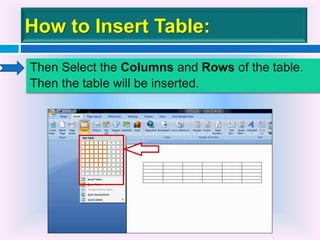
Then Select the Columns and Rows of the table.
Then the table will be inserted.
How to Insert Video:
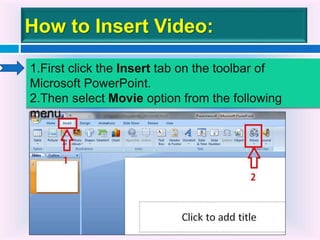
1.First click the Insert tab on the toolbar of
Microsoft PowerPoint.
2.Then select Movie option from the following
menu.
How to Insert Video:
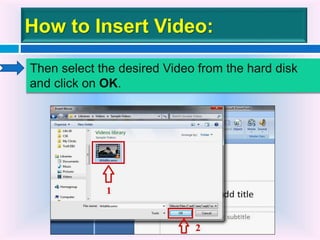
Then select the desired Video from the hard disk
and click on OK.
How to Insert Video:
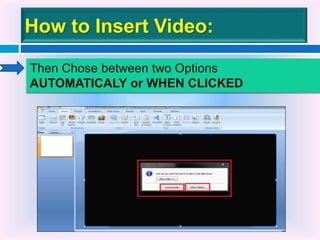
Then Chose between two Options
AUTOMATICALY or WHEN CLICKED
How to Insert Video:
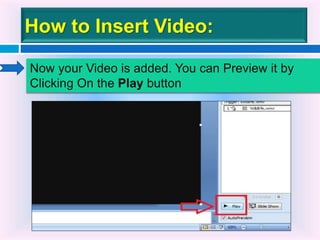
Now your Video is added. You can Preview it by
Clicking On the Play button
How to Save a File:
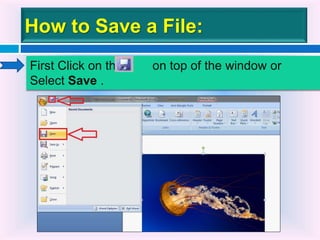
First Click on this on top of the window or
Select Save .
How to Save a File:
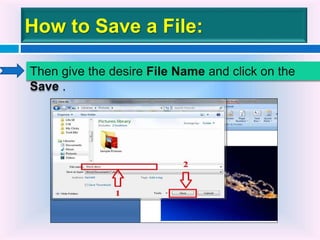
Then give the desire File Name and click on the
Save .
From this presentation we have learned that:
How we can insert image, table and video on
Microsoft Word and PowerPoint .
We have also learned how to save a document.
Conclusion:
The End

microsoft word & powerpoint

  • 1.
  • 2.
  • 3.
    Presented By: Nayem Musaddik ID:142-15-3740 Umme Habiba Madhobi ID: 142-15-3677 MD. Najmul Haque Noyon ID: 142-15-3511 MD Abid Hossain ID: 142-15-3683
  • 4.
    How To InsertVideo How To Save a File How To Insert Table Contents:
  • 5.
     Microsoft wordand PowerPoint are two very important Software for every day use. Learning the basic elements of these Software is essential for everybody. Introduction:
  • 6.
    How to InsertImage: 1.First click the Insert tab on the toolbar of Microsoft Word. 2.Then select Picture option from the following menu.
  • 7.
    How to InsertImage: At last select the desired image from the hard disk and click on Insert.
  • 8.
    How to InsertImage: Then the selected picture will be added.
  • 9.
    How to InsertTable: 1.First click the Insert tab on the toolbar of Microsoft Word. 2.Then select Table option from the following menu.
  • 10.
    How to InsertTable: Then Select the Columns and Rows of the table. Then the table will be inserted.
  • 11.
    How to InsertVideo: 1.First click the Insert tab on the toolbar of Microsoft PowerPoint. 2.Then select Movie option from the following menu.
  • 12.
    How to InsertVideo: Then select the desired Video from the hard disk and click on OK.
  • 13.
    How to InsertVideo: Then Chose between two Options AUTOMATICALY or WHEN CLICKED
  • 14.
    How to InsertVideo: Now your Video is added. You can Preview it by Clicking On the Play button
  • 15.
    How to Savea File: First Click on this on top of the window or Select Save .
  • 16.
    How to Savea File: Then give the desire File Name and click on the Save .
  • 17.
    From this presentationwe have learned that: How we can insert image, table and video on Microsoft Word and PowerPoint . We have also learned how to save a document. Conclusion:
  • 18.