

4/18/2017 1
PRESENTED BY
Umme Habiba 142-15-3677
Md. Sadhan Sarker 142-15-4001
Md. Hannan Talukder 142-15-3715
4/18/2017 2
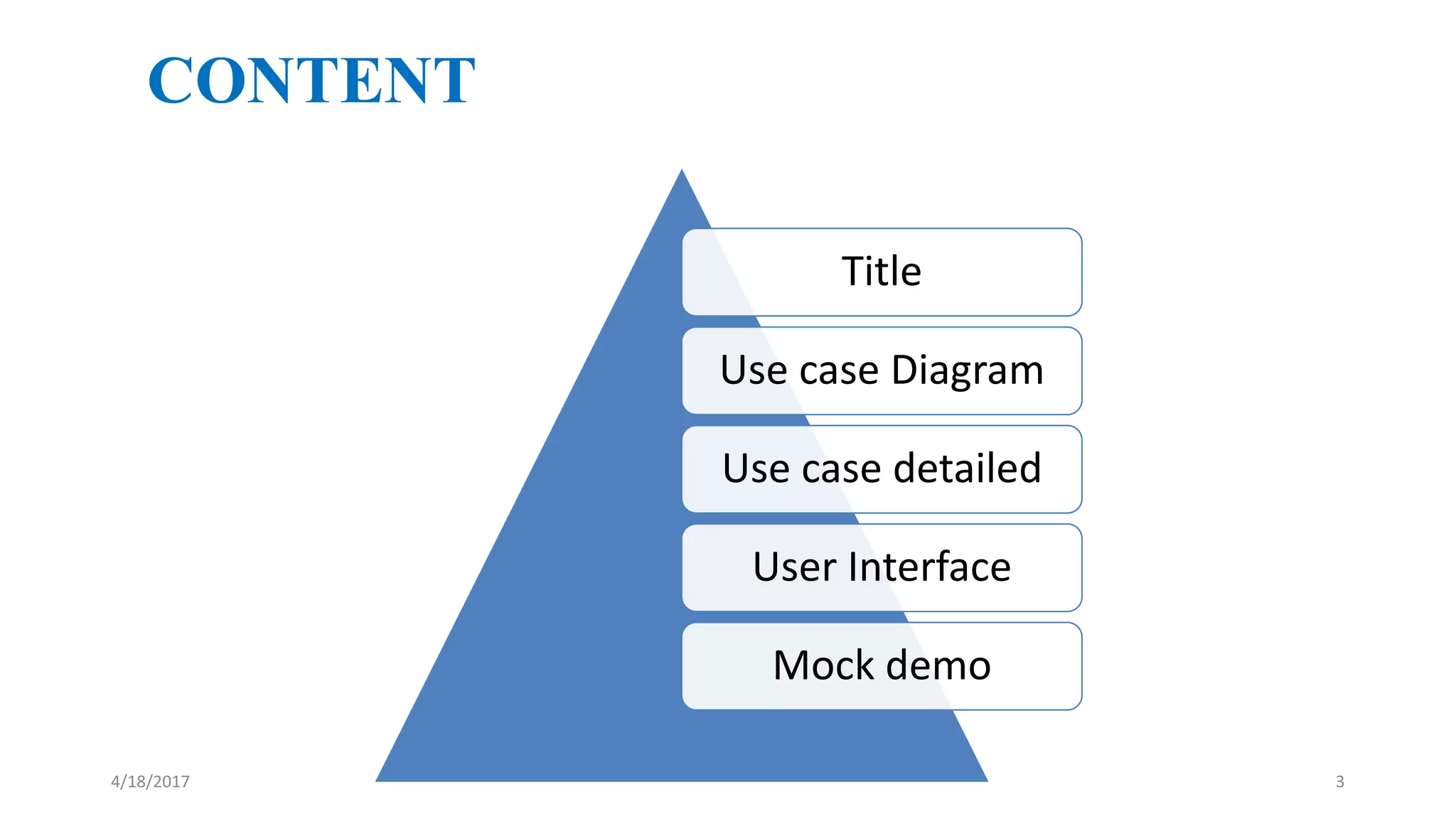
CONTENT
Title
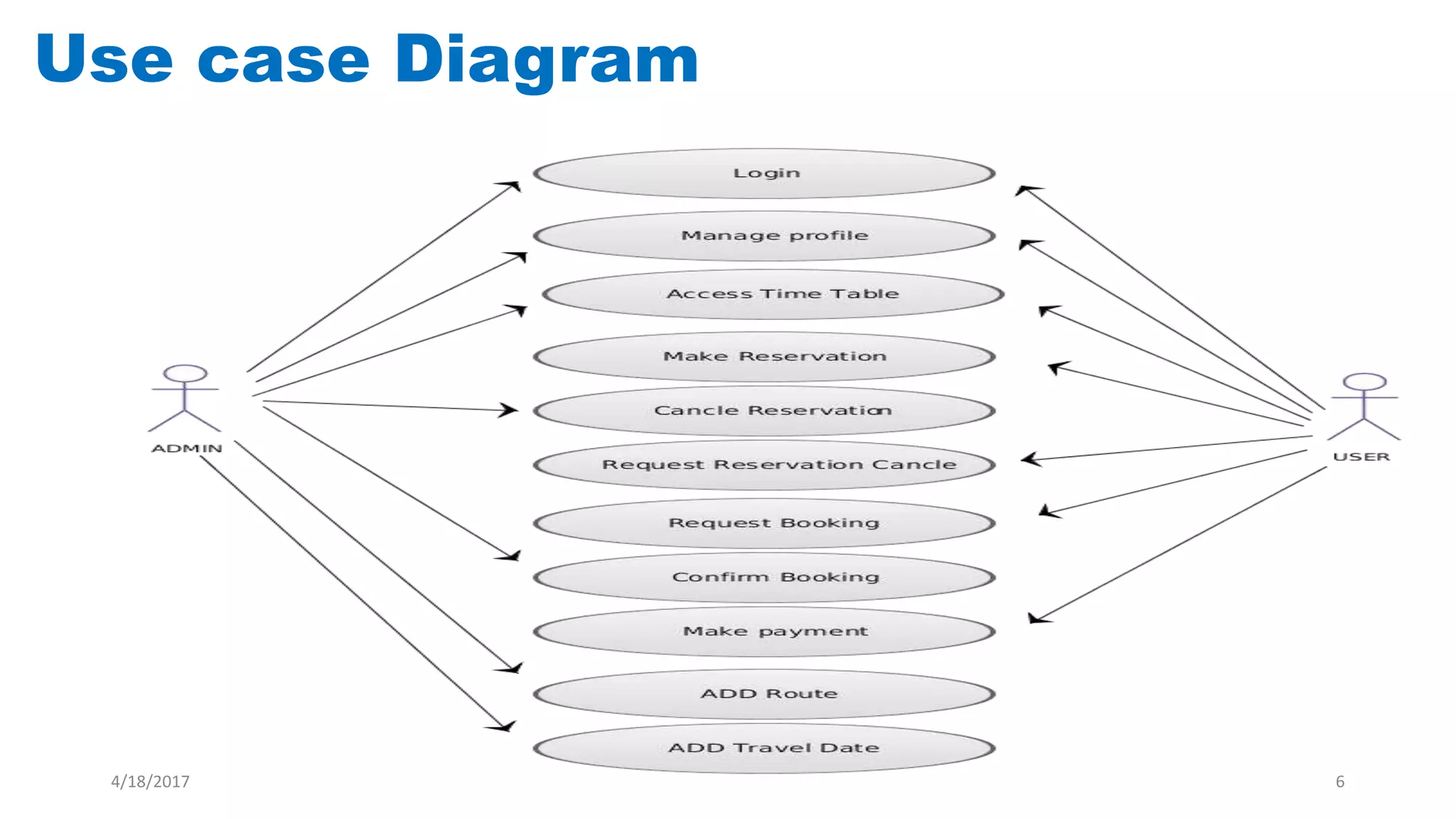
Use case Diagram
Use case detailed
User Interface
Mock demo
4/18/2017 3
Project Title:
Online Bus Ticket Management
4/18/2017 4
USE CASE
The use cases describe the system from the user’s point of view!
A use case is a description of how a user will use the system-to-be
to accomplish business goals
4/18/2017 5
Use case Diagram
4/18/2017 6
4/18/2017 7
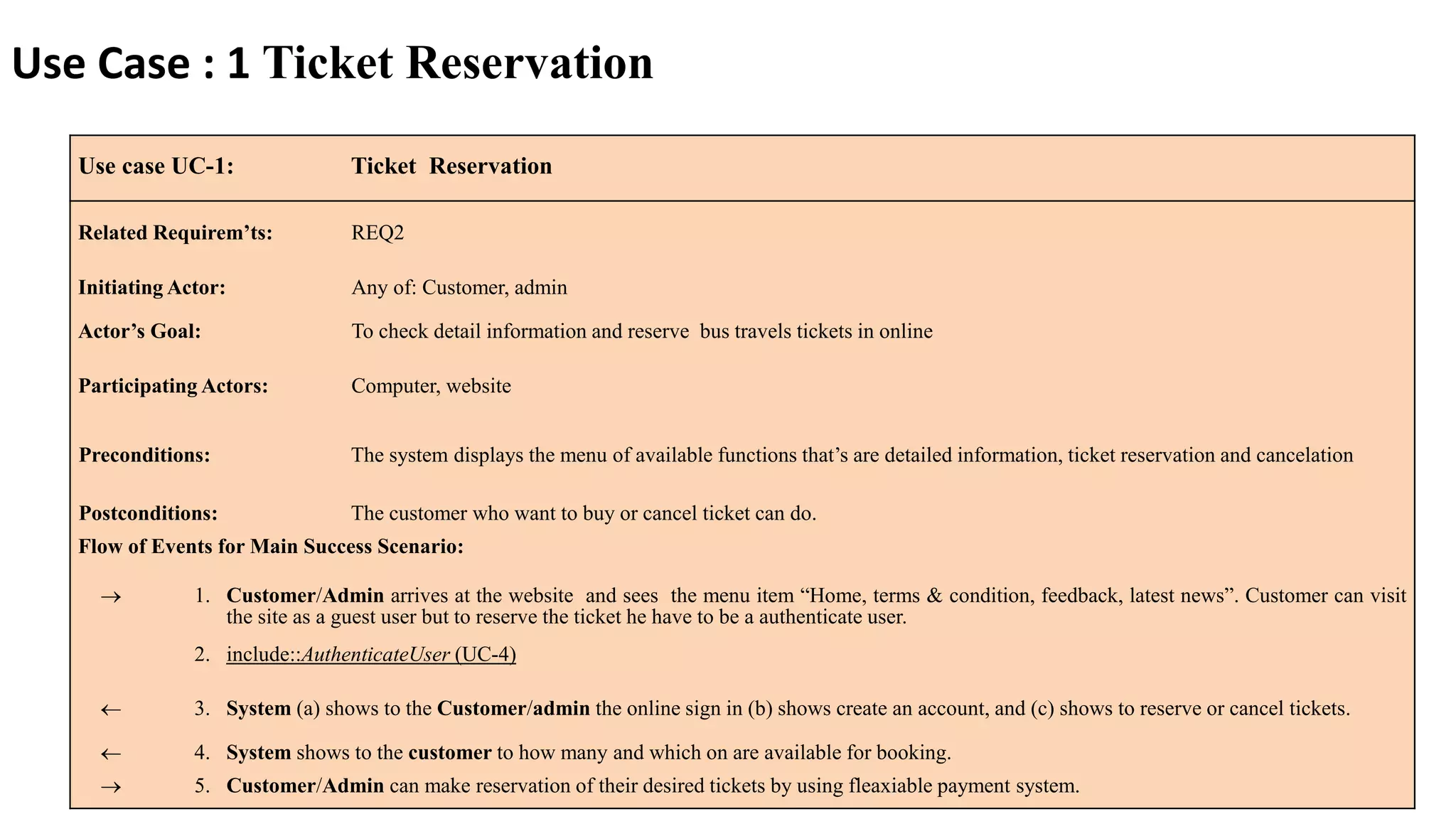
Use case UC-1: Ticket Reservation
Related Requirem’ts: REQ2
Initiating Actor: Any of: Customer, admin
Actor’s Goal: To check detail information and reserve bus travels tickets in online
Participating Actors: Computer, website
Preconditions: The system displays the menu of available functions that’s are detailed information, ticket reservation and cancelation
Postconditions: The customer who want to buy or cancel ticket can do.
Flow of Events for Main Success Scenario:
 1. Customer/Admin arrives at the website and sees the menu item “Home, terms & condition, feedback, latest news”. Customer can visit
the site as a guest user but to reserve the ticket he have to be a authenticate user.
2. include::AuthenticateUser (UC-4)
 3. System (a) shows to the Customer/admin the online sign in (b) shows create an account, and (c) shows to reserve or cancel tickets.
 4. System shows to the customer to how many and which on are available for booking.
 5. Customer/Admin can make reservation of their desired tickets by using fleaxiable payment system.
Use Case : 1 Ticket Reservation
4/18/2017 8
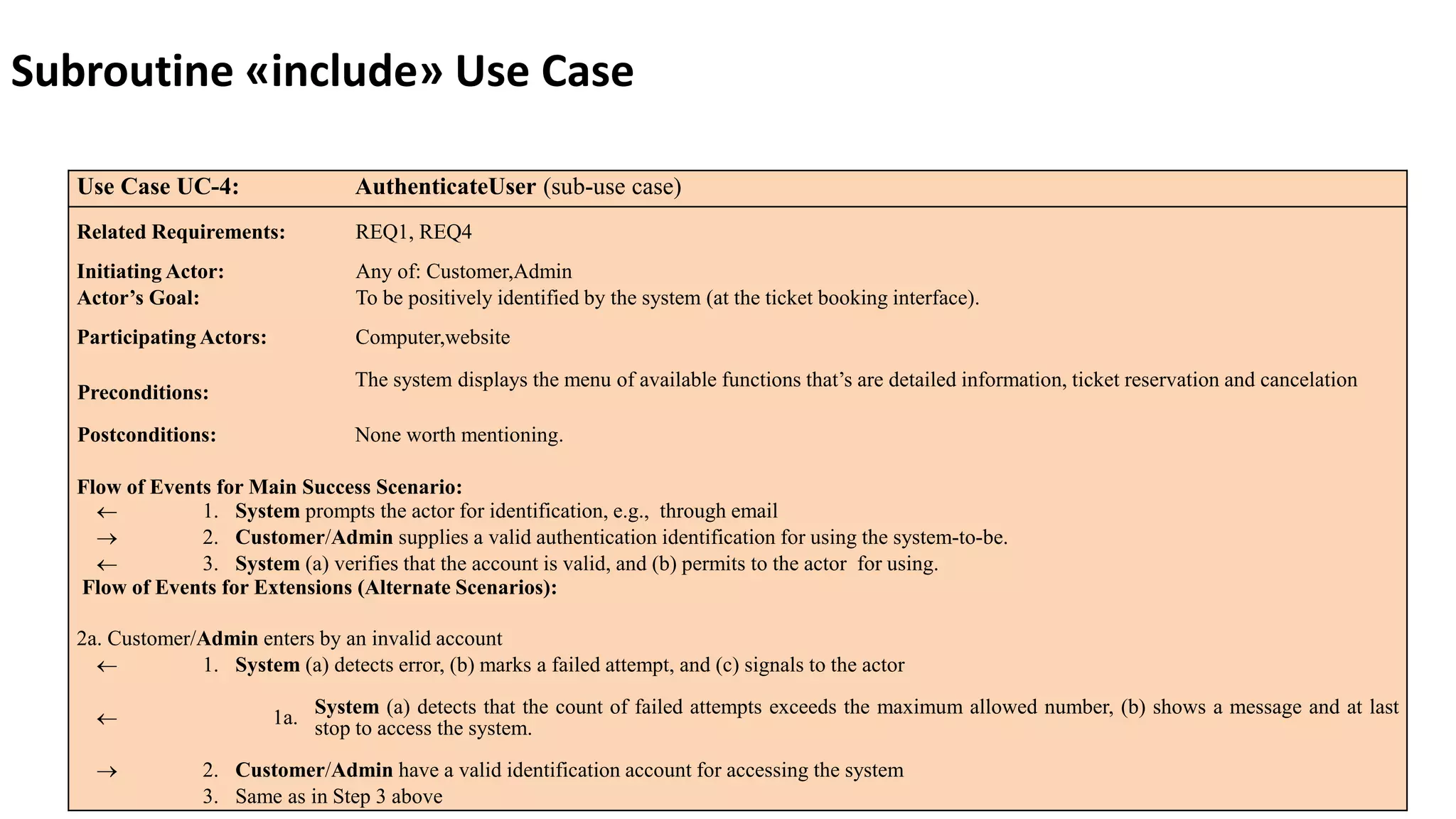
Use Case UC-4: AuthenticateUser (sub-use case)
Related Requirements: REQ1, REQ4
Initiating Actor: Any of: Customer,Admin
Actor’s Goal: To be positively identified by the system (at the ticket booking interface).
Participating Actors: Computer,website
Preconditions:
The system displays the menu of available functions that’s are detailed information, ticket reservation and cancelation
Postconditions: None worth mentioning.
Flow of Events for Main Success Scenario:
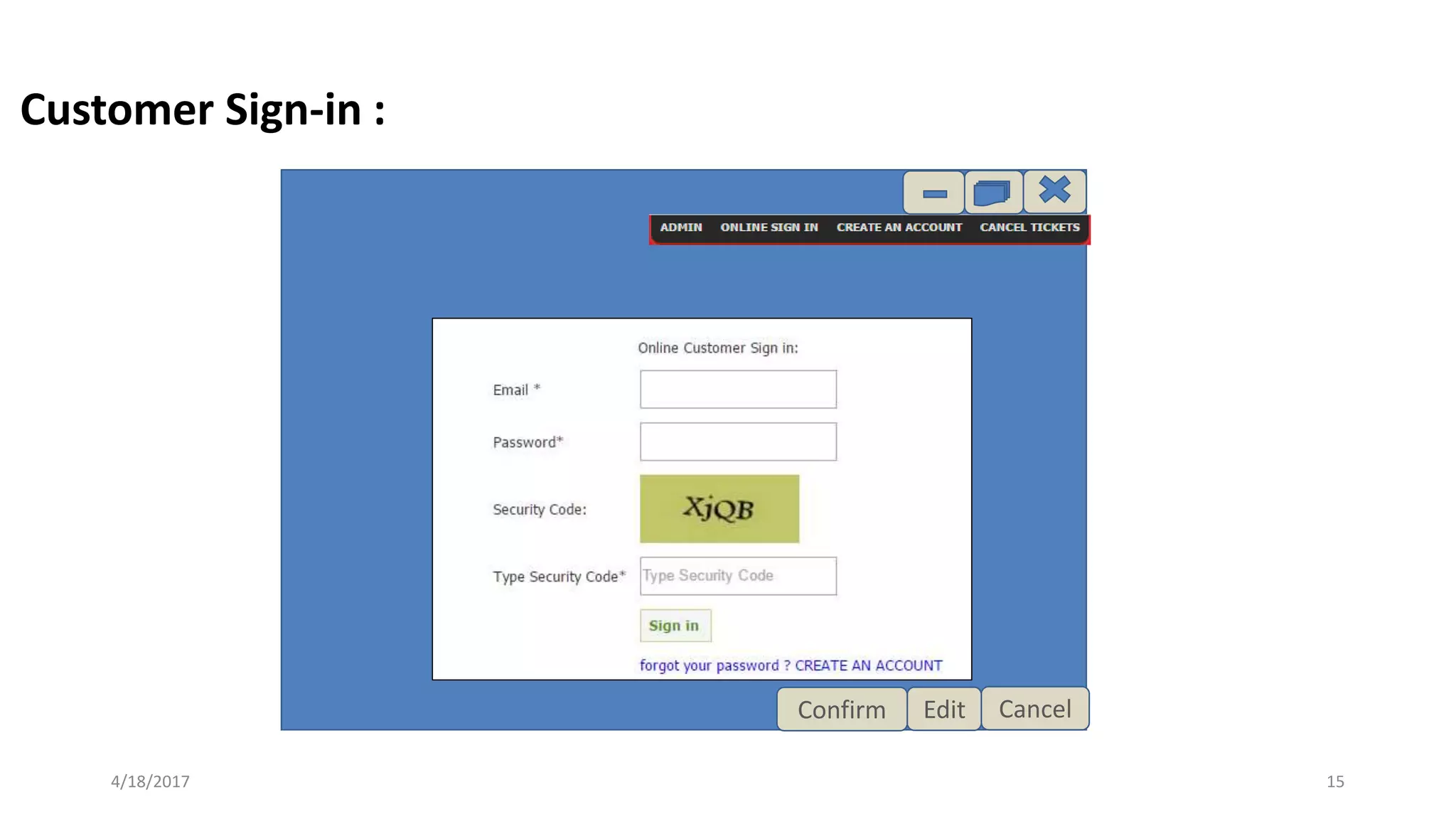
 1. System prompts the actor for identification, e.g., through email
 2. Customer/Admin supplies a valid authentication identification for using the system-to-be.
 3. System (a) verifies that the account is valid, and (b) permits to the actor for using.
Flow of Events for Extensions (Alternate Scenarios):
2a. Customer/Admin enters by an invalid account
 1. System (a) detects error, (b) marks a failed attempt, and (c) signals to the actor
 1a. System (a) detects that the count of failed attempts exceeds the maximum allowed number, (b) shows a message and at last
stop to access the system.
 2. Customer/Admin have a valid identification account for accessing the system
3. Same as in Step 3 above
Subroutine «include» Use Case
4/18/2017 9
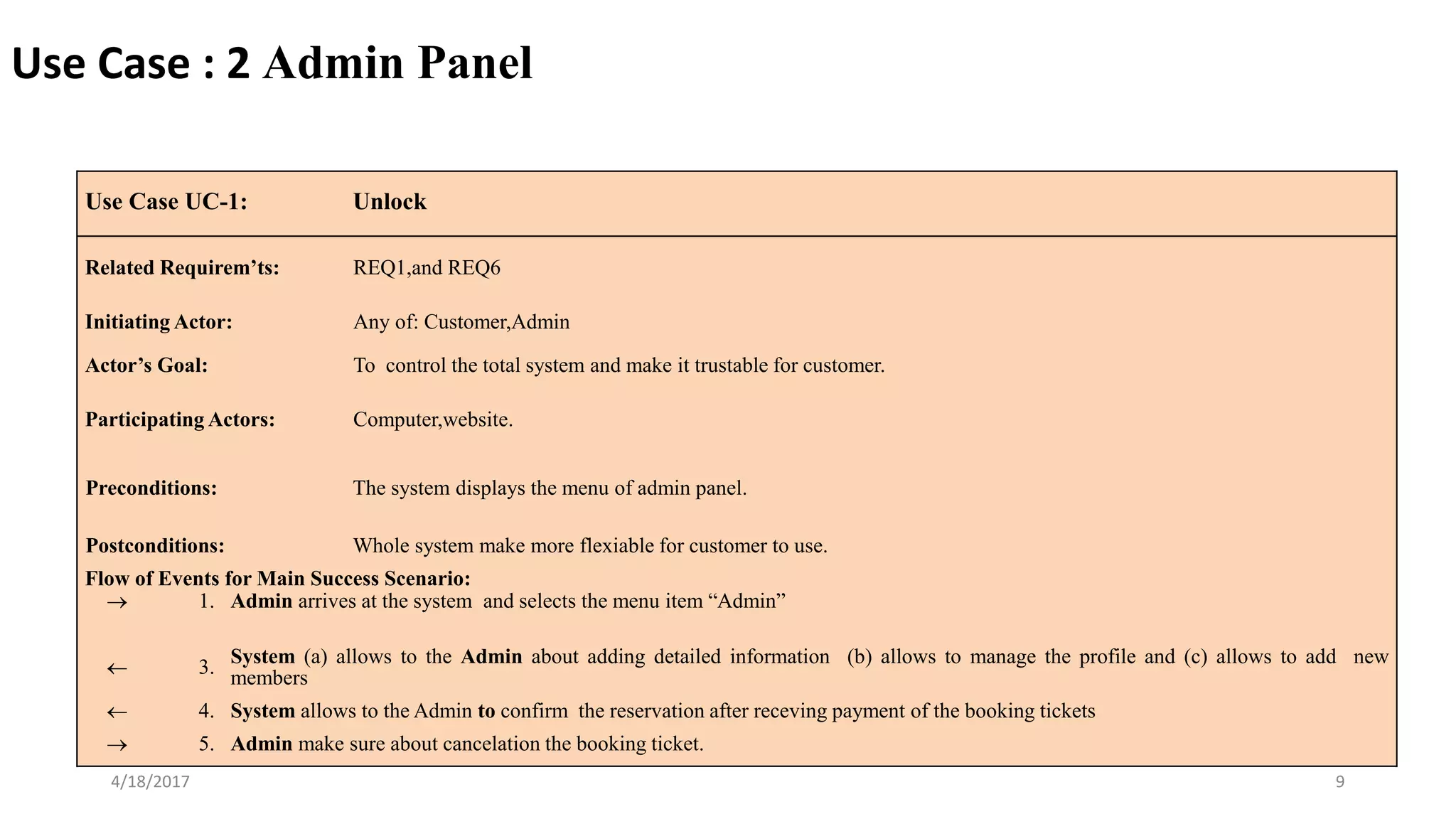
Use Case UC-1: Unlock
Related Requirem’ts: REQ1,and REQ6
Initiating Actor: Any of: Customer,Admin
Actor’s Goal: To control the total system and make it trustable for customer.
Participating Actors: Computer,website.
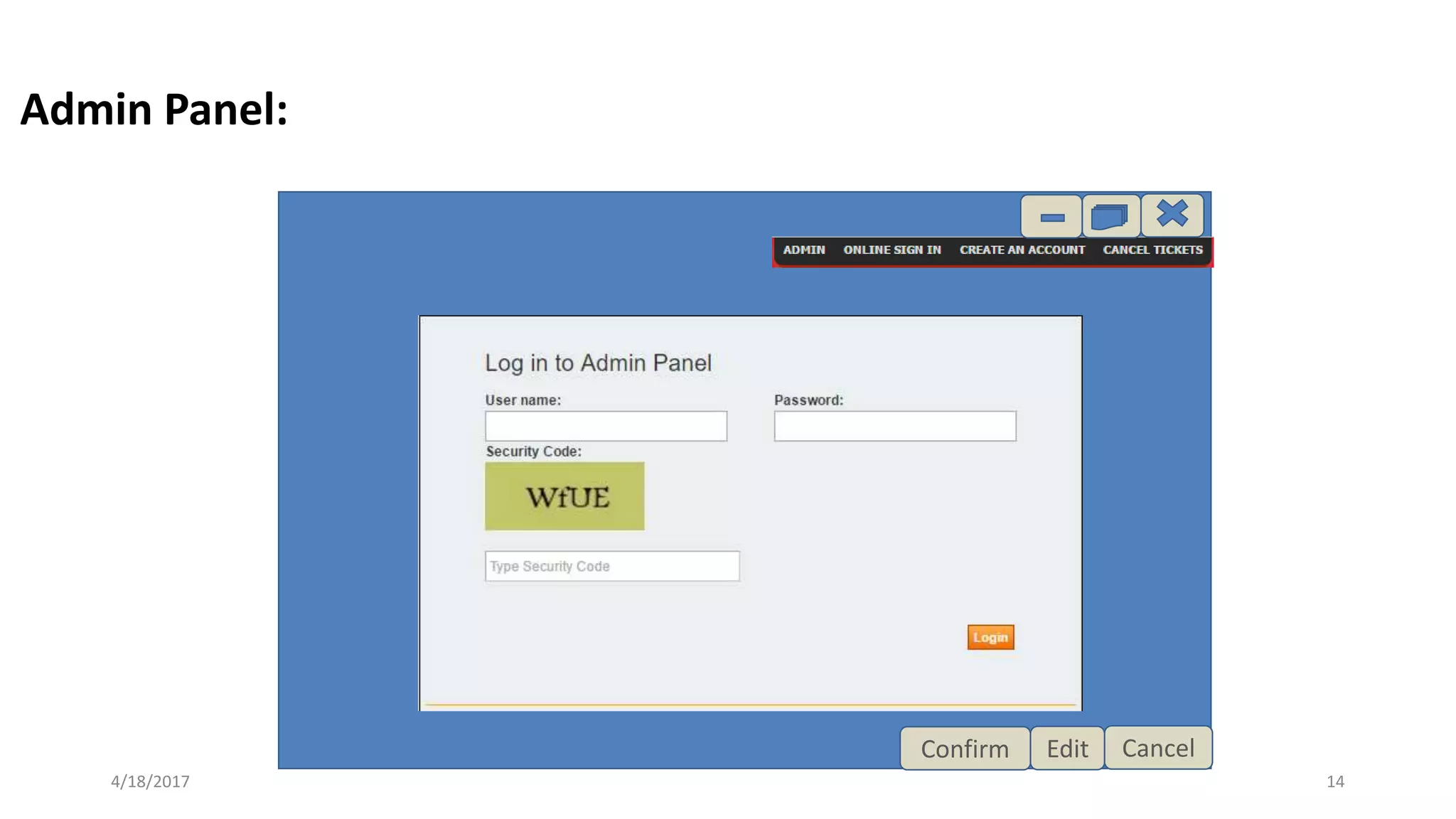
Preconditions: The system displays the menu of admin panel.
Postconditions: Whole system make more flexiable for customer to use.
Flow of Events for Main Success Scenario:
 1. Admin arrives at the system and selects the menu item “Admin”
 3. System (a) allows to the Admin about adding detailed information (b) allows to manage the profile and (c) allows to add new
members
 4. System allows to the Admin to confirm the reservation after receving payment of the booking tickets
 5. Admin make sure about cancelation the booking ticket.
Use Case : 2 Admin Panel
4/18/2017 10
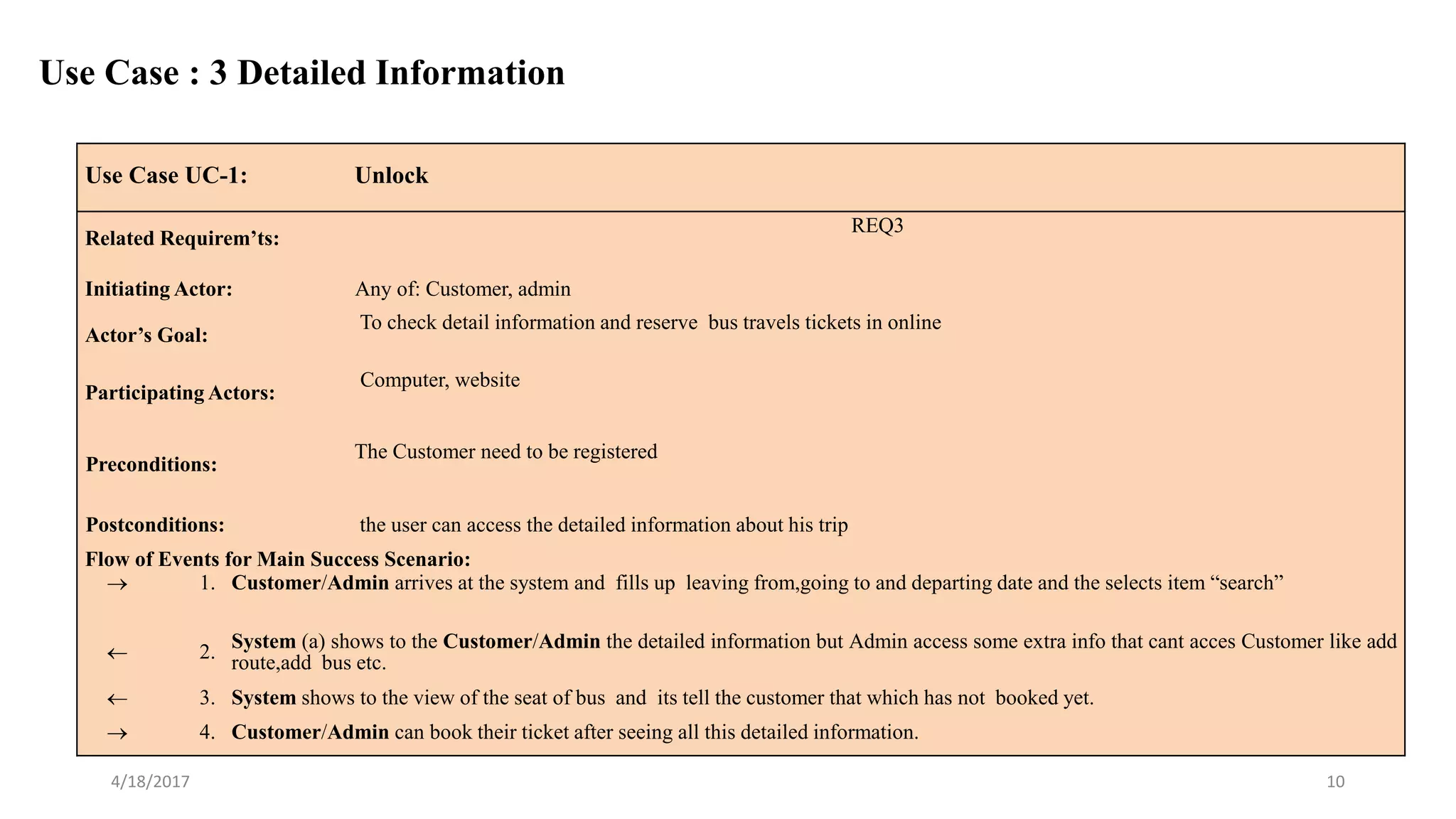
Use Case UC-1: Unlock
Related Requirem’ts:
REQ3
Initiating Actor: Any of: Customer, admin
Actor’s Goal:
To check detail information and reserve bus travels tickets in online
Participating Actors:
Computer, website
Preconditions:
The Customer need to be registered
Postconditions: the user can access the detailed information about his trip
Flow of Events for Main Success Scenario:
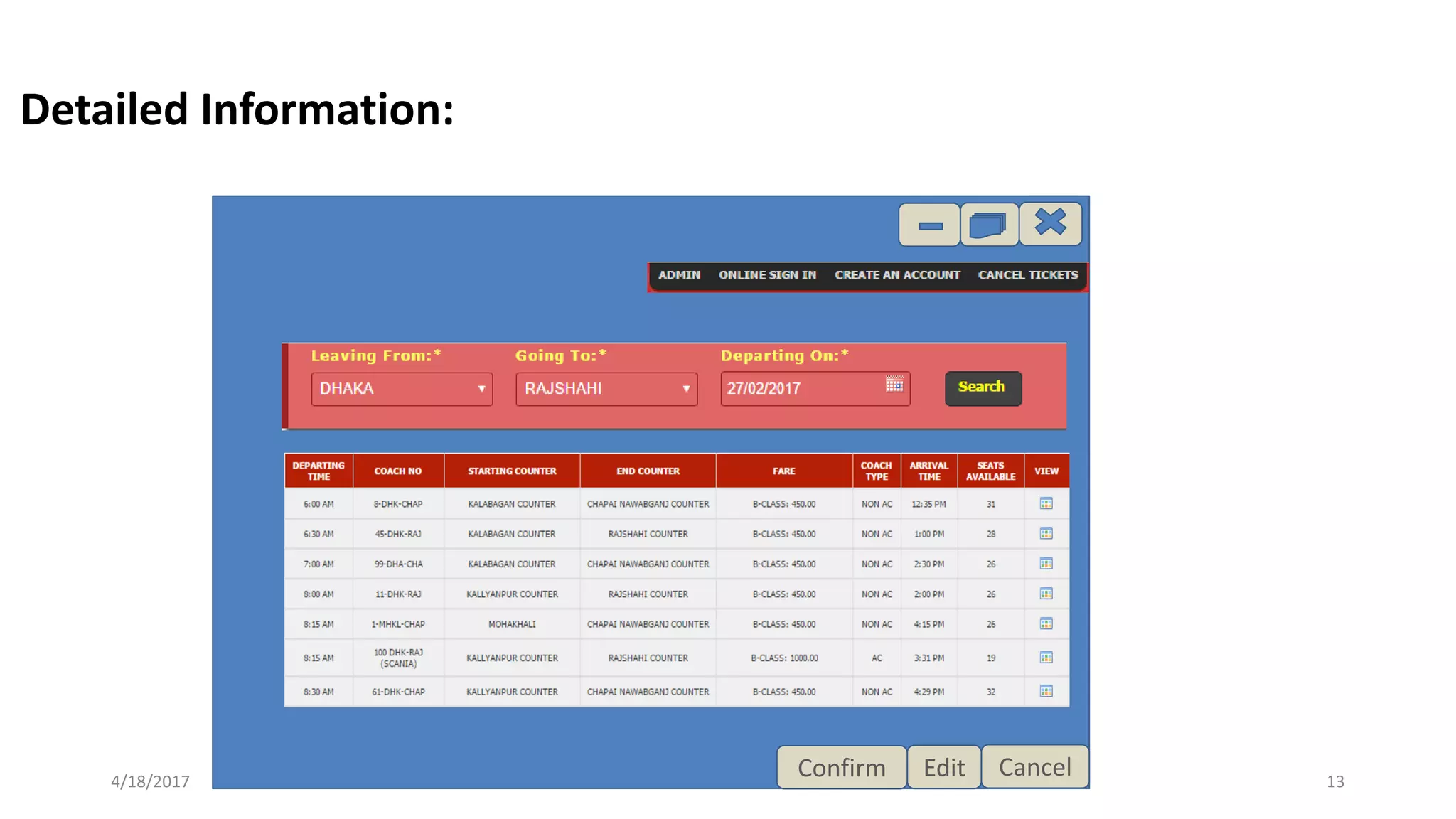
 1. Customer/Admin arrives at the system and fills up leaving from,going to and departing date and the selects item “search”
 2. System (a) shows to the Customer/Admin the detailed information but Admin access some extra info that cant acces Customer like add
route,add bus etc.
 3. System shows to the view of the seat of bus and its tell the customer that which has not booked yet.
 4. Customer/Admin can book their ticket after seeing all this detailed information.
Use Case : 3 Detailed Information
User Interface Design
The means by which the user and a computer system interact,
in particular the use of input devices and software.
4/18/2017 11
4/18/2017 12
Welcome To Online
Bus Ticket
Management
System
Home Page:
4/18/2017 13
CancelEditConfirm
Detailed Information:
4/18/2017 14
CancelEditConfirm
Admin Panel:
4/18/2017 15
CancelEditConfirm
Customer Sign-in :
4/18/2017 16
CancelEdit
Seat Reservation:
4/18/2017 17

online bus ticket booking system

  • 1.
  • 2.
    PRESENTED BY Umme Habiba142-15-3677 Md. Sadhan Sarker 142-15-4001 Md. Hannan Talukder 142-15-3715 4/18/2017 2
  • 3.
    CONTENT Title Use case Diagram Usecase detailed User Interface Mock demo 4/18/2017 3
  • 4.
    Project Title: Online BusTicket Management 4/18/2017 4
  • 5.
    USE CASE The usecases describe the system from the user’s point of view! A use case is a description of how a user will use the system-to-be to accomplish business goals 4/18/2017 5
  • 6.
  • 7.
    4/18/2017 7 Use caseUC-1: Ticket Reservation Related Requirem’ts: REQ2 Initiating Actor: Any of: Customer, admin Actor’s Goal: To check detail information and reserve bus travels tickets in online Participating Actors: Computer, website Preconditions: The system displays the menu of available functions that’s are detailed information, ticket reservation and cancelation Postconditions: The customer who want to buy or cancel ticket can do. Flow of Events for Main Success Scenario:  1. Customer/Admin arrives at the website and sees the menu item “Home, terms & condition, feedback, latest news”. Customer can visit the site as a guest user but to reserve the ticket he have to be a authenticate user. 2. include::AuthenticateUser (UC-4)  3. System (a) shows to the Customer/admin the online sign in (b) shows create an account, and (c) shows to reserve or cancel tickets.  4. System shows to the customer to how many and which on are available for booking.  5. Customer/Admin can make reservation of their desired tickets by using fleaxiable payment system. Use Case : 1 Ticket Reservation
  • 8.
    4/18/2017 8 Use CaseUC-4: AuthenticateUser (sub-use case) Related Requirements: REQ1, REQ4 Initiating Actor: Any of: Customer,Admin Actor’s Goal: To be positively identified by the system (at the ticket booking interface). Participating Actors: Computer,website Preconditions: The system displays the menu of available functions that’s are detailed information, ticket reservation and cancelation Postconditions: None worth mentioning. Flow of Events for Main Success Scenario:  1. System prompts the actor for identification, e.g., through email  2. Customer/Admin supplies a valid authentication identification for using the system-to-be.  3. System (a) verifies that the account is valid, and (b) permits to the actor for using. Flow of Events for Extensions (Alternate Scenarios): 2a. Customer/Admin enters by an invalid account  1. System (a) detects error, (b) marks a failed attempt, and (c) signals to the actor  1a. System (a) detects that the count of failed attempts exceeds the maximum allowed number, (b) shows a message and at last stop to access the system.  2. Customer/Admin have a valid identification account for accessing the system 3. Same as in Step 3 above Subroutine «include» Use Case
  • 9.
    4/18/2017 9 Use CaseUC-1: Unlock Related Requirem’ts: REQ1,and REQ6 Initiating Actor: Any of: Customer,Admin Actor’s Goal: To control the total system and make it trustable for customer. Participating Actors: Computer,website. Preconditions: The system displays the menu of admin panel. Postconditions: Whole system make more flexiable for customer to use. Flow of Events for Main Success Scenario:  1. Admin arrives at the system and selects the menu item “Admin”  3. System (a) allows to the Admin about adding detailed information (b) allows to manage the profile and (c) allows to add new members  4. System allows to the Admin to confirm the reservation after receving payment of the booking tickets  5. Admin make sure about cancelation the booking ticket. Use Case : 2 Admin Panel
  • 10.
    4/18/2017 10 Use CaseUC-1: Unlock Related Requirem’ts: REQ3 Initiating Actor: Any of: Customer, admin Actor’s Goal: To check detail information and reserve bus travels tickets in online Participating Actors: Computer, website Preconditions: The Customer need to be registered Postconditions: the user can access the detailed information about his trip Flow of Events for Main Success Scenario:  1. Customer/Admin arrives at the system and fills up leaving from,going to and departing date and the selects item “search”  2. System (a) shows to the Customer/Admin the detailed information but Admin access some extra info that cant acces Customer like add route,add bus etc.  3. System shows to the view of the seat of bus and its tell the customer that which has not booked yet.  4. Customer/Admin can book their ticket after seeing all this detailed information. Use Case : 3 Detailed Information
  • 11.
    User Interface Design Themeans by which the user and a computer system interact, in particular the use of input devices and software. 4/18/2017 11
  • 12.
    4/18/2017 12 Welcome ToOnline Bus Ticket Management System Home Page:
  • 13.
  • 14.
  • 15.
  • 16.
  • 17.