Mac OS 
APPLE INC
Presented by 
 Faizan Shaikh T-216 
 Rizwan Khan T-22 
 Faizan Qureshi T-213 
 Ashok Kumar T-201
Overview 
1. What is an Operating System? 
2. What is a Mac OS? 
3. The First Mac OS 
4. Various Versions of Mac OS 
5. Advantages of a Mac OS 
6. Disadvantages of a Mac OS
What is an Operating System? 
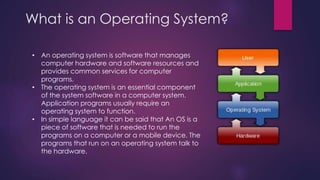
• An operating system is software that manages 
computer hardware and software resources and 
provides common services for computer 
programs. 
• The operating system is an essential component 
of the system software in a computer system. 
Application programs usually require an 
operating system to function. 
• In simple language it can be said that An OS is a 
piece of software that is needed to run the 
programs on a computer or a mobile device. The 
programs that run on an operating system talk to 
the hardware.
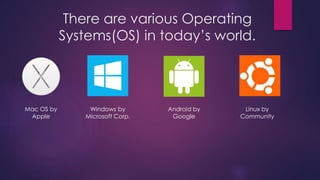
There are various Operating 
Systems(OS) in today’s world. 
Mac OS by 
Apple 
Windows by 
Microsoft Corp. 
Android by 
Google 
Linux by 
Community
Mac OS 
 Mac OS is a series of graphical user interface-based operating 
systems developed by Apple Inc. for their Macintosh line of 
computer systems. 
 Mac OS was designed only to run on Apple Computers. 
 In 1984, Apple introduced the Macintosh PC with the 
Macintosh Operating System. 
 Apple names its OS as “Mac OS”, beginning in 1997 which 
was previously known as “System”.
The First Mac OS 
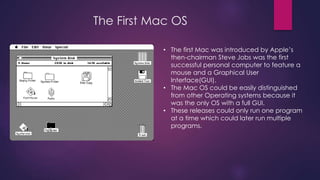
• The first Mac was introduced by Apple’s 
then-chairman Steve Jobs was the first 
successful personal computer to feature a 
mouse and a Graphical User 
Interface(GUI). 
• The Mac OS could be easily distinguished 
from other Operating systems because it 
was the only OS with a full GUI. 
• These releases could only run one program 
at a time which could later run multiple 
programs.
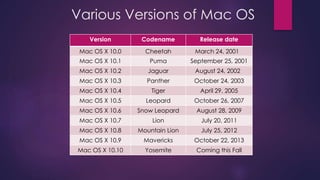
Various Versions of Mac OS 
Version Codename Release date 
Mac OS X 10.0 Cheetah March 24, 2001 
Mac OS X 10.1 Puma September 25, 2001 
Mac OS X 10.2 Jaguar August 24, 2002 
Mac OS X 10.3 Panther October 24, 2003 
Mac OS X 10.4 Tiger April 29, 2005 
Mac OS X 10.5 Leopard October 26, 2007 
Mac OS X 10.6 Snow Leopard August 28, 2009 
Mac OS X 10.7 Lion July 20, 2011 
Mac OS X 10.8 Mountain Lion July 25, 2012 
Mac OS X 10.9 Mavericks October 22, 2013 
Mac OS X 10.10 Yosemite Coming this Fall
Mac OS X Cheetah 
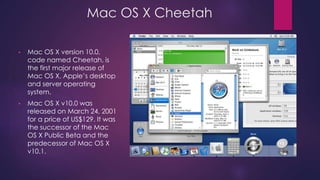
• Mac OS X version 10.0, 
code named Cheetah, is 
the first major release of 
Mac OS X, Apple’s desktop 
and server operating 
system. 
• Mac OS X v10.0 was 
released on March 24, 2001 
for a price of US$129. It was 
the successor of the Mac 
OS X Public Beta and the 
predecessor of Mac OS X 
v10.1.
Mac OS X Cheetah 
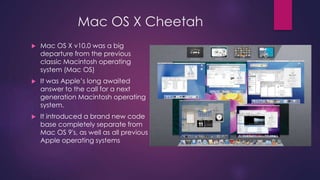
 Mac OS X v10.0 was a big 
departure from the previous 
classic Macintosh operating 
system (Mac OS) 
 It was Apple’s long awaited 
answer to the call for a next 
generation Macintosh operating 
system. 
 It introduced a brand new code 
base completely separate from 
Mac OS 9's, as well as all previous 
Apple operating systems
Mac OS X Panther 
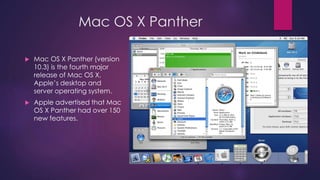
 Mac OS X Panther (version 
10.3) is the fourth major 
release of Mac OS X, 
Apple’s desktop and 
server operating system. 
 Apple advertised that Mac 
OS X Panther had over 150 
new features.
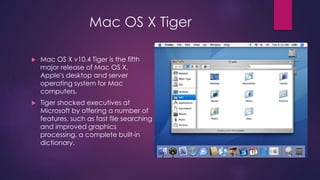
Mac OS X Tiger 
 Mac OS X v10.4 Tiger is the fifth 
major release of Mac OS X, 
Apple's desktop and server 
operating system for Mac 
computers. 
 Tiger shocked executives at 
Microsoft by offering a number of 
features, such as fast file searching 
and improved graphics 
processing, a complete built-in 
dictionary.
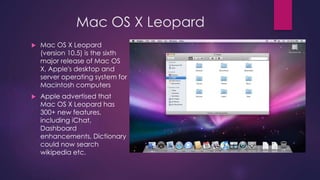
Mac OS X Leopard 
 Mac OS X Leopard 
(version 10.5) is the sixth 
major release of Mac OS 
X, Apple's desktop and 
server operating system for 
Macintosh computers 
 Apple advertised that 
Mac OS X Leopard has 
300+ new features, 
including iChat, 
Dashboard 
enhancements, Dictionary 
could now search 
wikipedia etc.
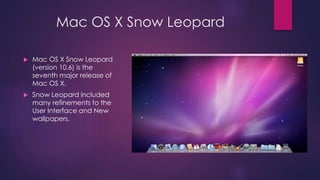
Mac OS X Snow Leopard 
 Mac OS X Snow Leopard 
(version 10.6) is the 
seventh major release of 
Mac OS X. 
 Snow Leopard included 
many refinements to the 
User Interface and New 
wallpapers.
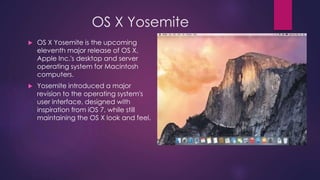
OS X Yosemite 
 OS X Yosemite is the upcoming 
eleventh major release of OS X, 
Apple Inc.'s desktop and server 
operating system for Macintosh 
computers. 
 Yosemite introduced a major 
revision to the operating system's 
user interface, designed with 
inspiration from iOS 7, while still 
maintaining the OS X look and feel.
Advantages of Mac OS 
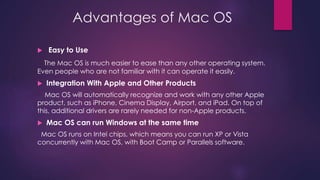
 Easy to Use 
The Mac OS is much easier to ease than any other operating system. 
Even people who are not familiar with it can operate it easily. 
 Integration With Apple and Other Products 
Mac OS will automatically recognize and work with any other Apple 
product, such as iPhone, Cinema Display, Airport, and iPad. On top of 
this, additional drivers are rarely needed for non-Apple products. 
 Mac OS can run Windows at the same time 
Mac OS runs on Intel chips, which means you can run XP or Vista 
concurrently with Mac OS, with Boot Camp or Parallels software.
Advantages of Mac OS 
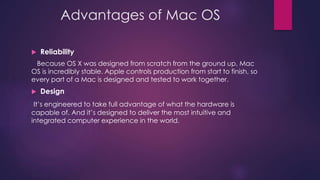
 Reliability 
Because OS X was designed from scratch from the ground up, Mac 
OS is incredibly stable. Apple controls production from start to finish, so 
every part of a Mac is designed and tested to work together. 
 Design 
It’s engineered to take full advantage of what the hardware is 
capable of. And it’s designed to deliver the most intuitive and 
integrated computer experience in the world.
Disadvantages of Mac OS 
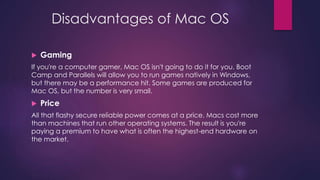
 Gaming 
If you're a computer gamer, Mac OS isn't going to do it for you. Boot 
Camp and Parallels will allow you to run games natively in Windows, 
but there may be a performance hit. Some games are produced for 
Mac OS, but the number is very small. 
 Price 
All that flashy secure reliable power comes at a price. Macs cost more 
than machines that run other operating systems. The result is you're 
paying a premium to have what is often the highest-end hardware on 
the market.
Disadvantages of Mac OS 
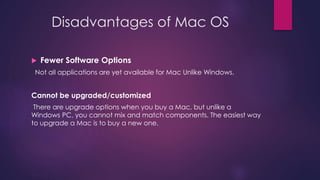
 Fewer Software Options 
Not all applications are yet available for Mac Unlike Windows. 
Cannot be upgraded/customized 
There are upgrade options when you buy a Mac, but unlike a 
Windows PC, you cannot mix and match components. The easiest way 
to upgrade a Mac is to buy a new one.
Any Questions?
Mac OS(Operating System)

Mac OS(Operating System)

  • 1.
  • 2.
    Presented by Faizan Shaikh T-216  Rizwan Khan T-22  Faizan Qureshi T-213  Ashok Kumar T-201
  • 3.
    Overview 1. Whatis an Operating System? 2. What is a Mac OS? 3. The First Mac OS 4. Various Versions of Mac OS 5. Advantages of a Mac OS 6. Disadvantages of a Mac OS
  • 4.
    What is anOperating System? • An operating system is software that manages computer hardware and software resources and provides common services for computer programs. • The operating system is an essential component of the system software in a computer system. Application programs usually require an operating system to function. • In simple language it can be said that An OS is a piece of software that is needed to run the programs on a computer or a mobile device. The programs that run on an operating system talk to the hardware.
  • 5.
    There are variousOperating Systems(OS) in today’s world. Mac OS by Apple Windows by Microsoft Corp. Android by Google Linux by Community
  • 6.
    Mac OS Mac OS is a series of graphical user interface-based operating systems developed by Apple Inc. for their Macintosh line of computer systems.  Mac OS was designed only to run on Apple Computers.  In 1984, Apple introduced the Macintosh PC with the Macintosh Operating System.  Apple names its OS as “Mac OS”, beginning in 1997 which was previously known as “System”.
  • 7.
    The First MacOS • The first Mac was introduced by Apple’s then-chairman Steve Jobs was the first successful personal computer to feature a mouse and a Graphical User Interface(GUI). • The Mac OS could be easily distinguished from other Operating systems because it was the only OS with a full GUI. • These releases could only run one program at a time which could later run multiple programs.
  • 8.
    Various Versions ofMac OS Version Codename Release date Mac OS X 10.0 Cheetah March 24, 2001 Mac OS X 10.1 Puma September 25, 2001 Mac OS X 10.2 Jaguar August 24, 2002 Mac OS X 10.3 Panther October 24, 2003 Mac OS X 10.4 Tiger April 29, 2005 Mac OS X 10.5 Leopard October 26, 2007 Mac OS X 10.6 Snow Leopard August 28, 2009 Mac OS X 10.7 Lion July 20, 2011 Mac OS X 10.8 Mountain Lion July 25, 2012 Mac OS X 10.9 Mavericks October 22, 2013 Mac OS X 10.10 Yosemite Coming this Fall
  • 9.
    Mac OS XCheetah • Mac OS X version 10.0, code named Cheetah, is the first major release of Mac OS X, Apple’s desktop and server operating system. • Mac OS X v10.0 was released on March 24, 2001 for a price of US$129. It was the successor of the Mac OS X Public Beta and the predecessor of Mac OS X v10.1.
  • 10.
    Mac OS XCheetah  Mac OS X v10.0 was a big departure from the previous classic Macintosh operating system (Mac OS)  It was Apple’s long awaited answer to the call for a next generation Macintosh operating system.  It introduced a brand new code base completely separate from Mac OS 9's, as well as all previous Apple operating systems
  • 11.
    Mac OS XPanther  Mac OS X Panther (version 10.3) is the fourth major release of Mac OS X, Apple’s desktop and server operating system.  Apple advertised that Mac OS X Panther had over 150 new features.
  • 12.
    Mac OS XTiger  Mac OS X v10.4 Tiger is the fifth major release of Mac OS X, Apple's desktop and server operating system for Mac computers.  Tiger shocked executives at Microsoft by offering a number of features, such as fast file searching and improved graphics processing, a complete built-in dictionary.
  • 13.
    Mac OS XLeopard  Mac OS X Leopard (version 10.5) is the sixth major release of Mac OS X, Apple's desktop and server operating system for Macintosh computers  Apple advertised that Mac OS X Leopard has 300+ new features, including iChat, Dashboard enhancements, Dictionary could now search wikipedia etc.
  • 14.
    Mac OS XSnow Leopard  Mac OS X Snow Leopard (version 10.6) is the seventh major release of Mac OS X.  Snow Leopard included many refinements to the User Interface and New wallpapers.
  • 15.
    OS X Yosemite  OS X Yosemite is the upcoming eleventh major release of OS X, Apple Inc.'s desktop and server operating system for Macintosh computers.  Yosemite introduced a major revision to the operating system's user interface, designed with inspiration from iOS 7, while still maintaining the OS X look and feel.
  • 16.
    Advantages of MacOS  Easy to Use The Mac OS is much easier to ease than any other operating system. Even people who are not familiar with it can operate it easily.  Integration With Apple and Other Products Mac OS will automatically recognize and work with any other Apple product, such as iPhone, Cinema Display, Airport, and iPad. On top of this, additional drivers are rarely needed for non-Apple products.  Mac OS can run Windows at the same time Mac OS runs on Intel chips, which means you can run XP or Vista concurrently with Mac OS, with Boot Camp or Parallels software.
  • 17.
    Advantages of MacOS  Reliability Because OS X was designed from scratch from the ground up, Mac OS is incredibly stable. Apple controls production from start to finish, so every part of a Mac is designed and tested to work together.  Design It’s engineered to take full advantage of what the hardware is capable of. And it’s designed to deliver the most intuitive and integrated computer experience in the world.
  • 18.
    Disadvantages of MacOS  Gaming If you're a computer gamer, Mac OS isn't going to do it for you. Boot Camp and Parallels will allow you to run games natively in Windows, but there may be a performance hit. Some games are produced for Mac OS, but the number is very small.  Price All that flashy secure reliable power comes at a price. Macs cost more than machines that run other operating systems. The result is you're paying a premium to have what is often the highest-end hardware on the market.
  • 19.
    Disadvantages of MacOS  Fewer Software Options Not all applications are yet available for Mac Unlike Windows. Cannot be upgraded/customized There are upgrade options when you buy a Mac, but unlike a Windows PC, you cannot mix and match components. The easiest way to upgrade a Mac is to buy a new one.
  • 20.