Operating System
1
Overview
1. Some facts about apple
2. What is a Mac OS?
3. Types of Mac os
4. Basic Tutorial for first user of Mac
5. Difference between Mac OS and Windows
6. Difference between Mac OS and Linux
7. Advantages of a Mac OS
8. Disadvantages of a Mac OS
Some Facts About Apple
•Steve Wozniak and Steve Jobs form the Apple
Computer Company on April Fool's Day on
1976 in GARAGE.
•The Apple was chosen because the company to
beat in the technological industry at the time was
Atari , And Apple computer came before Atari in
alphabet And Another reason was that jobs had
happy memories of working an apple farm
• Apple was the first company to introduce the
mouse and the trackpad.
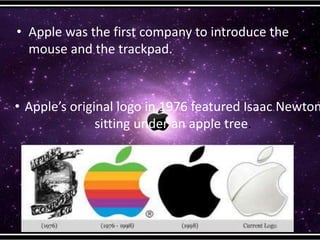
• Apple’s original logo in 1976 featured Isaac Newton
sitting under an apple tree.
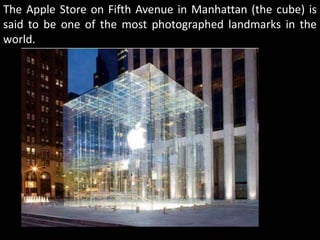
The Apple Store on Fifth Avenue in Manhattan (the cube) is
said to be one of the most photographed landmarks in the
world.
Macintosh OS
• Mac OS is a series of graphical user
interface-based operating systems
developed by Apple Inc. for their
Macintosh line of computer systems.
• Mac OS was designed only to run on Apple
Computers.
• In 1984, Apple introduced the Macintosh
PC with the Macintosh Operating System.
• Apple names its OS as “Mac OS”,
beginning in 1997 which was previously
known as “System”.
Types of Mac Os
Mac OS Family
The Mac OS Classic
family, which was based
on Apple's own code
The Mac OS X operating
system, developed from
Mac OS Classic family,
and NeXTSTEP, which
was UNIX-based
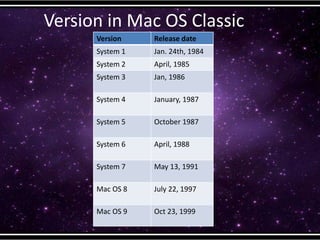
Version in Mac OS Classic
Version Release date
System 1 Jan. 24th, 1984
System 2 April, 1985
System 3 Jan, 1986
System 4 January, 1987
System 5 October 1987
System 6 April, 1988
System 7 May 13, 1991
Mac OS 8 July 22, 1997
Mac OS 9 Oct 23, 1999
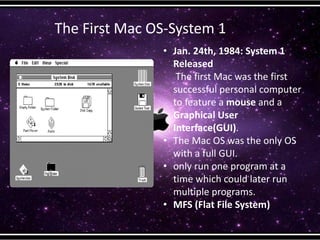
The First Mac OS-System 1
• Jan. 24th, 1984: System 1
Released
The first Mac was the first
successful personal computer
to feature a mouse and a
Graphical User
Interface(GUI).
• The Mac OS was the only OS
with a full GUI.
• only run one program at a
time which could later run
multiple programs.
• MFS (Flat File System)
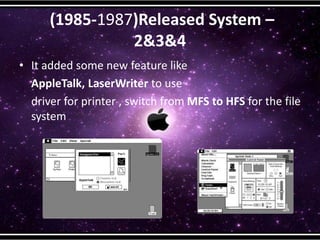
(1985-1987)Released System –
2&3&4
• It added some new feature like
AppleTalk, LaserWriter to use
driver for printer , switch from MFS to HFS for the file
system
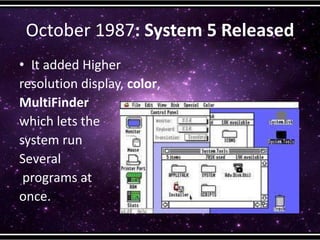
October 1987: System 5 Released
• It added Higher
resolution display, color,
MultiFinder
which lets the
system run
Several
programs at
once.
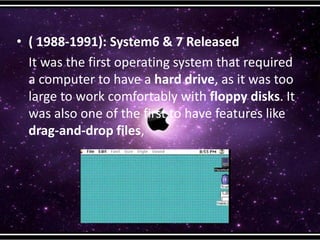
• ( 1988-1991): System6 & 7 Released
It was the first operating system that required
a computer to have a hard drive, as it was too
large to work comfortably with floppy disks. It
was also one of the first to have features like
drag-and-drop files,
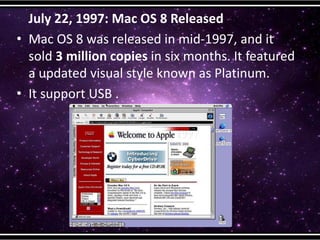
July 22, 1997: Mac OS 8 Released
• Mac OS 8 was released in mid-1997, and it
sold 3 million copies in six months. It featured
a updated visual style known as Platinum.
• It support USB .
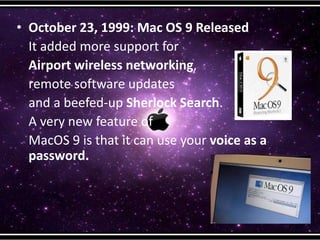
• October 23, 1999: Mac OS 9 Released
It added more support for
Airport wireless networking,
remote software updates
and a beefed-up Sherlock Search.
A very new feature of
MacOS 9 is that it can use your voice as a
password.
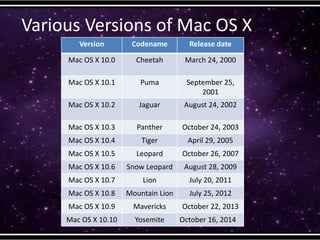
Various Versions of Mac OS X
Version Codename Release date
Mac OS X 10.0 Cheetah March 24, 2000
Mac OS X 10.1 Puma September 25,
2001
Mac OS X 10.2 Jaguar August 24, 2002
Mac OS X 10.3 Panther October 24, 2003
Mac OS X 10.4 Tiger April 29, 2005
Mac OS X 10.5 Leopard October 26, 2007
Mac OS X 10.6 Snow Leopard August 28, 2009
Mac OS X 10.7 Lion July 20, 2011
Mac OS X 10.8 Mountain Lion July 25, 2012
Mac OS X 10.9 Mavericks October 22, 2013
Mac OS X 10.10 Yosemite October 16, 2014
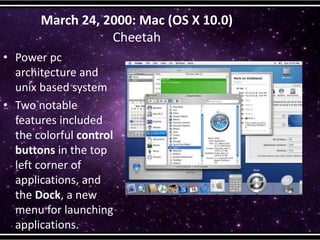
March 24, 2000: Mac (OS X 10.0)
Cheetah
• Power pc
architecture and
unix based system
• Two notable
features included
the colorful control
buttons in the top
left corner of
applications, and
the Dock, a new
menu for launching
applications.
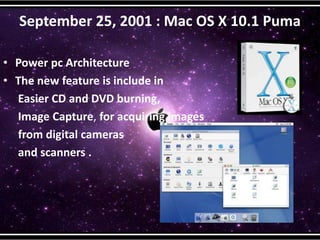
September 25, 2001 : Mac OS X 10.1 Puma
• Power pc Architecture
• The new feature is include in
Easier CD and DVD burning,
Image Capture, for acquiring images
from digital cameras
and scanners .
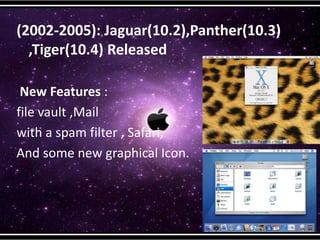
(2002-2005): Jaguar(10.2),Panther(10.3)
,Tiger(10.4) Released
New Features :
file vault ,Mail
with a spam filter , Safari,
And some new graphical Icon.
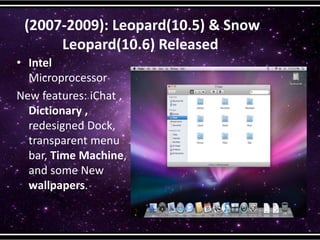
(2007-2009): Leopard(10.5) & Snow
Leopard(10.6) Released
• Intel
Microprocessor
New features: iChat ,
Dictionary ,
redesigned Dock,
transparent menu
bar, Time Machine,
and some New
wallpapers.
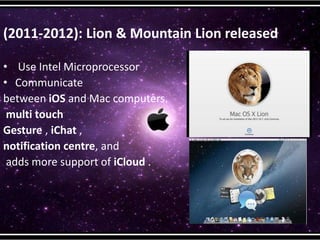
(2011-2012): Lion & Mountain Lion released
• Use Intel Microprocessor
• Communicate
between iOS and Mac computers.
multi touch
Gesture , iChat ,
notification centre, and
adds more support of iCloud .
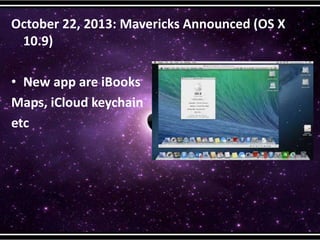
October 22, 2013: Mavericks Announced (OS X
10.9)
• New app are iBooks
Maps, iCloud keychain
etc
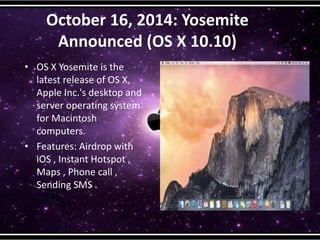
October 16, 2014: Yosemite
Announced (OS X 10.10)
• OS X Yosemite is the
latest release of OS X,
Apple Inc.'s desktop and
server operating system
for Macintosh
computers.
• Features: Airdrop with
iOS , Instant Hotspot ,
Maps , Phone call ,
Sending SMS .
Minimum Requirement for Mac OS
• Processor: Intel based Mac
• Memory: 2GB or more
• Free Disk Space :7 GB or More
• Screen Resolution:1024*768 pixel or higher
Basic tutorial for Mac
Difference between Mac OS and Windows
Comparision Mac Windows
Manufacture Apple inc Several companies : HP ,Lenovo,
Dell, Acer etc
Cost Expensive 40% cheaper then Mac
Popular Application Iphoto, Safari , Time
machine, itunes , Calender
IE, Media Player, windows
Defender, Skydrive
Letest os Yosemite(10.10) Windows 8/8.1
secure More secure windows can be easily hacked
since it is used universally.
Why Mac is more Secure
• Mac OS X is built in the Unix kernel which is
oldest and most secure OS.
• Ms window is used by lot more person then
Mac so it is much better target and makes its
easier to spread the viruses.
• Most of the virus writers are more familiar
with IBM platform And ms window which
means it is easier to create virus for that
platform.
Contd..
• Many of the tools script used to create virus or
other malware are designed for ms window.
Diff with Linux
• Mac is an entire platform consisting of
software and hardware while Linux is just an
operating system consisting of only software.
• Mac is focused on graphics and multimedia
functions while Linux is focused on office
functions.
• Mac cannot be installed on all the computers
whereas Linux is an operating system that can
be installed on any computer.
Advantages of Mac OS
• Easy to Use
• Integration With Apple and Other
Products
• Mac OS can run Windows at the same
time
Mac OS runs on Intel chips, which means you
can run XP or Vista concurrently with Mac OS,
with Boot Camp or Parallels software.
Advantages of Mac OS
• Reliability
every part of a Mac is designed and tested to
work together. its increase the reliability of
OS
• Design
It’s engineered to take full advantage of
what the hardware is capable of. And it’s
designed to deliver the most intuitive and
integrated computer experience in the
world.
Disadvantages of Mac OS
• Gaming
Some games are produced for Mac OS, but
the number is very small.
• Price
•. Fewer Software Options
•Can run only in Apple Support
Hardware
Enjoy the Mac World …..

Mac_os_final_piyush

  • 1.
  • 2.
    Overview 1. Some factsabout apple 2. What is a Mac OS? 3. Types of Mac os 4. Basic Tutorial for first user of Mac 5. Difference between Mac OS and Windows 6. Difference between Mac OS and Linux 7. Advantages of a Mac OS 8. Disadvantages of a Mac OS
  • 3.
  • 4.
    •Steve Wozniak andSteve Jobs form the Apple Computer Company on April Fool's Day on 1976 in GARAGE. •The Apple was chosen because the company to beat in the technological industry at the time was Atari , And Apple computer came before Atari in alphabet And Another reason was that jobs had happy memories of working an apple farm
  • 5.
    • Apple wasthe first company to introduce the mouse and the trackpad. • Apple’s original logo in 1976 featured Isaac Newton sitting under an apple tree.
  • 6.
    The Apple Storeon Fifth Avenue in Manhattan (the cube) is said to be one of the most photographed landmarks in the world.
  • 7.
    Macintosh OS • MacOS is a series of graphical user interface-based operating systems developed by Apple Inc. for their Macintosh line of computer systems. • Mac OS was designed only to run on Apple Computers. • In 1984, Apple introduced the Macintosh PC with the Macintosh Operating System. • Apple names its OS as “Mac OS”, beginning in 1997 which was previously known as “System”.
  • 8.
    Types of MacOs Mac OS Family The Mac OS Classic family, which was based on Apple's own code The Mac OS X operating system, developed from Mac OS Classic family, and NeXTSTEP, which was UNIX-based
  • 9.
    Version in MacOS Classic Version Release date System 1 Jan. 24th, 1984 System 2 April, 1985 System 3 Jan, 1986 System 4 January, 1987 System 5 October 1987 System 6 April, 1988 System 7 May 13, 1991 Mac OS 8 July 22, 1997 Mac OS 9 Oct 23, 1999
  • 10.
    The First MacOS-System 1 • Jan. 24th, 1984: System 1 Released The first Mac was the first successful personal computer to feature a mouse and a Graphical User Interface(GUI). • The Mac OS was the only OS with a full GUI. • only run one program at a time which could later run multiple programs. • MFS (Flat File System)
  • 11.
    (1985-1987)Released System – 2&3&4 •It added some new feature like AppleTalk, LaserWriter to use driver for printer , switch from MFS to HFS for the file system
  • 12.
    October 1987: System5 Released • It added Higher resolution display, color, MultiFinder which lets the system run Several programs at once.
  • 13.
    • ( 1988-1991):System6 & 7 Released It was the first operating system that required a computer to have a hard drive, as it was too large to work comfortably with floppy disks. It was also one of the first to have features like drag-and-drop files,
  • 14.
    July 22, 1997:Mac OS 8 Released • Mac OS 8 was released in mid-1997, and it sold 3 million copies in six months. It featured a updated visual style known as Platinum. • It support USB .
  • 15.
    • October 23,1999: Mac OS 9 Released It added more support for Airport wireless networking, remote software updates and a beefed-up Sherlock Search. A very new feature of MacOS 9 is that it can use your voice as a password.
  • 16.
    Various Versions ofMac OS X Version Codename Release date Mac OS X 10.0 Cheetah March 24, 2000 Mac OS X 10.1 Puma September 25, 2001 Mac OS X 10.2 Jaguar August 24, 2002 Mac OS X 10.3 Panther October 24, 2003 Mac OS X 10.4 Tiger April 29, 2005 Mac OS X 10.5 Leopard October 26, 2007 Mac OS X 10.6 Snow Leopard August 28, 2009 Mac OS X 10.7 Lion July 20, 2011 Mac OS X 10.8 Mountain Lion July 25, 2012 Mac OS X 10.9 Mavericks October 22, 2013 Mac OS X 10.10 Yosemite October 16, 2014
  • 17.
    March 24, 2000:Mac (OS X 10.0) Cheetah • Power pc architecture and unix based system • Two notable features included the colorful control buttons in the top left corner of applications, and the Dock, a new menu for launching applications.
  • 18.
    September 25, 2001: Mac OS X 10.1 Puma • Power pc Architecture • The new feature is include in Easier CD and DVD burning, Image Capture, for acquiring images from digital cameras and scanners .
  • 19.
    (2002-2005): Jaguar(10.2),Panther(10.3) ,Tiger(10.4) Released NewFeatures : file vault ,Mail with a spam filter , Safari, And some new graphical Icon.
  • 20.
    (2007-2009): Leopard(10.5) &Snow Leopard(10.6) Released • Intel Microprocessor New features: iChat , Dictionary , redesigned Dock, transparent menu bar, Time Machine, and some New wallpapers.
  • 21.
    (2011-2012): Lion &Mountain Lion released • Use Intel Microprocessor • Communicate between iOS and Mac computers. multi touch Gesture , iChat , notification centre, and adds more support of iCloud .
  • 22.
    October 22, 2013:Mavericks Announced (OS X 10.9) • New app are iBooks Maps, iCloud keychain etc
  • 23.
    October 16, 2014:Yosemite Announced (OS X 10.10) • OS X Yosemite is the latest release of OS X, Apple Inc.'s desktop and server operating system for Macintosh computers. • Features: Airdrop with iOS , Instant Hotspot , Maps , Phone call , Sending SMS .
  • 24.
    Minimum Requirement forMac OS • Processor: Intel based Mac • Memory: 2GB or more • Free Disk Space :7 GB or More • Screen Resolution:1024*768 pixel or higher
  • 25.
  • 26.
    Difference between MacOS and Windows Comparision Mac Windows Manufacture Apple inc Several companies : HP ,Lenovo, Dell, Acer etc Cost Expensive 40% cheaper then Mac Popular Application Iphoto, Safari , Time machine, itunes , Calender IE, Media Player, windows Defender, Skydrive Letest os Yosemite(10.10) Windows 8/8.1 secure More secure windows can be easily hacked since it is used universally.
  • 27.
    Why Mac ismore Secure • Mac OS X is built in the Unix kernel which is oldest and most secure OS. • Ms window is used by lot more person then Mac so it is much better target and makes its easier to spread the viruses. • Most of the virus writers are more familiar with IBM platform And ms window which means it is easier to create virus for that platform.
  • 28.
    Contd.. • Many ofthe tools script used to create virus or other malware are designed for ms window.
  • 29.
    Diff with Linux •Mac is an entire platform consisting of software and hardware while Linux is just an operating system consisting of only software. • Mac is focused on graphics and multimedia functions while Linux is focused on office functions. • Mac cannot be installed on all the computers whereas Linux is an operating system that can be installed on any computer.
  • 30.
    Advantages of MacOS • Easy to Use • Integration With Apple and Other Products • Mac OS can run Windows at the same time Mac OS runs on Intel chips, which means you can run XP or Vista concurrently with Mac OS, with Boot Camp or Parallels software.
  • 31.
    Advantages of MacOS • Reliability every part of a Mac is designed and tested to work together. its increase the reliability of OS • Design It’s engineered to take full advantage of what the hardware is capable of. And it’s designed to deliver the most intuitive and integrated computer experience in the world.
  • 32.
    Disadvantages of MacOS • Gaming Some games are produced for Mac OS, but the number is very small. • Price •. Fewer Software Options •Can run only in Apple Support Hardware
  • 33.
    Enjoy the MacWorld …..