PRESENTATION OF INTRODUCTION TO
COMPUTERS
COMPARISON OF MAC OS,
WINDOWS OS & LINUX OS
PRESENTED BY
CREATIVE MANICS
•ALI ZAR
•SHAKEEL TUFAIL
•SAAD ALI
•RABBIYA
•FATIMA ASGHAR
OBJECTIVES OVERVIEW
• WHAT IS OPERATING SYSTEM?
• DIFFERENT OPERATING SYSTEMS.
• MAC OS
• FEATURES OF MAC OS
• WINDOWS OS
• FEATURES OF WINDOWS OS
• LINUX OS
• FEATURES OF LINUX OS
• COMPARISON
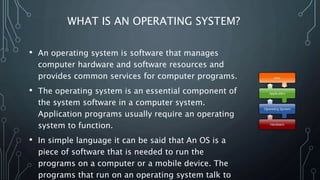
WHAT IS AN OPERATING SYSTEM?
• An operating system is software that manages
computer hardware and software resources and
provides common services for computer programs.
• The operating system is an essential component of
the system software in a computer system.
Application programs usually require an operating
system to function.
• In simple language it can be said that An OS is a
piece of software that is needed to run the
programs on a computer or a mobile device. The
programs that run on an operating system talk to
THERE ARE VARIOUS OPERATING SYSTEMS(OS) IN
TODAY’S WORLD.
Mac OS by
Apple
Windows by
Microsoft Corp.
Linux by
Community
MAC OS
• Mac OS is a series of graphical user interface-based operating
systems developed by Apple Inc. for their Macintosh line of
computer systems.
• Mac OS was designed only to run on Apple Computers.
• In 1984, Apple introduced the Macintosh PC with the Macintosh
Operating System.
• Apple names its OS as “Mac OS”, beginning in 1997 which was
previously known as “System”.
FEATURES OF MAC OS
• Security
• Reliability
• Ease of use
• Integration with Apple & Other products
SECURITY
• Mac OS is a two-layered system: the ”attractive GUI” sits atop a
Unix core, and Unix is best-known for its security features. It's
simply impossible to install a destructive Trojan or virus unless
the user explicitly allows it root access via typing in the admin
password. Mac OS's built-in firewall is set up to work
unobtrusively out of the box as well as being highly
configurable.
• Mac OS users should be vigilant about strange files and never
allow an application they aren't certain of admin access, but
they don't need special anti-virus software
RELIABILITY
• Because OS X (means MAC OS) was designed from scratch from
the ground up, Mac OS is incredibly stable. Apple controls
production from start to finish, so every part of a Mac is
designed and tested to work together.
EASE OF USE
• Apple's known for hiring the best industrial and interface designers
around, and it shows in the intuitive nature of the GUI. I don't mean
to sound like I'm verging into fangirl territory here; it's just true. Like
the OS's reliability, the OS's functionality is designed to just work.
• The attractiveness of the interface can't be discounted. Some scoff
that looks aren't everything, but when you're spending 8 or more
hours a day staring at a screen, it's a relief to spend that time staring
at a well-designed screen.
• Advanced users have easy command-line access with the Terminal
app.
INTEGRATION WITH APPLE AND OTHER
PRODUCTS
• Mac OS will automatically recognize and work with any other
Apple product, such as iPhone, Cinema Display, Airport, and
iPad. On top of this, additional drivers are rarely needed for
non-Apple products, and I can't think of the last time I plugged
a non-Apple device into my Mac that Mac OS didn't recognize.
WINDOWS OS
• Microsoft Windows operating system was developed by Microsoft to
overcome the limitation of its own MS-DOS operating system.
• First successful version were Windows 3.0, released in 1990.
• Subsequently released version were “Windows 95, Windows 98, Windows
2000, Windows XP, Windows XP Professional , Windows Vista, Windows 7,
Windows 8, Windows 8.1 and nowadays Microsoft launches it’s latest OS
Windows 10.”
FEATURES OF WINDOWS OS
• Easy to use
• Performance monitor
• Files management
• Plug & Play
• Based on MS-Dos
• Windows
EASY TO USE
• Microsoft windows is easy to use as compared to other
operating systems in the modern era therefore Windows is
most popular OS in the world.
PERFORMANCE MONITOR
• Windows gives you an advantage of checking the performance
of your PC .
• Any one can check the performance of it’s windows pc by
pressing “alt+ctlr+del” keys at the same time.
FILES MANAGEMENT
• Windows manage your files automatically into a spefic location
on the basis of the type of the file. E.g., images were
automatically sent in “ Pictures folder”.
PLUG AND PLAY
• Windows gives plug and play option to it’s user. There is no
need to install the driver of any external pheriphal device like
“web camera’s, joysticks data traveler devices etc.
BASED ON MS-DOS
• Windows is a MS-DOS based operating system.
WINDOWS
• Microsoft Windows is a windows operating system: “means that
every task we want to do done in it’s own window”.
• Every program / task has is it’s own window in which that task
occurs.
LINUX OS
• Linux was originally built by Linus Torvalds at the University of
Helsinki in 1991.
• Linux is a Unix-like, Kernel-based, fully memory-protected,
multitasking operating system .
FEATURES OF LINUX OS
• Open Source Operating System.
• Free Software
• It runs on a wide range of hardware from PCs to Macs.
OPEN SOURCE OPERATING SYSTEM
• Linux is a open source operating system. Any programmer can
modify it due to it’s needs.
FREE SOFTWARE
• Linux is a free software any one can download it from web and
install it on it’s pc
IT RUNS ON A WIDE RANGE OF HARDWARE FROM
PCS TO MACS.
• Iany pc user can install linux to it’s system there is no specific
requirements for installing it.
MAC OS WINDOWS OS LINUX OS
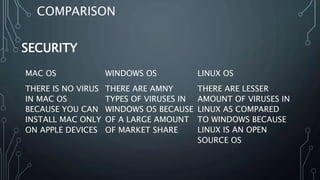
THERE IS NO VIRUS
IN MAC OS
BECAUSE YOU CAN
INSTALL MAC ONLY
ON APPLE DEVICES
THERE ARE AMNY
TYPES OF VIRUSES IN
WINDOWS OS BECAUSE
OF A LARGE AMOUNT
OF MARKET SHARE
THERE ARE LESSER
AMOUNT OF VIRUSES IN
LINUX AS COMPARED
TO WINDOWS BECAUSE
LINUX IS AN OPEN
SOURCE OS
SECURITY
COMPARISON
COMPARISON
MAC OS WINDOWS OS LINUX OS
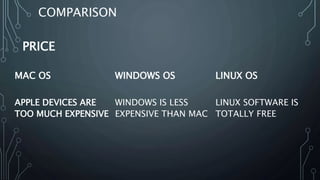
APPLE DEVICES ARE
TOO MUCH EXPENSIVE
WINDOWS IS LESS
EXPENSIVE THAN MAC
LINUX SOFTWARE IS
TOTALLY FREE
PRICE
COMPARISON
MAC OS WINDOWS OS LINUX OS
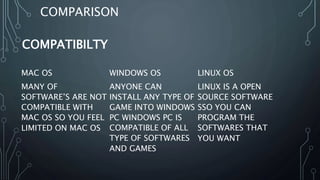
MANY OF
SOFTWARE’S ARE NOT
COMPATIBLE WITH
MAC OS SO YOU FEEL
LIMITED ON MAC OS
ANYONE CAN
INSTALL ANY TYPE OF
GAME INTO WINDOWS
PC WINDOWS PC IS
COMPATIBLE OF ALL
TYPE OF SOFTWARES
AND GAMES
LINUX IS A OPEN
SOURCE SOFTWARE
SSO YOU CAN
PROGRAM THE
SOFTWARES THAT
YOU WANT
COMPATIBILTY
MAC OS WINDOWS OS LINUX OS
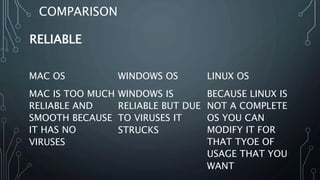
MAC IS TOO MUCH
RELIABLE AND
SMOOTH BECAUSE
IT HAS NO
VIRUSES
WINDOWS IS
RELIABLE BUT DUE
TO VIRUSES IT
STRUCKS
BECAUSE LINUX IS
NOT A COMPLETE
OS YOU CAN
MODIFY IT FOR
THAT TYOE OF
USAGE THAT YOU
WANT
RELIABLE
COMPARISON
COMPARISON
TASK MANAGER/ PERFORMANCE MONITOR
CONCLUSION
In conclusion, no operating system is really
better, the choice is up to you. If you're a
gamer, then you have no choice, go for
Windows. Programmers might prefer Linux
and video/graphics producers will probably
tend towards Mac. The best thing to do is
probably to try each OS and see which is
best for you!
CREDITS
COLLECTION OF DATA:
SAAD TUFAIL, FATIMA ASGHAR& RABIA SHEHNAAZ
GRAPHICS AND DESIGNING BY
MEHAR ALI ZAR & SHAKEEL TUFAIL ANSARI
THANK YOU

Comparison of windows linux and mac os

  • 1.
    PRESENTATION OF INTRODUCTIONTO COMPUTERS COMPARISON OF MAC OS, WINDOWS OS & LINUX OS
  • 2.
    PRESENTED BY CREATIVE MANICS •ALIZAR •SHAKEEL TUFAIL •SAAD ALI •RABBIYA •FATIMA ASGHAR
  • 3.
    OBJECTIVES OVERVIEW • WHATIS OPERATING SYSTEM? • DIFFERENT OPERATING SYSTEMS. • MAC OS • FEATURES OF MAC OS • WINDOWS OS • FEATURES OF WINDOWS OS • LINUX OS • FEATURES OF LINUX OS • COMPARISON
  • 4.
    WHAT IS ANOPERATING SYSTEM? • An operating system is software that manages computer hardware and software resources and provides common services for computer programs. • The operating system is an essential component of the system software in a computer system. Application programs usually require an operating system to function. • In simple language it can be said that An OS is a piece of software that is needed to run the programs on a computer or a mobile device. The programs that run on an operating system talk to
  • 5.
    THERE ARE VARIOUSOPERATING SYSTEMS(OS) IN TODAY’S WORLD. Mac OS by Apple Windows by Microsoft Corp. Linux by Community
  • 6.
    MAC OS • MacOS is a series of graphical user interface-based operating systems developed by Apple Inc. for their Macintosh line of computer systems. • Mac OS was designed only to run on Apple Computers. • In 1984, Apple introduced the Macintosh PC with the Macintosh Operating System. • Apple names its OS as “Mac OS”, beginning in 1997 which was previously known as “System”.
  • 7.
    FEATURES OF MACOS • Security • Reliability • Ease of use • Integration with Apple & Other products
  • 8.
    SECURITY • Mac OSis a two-layered system: the ”attractive GUI” sits atop a Unix core, and Unix is best-known for its security features. It's simply impossible to install a destructive Trojan or virus unless the user explicitly allows it root access via typing in the admin password. Mac OS's built-in firewall is set up to work unobtrusively out of the box as well as being highly configurable. • Mac OS users should be vigilant about strange files and never allow an application they aren't certain of admin access, but they don't need special anti-virus software
  • 9.
    RELIABILITY • Because OSX (means MAC OS) was designed from scratch from the ground up, Mac OS is incredibly stable. Apple controls production from start to finish, so every part of a Mac is designed and tested to work together.
  • 10.
    EASE OF USE •Apple's known for hiring the best industrial and interface designers around, and it shows in the intuitive nature of the GUI. I don't mean to sound like I'm verging into fangirl territory here; it's just true. Like the OS's reliability, the OS's functionality is designed to just work. • The attractiveness of the interface can't be discounted. Some scoff that looks aren't everything, but when you're spending 8 or more hours a day staring at a screen, it's a relief to spend that time staring at a well-designed screen. • Advanced users have easy command-line access with the Terminal app.
  • 11.
    INTEGRATION WITH APPLEAND OTHER PRODUCTS • Mac OS will automatically recognize and work with any other Apple product, such as iPhone, Cinema Display, Airport, and iPad. On top of this, additional drivers are rarely needed for non-Apple products, and I can't think of the last time I plugged a non-Apple device into my Mac that Mac OS didn't recognize.
  • 12.
    WINDOWS OS • MicrosoftWindows operating system was developed by Microsoft to overcome the limitation of its own MS-DOS operating system. • First successful version were Windows 3.0, released in 1990. • Subsequently released version were “Windows 95, Windows 98, Windows 2000, Windows XP, Windows XP Professional , Windows Vista, Windows 7, Windows 8, Windows 8.1 and nowadays Microsoft launches it’s latest OS Windows 10.”
  • 13.
    FEATURES OF WINDOWSOS • Easy to use • Performance monitor • Files management • Plug & Play • Based on MS-Dos • Windows
  • 14.
    EASY TO USE •Microsoft windows is easy to use as compared to other operating systems in the modern era therefore Windows is most popular OS in the world.
  • 15.
    PERFORMANCE MONITOR • Windowsgives you an advantage of checking the performance of your PC . • Any one can check the performance of it’s windows pc by pressing “alt+ctlr+del” keys at the same time.
  • 16.
    FILES MANAGEMENT • Windowsmanage your files automatically into a spefic location on the basis of the type of the file. E.g., images were automatically sent in “ Pictures folder”.
  • 17.
    PLUG AND PLAY •Windows gives plug and play option to it’s user. There is no need to install the driver of any external pheriphal device like “web camera’s, joysticks data traveler devices etc.
  • 18.
    BASED ON MS-DOS •Windows is a MS-DOS based operating system.
  • 19.
    WINDOWS • Microsoft Windowsis a windows operating system: “means that every task we want to do done in it’s own window”. • Every program / task has is it’s own window in which that task occurs.
  • 20.
    LINUX OS • Linuxwas originally built by Linus Torvalds at the University of Helsinki in 1991. • Linux is a Unix-like, Kernel-based, fully memory-protected, multitasking operating system .
  • 21.
    FEATURES OF LINUXOS • Open Source Operating System. • Free Software • It runs on a wide range of hardware from PCs to Macs.
  • 22.
    OPEN SOURCE OPERATINGSYSTEM • Linux is a open source operating system. Any programmer can modify it due to it’s needs.
  • 23.
    FREE SOFTWARE • Linuxis a free software any one can download it from web and install it on it’s pc
  • 24.
    IT RUNS ONA WIDE RANGE OF HARDWARE FROM PCS TO MACS. • Iany pc user can install linux to it’s system there is no specific requirements for installing it.
  • 25.
    MAC OS WINDOWSOS LINUX OS THERE IS NO VIRUS IN MAC OS BECAUSE YOU CAN INSTALL MAC ONLY ON APPLE DEVICES THERE ARE AMNY TYPES OF VIRUSES IN WINDOWS OS BECAUSE OF A LARGE AMOUNT OF MARKET SHARE THERE ARE LESSER AMOUNT OF VIRUSES IN LINUX AS COMPARED TO WINDOWS BECAUSE LINUX IS AN OPEN SOURCE OS SECURITY COMPARISON
  • 26.
    COMPARISON MAC OS WINDOWSOS LINUX OS APPLE DEVICES ARE TOO MUCH EXPENSIVE WINDOWS IS LESS EXPENSIVE THAN MAC LINUX SOFTWARE IS TOTALLY FREE PRICE
  • 27.
    COMPARISON MAC OS WINDOWSOS LINUX OS MANY OF SOFTWARE’S ARE NOT COMPATIBLE WITH MAC OS SO YOU FEEL LIMITED ON MAC OS ANYONE CAN INSTALL ANY TYPE OF GAME INTO WINDOWS PC WINDOWS PC IS COMPATIBLE OF ALL TYPE OF SOFTWARES AND GAMES LINUX IS A OPEN SOURCE SOFTWARE SSO YOU CAN PROGRAM THE SOFTWARES THAT YOU WANT COMPATIBILTY
  • 28.
    MAC OS WINDOWSOS LINUX OS MAC IS TOO MUCH RELIABLE AND SMOOTH BECAUSE IT HAS NO VIRUSES WINDOWS IS RELIABLE BUT DUE TO VIRUSES IT STRUCKS BECAUSE LINUX IS NOT A COMPLETE OS YOU CAN MODIFY IT FOR THAT TYOE OF USAGE THAT YOU WANT RELIABLE COMPARISON
  • 29.
  • 30.
    CONCLUSION In conclusion, nooperating system is really better, the choice is up to you. If you're a gamer, then you have no choice, go for Windows. Programmers might prefer Linux and video/graphics producers will probably tend towards Mac. The best thing to do is probably to try each OS and see which is best for you!
  • 31.
    CREDITS COLLECTION OF DATA: SAADTUFAIL, FATIMA ASGHAR& RABIA SHEHNAAZ GRAPHICS AND DESIGNING BY MEHAR ALI ZAR & SHAKEEL TUFAIL ANSARI
  • 32.