Mac OS
Apple Inc.
Presented By
Prithwiraj Joydhar Sujoy (18-39143-3)
S.M Muntasir Rahman (18-39197-3)
Rahul Hasan(18-39145-3)
Nayeem Mohammad Mostafa (18-39204-3)
Overview
1.What Is an Operating system ?
2.What is a Mac OS? And why this Uncommon!
3.History behind the apple’s logo
4.The First Mac OS
5.Various version of Mac OS
6.Advanteges of Mac OS?
7.Disadvantages Of Mac OS
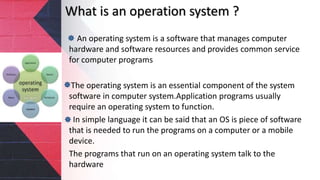
What is an operation system ?
An operating system is a software that manages computer
hardware and software resources and provides common service
for computer programs
The operating system is an essential component of the system
software in computer system.Application programs usually
require an operating system to function.
In simple language it can be said that an OS is piece of software
that is needed to run the programs on a computer or a mobile
device.
The programs that run on an operating system talk to the
hardware
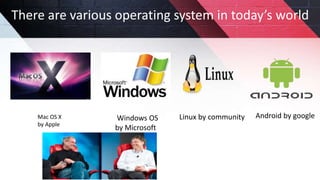
Mac OS X
by Apple
There are various operating system in today’s world
Windows OS
by Microsoft
Linux by community Android by google
Mac OS
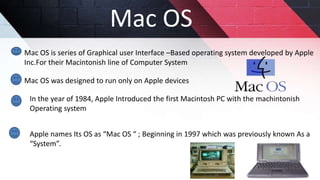
Mac OS is series of Graphical user Interface –Based operating system developed by Apple
Inc.For their Macintonish line of Computer System
Mac OS was designed to run only on Apple devices
In the year of 1984, Apple Introduced the first Macintosh PC with the machintonish
Operating system
Apple names Its OS as “Mac OS “ ; Beginning in 1997 which was previously known As a
“System”.
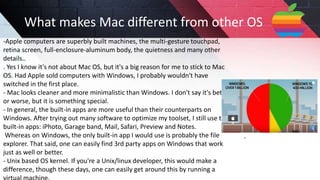
-Apple computers are superbly built machines, the multi-gesture touchpad,
retina screen, full-enclosure-aluminum body, the quietness and many other
details..
. Yes I know it's not about Mac OS, but it's a big reason for me to stick to Mac
OS. Had Apple sold computers with Windows, I probably wouldn't have
switched in the first place.
- Mac looks cleaner and more minimalistic than Windows. I don't say it's better
or worse, but it is something special.
- In general, the built-in apps are more useful than their counterparts on
Windows. After trying out many software to optimize my toolset, I still use the
built-in apps: iPhoto, Garage band, Mail, Safari, Preview and Notes.
Whereas on Windows, the only built-in app I would use is probably the file
explorer. That said, one can easily find 3rd party apps on Windows that work
just as well or better.
- Unix based OS kernel. If you're a Unix/linux developer, this would make a
difference, though these days, one can easily get around this by running a
What makes Mac different from other OS
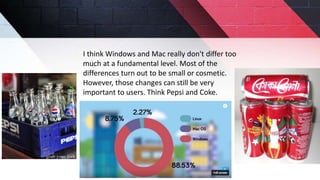
I think Windows and Mac really don't differ too
much at a fundamental level. Most of the
differences turn out to be small or cosmetic.
However, those changes can still be very
important to users. Think Pepsi and Coke.
History
of
apple
Logo
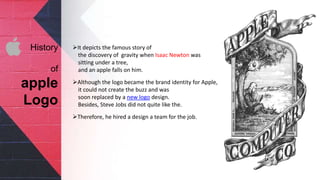
It depicts the famous story of
the discovery of gravity when Isaac Newton was
sitting under a tree,
and an apple falls on him.
Although the logo became the brand identity for Apple,
it could not create the buzz and was
soon replaced by a new logo design.
Besides, Steve Jobs did not quite like the.
Therefore, he hired a design a team for the job.
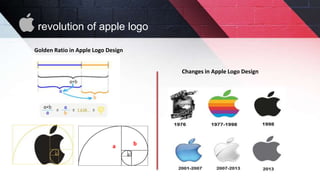
Changes in Apple Logo Design
Golden Ratio in Apple Logo Design
a b
revolution of apple logo
The First MAC OS
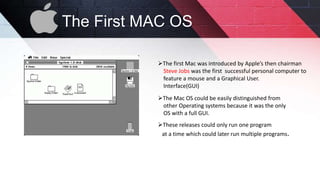
The first Mac was introduced by Apple’s then chairman
Steve Jobs was the first successful personal computer to
feature a mouse and a Graphical User.
Interface(GUI)
The Mac OS could be easily distinguished from
other Operating systems because it was the only
OS with a full GUI.
These releases could only run one program
at a time which could later run multiple programs.
Various
Versions
of
MAC OS
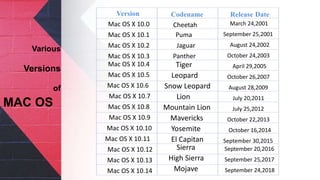
Version Codename Release Date
Mac OS X 10.0
Mac OS X 10.1
Mac OS X 10.2
Mac OS X 10.3
Mac OS X 10.4
Mac OS X 10.5
Mac OS X 10.7
Mac OS X 10.8
Cheetah
Puma
Jaguar
Panther
Mac OS X 10.9
Mac OS X 10.6
Mac OS X 10.10
Mac OS X 10.12
Mac OS X 10.13
Mac OS X 10.11
Mac OS X 10.14
Tiger
Leopard
Snow Leopard
Lion
Mountain Lion
Mavericks
Yosemite
El Capitan
Sierra
High Sierra
Mojave
March 24,2001
September 25,2001
August 24,2002
October 24,2003
April 29,2005
October 26,2007
August 28,2009
July 20,2011
July 25,2012
October 22,2013
October 16,2014
September 30,2015
September 20,2016
September 25,2017
September 24,2018
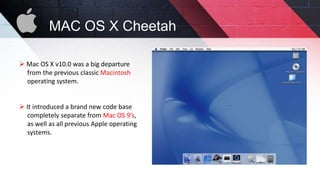
 Mac OS X v10.0 was a big departure
from the previous classic Macintosh
operating system.
 It introduced a brand new code base
completely separate from Mac OS 9’s,
as well as all previous Apple operating
systems.
MAC OS X Cheetah
MAC OS X Cheetah
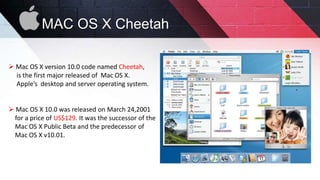
 Mac OS X version 10.0 code named Cheetah,
is the first major released of Mac OS X.
Apple’s desktop and server operating system.
 Mac OS X 10.0 was released on March 24,2001
for a price of US$129. It was the successor of the
Mac OS X Public Beta and the predecessor of
Mac OS X v10.01.
MAC OS X MOJAVE
MacOS Mojave (version 10.14) is the fifteenth major release of macOS,
Apple Inc.'s desktop operating system for Macintosh computers.
The successor to macOS High Sierra,
it was announced at the WWDC 2018, on June 4, 2018,and
was released to the public on September 24, 2018.
Following the California landmark-based naming system introduced with
OS X Mavericks,
the name "Mojave" refers to the Mojave Desert in California.
MAC OS X EL CAPITAN
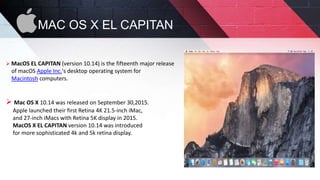
 MacOS EL CAPITAN (version 10.14) is the fifteenth major release
of macOS Apple Inc.'s desktop operating system for
Macintosh computers.
 Mac OS X 10.14 was released on September 30,2015.
Apple launched their first Retina 4K 21.5-inch iMac,
and 27-inch iMacs with Retina 5K display in 2015.
MacOS X EL CAPITAN version 10.14 was introduced
for more sophisticated 4k and 5k retina display.
 Leopard and Windows:
Nonetheless, just because Mac OS X v10.5 Leopard is faster and better than
Windows doesn’t mean that Apple ignores users who are new to Macs and
more familiar with the Microsoft operating system.
 Networks:
There’s always a certain amount of pressure to conform to the type of
computers used on a network at home or work. Macs, however, can join
any network either wirelessly or with an Ethernet cable and function perfectly.
 Viruses:
There’s always a certain amount of pressure to conform to the type of
computers used on a network at home or work. Macs, however, can join any
network either wirelessly or with an Ethernet cable and function perfectly.
Some
Features
of
Mac
 Peripherals:
This is not to suggest that you must use Apple brand peripheral devices
such as printers, cameras, and hard drives. On the contrary: Apple installs
hundreds of peripheral drivers in each Mac so that it recognizes most
peripherals the moment you connect them wirelessly or via the USB or
FireWire ports.
 Processors:
All Mac models made in the past five years use fast Intel microprocessors,
similar to those used in most PCs. Apple uses processors that feature two or
more processor cores, allowing them to work faster.
 Graphics:
All Macs include a graphics processor unit (GPU) to speed the display of
pictures and video. The low-end version of Mac mini and 11- and 13-inch
Mac laptops use an Intel HD 3000 graphics processor integrated into the
CPU chip set.
Some
Features
of
Mac
Advantages of Mac OS
 Easy to use.
 Simple but powerful user interface.
 Fewer viruses and other security issues.
 Comes preloaded with productivity apps.
 Effective and unparalleled multitasking feature.
 Integration with other Apple products.
Disadvantages of Mac OS
 Mac computers are considerably expensive.
 Inflexible when it comes to hardware upgrades.
 Lack of game titles and advanced gaming experience.
 App ecosystem is still lackluster.
 Fewer software option.
Any Questions?
Viewers
Thanks For
Watching

Difference between Mac and Window

  • 1.
  • 2.
    Presented By Prithwiraj JoydharSujoy (18-39143-3) S.M Muntasir Rahman (18-39197-3) Rahul Hasan(18-39145-3) Nayeem Mohammad Mostafa (18-39204-3)
  • 3.
    Overview 1.What Is anOperating system ? 2.What is a Mac OS? And why this Uncommon! 3.History behind the apple’s logo 4.The First Mac OS 5.Various version of Mac OS 6.Advanteges of Mac OS? 7.Disadvantages Of Mac OS
  • 4.
    What is anoperation system ? An operating system is a software that manages computer hardware and software resources and provides common service for computer programs The operating system is an essential component of the system software in computer system.Application programs usually require an operating system to function. In simple language it can be said that an OS is piece of software that is needed to run the programs on a computer or a mobile device. The programs that run on an operating system talk to the hardware
  • 5.
    Mac OS X byApple There are various operating system in today’s world Windows OS by Microsoft Linux by community Android by google
  • 6.
    Mac OS Mac OSis series of Graphical user Interface –Based operating system developed by Apple Inc.For their Macintonish line of Computer System Mac OS was designed to run only on Apple devices In the year of 1984, Apple Introduced the first Macintosh PC with the machintonish Operating system Apple names Its OS as “Mac OS “ ; Beginning in 1997 which was previously known As a “System”.
  • 7.
    -Apple computers aresuperbly built machines, the multi-gesture touchpad, retina screen, full-enclosure-aluminum body, the quietness and many other details.. . Yes I know it's not about Mac OS, but it's a big reason for me to stick to Mac OS. Had Apple sold computers with Windows, I probably wouldn't have switched in the first place. - Mac looks cleaner and more minimalistic than Windows. I don't say it's better or worse, but it is something special. - In general, the built-in apps are more useful than their counterparts on Windows. After trying out many software to optimize my toolset, I still use the built-in apps: iPhoto, Garage band, Mail, Safari, Preview and Notes. Whereas on Windows, the only built-in app I would use is probably the file explorer. That said, one can easily find 3rd party apps on Windows that work just as well or better. - Unix based OS kernel. If you're a Unix/linux developer, this would make a difference, though these days, one can easily get around this by running a What makes Mac different from other OS
  • 8.
    I think Windowsand Mac really don't differ too much at a fundamental level. Most of the differences turn out to be small or cosmetic. However, those changes can still be very important to users. Think Pepsi and Coke.
  • 9.
    History of apple Logo It depicts thefamous story of the discovery of gravity when Isaac Newton was sitting under a tree, and an apple falls on him. Although the logo became the brand identity for Apple, it could not create the buzz and was soon replaced by a new logo design. Besides, Steve Jobs did not quite like the. Therefore, he hired a design a team for the job.
  • 10.
    Changes in AppleLogo Design Golden Ratio in Apple Logo Design a b revolution of apple logo
  • 11.
    The First MACOS The first Mac was introduced by Apple’s then chairman Steve Jobs was the first successful personal computer to feature a mouse and a Graphical User. Interface(GUI) The Mac OS could be easily distinguished from other Operating systems because it was the only OS with a full GUI. These releases could only run one program at a time which could later run multiple programs.
  • 12.
    Various Versions of MAC OS Version CodenameRelease Date Mac OS X 10.0 Mac OS X 10.1 Mac OS X 10.2 Mac OS X 10.3 Mac OS X 10.4 Mac OS X 10.5 Mac OS X 10.7 Mac OS X 10.8 Cheetah Puma Jaguar Panther Mac OS X 10.9 Mac OS X 10.6 Mac OS X 10.10 Mac OS X 10.12 Mac OS X 10.13 Mac OS X 10.11 Mac OS X 10.14 Tiger Leopard Snow Leopard Lion Mountain Lion Mavericks Yosemite El Capitan Sierra High Sierra Mojave March 24,2001 September 25,2001 August 24,2002 October 24,2003 April 29,2005 October 26,2007 August 28,2009 July 20,2011 July 25,2012 October 22,2013 October 16,2014 September 30,2015 September 20,2016 September 25,2017 September 24,2018
  • 13.
     Mac OSX v10.0 was a big departure from the previous classic Macintosh operating system.  It introduced a brand new code base completely separate from Mac OS 9’s, as well as all previous Apple operating systems. MAC OS X Cheetah
  • 14.
    MAC OS XCheetah  Mac OS X version 10.0 code named Cheetah, is the first major released of Mac OS X. Apple’s desktop and server operating system.  Mac OS X 10.0 was released on March 24,2001 for a price of US$129. It was the successor of the Mac OS X Public Beta and the predecessor of Mac OS X v10.01.
  • 15.
    MAC OS XMOJAVE MacOS Mojave (version 10.14) is the fifteenth major release of macOS, Apple Inc.'s desktop operating system for Macintosh computers. The successor to macOS High Sierra, it was announced at the WWDC 2018, on June 4, 2018,and was released to the public on September 24, 2018. Following the California landmark-based naming system introduced with OS X Mavericks, the name "Mojave" refers to the Mojave Desert in California.
  • 16.
    MAC OS XEL CAPITAN  MacOS EL CAPITAN (version 10.14) is the fifteenth major release of macOS Apple Inc.'s desktop operating system for Macintosh computers.  Mac OS X 10.14 was released on September 30,2015. Apple launched their first Retina 4K 21.5-inch iMac, and 27-inch iMacs with Retina 5K display in 2015. MacOS X EL CAPITAN version 10.14 was introduced for more sophisticated 4k and 5k retina display.
  • 17.
     Leopard andWindows: Nonetheless, just because Mac OS X v10.5 Leopard is faster and better than Windows doesn’t mean that Apple ignores users who are new to Macs and more familiar with the Microsoft operating system.  Networks: There’s always a certain amount of pressure to conform to the type of computers used on a network at home or work. Macs, however, can join any network either wirelessly or with an Ethernet cable and function perfectly.  Viruses: There’s always a certain amount of pressure to conform to the type of computers used on a network at home or work. Macs, however, can join any network either wirelessly or with an Ethernet cable and function perfectly. Some Features of Mac
  • 18.
     Peripherals: This isnot to suggest that you must use Apple brand peripheral devices such as printers, cameras, and hard drives. On the contrary: Apple installs hundreds of peripheral drivers in each Mac so that it recognizes most peripherals the moment you connect them wirelessly or via the USB or FireWire ports.  Processors: All Mac models made in the past five years use fast Intel microprocessors, similar to those used in most PCs. Apple uses processors that feature two or more processor cores, allowing them to work faster.  Graphics: All Macs include a graphics processor unit (GPU) to speed the display of pictures and video. The low-end version of Mac mini and 11- and 13-inch Mac laptops use an Intel HD 3000 graphics processor integrated into the CPU chip set. Some Features of Mac
  • 19.
    Advantages of MacOS  Easy to use.  Simple but powerful user interface.  Fewer viruses and other security issues.  Comes preloaded with productivity apps.  Effective and unparalleled multitasking feature.  Integration with other Apple products.
  • 20.
    Disadvantages of MacOS  Mac computers are considerably expensive.  Inflexible when it comes to hardware upgrades.  Lack of game titles and advanced gaming experience.  App ecosystem is still lackluster.  Fewer software option.
  • 21.
  • 22.