MAC
OPERATING
SYSTEM
MAHLA KETAPI
MR. MANGUIAT
CIS50
WHAT IS AN (OS)
OPERATING
SYSTEM?
• Operating system software is already preinstalled
on your computer’s hard drive or embedded in
smaller devices and manages hardware and
software
• Provides common services for computer programs
• An operating system is an essential component of
system software. Programs require an OS to
function that will in turn communicate to the
hardware
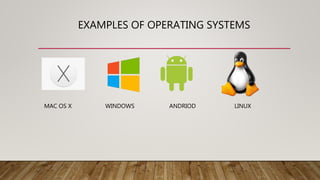
EXAMPLES OF OPERATING SYSTEMS
MAC OS X WINDOWS ANDRIOD LINUX
HISTORY OF MAC OS
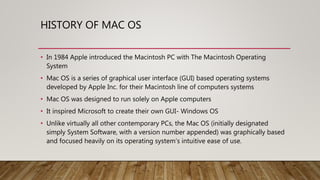
• In 1984 Apple introduced the Macintosh PC with The Macintosh Operating
System
• Mac OS is a series of graphical user interface (GUI) based operating systems
developed by Apple Inc. for their Macintosh line of computers systems
• Mac OS was designed to run solely on Apple computers
• It inspired Microsoft to create their own GUI- Windows OS
• Unlike virtually all other contemporary PCs, the Mac OS (initially designated
simply System Software, with a version number appended) was graphically based
and focused heavily on its operating system’s intuitive ease of use.
CLASSIC MAC OS
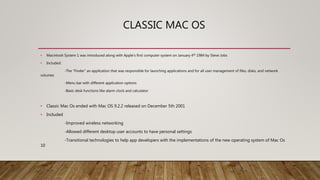
• Macintosh System 1 was introduced along with Apple’s first computer system on January 4th 1984 by Steve Jobs
• Included:
-The “Finder” an application that was responsible for launching applications and for all user management of files, disks, and network
volumes
-Menu bar with different application options
-Basic desk functions like alarm clock and calculator
• Classic Mac Os ended with Mac OS 9.2.2 released on December 5th 2001
• Included
-Improved wireless networking
-Allowed different desktop user accounts to have personal settings
-Transitional technologies to help app developers with the implementations of the new operating system of Mac Os
10
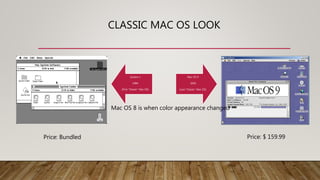
CLASSIC MAC OS LOOK
System 1
1984
(First “Classic” Mac OS)
Mac OS 9
2001
(Last “Classic” Mac OS)
Mac OS 8 is when color appearance changed
Price: Bundled Price: $ 159.99
TRANSITION TO MAC OS X
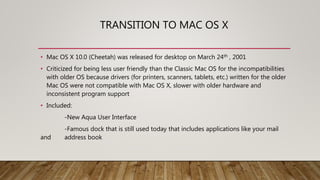
• Mac OS X 10.0 (Cheetah) was released for desktop on March 24th , 2001
• Criticized for being less user friendly than the Classic Mac OS for the incompatibilities
with older OS because drivers (for printers, scanners, tablets, etc.) written for the older
Mac OS were not compatible with Mac OS X, slower with older hardware and
inconsistent program support
• Included:
-New Aqua User Interface
-Famous dock that is still used today that includes applications like your mail
and address book
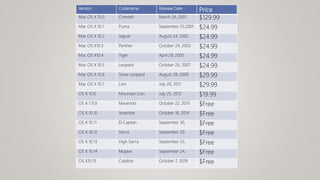
Version Codename Release Date Price
Mac OS X 10.0 Cheetah March 24, 2001 $129.99
Mac OS X 10.1 Puma September 25,2001 $24.99
Mac OS X 10.2 Jaguar August 24, 2002 $24.99
Mac OS X10.3 Panther October 24, 2003 $24.99
Mac OS X10.4 Tiger April 29, 2005 $24.99
Mac OS X 10.5 Leopard October 26, 2007 $24.99
Mac OS X 10.6 Snow Leopard August 28, 2009 $29.99
Mac OS X 10.7 Lion July 20, 2011 $29.99
OS X 10.8 Mountain Lion July 25, 2012 $19.99
OS X 1 0.9 Mavericks October 22, 2013 $Free
OS X 10.10 Yosemite October 16, 2014 $Free
OS X 10.11 El Capitan September 30, $Free
OS X 10.12 Sierra September 20, $Free
OS X 10.13 High Sierra September 25, $Free
OS X 10.14 Mojave September 24, $Free
OS X10.15 Catalina October 7, 2019 $Free
OS X 10.15 CATALINA
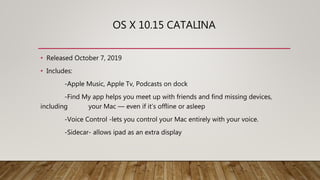
• Released October 7, 2019
• Includes:
-Apple Music, Apple Tv, Podcasts on dock
-Find My app helps you meet up with friends and find missing devices,
including your Mac — even if it’s offline or asleep
-Voice Control -lets you control your Mac entirely with your voice.
-Sidecar- allows ipad as an extra display
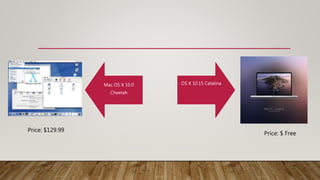
Mac OS X 10.0
Cheetah
OS X 10.15 Catalina
Price: $129.99
Price: $ Free
ADVANTAGES TO MAC OS
EASY TO USE RELIABLE WELL DESIGNED
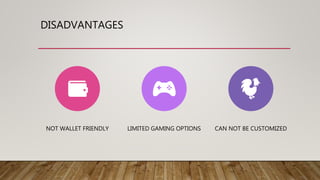
DISADVANTAGES
NOT WALLET FRIENDLY LIMITED GAMING OPTIONS CAN NOT BE CUSTOMIZED

Mac OS Presentation

  • 1.
  • 2.
    WHAT IS AN(OS) OPERATING SYSTEM? • Operating system software is already preinstalled on your computer’s hard drive or embedded in smaller devices and manages hardware and software • Provides common services for computer programs • An operating system is an essential component of system software. Programs require an OS to function that will in turn communicate to the hardware
  • 3.
    EXAMPLES OF OPERATINGSYSTEMS MAC OS X WINDOWS ANDRIOD LINUX
  • 4.
    HISTORY OF MACOS • In 1984 Apple introduced the Macintosh PC with The Macintosh Operating System • Mac OS is a series of graphical user interface (GUI) based operating systems developed by Apple Inc. for their Macintosh line of computers systems • Mac OS was designed to run solely on Apple computers • It inspired Microsoft to create their own GUI- Windows OS • Unlike virtually all other contemporary PCs, the Mac OS (initially designated simply System Software, with a version number appended) was graphically based and focused heavily on its operating system’s intuitive ease of use.
  • 5.
    CLASSIC MAC OS •Macintosh System 1 was introduced along with Apple’s first computer system on January 4th 1984 by Steve Jobs • Included: -The “Finder” an application that was responsible for launching applications and for all user management of files, disks, and network volumes -Menu bar with different application options -Basic desk functions like alarm clock and calculator • Classic Mac Os ended with Mac OS 9.2.2 released on December 5th 2001 • Included -Improved wireless networking -Allowed different desktop user accounts to have personal settings -Transitional technologies to help app developers with the implementations of the new operating system of Mac Os 10
  • 6.
    CLASSIC MAC OSLOOK System 1 1984 (First “Classic” Mac OS) Mac OS 9 2001 (Last “Classic” Mac OS) Mac OS 8 is when color appearance changed Price: Bundled Price: $ 159.99
  • 7.
    TRANSITION TO MACOS X • Mac OS X 10.0 (Cheetah) was released for desktop on March 24th , 2001 • Criticized for being less user friendly than the Classic Mac OS for the incompatibilities with older OS because drivers (for printers, scanners, tablets, etc.) written for the older Mac OS were not compatible with Mac OS X, slower with older hardware and inconsistent program support • Included: -New Aqua User Interface -Famous dock that is still used today that includes applications like your mail and address book
  • 8.
    Version Codename ReleaseDate Price Mac OS X 10.0 Cheetah March 24, 2001 $129.99 Mac OS X 10.1 Puma September 25,2001 $24.99 Mac OS X 10.2 Jaguar August 24, 2002 $24.99 Mac OS X10.3 Panther October 24, 2003 $24.99 Mac OS X10.4 Tiger April 29, 2005 $24.99 Mac OS X 10.5 Leopard October 26, 2007 $24.99 Mac OS X 10.6 Snow Leopard August 28, 2009 $29.99 Mac OS X 10.7 Lion July 20, 2011 $29.99 OS X 10.8 Mountain Lion July 25, 2012 $19.99 OS X 1 0.9 Mavericks October 22, 2013 $Free OS X 10.10 Yosemite October 16, 2014 $Free OS X 10.11 El Capitan September 30, $Free OS X 10.12 Sierra September 20, $Free OS X 10.13 High Sierra September 25, $Free OS X 10.14 Mojave September 24, $Free OS X10.15 Catalina October 7, 2019 $Free
  • 9.
    OS X 10.15CATALINA • Released October 7, 2019 • Includes: -Apple Music, Apple Tv, Podcasts on dock -Find My app helps you meet up with friends and find missing devices, including your Mac — even if it’s offline or asleep -Voice Control -lets you control your Mac entirely with your voice. -Sidecar- allows ipad as an extra display
  • 10.
    Mac OS X10.0 Cheetah OS X 10.15 Catalina Price: $129.99 Price: $ Free
  • 11.
    ADVANTAGES TO MACOS EASY TO USE RELIABLE WELL DESIGNED
  • 12.
    DISADVANTAGES NOT WALLET FRIENDLYLIMITED GAMING OPTIONS CAN NOT BE CUSTOMIZED