WELCOME
TO OUR
PRESENTATION
IRIN NAHAR LIZA
18103243
DIDER-ALAM
18103277
SUMIYA AZAD LABONI
18103257
MUSHFIQUR RAHMAN
15103335
GROUP MEMBER
MAC OS
Macintosh Operating
System
• Operating system
DISCUTION
• Mac OS
• Various Versions of
Mac OS
• Hardware compatibility
• Instalation
procedure
• Mac OS features
• pros & cons
What Is an Operating System
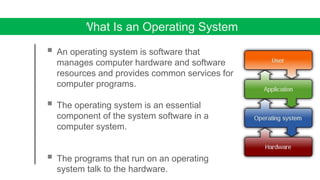
 An operating system is software that
manages computer hardware and software
resources and provides common services for
computer programs.
 The operating system is an essential
component of the system software in a
computer system.
 The programs that run on an operating
system talk to the hardware.
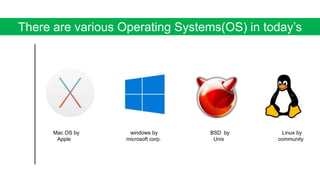
There are various Operating Systems(OS) in today’s
world
Mac OS by windows by BSD by Linux by
Apple microsoft corp. Unix community
MAC OS
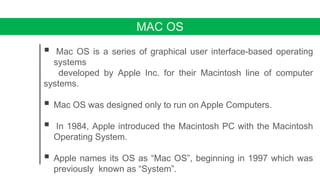
 Mac OS is a series of graphical user interface-based operating
systems
developed by Apple Inc. for their Macintosh line of computer
systems.
 Mac OS was designed only to run on Apple Computers.
 In 1984, Apple introduced the Macintosh PC with the Macintosh
Operating System.
 Apple names its OS as “Mac OS”, beginning in 1997 which was
previously known as “System”.
Some Fact About Mac
Developer : Apple computer Inc.
OS family : Macintosh.
Written in : c++,objective-C.swift
Source model : Closed source.
Initial release : January 24,1984; [35 years ago]
Latest release : September 24, 2018.
Marketing target: Personal computer.
Kernel type : Hybrid kernel.
The First Mac OS
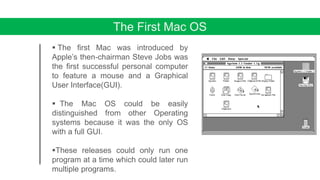
 The first Mac was introduced by
Apple’s then-chairman Steve Jobs was
the first successful personal computer
to feature a mouse and a Graphical
User Interface(GUI).
 The Mac OS could be easily
distinguished from other Operating
systems because it was the only OS
with a full GUI.
These releases could only run one
program at a time which could later run
multiple programs.
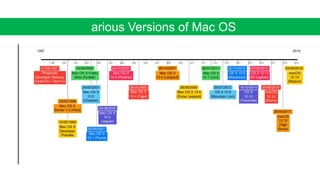
Various Versions of Mac OS
MAC OS X Cheetah
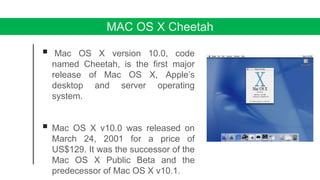
 Mac OS X version 10.0, code
named Cheetah, is the first major
release of Mac OS X, Apple’s
desktop and server operating
system.
 Mac OS X v10.0 was released on
March 24, 2001 for a price of
US$129. It was the successor of the
Mac OS X Public Beta and the
predecessor of Mac OS X v10.1.
MAC OS X Panther
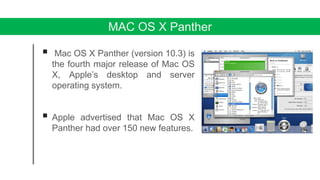
 Mac OS X Panther (version 10.3) is
the fourth major release of Mac OS
X, Apple’s desktop and server
operating system.
 Apple advertised that Mac OS X
Panther had over 150 new features.
MAC OS X Tiger
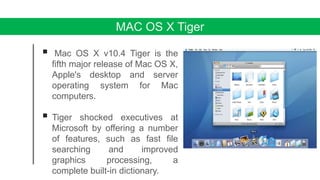
 Mac OS X v10.4 Tiger is the
fifth major release of Mac OS X,
Apple's desktop and server
operating system for Mac
computers.
 Tiger shocked executives at
Microsoft by offering a number
of features, such as fast file
searching and improved
graphics processing, a
complete built-in dictionary.
MAC OS X Leopard
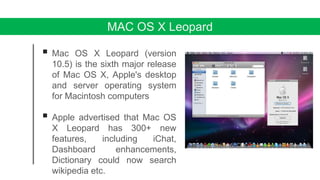
 Mac OS X Leopard (version
10.5) is the sixth major release
of Mac OS X, Apple's desktop
and server operating system
for Macintosh computers
 Apple advertised that Mac OS
X Leopard has 300+ new
features, including iChat,
Dashboard enhancements,
Dictionary could now search
wikipedia etc.
MAC OS X Snow Leopard
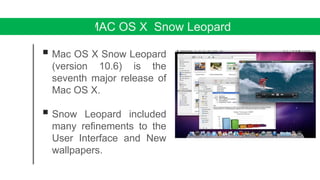
 Mac OS X Snow Leopard
(version 10.6) is the
seventh major release of
Mac OS X.
 Snow Leopard included
many refinements to the
User Interface and New
wallpapers.
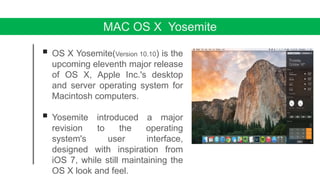
MAC OS X Yosemite
 OS X Yosemite(Version 10.10) is the
upcoming eleventh major release
of OS X, Apple Inc.'s desktop
and server operating system for
Macintosh computers.
 Yosemite introduced a major
revision to the operating
system's user interface,
designed with inspiration from
iOS 7, while still maintaining the
OS X look and feel.
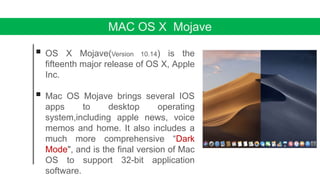
MAC OS X Mojave
 OS X Mojave(Version 10.14) is the
fifteenth major release of OS X, Apple
Inc.
 Mac OS Mojave brings several IOS
apps to desktop operating
system,including apple news, voice
memos and home. It also includes a
much more comprehensive “Dark
Mode", and is the final version of Mac
OS to support 32-bit application
software.
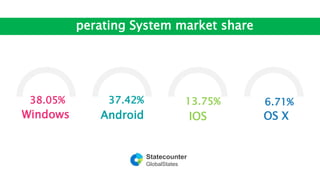
38.05%
Windows
37.42%
Android
13.75%
IOS
6.71%
OS X
Operating System market share
Statecounter
GlobalStates
Hardware compatibility
10.14
Intel Macs (64-bit) released in:
2010 (Mac Pro with compatiblegraphics card), 2012 (other) or later
2 GB
10.12 – 10.13 Intel Macs (64-bit) released in:
2009 (iMac and main MacBook line) or later[97]
10.8 – 10.11 Intel Macs (64-bit) released in:
2007 (prosumer and iMac), 2008 (other consumer), 2009 (Xserve) or later
10.7 Intel Macs (64-bit)[98]
Rosetta support dropped from 10.7 and newer.
10.6 Intel Macs (32-bit or 64-bit)[98] 1 GB
10.5 G4, G5 and Intel Macs (32-bit or 64-bit) at 867 MHz or faster
Classic support dropped from 10.5 and newer.
512 MB
10.4 Macs with built-in FireWire and either a New World ROM or Intel
processor
256 MB
10.3 Macs with a New World ROM[99]
128 MB10.0-10.2 G3, G4 and G5 iBook and PowerBook, Power Mac and iMac
(except PowerBook G3 "Kanga")
Operating system Supported systems
Ram
Installation Procedure
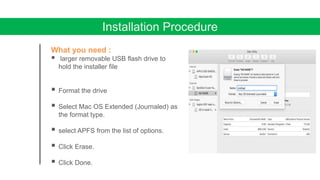
What you need :
 larger removable USB flash drive to
hold the installer file
 Format the drive
 Select Mac OS Extended (Journaled) as
the format type.
 select APFS from the list of options.
 Click Erase.
 Click Done.
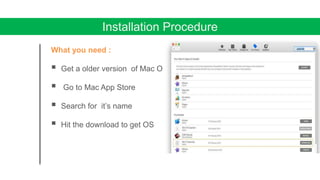
Installation Procedure
What you need :
 Get a older version of Mac OS
 Go to Mac App Store
 Search for it’s name
 Hit the download to get OS
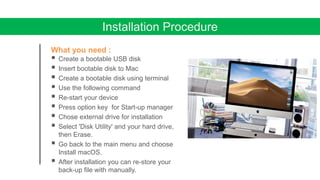
Installation Procedure
What you need :
 Create a bootable USB disk
 Insert bootable disk to Mac
 Create a bootable disk using terminal
 Use the following command
 Re-start your device
 Press option key for Start-up manager
 Chose external drive for installation
 Select 'Disk Utility' and your hard drive,
then Erase.
 Go back to the main menu and choose
Install macOS.
 After installation you can re-store your
back-up file with manually.
MAC OS X Browser
 Graphical web browser.
 Based on the WebKit engine.
 released 2003 with Mac OS X Panther.
 A mobile version has been bundled
with iOS devices since the iPhone's introduction
in 2007.
 Safari is the default browser on Apple devices.
 A Windows version was available from 2007 to 2012
Safari Browser
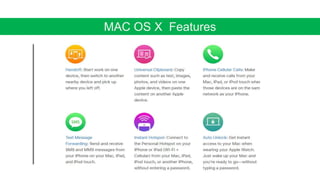
MAC OS X Features
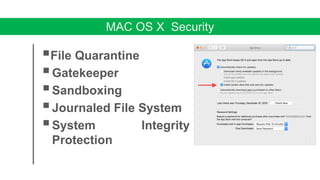
MAC OS X Security
File Quarantine
Gatekeeper
Sandboxing
Journaled File System
System Integrity
Protection
Advantages of Mac OS
 Easy to use
The Mac OS is much easier to use than any other operating system. Even
people who are not familiar with it can operate it easily.
 Integration With Apple and Other Products
Mac OS will automatically recognize and work with any other Apple
product, such as iPhone, Cinema Display, Airpod, and iPad. On top of this,
additional drivers are rarely needed for non-Apple products.
 Mac OS can run Windows at the same time
Mac OS runs on Intel chips, which means you can run XP or Vista
concurrently with Mac OS, with Boot Camp or Parallels software.
Advantages of Mac OS
 Reliability
Because OS X was designed from scratch from the ground up,
Mac OS is incredibly stable. Apple controls production from start
to finish, so every part of a Mac is designed and tested to work
together.
 Design
It’s engineered to take full advantage of what the hardware is
capable of. And it’s designed to deliver the most intuitive and
integrated computer experience in the world.
Disadvantages of Mac OS
 Gaming
If you're a computer gamer, Mac OS isn't going to do it for you.
Boot Camp and Parallels will allow you to run games natively in
Windows, but there may be a performance hit. Some games are
produced for Mac OS, but the number is very small.
 Price
All that flashy secure reliable power comes at a price. Macs cost
more than machines that run other operating systems. The result
is you're paying a premium to have what is often the highest-end
hardware on the market.
Disadvantages of Mac OS
 Fewer Software Options
Not all applications are yet available for Mac Unlike Windows.
 Cannot be upgraded/customized
There are upgrade options when you buy a Mac, but unlike a
Windows PC, you cannot mix and match components. The
easiest way to upgrade a Mac is to buy a new one.
mackintosh operating system

mackintosh operating system

  • 1.
  • 2.
    IRIN NAHAR LIZA 18103243 DIDER-ALAM 18103277 SUMIYAAZAD LABONI 18103257 MUSHFIQUR RAHMAN 15103335 GROUP MEMBER
  • 3.
  • 4.
    • Operating system DISCUTION •Mac OS • Various Versions of Mac OS • Hardware compatibility • Instalation procedure • Mac OS features • pros & cons
  • 5.
    What Is anOperating System  An operating system is software that manages computer hardware and software resources and provides common services for computer programs.  The operating system is an essential component of the system software in a computer system.  The programs that run on an operating system talk to the hardware.
  • 6.
    There are variousOperating Systems(OS) in today’s world Mac OS by windows by BSD by Linux by Apple microsoft corp. Unix community
  • 8.
    MAC OS  MacOS is a series of graphical user interface-based operating systems developed by Apple Inc. for their Macintosh line of computer systems.  Mac OS was designed only to run on Apple Computers.  In 1984, Apple introduced the Macintosh PC with the Macintosh Operating System.  Apple names its OS as “Mac OS”, beginning in 1997 which was previously known as “System”.
  • 9.
    Some Fact AboutMac Developer : Apple computer Inc. OS family : Macintosh. Written in : c++,objective-C.swift Source model : Closed source. Initial release : January 24,1984; [35 years ago] Latest release : September 24, 2018. Marketing target: Personal computer. Kernel type : Hybrid kernel.
  • 10.
    The First MacOS  The first Mac was introduced by Apple’s then-chairman Steve Jobs was the first successful personal computer to feature a mouse and a Graphical User Interface(GUI).  The Mac OS could be easily distinguished from other Operating systems because it was the only OS with a full GUI. These releases could only run one program at a time which could later run multiple programs.
  • 11.
  • 12.
    MAC OS XCheetah  Mac OS X version 10.0, code named Cheetah, is the first major release of Mac OS X, Apple’s desktop and server operating system.  Mac OS X v10.0 was released on March 24, 2001 for a price of US$129. It was the successor of the Mac OS X Public Beta and the predecessor of Mac OS X v10.1.
  • 13.
    MAC OS XPanther  Mac OS X Panther (version 10.3) is the fourth major release of Mac OS X, Apple’s desktop and server operating system.  Apple advertised that Mac OS X Panther had over 150 new features.
  • 14.
    MAC OS XTiger  Mac OS X v10.4 Tiger is the fifth major release of Mac OS X, Apple's desktop and server operating system for Mac computers.  Tiger shocked executives at Microsoft by offering a number of features, such as fast file searching and improved graphics processing, a complete built-in dictionary.
  • 15.
    MAC OS XLeopard  Mac OS X Leopard (version 10.5) is the sixth major release of Mac OS X, Apple's desktop and server operating system for Macintosh computers  Apple advertised that Mac OS X Leopard has 300+ new features, including iChat, Dashboard enhancements, Dictionary could now search wikipedia etc.
  • 16.
    MAC OS XSnow Leopard  Mac OS X Snow Leopard (version 10.6) is the seventh major release of Mac OS X.  Snow Leopard included many refinements to the User Interface and New wallpapers.
  • 17.
    MAC OS XYosemite  OS X Yosemite(Version 10.10) is the upcoming eleventh major release of OS X, Apple Inc.'s desktop and server operating system for Macintosh computers.  Yosemite introduced a major revision to the operating system's user interface, designed with inspiration from iOS 7, while still maintaining the OS X look and feel.
  • 18.
    MAC OS XMojave  OS X Mojave(Version 10.14) is the fifteenth major release of OS X, Apple Inc.  Mac OS Mojave brings several IOS apps to desktop operating system,including apple news, voice memos and home. It also includes a much more comprehensive “Dark Mode", and is the final version of Mac OS to support 32-bit application software.
  • 19.
  • 20.
    Hardware compatibility 10.14 Intel Macs(64-bit) released in: 2010 (Mac Pro with compatiblegraphics card), 2012 (other) or later 2 GB 10.12 – 10.13 Intel Macs (64-bit) released in: 2009 (iMac and main MacBook line) or later[97] 10.8 – 10.11 Intel Macs (64-bit) released in: 2007 (prosumer and iMac), 2008 (other consumer), 2009 (Xserve) or later 10.7 Intel Macs (64-bit)[98] Rosetta support dropped from 10.7 and newer. 10.6 Intel Macs (32-bit or 64-bit)[98] 1 GB 10.5 G4, G5 and Intel Macs (32-bit or 64-bit) at 867 MHz or faster Classic support dropped from 10.5 and newer. 512 MB 10.4 Macs with built-in FireWire and either a New World ROM or Intel processor 256 MB 10.3 Macs with a New World ROM[99] 128 MB10.0-10.2 G3, G4 and G5 iBook and PowerBook, Power Mac and iMac (except PowerBook G3 "Kanga") Operating system Supported systems Ram
  • 21.
    Installation Procedure What youneed :  larger removable USB flash drive to hold the installer file  Format the drive  Select Mac OS Extended (Journaled) as the format type.  select APFS from the list of options.  Click Erase.  Click Done.
  • 22.
    Installation Procedure What youneed :  Get a older version of Mac OS  Go to Mac App Store  Search for it’s name  Hit the download to get OS
  • 23.
    Installation Procedure What youneed :  Create a bootable USB disk  Insert bootable disk to Mac  Create a bootable disk using terminal  Use the following command  Re-start your device  Press option key for Start-up manager  Chose external drive for installation  Select 'Disk Utility' and your hard drive, then Erase.  Go back to the main menu and choose Install macOS.  After installation you can re-store your back-up file with manually.
  • 24.
    MAC OS XBrowser  Graphical web browser.  Based on the WebKit engine.  released 2003 with Mac OS X Panther.  A mobile version has been bundled with iOS devices since the iPhone's introduction in 2007.  Safari is the default browser on Apple devices.  A Windows version was available from 2007 to 2012 Safari Browser
  • 25.
    MAC OS XFeatures
  • 26.
    MAC OS XSecurity File Quarantine Gatekeeper Sandboxing Journaled File System System Integrity Protection
  • 27.
    Advantages of MacOS  Easy to use The Mac OS is much easier to use than any other operating system. Even people who are not familiar with it can operate it easily.  Integration With Apple and Other Products Mac OS will automatically recognize and work with any other Apple product, such as iPhone, Cinema Display, Airpod, and iPad. On top of this, additional drivers are rarely needed for non-Apple products.  Mac OS can run Windows at the same time Mac OS runs on Intel chips, which means you can run XP or Vista concurrently with Mac OS, with Boot Camp or Parallels software.
  • 28.
    Advantages of MacOS  Reliability Because OS X was designed from scratch from the ground up, Mac OS is incredibly stable. Apple controls production from start to finish, so every part of a Mac is designed and tested to work together.  Design It’s engineered to take full advantage of what the hardware is capable of. And it’s designed to deliver the most intuitive and integrated computer experience in the world.
  • 29.
    Disadvantages of MacOS  Gaming If you're a computer gamer, Mac OS isn't going to do it for you. Boot Camp and Parallels will allow you to run games natively in Windows, but there may be a performance hit. Some games are produced for Mac OS, but the number is very small.  Price All that flashy secure reliable power comes at a price. Macs cost more than machines that run other operating systems. The result is you're paying a premium to have what is often the highest-end hardware on the market.
  • 30.
    Disadvantages of MacOS  Fewer Software Options Not all applications are yet available for Mac Unlike Windows.  Cannot be upgraded/customized There are upgrade options when you buy a Mac, but unlike a Windows PC, you cannot mix and match components. The easiest way to upgrade a Mac is to buy a new one.