



LIBRARY BOOK
LOCATOR
We all might have
experienced some
difficulty in locating a
specific book in a
library. This project
aims to develop a
system used to locate
a particular book in a
library with the help
of a PC.
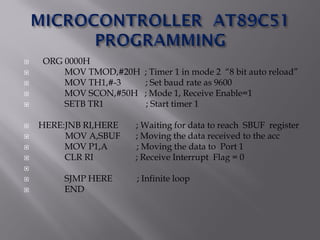
 ORG 0000H
 MOV TMOD,#20H ; Timer 1 in mode 2 “8 bit auto reload”
 MOV TH1,#-3 ; Set baud rate as 9600
 MOV SCON,#50H ; Mode 1, Receive Enable=1
 SETB TR1 ; Start timer 1
 HERE:JNB RI,HERE ; Waiting for data to reach SBUF register
 MOV A,SBUF ; Moving the data received to the acc
 MOV P1,A ; Moving the data to Port 1
 CLR RI ; Receive Interrupt Flag = 0

 SJMP HERE ; Infinite loop
 END
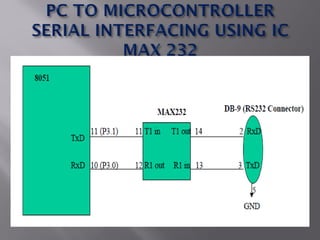
 • RS232 is not compatible to TTL. For this
reason, to connect any RS232 to a
microcontroller system, we must use “Voltage
Converters” such as MAX232 to convert the
 TTL logic levels to the RS232 voltage levels,
and vice versa.
 • MAX232 IC chips is referred to as “Line
Driver”.
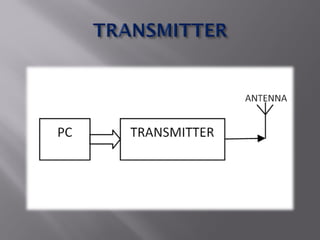
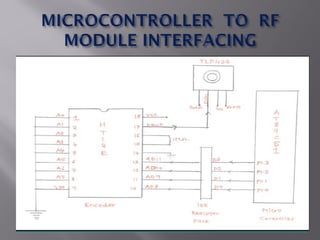
 The parallel data obtained from the
Microcontroller AT 89C51 Ports is transferred
to the encoder IC HT12E
 The HT12E encoder converts this parallel data
into serial data which is then transmitted via
the ASK transmitter.
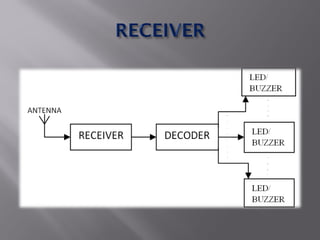
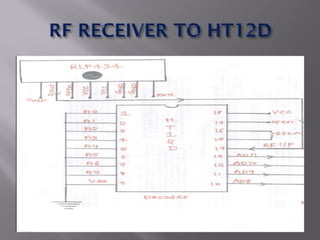
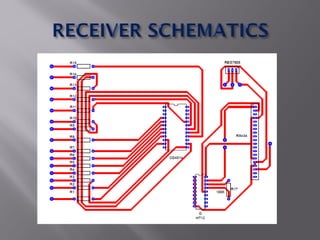
 ASK Receiver module receives the data
transmitted by the ASK Transmitter and
transfers this serial data to the HT12D decoder
IC.
 HT12D decoder IC converts the serial data into
4 bit parallel data.
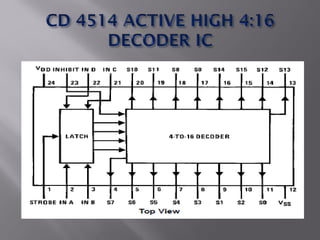
 This 4 bit parallel data is further fed into a 4:16
decoder IC CD 4514 to get 16 parallel outputs.
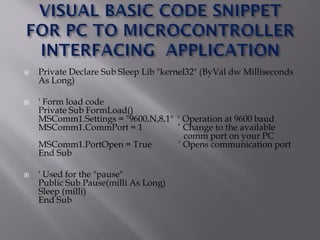
 Private Declare Sub Sleep Lib "kernel32" (ByVal dw Milliseconds
As Long)
 ' Form load code
Private Sub FormLoad()
MSComm1.Settings = "9600,N,8,1" „ Operation at 9600 baud
MSComm1.CommPort = 1 ‟ Change to the available
comm port on your PC
MSComm1.PortOpen = True „ Opens communication port
End Sub
 ' Used for the "pause"
Public Sub Pause(milli As Long)
Sleep (milli)
End Sub
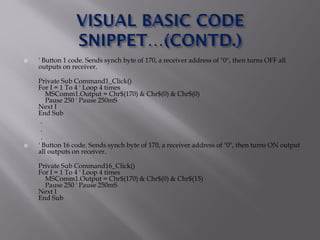
 ' Button 1 code. Sends synch byte of 170, a receiver address of "0", then turns OFF all
outputs on receiver.
Private Sub Command1_Click()
For I = 1 To 4 ' Loop 4 times
MSComm1.Output = Chr$(170) & Chr$(0) & Chr$(0)
Pause 250 ' Pause 250mS
Next I
End Sub
.
.
.
 ' Button 16 code. Sends synch byte of 170, a receiver address of "0", then turns ON output
all outputs on receiver.
Private Sub Command16_Click()
For I = 1 To 4 ' Loop 4 times
MSComm1.Output = Chr$(170) & Chr$(0) & Chr$(15)
Pause 250 ' Pause 250mS
Next I
End Sub
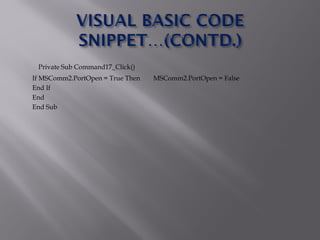
Private Sub Command17_Click()
If MSComm2.PortOpen = True Then MSComm2.PortOpen = False
End If
End
End Sub
Library Book Locator

Library Book Locator

  • 2.
    LIBRARY BOOK LOCATOR We allmight have experienced some difficulty in locating a specific book in a library. This project aims to develop a system used to locate a particular book in a library with the help of a PC.
  • 8.
     ORG 0000H MOV TMOD,#20H ; Timer 1 in mode 2 “8 bit auto reload”  MOV TH1,#-3 ; Set baud rate as 9600  MOV SCON,#50H ; Mode 1, Receive Enable=1  SETB TR1 ; Start timer 1  HERE:JNB RI,HERE ; Waiting for data to reach SBUF register  MOV A,SBUF ; Moving the data received to the acc  MOV P1,A ; Moving the data to Port 1  CLR RI ; Receive Interrupt Flag = 0   SJMP HERE ; Infinite loop  END
  • 9.
     • RS232is not compatible to TTL. For this reason, to connect any RS232 to a microcontroller system, we must use “Voltage Converters” such as MAX232 to convert the  TTL logic levels to the RS232 voltage levels, and vice versa.  • MAX232 IC chips is referred to as “Line Driver”.
  • 10.
     The paralleldata obtained from the Microcontroller AT 89C51 Ports is transferred to the encoder IC HT12E  The HT12E encoder converts this parallel data into serial data which is then transmitted via the ASK transmitter.
  • 13.
     ASK Receivermodule receives the data transmitted by the ASK Transmitter and transfers this serial data to the HT12D decoder IC.  HT12D decoder IC converts the serial data into 4 bit parallel data.  This 4 bit parallel data is further fed into a 4:16 decoder IC CD 4514 to get 16 parallel outputs.
  • 16.
     Private DeclareSub Sleep Lib "kernel32" (ByVal dw Milliseconds As Long)  ' Form load code Private Sub FormLoad() MSComm1.Settings = "9600,N,8,1" „ Operation at 9600 baud MSComm1.CommPort = 1 ‟ Change to the available comm port on your PC MSComm1.PortOpen = True „ Opens communication port End Sub  ' Used for the "pause" Public Sub Pause(milli As Long) Sleep (milli) End Sub
  • 17.
     ' Button1 code. Sends synch byte of 170, a receiver address of "0", then turns OFF all outputs on receiver. Private Sub Command1_Click() For I = 1 To 4 ' Loop 4 times MSComm1.Output = Chr$(170) & Chr$(0) & Chr$(0) Pause 250 ' Pause 250mS Next I End Sub . . .  ' Button 16 code. Sends synch byte of 170, a receiver address of "0", then turns ON output all outputs on receiver. Private Sub Command16_Click() For I = 1 To 4 ' Loop 4 times MSComm1.Output = Chr$(170) & Chr$(0) & Chr$(15) Pause 250 ' Pause 250mS Next I End Sub
  • 18.
    Private Sub Command17_Click() IfMSComm2.PortOpen = True Then MSComm2.PortOpen = False End If End End Sub