Serial Peripheral Interface
By:- Rishu
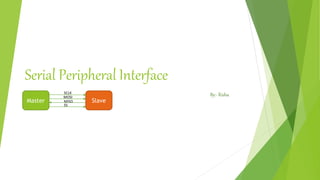
Master Slave
SCLK
MOSI
MISO
SS
Index
 Introduction
 Overview
 Communication
 Advantages
 Disadvantages
 Applications
Introduction
 Communication Protocol Developed By Motorola
 Four Wire Protocol
 Serial Interface
 Master-Slave Approach
 Synchronous- Data clocked with Clock Signal
 Data Rate-10mbps
 Full Duplex Protocol
 Low power than I2C (no need of Pull ups)
 Supports Single master and multiple slaves
 No hardware slave acknowledgement
Overview
 SPI stands for Serial Peripheral Interface
 Used for moving data simply and quickly from one device to another
 Used to communicate across small distances
 Master-Slave(Multiple Slaves, Single Master)
 Serial Interface
 Synchronous
 Data Exchange
Continue…
 SPI is a Master-Slave protocol
 The Master device controls the clock (SCK)
 No data is transferred unless a clock signal is present
 All slaves are controlled by the master clock
 The slave devices may not manipulate the clock
 Master Set Slave Select low
 Master Generates Clock
 Shift registers shift in and out data
Master Slave
SCLK
MOSI
MISO
SS
Continue…
 Simple SPI Protocol Specifies 4 Signal Wires
 Master Out Slave In (MOSI)
 Master In Slave Out (MISO)
 Serial Clock (SCLK)
 Slave Select (SS)
 MOSI – Carries data out of Master to Slave
 MISO – Carries data from Slave to Master (Both signals happen for every transmission)
 SS – Unique line to select a slave
 SCLK – Master produced clock to synchronize data transfer MOSI
Master Slave
SCLK
MOSI
MISO
SS
Continue…
 SPI is a Synchronous protocol
 The data is clocked along with a clock signal(SCK)
 The clock signal controls when data is changed and when it should be read
 Since SPI is synchronous, the clock rate can vary, unlike RS-232 style communications
Continue…
 SPI is a Data Exchange protocol
 As data is being clocked out, new data is clocked in
 Data is exchanged - no device can just be a transmitter only or receiver only
 the master controls the exchange by manipulating the clock line (SCK)
 Often a signal controls when a device is accessed - this is the CS or SS signal
 CS or SS signal is known as “Chip Select” or “Slave Select” and is frequently an active-low signal.
 Data is only output during the rising or falling edge of SCK
 Data is latched during the opposite edge of SCK
 The opposite edge is used to ensure data is valid at the time of reading
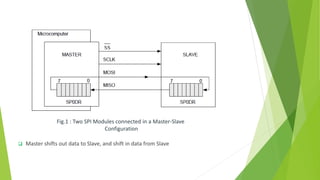
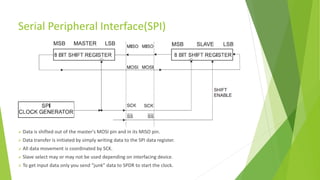
Fig.1 : Two SPI Modules connected in a Master-Slave
Configuration
 Master shifts out data to Slave, and shift in data from Slave
Serial Peripheral Interface(SPI)
 Data is shifted out of the master's MOSI pin and in its MISO pin.
 Data transfer is initiated by simply writing data to the SPI data register.
 All data movement is coordinated by SCK.
 Slave select may or may not be used depending on interfacing device.
 To get input data only you send “junk” data to SPDR to start the clock.
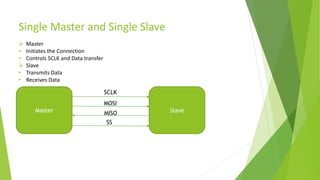
Single Master and Single Slave
Master Slave
SCLK
MOSI
MISO
SS
 Master
• Initiates the Connection
• Controls SCLK and Data transfer
 Slave
• Transmits Data
• Receives Data
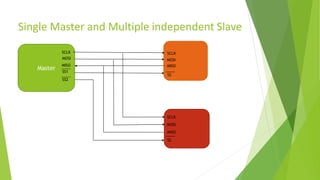
Single Master and Multiple independent Slave
Master
SCLK
MOSI
MISO
SS1
SS2
SCLK
MOSI
MISO
SS
SCLK
MOSI
MISO
SS
Master and multiple daisy-chained slaves
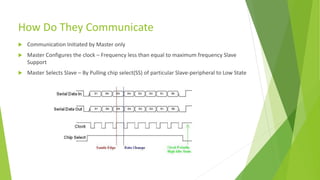
How Do They Communicate
 Communication Initiated by Master only
 Master Configures the clock – Frequency less than equal to maximum frequency Slave
Support
 Master Selects Slave – By Pulling chip select(SS) of particular Slave-peripheral to Low State
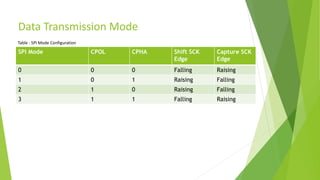
Data Transmission Mode
SPI Mode CPOL CPHA Shift SCK
Edge
Capture SCK
Edge
0 0 0 Falling Raising
1 0 1 Raising Falling
2 1 0 Raising Falling
3 1 1 Falling Raising
Table : SPI Mode Configuration
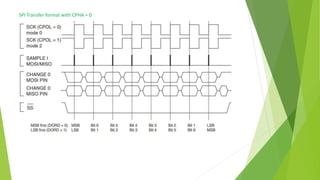
SPI Transfer format with CPHA = 0
SPI Transfer format with CPHA = 1
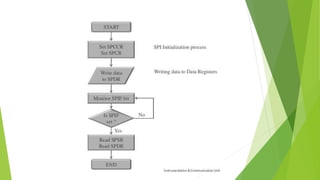
Steps for Master Mode
 Set SPCCR (Clock Counter Register) with appropriate clock frequency
 Set SPCR (Control Register) to desired settings
 Write the data into SPDR (Data Register) of SPI
 Monitor SPIF bit of SPCR register, until it sets to 1(SPIF = 1 means data transfer is complete ).
 Read SPSR (Status Register), this will clear SPIF bit
 Read SPDR (Data Register), reading data register will return data sent by the slave during last
transfer.
Steps for Slave Mode
 Clock will be decided by Master
 Set SPCR (Control Register) to desired settings
 Write dummy data into SPDR (Data Register), so that SPI control block will generate Clock.
 Monitor SPIF bit of SPCR register, until it sets to 1
 Read SPSR (Status Register), this will clear SPIF bit
 Read SPDR (Data Register), reading data register will return data sent by the slave during last
transfer.
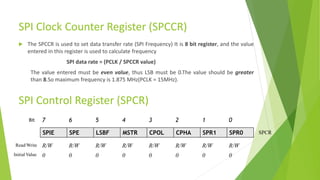
SPI Clock Counter Register (SPCCR)
 The SPCCR is used to set data transfer rate (SPI Frequency) It is 8 bit register, and the value
entered in this register is used to calculate frequency
SPI data rate = (PCLK / SPCCR value)
The value entered must be even value, thus LSB must be 0.The value should be greater
than 8.So maximum frequency is 1.875 MHz(PCLK = 15MHz).
SPI Control Register (SPCR)
SPIE SPE LSBF MSTR CPOL CPHA SPR1 SPR0
Bit 7 6 5 4 3 2 1 0
Read/Write
Initial Value
R/W R/W R/W R/W R/W R/W R/W R/W
0 0 0 0 0 0 0 0
SPCR
SPI Control Register (SPCR)
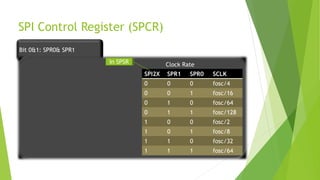
Bit 0&1: SPR0& SPR1
SPI2X SPR1 SPR0 SCLK
0 0 0 fosc/4
0 0 1 fosc/16
0 1 0 fosc/64
0 1 1 fosc/128
1 0 0 fosc/2
1 0 1 fosc/8
1 1 0 fosc/32
1 1 1 fosc/64
In SPSR Clock Rate
SPI Control Register (SPCR)
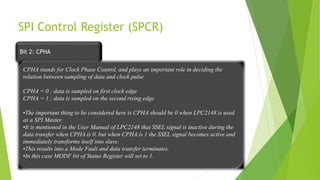
Bit 2: CPHA
CPHA stands for Clock Phase Control, and plays an important role in deciding the
relation between sampling of data and clock pulse
CPHA = 0 ; data is sampled on first clock edge
CPHA = 1 ; data is sampled on the second rising edge
•The important thing to be considered here is CPHA should be 0 when LPC2148 is used
as a SPI Master.
•It is mentioned in the User Manual of LPC2148 that SSEL signal is inactive during the
data transfer when CPHA is 0, but when CPHA is 1 the SSEL signal becomes active and
immediately transforms itself into slave.
•This results into a Mode Fault and data transfer terminates.
•In this case MODF bit of Status Register will set to 1.
SPI Control Register (SPCR)
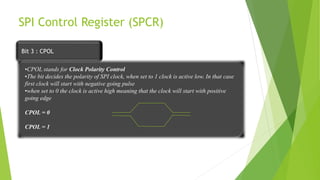
Bit 3 : CPOL
•CPOL stands for Clock Polarity Control
•The bit decides the polarity of SPI clock, when set to 1 clock is active low. In that case
first clock will start with negative going pulse
•when set to 0 the clock is active high meaning that the clock will start with positive
going edge
CPOL = 0
CPOL = 1
SPI Control Register (SPCR)
Bit 4 : MSTR
The bit is used to configure SPI block in Master/Slave Mode
MSTR = 0 Slave Mode
MSTR = 1 Master Mode
Bit 5 : DORD or LSBF
The bit decides the direction of bit transfer
LSBF = 0 MSB is transferred first
LSBF = 1 LSB is transferred first
SPI Control Register (SPCR)
Bit 6 : SPE
•The bit is used to enable SPI Interface
SPE = 0 disable SPI Interface
SPE = 1 enable SPI Interface
•It is an interrupt Enable bit,
SPIE = 0 Interrupt are disabled
SPIE = 1 Interrupts are enabled and will occur when SPI/ WCOL bit is set.
Bit 7 : SPIE
SPI Status Register (SPSR)
Bit 0 : SPI2X
Bit 6 : WCOL
•The bit is used to set double clock rate in master mode
SPI2X = 0 normal clock rate
SPI2X = 1 double clock rate
•The bit is used for write collision
WCOL is set if SPDR is written during a receive transfer
SPI Status Register (SPSR)
Bit 7 : SPIF
•The bit is used for interrupt flag
SPIF bit is set when serial transfer is complete.
SPIF WCOL - - - - - SPI2X SPSR
Bit 7 6 5 4 3 2 1 0
Read/Write
Initial Value
R R R R R R R R/W
0 0 0 0 0 0 0 0
SPI Data Register (SPDR)
 It is 16 bit register used in data transfer, the data length is selectable (8 –16bits).
 The data length can be configured by using bit 2 (BitEnable) and bits 11:8 of control register.
 There is no buffer between the data register and the internal shift register.
 A write to the data register goes directly into the internal shift register.
 Therefore, data should only be written to this register when a transmit is not currently in
progress. Otherwise a Collision Error may occur.
 Read data is buffered. When a transfer is complete, the receive data is transferred to a single
byte data buffer, where it is later read.
MSB - - - - - - LSB SPDR
Bit 7 6 5 4 3 2 1 0
Read/Write R/W R/W R/W R/W R/W R/W R/W R/W
X X X X X X X X
Advantages
 Full Duplex Communication
 Higher Throughput than I2C
 Not Limited to 8 bit words in case of bit transferring
 Arbitrary choice of message size, content and Purpose
 Low Power
 Fast and easy
 Fast for point-to-point connections
 Easily allows streaming/Constant data inflow
 No addressing/Simple to implement
 Everyone supports it
Disadvantages
 Requires more pins than I2C
 No hardware flow control
 No Slave Acknowledgement ability
 No inherent arbitration
 Multi Master Difficult to Implement
 SS makes multiple slaves very complicated
 Short Distance
SPI Peripherals
 Converters (ADC, DAC)
 Memories (EEPROM, RAM’s, Flash)
 Sensors (Temperature, Humidity, Pressure)
 Real Time Clocks
 Misc.- Potentiometers, LCD controllers, UART’s, USB controller, CAN controller, amplifiers
Some Important Facts
 A read or write of the SPI data register is required in order to clear the SPIF status
bit.
 The prime function of SPSR register is to indicate the completion of data transfer
between two devices. The remaining bits of SPSR register.
 When CPHA = 0, the SSEL signal will always go inactive between data transfers.
This is not guaranteed when CPHA = 1 (the signal can remain active).
Thank You !!!

Serial Peripheral Interface

  • 1.
    Serial Peripheral Interface By:-Rishu Master Slave SCLK MOSI MISO SS
  • 2.
    Index  Introduction  Overview Communication  Advantages  Disadvantages  Applications
  • 3.
    Introduction  Communication ProtocolDeveloped By Motorola  Four Wire Protocol  Serial Interface  Master-Slave Approach  Synchronous- Data clocked with Clock Signal  Data Rate-10mbps  Full Duplex Protocol  Low power than I2C (no need of Pull ups)  Supports Single master and multiple slaves  No hardware slave acknowledgement
  • 4.
    Overview  SPI standsfor Serial Peripheral Interface  Used for moving data simply and quickly from one device to another  Used to communicate across small distances  Master-Slave(Multiple Slaves, Single Master)  Serial Interface  Synchronous  Data Exchange
  • 5.
    Continue…  SPI isa Master-Slave protocol  The Master device controls the clock (SCK)  No data is transferred unless a clock signal is present  All slaves are controlled by the master clock  The slave devices may not manipulate the clock  Master Set Slave Select low  Master Generates Clock  Shift registers shift in and out data Master Slave SCLK MOSI MISO SS
  • 6.
    Continue…  Simple SPIProtocol Specifies 4 Signal Wires  Master Out Slave In (MOSI)  Master In Slave Out (MISO)  Serial Clock (SCLK)  Slave Select (SS)  MOSI – Carries data out of Master to Slave  MISO – Carries data from Slave to Master (Both signals happen for every transmission)  SS – Unique line to select a slave  SCLK – Master produced clock to synchronize data transfer MOSI Master Slave SCLK MOSI MISO SS
  • 7.
    Continue…  SPI isa Synchronous protocol  The data is clocked along with a clock signal(SCK)  The clock signal controls when data is changed and when it should be read  Since SPI is synchronous, the clock rate can vary, unlike RS-232 style communications
  • 8.
    Continue…  SPI isa Data Exchange protocol  As data is being clocked out, new data is clocked in  Data is exchanged - no device can just be a transmitter only or receiver only  the master controls the exchange by manipulating the clock line (SCK)  Often a signal controls when a device is accessed - this is the CS or SS signal  CS or SS signal is known as “Chip Select” or “Slave Select” and is frequently an active-low signal.  Data is only output during the rising or falling edge of SCK  Data is latched during the opposite edge of SCK  The opposite edge is used to ensure data is valid at the time of reading
  • 9.
    Fig.1 : TwoSPI Modules connected in a Master-Slave Configuration  Master shifts out data to Slave, and shift in data from Slave
  • 10.
    Serial Peripheral Interface(SPI) Data is shifted out of the master's MOSI pin and in its MISO pin.  Data transfer is initiated by simply writing data to the SPI data register.  All data movement is coordinated by SCK.  Slave select may or may not be used depending on interfacing device.  To get input data only you send “junk” data to SPDR to start the clock.
  • 11.
    Single Master andSingle Slave Master Slave SCLK MOSI MISO SS  Master • Initiates the Connection • Controls SCLK and Data transfer  Slave • Transmits Data • Receives Data
  • 12.
    Single Master andMultiple independent Slave Master SCLK MOSI MISO SS1 SS2 SCLK MOSI MISO SS SCLK MOSI MISO SS
  • 13.
    Master and multipledaisy-chained slaves
  • 14.
    How Do TheyCommunicate  Communication Initiated by Master only  Master Configures the clock – Frequency less than equal to maximum frequency Slave Support  Master Selects Slave – By Pulling chip select(SS) of particular Slave-peripheral to Low State
  • 15.
    Data Transmission Mode SPIMode CPOL CPHA Shift SCK Edge Capture SCK Edge 0 0 0 Falling Raising 1 0 1 Raising Falling 2 1 0 Raising Falling 3 1 1 Falling Raising Table : SPI Mode Configuration
  • 16.
    SPI Transfer formatwith CPHA = 0
  • 17.
    SPI Transfer formatwith CPHA = 1
  • 19.
    Steps for MasterMode  Set SPCCR (Clock Counter Register) with appropriate clock frequency  Set SPCR (Control Register) to desired settings  Write the data into SPDR (Data Register) of SPI  Monitor SPIF bit of SPCR register, until it sets to 1(SPIF = 1 means data transfer is complete ).  Read SPSR (Status Register), this will clear SPIF bit  Read SPDR (Data Register), reading data register will return data sent by the slave during last transfer.
  • 20.
    Steps for SlaveMode  Clock will be decided by Master  Set SPCR (Control Register) to desired settings  Write dummy data into SPDR (Data Register), so that SPI control block will generate Clock.  Monitor SPIF bit of SPCR register, until it sets to 1  Read SPSR (Status Register), this will clear SPIF bit  Read SPDR (Data Register), reading data register will return data sent by the slave during last transfer.
  • 22.
    SPI Clock CounterRegister (SPCCR)  The SPCCR is used to set data transfer rate (SPI Frequency) It is 8 bit register, and the value entered in this register is used to calculate frequency SPI data rate = (PCLK / SPCCR value) The value entered must be even value, thus LSB must be 0.The value should be greater than 8.So maximum frequency is 1.875 MHz(PCLK = 15MHz). SPI Control Register (SPCR) SPIE SPE LSBF MSTR CPOL CPHA SPR1 SPR0 Bit 7 6 5 4 3 2 1 0 Read/Write Initial Value R/W R/W R/W R/W R/W R/W R/W R/W 0 0 0 0 0 0 0 0 SPCR
  • 23.
    SPI Control Register(SPCR) Bit 0&1: SPR0& SPR1 SPI2X SPR1 SPR0 SCLK 0 0 0 fosc/4 0 0 1 fosc/16 0 1 0 fosc/64 0 1 1 fosc/128 1 0 0 fosc/2 1 0 1 fosc/8 1 1 0 fosc/32 1 1 1 fosc/64 In SPSR Clock Rate
  • 24.
    SPI Control Register(SPCR) Bit 2: CPHA CPHA stands for Clock Phase Control, and plays an important role in deciding the relation between sampling of data and clock pulse CPHA = 0 ; data is sampled on first clock edge CPHA = 1 ; data is sampled on the second rising edge •The important thing to be considered here is CPHA should be 0 when LPC2148 is used as a SPI Master. •It is mentioned in the User Manual of LPC2148 that SSEL signal is inactive during the data transfer when CPHA is 0, but when CPHA is 1 the SSEL signal becomes active and immediately transforms itself into slave. •This results into a Mode Fault and data transfer terminates. •In this case MODF bit of Status Register will set to 1.
  • 25.
    SPI Control Register(SPCR) Bit 3 : CPOL •CPOL stands for Clock Polarity Control •The bit decides the polarity of SPI clock, when set to 1 clock is active low. In that case first clock will start with negative going pulse •when set to 0 the clock is active high meaning that the clock will start with positive going edge CPOL = 0 CPOL = 1
  • 26.
    SPI Control Register(SPCR) Bit 4 : MSTR The bit is used to configure SPI block in Master/Slave Mode MSTR = 0 Slave Mode MSTR = 1 Master Mode Bit 5 : DORD or LSBF The bit decides the direction of bit transfer LSBF = 0 MSB is transferred first LSBF = 1 LSB is transferred first
  • 27.
    SPI Control Register(SPCR) Bit 6 : SPE •The bit is used to enable SPI Interface SPE = 0 disable SPI Interface SPE = 1 enable SPI Interface •It is an interrupt Enable bit, SPIE = 0 Interrupt are disabled SPIE = 1 Interrupts are enabled and will occur when SPI/ WCOL bit is set. Bit 7 : SPIE
  • 28.
    SPI Status Register(SPSR) Bit 0 : SPI2X Bit 6 : WCOL •The bit is used to set double clock rate in master mode SPI2X = 0 normal clock rate SPI2X = 1 double clock rate •The bit is used for write collision WCOL is set if SPDR is written during a receive transfer
  • 29.
    SPI Status Register(SPSR) Bit 7 : SPIF •The bit is used for interrupt flag SPIF bit is set when serial transfer is complete. SPIF WCOL - - - - - SPI2X SPSR Bit 7 6 5 4 3 2 1 0 Read/Write Initial Value R R R R R R R R/W 0 0 0 0 0 0 0 0
  • 30.
    SPI Data Register(SPDR)  It is 16 bit register used in data transfer, the data length is selectable (8 –16bits).  The data length can be configured by using bit 2 (BitEnable) and bits 11:8 of control register.  There is no buffer between the data register and the internal shift register.  A write to the data register goes directly into the internal shift register.  Therefore, data should only be written to this register when a transmit is not currently in progress. Otherwise a Collision Error may occur.  Read data is buffered. When a transfer is complete, the receive data is transferred to a single byte data buffer, where it is later read. MSB - - - - - - LSB SPDR Bit 7 6 5 4 3 2 1 0 Read/Write R/W R/W R/W R/W R/W R/W R/W R/W X X X X X X X X
  • 31.
    Advantages  Full DuplexCommunication  Higher Throughput than I2C  Not Limited to 8 bit words in case of bit transferring  Arbitrary choice of message size, content and Purpose  Low Power  Fast and easy  Fast for point-to-point connections  Easily allows streaming/Constant data inflow  No addressing/Simple to implement  Everyone supports it
  • 32.
    Disadvantages  Requires morepins than I2C  No hardware flow control  No Slave Acknowledgement ability  No inherent arbitration  Multi Master Difficult to Implement  SS makes multiple slaves very complicated  Short Distance
  • 33.
    SPI Peripherals  Converters(ADC, DAC)  Memories (EEPROM, RAM’s, Flash)  Sensors (Temperature, Humidity, Pressure)  Real Time Clocks  Misc.- Potentiometers, LCD controllers, UART’s, USB controller, CAN controller, amplifiers
  • 34.
    Some Important Facts A read or write of the SPI data register is required in order to clear the SPIF status bit.  The prime function of SPSR register is to indicate the completion of data transfer between two devices. The remaining bits of SPSR register.  When CPHA = 0, the SSEL signal will always go inactive between data transfers. This is not guaranteed when CPHA = 1 (the signal can remain active).
  • 35.